
In an increasingly data-driven world, the ability to visualize complex information is paramount. For centuries, equations have been the bedrock of scientific, engineering, and mathematical understanding, encapsulating relationships between variables in concise symbolic forms. Yet, their true power often unfolds when these abstract expressions are translated into visual representations – graphs. Plotting an equation transforms a series of numbers and symbols into a discernible pattern, revealing trends, intersections, and critical points that might otherwise remain hidden.
From ancient mathematicians sketching curves on sand to modern scientists leveraging supercomputers, the goal has remained consistent: to understand and communicate the behavior of functions. Today, thanks to a revolution in software and digital tools, plotting an equation is no longer an arduous task confined to specialized fields. It’s an accessible skill, critical for students, researchers, engineers, and even data enthusiasts. This comprehensive guide delves into the technological landscape of equation plotting, exploring the tools, techniques, and best practices that empower users to unlock insights from mathematical expressions. We’ll navigate the spectrum of solutions, from intuitive online calculators to powerful programming libraries, ensuring you have the knowledge to select and master the perfect tool for any plotting challenge.

The Foundational Concepts Behind Equation Visualization
Before diving into the digital tools, it’s crucial to grasp the core mathematical principles that underpin equation plotting. Understanding these fundamentals ensures not just the ability to generate a graph, but also to interpret it accurately and meaningfully.
Understanding Equations and Variables
At its heart, an equation defines a relationship between one or more variables. Typically, in the context of plotting, we deal with functions where one variable (the dependent variable, usually y) is expressed in terms of another (the independent variable, usually x). For example, in the equation y = 2x + 1, y‘s value depends entirely on x‘s value. More complex equations might involve exponents (y = x^2), trigonometric functions (y = sin(x)), or logarithms. The goal of plotting is to visualize how the dependent variable changes as the independent variable varies across a specified range.
The Cartesian Coordinate System: Our Visual Canvas
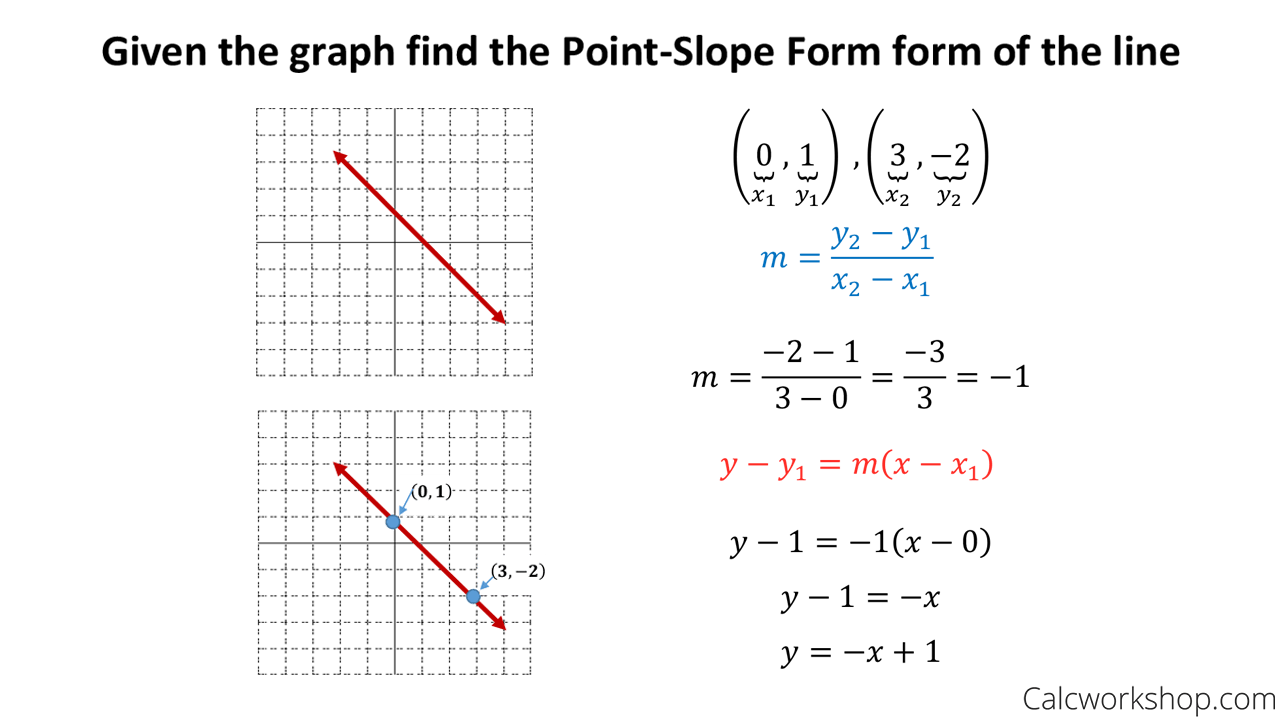
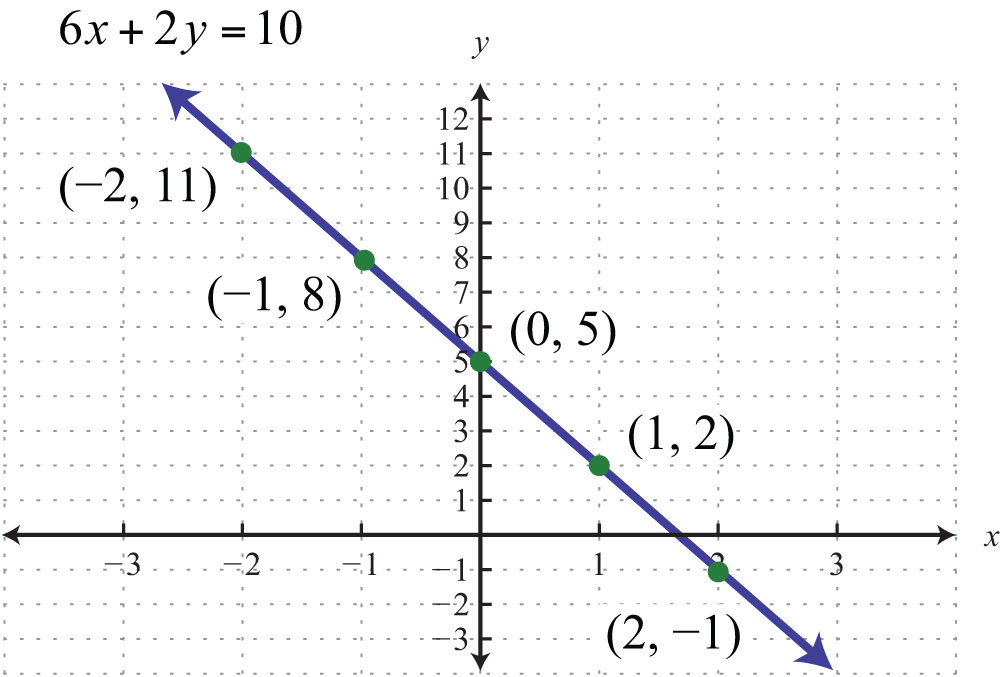
The vast majority of equation plots utilize the Cartesian coordinate system, a two-dimensional plane defined by two perpendicular axes: the horizontal x-axis and the vertical y-axis. Each point on this plane is uniquely identified by an ordered pair (x, y). When we plot an equation, we are essentially finding numerous pairs of (x, y) values that satisfy the equation and then marking these points on the Cartesian plane. Connecting these points forms the graph of the equation, a visual representation of its mathematical behavior. For more advanced plotting, such as 3D graphs, additional axes (z) are introduced, but the principle remains the same.
Why Visualize Data? The Power of Graphs
The human brain is remarkably adept at processing visual information. While an equation like y = x^2 might describe a parabolic relationship, seeing the actual curve immediately conveys its symmetry, its minimum point, and how steeply it rises. Graphs offer several profound advantages:
- Instant Comprehension: Complex relationships become immediately apparent.
- Pattern Recognition: Trends, cycles, and anomalies are easily spotted.
- Comparison: Multiple equations or datasets can be overlaid for quick comparison.
- Communication: Graphs are a universal language, making it easier to convey findings to diverse audiences.
- Problem Solving: Visualizing an equation can aid in identifying roots, turning points, and asymptotes, which are crucial for solving real-world problems.
Essential Digital Tools for Plotting Equations
The digital age has democratized equation plotting, making sophisticated graphing capabilities available to everyone. From simple browser-based tools to powerful scripting environments, the choice of tool often depends on the complexity of the equation, the desired level of customization, and the user’s technical proficiency.
Online Graphing Calculators: Instant Gratification
For quick visualization and interactive exploration, online graphing calculators are unparalleled. They are intuitive, require no installation, and often provide immediate feedback.
- Desmos: Renowned for its user-friendly interface and powerful interactive features. Users can input multiple equations, create sliders to observe parameter changes, and easily share their graphs. It excels in both educational settings and quick professional checks.
- GeoGebra: A dynamic mathematics software that combines geometry, algebra, spreadsheets, graphing, statistics, and calculus in one easy-to-use package. It’s particularly strong for visualizing geometric transformations and calculus concepts alongside basic plotting.
- Wolfram Alpha: More than just a plotter, Wolfram Alpha is a computational knowledge engine. It can plot equations, but also provides step-by-step solutions, domain/range information, derivatives, integrals, and more, making it a comprehensive mathematical assistant.
Spreadsheet Software: Practical for Discrete Data
While not designed specifically for continuous function plotting, spreadsheet programs like Microsoft Excel, Google Sheets, or LibreOffice Calc are highly versatile tools. They are excellent for plotting discrete data points and can be adapted to plot equations by generating a series of (x, y) pairs.
- Generating Data: Create a column for
xvalues (e.g., from -10 to 10 with a step of 0.1). In an adjacent column, enter the equation as a formula referencing thexcolumn. - Charting: Select both columns and choose a “Scatter with Smooth Lines” or “Line Chart” option.
- Customization: Spreadsheets offer robust options for customizing axis labels, titles, legends, and chart styles, making them suitable for presentation-ready graphs. Their strength lies in combining data manipulation with visualization.
Programming Languages and Libraries: The Powerhouse
For advanced users, complex equations, 3D plots, or programmatic control over visualizations, programming languages offer unmatched flexibility and power.
- Python with Matplotlib, NumPy, and SciPy: Python is the de facto language for data science and scientific computing.
- NumPy: Essential for numerical operations, especially for creating arrays of
xvalues and performing element-wise calculations fory. - Matplotlib: The cornerstone plotting library. It allows for highly customized 2D plots (and basic 3D plots), offering control over every aspect of the graph. Its syntax is straightforward for basic plots but can be extended for intricate visualizations.
- SciPy: Builds on NumPy, offering more advanced mathematical algorithms, which can sometimes be useful for generating complex function data.
- NumPy: Essential for numerical operations, especially for creating arrays of
- R with ggplot2: R is another statistical programming language widely used for data analysis and visualization.
ggplot2is its premier plotting library, based on a “grammar of graphics.” It’s highly acclaimed for producing aesthetically pleasing and statistically informative plots with a structured, layered approach.
Dedicated Math Software: Professional Grade Solutions
For highly specialized mathematical and scientific applications, dedicated software packages provide unparalleled capabilities.
- MATLAB: A proprietary programming platform optimized for engineers and scientists. It excels in numerical computation, data analysis, algorithm development, and, crucially, high-quality 2D and 3D plotting with extensive customization options.
- Mathematica: A computational software program that specializes in symbolic computation, numerical computation, and visualization. Its powerful symbolic engine makes it exceptional for plotting functions that are difficult to define numerically, and its visualizations are highly sophisticated.
- Octave: A free and open-source alternative to MATLAB, offering a similar syntax and environment, making it a viable option for those needing powerful scientific computing and plotting capabilities without the commercial license.
Step-by-Step Guide: Plotting with Popular Tech Tools
Let’s walk through the basic steps for plotting an equation using examples from different tool categories.
Plotting with an Online Graphing Calculator (e.g., Desmos)
- Navigate to Desmos: Open your web browser and go to
desmos.com/calculator. - Input the Equation: On the left-hand sidebar, you’ll see an input field. Simply type your equation, e.g.,
y = x^2 - 3x + 2. As you type, the graph will appear dynamically on the right pane. - Adjust Viewport/Range: Desmos automatically scales the axes. You can click and drag the graph to pan, or use the scroll wheel to zoom in/out. For precise control, click the wrench icon (Graph Settings) to manually set the
xandyaxis ranges. - Plot Multiple Equations: Add another input field by clicking the
+button and typey = x + 1. Both graphs will appear, allowing for easy comparison. - Explore Interactivity: Click on the graph to reveal key points like intercepts, vertices, and intersections between multiple curves. Desmos also allows for sliders to animate parameter changes, e.g., for
y = ax^2 + bx + c, you can create sliders fora,b, andc.
Plotting with Spreadsheet Software (e.g., Excel)
- Set up
xValues: In cell A1, type “x”. In A2, enter a startingxvalue (e.g.,-10). In A3, enter the nextxvalue (e.g.,-9.9). Select A2 and A3, then drag the fill handle (small square at the bottom-right of A3) down to generate a range ofxvalues (e.g., up to10). - Calculate
yValues: In cell B1, type “y”. In B2, enter your equation as an Excel formula, referencing thexvalue in A2. Fory = x^2 - 3x + 2, the formula would be=A2^2 - 3*A2 + 2. - Apply Formula: Press Enter, then select B2 and drag its fill handle down to apply the formula to all corresponding
xvalues. - Create the Chart: Select both columns (A and B). Go to the “Insert” tab in the ribbon. Under “Charts,” select “Scatter” and then choose “Scatter with Smooth Lines” or a similar line chart type.
- Customize Chart: Use the “Chart Elements” (
+) button next to the chart to add Axis Titles, Chart Title, and Legend. Use the “Format Pane” (right-click chart element) to adjust colors, line styles, fonts, and axis scales for a professional look.
Plotting with Python (Matplotlib Basics)
- Set up Environment: Ensure you have Python installed, along with
NumPyandMatplotlib. A Jupyter Notebook or an IDE like VS Code is ideal for interactive coding.
python

# Install if you haven't already

# pip install numpy matplotlib
- Import Libraries:
python

import numpy as np

import matplotlib.pyplot as plt
- Generate
xValues: Usenp.linspace()to create an array ofxvalues over a desired range.
python

x = np.linspace(-10, 10, 400) # 400 points between -10 and 10
- Calculate
yValues: Define your equation using NumPy’s array operations.
python

y = x**2 - 3*x + 2
- Plot the Equation: Use
plt.plot()to create the line graph.
python

plt.plot(x, y)
- Add Labels and Title: Make your plot informative.
python

plt.xlabel('x-axis')

plt.ylabel('y-axis')

plt.title('Graph of y = x^2 - 3x + 2')
- Display the Plot:
python

plt.grid(True) # Add a grid for readability

plt.show()
This basic structure can be extended with many customization options in Matplotlib for line style, color, markers, multiple plots, and subplots.
Advanced Techniques and Considerations
As equations become more complex or the visualization requirements more sophisticated, certain advanced techniques and tools come into play.
Parametric and Polar Equations
Beyond simple y = f(x) functions, you might encounter:
- Parametric Equations: Where
xandyare both defined in terms of a third parameter,t(e.g.,x = sin(t),y = cos(t)for a circle). These are easily plotted in most online calculators by entering thex(t)andy(t)forms, and in Python by calculating arrays forxandybased ont. - Polar Equations: Where a point is defined by a distance from the origin (
r) and an angle (theta) (e.g.,r = sin(theta)). Tools like Desmos have ar = f(theta)input, and Matplotlib providesplt.polar()for plotting in polar coordinates.
3D Plotting: Visualizing Functions of Two Variables
When an equation involves two independent variables (e.g., z = f(x, y)), a 3D plot is necessary to visualize the surface it represents.
- Matplotlib’s
mplot3dToolkit: Python’s Matplotlib offersAxes3Dfor creating surface plots, wireframe plots, and scatter plots in three dimensions. This involves creating a meshgrid forxandyvalues and then calculating correspondingzvalues. - Dedicated Software: MATLAB and Mathematica excel at 3D plotting, offering highly optimized rendering and interactive manipulation of 3D graphs, crucial for fields like fluid dynamics or structural engineering.
Interactive Plots for Dynamic Insights
Static images, while informative, lack the dynamism to explore data in depth. Interactive plots allow users to zoom, pan, hover for details, and even filter data directly within the graph.
- Plotly: A powerful library for Python, R, JavaScript, and more, enabling the creation of beautiful, interactive, web-based visualizations. Plotly graphs can be embedded in web applications, dashboards, or shared as standalone HTML files.
- Bokeh: Another Python library that specializes in creating interactive plots for modern web browsers, offering a similar level of interactivity and customization as Plotly.
Data Export and Sharing
Once a perfect plot is generated, the ability to export and share it is crucial. Most tools offer:
- Image Formats: Export to PNG, JPEG, SVG (for scalable vector graphics), or PDF for reports and presentations.
- Interactive HTML: Plotly and Bokeh can export interactive plots as HTML files, allowing others to explore them in their browsers without needing the original software.
- Code Snippets: For programming-based plots, sharing the code allows others to reproduce and modify the visualization.
Best Practices for Effective Equation Visualization
Generating a plot is just the first step; creating an effective plot is an art. Thoughtful design choices can significantly enhance clarity and insight.
Clarity and Simplicity: Less is Often More
Avoid clutter. Every element on your graph should serve a purpose. Too many lines, labels, or gridlines can make a plot unreadable. Focus on the key relationships you want to highlight.
Appropriate Scaling: Revealing the Full Story
Choosing the correct axis ranges is critical.
- Too narrow: You might miss important features of the graph.
- Too wide: The interesting details could be compressed and appear flat.
- Logarithmic Scales: For data spanning several orders of magnitude, a logarithmic scale can reveal patterns that are invisible on a linear scale.
Labeling and Legends: Context is Key
Every graph needs clear labels:
- Axis Labels: Clearly identify what the x-axis and y-axis represent, including units if applicable (e.g., “Time (s)”, “Temperature (°C)”).
- Chart Title: A concise, descriptive title that immediately tells the viewer what the graph is about.
- Legends: If plotting multiple equations, a legend is essential to differentiate between them.
Color and Style: Leveraging Visual Cues
- Meaningful Colors: Use colors to differentiate elements, but do so thoughtfully. Avoid using too many distinct colors. Consider colorblind-friendly palettes.
- Line Styles: Dashed lines, dotted lines, and varying line thicknesses can help distinguish plots, especially in black-and-white print.
- Markers: Use markers (circles, squares, triangles) for discrete points or to highlight specific data points on a continuous curve.
Accuracy and Interpretation: Beyond the Visuals
Always double-check your data input and ensure the plot accurately reflects the equation. Remember that a graph is a tool for understanding, but it doesn’t replace mathematical rigor. Be critical in interpreting what the plot reveals, and correlate visual insights with the underlying mathematical principles.
Conclusion
The journey from a abstract mathematical equation to a compelling visual graph is now smoother and more accessible than ever, thanks to a wealth of technological advancements. Whether you’re a student trying to grasp the basics of functions, an engineer visualizing complex system behaviors, or a data scientist seeking to communicate profound insights, the tools are at your fingertips. From the immediate feedback of online graphing calculators to the limitless customization of programming libraries and the power of dedicated math software, each tool offers unique advantages for specific use cases. By mastering these digital resources and adhering to best practices in visualization, you can transform equations from mere symbols into powerful narratives, illuminating relationships, trends, and the inherent beauty of mathematics in a world that increasingly relies on visual understanding. Embrace the tech, plot with purpose, and let your equations tell their story.
aViewFromTheCave is a participant in the Amazon Services LLC Associates Program, an affiliate advertising program designed to provide a means for sites to earn advertising fees by advertising and linking to Amazon.com. Amazon, the Amazon logo, AmazonSupply, and the AmazonSupply logo are trademarks of Amazon.com, Inc. or its affiliates. As an Amazon Associate we earn affiliate commissions from qualifying purchases.