
In an increasingly digital world, establishing an online presence is no longer a luxury but a necessity for businesses aiming to thrive. Shopify stands out as a leading e-commerce platform, empowering entrepreneurs and established brands alike to launch and manage their digital storefronts with remarkable ease and powerful functionality. Far more than just a website builder, Shopify is a comprehensive Software-as-a-Service (SaaS) solution designed specifically for online retail, abstracting away much of the underlying technical complexity to allow merchants to focus on their products and customers. This guide delves into the technical journey of setting up your online store on Shopify, highlighting the platform’s capabilities as a robust technological backbone for your e-commerce ambitions.
1. Understanding the Shopify Ecosystem: A Software Overview
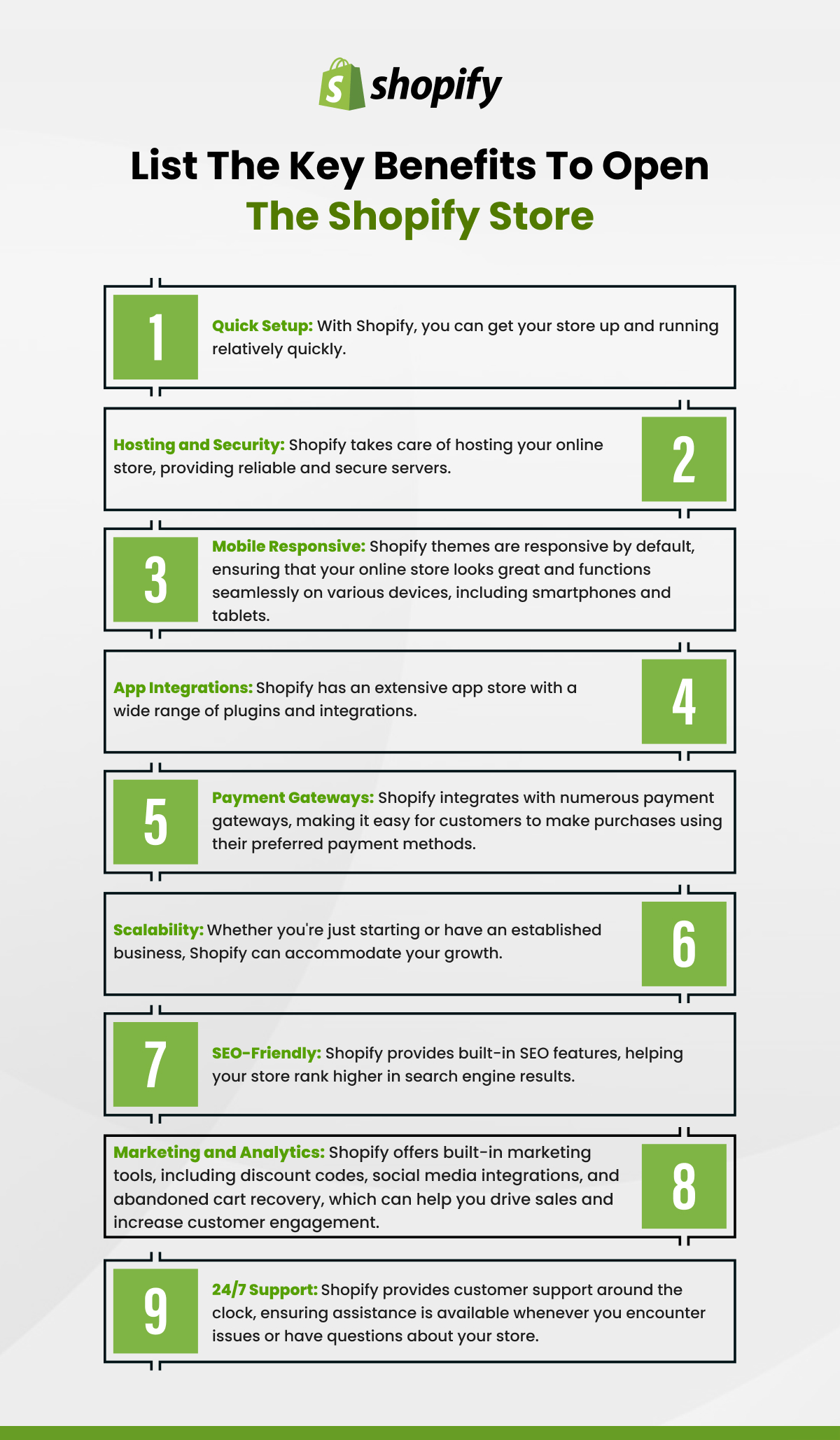
Shopify operates on a SaaS model, meaning you subscribe to use their software without needing to worry about hosting, server maintenance, or complex technical infrastructure. This fundamental aspect makes it incredibly accessible, even for those with minimal technical expertise, while still providing powerful tools for scaling.
SaaS Simplicity and Scalability
The core strength of Shopify lies in its simplicity for the end-user, underpinned by a highly sophisticated and scalable technical architecture. As a merchant, you interact with an intuitive admin panel, performing actions like adding products, customizing themes, and managing orders. Behind the scenes, Shopify handles all the heavy lifting: secure server infrastructure, payment gateway integrations, Content Delivery Networks (CDNs) for fast loading times globally, and automatic security updates. This means your store can handle sudden spikes in traffic or a growing product catalog without requiring manual server upgrades or advanced IT knowledge. The platform’s commitment to continuous development ensures that your store benefits from the latest e-commerce technologies and security protocols without any effort on your part.
Core E-commerce Functionalities
Shopify is engineered from the ground up to support every facet of online retail operations. Its suite of integrated tools covers critical technical components of an e-commerce business. This includes a robust product management system that handles inventory, variants, and digital downloads; a flexible content management system (CMS) for pages and blog posts; secure checkout processes compliant with global standards; and integrated analytics to track digital performance. The platform provides a foundational digital environment where all these elements are designed to work seamlessly together, simplifying data flow and operational workflows for the merchant. Beyond the basics, Shopify offers built-in SEO tools, mobile responsiveness across all themes, and enterprise-grade security features like PCI DSS compliance for payment processing, ensuring a secure and optimized experience for both merchants and customers.
2. Technical Setup: Laying the Digital Foundation
Starting your Shopify store begins with fundamental technical configurations that establish your online presence and ensure your store operates correctly from the outset. This initial phase involves account creation, navigating the admin interface, and setting up core operational parameters.
Account Registration and Store Name
The journey begins by visiting Shopify’s website and signing up for a free trial. This process typically involves providing your email address, creating a password, and choosing a unique store name. This store name will initially form your default Shopify domain (e.g., yourstorename.myshopify.com). While this default domain is functional, it’s a placeholder. The primary technical goal here is to establish your core Shopify account, which acts as the central control panel for your entire e-commerce operation. Selecting a provisional store name is flexible, as you can later connect a custom domain.
Navigating the Admin Panel
Upon successful registration, you’ll be directed to your Shopify admin panel – the command center for your online store. This intuitive dashboard is designed for ease of use, segmenting functionalities into logical categories such as Orders, Products, Customers, Analytics, Marketing, Discounts, Apps, and Online Store. Familiarizing yourself with this interface is crucial. The “Online Store” section is where you manage your theme, blog posts, pages, navigation menus, and domain settings. The “Settings” menu (usually found at the bottom left) is where you’ll configure all the technical backend aspects of your store, from payment providers to shipping rules. Spending time exploring each section will demystify the platform and highlight the array of technical capabilities available at your fingertips.
Configuring Basic Store Settings
Before adding products, it’s vital to configure your store’s foundational technical settings. In the “Settings” menu, you’ll find options to set your store’s currency, time zone, and general business information. More critically, this is where you define your shipping zones and rates, which involves specifying the geographical regions you serve and the associated shipping calculations. Furthermore, you’ll need to set up tax rates, either by enabling Shopify’s automatic tax calculations based on your location or by manually configuring tax overrides. These settings directly impact the technical calculations performed at checkout and ensure legal and financial compliance for your digital transactions. Proper setup here prevents costly errors and ensures a smooth checkout experience for customers.
Connecting Your Custom Domain
A professional online presence requires a custom domain (e.g., www.yourstore.com) rather than the default myshopify.com subdomain. Shopify provides a straightforward process to connect an existing domain you own or to purchase a new one directly through them. Technically, this involves updating your Domain Name System (DNS) records. If you own a domain from a third-party registrar (like GoDaddy or Namecheap), you will typically need to point your domain’s A record to Shopify’s IP address and your CNAME record to shops.myshopify.com. Shopify offers detailed instructions and often automates much of this process. This step is crucial for brand identity and for optimizing your store for search engines, as a custom domain is a fundamental element of a professional web presence.
3. Populating Your Digital Storefront: Content and Commerce Modules
With the foundational technical setup complete, the next phase involves populating your store with products, defining its visual identity, and integrating the critical payment and shipping functionalities. This involves utilizing Shopify’s dedicated content and commerce modules.
Adding Products and Managing Inventory
The “Products” section of your admin panel is where you digitally catalog your offerings. For each product, you’ll input crucial data fields such as title, description, images, pricing, and crucially, inventory details. Shopify’s product management system allows for the creation of variants (e.g., different sizes, colors), each with its own SKU (Stock Keeping Unit), barcode, and individual inventory count. This robust system helps in tracking stock levels automatically, notifying you when products are low, and preventing overselling. For digital products, Shopify also facilitates secure file uploads and delivery. Efficient product data entry and meticulous inventory management within the platform are technical prerequisites for seamless order fulfillment and accurate financial reporting.
Customizing Your Theme
Your store’s appearance is controlled by a “theme,” which is essentially a set of pre-designed templates that dictate the layout, styling, and user interface elements of your storefront. Shopify offers a wide range of free and paid themes in its Theme Store. Once you select a theme, you customize it using Shopify’s intuitive drag-and-drop “Theme Editor.” This visual editor allows you to modify sections, colors, fonts, and images without writing a single line of code. For those with advanced technical skills, themes are built using Liquid (Shopify’s open-source template language) and can be fully customized by editing the theme’s code, offering deep control over the front-end presentation and functionality. This flexibility allows merchants to create a unique digital experience that aligns with their brand while leveraging Shopify’s robust framework.
Integrating Payment Gateways
A critical technical component of any e-commerce store is the ability to securely accept payments. Shopify provides its own payment processor, Shopify Payments, which offers competitive rates and seamless integration, eliminating the need for complex third-party setups. Alternatively, you can integrate a wide array of other payment gateways like PayPal, Stripe, Authorize.net, and many more. The integration process typically involves selecting the desired gateway from the “Payments” section in your settings, entering your account credentials, and configuring any specific technical parameters. Shopify handles the secure transmission of sensitive payment information, ensuring PCI DSS compliance – a rigorous industry standard for handling credit card data. This technical security infrastructure is paramount for building trust with customers and protecting their financial information.
Setting Up Shipping and Tax Calculations
Beyond basic settings, detailed configuration of shipping and tax rules is essential. In the “Shipping and Delivery” settings, you can create various shipping profiles. This involves defining complex rules based on product weight, price, or specific zones, and integrating with real-time carrier calculations if desired. Similarly, the “Taxes and Duties” section allows for fine-tuning tax collection based on specific product categories or customer locations, accounting for different VAT, GST, or sales tax regulations globally. These are highly technical configurations that ensure accurate charges at checkout, preventing discrepancies and potential legal issues. Shopify’s system automates these calculations, but initial precise setup is critical.
4. Enhancing Functionality with Shopify Apps
One of Shopify’s most powerful technological advantages is its extensive App Store, a marketplace offering thousands of applications that extend your store’s core functionalities. These apps integrate seamlessly with your Shopify admin, allowing you to add advanced features without custom coding.
Exploring the Shopify App Store
The Shopify App Store is a digital marketplace where developers offer solutions ranging from marketing automation and customer service tools to inventory management and advanced analytics. It serves as an extension of Shopify’s own API (Application Programming Interface), allowing third-party developers to build applications that connect directly to your store’s data and functionality. Merchants can browse categories, read reviews, and install apps directly into their store with just a few clicks. Each app, once installed, typically adds new features to your admin panel or front-end store, enhancing the user experience or streamlining backend operations.
Key App Categories for E-commerce Operations
Apps can significantly augment your store’s capabilities in numerous technical areas. For instance:
- Product Sourcing & Management: Apps for dropshipping integration (e.g., Oberlo), print-on-demand services, or advanced inventory management. These integrate external catalogs or synchronize stock levels across multiple channels.
- Marketing & SEO: Tools for email marketing automation (e.g., Klaviyo), social media integration, search engine optimization enhancements, and ad campaign management. These leverage Shopify’s data to improve reach and visibility.
- Customer Service: Live chat widgets, help desk integrations, and FAQ apps to provide instant support and enhance customer experience. These typically integrate communication channels directly into your storefront and admin.
- Shipping & Fulfillment: Apps that connect with various carriers for discounted rates, automate label printing, or integrate with third-party logistics (3PL) providers. These streamline the technical aspects of order fulfillment.
- Reporting & Analytics: Advanced dashboards that pull data from various sources (sales, traffic, customer behavior) to provide deeper insights than Shopify’s native analytics.
Seamless Integrations for Enhanced Features
The beauty of the Shopify App Store lies in its focus on seamless integration. When you install an app, it’s designed to work harmoniously with Shopify’s existing infrastructure. This means data often flows automatically between the app and your store, reducing manual data entry and potential errors. For instance, a reviews app will integrate with your product pages to display customer feedback, while a loyalty program app will track customer purchases and award points directly within their Shopify customer profiles. This modular approach to functionality allows merchants to customize their store’s technical capabilities precisely to their business needs, turning Shopify into a highly adaptable and powerful e-commerce platform.
5. Pre-Launch Checklist and Going Live
Before officially launching your Shopify store to the public, a thorough review of all configurations and functionalities is essential. This technical checklist ensures a smooth customer experience and optimal store performance from day one.
Rigorous Testing of Functionalities
Prior to launch, you must thoroughly test every aspect of your store’s functionality. This includes conducting multiple “test orders” using different payment methods (e.g., Shopify Payments, PayPal, manual payment options like “Cash on Delivery” if applicable). Verify that discounts apply correctly, shipping rates are accurate, taxes are calculated as expected, and email notifications (order confirmation, shipping updates) are sent to customers. Test all forms, contact pages, and search functions. Ensure product variants are selectable and display correctly, and that all links work as intended. Test your store on various devices (desktop, tablet, mobile) and browsers to confirm responsiveness and usability across different technical environments. This meticulous testing identifies and resolves technical glitches before they impact real customers.
Ensuring Data Security and Privacy
Shopify is built with robust security features, including free SSL certificates for all stores, PCI DSS compliance, and regular security updates. However, as a merchant, you also have responsibilities. Ensure your privacy policy and terms of service are clearly articulated and easily accessible, especially concerning data collection and usage, to comply with regulations like GDPR or CCPA where applicable. Review your app permissions to understand what data each installed app accesses. Use strong, unique passwords for your Shopify account and consider enabling two-factor authentication for enhanced security. Regularly backing up your theme files and exporting product/customer data (which Shopify facilitates) is also a good practice, even though Shopify handles server-side backups. Maintaining vigilance over these technical and policy aspects protects both your business and your customers.

Final Platform Configuration and Launch
With testing complete and security measures in place, the final steps involve adjusting a few critical settings and then removing your password page. In your Shopify admin, go to “Online Store” > “Preferences” to review and optimize your store’s title, meta description, and Google Analytics setup. If you plan to use Google Search Console, verify your site ownership there. Once you are confident that everything is perfect, navigate to “Online Store” > “Preferences” and disable the “Password protection” option. This action officially removes the virtual padlock from your digital storefront, making it publicly accessible to customers worldwide. Congratulations, your Shopify store is now live and ready to engage with the digital marketplace, leveraging a powerful e-commerce platform to fuel your business growth.
aViewFromTheCave is a participant in the Amazon Services LLC Associates Program, an affiliate advertising program designed to provide a means for sites to earn advertising fees by advertising and linking to Amazon.com. Amazon, the Amazon logo, AmazonSupply, and the AmazonSupply logo are trademarks of Amazon.com, Inc. or its affiliates. As an Amazon Associate we earn affiliate commissions from qualifying purchases.