
In the vast landscape of software installation, few technologies are as foundational and yet as often misunderstood as the MSI installer. If you’ve ever installed an application on a Windows computer, chances are you’ve interacted with an MSI file, perhaps without even realizing it. More than just a simple executable, the MSI (Microsoft Software Installer, now more commonly known as Windows Installer) is a powerful, database-driven package format that dictates how software is installed, maintained, and removed on Microsoft Windows operating systems. For anyone navigating the complexities of modern computing – from end-users seeking seamless installations to IT professionals managing large deployments, and even developers aiming for professional distribution – grasping the nuances of MSI is indispensable.
This article delves deep into the core of MSI installers, explaining what they are, how they work, their distinct advantages, and the scenarios where they become the de facto choice for reliable software management. We’ll explore why this particular installer technology remains relevant in an evolving tech world and how it contributes to digital security and productivity, aligning perfectly with the technological pulse of our times.
Understanding the Core: What an MSI File Represents
At its heart, an MSI file is not merely a collection of files to be copied; it is a structured, transactional database containing all the information required to install, modify, or remove an application from a Windows system. This includes instructions for copying files, creating shortcuts, modifying the registry, setting up services, and much more.
The Genesis of Windows Installer
The concept of a robust, standardized installer emerged from a need to bring order to the often chaotic process of software installation. Before MSI, developers often created custom setup programs, leading to inconsistent user experiences, difficult uninstalls, and the dreaded “DLL hell” – conflicts arising from different applications overwriting shared system files. Microsoft introduced the Windows Installer technology (and its file format, MSI) to standardize this process, providing a consistent framework that developers could leverage and administrators could manage.
The Windows Installer service, a core component of the Windows operating system, is responsible for interpreting and executing the instructions contained within an MSI package. This service ensures that installations adhere to a predefined set of rules, promoting system stability and improving the reliability of software management.
Beyond a Simple Executable: The Database Approach
Unlike a traditional executable (.EXE) installer that might run a script or a sequence of commands, an MSI is a relational database stored in a structured storage format. This database contains multiple tables, each holding specific types of information:
- File Table: Details about files to be installed, their source, and destination.
- Registry Table: Instructions for creating or modifying registry keys and values.
- Shortcut Table: Definitions for shortcuts (desktop, Start Menu, etc.).
- CustomAction Table: Pointers to executable programs, scripts, or DLL functions to run during installation for specific needs.
- Feature and Component Tables: Define logical groups of files and resources that make up the application, allowing for modular installations.
This database-driven approach allows for sophisticated capabilities that a simple executable installer often cannot match. It’s this structure that enables advanced features like transactional installations and rollbacks, which we’ll discuss shortly.
The Mechanics Behind the Magic: How MSI Works
To truly appreciate the MSI installer, it’s helpful to understand the underlying mechanics that govern its operations. It’s not just a file you double-click; it’s an intricate dance between the MSI package, the Windows Installer service, and the operating system itself.
The Role of the Windows Installer Service
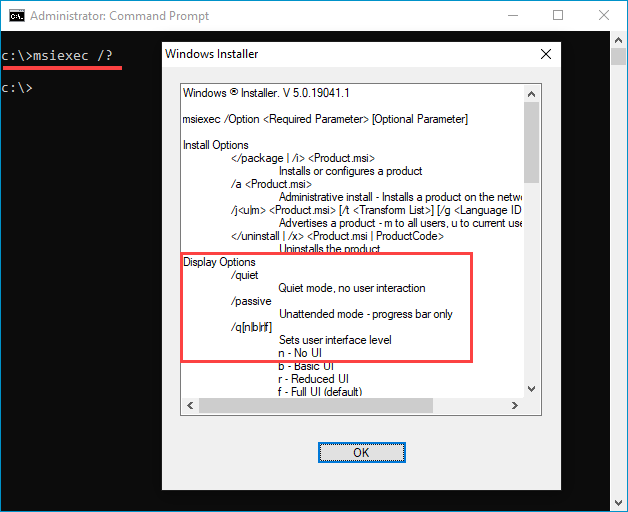
The Windows Installer service (msiexec.exe) is the unsung hero of MSI installations. When you launch an MSI file, you’re not directly running the application’s setup logic. Instead, you’re instructing the Windows Installer service to read the MSI database and execute the installation sequence defined within it. This service runs with elevated privileges, allowing it to make necessary system-wide changes, even if the user initiating the installation has limited permissions.
This central service acts as an intermediary, ensuring all installations conform to system policies, logging installation events, and managing shared components. This centralized control significantly enhances digital security and system stability, as it prevents rogue installers from making arbitrary changes outside the defined framework.
Key Stages of an MSI Installation
An MSI installation process typically follows a well-defined sequence of actions, ensuring consistency and robustness:
- Preparation (Costing and Validation): The installer first analyzes the system, checks for sufficient disk space, validates package integrity, and resolves any dependencies.
- Execution (Installation Script Generation): Based on the MSI database, the Windows Installer service generates an internal script of operations to be performed.
- Installation (Script Execution): This is where the actual changes occur. Files are copied, registry entries are written, shortcuts are created, and custom actions are executed.
- Commit/Rollback: If all actions complete successfully, the installation is committed, and the changes become permanent. Crucially, if any action fails, the entire installation can be rolled back to its initial state, leaving the system untouched. This transactional integrity is a hallmark of MSI.
This meticulously planned sequence ensures that software installations are predictable, reversible, and less prone to leaving behind orphaned files or corrupted system states, contributing directly to user productivity and system reliability.
Advantages of Using MSI Packages
The database-driven, service-managed nature of MSI installers brings a host of benefits that are particularly valuable in professional environments and for developers aiming for high-quality software distribution.
Reliability and Transactional Integrity
One of the most significant advantages of MSI is its transactional installation capability. If an installation fails mid-way (e.g., due to a power outage, user cancellation, or an error), the Windows Installer service can automatically roll back all changes, restoring the system to its state before the installation began. This ensures that the system is not left in a corrupted or partially installed state, a common issue with simpler EXE installers. This reliability minimizes IT support calls and maximizes user uptime, a direct benefit for productivity.
Streamlined Deployment and Management
MSI packages are inherently designed for enterprise deployment. Their structured nature makes them ideal for:
- Group Policy Object (GPO) Deployment: IT administrators can easily deploy MSI packages across an entire network of Windows machines using Active Directory Group Policy. This enables silent, automated installations without user intervention, saving significant time and resources in large organizations (a clear “Money” benefit).
- Silent Installations: MSI packages can be installed without displaying any user interface, which is perfect for unattended deployments or scripting.
- Patches and Upgrades (MSPs): MSI technology supports creating lightweight patch files (.MSP) that only contain the differences between two versions of an application. This allows for efficient updating, reducing network traffic and installation time.
- Uninstallation Consistency: Because the MSI package records every change made during installation, uninstallation is clean and complete, removing all associated files, registry entries, and shortcuts. This helps maintain system hygiene and digital security by preventing leftover data from potential vulnerabilities.
Consistency and User Experience
For end-users, MSI installations often translate to a more consistent and predictable experience. The standard Windows Installer dialogs, progress bars, and error messages provide a familiar interface, reducing confusion. For developers, adhering to the MSI standard encourages best practices in software packaging, leading to more professional and reliable products that enhance their brand reputation.
Limitations and Considerations
While MSI offers numerous advantages, it’s not without its drawbacks or specific considerations. Understanding these helps in making informed decisions about installer technology.
Complexity for Developers
Creating an MSI package can be more complex than simply bundling an executable with a few files. Developers need to understand the intricacies of the Windows Installer database, tables, and sequences. Tools like WiX (Windows Installer XML) or commercial solutions like InstallShield and Advanced Installer simplify this process, but there’s still a steeper learning curve compared to creating a basic EXE installer that might just copy files and run a few commands. This initial investment in time and expertise is a “Money” consideration for development teams.

Platform Specificity
MSI is a Windows-specific technology. It is designed to work exclusively within the Microsoft Windows ecosystem. For applications that need to be deployed across multiple operating systems (macOS, Linux), developers will need to utilize different installer technologies or cross-platform packaging solutions. This isn’t a limitation of MSI itself, but rather a scope consideration for multi-platform development strategies.
MSI vs. EXE: A Crucial Distinction
Often, users encounter both .MSI and .EXE files for software installation and might wonder about the differences. While both can install software, their underlying mechanisms and intended use cases differ significantly.
When to Choose MSI
MSI is generally the preferred choice when:
- Reliability and Rollback are Critical: For complex installations where failure could lead to system instability, MSI’s transactional capabilities are invaluable.
- Enterprise Deployment is Required: For IT administrators managing hundreds or thousands of machines, MSI’s compatibility with GPO, silent installations, and consistent behavior is paramount for productivity and cost-efficiency.
- Clean Uninstallation is a Priority: Ensuring all traces of an application are removed is easier with MSI.
- Standardization is Key: When a consistent installation experience and adherence to Windows best practices are desired.
When EXE Might Be Preferred
Executable installers still have their place, often preferred when:
- Simplicity is the Overriding Factor: For very small, self-contained applications that don’t require complex system integration or deep registry modifications.
- Cross-Platform Support is Needed: Many EXE installers are wrappers that can bundle various types of installers (including MSI) or custom logic for different OSes, or they might be simpler, script-based installers that work on specific non-Windows platforms (though this is less common for “EXE” itself).
- Custom Pre-Installation Logic is Extensive: While MSI supports custom actions, some highly complex pre-installation checks or unique user interactions that are difficult to model in the MSI database might sometimes be easier to script directly in a proprietary EXE wrapper.
- Bootstrapping is Required: An EXE installer can act as a “bootstrapper,” which first checks for and installs prerequisites (like .NET Framework or Visual C++ redistributables) and then launches an MSI. Many commercial setup tools generate an EXE wrapper that contains the MSI.
Creating and Customizing MSI Installers
For developers and IT professionals, the ability to create and customize MSI packages is a powerful tool for professional software distribution and efficient system management.
Popular Development Tools
Creating an MSI package typically involves using specialized tools that abstract away some of the underlying database complexities:
- WiX Toolset (Windows Installer XML): A free, open-source set of tools that build Windows installation packages from XML source code. It offers immense flexibility and control but has a steeper learning curve. It’s a favorite among developers for its power and integration with build systems.
- InstallShield: A leading commercial solution, offering a graphical interface and comprehensive features for creating MSI installers, patches, and web installers. Widely used in corporate environments.
- Advanced Installer: Another popular commercial tool known for its user-friendly interface and robust feature set for professional MSI package creation.
These tools allow developers to define files, registry entries, shortcuts, custom actions, and features, compiling all this information into a compliant MSI database.
Customization and Transformation Files (MST)
One of the most powerful features of MSI is the ability to customize installations without altering the original MSI package. This is achieved through Transformation Files (.MST). An MST file contains a set of modifications (additions, deletions, changes) to apply to an existing MSI database.
For instance, an organization might receive a vendor’s standard MSI and then create an MST file to:
- Pre-populate serial keys.
- Disable certain features by default.
- Change installation paths.
- Add custom registry entries specific to their environment.
This allows IT departments to standardize deployments based on vendor MSIs, enhancing productivity and ensuring consistency across their systems.
Troubleshooting Common MSI Issues
Despite their robustness, MSI installations can sometimes encounter issues. Common problems often stem from:
- Permissions: Insufficient user or system permissions preventing files from being copied or registry keys from being written.
- Missing Prerequisites: The application requires a specific version of a framework or runtime that isn’t present.
- Corrupted Packages: The MSI file itself is damaged during download or transfer.
- Conflicting Software: Other installed applications or security software interfering with the installation process.
- Windows Installer Service Issues: The service itself might be corrupted or malfunctioning.
Troubleshooting often involves checking installation logs (which MSI extensively generates), verifying system requirements, and sometimes using Microsoft’s own “Program Install and Uninstall Troubleshooter” or third-party MSI analysis tools. Understanding these potential pitfalls is key to maintaining system health and digital security.
The Broader Impact: Why MSI Matters for Tech Users and Businesses
The MSI installer, while seemingly a technical detail, plays a pivotal role in the larger tech ecosystem, touching upon productivity, digital security, and even brand perception.
For End-Users: A Seamless Experience
For the average user, a well-crafted MSI installation means a smooth, predictable, and reliable experience. It minimizes the chances of failed installations, partial software deployments, or messy uninstalls that can leave behind digital clutter and potential vulnerabilities. This contributes to a positive perception of the software and, by extension, the brand behind it.
For IT Professionals: Efficiency and Control
For IT departments and system administrators, MSI is an indispensable tool for managing software lifecycles. Its capabilities for silent deployment, consistent updates, and clean uninstallation translate directly into significant time savings and reduced operational costs. It allows for greater control over the software environment, enhancing digital security by ensuring applications are deployed and maintained according to policy. This operational efficiency is a direct “Money” saver for businesses.
For Software Developers: Professional Distribution
For software developers, embracing MSI means delivering a professional, robust, and enterprise-ready product. It signifies adherence to industry best practices, building trust with users and IT managers alike. A reliable installer is as crucial to a product’s success as its features, directly impacting customer satisfaction and brand loyalty.
Conclusion
The MSI installer is far more than just a file type; it’s a mature, sophisticated technology that underpins the reliable deployment and management of software on Windows. Its database-driven architecture, transactional integrity, and enterprise-focused features make it an essential component for digital security, productivity, and a seamless user experience. Whether you’re a user wondering why some installations are so much smoother than others, an IT professional streamlining deployments, or a developer crafting your next big application, understanding the “what” and “how” of MSI installers is fundamental to navigating the modern tech landscape effectively. It stands as a testament to structured software management, continually evolving to support the ever-changing demands of technology.
aViewFromTheCave is a participant in the Amazon Services LLC Associates Program, an affiliate advertising program designed to provide a means for sites to earn advertising fees by advertising and linking to Amazon.com. Amazon, the Amazon logo, AmazonSupply, and the AmazonSupply logo are trademarks of Amazon.com, Inc. or its affiliates. As an Amazon Associate we earn affiliate commissions from qualifying purchases.