
In an increasingly digital world, managing our online presence and data footprint is paramount. Services like Intuit, with its suite of powerful financial tools including TurboTax, QuickBooks, and Mint, become integral parts of our personal and business lives. However, circumstances change, and the need to delete an Intuit account—or specific product data—can arise. Whether driven by privacy concerns, a switch to alternative services, or simply no longer requiring financial software, understanding the process of disentangling yourself from the Intuit ecosystem is a critical aspect of modern digital security and data management.

This guide delves into the often-complex world of Intuit account deletion, offering a professional, insightful, and engaging walkthrough for users seeking to reclaim control over their digital information. We’ll explore why deleting an Intuit account isn’t always a simple click, provide product-specific instructions, and discuss the broader implications for your digital privacy and data retention.
Understanding the Intuit Ecosystem and Account Deletion Nuances
Intuit operates a vast network of interlinked services, primarily centered around financial management. This interconnectedness, while beneficial for users moving between products, introduces layers of complexity when it comes to account deletion. Unlike many social media platforms or general e-commerce sites, Intuit deals with highly sensitive financial data, which inherently impacts its data retention policies and the ease of account closure.
Why Deleting an Intuit Account Isn’t Always Straightforward
The primary reason for the complexity stems from the nature of the data Intuit handles: financial records, tax information, and banking details. Regulatory compliance, such as IRS mandates for tax record retention or financial industry standards, often dictates that Intuit must retain certain user data for specific periods, even after a user requests deletion. This isn’t unique to Intuit; any company dealing with critical regulated data faces similar challenges.
Furthermore, Intuit aims for a unified user experience through an overarching “Intuit ID.” Deleting a specific product’s data (e.g., your TurboTax history) doesn’t necessarily mean your entire Intuit ID, or your account with another Intuit product like QuickBooks, is also removed. This distinction is crucial for managing your digital footprint effectively.
Key Considerations Before Initiating Deletion
Before you embark on the deletion process, it’s vital to undertake several preparatory steps. Rushing into deletion without proper foresight can lead to lost data or future complications.
- Backup Your Data: For any financial software, data export is a non-negotiable first step.
- QuickBooks: Export reports, customer lists, vendor lists, and transaction data. QuickBooks Online typically offers various export options (CSV, Excel). QuickBooks Desktop data can be backed up as a company file.
- TurboTax: Download and save copies of all your past tax returns (PDFs). The IRS generally recommends retaining tax records for at least three years, and for some records, up to seven years.
- Mint: Download transaction history, budgets, and investment data if needed.
- Cancel Subscriptions: Ensure any active subscriptions (e.g., QuickBooks Online, TurboTax Live) are canceled to avoid recurring charges. This is usually done through the billing section of your account settings.
- Unlink Financial Accounts: For services like Mint or QuickBooks that link directly to bank accounts, credit cards, or investment portfolios, manually unlink these connections first. This prevents continued data fetching and enhances security.
- Understand Data Retention Policies: Familiarize yourself with Intuit’s terms of service and privacy policy regarding data retention. This will give you realistic expectations about what data can be fully deleted and what might be retained for compliance purposes.
- Assess Impact on Linked Services: Consider if deleting your Intuit ID will affect other services or applications that used your Intuit credentials for single sign-on or data integration.
Step-by-Step Deletion Procedures for Core Intuit Products
The process for deleting an “account” varies significantly depending on the specific Intuit product you are using. Often, it’s more about removing personal data and deactivating access than a complete “erase all” button for your overarching Intuit ID.
Navigating TurboTax Account Deletion
TurboTax is primarily an annual tax preparation service. As such, the concept of “deleting an account” often translates to removing your personal tax data from their servers for specific years, rather than a full Intuit ID obliteration.
- Download Tax Returns: Log into your TurboTax account and download PDF copies of all your tax returns for every year you used the service. Save them securely.
- Clear Prior Year Data: TurboTax typically retains prior year tax data to facilitate future filings. While there isn’t a direct “delete account” button, you can often clear personal data associated with specific tax years. This might involve navigating to the “My Info” section and manually removing sensitive details. However, this primarily anonymizes the data, rather than deleting the underlying record that a return was filed.
- Stop Using the Service: The most practical way to “delete” your TurboTax presence is to simply stop using it. Your Intuit ID will remain, but no new tax data will be added.
- Contact Customer Support (for severe privacy concerns): If you have extreme privacy concerns and wish to explore options for more thorough data purging beyond standard procedures, you would need to contact TurboTax customer support directly. Be prepared for a potentially lengthy process, as they will need to verify your identity and assess the feasibility given regulatory requirements.
Closing Your QuickBooks Online Account
QuickBooks Online (QBO) is a subscription-based service for ongoing business accounting. Closing this account involves canceling the subscription and managing the associated company data.
- Export All Critical Data: Before anything else, export all your crucial financial data. Go to the “Gear Icon” (Settings) -> “Export Data” or “Export Reports.” This can include general ledger, customer lists, vendor lists, invoices, bills, and transaction histories. QBO allows export to Excel or CSV formats.
- Cancel Your Subscription:
- Log into QuickBooks Online as the master admin.
- Click the “Gear Icon” (Settings) -> “Account and Settings.”
- Go to the “Billing & Subscription” tab.
- Click “Cancel subscription” or “Cancel your plan.”
- Follow the prompts, which will likely ask for a reason for cancellation.
- Data Retention After Cancellation: After cancelling, your data will typically be available in a read-only state for a certain period (e.g., one year). This allows you to access historical records if needed. After this period, Intuit’s data retention policy will dictate when and how the data is purged from their active servers. For a complete and immediate data purge request, you would need to contact QuickBooks support and follow their specific protocols, which often involves a detailed verification process.
- QuickBooks Desktop: For QuickBooks Desktop users, your data is stored locally on your computer. To “delete” your account, you simply stop using the software and delete the company file(s) from your local drive. Your Intuit ID might still exist for licensing purposes, but your financial data is under your direct control.
Deactivating Your Mint Profile
Mint is a personal finance aggregator, linking various financial accounts to provide a holistic view. Deactivating a Mint profile is generally more straightforward than with tax or accounting software, as the data is primarily for personal insight rather than strict regulatory compliance.
- Unlink All Financial Accounts: Log into Mint. For each linked bank, credit card, investment, or loan account, go into its settings and choose to “Unlink” or “Delete” the connection. This stops Mint from accessing new data.
- Delete Your Mint Account:
- Log into your Mint account.
- Go to “Settings” (usually a gear icon or profile icon).
- Look for an option like “Delete your Mint account” or “Deactivate account.”
- Follow the prompts to confirm your decision.
- Mint will typically send an email confirmation.
- Impact on Intuit ID: Deleting your Mint account might prompt options related to your overarching Intuit ID. If given the choice, specify that you only wish to delete the Mint profile. Your Intuit ID might persist if you use other Intuit products.

Managing Your Credit Karma Account
Credit Karma, now part of Intuit, provides credit monitoring and financial recommendations. Deleting a Credit Karma account is usually a distinct process.
- Access Account Settings: Log into your Credit Karma account. Navigate to your profile or settings.
- Locate Deletion Option: Look for an option such as “Privacy,” “Account Settings,” or “Delete Account.”
- Follow Prompts: Credit Karma will likely ask for verification and a reason for deletion. Confirm your decision.
- Confirm Deletion: You should receive a confirmation that your account has been closed. Be aware that some historical data, especially concerning credit reports, may still be retained by credit bureaus for statutory periods, regardless of your Credit Karma account status.
The Broader Landscape: Intuit ID and Data Retention
Beyond product-specific deletion, understanding your overarching Intuit ID and the company’s data retention policies is crucial for a complete digital detox.
Differentiating Between Product Accounts and Your Intuit ID
When you create an account for any Intuit product (e.g., TurboTax, QuickBooks Online, Mint), you are essentially creating or linking to an Intuit ID. This ID serves as a universal login across many Intuit services.
- Deleting a product account: This typically means removing the data and access rights specifically tied to that product. For example, deleting your Mint profile removes your personal finance dashboard.
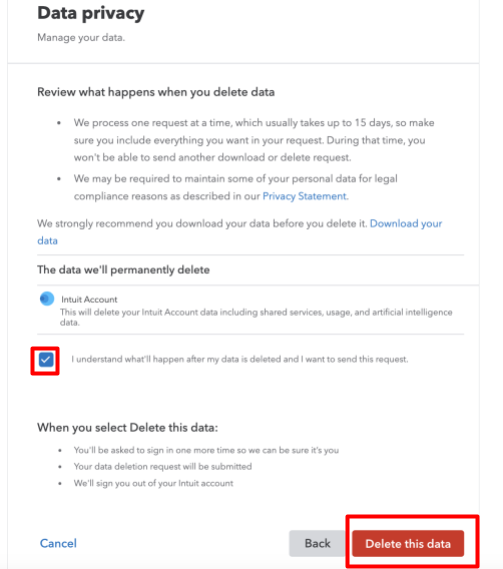
- Deleting your Intuit ID: This is a much more comprehensive and often more challenging process. It implies a desire to remove your entire presence from Intuit’s core user database. Due to the sensitive financial and tax-related data associated with Intuit products, fully deleting an Intuit ID, especially if it has been used for tax filings or business accounting, is exceptionally difficult, if not impossible, without direct intervention from Intuit support and often legal review. Intuit’s primary obligation is to comply with legal data retention requirements, which often supersede an individual’s immediate deletion request for historical financial data.
Intuit’s Data Retention Policies and Your Privacy Rights
Intuit, like all major data processors, operates under specific data retention policies that balance user privacy with legal and operational necessities.
- Legal & Regulatory Compliance: For services like TurboTax and QuickBooks, Intuit must retain data for periods mandated by tax authorities (e.g., IRS) and financial regulations. This is non-negotiable and impacts how quickly and completely your data can be purged.
- Operational Needs: Intuit may retain certain anonymized or aggregated data for business analysis, product improvement, and fraud prevention.
- User Agreements: When you sign up for Intuit services, you agree to their terms of service and privacy policy, which outline these data retention practices.
- GDPR and CCPA: For users covered by GDPR (Europe) or CCPA (California), you have specific “rights to be forgotten” or “rights to delete personal information.” While these rights strengthen a user’s position, they are often subject to exemptions for legal compliance, particularly concerning financial data. If you fall under these regulations, explicitly citing them when contacting Intuit support can sometimes streamline the process or provide a more definitive answer regarding what data can be deleted.
When contacting Intuit to request the deletion of your entire Intuit ID, be prepared for a thorough verification process and understand that a complete removal of all associated historical data might not be feasible due to regulatory obligations.
Alternatives to Full Deletion and Best Practices for Digital Security
Given the complexities of completely eradicating your Intuit digital footprint, sometimes alternatives or proactive measures are more practical and achieve similar security objectives.
When Deactivation or Data Export Suffices
For many users, a full “deletion” of the Intuit ID isn’t strictly necessary or even achievable. Consider these alternatives:
- Deactivation (for certain products): For services like Mint, deactivating the account effectively stops data collection and hides your profile without completely deleting the underlying Intuit ID.
- Data Export and Manual Deletion of Product-Specific Information: As detailed in the product-specific sections, exporting your data and then manually clearing or unlinking sensitive information within each product (e.g., removing bank accounts from Mint, clearing “My Info” in TurboTax) can significantly reduce your active data footprint.
- Cancelling Subscriptions: For paid services like QuickBooks Online, simply canceling the subscription ensures no new data is added and access eventually becomes read-only, then potentially purged according to Intuit’s policies.
- Strong Password and Two-Factor Authentication (2FA): If you decide to leave your Intuit ID dormant, ensure it’s protected with a unique, strong password and robust 2FA. This is a fundamental digital security practice that minimizes the risk of unauthorized access to any remaining data.
Proactive Steps for Enhanced Digital Data Control
Beyond specific deletion requests, adopting a proactive approach to your digital security and data management is always beneficial.
- Regular Data Audits: Periodically review which online services you use, what data they hold, and whether you still need them.
- Leverage Privacy Settings: Maximize the privacy settings within all your online accounts, including Intuit products, to limit data sharing or collection where possible.
- Monitor Account Activity: Regularly check activity logs for your financial accounts, both within Intuit products and directly with your banks, to detect any unusual or unauthorized transactions.
- Educate Yourself: Stay informed about data privacy regulations (like GDPR, CCPA) and the data retention policies of the services you use. This empowers you to make informed decisions and assert your rights.
- Use Strong, Unique Passwords and 2FA Everywhere: This cannot be overstressed. A compromised password on one service can cascade into breaches on others.
Conclusion: Reclaiming Your Digital Footprint from Intuit
Deleting an Intuit account is rarely a simple one-click affair. The interconnectedness of its financial products, coupled with stringent regulatory data retention requirements, creates a nuanced landscape for digital data management. While a complete, immediate erasure of your entire Intuit ID might be challenging for historical financial data, you possess significant control over your active data footprint.
By understanding the distinctions between product-specific data and your overarching Intuit ID, carefully backing up your information, and following product-specific deletion or deactivation steps, you can substantially reduce your digital presence. For ultimate peace of mind or for users protected by robust data privacy laws, direct engagement with Intuit customer support remains an option, albeit one that requires patience and clear communication. Ultimately, a proactive approach to digital security—embracing strong authentication, regular data audits, and an understanding of data retention policies—empowers you to reclaim and protect your invaluable digital footprint.
aViewFromTheCave is a participant in the Amazon Services LLC Associates Program, an affiliate advertising program designed to provide a means for sites to earn advertising fees by advertising and linking to Amazon.com. Amazon, the Amazon logo, AmazonSupply, and the AmazonSupply logo are trademarks of Amazon.com, Inc. or its affiliates. As an Amazon Associate we earn affiliate commissions from qualifying purchases.