
In the ever-evolving landscape of digital technology, the lines between traditional websites and native mobile applications have become increasingly blurred. Emerging at the intersection of these two worlds is a powerful and versatile solution known as the Progressive Web App (PWA). Far from being just another buzzword, PWAs represent a paradigm shift in how we conceive, build, and interact with web experiences, offering a blend of web accessibility and native app functionality.
A Progressive Web App is essentially a website that leverages modern web capabilities to deliver an app-like user experience. It’s designed to be reliable, fast, and engaging, overcoming many of the limitations associated with conventional web browsers and offering features previously exclusive to platform-specific applications. The “progressive” in its name signifies its ability to work for every user, regardless of browser choice or internet connection quality, by progressively enhancing the experience as the user’s browser and network allow. This adaptability ensures a baseline experience for all, while delivering a richer, more immersive interaction for those with modern browsers and stable connections.
The concept of PWAs was first introduced by Google in 2015, advocating for web experiences that possess the robust capabilities and seamless feel of native apps. Since then, it has gained significant traction across industries, with major companies adopting PWAs to improve user engagement, streamline development, and expand their digital reach. Understanding what constitutes a PWA and how it functions is crucial for anyone looking to navigate the future of web and mobile interaction.
The Core Concept: Bridging Web and Native Experiences
At its heart, a PWA seeks to combine the best aspects of the web and native applications. It’s a bold vision that aims to eliminate the friction often associated with app stores, installations, and platform-specific development, while still delivering the speed, reliability, and rich features users have come to expect from their most-loved applications.
Defining a Progressive Web App
A Progressive Web App is not a new framework or technology in itself, but rather a set of best practices and technologies applied to a web application. It uses standard web technologies like HTML, CSS, and JavaScript, but augments them with cutting-edge APIs to provide capabilities that were once exclusive to native applications. Think of it as a website that can behave like an app: it can be “installed” to a user’s home screen, send push notifications, and even work offline.
The core idea is to deliver an experience that is:
- Discoverable: Like websites, PWAs are indexable by search engines and shareable via URLs.
- Linkable: Easy to share through a simple URL, no app store download needed.
- Progressively Enhanced: Works for every user, enhancing capabilities based on their browser and network.
- Responsive: Adapts to any screen size and orientation, from desktop to mobile.
- Secure: Served over HTTPS to prevent snooping and ensure content integrity.
This definition highlights the inherent flexibility and user-centric design philosophy behind PWAs, making them a powerful tool for developers and businesses alike.
The “Progressive” Aspect Explained
The term “progressive” is key to understanding the PWA philosophy. It implies that the application should function across all browsers and devices, providing a baseline experience to everyone. As users access the PWA with more capable browsers or better network conditions, the application “progresses” to offer enhanced features and a richer experience.
For example, a user with an older browser might simply access the PWA as a responsive website. However, a user with a modern browser and a stable internet connection could see the option to “install” the PWA to their home screen, receive push notifications, and benefit from offline caching. This progressive enhancement ensures broad accessibility while still delivering a cutting-edge experience to those with the latest technology. It’s about meeting users where they are, rather than demanding they meet the application at its highest technical specification. This approach significantly lowers the barrier to entry for users and expands the potential audience for any digital service.
Key Characteristics of a Robust PWA
To truly qualify as a Progressive Web App, an application must embody several core characteristics that elevate it beyond a standard responsive website. These features are what give PWAs their app-like feel and functionality, making them stand out in the crowded digital space.
Reliability and Offline Capability (Service Workers)
One of the most defining features of a PWA is its reliability, especially in challenging network conditions. This is primarily achieved through Service Workers. A service worker is a JavaScript file that runs in the background of the browser, separate from the web page itself. It acts as a programmable proxy between the browser and the network.
With service workers, PWAs can:
- Cache assets: Store static assets (HTML, CSS, JavaScript, images) locally, allowing for instant loading on subsequent visits, even offline.
- Intercept network requests: Decide whether to serve content from the cache or fetch it from the network.
- Provide offline fallbacks: Display a custom offline page or cached content when there’s no internet connection, preventing the frustrating “no internet connection” dinosaur page.
This capability makes PWAs incredibly resilient, ensuring a consistent user experience regardless of network quality, which is particularly valuable in areas with unreliable internet access or for users on the go.
Speed and Performance Optimization
Speed is paramount in the digital world; users expect immediate responses. PWAs are inherently designed for speed. By utilizing service workers for caching, they can load almost instantaneously on repeat visits. Furthermore, developers often employ an “app shell” architecture, where the basic UI (header, navigation, etc.) is loaded instantly from cache, while dynamic content is fetched asynchronously.
This separation of static shell from dynamic content creates the perception of speed, as the user sees a functional interface immediately. Beyond caching, PWAs leverage other web performance best practices, such as optimized image loading, code splitting, and efficient resource delivery, all contributing to a snappy and responsive user experience that rivals native apps. Faster loading times lead to lower bounce rates and higher engagement.
Engagement and Native-Like Features (Manifest, Notifications)
For an app to be successful, it needs to keep users engaged. PWAs achieve this through several mechanisms that mimic native app functionality.
- Web App Manifest: This JSON file provides metadata about the PWA (name, icons, start URL, display mode, theme colors). It’s crucial for the “install to home screen” feature, telling the browser how the PWA should behave when launched from the home screen (e.g., full screen without browser UI). It allows users to personalize the app icon and launch experience.
- Push Notifications: Thanks to the Push API and Notification API, PWAs can send re-engaging notifications to users, even when the browser or PWA is closed. These notifications work similarly to native app notifications, prompting users to return to the application for updates, special offers, or new content. This direct line of communication is a powerful tool for retaining users and driving interaction.
These features contribute significantly to the PWA’s ability to foster a deeper, more continuous engagement with users, blurring the lines between a website and a full-fledged application.
Installability and Accessibility
A key differentiator for PWAs is their installability. Users can “install” a PWA directly from their browser to their device’s home screen, without going through an app store. This process is seamless and lightweight, typically involving a banner prompt or an option in the browser menu. Once installed, the PWA can be launched directly from the home screen, behaving like a native app: it can open in full-screen mode, without the browser’s address bar or navigation elements, providing a truly immersive experience.
This installability dramatically improves accessibility. Users don’t need to commit to a large download or navigate a complex app store. A simple tap is often all it takes to gain quick, persistent access. Furthermore, because PWAs are fundamentally web pages, they benefit from the web’s inherent accessibility features, such as screen reader compatibility and keyboard navigation, making them usable for a broader audience.
The Technological Backbone: How PWAs Function
The magic of Progressive Web Apps isn’t rooted in a single, revolutionary technology, but rather in the intelligent orchestration of several modern web APIs and best practices. These underlying components work in concert to deliver the robust, app-like experience users have come to expect.

Service Workers: The Offline Enablers
As mentioned earlier, Service Workers are the unsung heroes of PWA functionality. These client-side programmable proxies intercept network requests made by the web application. Their capabilities include:
- Caching strategies: They allow developers to define precise caching rules – what to cache, when to update, and how to serve content (e.g., “cache first, then network,” “network first, then cache”).
- Background synchronization: They can defer actions until a stable connection is available, ensuring data is sent even if the user goes offline temporarily.
- Push notifications: They receive push messages from a server and display notifications to the user, even when the PWA is not open.
Service workers operate in a separate thread from the main browser process, meaning they don’t block the UI and can perform complex tasks without affecting the app’s responsiveness. They are the fundamental building block for offline capabilities, network resilience, and background features that define a PWA.
Web App Manifest: Crafting the User Interface
The Web App Manifest is a JSON file that provides information about the web application in a simple, text-based format. This file serves as the instruction manual for the browser and operating system, dictating how the PWA should appear and behave when installed. Key properties within the manifest include:
nameandshort_name: The full and abbreviated names of the application.start_url: The URL that should be loaded when the PWA is launched from the home screen.display: Defines the display mode (e.g.,fullscreen,standalone,minimal-ui,browser).standalonetypically removes browser UI elements.icons: An array of image objects specifying icons for various resolutions and purposes (e.g., home screen, splash screen).theme_color: The default theme color for the application.background_color: The background color that appears on the splash screen before the stylesheet loads.
By properly configuring the Web App Manifest, developers can ensure their PWA integrates seamlessly into the user’s device, providing a cohesive and polished user experience from the moment it’s launched.
Secure Contexts (HTTPS)
Security is non-negotiable for PWAs. A fundamental requirement for a web application to be considered a PWA is that it must be served over HTTPS (Hypertext Transfer Protocol Secure). HTTPS encrypts the communication between the user’s browser and the web server, protecting data from eavesdropping and tampering.
This security measure is not just a best practice; it’s a technical prerequisite for many advanced web features, including Service Workers and the Push API, to function. Browsers strictly enforce this to ensure that sensitive user data is protected and that the integrity of the application’s content is maintained. Running over HTTPS builds user trust and is crucial for delivering a reliable and safe app-like experience.
Advantages of Adopting Progressive Web Apps
The growing popularity of PWAs is not without reason. They offer a compelling array of benefits for both the end-user and the businesses that deploy them, making them a strategic choice for modern digital presence.
Benefits for Users: Enhanced Experience and Accessibility
From a user’s perspective, PWAs bring a host of advantages that address common frustrations with traditional web and native app experiences:
- No Installation Hassle: Users can simply visit a website and choose to “add to home screen” without the friction of app store downloads, long installation processes, or storage concerns.
- Offline Access: Crucial content and functionality remain available even without an internet connection, thanks to service workers. This is invaluable for commuters or those in areas with spotty connectivity.
- Faster Loading Times: Caching ensures that repeat visits are nearly instant, leading to a smoother, more responsive experience than traditional websites.
- Less Data Usage: By caching assets and serving content efficiently, PWAs often consume less data than constantly downloading assets for every web visit or a large native app.
- Always Up-to-Date: Since PWAs are web-based, they update automatically without user intervention, ensuring users always have the latest features and bug fixes.
- Native-Like Experience: Push notifications, full-screen mode, and fast performance contribute to an immersive experience that feels indistinguishable from a native app.
These user-centric benefits translate directly into higher satisfaction, improved engagement, and greater loyalty to the brand or service.
Benefits for Businesses: Reach, Engagement, and Cost-Efficiency
For businesses, the advantages of PWAs are equally significant, impacting everything from development costs to market reach:
- Wider Reach & Lower Barrier to Entry: PWAs are accessible via a URL, making them instantly discoverable through search engines. There’s no app store approval process, and the “install” process is simpler, converting more casual visitors into engaged users. This expands the potential audience significantly.
- Reduced Development Costs: A single codebase (HTML, CSS, JavaScript) can target all platforms (web, Android, iOS), significantly reducing the development time and cost compared to building separate native apps for each operating system.
- Increased Engagement & Conversion Rates: Features like push notifications and offline capabilities lead to higher user retention and conversion rates. Businesses can re-engage users more effectively, driving sales or content consumption.
- Improved SEO: As they are web-based, PWAs are indexable by search engines, allowing for better visibility and organic traffic, unlike native apps hidden behind app stores.
- Seamless Updates: Updates are deployed instantly to all users without requiring app store submissions or manual user updates, ensuring everyone is on the latest version.
- Lower Data Costs for Users: This indirectly benefits businesses by making their services more attractive to users with limited data plans, especially in emerging markets.
These business advantages make PWAs an attractive solution for companies looking to optimize their digital strategy, maximize their reach, and get a better return on investment.
Real-World Impact: Success Stories and Industry Adoption
Many prominent companies have successfully adopted PWAs, demonstrating their tangible benefits across various sectors:
- Twitter Lite: Reduced data usage by 70%, loaded faster, and increased engagement.
- Starbucks: Their PWA allows customers to browse the menu, customize orders, and add items to their cart offline, leading to a significant increase in daily active users.
- Pinterest: Saw a 60% increase in core engagements, a 40% increase in time spent, and a 44% increase in user-generated ad revenue after launching their PWA.
- Uber: Launched an PWA for markets with less reliable network connections, providing a seamless ride-hailing experience without the need for a bulky native app.
- Trivago: Increased click-through rates by 90% for users who added their PWA to the home screen.
These examples illustrate that PWAs are not just a theoretical concept but a proven strategy for improving user experience and achieving business objectives on a global scale. Their success underscores the power of combining web flexibility with app-like performance.
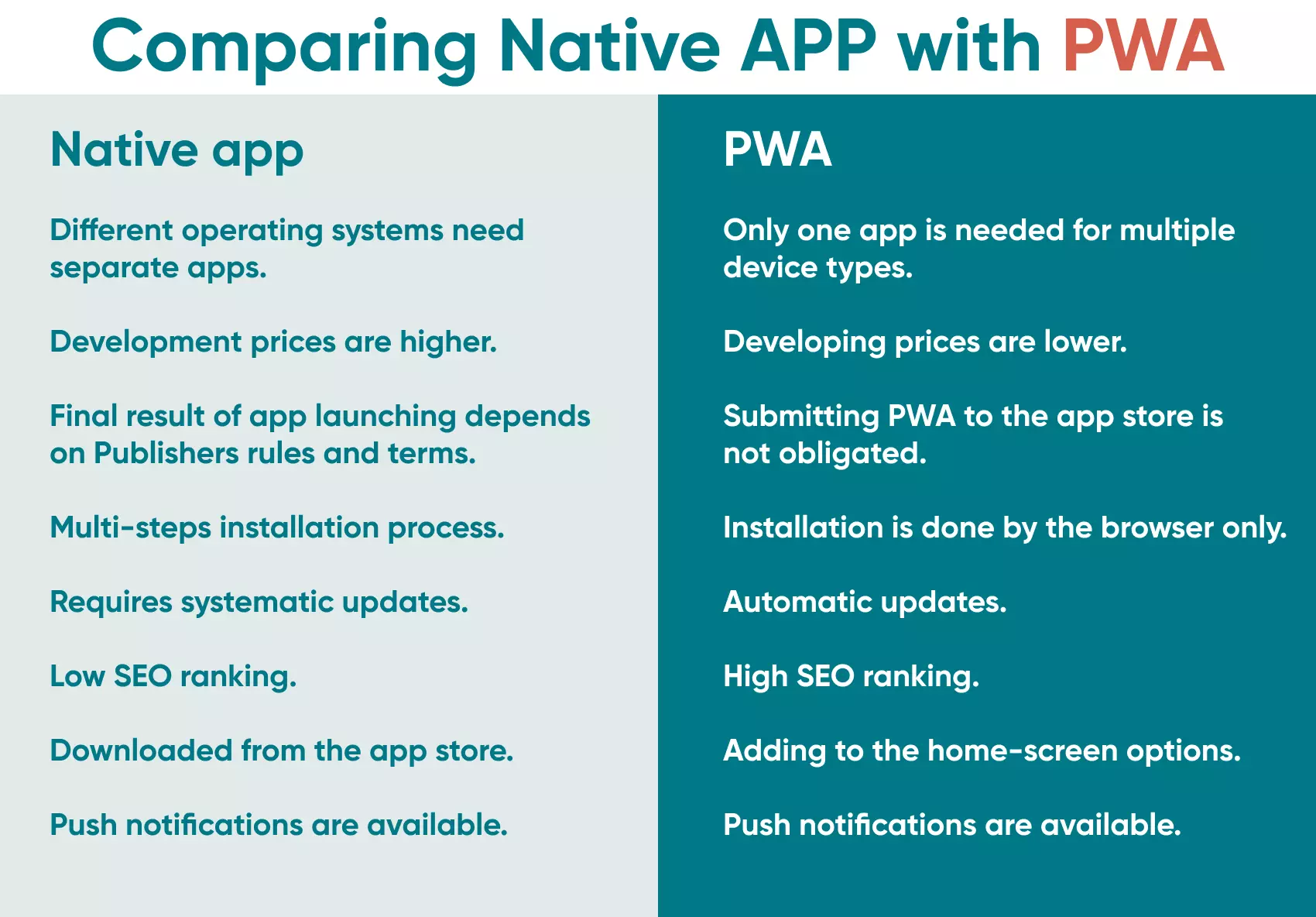
PWA vs. Native Apps vs. Traditional Websites: A Comparative Look
Understanding where PWAs fit into the broader digital ecosystem requires a brief comparison with their counterparts: native mobile apps and traditional responsive websites. Each has its strengths and ideal use cases.
Traditional Websites:
- Pros: Highly discoverable (SEO), easy to share (URL), cross-platform by default, low development cost.
- Cons: Often lack offline access, no push notifications, can be slower than apps, no home screen icon, not deeply integrated with device features.
Native Mobile Apps (iOS/Android):
- Pros: Deep device integration (camera, GPS, contacts), best performance, rich UI/UX possibilities, push notifications, offline access, presence in app stores.
- Cons: Platform-specific development (higher cost/time), app store approval process, large download sizes, user must actively download/install, updates require user action.
Progressive Web Apps (PWAs):
- Pros: Web discoverability and shareability, cross-platform with single codebase, offline access, push notifications, home screen installability (no app store needed), faster loading, uses less data, automatic updates, leverages modern web standards.
- Cons: Less access to low-level device hardware (e.g., NFC, advanced Bluetooth, contact list integration) compared to native apps, performance can be slightly less than highly optimized native apps, browser support for all PWA features can vary, limited visibility in app stores (though some app stores now accept PWAs).
PWAs effectively bridge the gap, offering a significant upgrade over traditional websites while mitigating many of the complexities and costs associated with native app development.
When to Choose a PWA
A PWA is often the ideal choice for:
- Content-heavy sites: Blogs, news portals, e-commerce sites benefit from faster loading and offline access.
- E-commerce platforms: Improved conversion rates, easier access, and better engagement.
- Services needing re-engagement: Any platform that benefits from push notifications to bring users back.
- Businesses targeting emerging markets: Where internet connectivity might be unreliable and data plans are expensive, PWAs offer a lightweight, performant alternative.
- When quick market entry is crucial: Avoiding app store approvals means faster deployment.
- When a strong web presence is already established: Leveraging existing web infrastructure.

Complementing Native and Web Strategies
PWAs are not necessarily a replacement for native apps but rather a powerful complement. For applications requiring intensive hardware access (e.g., advanced photo editing, augmented reality, complex gaming), native apps might still be superior. However, for most business and content delivery needs, a PWA can serve as the primary mobile experience, or even as a “lite” version of a more complex native app, acting as a gateway to the full experience.
Many companies adopt a hybrid strategy: a PWA for broad reach and quick engagement, and a native app for power users who demand the absolute deepest integration and performance. Ultimately, the decision depends on specific business goals, target audience needs, and the required level of device integration. However, the versatility and growing capabilities of PWAs make them an indispensable tool in any modern digital strategy.
The journey of the web from static pages to dynamic, interactive applications has been remarkable, and Progressive Web Apps mark a significant milestone in this evolution. By harnessing the power of modern web technologies, PWAs deliver experiences that are not only efficient and engaging but also universally accessible, promising a more connected and seamless digital future for everyone.
aViewFromTheCave is a participant in the Amazon Services LLC Associates Program, an affiliate advertising program designed to provide a means for sites to earn advertising fees by advertising and linking to Amazon.com. Amazon, the Amazon logo, AmazonSupply, and the AmazonSupply logo are trademarks of Amazon.com, Inc. or its affiliates. As an Amazon Associate we earn affiliate commissions from qualifying purchases.