
In an increasingly digital world, managing your finances effectively and securely is paramount. From paying bills online to receiving payments for freelance work, or simply sending money to friends and family across continents, the ability to transact digitally has become a cornerstone of modern life. Among the myriad of platforms facilitating these transactions, PayPal stands out as a pioneering and widely adopted solution. This comprehensive guide will walk you through the process of starting a PayPal account, ensuring you can harness its full potential as a robust financial tool.

PayPal is not merely an app or a website; it’s a global financial ecosystem that empowers individuals and businesses to conduct transactions with unprecedented ease and security. As a critical component of personal finance, online income strategies, and business operations, understanding how to effectively set up and utilize a PayPal account is a fundamental skill in the digital age. This article delves into the nuances of creating your account, linking your financial instruments, and leveraging PayPal for various financial activities, all within the overarching context of prudent money management.
Understanding PayPal’s Role in Modern Finance
Before diving into the mechanics of account creation, it’s essential to grasp what PayPal is and why it has become an indispensable financial tool for millions worldwide. Its integration into global commerce and personal transactions underscores its significance in the money niche.
What is PayPal and Why Do You Need One?
PayPal is a global online payment system that supports online money transfers and serves as an electronic alternative to traditional paper methods like checks and money orders. It acts as an intermediary between your bank account or credit card and the merchants or individuals you transact with, adding an extra layer of security by not sharing your sensitive financial details directly. For many, PayPal simplifies online shopping, facilitates international payments, and provides a streamlined way to manage funds.
The “why” is manifold:
- Convenience: Send and receive money instantly, often with just an email address or mobile number.
- Security: Your financial information (bank account numbers, credit card details) is encrypted and not directly shared with sellers, significantly reducing the risk of fraud.
- Global Reach: Conduct transactions across borders and currencies, making it ideal for international business or personal remittances.
- Dispute Resolution: PayPal offers buyer and seller protection programs, providing recourse in case of transaction issues.
- Integration: Widely accepted by online retailers, e-commerce platforms, and service providers.
The Core Benefits for Individuals and Businesses
For individuals, PayPal streamlines online purchases, bill payments, and peer-to-peer money transfers. It provides a digital wallet where funds can be held, making it easier to track spending and manage budgets. It’s particularly beneficial for those engaging in side hustles or freelance work, as it offers an accessible way to receive payments.
For businesses, especially small and medium-sized enterprises (SMEs) and online entrepreneurs, PayPal offers a comprehensive suite of financial tools. It enables businesses to accept payments from customers globally, manage invoicing, track sales, and even process payroll. Its low barrier to entry and straightforward integration with e-commerce platforms make it a cornerstone for establishing an online presence and driving revenue. From a financial perspective, PayPal simplifies cash flow management and expands a business’s market reach without the complexities of traditional international banking.
Different Account Types: Personal vs. Business
PayPal offers two primary account types, each tailored to specific financial needs:
- Personal Account: Ideal for individuals who want to send and receive money for personal use, shop online, or send money to friends and family. This account type focuses on simplicity and convenience for everyday financial transactions. It’s perfect for managing personal budgets and facilitating casual online spending.
- **Business Account: Designed for merchants, freelancers, and businesses of all sizes. It comes with advanced features like accepting payments from customers via credit cards and debit cards (even if they don’t have a PayPal account), managing multiple users, issuing invoices, and accessing detailed sales reports. A Business account is crucial for anyone looking to monetize their skills online, run an e-commerce store, or manage professional income streams, offering financial tools that support growth and compliance.
Choosing the right account type from the outset is important for aligning with your financial objectives and ensuring you have access to the appropriate financial management tools. While you can upgrade a Personal account to a Business account later, starting with the correct one can save time and effort.
The Step-by-Step Guide to Opening Your PayPal Account
Opening a PayPal account is a straightforward process, but preparing adequately ensures a smooth setup. This section outlines the practical steps, ensuring you embark on your digital finance journey without hitches.
Preparing for Registration: What You’ll Need
Before you begin the registration process, gather the following essential information and items:
- Valid Email Address: This will be your primary identifier for logging in and receiving transaction notifications. It should be an email you check regularly.
- Mobile Phone Number: For account verification and security purposes, such as two-factor authentication.
- Personal Information: Your full legal name, residential address, and date of birth. This information is required for identity verification, a standard practice for financial institutions to comply with “Know Your Customer” (KYC) regulations.
- Financial Information (Optional but Recommended): Details of a bank account or credit/debit card that you wish to link to your PayPal account. This allows you to fund payments and withdraw received money. While not strictly necessary for initial setup, linking a funding source is crucial for full functionality.
Having these details ready will significantly expedite the sign-up process and reduce potential delays.
Navigating the Sign-Up Process
- Visit the PayPal Website: Open your web browser and go to the official PayPal website (www.paypal.com).
- Click “Sign Up”: Locate the “Sign Up” or “Sign Up for Free” button, usually prominently displayed at the top right corner of the homepage.
- Choose Account Type: Select whether you want a “Personal Account” or a “Business Account.” Remember the distinctions discussed earlier to make an informed choice based on your financial needs.
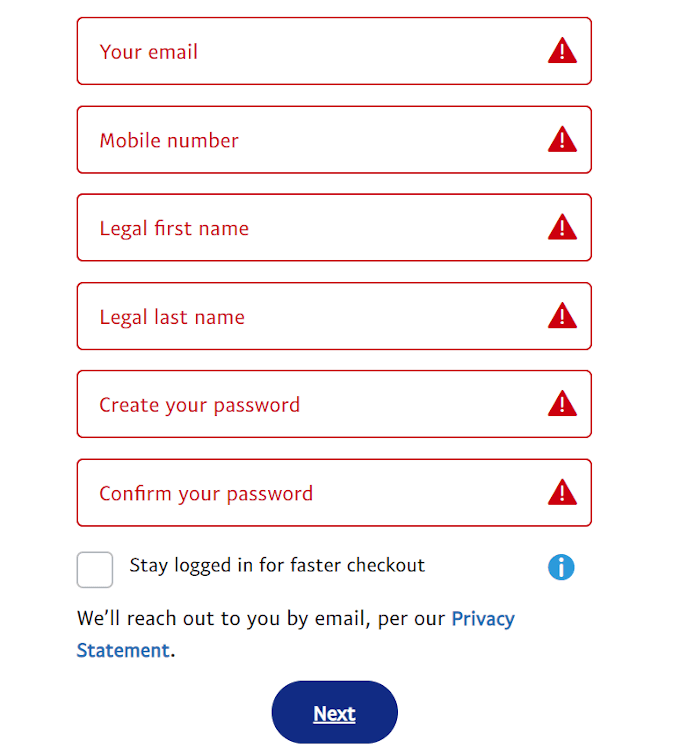
- Enter Your Mobile Number: PayPal will ask for your mobile number to send a verification code. Enter it and submit the code when prompted.
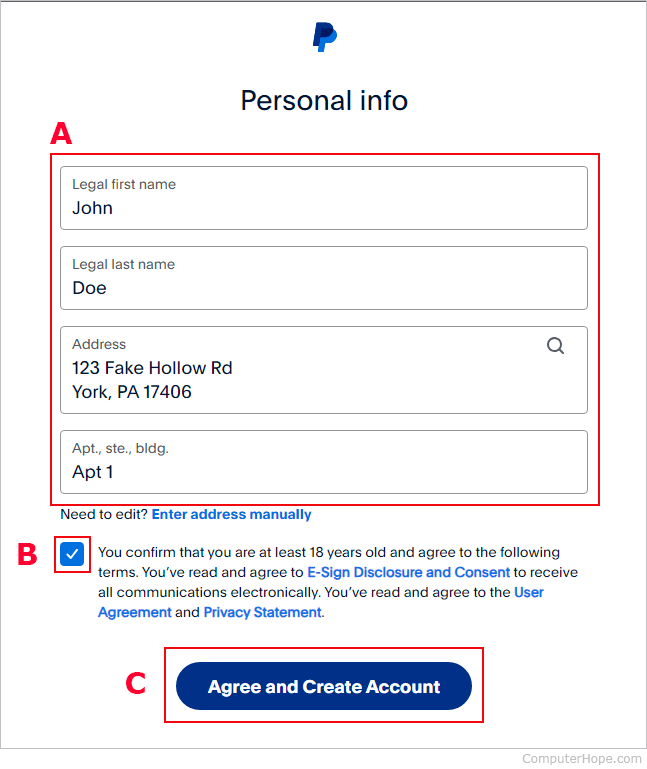
- Provide Personal Details: Fill in your name, email address, and create a strong password. For business accounts, you’ll also enter your business name and details.
- Enter Address Information: Provide your residential address (for personal accounts) or business address.
- Agree to Terms and Conditions: Review PayPal’s User Agreement and Privacy Policy. It’s crucial for understanding your rights and responsibilities when using this financial tool. Check the box to agree and click “Agree and Create Account” or similar.
Congratulations, your basic PayPal account is now created! However, to unlock its full financial potential and increase security, further steps are often required.
Verifying Your Account for Enhanced Security and Functionality
Account verification is a critical step that financial platforms like PayPal implement to enhance security, comply with regulatory requirements, and reduce fraud. It also typically removes sending and withdrawal limits, giving you full access to your account’s capabilities.
- Confirm Your Email Address: PayPal will send a verification email to the address you provided during registration. Open this email and click the confirmation link to verify your email address. This is a fundamental security measure.
- Link a Bank Account or Card: To verify your identity further and enable full transaction capabilities, PayPal will prompt you to link a bank account or credit/debit card.
- For Bank Account: You’ll typically enter your bank’s routing and account numbers. PayPal will then make two small deposits (usually a few cents) into your bank account, which you’ll need to confirm on PayPal’s site. This process can take a few business days.
- For Credit/Debit Card: You’ll enter your card number, expiration date, and CVV. PayPal might make a small temporary charge to your card, along with a 4-digit code in the transaction description, which you’ll enter back into PayPal to verify the card. This charge is usually refunded.
Completing these verification steps not only secures your account but also lifts initial transaction limits, allowing you to send and receive larger sums, critical for managing significant online income or business finances.
Linking and Managing Your Financial Instruments
With your PayPal account set up, the next crucial step is to connect it to your existing financial instruments. This integration transforms PayPal into a powerful hub for your digital financial activities.
Connecting Bank Accounts and Debit/Credit Cards
Linking your bank account or credit/debit cards is fundamental to using PayPal effectively. These sources act as the primary means to fund your PayPal payments and to withdraw money you receive into your PayPal balance.
- Adding a Bank Account: Navigate to the “Wallet” or “Money” section in your PayPal account. Select “Link a bank account.” You’ll be asked to provide your bank’s name, routing number, and account number. As part of the verification process, PayPal will make two small deposits (usually a few cents) into your account. Once these deposits appear on your bank statement (typically within 1-3 business days), return to PayPal, click on the bank account you linked, and enter the exact amounts of the deposits. This confirms you own the account and fully verifies it.
- Adding a Debit or Credit Card: In the same “Wallet” section, choose “Link a card.” Enter your card number, expiration date, security code (CVV), and billing address. Similar to bank verification, PayPal may initiate a small temporary charge with a 4-digit code in the transaction description. You’ll enter this code on PayPal to verify the card.
Linking multiple funding sources provides flexibility and a backup in case one method is unavailable. This is a key aspect of robust personal finance management.
Setting Up Your Preferred Payment Methods
Once you have linked multiple bank accounts or cards, you can set a preferred payment method. This dictates which source PayPal will attempt to use first when you make a payment, assuming sufficient funds.
- Prioritizing Sources: Go to your “Wallet” and select the bank account or card you wish to make your primary payment method. Click on it and choose “Set as preferred.”
- Funding Options: You can choose to fund payments directly from your PayPal balance, your preferred bank account, or a preferred card. For financial planning, it’s useful to consider whether you want to spend funds from your PayPal balance first (e.g., income from online sales) or draw directly from your bank account for personal expenses.
Managing these preferences helps you maintain control over your spending and ensures your financial flows align with your budgeting strategies.
Understanding PayPal Balance and Funds Management
Your PayPal balance is the money you have available directly within your PayPal account. This balance can accumulate from payments you receive, refunds, or transfers from your linked bank account.
- Receiving Funds: When someone sends you money via PayPal, it typically appears in your PayPal balance.
- Sending Funds: You can use your PayPal balance to make payments, send money to others, or even shop online.
- Withdrawing Funds: To access the money in your PayPal balance in physical cash or transfer it to another account, you’ll need to withdraw it to a linked bank account. This process usually takes 1-5 business days depending on your bank and the withdrawal method chosen. Instant transfers are often available for a small fee.
- Automatic Transfers: For business accounts or those managing frequent online income, you might set up automatic transfers of your PayPal balance to your bank account, streamlining your cash flow management.
Effectively managing your PayPal balance is an integral part of personal and business finance, ensuring you can readily access and deploy your funds as needed.
Leveraging PayPal for Financial Growth and Transactions
Beyond simple money transfers, PayPal offers a robust suite of features that can significantly contribute to your financial well-being, whether through personal budgeting or professional income generation.
Sending and Receiving Money: Personal and Commercial Transactions
The primary function of PayPal is to facilitate easy money transfers.
- Sending Money: To send money, simply click “Send & Request” or “Send Payment.” Enter the recipient’s email address or mobile number, the amount, and choose the currency. You can designate it as a “Friends and Family” payment (usually no fees for sender if funded by bank or balance) or “Goods and Services” payment (protection for buyer and seller, with seller fees). Understanding this distinction is vital for accurate financial record-keeping and avoiding unexpected costs.
- Receiving Money: To receive money, simply provide your PayPal-registered email address or mobile number to the sender. The funds will appear in your PayPal balance. For businesses or freelancers, generating a payment link or invoice directly from PayPal ensures clarity and professionalism. PayPal’s invoicing tool is a significant asset for tracking income and managing receivables for online income streams.
Using PayPal for Online Shopping and Bill Payments
PayPal is widely accepted as a payment method across thousands of online retailers globally.
- Online Shopping: When checking out on an e-commerce site, select PayPal as your payment option. You’ll be redirected to PayPal’s secure portal to log in and confirm the payment. This method not only offers convenience but also provides PayPal’s Buyer Protection, adding a layer of security to your online purchases.
- Bill Payments: Many utility companies, service providers, and subscription services accept PayPal. You can often set up recurring payments, making it easier to manage your monthly expenditures and avoid late fees, a key component of effective personal finance management.
Exploring PayPal’s Business Tools for Entrepreneurs
For those utilizing PayPal for online income, side hustles, or running full-fledged businesses, the platform offers specialized tools:
- Invoicing: Create and send professional invoices directly from your PayPal account, track their status, and send reminders. This streamlines accounting and payment collection.
- Payment Buttons & Links: Easily integrate PayPal payment buttons onto your website or share payment links via email or social media, allowing customers to pay you quickly and securely.
- Reports & Analytics: Access detailed transaction histories, sales reports, and financial summaries, which are invaluable for bookkeeping, tax preparation, and understanding business performance.
- Mass Payments: For businesses needing to pay multiple freelancers or vendors simultaneously, PayPal’s Mass Payments feature can simplify payroll and supplier disbursements, enhancing efficiency in business finance.
These tools transform PayPal from a simple payment processor into a comprehensive financial management platform for entrepreneurs.
Security, Support, and Best Practices for Your PayPal Account
Maintaining the security of your financial accounts is paramount. PayPal offers robust security features, but user vigilance is also crucial. Understanding fees and knowing how to get support further enhances your experience.
Protecting Your Account: Security Features and Tips
PayPal employs advanced encryption and fraud detection technologies. However, you also play a vital role in securing your financial assets.
- Strong, Unique Password: Always use a complex password that is unique to your PayPal account. Avoid using easily guessable information or reusing passwords from other sites.
- Two-Factor Authentication (2FA): Enable 2FA (also known as “2-Step Verification”) for an added layer of security. This requires a code from your mobile device in addition to your password to log in. This is arguably the most important step for account protection.
- Monitor Your Activity: Regularly review your PayPal transaction history for any unauthorized activity. Set up email or SMS notifications for all transactions.
- Beware of Phishing: Be extremely cautious of suspicious emails or messages purporting to be from PayPal. PayPal will never ask for your password, bank account details, or full credit card number via email. Always check the sender’s email address and hover over links before clicking. If in doubt, log directly into your PayPal account via their official website.
- Secure Devices: Ensure your computer and mobile devices are protected with up-to-date antivirus software and strong firewalls. Avoid accessing your PayPal account on public Wi-Fi networks without a VPN.
Understanding Fees and Transaction Limits
While PayPal offers many services for free, certain transactions incur fees, and limits may apply, especially for unverified accounts.
- Sending Money:
- Friends & Family: Usually free for the sender if funded by PayPal balance or linked bank account (within the same country). International transfers or those funded by credit/debit card typically incur a fee.
- Goods & Services: The recipient (seller) pays a fee, typically a percentage of the transaction plus a fixed amount. This fee covers buyer and seller protection.
- Receiving Money: For business transactions or goods and services, the recipient typically pays a fee. For personal gifts (Friends & Family), receiving money is usually free.
- Withdrawal Fees: Standard bank transfers are usually free, but instant transfers to a debit card or bank account may incur a small fee.
- Currency Conversion: When sending or receiving money in a different currency, PayPal applies a conversion rate and may charge a conversion fee.
- Transaction Limits: New or unverified accounts may have sending and withdrawal limits. Verification (linking and confirming a bank account or card) typically lifts these restrictions, crucial for managing substantial online income or business finances.
Always review PayPal’s fee structure on their official website, as rates can vary by region and change over time. Being aware of these costs is crucial for accurate financial planning.
Accessing PayPal Customer Support
Should you encounter any issues, need assistance, or suspect fraudulent activity, PayPal offers various customer support channels:
- Help Center: The PayPal website features an extensive Help Center with FAQs, articles, and guides covering a wide range of topics.
- Community Forum: Engage with other PayPal users and experts to find solutions or share experiences.
- Contact Us: For specific account-related issues, you can typically contact PayPal via phone, email, or live chat. The contact options are usually found within the “Contact Us” section of their website. Always log in to your account before seeking support to ensure you are connecting securely.
Having a reliable point of contact for financial tools is essential for peace of mind and efficient problem resolution.
In conclusion, establishing a PayPal account is a strategic move for anyone looking to navigate the modern financial landscape with greater ease and security. From personal budgeting and online shopping to managing freelance income and running a full-fledged e-commerce business, PayPal provides a versatile and secure platform. By following these steps and adhering to best practices, you can confidently unlock the full potential of your PayPal account, making it a powerful ally in your journey towards financial empowerment and success in the digital age.
aViewFromTheCave is a participant in the Amazon Services LLC Associates Program, an affiliate advertising program designed to provide a means for sites to earn advertising fees by advertising and linking to Amazon.com. Amazon, the Amazon logo, AmazonSupply, and the AmazonSupply logo are trademarks of Amazon.com, Inc. or its affiliates. As an Amazon Associate we earn affiliate commissions from qualifying purchases.