
In an increasingly digital world, the convenience of paying with a tap or a scan of your phone has transformed how we conduct transactions. Gone are the days when a bulky wallet filled with cards and cash was the only option. Today, your smartphone, a device you likely already carry everywhere, has evolved into a powerful financial tool, capable of handling everything from your morning coffee to your monthly bills. This guide delves into the technology, setup, and usage of mobile payments, ensuring you can confidently navigate this modern convenience.
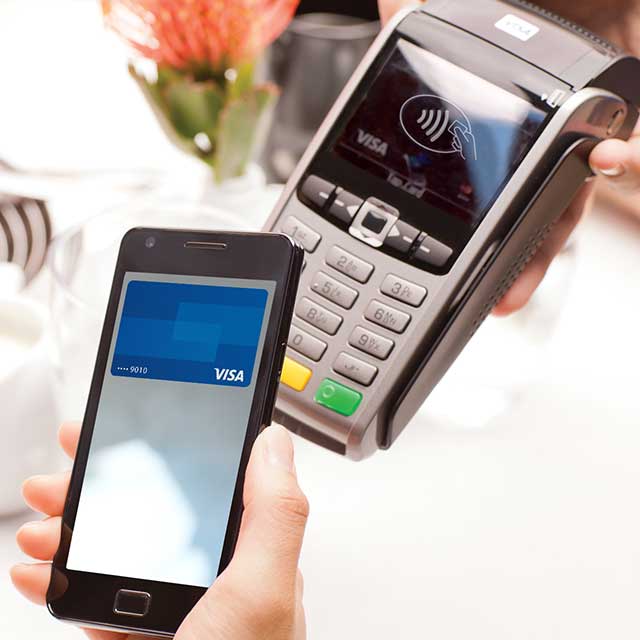
The shift towards mobile payments is more than just a trend; it’s a testament to technological advancements designed to simplify our lives, enhance security, and streamline commerce. From contactless payments in brick-and-mortar stores to seamless online checkouts and peer-to-peer transfers, your phone is rapidly becoming the ultimate digital wallet. Understanding the underlying technologies and best practices is key to harnessing its full potential.
The Digital Wallet Revolution: From Physical to Virtual
The concept of a wallet has undergone a profound transformation, evolving from a leather accessory to a sophisticated software application on our smartphones. This evolution is driven by a desire for greater efficiency, improved security, and ultimate convenience. Mobile payments are not just a new way to pay; they represent a fundamental shift in how we interact with money and merchants, powered by cutting-edge digital infrastructure.
From Plastic Cards to Digital Convenience
For decades, credit and debit cards represented the pinnacle of payment convenience, freeing consumers from the necessity of carrying large amounts of cash. However, even plastic cards have their limitations – they can be lost, stolen, or damaged, and require physical contact with a terminal. The digital wallet leapfrogs these constraints by virtualizing your payment credentials. Instead of carrying a physical card, your card details are securely stored within a dedicated app on your smartphone, tablet, or smartwatch. This digital representation allows for transactions without ever pulling out a physical card, often requiring just a simple tap or scan. The convenience extends beyond mere physical presence; digital wallets can store loyalty cards, gift cards, and even event tickets, consolidating numerous physical items into one accessible digital hub. This convergence of functionalities truly defines the modern digital wallet as a multi-purpose tool, transforming your phone into an indispensable accessory for daily life.
The Core Technologies Powering Mobile Payments: NFC and QR Codes
At the heart of mobile payment functionality lie sophisticated communication protocols and imaging technologies. The two predominant methods enabling these transactions are Near Field Communication (NFC) and Quick Response (QR) codes, each with distinct operational mechanisms and use cases.
Near Field Communication (NFC) is a short-range wireless technology that allows two devices to communicate when they are brought within a few centimeters of each other. Most modern smartphones are equipped with an NFC chip. When you initiate a mobile payment (e.g., via Apple Pay, Google Pay, or Samsung Pay) and hold your phone near a compatible payment terminal, the NFC chip in your phone communicates wirelessly with the terminal’s NFC reader. This communication securely transmits tokenized payment information, authorizing the transaction almost instantaneously. The beauty of NFC lies in its speed, security, and the fact that it doesn’t require an internet connection during the transaction itself (though initial setup and verification may need one). It’s the technology behind the ubiquitous “tap to pay” functionality.
QR Codes, on the other hand, are two-dimensional barcodes that can be read by a smartphone’s camera. Instead of proximity-based communication, QR code payments typically involve a user scanning a QR code displayed by a merchant, or the merchant scanning a QR code displayed on the user’s phone. When scanned, the QR code either directs the user to a payment portal or directly initiates a payment request within a mobile payment app. This method is particularly popular in regions where NFC infrastructure is less prevalent, or for specific applications like peer-to-peer payments (e.g., Venmo, PayPal) where one user generates a QR code for another to scan. While requiring a camera and often an internet connection, QR codes offer flexibility and a lower barrier to entry for merchants who might not have NFC-enabled terminals. Both NFC and QR codes represent robust technological solutions, each carving out its niche in the diverse landscape of mobile payment systems, working in tandem to offer comprehensive payment options.
Setting Up Your Phone for Seamless Transactions
Before you can experience the convenience of paying with your phone, a few initial setup steps are required. This process typically involves selecting a digital wallet platform, linking your payment methods, and activating critical security features to protect your financial information. The setup is designed to be user-friendly, guiding you through each stage to ensure your digital wallet is both functional and secure.
Choosing Your Preferred Digital Wallet
The first step is to decide which digital wallet platform best suits your device and ecosystem. The market is primarily dominated by three major players, each offering a robust and secure experience:
- Apple Pay: Integrated seamlessly into iOS devices (iPhones, Apple Watches, iPads, Macs), Apple Pay leverages the device’s built-in security features like Face ID or Touch ID. It’s renowned for its user-friendly interface and strong privacy protocols.
- Google Pay: Available for Android devices and compatible with Wear OS smartwatches, Google Pay is highly versatile. It integrates with various Google services and allows for both in-store and online payments across a wide range of devices.
- Samsung Pay: Exclusively for Samsung devices, Samsung Pay stands out with its unique ability to work not only with NFC terminals but also with traditional magnetic stripe readers (MST technology, though less common in newer devices). This broad compatibility gives it an edge in locations where NFC terminals are not yet widespread.
Beyond these giants, numerous bank-specific apps and third-party payment apps (like PayPal, Venmo, or regional solutions) also offer mobile payment capabilities, often with integrated digital wallet features. Your choice may depend on your device, your bank, and your preferred ecosystem for other digital services. Each platform provides clear instructions within its application to guide you through the initial configuration.
Adding Payment Methods: Cards, Bank Accounts, and More
Once you’ve chosen and opened your digital wallet app, the next crucial step is to link your existing payment methods. This typically involves adding your credit and debit cards, but many platforms also support linking bank accounts, loyalty cards, and even specific gift cards.
The process usually involves:
- Opening the Wallet App: Locate and open your chosen digital wallet application (e.g., Wallet app on iPhone, Google Pay app on Android).
- Selecting “Add Card” or “Add Payment Method”: This option is usually prominently displayed.
- Scanning or Manual Entry: You will often be given the option to use your phone’s camera to scan your card number, expiration date, and other details. Alternatively, you can manually input these details.
- Verification: For security purposes, your bank or card issuer will likely require a verification step. This might involve receiving a one-time passcode via SMS, email, or a call to confirm that you are the legitimate cardholder. This step is critical for preventing unauthorized card additions.
- Terms and Conditions: You’ll typically need to accept the terms and conditions from both the digital wallet provider and your financial institution.
Once verified, your card is tokenized and securely stored within your digital wallet, ready for use. You can typically add multiple cards, allowing you to choose which one to use for each transaction. This flexibility is a significant advantage, enabling you to manage various financial accounts from a single interface.
Activating Security Features: Biometrics and Passcodes
Security is paramount when it comes to financial transactions, and mobile payment platforms are built with robust security layers. Activating and understanding these features is essential for protecting your digital wallet.
- Biometric Authentication: This is the cornerstone of mobile payment security. Most digital wallets require you to authenticate each transaction using biometric data – either your fingerprint (Touch ID/fingerprint scanner) or your face (Face ID/facial recognition). This ensures that only you can authorize payments from your device, even if your phone is lost or stolen. This technology uses unique biological characteristics, making it incredibly difficult for unauthorized users to bypass.
- Passcodes and PINs: As a fallback or primary security measure, a strong passcode or PIN is crucial. Before you can even access your digital wallet or complete a transaction, your device’s passcode might be required. For individual cards within some apps, you might also set up a separate PIN.
- Device Lock: Ensuring your phone itself is locked with a strong passcode, pattern, or biometric authentication is the first line of defense. Without unlocking the device, unauthorized individuals generally cannot access your digital wallet.
- Remote Wipe Capabilities: In the unfortunate event your phone is lost or stolen, most platforms offer remote device management tools (like Find My for Apple or Find My Device for Android). These tools allow you to remotely lock your phone, display a message, or even wipe all data, including your payment information, preventing misuse.
By fully leveraging these built-in security features, you create a formidable barrier against fraud and unauthorized access, making mobile payments often more secure than traditional physical card transactions.
Mastering Mobile Payments: Step-by-Step Usage Scenarios
With your digital wallet set up and secured, you’re ready to experience the full breadth of mobile payment convenience. Understanding how to use your phone for various transaction types is key to seamlessly integrating this technology into your daily life. The process is remarkably straightforward, designed for speed and efficiency across different payment environments.
In-Store Contactless Payments: Tap and Go
This is perhaps the most iconic and widely adopted form of mobile payment. It leverages NFC technology to enable swift, secure transactions at compatible terminals.
- Look for the Symbol: Identify payment terminals displaying the contactless payment symbol (a series of four curved lines) or the logos of Apple Pay, Google Pay, or Samsung Pay.
- Activate Your Digital Wallet:
- Apple Pay: Double-click the side button (or home button on older models) to bring up your default card.
- Google Pay: Open the Google Pay app, or for smaller transactions, simply unlock your phone and hold it near the terminal.
- Samsung Pay: Swipe up from the bottom of the screen (even when locked) to access your cards.
- Authenticate: Your device will prompt you to authenticate the transaction using Face ID, Touch ID, or your passcode. This is a crucial security step.
- Tap Your Phone: Hold the top of your phone (where the NFC chip is typically located) close to the contactless reader on the payment terminal.
- Confirmation: A checkmark, a chime, or a message on your phone screen and the terminal will confirm the successful transaction.
The entire process typically takes mere seconds, often faster than swiping or inserting a physical card. This “tap and go” method significantly reduces transaction time and minimizes physical contact, making it hygienic and efficient.

Online and In-App Purchases: Streamlined Checkout
Mobile payments extend far beyond physical stores, offering a streamlined experience for online shopping and in-app purchases. This eliminates the need to manually enter card details, significantly speeding up the checkout process and reducing potential errors.
- Select Payment Method: When checking out online or within an app, look for options like “Pay with Apple Pay,” “Pay with Google Pay,” or “Pay with PayPal.” These buttons are typically displayed prominently alongside traditional credit card entry fields.
- Authenticate: Once you select your preferred mobile payment method, your device (or web browser, if on a computer) will prompt you to authenticate the purchase. This could involve Face ID, Touch ID, a passcode, or logging into your digital wallet account.
- Confirm Details: A summary of your purchase and shipping information (which can often be securely shared by your digital wallet if permitted) will appear for your review.
- Complete Purchase: Confirm the transaction, and the payment will be processed securely without exposing your full card number to the merchant.
This method not only saves time but also enhances security by using tokenization, where a unique, single-use token is generated for each transaction instead of transmitting your actual card number.
Peer-to-Peer Transfers: Sending Money to Friends and Family
Mobile payment technology has also revolutionized how individuals send money to each other. Peer-to-peer (P2P) payment apps have become incredibly popular, offering a convenient way to split bills, send gifts, or repay debts instantly.
- Choose a P2P App: Popular options include Venmo, PayPal, Cash App, Zelle (often integrated directly into banking apps), and similar regional services.
- Link Your Bank Account or Debit Card: Most P2P apps require you to link a bank account or debit card as the funding source for transfers.
- Find the Recipient: You typically locate the recipient using their username, phone number, or email address within the app. Some apps also allow scanning a QR code for direct transfers.
- Enter Amount and Purpose: Specify the amount you wish to send and, optionally, add a note about the purpose of the payment.
- Confirm and Send: Review the details and confirm the transaction. The money is usually transferred instantly or within a few business days, depending on the app and whether funds need to be withdrawn to a bank account.
These P2P services often incorporate social features, allowing users to share payment activities and comments, further embedding financial transactions within our digital social fabric. The underlying technology ensures that transfers are both fast and secure, acting as digital conduits for personal financial exchanges.
Digital Security: Protecting Your Transactions
While the convenience of mobile payments is undeniable, concerns about security are natural. Fortunately, mobile payment platforms are engineered with multiple layers of advanced security technologies designed to protect your financial data and prevent fraud, often making them more secure than traditional payment methods. Understanding these safeguards can instill greater confidence in using your phone for transactions.
Tokenization and Encryption: The Invisible Shield
At the core of mobile payment security are two critical technologies: tokenization and encryption. These work in tandem to protect your sensitive card information from the moment you add it to your device to the point of sale.
- Tokenization: When you add a credit or debit card to your digital wallet (e.g., Apple Pay, Google Pay, Samsung Pay), your actual 16-digit card number is never stored on your device or transmitted to the merchant during a transaction. Instead, your card number is replaced with a unique, encrypted digital alias called a “token” or “Device Account Number.” This token is specific to your device and your digital wallet. When you make a payment, this token, not your real card number, is sent to the merchant and then to the payment network. If a merchant’s system were ever breached, the hackers would only obtain these useless tokens, not your actual card details, rendering the stolen data worthless. Each transaction may even use a dynamically generated token, adding another layer of protection.
- Encryption: From the moment your payment information leaves your device to the moment it reaches the bank, it is protected by strong encryption protocols. This scrambles the data, making it unreadable to anyone without the correct decryption key. Even if an unauthorized party were to intercept the transmission, the encrypted data would appear as gibberish. This end-to-end encryption ensures that your payment details remain confidential and secure throughout the entire transaction process.
This combination of tokenization and encryption creates an “invisible shield” around your financial data, significantly reducing the risk of fraud compared to physical cards where your actual number is exposed during transactions.
Safeguarding Your Device: Passcodes and Biometrics
Beyond the network-level security of tokenization and encryption, the physical security of your smartphone is your first line of defense. The security features built into modern smartphones are integral to the safety of your mobile payments.
- Mandatory Device Security: To use mobile payment features, your device typically must have a screen lock enabled. This can be a strong passcode, PIN, pattern, or, most commonly, biometric authentication. Without unlocking your device, no one can access your digital wallet or initiate a payment.
- Biometric Authentication for Transactions: For every payment transaction, mobile payment platforms require additional authentication using your unique biometric data (Face ID, Touch ID, or fingerprint scan). This means that even if someone manages to unlock your phone, they still cannot make a purchase without your specific biological verification. This is a critical barrier against unauthorized use, as your biometrics are exceptionally difficult to replicate.
- Secure Enclave/Element: Most modern smartphones include a dedicated, physically isolated chip known as a “Secure Enclave” (Apple) or “Secure Element” (Android). This hardware component is designed to store sensitive data, such as biometric information and payment tokens, in a highly protected environment, separate from the main operating system. Even if the rest of your phone’s software is compromised, the data within the Secure Enclave remains protected, acting as a vault for your most sensitive credentials.
These device-level security measures ensure that your digital wallet is intrinsically tied to your identity, making unauthorized transactions exceedingly difficult.
Best Practices for Secure Mobile Payments
While mobile payment technology is inherently secure, user habits play a crucial role in maintaining that security. Adopting these best practices will further safeguard your digital wallet:
- Keep Your Software Updated: Always install the latest operating system and app updates. These updates often include critical security patches that protect against newly discovered vulnerabilities.
- Use Strong, Unique Passcodes: Ensure your phone’s passcode is strong and not easily guessable. Avoid simple patterns or birthdays.
- Enable Find My Device Features: For Apple (Find My) or Android (Find My Device), ensure these services are enabled. In case of loss or theft, you can remotely locate, lock, or wipe your phone, protecting your data.
- Be Wary of Public Wi-Fi for Sensitive Transactions: While encrypted payment data is generally safe, it’s wise to exercise caution when making financial transactions over unsecured public Wi-Fi networks, which can be vulnerable to eavesdropping. Using your cellular data is often a safer alternative.
- Monitor Your Bank Statements: Regularly check your bank and credit card statements for any unauthorized transactions. If you spot anything suspicious, report it to your bank immediately.
- Avoid Jailbreaking/Rooting Your Phone: Modifying your phone’s operating system (jailbreaking for iOS, rooting for Android) can bypass built-in security features, making your device and digital wallet far more vulnerable to malware and attacks.
- Be Aware of Phishing Scams: Do not click on suspicious links or provide your payment credentials in response to unsolicited emails or messages, which could be attempts to trick you into revealing sensitive information.
By combining robust technological security with diligent user practices, mobile payments offer a highly secure and convenient alternative to traditional payment methods, providing peace of mind as you tap, scan, and pay.
The Future Landscape of Mobile Payments
The journey of mobile payments is far from over. As technology continues to advance at an exponential rate, we can anticipate even more sophisticated, integrated, and seamless ways to transact using our smartphones and other connected devices. The future promises a continued evolution, driven by innovation and a push towards a truly cashless, hyper-convenient society.
Emerging Technologies and Innovative Solutions
The horizon of mobile payments is brimming with potential. Several emerging technologies and innovative solutions are poised to further reshape how we conduct financial transactions:
- Biometric Payment Expansion: While fingerprint and facial recognition are common, we may see the integration of other biometrics like iris scans, voice recognition, or even vein patterns for authentication, offering even greater security and convenience.
- Wearable Payments: Smartwatches and other wearables are already enabling payments with a flick of the wrist. This trend is expected to grow, with payment capabilities embedding into more accessories like rings, bands, and even clothing, offering hands-free and phone-free transaction options.
- Voice-Activated Payments: With the proliferation of smart assistants (Siri, Google Assistant, Alexa), voice commands are increasingly being used for tasks. Integrating secure voice authentication for payments could enable users to authorize transactions simply by speaking, particularly useful in smart homes or cars.
- Cryptocurrency Integration: As cryptocurrencies gain mainstream acceptance, digital wallets are beginning to support their storage and transaction. Future mobile payment systems might natively integrate various digital currencies, allowing users to pay with their preferred crypto directly from their phone.
- Invisible Payments: The concept of “invisible payments” aims to make transactions so seamless they almost disappear. Think of technologies like Amazon Go stores, where cameras and sensors detect what you take, and your digital wallet is automatically charged upon exit, without any explicit action from the user. This frictionless experience could become more widespread in various retail environments.
- IoT (Internet of Things) Payments: Imagine your smart refrigerator automatically reordering groceries and paying for them when supplies run low, or your connected car paying for fuel and parking. The expansion of IoT devices means payment capabilities will extend beyond phones to a vast network of smart objects, facilitating autonomous commerce.
These innovations highlight a future where payments are not just mobile, but also contextual, intelligent, and deeply integrated into our daily lives, moving towards a world where transactions are virtually effortless and often automated.

The Path Towards a Cashless Society
The continuous evolution of mobile payment technologies is a significant driving force behind the global trend towards a cashless society. While completely eliminating cash presents various social and economic challenges, the trajectory is clear: digital transactions are gaining dominance.
- Efficiency and Cost Reduction: For businesses, digital payments reduce the costs associated with handling cash (counting, securing, transporting) and often speed up checkout lines. For consumers, they offer unparalleled convenience and transparency.
- Financial Inclusion: In many developing regions, mobile payment systems have leapfrogged traditional banking infrastructure, offering access to financial services for populations previously underserved by banks. A simple feature phone can become a gateway to economic participation.
- Enhanced Security and Traceability: As discussed, digital transactions, with tokenization and encryption, can be more secure than carrying physical cash. Moreover, the digital trail of transactions can aid in combating illicit financial activities and improving financial oversight.
- Government Initiatives: Many governments worldwide are actively promoting digital payments through incentives, infrastructure development, and policy changes to increase transparency and boost economic efficiency.
However, the path to a fully cashless society also involves overcoming hurdles like digital divide, privacy concerns, and ensuring robust cybersecurity. Yet, the momentum is undeniable. Your phone, once a mere communication device, is now a powerful financial instrument, standing at the forefront of this profound shift. As these technologies mature and integrate more deeply into our infrastructure, paying with your phone will not just be an alternative; it will be the default, seamless, and increasingly intelligent way to manage your financial interactions in a hyper-connected world.
aViewFromTheCave is a participant in the Amazon Services LLC Associates Program, an affiliate advertising program designed to provide a means for sites to earn advertising fees by advertising and linking to Amazon.com. Amazon, the Amazon logo, AmazonSupply, and the AmazonSupply logo are trademarks of Amazon.com, Inc. or its affiliates. As an Amazon Associate we earn affiliate commissions from qualifying purchases.