
In an increasingly digitized world, safeguarding one’s financial identity has become paramount. For taxpayers, one critical tool in this defense arsenal against tax fraud and identity theft is the IRS PIN number. Far from being a singular identifier, the IRS utilizes several types of PINs, each serving a distinct purpose in securing tax filings and authenticating individuals or professionals interacting with the tax system. Understanding these various PINs – what they are, why they matter, and crucially, how to obtain them – is essential for responsible financial management and compliance. This comprehensive guide will demystify the IRS PIN landscape, providing clear, actionable steps for obtaining the specific PIN you need, thereby empowering you to protect your financial interests and navigate the tax season with confidence.
Understanding IRS PIN Numbers: More Than Just a Number
The term “IRS PIN number” often leads to confusion, as the Internal Revenue Service employs different types of Personal Identification Numbers (PINs) for various functionalities. Each PIN serves a unique role, from protecting individual taxpayers against identity theft to authenticating tax preparers and simplifying electronic filing. Grasping these distinctions is the first step toward successfully navigating the process of acquiring the correct one.
What is an IRS PIN Number?
At its core, an IRS PIN is a numerical code designed to provide an additional layer of security or authentication. It acts as a digital signature or a protective barrier, ensuring that only authorized individuals can perform specific actions related to tax filing or professional tax services. Without these PINs, certain critical functions within the tax ecosystem would be vulnerable to fraud or unauthorized access, underscoring their importance in maintaining the integrity of the U.S. tax system.
Why Do You Need an IRS PIN?
The primary reasons for needing an IRS PIN revolve around security and compliance. For individual taxpayers, especially those who have been victims of identity theft, an Identity Protection PIN (IP PIN) is a vital shield, preventing criminals from filing fraudulent tax returns in their name. For tax professionals, a Preparer Tax Identification Number (PTIN) is a mandatory credential, signifying their authorization to prepare federal tax returns for compensation. Even for certain electronic filings, a self-selected E-file PIN might be necessary to authenticate the taxpayer. Each PIN serves to verify identity and legitimacy, thereby reducing the risk of fraud and ensuring the accurate processing of tax documents.
Differentiating Between Various IRS PINs
To clarify the landscape, it’s crucial to distinguish between the most common types of IRS PINs:
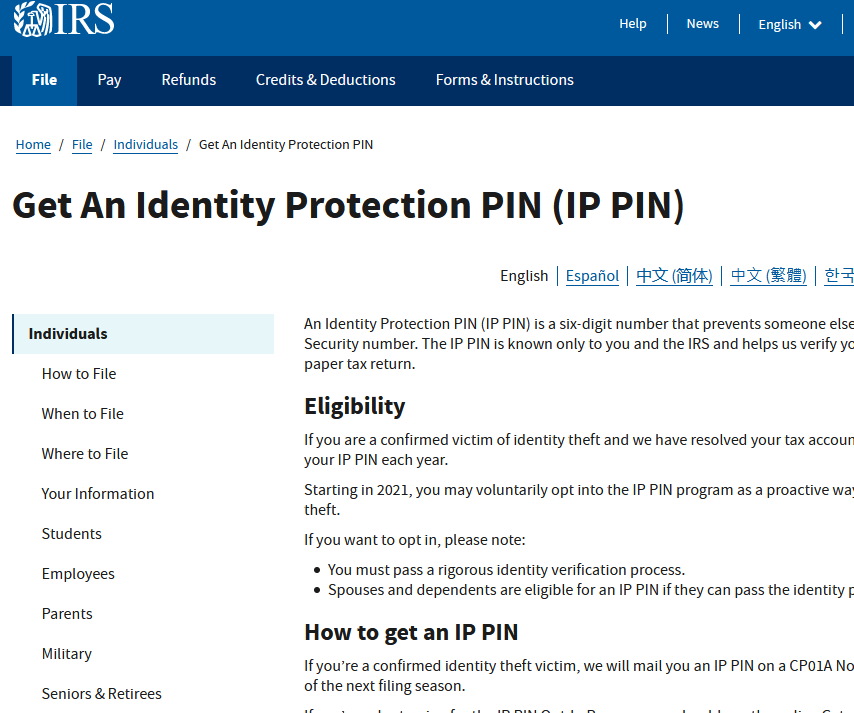
- Identity Protection PIN (IP PIN): This is a six-digit number issued to eligible taxpayers to help prevent the use of their Social Security number (SSN) or Individual Taxpayer Identification Number (ITIN) on fraudulent federal income tax returns. It’s known to only the taxpayer and the IRS and must be entered correctly on electronic and paper tax returns to avoid rejection.
- Preparer Tax Identification Number (PTIN): This is a mandatory identification number for all paid tax preparers who prepare or assist in preparing federal tax returns or claims for refund. It ensures accountability and traceability for tax professionals.
- E-file PIN (Self-Selected PIN): Historically, this was a five-digit PIN that taxpayers could create themselves or use their prior-year Adjusted Gross Income (AGI) as an E-file PIN to electronically sign their tax return. While its use has diminished with the rise of secure digital authentication methods, it still exists for certain limited scenarios, particularly for those using tax software or services that rely on this method for authentication.
Each of these PINs serves a unique purpose and has specific acquisition methods, which we will explore in detail.
The Identity Protection PIN (IP PIN): Your Shield Against Tax Fraud
The Identity Protection PIN (IP PIN) is arguably the most critical PIN for individual taxpayers concerned about identity theft. It acts as a unique identifier that only you and the IRS know, effectively locking your tax account from fraudsters attempting to file a return in your name. Understanding its eligibility, acquisition, and usage is crucial for proactive tax security.
Who is Eligible for an IP PIN?
Eligibility for an IP PIN primarily falls into two categories:
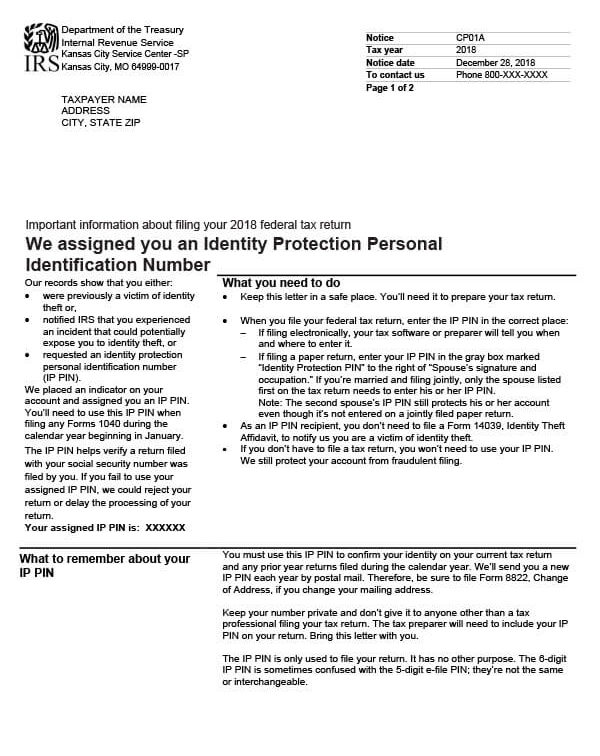
- Victims of Identity Theft: If you’ve been a victim of tax-related identity theft and the IRS has sent you a CP01A Notice with an IP PIN, you are automatically in the program.
- Voluntary Opt-In: Anyone with an SSN or ITIN who can verify their identity can request an IP PIN through the IRS’s online tool. This proactive measure is highly recommended, even if you haven’t been a victim of identity theft, as it provides an excellent layer of protection. It’s important to note that once you opt-in, you will receive an IP PIN every year, and it must be used to file your tax return.
How to Obtain an IP PIN
The IRS offers several convenient ways to obtain an IP PIN, catering to different preferences and situations. The most popular and recommended method is online, but mail and in-person options are also available.
Getting an IP PIN Online (IRS.gov/IPPIN)
The quickest and most efficient way to get an IP PIN is through the IRS’s online IP PIN retrieval tool. This tool is available 24/7.
- Visit IRS.gov/IPPIN: Navigate to the official IRS website and search for “Get an IP PIN.”
- Access the Online Account: You will need an existing IRS online account or create one. This process involves a rigorous identity verification step, often using services like ID.me, which requires a photo ID, a selfie, and possibly other documentation. This stringent verification is designed to ensure that only you can access your tax information.
- Retrieve Your IP PIN: Once your identity is verified and you are logged into your IRS online account, you can view your current IP PIN. It will be immediately displayed on the screen. The IP PIN is valid for the current tax year, and a new one is generated annually.
Requesting an IP PIN by Mail (Form 15227)
If you are unable to verify your identity online or prefer not to use online services, you can request an IP PIN by mail.
- Complete Form 15227, Application for an Identity Protection Personal Identification Number (IP PIN): This form can be downloaded from the IRS website.
- Mail the Form: Send the completed form to the IRS address specified in the instructions for Form 15227.
- Wait for Delivery: The IRS will mail you an IP PIN within 4 to 6 weeks. This method is slower and should be initiated well in advance of tax filing deadlines. Note that not everyone can use Form 15227. It’s typically for those who are unable to use the online tool, and the IRS might require additional identity verification steps after receiving the form.
Visiting a Taxpayer Assistance Center (TAC)
For those who cannot use the online tool and require immediate assistance or personalized help, visiting a Taxpayer Assistance Center (TAC) is an option.
- Schedule an Appointment: You must schedule an appointment in advance. Walk-ins are generally not accepted for IP PIN assistance.
- Bring Required Documents: Bring a valid government-issued photo identification and other documentation that proves your identity.
- Receive Your IP PIN: An IRS representative can help you verify your identity and issue an IP PIN.
When and How to Use Your IP PIN
Once you have your IP PIN, it’s crucial to use it correctly:
- Annual Requirement: Your IP PIN changes every year. You will receive a new IP PIN via mail (CP01A Notice) or can retrieve it online at the beginning of each tax season.
- Mandatory Inclusion: The IP PIN must be entered correctly on your federal tax return (both electronic and paper filings). If you e-file, your software will prompt you for it. If you file a paper return, write it in the designated box.
- Consequences of Omission: Failing to enter your IP PIN or entering an incorrect one will result in the rejection of your e-filed return or significant delays in processing a paper return.
Professional Tax Preparer Identification Number (PTIN): For Paid Preparers
For individuals who prepare federal tax returns for compensation, the Preparer Tax Identification Number (PTIN) is not just a useful tool but a mandatory requirement. It ensures that every paid tax preparer can be identified and held accountable, fostering transparency and trust within the tax preparation industry.
Who Needs a PTIN?
Any individual who prepares or assists in preparing all or substantially all of a federal tax return or claim for refund for compensation must have a PTIN. This requirement applies to various professionals, including:
- Enrolled Agents
- CPAs (Certified Public Accountants)
- Attorneys
- Non-credentialed tax preparers
The PTIN acts as a unique identifier for the preparer, separate from their SSN, which protects their personal information while providing the IRS with a record of their professional activity.
Applying for and Renewing Your PTIN
Obtaining and maintaining a PTIN is a straightforward process, primarily managed online through the IRS’s dedicated portal.
- Online Application (Recommended):
- Create an Account: Go to the IRS’s PTIN System website (www.irs.gov/ptin). If you don’t have an account, you’ll need to create one, which involves providing personal information such as your SSN, name, address, and answering security questions.
- Complete the Application: Fill out the online PTIN application. This will require information about your professional credentials (e.g., CPA license, Enrolled Agent status) if applicable.
- Pay the Fee: There is a non-refundable fee associated with obtaining or renewing a PTIN, which must be paid during the online application process.
- Receive Your PTIN: Upon successful completion and payment, your PTIN will be issued immediately.
- Paper Application (Form W-12): If you cannot apply online, you can submit Form W-12, IRS Paid Preparer Tax Identification Number (PTIN) Application and Renewal. This method is significantly slower, and you will need to mail the form and payment.
- Annual Renewal: A PTIN is valid for one calendar year. All PTINs expire on December 31st each year, regardless of when they were obtained. Paid preparers must renew their PTIN annually between October and December for the upcoming tax season. The renewal process is similar to the initial application, primarily conducted online, and also requires payment of the renewal fee.
The Importance of a PTIN
The PTIN system is fundamental to maintaining professional standards and compliance in the tax preparation industry. It enables the IRS to:
- Track Preparer Activities: Monitor the filing practices of paid preparers.
- Ensure Accountability: Hold preparers responsible for the accuracy and legality of the returns they prepare.
- Combat Fraud: Identify and investigate preparers involved in abusive tax schemes.
For tax preparers, having a PTIN is not just a legal requirement but a mark of their professional standing and commitment to ethical practice.
E-file PIN: A Legacy Option for Certain Filers
The E-file PIN, or self-selected PIN, represents an older method of authenticating electronic tax returns. While its prominence has waned in favor of more robust security measures like the IP PIN and advanced digital signatures, it still plays a role for specific taxpayers, particularly those who file electronically without an IP PIN and use certain tax software.
What is an E-file PIN?
An E-file PIN is a five-digit number that individual taxpayers can create themselves to sign their electronic federal tax return. Alternatively, taxpayers can use their prior-year Adjusted Gross Income (AGI) as an E-file PIN. Its purpose is to provide a digital signature, signifying that the taxpayer has authorized the electronic submission of their return. It’s important to differentiate this from the IP PIN, which is a security measure against identity theft, whereas the E-file PIN is primarily an authentication method for electronic filing.
When and How to Use an E-file PIN
The use of an E-file PIN is most common for:
- Taxpayers without an IP PIN: If you are not enrolled in the IP PIN program, tax software or a tax professional may ask you to use a self-selected PIN to authenticate your e-filed return.
- Using Prior-Year AGI: Often, tax software will prompt you to enter your prior-year AGI. If you enter it correctly, this AGI serves as your electronic signature or E-file PIN for the current year’s return. This method helps verify your identity by confirming knowledge of a past tax detail.
- Creating a Self-Selected PIN: If you do not have your prior-year AGI or it’s your first time filing, some tax software allows you to create a five-digit personal identification number that will serve as your E-file PIN. You should keep this PIN in a secure place.
The Shift Away from E-file PINs
The IRS has increasingly moved towards more secure and robust identity verification methods. The rise of the Identity Protection PIN (IP PIN) and the emphasis on using a taxpayer’s prior-year AGI as the primary authentication for e-filed returns reflect this shift. While the E-file PIN still exists, particularly for certain software workflows, it’s less emphasized as a standalone security measure compared to the annual IP PIN system. Taxpayers with an IP PIN must use their IP PIN; the E-file PIN does not replace it. If you have an IP PIN, you do not need an E-file PIN. The IP PIN is your electronic signature/authentication for that year.
Security, Best Practices, and Troubleshooting Common Issues
Obtaining an IRS PIN is only half the battle; effectively managing and protecting it is equally important. Security best practices, knowing how to retrieve a lost PIN, and understanding common pitfalls can prevent significant headaches and ensure a smooth tax filing experience.
Protecting Your IRS PINs
The security of your IRS PINs is paramount to safeguarding your tax identity. Treat them with the same level of confidentiality as your Social Security number or bank account details.
- Secure Storage: Never share your IP PIN or E-file PIN with anyone other than your trusted tax preparer. Store them in a secure, private location, such as a locked safe or a password-protected digital document. Avoid writing them on physical tax documents that could be easily lost or stolen.
- Beware of Scams: The IRS will never call, email, or text you asking for your PIN. Any such communication is a scam. Report suspicious contact immediately.
- Professional Responsibility: For PTIN holders, protecting your PTIN means preventing its unauthorized use. Do not share your PTIN with non-preparers or allow others to use it for their compensated preparation activities.
What to Do if You Lose Your PIN
Losing an IRS PIN can be stressful, especially as tax deadlines loom. However, retrieval methods are in place for each type:
- Lost IP PIN: The quickest way to retrieve a lost IP PIN is through the IRS online IP PIN retrieval tool (IRS.gov/IPPIN). If you cannot access the online tool, you can call the IRS directly or visit a TAC. Remember, a new IP PIN is issued annually, so you’ll need to retrieve the current year’s PIN.
- Lost PTIN: If you forget your PTIN, you can easily retrieve it by logging into your account on the IRS PTIN System website. The system will display your active PTIN.
- Lost E-file PIN (Self-Selected): If you used your prior-year AGI as your E-file PIN and can’t recall it, you can find your AGI on a copy of your previous year’s tax return. If you created a custom 5-digit PIN and forgot it, you may be able to create a new one within your tax software, or if unable, the prior-year AGI method is usually the fallback.
Common Pitfalls and How to Avoid Them
Navigating the world of IRS PINs can present a few challenges:
- Incorrect IP PIN Entry: One of the most common reasons for rejected e-filed returns is entering an incorrect IP PIN. Double-check the number carefully. If you have an IP PIN, you must use it. Do not accidentally use an E-file PIN if you have an IP PIN.
- Missed PTIN Renewal: Paid preparers often forget to renew their PTIN by the December 31st deadline, leading to compliance issues. Set reminders to renew your PTIN annually.
- Identity Verification Hurdles for IP PIN: The online identity verification process for an IRS online account (necessary to retrieve an IP PIN) can be stringent. Ensure you have clear photos of your ID and are in a well-lit area for the selfie verification if using ID.me. If you repeatedly fail, consider the mail or in-person options.
- Using Outdated Information: Always refer to the most current IRS guidance on PINs, as procedures and requirements can change annually.
Resources and Further Assistance
The IRS provides a wealth of resources to assist taxpayers and preparers:
- IRS Website (IRS.gov): The official source for all forms, instructions, and tools related to PINs. Search for “IP PIN,” “PTIN,” or “E-file PIN” for specific information.
- Taxpayer Assistance Centers (TACs): For in-person help with IP PINs or other tax matters, make an appointment at your local TAC.
- IRS Phone Lines: General tax questions and assistance with IP PINs can be addressed by calling the appropriate IRS toll-free number.
- Tax Professionals: A qualified tax professional can offer expert advice and help you navigate the complexities of IRS PINs and tax filing.
In conclusion, understanding and correctly utilizing the various IRS PIN numbers are indispensable aspects of modern financial management and tax compliance. By proactively obtaining the necessary PINs and adhering to security best practices, individuals and professionals alike can significantly enhance their financial security, mitigate the risks of identity theft and fraud, and ensure a seamless interaction with the Internal Revenue Service. Staying informed and prepared is your strongest asset in the intricate world of taxation.
aViewFromTheCave is a participant in the Amazon Services LLC Associates Program, an affiliate advertising program designed to provide a means for sites to earn advertising fees by advertising and linking to Amazon.com. Amazon, the Amazon logo, AmazonSupply, and the AmazonSupply logo are trademarks of Amazon.com, Inc. or its affiliates. As an Amazon Associate we earn affiliate commissions from qualifying purchases.