
Navigating the complexities of the Internal Revenue Service (IRS) can often feel daunting, especially when it comes to understanding your financial standing with them. Whether you suspect you owe additional taxes, are expecting a refund, or are managing an existing payment plan, knowing how to accurately check your IRS balance is a critical skill for responsible financial management. This comprehensive guide will walk you through the official channels, essential steps, and crucial considerations for accessing your IRS account information, ensuring you remain informed and in control of your financial obligations and entitlements.
Understanding Your IRS Balance and Why It Matters
Before diving into the “how-to,” it’s vital to grasp what an “IRS balance” truly represents and why keeping tabs on it is an indispensable part of your financial health. Your IRS balance isn’t a static figure; it’s a dynamic reflection of your financial relationship with the U.S. government’s tax collection agency.

What Constitutes an IRS Balance?
Your IRS balance can encompass several different financial scenarios, each with its own implications:
- Taxes Owed: This is the most common understanding. If, after filing your tax return, you owe money to the IRS, or if an audit or adjustment determines you underpaid, this amount becomes part of your outstanding balance. This can include income tax, self-employment tax, penalties, and accrued interest.
- Penalties and Interest: The IRS imposes penalties for various reasons, such as failure to file on time, failure to pay on time, or underpayment of estimated taxes. Interest can also accrue on unpaid balances, increasing your total debt over time. Understanding these specific components is crucial for resolving your obligations.
- Refunds Due: On the other side of the coin, your IRS balance might reflect a refund that is due to you. This happens when you’ve paid more in taxes through withholding or estimated payments than your actual tax liability. Knowing your refund status helps you plan your personal finances.
- Payment Plan Status: If you’ve established an installment agreement or offer in compromise with the IRS, your balance check will provide updates on your remaining principal, interest, and payment schedule, confirming your compliance.
Common Scenarios Requiring a Balance Check
People check their IRS balance for a multitude of reasons, often driven by specific life events or financial needs:
- Unpaid Taxes: If you’ve received a notice from the IRS indicating an outstanding balance, checking your account is the first step to verify the amount and understand the details.
- Payment Plan Management: For those on an installment agreement, regular checks confirm your payments are being applied correctly and track your progress toward resolving your debt.
- Amended Returns: After filing an amended tax return (Form 1040-X), you might need to check your balance to see if it results in an additional amount owed or a new refund.
- Waiting for a Refund: During tax season, millions of taxpayers eagerly await their refunds. Checking your balance and refund status tools provides estimated delivery dates and any potential delays.
- Pre-Tax Season Planning: Proactive taxpayers might check their past balances or current withholding estimates to avoid surprises come tax time.
- Identity Theft Concerns: In cases of suspected identity theft, checking your IRS account for unauthorized activity is a critical security measure.
Official Methods for Accessing Your IRS Information
The IRS provides several secure and official channels for taxpayers to check their balances and access their tax information. Relying exclusively on these methods is paramount for safeguarding your financial data and ensuring accuracy.
The IRS Online Account: Your Digital Hub
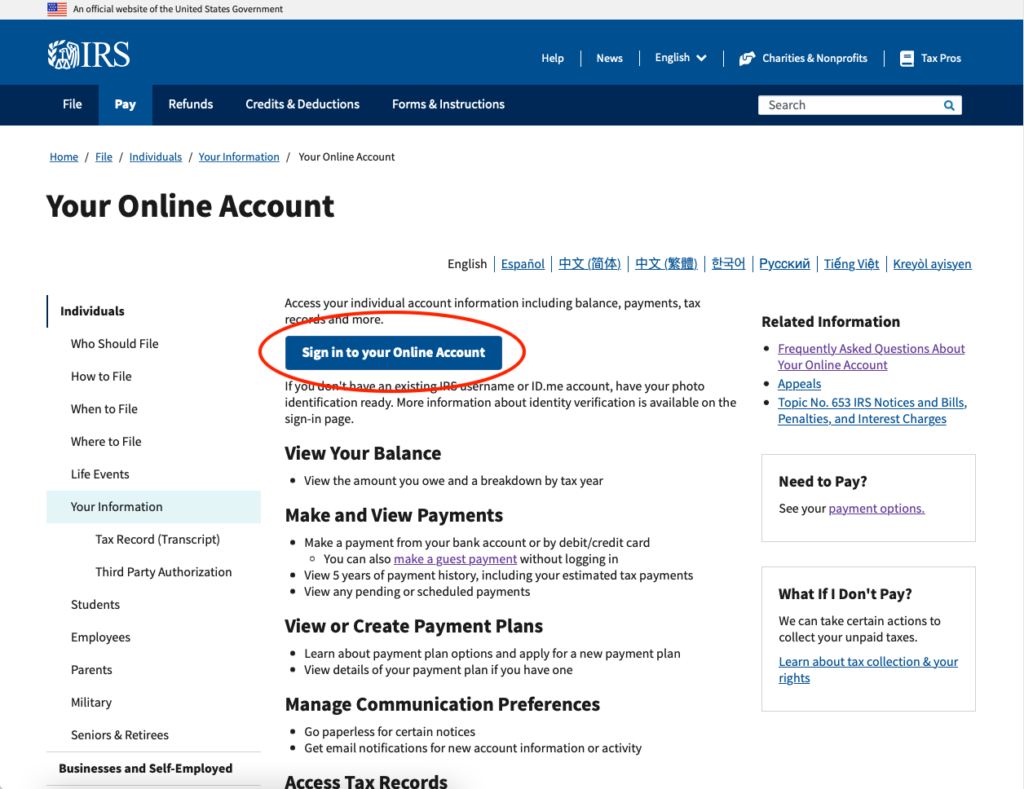
The most convenient and comprehensive method for checking your IRS balance is through your personal IRS Online Account. This digital portal offers a wealth of information at your fingertips, accessible 24/7.
- Setup and Access: To create an account, you’ll need to go through a rigorous identity verification process, which typically involves providing personal details (Social Security Number, date of birth, filing status), financial account numbers (like a credit card or loan account), and a phone number capable of receiving a verification code. Once verified, you can log in securely.
- Features and Information Available: Through your online account, you can:
- View your current tax balance due, including updates for the current tax year.
- See your payment history and any scheduled or pending payments.
- Access tax records, including various tax transcripts (account transcript, wage and income transcript).
- View key information from your most recently filed tax return.
- Set up payment plans or make payments directly.
- Manage communication preferences.
- Required Information: Besides your personal identifiers, be prepared to answer security questions based on your credit history or previous financial accounts during the initial setup to confirm your identity.
Direct Communication: Phone and Mail
While the online account is often preferred for its speed and accessibility, the IRS still offers traditional methods for those who prefer speaking to a representative or receiving information by mail.
- Phone Inquiries: You can call the IRS directly to inquire about your balance. The main phone number for individuals is 1-800-829-1040. For businesses, it’s 1-800-829-4933.
- What to Prepare: Before calling, gather essential information such as your Social Security Number (SSN) or Individual Taxpayer Identification Number (ITIN), your date of birth, your current address, and a copy of a recently filed tax return. This information helps the representative verify your identity efficiently.
- Timing: Be aware that wait times can be significant, especially during peak tax season. The IRS recommends calling early in the morning or late in the afternoon.
- Mail Requests: You can also request a copy of your tax account transcript or balance information by mail using Form 4506-T, Request for Transcript of Tax Return. This method is slower but can be useful if you’re unable to access online services or prefer a paper record.
- Addresses for Mail Requests: The mailing address for Form 4506-T depends on your location. Detailed instructions are provided on the form itself.
Leveraging Tax Professionals and Software
For more complex situations or for those who prefer assistance, tax professionals and certain tax software can also help you ascertain your IRS balance.
- When to Use a Professional: If you have a complicated tax history, multiple outstanding balances, or need to dispute an amount, a Certified Public Accountant (CPA) or Enrolled Agent (EA) can act on your behalf. With your authorization (via Form 2848, Power of Attorney and Declaration of Representative), they can contact the IRS, access your records, and discuss your account details.
- Tax Preparation Software Integration: Many reputable tax preparation software programs allow you to import your previous year’s tax data, and some can even link to your IRS account (with your permission) to pull specific data points, though they generally don’t show real-time balance information directly from the IRS. They are primarily for preparing returns, not managing existing balances.
Navigating the IRS Online Account Step-by-Step
Since the IRS Online Account is the most efficient method, let’s walk through the process in more detail to ensure you can access your information smoothly.
Creating or Logging into Your Account
- Visit the Official IRS Website: Always start at IRS.gov. Look for the “View Your Account Information” or “Log In to Your Online Account” link.
- Select Your Login Method: The IRS uses ID.me for secure identity verification. If you already have an ID.me account from another government service (like the Social Security Administration), you can use it. Otherwise, you’ll need to create one.
- Complete Identity Verification: This is the most critical step. ID.me requires multi-factor authentication and often involves:
- Providing your SSN, date of birth, and phone number.
- Taking a photo of your government-issued ID (driver’s license, state ID, passport).
- Taking a selfie to match your ID photo.
- Potentially entering credit card or loan account information for additional verification.
- Secure Your Account: Once verified, you’ll set up a strong password and possibly another form of multi-factor authentication for future logins.

Locating Your Balance Information
Once logged into your IRS Online Account:
- Dashboard Overview: Your dashboard will typically provide a summary of your most recent tax year’s information and any outstanding balances.
- “Balance Due” Section: Look for a prominent section labeled “Balance Due” or similar. This will display your total outstanding amount across all tax years, including penalties and interest.
- “Payment History” and “Payment Options”: You can drill down into your payment history to see how previous payments were applied and explore options for making current or future payments.
- Understanding Your Statements: The online account allows you to view digital copies of certain notices or statements that explain the components of your balance in detail. Review these carefully.
Understanding Your Tax Transcripts
Beyond a simple balance, tax transcripts offer a detailed look at your tax history and can be invaluable for various purposes:
- What They Are: A tax transcript is a summary of your tax return information or account information, not a copy of your actual tax return. They are often required for mortgage applications, student loans, and other financial processes.
- How to Request: You can request various types of transcripts directly through your IRS Online Account or by mail using Form 4506-T or Form 4506T-EZ.
- Types of Transcripts:
- Account Transcript: Shows most line items from your tax return as it was originally filed, along with any adjustments made by you or the IRS, and your payment history. This is often the best for checking your overall account balance.
- Record of Account Transcript: Combines the information from the line items of your tax return and your account transcript.
- Wage and Income Transcript: Displays data from information returns sent to the IRS, such as W-2s, 1099s, and 1098s.
- Return Transcript: Shows most line items from your original tax return as you filed it.
What to Do After Checking Your Balance
Once you have an accurate picture of your IRS balance, the next step depends on what you’ve discovered. Proactive action is always the best approach.
Addressing Outstanding Tax Debt
If your balance check reveals an amount owed, don’t panic. The IRS offers several solutions:
- Payment Options: You can make payments online directly from your bank account (Direct Pay), by debit/credit card through third-party processors, by electronic funds withdrawal when e-filing, or by mail with a check or money order.
- Short-Term Payment Plan: If you can pay off your tax debt within 180 days, you might qualify for a short-term payment plan, though interest and penalties still apply.
- Installment Agreement: If you need more time, an installment agreement allows you to make monthly payments for up to 72 months. You can typically set this up online if your combined tax, penalties, and interest are below a certain threshold.
- Offer in Compromise (OIC): For those facing significant financial hardship, an OIC allows certain taxpayers to resolve their tax liability with the IRS for a lower amount than what they originally owe. This is a complex process and generally requires professional assistance.
Confirming Your Refund Status
If you’re due a refund, you can track its status:
- “Where’s My Refund?” Tool: The IRS offers a dedicated online tool, “Where’s My Refund?”, accessible via IRS.gov or the IRS2Go mobile app. You’ll need your SSN/ITIN, filing status, and the exact refund amount shown on your return.
- What Delays Mean: While most refunds are issued within 21 days of filing electronically, some may take longer. Reasons for delays can include errors on the return, requiring manual review, identity theft concerns, or if you claimed certain credits (like the Earned Income Tax Credit or Additional Child Tax Credit).
Disputing Errors or Seeking Clarification
Sometimes, the balance information you receive might seem incorrect, or you may simply need more clarity.
- Contacting the IRS: If you believe there’s an error, gather all supporting documentation and contact the IRS directly via phone. Be prepared to explain your situation clearly.
- Submitting Documentation: The IRS may request additional documentation to support your claim. Respond promptly and keep copies of everything you send.
- Seeking Professional Help: For complex disputes or if you’re struggling to get answers, a tax professional (CPA, EA, or tax attorney) can represent you and advocate on your behalf. The Taxpayer Advocate Service (TAS) is also an independent organization within the IRS that helps taxpayers resolve problems with the IRS that they haven’t been able to resolve through normal channels.
Essential Considerations for Security and Accuracy
When dealing with sensitive financial information like your IRS balance, security and accuracy are paramount. Staying vigilant can protect you from fraud and ensure your records are correct.
Protecting Your Personal and Financial Information
The IRS will never initiate contact with you via email, text message, or social media to request personal or financial information.
- Phishing Scams: Be extremely wary of unsolicited communications claiming to be from the IRS. These are almost always phishing attempts designed to steal your data.
- Secure Connections: Always ensure you are on a secure website (look for “https://” in the URL and a padlock icon) when accessing your IRS online account or making payments.
- Strong Passwords and Multi-Factor Authentication: Use unique, complex passwords for your IRS online account and enable multi-factor authentication (like a code sent to your phone) for an added layer of security.
- Public Wi-Fi: Avoid accessing sensitive financial accounts, including your IRS account, when connected to unsecured public Wi-Fi networks.
Relying on Official IRS Channels Only
There are many unofficial websites and services that claim to help with IRS matters. Stick to the official sources to avoid misinformation and potential scams.
- IRS.gov is Your Go-To: Always verify information by visiting the official IRS website.
- Official Communications: If you receive a letter from the IRS, cross-reference the information with what you see in your online account. If you’re unsure, call the official IRS phone number (not one provided in a suspicious letter).
The Importance of Keeping Records
Maintaining meticulous records of your tax returns, payments, and all correspondence with the IRS is crucial.
- Proof of Payments: Keep records of all tax payments, including dates, amounts, and confirmation numbers.
- Communication Log: Document all phone calls with the IRS, including the date, time, representative’s name (if provided), and a summary of the conversation.
- Copies of Notices: Retain copies of all notices or letters received from the IRS. These records serve as your primary defense and reference if any discrepancies or disputes arise in the future.
Checking your IRS balance is a foundational aspect of sound financial management. By utilizing the official online resources, understanding your options, and taking appropriate action, you can maintain clarity and control over your tax obligations and entitlements. Regular vigilance and adherence to security best practices will ensure your financial relationship with the IRS remains transparent and secure.
aViewFromTheCave is a participant in the Amazon Services LLC Associates Program, an affiliate advertising program designed to provide a means for sites to earn advertising fees by advertising and linking to Amazon.com. Amazon, the Amazon logo, AmazonSupply, and the AmazonSupply logo are trademarks of Amazon.com, Inc. or its affiliates. As an Amazon Associate we earn affiliate commissions from qualifying purchases.