
In an increasingly digitized world, managing personal and business finances often extends beyond traditional banking. Online payment platforms have become indispensable tools, bridging the gap between physical currency and the virtual economy. Among these, PayPal stands out as a pioneering and widely adopted service, enabling millions worldwide to send, receive, and manage money with unprecedented ease. Setting up a PayPal account is a fundamental step for anyone looking to engage in online commerce, streamline personal finances, accept payments for online work, or manage business transactions efficiently. This guide will walk you through the process, emphasizing PayPal’s role as a powerful financial tool and how its proper setup can unlock significant financial advantages.

The Indispensable Role of PayPal in Modern Finance
PayPal is more than just a payment processor; it’s a comprehensive financial ecosystem that integrates seamlessly into the digital lifestyle. For individuals, it simplifies online shopping, bill payments, and peer-to-peer transfers. For businesses and freelancers, it offers robust solutions for accepting payments, sending invoices, and managing international transactions. Understanding its core value proposition is the first step toward appreciating why setting up an account is a strategic financial move.
Understanding PayPal’s Value Proposition
At its core, PayPal provides a secure and convenient alternative to traditional payment methods. Instead of sharing sensitive credit card or bank account details with every online merchant, users can route payments through their PayPal account, which acts as a secure intermediary. This layer of abstraction significantly enhances digital security, reducing exposure to potential fraud. Beyond security, its convenience is unparalleled. With just an email address and password, users can complete transactions quickly, often with buyer protection policies that safeguard purchases.
For those involved in the gig economy or running small online businesses, PayPal simplifies the complexities of receiving payments from diverse sources, often across borders. It consolidates funds into a single digital wallet, which can then be easily transferred to a linked bank account or used for further online spending. This centralization of funds management offers a clear advantage in tracking income and expenditures, a crucial aspect of personal and business financial health. Moreover, PayPal’s global reach means that geographical barriers to financial transactions are significantly reduced, opening up new avenues for earning and spending internationally.
Who Needs a PayPal Account?
The utility of a PayPal account spans a wide spectrum of users, making it a near-essential financial tool for various demographics:
- Online Shoppers: For frequent online purchases, PayPal offers a quick checkout process and often includes buyer protection for eligible transactions, adding peace of mind.
- Freelancers and Gig Workers: Individuals earning income through platforms like Upwork, Fiverr, or directly from international clients find PayPal invaluable for receiving payments efficiently and securely.
- Small Business Owners & E-commerce Merchants: From sole proprietors to growing online stores, PayPal provides a robust payment gateway to accept customer payments, issue invoices, and manage sales. Its integration with various e-commerce platforms makes it a flexible solution.
- Individuals Sending or Receiving Money: Whether splitting bills with friends, sending money to family abroad, or receiving funds from others, PayPal offers a swift and low-cost solution for peer-to-peer transfers.
- Travelers: For those traveling internationally, PayPal can offer a convenient way to make payments or access funds without relying solely on physical cards or cash, especially when linked to a debit card.
In essence, anyone who regularly engages in online financial transactions, whether for personal use or income generation, stands to benefit significantly from a PayPal account.
Navigating the Account Setup Process: A Step-by-Step Guide
Setting up a PayPal account is a straightforward process designed to be intuitive and user-friendly. However, making informed choices during setup can optimize your experience and align the account with your financial objectives.
Choosing Your Account Type: Personal vs. Business
The first crucial decision involves selecting the appropriate account type:
- Personal Account: Ideal for individuals who primarily use PayPal for online shopping, sending and receiving money from friends and family, and occasional payments for services. It’s suitable for personal financial management and low-volume, non-commercial transactions.
- Business Account: Designed for merchants, freelancers, and businesses of all sizes. It allows you to accept payments from customers via credit cards, debit cards, and PayPal itself. Business accounts offer features like invoicing, multiple user access, and branded checkout pages, alongside tools for sales tracking and financial reporting. If you plan to accept payments for goods or services, even as a sole proprietor, a Business account is generally recommended as it provides specific financial tools and ensures compliance with PayPal’s user agreement regarding commercial transactions.
While you can often upgrade a Personal account to a Business account later, starting with the correct type prevents potential future hassles and ensures you have the right financial tools from the outset.
The Initial Registration: Essential Information
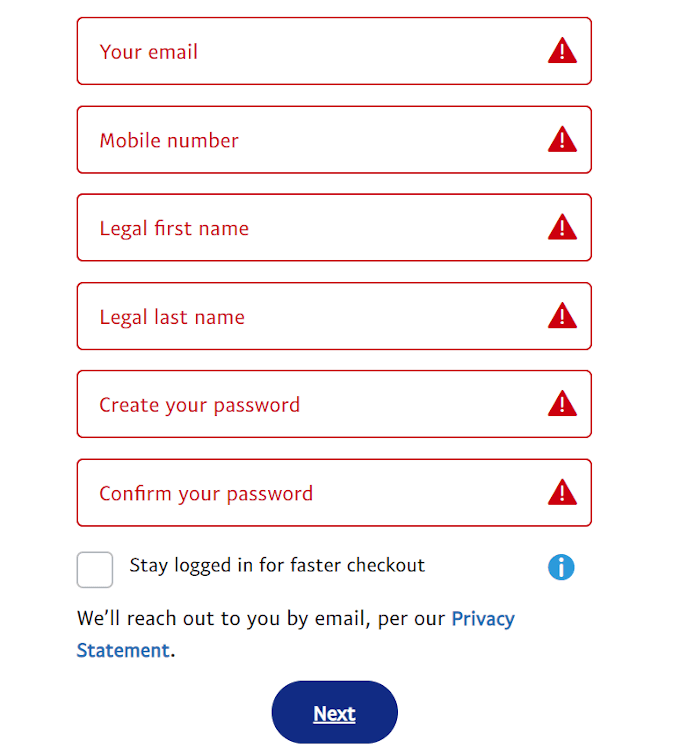
Once you’ve selected your account type, the registration process begins. You’ll typically need to provide:
- Email Address: This will be your primary identifier and how others will send money to you. Choose an email address you check regularly and ensure it’s secure.
- Mobile Phone Number: For account verification and security purposes, including two-factor authentication.
- Personal Details: Your full legal name, date of birth, and physical address. These are required for identity verification and compliance with financial regulations.
- Create a Password: Choose a strong, unique password that combines uppercase and lowercase letters, numbers, and symbols. Avoid using easily guessable information.
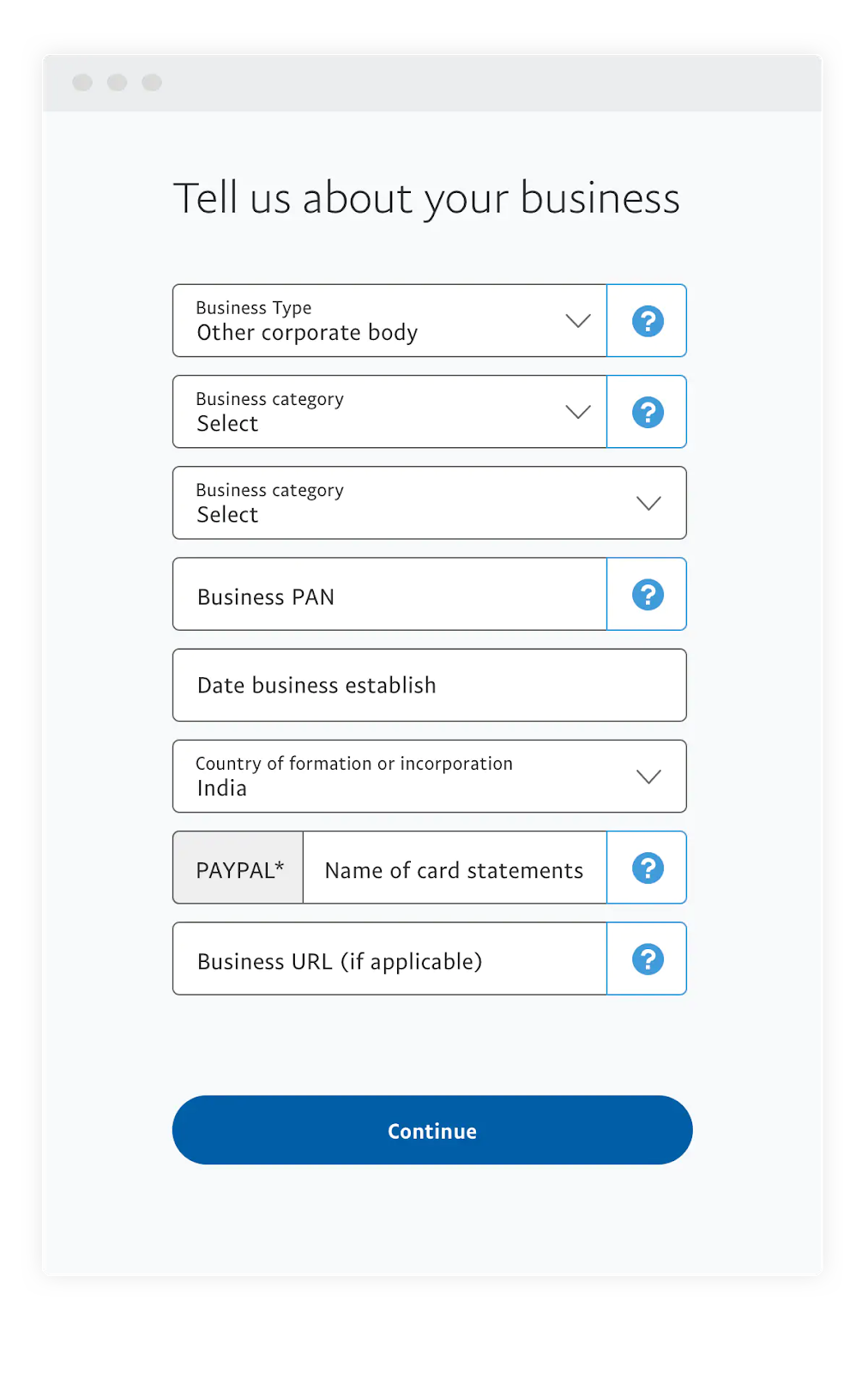
For a Business account, you will also need to provide your business name, legal entity type (e.g., sole proprietorship, corporation), business address, and potentially tax identification numbers (EIN/SSN), depending on your region and business structure. Accuracy in providing this information is critical for smooth account operation and compliance.
Linking Your Financial Instruments: Bank Accounts and Cards
To fully utilize PayPal as a financial tool, you’ll need to link it to your existing bank accounts and/or credit/debit cards. This enables you to:
- Fund Payments: Draw money directly from your bank account or card for purchases if your PayPal balance is insufficient.
- Receive Funds: Transfer money from your PayPal balance to your linked bank account.
- Verify Your Account: Linking a bank account or card is a key step in verifying your identity and removing initial sending/receiving limits.
Linking a Bank Account: PayPal typically uses a micro-deposit verification method. They will send two small, random deposits (e.g., $0.05 and $0.13) to your bank account within a few business days. You’ll then log back into PayPal and enter these exact amounts to confirm your bank account ownership.
Linking a Debit or Credit Card: You’ll enter your card number, expiration date, and security code (CVV). PayPal may make a small temporary charge (e.g., $1.00-$1.95) to your card to verify it, which is then refunded. You might need to check your card statement or contact your bank to get the specific code associated with this charge to complete the verification.
Linking these financial instruments transforms your PayPal account into a versatile financial hub, capable of seamless integration with your broader financial landscape.
Securing Your Digital Wallet and Verifying Your Account
In the realm of digital finance, security is paramount. PayPal implements robust security measures, but users also play a vital role in protecting their accounts and the funds within them. Account verification further solidifies your identity and expands your account’s capabilities.
Enhancing Security: Two-Factor Authentication and Strong Passwords
Even with PayPal’s sophisticated fraud detection systems, the first line of defense is your personal account security:
- Strong, Unique Passwords: As mentioned earlier, never reuse passwords across different platforms. Use a password manager to generate and store complex passwords.
- Two-Factor Authentication (2FA): This is perhaps the most critical security enhancement you can enable. With 2FA, even if someone obtains your password, they cannot access your account without the second factor – typically a code sent to your registered mobile phone. PayPal offers various 2FA options, including SMS codes or authenticator apps. Enabling this significantly mitigates the risk of unauthorized access to your financial information.
- Regular Monitoring: Periodically review your PayPal activity log for any unfamiliar transactions. Enable email notifications for all activity to stay informed.
By proactively managing your password and enabling 2FA, you significantly bolster the security of your digital financial gateway.
The Importance of Account Verification
Verifying your PayPal account is not just a formality; it’s a crucial step that enhances the legitimacy and functionality of your financial tool. An unverified account typically has limitations on the amount of money you can send, receive, or withdraw. Verification generally involves:
- Confirming Your Email Address: Clicking a link in an email sent to your registered address.
- Linking and Confirming a Bank Account: As detailed above, using micro-deposits.
- Linking and Confirming a Credit/Debit Card: As detailed above, using a small temporary charge code.
- Providing Identity Documents (if requested): In some cases, especially for higher transaction volumes or for business accounts, PayPal may require you to upload government-issued ID (e.g., driver’s license, passport) or proof of address. This is part of Know Your Customer (KYC) regulations and anti-money laundering (AML) compliance, vital for maintaining the integrity of the financial system.
A fully verified account demonstrates your identity, removes sending and receiving limits, and provides full access to all of PayPal’s features, ensuring you can leverage the platform without restrictions for your personal and business financial needs.
Maximizing Your PayPal Account for Financial Advantage
Once your PayPal account is set up and verified, its full potential as a financial tool becomes accessible. Understanding how to leverage its various features can significantly benefit your financial management.
Leveraging PayPal for Online Shopping and Payments
For consumers, PayPal transforms the online shopping experience:
- Streamlined Checkout: No need to re-enter card details on every website. A few clicks and your purchase is complete, often with an added layer of security.
- Buyer Protection: For eligible purchases, PayPal’s Buyer Protection program can offer recourse if an item doesn’t arrive or is significantly not as described, providing a safety net for your funds.
- Managing Subscriptions: PayPal can manage recurring payments for subscriptions, offering a centralized place to view and control these ongoing expenses.
- Send Money to Friends and Family: Easily transfer funds to others for splitting bills, gifting, or repaying debts, often without fees for personal transactions within the same country when funded by a bank account or PayPal balance.
Using PayPal strategically for online purchases not only saves time but also adds a layer of financial security and oversight to your spending habits.
Facilitating Online Income and Freelance Payments
For those earning income online, PayPal is an indispensable financial conduit:
- Receiving Payments Globally: Freelancers can accept payments from clients located anywhere in the world, often with competitive exchange rates compared to traditional bank transfers.
- Simplified Invoicing: PayPal’s invoicing tools allow you to create and send professional invoices directly from your account, helping you get paid promptly and track outstanding payments.
- Integration with Freelance Platforms: Many popular freelance marketplaces (e.g., Upwork, Fiverr) offer PayPal as a primary payout option, making it easy to withdraw your earnings.
- Tracking Income: All transactions are logged within your PayPal activity, providing a clear record for income tracking, tax purposes, and overall financial analysis of your online earnings.
By utilizing PayPal for your online income, you streamline your payment collection process, enhance your financial record-keeping, and broaden your potential client base.
Managing Business Transactions and Invoicing
For small businesses and e-commerce operators, PayPal offers a comprehensive suite of financial management tools:
- Payment Gateway: Accept credit and debit card payments directly on your website or through PayPal’s secure checkout.
- Point of Sale (POS) Solutions: For brick-and-mortar businesses, PayPal Here offers mobile card readers to process payments in person.
- Mass Payments: For businesses that need to pay multiple individuals (e.g., contractors, affiliates), PayPal’s mass payment feature simplifies bulk payouts.
- Dispute Resolution Tools: Access to tools for managing customer disputes and chargebacks, helping protect your business’s financial integrity.
- Reporting and Analytics: Business accounts typically provide more detailed financial reports, helping you understand sales trends, track expenses, and manage cash flow more effectively.
Leveraging these business-specific features transforms PayPal from a simple payment processor into a valuable financial partner for growth and operational efficiency.
Common Pitfalls and Best Practices for PayPal Users
While PayPal offers significant financial advantages, being aware of common pitfalls and adhering to best practices is crucial for protecting your funds and ensuring a smooth experience.
Protecting Against Scams and Fraud
PayPal is a target for scammers, so vigilance is key:
- Phishing Scams: Be wary of emails or messages purporting to be from PayPal that ask for sensitive information or prompt you to click suspicious links. Always log directly into your PayPal account through your browser to verify any urgent messages. PayPal will never ask for your password via email.
- Fake Payment Notifications: Scammers might send fake payment notifications to trick sellers into shipping goods without actual payment. Always verify payments by logging into your PayPal account directly and checking your transaction history.
- “Payment Pending” Tricks: Be cautious of buyers who claim to have paid but say the payment is “pending” until you ship or send additional funds. Legitimate payments will show up in your PayPal balance.
- Offers for Overpayment: If a buyer sends more than the agreed amount and asks you to refund the difference, it’s often a scam. The original payment may later be reversed, leaving you out of pocket.
Always prioritize direct verification within your PayPal account interface. If something seems too good to be true, it likely is.
Understanding Fees and Transaction Limits
While many PayPal services are free, particularly for personal transactions funded by a bank account or PayPal balance, it’s essential to understand where fees apply:
- Commercial Transactions: When receiving payments for goods or services (Business accounts), PayPal charges a percentage-based fee plus a fixed fee per transaction. These fees vary by region and transaction type.
- International Transactions: Sending or receiving money internationally, or transactions involving currency conversion, typically incur fees. The exchange rates used by PayPal also include a spread.
- Instant Transfers: While standard transfers to a linked bank account are usually free, opting for instant transfers (where available) often incurs a small fee.
- Credit Card Funding: When sending personal payments funded by a credit card, the sender may be charged a fee.
Regularly review PayPal’s fee structure on their official website to avoid surprises and factor these costs into your financial planning, especially if you rely on PayPal for business or international income. Understanding transaction limits, which are typically removed upon full account verification, is also important for uninterrupted financial operations.
By diligently setting up and managing your PayPal account, leveraging its features, and staying informed about best practices and potential risks, you unlock a powerful financial tool that can significantly enhance your personal and business financial capabilities in the digital age.
aViewFromTheCave is a participant in the Amazon Services LLC Associates Program, an affiliate advertising program designed to provide a means for sites to earn advertising fees by advertising and linking to Amazon.com. Amazon, the Amazon logo, AmazonSupply, and the AmazonSupply logo are trademarks of Amazon.com, Inc. or its affiliates. As an Amazon Associate we earn affiliate commissions from qualifying purchases.