
In an increasingly digital world, online platforms have become indispensable for everything from communication to commerce. Among these, Amazon stands as a colossus, a sprawling ecosystem that has redefined how we shop, consume media, and even manage aspects of our smart homes. For newcomers to the digital landscape or those simply looking to finally tap into the vast offerings of the world’s largest online retailer, the first step is often the most fundamental: creating an Amazon account. This guide will walk you through the process, demystifying each stage and equipping you with the knowledge to navigate this powerful platform with confidence. Far more than just a gateway to online shopping, an Amazon account is your key to a suite of digital services, personalized experiences, and a world of convenience. Understanding how to set it up correctly and leverage its features is a critical piece of digital literacy in today’s interconnected environment.

The Gateway to a Digital Ecosystem: Why Create an Amazon Account?
Before diving into the mechanics, it’s worth understanding the immense value proposition an Amazon account offers. It’s not merely a login for buying products; it’s an integrated identity that unlocks a broad spectrum of digital services and personalized interactions designed to streamline various aspects of your life. The convenience and scope of services bundled under a single Amazon account are unparalleled, making it a pivotal component for many modern tech users.
Seamless Shopping and Product Discovery
At its core, an Amazon account facilitates an incredibly efficient shopping experience. With an account, you gain the ability to add items to a persistent cart, create wish lists, track orders, and review past purchases. This personalized history not only makes reordering simple but also feeds into Amazon’s sophisticated recommendation engine, which tailors product suggestions based on your browsing and purchase patterns. This targeted discovery helps users find new products and deals that genuinely match their interests, transforming a potentially overwhelming catalog into a curated shopping journey. Beyond mere transactions, the account structure supports features like one-click ordering and subscription services (Subscribe & Save), further simplifying routine purchases and ensuring you never run out of essentials.
Accessing Exclusive Services: Prime, Kindle, and More
An Amazon account is the essential prerequisite for accessing some of its most popular and value-driven services. Amazon Prime, perhaps the most prominent, offers expedited shipping, streaming video and music, exclusive deals, and cloud storage, among other benefits. Without an account, subscribing to Prime is impossible. Similarly, your Amazon account acts as the central hub for your Kindle library, storing all your purchased e-books and allowing seamless synchronization across multiple devices. It’s also required for services like Amazon Music, Amazon Photos, Audible, and even Alexa-enabled devices, linking your preferences and content to your personal profile. For anyone looking to fully integrate Amazon’s extensive digital offerings into their lifestyle, an account is not just recommended, it’s mandatory.
Personalized Experiences and Order Management
Beyond direct services, an Amazon account personalizes your interaction with the platform. Your shipping addresses, payment methods, and contact information are securely stored, making checkout processes remarkably fast and convenient. More importantly, it provides a centralized dashboard for managing all your orders, returns, and refunds. You can track packages in real-time, initiate returns with a few clicks, and communicate with sellers or Amazon customer service directly through your account. This level of oversight and control over your digital transactions enhances user confidence and significantly improves the post-purchase experience, making Amazon a reliable platform for managing consumer goods.
Engaging with the Amazon Marketplace
Finally, having an Amazon account allows you to fully engage with the marketplace beyond being a mere consumer. You can write product reviews, ask and answer customer questions, and even participate in discussions. For those with entrepreneurial ambitions, an Amazon account is also the foundation for setting up a Seller Central account, allowing you to list and sell your own products to millions of potential customers worldwide. This dual functionality highlights the account’s versatility, serving both the casual shopper and the serious entrepreneur within the same digital ecosystem.
Step-by-Step: Creating Your Amazon Account
Creating an Amazon account is a straightforward process designed to be intuitive and user-friendly, even for those with limited technical proficiency. The entire procedure typically takes just a few minutes, after which you’ll be ready to explore the vast array of Amazon’s offerings. It’s important to follow each step carefully to ensure your account is set up securely and accurately.
Initiating the Registration Process
The journey begins by navigating to the Amazon website in your preferred region (e.g., amazon.com, amazon.co.uk, amazon.de). Once there, look for the “Account & Lists” dropdown menu, usually located in the top right corner of the homepage. Hovering over this will reveal an option that says “Sign in” or “Hello, Sign in.” Below this, you’ll find a link or button typically labeled “Start here” or “New customer? Start here.” Clicking this will redirect you to the account creation page. Alternatively, if you’re using the Amazon mobile app, the option to “Create a new account” is usually prominently displayed upon opening the app for the first time or after logging out.
Providing Essential Information
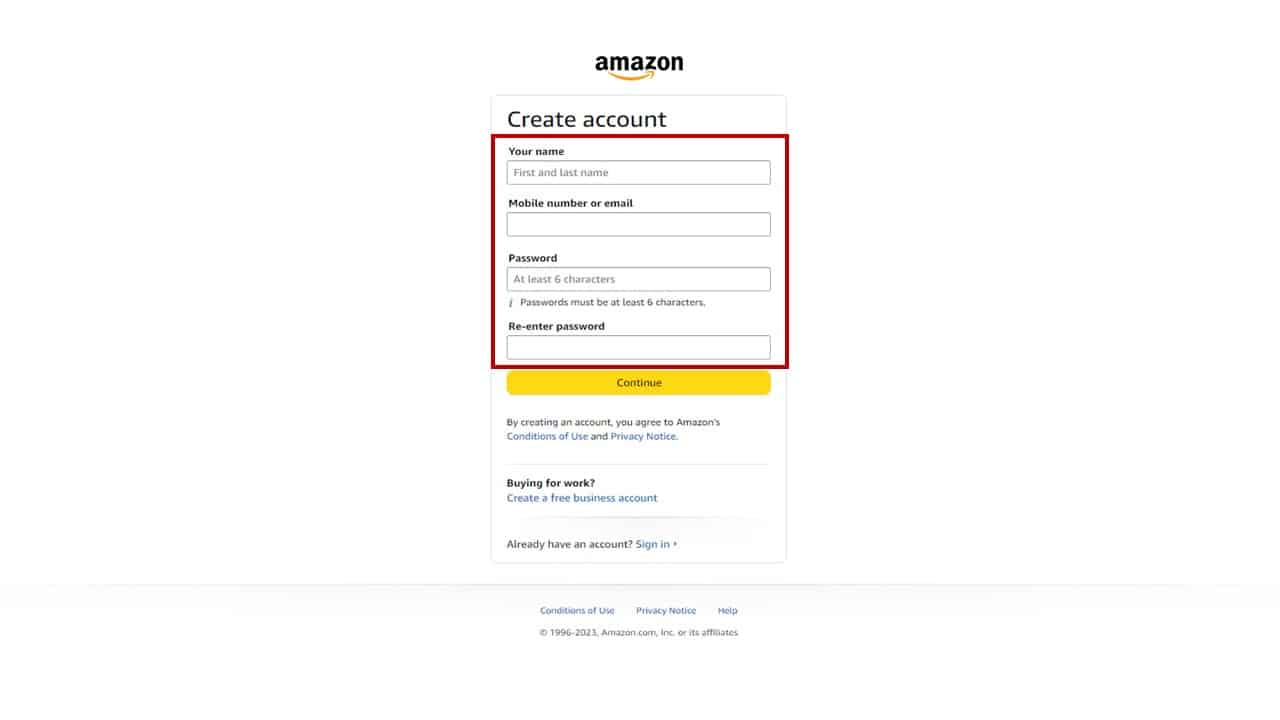
On the account creation page, you’ll be prompted to enter some basic personal details. The required fields typically include:
- Your Name: Enter your full name as you wish it to appear on your account.
- Mobile Number or Email: You will need to provide either a valid mobile phone number or an email address. This will serve as your primary login identifier and is crucial for account verification and communication. It’s recommended to use an email address or phone number that you regularly access and that is unique to you.
- Password: Choose a strong, unique password. Amazon usually requires a minimum of 6 characters. It’s best practice to combine uppercase and lowercase letters, numbers, and symbols to maximize security. Avoid using easily guessable passwords like birthdays or common phrases. Consider using a password manager to generate and store complex passwords.
After filling out these details, click the “Continue” or “Verify mobile number/email” button.
Verification and Security Measures
Amazon implements a verification step to ensure the legitimacy of your account and protect against fraudulent sign-ups. If you provided an email address, Amazon will send a One-Time Password (OTP) to that address. If you provided a mobile number, the OTP will be sent via SMS. You will then need to retrieve this OTP and enter it into the designated field on the Amazon registration page. This step confirms that you have access to the provided contact information, significantly enhancing the security of your new account. Once the OTP is entered correctly, your account creation is complete, and you will typically be logged in automatically.
Setting Up Payment Methods (Optional but Recommended)
While not strictly required during the initial account creation, setting up a payment method is essential for making purchases. You can do this immediately after creating your account or at any point before your first checkout.
- Navigate to Your Account: From the “Account & Lists” menu, select “Your Account.”
- Find Payment Options: Look for “Your Payments” or “Payment options.”
- Add a Payment Method: You’ll typically have options to add a credit card, debit card, or link a bank account (depending on your region and available payment types). Enter the card number, expiration date, and the name on the card. For security, you might also need to re-enter your Amazon password.
Amazon securely encrypts and stores this information, making future purchases faster and more convenient. You can also set a default payment method for swift checkouts.
Exploring Account Settings and Preferences
Upon successful account creation, take a moment to explore your account settings. This is where you can refine your personal preferences and bolster security:
- Addresses: Add and manage multiple shipping addresses.
- Communication Preferences: Control which types of emails and notifications you receive from Amazon.
- Security Settings: Enable Two-Factor Authentication (2FA) for an extra layer of security. This requires a code from your phone in addition to your password when logging in from a new device, significantly reducing the risk of unauthorized access. It’s highly recommended for all users.
Navigating Your New Amazon Account: Essential Features and Tips
With your account established, the real utility of Amazon begins. Navigating its myriad features might seem daunting at first, but understanding the key areas will significantly enhance your experience, ensuring you get the most out of the platform while maintaining good digital hygiene.
Managing Orders and Returns
The “Your Orders” section (accessible via “Account & Lists”) is your command center for everything related to your purchases. Here, you can:
- Track Shipments: View real-time updates on your order’s journey from warehouse to doorstep.
- Cancel or Modify Orders: For eligible items, you might be able to cancel an order before it ships or request modifications.
- Initiate Returns: If an item isn’t right, this section provides a streamlined process for initiating returns, printing return labels, and monitoring the refund status. Amazon’s return policy is generally customer-friendly, but understanding the specific rules for different item categories is beneficial.
- Contact Seller/Customer Service: Directly communicate with third-party sellers or Amazon customer support regarding specific orders.
Personalizing Your Shopping Experience
Amazon excels at personalization, and your account plays a central role. To refine this:
- Browsing History: Review and clear your browsing history to prevent unwanted recommendations or maintain privacy.
- Recommendations: Adjust your recommendation preferences. You can rate products, mark items as “don’t show me this,” or tell Amazon what categories you’re interested in, refining future suggestions.
- Lists: Create various lists beyond just a “Wish List.” You can make lists for gift ideas, future purchases, or even specific projects, categorizing items for easy access.
Leveraging Amazon Prime Benefits
If you’ve subscribed to Amazon Prime, make sure you’re taking full advantage of its extensive benefits:
- Prime Video: Access a vast library of movies and TV shows.
- Prime Music: Stream millions of songs ad-free.
- Prime Reading: Borrow books, magazines, and more from a rotating selection.
- Whole Foods Market Discounts: In some regions, Prime members get exclusive savings at Whole Foods.
- Early Access Deals: Get a head start on some Lightning Deals and special promotions.
Regularly check the Prime benefits page to stay updated on new additions and ensure you’re utilizing your subscription to its fullest potential.
Understanding Security Best Practices
Digital security is paramount. Your Amazon account, holding personal and payment information, is a potential target for malicious actors.
- Strong, Unique Password: As mentioned earlier, use a complex password that isn’t reused on other sites.
- Two-Factor Authentication (2FA): Enable 2FA immediately. This adds a crucial layer of security, requiring a second verification step (usually a code sent to your phone) during login, making it much harder for unauthorized users to access your account even if they somehow obtain your password.
- Monitor Account Activity: Regularly review your order history and login activity (found in your security settings) for any suspicious transactions or access attempts.
- Beware of Phishing: Be vigilant against phishing emails or messages that claim to be from Amazon. Always verify the sender and never click suspicious links or enter your login details on unfamiliar websites. Amazon will never ask for your password via email.
Utilizing Customer Support Resources
Should you encounter any issues, Amazon provides robust customer support.
- Help & Customer Service: Access this section for FAQs, troubleshooting guides, and options to contact support via chat, email, or phone.
- Virtual Assistant: Amazon’s virtual assistant can often quickly resolve common queries.
- Order-Specific Support: For problems related to specific orders, using the “Your Orders” section to contact support ensures they have all the relevant context immediately.
Beyond Basic Shopping: Advanced Features and Account Management
An Amazon account is far more than a simple shopping cart; it’s a versatile digital identity that can be tailored to various needs, from managing family access to integrating with smart home devices. Understanding these advanced features allows for a deeper and more controlled engagement with the Amazon ecosystem.
Setting Up Household Accounts
For families, Amazon offers the “Amazon Household” feature, which allows two adults and up to four teens and four children to share Prime benefits. This is a significant advantage as it means only one Prime subscription is needed for multiple family members to enjoy free shipping, Prime Video, and other perks. Each adult maintains their separate account, but they can share payment methods and manage digital content (like Kindle books) across the household. For teens, a supervised account grants them the ability to shop with parental approval, fostering independence while maintaining oversight. This feature streamlines family logistics and reduces redundant subscriptions, making it a powerful tool for tech-savvy households.
Managing Digital Content and Devices
Your Amazon account serves as the central repository for all your digital purchases. Under “Content & Devices” (accessible via “Account & Lists”), you can:
- Manage Your Content: Review and organize your Kindle books, Audible audiobooks, apps, and other digital items. You can even remove content from specific devices or re-download it.
- Manage Your Devices: See all devices registered to your Amazon account (Kindle readers, Fire tablets, Echo devices, etc.). From here, you can deregister old devices, troubleshoot issues, or manage parental controls. This centralized control is crucial for securing your digital library and managing access across different gadgets.
- Family Library: If part of an Amazon Household, you can share eligible digital content (like Kindle books and apps) with other members, expanding everyone’s accessible library without additional purchases.
Exploring Amazon Business and Seller Accounts
For professionals and entrepreneurs, your personal Amazon account can be the stepping stone to more specialized accounts:
- Amazon Business: If you’re purchasing for a company or organization, Amazon Business offers features like multi-user accounts, tax-exempt purchases, bulk discounts, and approval workflows. You can easily convert your personal account or create a new Amazon Business account, separating personal and professional spending while leveraging Amazon’s extensive catalog.
- Amazon Seller Central: For those looking to sell products on Amazon, your personal account is required to register for an Amazon Seller Central account. This platform provides tools for listing products, managing inventory, processing orders, and communicating with customers, opening up a global marketplace for your business ventures. While requiring a separate registration process, the underlying personal Amazon account often serves as the initial identification.

Deactivating or Closing an Account (If Needed)
While the goal is often to create and utilize an Amazon account, understanding how to manage its lifecycle is also part of comprehensive digital literacy. Should you ever need to temporarily deactivate or permanently close your account, Amazon provides options through its customer support. This is typically done for privacy reasons, financial concerns, or simply if you no longer wish to use Amazon’s services. Before closing an account, it’s advisable to download any digital content you wish to keep and settle any outstanding balances. This process underscores Amazon’s commitment to user control over their data and online presence, ensuring that users can manage their digital footprint effectively.
Creating an Amazon account is more than just signing up for a service; it’s an initiation into a vast and powerful digital ecosystem. By understanding the setup process, leveraging core features, and maintaining robust security practices, users can unlock unparalleled convenience, entertainment, and commerce opportunities. From seamless shopping to advanced account management, your Amazon account acts as a central hub, making your digital life more integrated and efficient. As technology continues to evolve, mastering the fundamentals of platforms like Amazon remains a critical skill for navigating the modern online world.
aViewFromTheCave is a participant in the Amazon Services LLC Associates Program, an affiliate advertising program designed to provide a means for sites to earn advertising fees by advertising and linking to Amazon.com. Amazon, the Amazon logo, AmazonSupply, and the AmazonSupply logo are trademarks of Amazon.com, Inc. or its affiliates. As an Amazon Associate we earn affiliate commissions from qualifying purchases.