
Receiving a new credit card in the mail is an exciting moment, often signaling new financial opportunities, access to rewards, or enhanced purchasing power. However, that sleek piece of plastic isn’t ready for use straight out of the envelope. The critical first step before making any transactions, whether online or in-store, is to properly activate your card. This process is a fundamental security measure designed to protect you from fraud and ensure that the card is indeed received and acknowledged by the legitimate cardholder. For Bank of America cardholders, activation is a straightforward procedure, but understanding the available methods and necessary precautions can streamline the experience and set a positive tone for managing your new financial tool.
This comprehensive guide will walk you through the various ways to activate your Bank of America credit card, providing detailed instructions, essential tips, and insights into the broader context of responsible credit card management. By the end, you’ll not only know how to activate your card but also understand the importance of this step in your financial journey.
The Crucial First Step: Understanding Credit Card Activation
Before delving into the how-to, it’s vital to grasp why credit card activation is a mandatory process and what preparations you should make. This initial understanding ensures a smooth and secure activation experience, preventing common pitfalls and setting you up for confident use of your new card.
Why Activation Matters
Credit card activation serves multiple critical purposes, primarily centered on security and verification. When a bank issues a new card, whether it’s an initial issuance, a replacement, or a renewal, it arrives inactive. This inactivation acts as a safeguard. If your card were to be intercepted or stolen during transit, an unauthorized individual wouldn’t be able to use it immediately. Activation is the bank’s way of confirming that the card has reached its intended recipient—you—and that you are ready to assume responsibility for its use.
Furthermore, activating your card often initiates the official start of your billing cycle and the enrollment into any associated rewards programs or benefits. Delaying activation can sometimes delay your access to these perks or even cause confusion regarding billing dates, though most banks will adjust billing cycles from the date of first use or activation. It also prevents the bank from continuing to send reminders for an inactive card, streamlining their communication with you. From a personal finance perspective, activation is the official green light, empowering you to manage your credit and leverage the card’s features securely.
What You Need Before You Start
To ensure a seamless activation process, gather a few key pieces of information and items before you begin. Having these readily available will prevent delays and potential frustration.
- Your New Credit Card: This might seem obvious, but have the physical card in front of you. You’ll need access to the full 16-digit card number, the expiration date, and the 3- or 4-digit Card Verification Value (CVV) or Card Identification Number (CID) usually found on the back of the card (for Visa/Mastercard) or front (for Amex).
- Your Personal Identification Information: For verification purposes, you might be asked for details such as your Social Security Number (SSN), date of birth, or the primary phone number associated with your account.
- Your Bank of America Account Information: If you’re an existing Bank of America customer, having your online banking login credentials (username and password) or your checking/savings account number can be helpful, especially if you’re activating online or via phone.
- A Secure Environment: Whether you choose online or phone activation, ensure you’re in a private, secure location where your personal and financial details cannot be overheard or viewed by others. Avoid using public Wi-Fi networks for online activation.
Having these prerequisites in order will make the activation process swift and secure, allowing you to proceed with confidence.
Seamless Activation: Your Options with Bank of America
Bank of America provides several convenient methods for activating your new credit card, catering to different preferences and technological comfort levels. Each method is designed to be secure and efficient, offering you flexibility in how you initiate your card’s usability.
Online Activation: The Digital Path
For many, activating a credit card online is the quickest and most preferred method. It offers instant confirmation and can be done at any time, day or night, from the comfort of your home or office.
Via Bank of America’s Website
The Bank of America website is a robust platform for managing all your banking needs, including credit card activation.
- Navigate to the Activation Page: Open your web browser and go to the official Bank of America website (bankofamerica.com). Look for a prominent “Activate Your Card” or “Activate Credit Card” link, typically found in the credit card section or through a quick search on their site. Alternatively, you might find a direct activation URL printed on the sticker affixed to your new card.
- Log In or Provide Details: If you’re an existing Bank of America online banking customer, you’ll be prompted to log in to your account. This is often the most straightforward path, as your details are already linked. Once logged in, you’ll typically see an option to activate any new cards associated with your profile. If you’re a new customer or prefer not to log in immediately, there’s usually an option to activate as a guest by entering your card number, expiration date, and other identifying information (like the last four digits of your SSN).
- Follow On-Screen Prompts: The website will guide you through the remaining steps, which typically involve confirming your identity and acknowledging the activation. Once completed, you’ll receive an instant confirmation that your card is ready for use.
Leveraging the Mobile Banking App
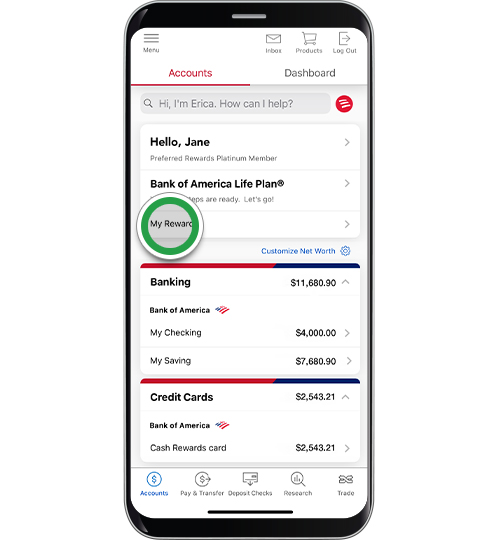
The Bank of America mobile app offers an equally convenient and often more streamlined activation experience for smartphone users.
- Download and Log In: If you haven’t already, download the official Bank of America Mobile Banking app from your device’s app store (iOS App Store or Google Play Store). Log in using your existing online banking credentials.
- Locate Activation Option: Once logged in, navigate to the credit card section of the app. You’ll often see a notification or a clear option to “Activate Card” prominently displayed, especially if you have a new, unactivated card linked to your profile.
- Complete Activation: Tap the activation option and follow the simple on-screen instructions, which will likely involve confirming your card details and identity. The app typically provides immediate confirmation upon successful activation. The mobile app also serves as an excellent tool for managing your card post-activation, allowing you to monitor transactions, pay bills, and set up alerts on the go.
Activating by Phone: A Direct Approach
For those who prefer a more traditional method or encounter issues with online activation, activating your Bank of America credit card by phone is a reliable alternative.
Locating the Activation Number
The most common place to find the activation phone number is on the sticker affixed to your new credit card. This sticker usually has a toll-free number specifically for card activation. If the sticker is missing or unreadable, you can also find the number on the back of your card (often the general customer service number, which can direct you to activation), on the card carrier letter that came with your card, or by visiting the official Bank of America website and navigating to their contact us or credit card support section.
What to Expect During the Call
- Automated System or Live Agent: Most activation lines begin with an automated system that guides you through the process. You’ll typically be prompted to enter your credit card number, expiration date, and potentially your date of birth or the last four digits of your SSN using your phone’s keypad.
- Verification: The system will use the information you provide to verify your identity. Ensure you speak clearly if prompted to answer questions verbally or enter numbers accurately.
- Confirmation: Upon successful verification, you’ll receive an audio confirmation that your card has been activated. In some cases, if the automated system cannot verify your identity or if you prefer, you may be transferred to a live customer service representative who can assist you.

In-Person Activation: A Less Common, Yet Available Route
While less common for simple activation, particularly with the ease of online and phone options, you can technically activate your card at a Bank of America branch. This method is usually reserved for individuals who prefer face-to-face interaction, have complex account issues, or do not have access to a phone or internet. A branch associate can assist you with the activation process and address any other banking needs you might have. Remember to bring your new credit card and a valid government-issued ID.
Beyond Activation: Safeguarding Your Financial Future
Activating your credit card is just the beginning of your journey. To truly harness its power and protect your financial well-being, several crucial steps should follow immediately after activation. These steps are integral to maintaining security and maximizing the utility of your new financial tool.
Setting Up Your Online Account and Alerts
If you haven’t already, ensure your new credit card is linked to your Bank of America online banking profile. This allows you to:
- Monitor Transactions: Regularly check your transactions for any unauthorized activity.
- Pay Bills: Conveniently schedule and make credit card payments.
- Access Statements: View electronic statements and track your spending.
- Manage Card Features: Set up travel notifications, freeze your card if lost, or request a credit limit increase.
Crucially, set up account alerts. Bank of America offers various alerts that can notify you via email or text message about:
- Transactions exceeding a certain amount.
- International transactions.
- Payments due or received.
- Low balance warnings.
These alerts are a proactive defense against fraud and help you stay on top of your financial obligations.
Understanding Your Card’s Features and Benefits
Take the time to thoroughly review the terms and conditions and the benefits guide that came with your credit card. Each Bank of America credit card comes with a unique set of features, such as:
- Rewards Programs: Cash back, travel points, or specialized rewards categories. Understand how to earn and redeem these.
- Introductory Offers: Low APR periods, bonus points, or statement credits for initial spending.
- Insurance Protections: Purchase protection, extended warranty, travel insurance, or rental car insurance.
- Concierge Services: Premium cards may offer access to personal assistance for bookings and planning.
Understanding these features allows you to strategically use your card to maximize its value and take advantage of all it has to offer.
Immediate Security Best Practices
Once your card is active, it’s a live financial instrument, and protecting it becomes paramount.
- Sign the Back of Your Card: This simple act is a traditional security measure. While merchants often don’t check signatures, it can deter some forms of fraud.
- Memorize Your PIN: If your card comes with a Personal Identification Number (PIN), memorize it and avoid writing it down. If you need to write it, store it securely and separately from your card.
- Secure Your Card Information: Do not share your card number, expiration date, or CVV with anyone you don’t trust implicitly. Be wary of unsolicited calls or emails asking for this information.
- Shred Old Cards and Documents: When you receive a replacement or a renewed card, safely shred the old card, especially the magnetic stripe and chip, along with any documents containing your full card number.
Troubleshooting and Essential Support
While credit card activation is generally straightforward, occasional issues can arise. Knowing how to troubleshoot common problems and where to seek help is crucial for a stress-free experience.
Common Activation Hurdles and Solutions
- Activation Fails Online/App: Double-check that you’ve entered all information correctly (card number, expiration date, CVV, personal ID). Ensure your internet connection is stable. If persistent, try another activation method (phone).
- Phone Activation Issues: Ensure you’re dialing the correct activation number. If using an automated system, speak clearly or enter numbers accurately. If you’re transferred to an agent, be prepared to answer security questions to verify your identity.
- “Card Not Found” or “Invalid Information”: This could be a simple typo. If you’re certain your details are correct, there might be a processing delay on the bank’s end or an issue with the card’s data. Contact Bank of America customer service directly.
- Lost Card Before Activation: If your card is lost or stolen before you can activate it, contact Bank of America immediately. They will cancel the compromised card and issue a new one to prevent any potential fraudulent use. Even though it’s inactive, the mere possession of an unactivated card could present risks.
When to Contact Bank of America Customer Service
Do not hesitate to contact Bank of America’s customer service if:
- You encounter any persistent issues during activation that you cannot resolve.
- You suspect any fraudulent activity related to your new card.
- You have questions about your card’s features, benefits, or terms.
- Your card is lost or stolen.
You can typically find the customer service number on the back of your card, on your card carrier, or on the Bank of America website. Be prepared to verify your identity with personal information.
Protecting Your Card from Fraud
Your active credit card is a powerful financial tool, but it also becomes a target for fraudsters. Beyond the initial security steps, maintaining vigilance is key:
- Regularly Review Statements: Scrutinize your monthly statements or online transaction history for any unfamiliar charges.
- Use Secure Websites: When making online purchases, ensure the website address begins with “https://” and look for a padlock icon in your browser’s address bar.
- Be Wary of Phishing Attempts: Never click on suspicious links or provide personal financial information in response to unsolicited emails, texts, or calls claiming to be from Bank of America. If in doubt, contact the bank directly using official numbers.
- Report Suspicious Activity Promptly: If you notice any unauthorized charges or suspect your card information has been compromised, report it to Bank of America immediately. Most credit cards offer zero-liability protection against fraudulent charges, but prompt reporting is often a condition.
Maximizing Your Bank of America Credit Card
Activating your card is a small, yet significant, step in a larger financial journey. To truly benefit from your Bank of America credit card, thoughtful usage and a proactive approach to financial management are essential.
Responsible Usage for Financial Wellness
Credit cards, when used responsibly, can be invaluable tools for building credit history, earning rewards, and managing cash flow. However, they also carry the potential for debt if not managed carefully.
- Pay Your Balance in Full and On Time: This is the golden rule of credit card management. It helps you avoid interest charges and late fees, significantly contributing to a healthy credit score.
- Keep Your Utilization Low: Aim to use no more than 30% of your available credit limit on any given card. Lower utilization ratios are viewed favorably by credit bureaus.
- Understand Your Credit Limit: Know your credit limit and avoid maxing out your card.
- Budgeting: Incorporate your credit card spending into your overall budget to ensure you’re not spending beyond your means.

Exploring Rewards and Perks
Bank of America offers a diverse portfolio of credit cards, each tailored with specific rewards and benefits. Once your card is active and you’ve familiarized yourself with its features, actively work to maximize these perks.
- Align Spending with Rewards: If your card offers bonus points on specific categories (e.g., dining, gas, groceries), try to use that card for purchases in those categories.
- Utilize Introductory Offers: If your card came with a sign-up bonus (e.g., spend X amount in Y months to get Z points/cash back), strategically plan your initial spending to meet these requirements.
- Take Advantage of Card Protections: Remember the extended warranties, purchase protection, or travel benefits that come with your card. These can offer significant value and peace of mind.
Activating your Bank of America credit card is the gateway to unlocking its full potential. By following the outlined activation steps, taking immediate security precautions, and embracing responsible financial practices, you can ensure a secure, rewarding, and beneficial experience with your new credit card. It’s more than just a piece of plastic; it’s a financial instrument that, when wielded wisely, can significantly contribute to your long-term financial health.
aViewFromTheCave is a participant in the Amazon Services LLC Associates Program, an affiliate advertising program designed to provide a means for sites to earn advertising fees by advertising and linking to Amazon.com. Amazon, the Amazon logo, AmazonSupply, and the AmazonSupply logo are trademarks of Amazon.com, Inc. or its affiliates. As an Amazon Associate we earn affiliate commissions from qualifying purchases.