
In the modern financial landscape, the speed of capital movement has become a cornerstone of personal and business liquidity. Among the most prominent tools facilitating this rapid exchange is Zelle, a peer-to-peer (P2P) payment service that has been seamlessly integrated into the infrastructure of major financial institutions like Bank of America. For the savvy consumer, managing money is no longer just about tracking physical receipts or waiting for a monthly paper statement. It is about real-time oversight and the ability to audit digital footprints instantaneously. Knowing how to look at your Zelle history within the Bank of America ecosystem is not merely a technical skill; it is a fundamental component of proactive financial management, fraud prevention, and budgetary discipline.
The Evolution of Peer-to-Peer Payments in Personal Finance
The transition from traditional wire transfers and checks to P2P services like Zelle represents a significant shift in how we perceive and handle “cash.” Bank of America, as a founding member of the network behind Zelle, has prioritized this integration to offer users a frictionless way to move funds. However, the convenience of instant transfers often leads to a high volume of small, frequent transactions that can easily become difficult to track without a dedicated review strategy.
From a personal finance perspective, the Zelle history serves as a digital ledger of your informal economy—reimbursing friends for dinner, paying a local service provider, or sending money to family. Because these transactions bypass the traditional “pending” period seen with credit cards or standard ACH transfers, they impact your available balance immediately. This makes the ability to view and categorize history vital for maintaining an accurate picture of your net worth and monthly cash flow.
Accessing Your Zelle Transaction History: A Dual-Platform Approach
Bank of America provides two primary gateways to access your Zelle records: the mobile banking application and the online banking portal. Each serves a specific purpose, whether you are performing a quick spot-check on the go or conducting a deep dive into your quarterly spending.
Navigating the Bank of America Mobile App
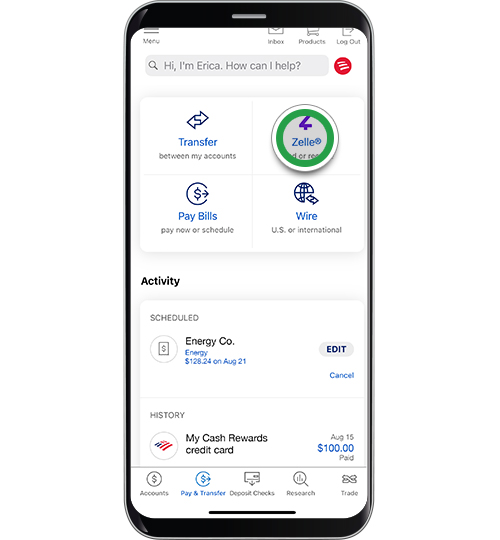
For most users, the mobile app is the primary interface for Zelle. To view your history, follow these strategic steps:
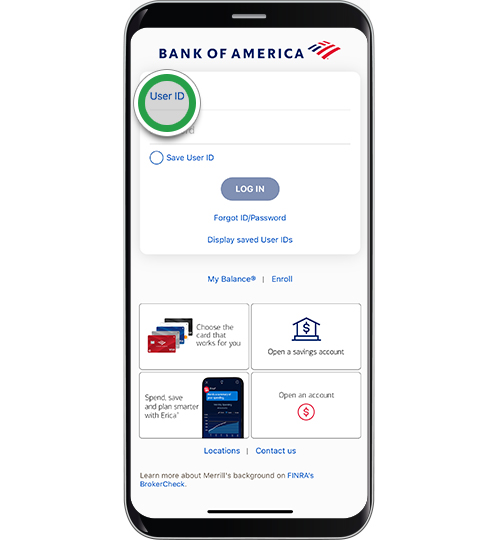
- Authentication: Securely log in to your Bank of America mobile app using your credentials or biometric ID.
- The Transfer Menu: Locate the “Transfer | Send” menu, usually situated at the bottom or within the main navigation hub.
- Zelle Integration: Within this menu, select “Send Money with Zelle.” This redirects you to the specific Zelle module within the app.
- Activity Tracking: Tap on the “Activity” tab. This section is specifically designed to isolate Zelle transactions from your general bank statement. Here, you will find two primary views: “Pending” and “Past.”
- Detail Analysis: By clicking on an individual transaction, you can view the recipient’s details, the date the funds were sent or received, the specific funding account used, and any memo notes you may have included at the time of the transaction.
Utilizing the Online Banking Portal for Comprehensive Review
While the app is convenient for quick looks, the desktop online banking portal is superior for detailed financial auditing.
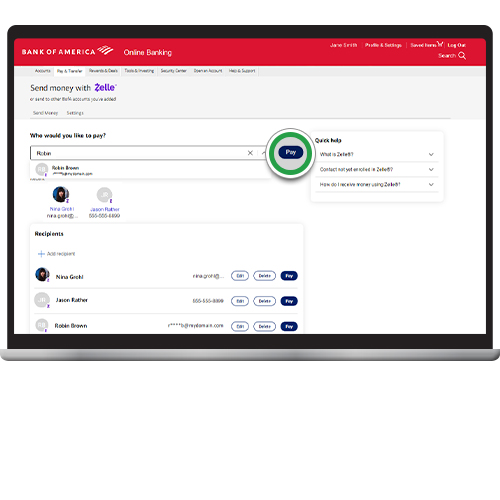
- Access: Log in via a secure web browser to the Bank of America homepage.
- Transfers Tab: Navigate to the “Transfer” tab in the main navigation bar and select “Send Money with Zelle.”
- The Activity Dashboard: Much like the mobile app, the desktop version features an “Activity” or “History” link. However, the desktop view often provides a broader visual layout, making it easier to scan multiple months of data.
- Filtering and Search: The web interface typically offers better filtering tools, allowing you to sort by recipient name, date range, or amount. This is particularly useful during tax season or when reconciling a disputed payment.
Leveraging Zelle Records for Effective Financial Auditing and Budgeting
Viewing your history is only the first step. The true value lies in how you utilize this data to improve your financial health. In the niche of personal finance, data is only as good as the insights you derive from it.
Categorizing the “Invisible” Expenses
One of the biggest challenges in modern budgeting is the “miscellaneous” category. Zelle transactions often fall into this black hole because they are not automatically categorized by most third-party budgeting software in the same way a transaction at a grocery store is. By reviewing your Zelle history monthly, you can manually assign these outflows to specific categories—such as “Rent,” “Utilities,” or “Entertainment”—ensuring your budget reflects reality.
Reconciling with Monthly Bank Statements
It is important to understand the relationship between your Zelle “Activity” tab and your official Bank of America account statement. While the Zelle tab provides the most user-friendly view of who you paid, the official bank statement is the legal record of the fund movement.
When you look at your Zelle history, you should cross-reference it with your checking account statement. On the bank statement, Zelle transactions usually appear with a description such as “Zelle Transfer To [Name]” or “Zelle Transfer From [Name].” Ensuring these two records align is a critical step in verifying that no unauthorized transfers have occurred and that all expected deposits have cleared.
Using History for Small Business and Side Hustle Tracking
For many entrepreneurs and side-hustlers, Zelle is a primary tool for receiving payments for services. If you are using a Bank of America account for business purposes, your Zelle history becomes a vital part of your bookkeeping. Accessing the history allows you to track outstanding invoices (via the “Pending” or “Request” features) and confirm payments received, which can then be exported or screenshotted for your accounting software.
Navigating Discrepancies and Security Audits
In the digital age, financial security is synonymous with vigilance. Regularly checking your Zelle history on Bank of America is one of the most effective ways to spot fraudulent activity before it escalates.
Identifying Unauthorized Activity
Because Zelle transfers are nearly instantaneous and generally irreversible, detecting unauthorized use early is paramount. By reviewing your “Past” activity at least once a week, you can identify any names or amounts that do not look familiar. If you spot a transaction you did not authorize, you must contact Bank of America’s fraud department immediately. While P2P services have different protections than credit cards, the bank has specific protocols for investigating compromised accounts.
Managing “Pending” Transactions and Expiration
A unique feature of the Zelle history is the “Pending” status. If you send money to someone who has not yet enrolled in Zelle, the money leaves your account but remains in a state of limbo. By checking your history, you can see if a payment is still pending. If it remains unclaimed for more than 14 days, the payment typically expires, and the funds are returned to your account. Tracking this ensures that you don’t lose track of “floating” capital that hasn’t reached its intended destination.
The Strategic Importance of Digital Record Keeping
As we move toward a more cashless society, the transparency of our financial tools becomes our greatest asset. The integration of Zelle within Bank of America provides a sophisticated level of transparency, but it requires the user to engage with the data actively.
High-net-worth individuals and disciplined savers alike understand that “watching the pennies” is easier when you have a clear view of where those pennies are going. By mastering the ability to look at and analyze your Zelle history, you are taking control of a significant portion of your digital cash flow. You are moving beyond passive banking into active financial management, where every transfer is accounted for, every recipient is verified, and your budget remains a true reflection of your financial goals.
Whether you are using the Bank of America mobile app for a quick check or the desktop portal for a deep financial audit, the history of your Zelle transactions is a map of your recent economic activity. Navigating this map with confidence is essential for anyone looking to maintain a secure, organized, and optimized financial life in the 21st century.
aViewFromTheCave is a participant in the Amazon Services LLC Associates Program, an affiliate advertising program designed to provide a means for sites to earn advertising fees by advertising and linking to Amazon.com. Amazon, the Amazon logo, AmazonSupply, and the AmazonSupply logo are trademarks of Amazon.com, Inc. or its affiliates. As an Amazon Associate we earn affiliate commissions from qualifying purchases.