
The landscape of television consumption has undergone a revolutionary transformation over the past decade. Gone are the days when a cable subscription was the sole gateway to live entertainment, news, and sports. Today, streaming live TV directly to your television offers unparalleled flexibility, a wider array of content choices, and often, significant cost savings. This guide will meticulously walk you through everything you need to know, from selecting the right hardware and services to optimizing your setup for a seamless viewing experience, all while staying firmly within the realm of technology and its practical application.

The Evolution of Television: Why Streaming Live TV Matters
For generations, the television set in our living rooms was synonymous with traditional cable or satellite subscriptions. Changing channels meant flipping through hundreds of options, many of which were rarely watched, all while paying a hefty monthly fee. The rise of the internet and advancements in digital technology have completely upended this model, paving the way for a more personalized, on-demand, and often more affordable alternative: live TV streaming.
The Shift from Traditional Broadcasts
Traditional television relied on broadcast signals (over-the-air, cable, satellite) delivered at specific times, with viewers largely at the mercy of network schedules. While this model served its purpose, it came with inherent limitations: geographical restrictions, rigid programming, and a lack of user control over content access and timing. The internet’s pervasive reach, coupled with increasingly sophisticated streaming technologies, has shattered these barriers. Viewers are no longer tethered to a physical connection point or a pre-defined schedule. They can now access a vast library of content, including live broadcasts, through an internet connection, often with features like cloud DVRs, multiple simultaneous streams, and personalized profiles. This shift represents a fundamental change in how we consume media, prioritizing convenience, choice, and customization.
Unpacking the Benefits of Live TV Streaming
Embracing live TV streaming offers a multitude of advantages that resonate with modern consumers. Firstly, cost savings are a primary driver. Bundled cable packages, often inflated with channels you never watch, can be expensive. Streaming services typically offer more targeted channel lineups at a fraction of the cost, allowing users to pay only for what they genuinely desire. Secondly, flexibility and portability are key. With streaming, your TV service isn’t tied to a physical box or a single location. You can watch on a smart TV, a dedicated streaming device, a computer, or even a mobile phone, offering unparalleled freedom to watch where and when you want. Thirdly, customization and control empower the viewer. Most services offer different tiers, add-ons for premium channels, and often include robust on-demand libraries alongside live programming. Features like cloud DVRs let you record live shows and watch them later, fast-forwarding through commercials, just like with traditional DVRs, but without the physical hardware. Finally, the ease of setup and cancellation is a significant draw. No complicated installations, no long-term contracts; most services allow you to subscribe and cancel with a few clicks, offering month-to-month flexibility.
Essential Gear for Your Streaming Setup
Before diving into the myriad of streaming services available, it’s crucial to ensure you have the foundational technology in place. A successful live TV streaming experience hinges on a robust internet connection and the right hardware to display the content on your television.
The Foundation: Reliable Internet Connection
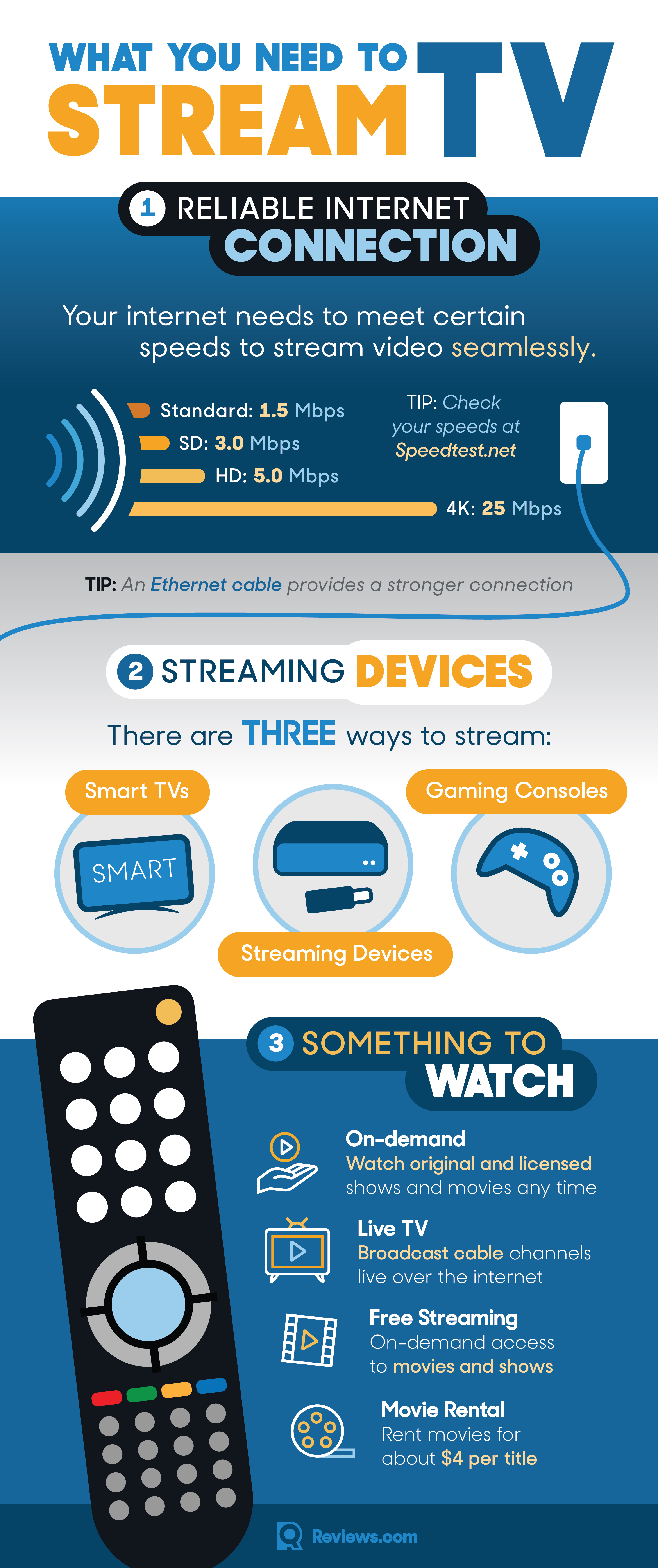
The single most critical component for streaming live TV is a fast and stable internet connection. Unlike basic web browsing or email, streaming high-definition video in real-time demands substantial bandwidth. While specific requirements vary by service and video quality (SD, HD, 4K), a general guideline suggests a minimum of 25 Mbps (megabits per second) download speed for smooth HD streaming on a single device. If you plan to stream to multiple devices simultaneously, or if anyone in your household engages in online gaming or large downloads, you’ll want significantly higher speeds, perhaps 50-100 Mbps or more. Beyond speed, stability is equally important. Frequent dropouts or inconsistent speeds will lead to buffering, pixelation, and a frustrating viewing experience. Consider using an Ethernet cable for your primary streaming device if possible, as a wired connection offers superior stability and speed compared to Wi-Fi.
Display Choices: Smart TVs vs. Dedicated Streaming Devices
Once your internet is sorted, you need a way to get the streamed content onto your television screen. You primarily have two options:
- Smart TVs: Most modern televisions come equipped with “smart” capabilities, meaning they have built-in operating systems (like Android TV, webOS, Tizen, Roku TV, Fire TV) that allow you to download and run streaming apps directly. This is often the most straightforward solution, as it requires no additional hardware. The integrated apps provide a seamless experience, and controlling everything with a single remote is convenient. However, older smart TVs might have slower processors, outdated operating systems that no longer support the latest app versions, or limited app stores.
- Dedicated Streaming Devices: These are small, external boxes or sticks that plug into your TV’s HDMI port. They essentially turn any TV (even an older “dumb” TV) into a smart TV. Dedicated devices often offer more processing power, a wider array of apps, frequent software updates, and a more user-friendly interface than many built-in smart TV platforms. They can also extend the life of an older TV, allowing it to access the latest streaming innovations without needing a full replacement.
Popular Streaming Hardware Breakdown
Understanding the landscape of dedicated streaming devices can help you choose the best fit for your needs and budget:
- Roku Devices (Roku Express, Streaming Stick, Ultra, Streambar): Known for their user-friendly interface, vast app selection, and device options across all price points. Roku OS is intuitive and easy to navigate.
- Amazon Fire TV Devices (Fire TV Stick Lite, 4K, Cube): Deeply integrated with Amazon’s ecosystem, offering Alexa voice control, and a strong emphasis on Amazon Prime Video and Music, though it supports most other popular apps.
- Apple TV (Apple TV HD, 4K): Offers a premium user experience, tight integration with the Apple ecosystem, powerful hardware, and a focus on high-quality video and gaming. It tends to be pricier than other options.
- Google Chromecast (Chromecast with Google TV): Google’s latest iteration with Google TV offers a full operating system and remote, moving beyond its traditional “casting” functionality to a more comprehensive streaming experience. Excellent for those already invested in Google services.
- Gaming Consoles (PlayStation, Xbox): Modern gaming consoles like the PlayStation 5 and Xbox Series X/S are powerful media centers, capable of running most major streaming apps in high fidelity. If you already own one, it can double as your streaming hub.
Navigating the Landscape of Live TV Streaming Services
With your hardware in place, the next step is choosing which live TV streaming service to subscribe to. The market is vibrant and competitive, offering a range of options from premium bundles to entirely free, ad-supported channels.
Premium Subscription Services: A Deep Dive
These services aim to replace traditional cable, offering familiar channel lineups, cloud DVRs, and multiple simultaneous streams, all delivered over the internet.
- YouTube TV: A comprehensive offering with a wide range of national networks, sports channels, and local affiliates. Known for its unlimited cloud DVR and user-friendly interface.
- Hulu + Live TV: Combines live TV channels with Hulu’s extensive on-demand library (including Hulu Originals). It’s a strong contender for those who want both live TV and a robust on-demand catalog.
- Sling TV: Often considered a more budget-friendly option, Sling TV offers customizable channel packages (“Orange” for ESPN, “Blue” for Fox/NBC) allowing users to select only the genres they prefer.
- fuboTV: Specializes in sports content, offering an extensive selection of sports channels, but also includes a good mix of news and entertainment. Ideal for sports enthusiasts.
- DirecTV Stream: Offers channel lineups most similar to traditional cable, making it a comfortable transition for those cutting the cord. It tends to be on the higher end of the pricing spectrum.
When choosing, consider factors like the specific channels you can’t live without, the included DVR storage, the number of simultaneous streams allowed, and of course, the monthly price. Many services offer free trials, which are invaluable for testing the interface and channel lineup before committing.
Discovering Free and Ad-Supported Live TV Channels
Not all live TV streaming requires a monthly fee. A growing number of services offer free, ad-supported live channels, often categorized by genre or network. These can be excellent supplements to a paid service or a viable option for those on a tight budget.
- Pluto TV: Offers hundreds of free, curated live channels covering movies, TV shows, news, sports, and more. It mimics a traditional TV guide experience with scheduled programming.
- Tubi: While primarily known for its on-demand library, Tubi also features a selection of live, ad-supported channels.
- Xumo Play: Similar to Pluto TV, Xumo offers a variety of free live channels across different categories.
- Peacock (Free Tier): NBCUniversal’s streaming service offers a free tier with access to some live channels (like SNL clips or curated content) and a rotating selection of movies and TV shows.
These services are perfect for casual viewing, discovering new content, or adding variety without increasing your monthly bill.
Local Channels and Antenna Integration: The Best of Both Worlds
Even with extensive streaming options, local network affiliates (ABC, CBS, FOX, NBC, PBS, The CW) can sometimes be a sticking point, particularly if you rely on them for local news, events, or specific sports broadcasts not covered by your chosen streaming service. While some premium live TV streaming services include local channels, coverage can vary by geographic area.
For guaranteed access to local channels, a traditional over-the-air (OTA) antenna remains the most reliable and cost-effective solution. Modern antennas are sleek, easy to set up, and provide crystal-clear HD signals for free. To integrate this into your streaming setup and achieve a more “cable-like” experience, you can use OTA DVR devices like:
- HDHomeRun: These devices connect to your antenna and home network, streaming live and recorded OTA TV to any device in your home (including streaming devices) via an app.
- Tablo: Similar to HDHomeRun, Tablo offers a more robust DVR interface, allowing you to record, pause, and rewind live TV from your antenna, accessible through apps on various streaming platforms.
Combining an antenna with an OTA DVR bridges the gap between traditional free TV and modern streaming convenience, ensuring you don’t miss out on vital local content.
Setting Up Your Streaming Hub: A Step-by-Step Guide
Once you’ve selected your devices and services, the next step is bringing it all together. The setup process is generally straightforward but benefits from a methodical approach.
Initial Device Connection and Configuration
For dedicated streaming devices, connect the device to an available HDMI port on your TV and plug it into a power source. Most devices come with clear on-screen instructions for the initial setup:
- Connect to Wi-Fi: You’ll be prompted to select your home Wi-Fi network and enter the password. For optimal performance, especially for 4K streaming, ensure you’re connecting to a 5GHz band if your router supports it.
- Software Updates: The device will likely check for and install the latest firmware updates. Let this process complete to ensure you have the most stable and feature-rich software.
- Account Creation/Login: You’ll need to create an account (e.g., Roku account, Amazon account, Google account) to personalize your device and manage app downloads.
For Smart TVs, the process is similar but typically involves navigating to the “Smart TV” or “Apps” section of your TV’s operating system, connecting to Wi-Fi, and potentially updating the TV’s firmware.
Installing and Managing Streaming Applications
Once your device is configured, you can start installing the streaming apps for the services you subscribe to (or the free services you wish to use).
- Access the App Store: Navigate to your device’s app store (e.g., Roku Channel Store, Amazon Appstore, Google Play Store, Apple App Store).
- Search and Install: Use the search function to find the specific live TV streaming apps (e.g., “YouTube TV,” “Hulu,” “Sling TV,” “Pluto TV”).
- Login: After installing, open each app and log in using your subscription credentials. This typically involves entering your username and password or using a device activation code provided on-screen.
- Organize Apps: Most streaming platforms allow you to arrange your apps, placing your most frequently used services in prominent positions for quick access.
Optimizing Your Home Network for Seamless Streaming
Even with fast internet, network congestion or poor Wi-Fi signal can lead to buffering. Take these steps to optimize your home network:
- Router Placement: Position your Wi-Fi router in a central location, away from obstructions like walls, large appliances, and other electronics that can cause interference.
- Minimize Interference: Cordless phones, microwaves, and even your neighbor’s Wi-Fi can interfere. Consider changing your Wi-Fi channel on your router settings if you suspect interference.
- Prioritize Traffic (QoS): Many modern routers offer Quality of Service (QoS) settings, allowing you to prioritize bandwidth for streaming devices, ensuring they get sufficient speed even when other devices are active.
- Update Router Firmware: Ensure your router’s firmware is up-to-date, as updates can improve performance and security.
- Consider a Mesh Wi-Fi System: For larger homes or areas with Wi-Fi dead zones, a mesh Wi-Fi system can significantly improve coverage and stability.
Enhancing Your Streaming Experience and Troubleshooting Common Issues
With your live TV streaming setup operational, understanding advanced features and knowing how to troubleshoot common problems will ensure you get the most out of your cord-cutting journey.
Advanced Features: DVR, Profiles, and Personalization
Modern live TV streaming services offer features that often surpass traditional cable boxes:
- Cloud DVR: Most services include a cloud-based DVR, allowing you to record live shows and store them remotely. Storage limits vary, with some services offering unlimited storage for a set period (e.g., 9 months for YouTube TV). This feature is essential for those who want to watch shows on their own schedule and skip commercials.
- User Profiles: Create individual profiles for each family member, ensuring personalized recommendations, watch histories, and favorite channels without interfering with others’ preferences.
- Simultaneous Streams: Check how many devices can stream content concurrently. This is crucial for households with multiple viewers who want to watch different programs at the same time.
- Parental Controls: Implement parental controls to restrict access to certain content based on ratings, ensuring a family-friendly viewing environment.
- Add-ons and Premium Channels: Expand your content library by adding premium channels (HBO Max, Showtime, Starz) or specialized sports packages directly through your streaming service.
Tackling Buffering and Connectivity Problems
Buffering is arguably the most frustrating issue for streamers. If you experience frequent pauses or quality degradation:
- Check Internet Speed: Use an online speed test (e.g., Speedtest.net) to verify your current download speed. If it’s below the recommended minimum for your streaming quality, contact your ISP.
- Restart Everything: A classic IT solution, but effective. Restart your modem, router, and streaming device. This can clear temporary glitches and refresh network connections.
- Clear App Cache: Over time, streaming apps can accumulate cached data that might slow them down. Go into your device’s settings (or the app’s settings) and clear the cache for problematic apps.
- Use a Wired Connection: If Wi-Fi is consistently problematic, connect your streaming device directly to your router with an Ethernet cable. This often resolves speed and stability issues.
- Reduce Network Congestion: If multiple devices are using bandwidth heavily (e.g., large downloads, online gaming), try reducing activity on other devices during peak streaming times.
- Update Apps and Device Software: Ensure all your streaming apps and your streaming device’s operating system are running the latest versions. Updates often include performance enhancements and bug fixes.
Future-Proofing Your Live TV Setup
The world of streaming technology is constantly evolving. To ensure your setup remains relevant:
- Invest in Future-Proof Hardware: When buying a streaming device or smart TV, opt for models that support the latest standards like 4K resolution, HDR (High Dynamic Range), and modern Wi-Fi protocols (Wi-Fi 6/6E) to ensure compatibility with future content and network advancements.
- Stay Informed: Keep an eye on tech news for new services, features, and hardware releases. The competitive nature of the streaming market means continuous innovation.
- Re-evaluate Services Periodically: Your content needs might change, or new services might emerge that offer better value or a more suitable channel lineup. Don’t be afraid to switch services to find the best fit.
By understanding the technology, choosing the right services, and optimizing your home network, you can fully embrace the freedom and flexibility of streaming live TV to your television. The cord-cutting revolution is here to stay, and with this guide, you’re well-equipped to navigate its exciting possibilities.
aViewFromTheCave is a participant in the Amazon Services LLC Associates Program, an affiliate advertising program designed to provide a means for sites to earn advertising fees by advertising and linking to Amazon.com. Amazon, the Amazon logo, AmazonSupply, and the AmazonSupply logo are trademarks of Amazon.com, Inc. or its affiliates. As an Amazon Associate we earn affiliate commissions from qualifying purchases.