
In an era defined by cord-cutting and the proliferation of streaming services, understanding the true cost of your entertainment is more crucial than ever. YouTube TV has emerged as a formidable contender in the live television streaming landscape, promising a robust alternative to traditional cable. However, as with any financial decision, discerning its actual cost—beyond just the monthly subscription fee—is paramount for consumers looking to optimize their personal finance strategies. This comprehensive guide delves into every facet of YouTube TV’s pricing structure, helping you make an informed investment in your home entertainment.
The Core Subscription: Unpacking YouTube TV’s Base Price
At the heart of YouTube TV’s offering is its base subscription plan, designed to replace conventional cable packages with a flexible, internet-delivered alternative. Understanding what this primary cost entails and what benefits it provides is the first step in evaluating its financial viability for your household.
Standard Monthly Fees and What’s Included
The foundational element of YouTube TV’s cost is its standard monthly subscription fee. This fee, while subject to occasional adjustments by Google, typically hovers around a competitive price point, often in the range of $70-$75 per month. For this investment, subscribers gain access to a comprehensive lineup of over 100 channels, encompassing major broadcast networks (ABC, CBS, FOX, NBC, PBS), popular cable channels across news, sports, entertainment, and lifestyle genres.
Beyond the sheer volume of channels, the base subscription includes several features that contribute significantly to its value proposition. Unlimited cloud DVR storage, for instance, allows users to record as many shows as they wish and keep them for up to nine months, eliminating the need for costly physical DVRs or storage concerns. Furthermore, the ability to stream on up to three concurrent devices and create up to six individual user accounts means that multiple family members can enjoy personalized viewing experiences simultaneously, a key financial advantage for larger households compared to per-stream costs on some other services.
From a financial perspective, the base price represents a significant portion of your monthly entertainment budget. It’s essential to weigh this cost against the quantity and quality of content offered, as well as the included features. For many, the breadth of channels and the robust DVR capabilities justify the outlay, especially when compared to the escalating costs and rigid contracts of traditional cable.
Navigating Trial Periods and Introductory Offers
For new subscribers, YouTube TV frequently extends trial periods and introductory offers, providing a valuable opportunity to experience the service before committing fully. Typically, these free trials range from 5 to 14 days, allowing ample time to explore the channel lineup, test the user interface, and assess the streaming quality. This trial period is a crucial financial tool, enabling potential subscribers to evaluate if the service genuinely meets their entertainment needs without any initial monetary risk.
Beyond free trials, YouTube TV occasionally rolls out promotional pricing for the first few months of a subscription. These introductory discounts, while temporary, can significantly lower the initial financial burden and provide a smoother transition from other services or traditional cable. For example, a common offer might be $10-$20 off the standard monthly price for the first 1-3 months. Savvy consumers can leverage these offers to reduce their overall expenditure during the initial phase of their subscription, effectively getting more value for their dollar.
However, it’s vital for consumers to be aware of the terms and conditions associated with these offers. Mark your calendar for the end date of any promotional period or trial to avoid unexpected charges. While these offers present an excellent opportunity for cost savings and risk-free evaluation, they are temporary reductions to the base price, and the full monthly fee will apply afterward. Factor this transition into your long-term budgeting for the service.
Beyond the Basics: Exploring YouTube TV’s Optional Add-ons and Enhancements
While the base subscription offers a comprehensive package, YouTube TV understands that different households have varying entertainment preferences and financial capacities. To cater to these diverse needs, it provides a range of optional add-ons and premium enhancements, each carrying its own additional cost. Understanding these extra investments is key to accurately calculating your total monthly streaming bill.
Premium Channels and Entertainment Packages
For viewers seeking specialized content or a broader selection of premium entertainment, YouTube TV offers a variety of add-on packages. These typically include popular premium networks like HBO Max (now Max), Showtime, Starz, and Cinemax, each incurring an additional monthly fee ranging from approximately $5 to $16, depending on the service. These are often the same premium channels found on cable, but with the flexibility of adding or dropping them month-to-month without long-term commitments.
Beyond individual premium channels, YouTube TV also offers themed entertainment packages. Examples might include a “Spanish Plus” package for extensive Spanish-language content or other genre-specific bundles. These packages often group several related channels at a slightly discounted rate compared to subscribing to each individually, presenting a potential cost-saving option for those interested in a specific niche.
From a financial planning perspective, adding these premium channels or entertainment packages can quickly increase your monthly YouTube TV bill. It’s imperative to evaluate whether the content provided by these add-ons genuinely justifies the additional expense. Are you a regular viewer of HBO’s original series, or do you occasionally tune into a Starz movie? Consider how frequently you would utilize the content from each add-on before committing, ensuring that your investment aligns with your actual consumption habits.
The 4K Plus Feature: Is It Worth the Extra Investment?
For those with compatible 4K televisions and a desire for the highest possible picture quality, YouTube TV offers the “4K Plus” add-on. This premium feature typically costs an additional $9.99 to $19.99 per month, though pricing can vary based on promotions or bundles. The 4K Plus add-on provides several significant enhancements:
- 4K Streaming: Access to available content in stunning 4K resolution (e.g., select live sports, on-demand programs).
- Offline Downloads: The ability to download recorded content to mobile devices for offline viewing.
- Unlimited Concurrent Streams at Home: While the base plan allows three concurrent streams, 4K Plus extends this to unlimited streams within your home network.
The financial decision regarding 4K Plus hinges on a cost-benefit analysis. Is the enhanced resolution critical to your viewing experience, especially for live sports or high-definition movies? Do you frequently travel or commute, making offline downloads a valuable feature? Do you have a large household that regularly exceeds three concurrent streams? For many, the base 1080p resolution is more than adequate, and the three concurrent streams suffice. However, for a household with multiple avid viewers, a high-end entertainment setup, or a need for portability, the additional investment in 4K Plus could be justified by the enhanced functionality and convenience it provides.
Sports and Niche Content Add-ons
Sports enthusiasts represent a significant segment of the streaming market, and YouTube TV caters to them with various sports-specific add-ons. The “Sports Plus” package is a common offering, typically costing around $10-$11 per month, and includes channels like NFL RedZone, Fox Soccer Plus, GOLTV, and sometimes specialty regional sports networks not covered in the base plan. These add-ons are designed to augment the already strong sports lineup in the base package.
Similar to other premium add-ons, the financial prudence of subscribing to sports or niche content packages depends entirely on individual viewing habits. If you’re a dedicated fan of a particular sport or league that is exclusively available through an add-on, the investment may be worthwhile. However, for casual sports viewers, the base package often provides sufficient coverage. It’s crucial to scrutinize the channels included in these add-ons against your preferred content and determine if the additional cost delivers proportional value for your entertainment budget. Remember that many sports fans will also combine streaming services to get full coverage, which can quickly add up.
The True Cost: Factors Influencing Your Total YouTube TV Bill
Calculating the final cost of YouTube TV goes beyond simply adding up the base price and chosen add-ons. Several other factors, both direct and indirect, can influence your total monthly outlay, making it essential to consider them for accurate financial planning.
Taxes and Regional Price Variations
One often-overlooked component of your YouTube TV bill is sales tax. Like many digital services, YouTube TV is subject to state and local sales taxes in various jurisdictions. These taxes can add a few extra dollars to your monthly bill, depending on your location, and are typically calculated as a percentage of your total subscription cost (base + add-ons). While seemingly small, these incremental costs accumulate over time and should be factored into your budget.
Furthermore, while the base price is generally consistent across the United States, there might be subtle regional variations or specific local fees that could slightly alter the final price. These are less common for the base subscription but can sometimes apply to specific regional sports networks or local broadcast surcharges, though YouTube TV typically integrates these into its overall pricing model. Always review your first bill carefully to understand the exact breakdown of charges for your specific locale.
The Indirect Costs: Internet, Devices, and Data Usage
While not directly paid to YouTube TV, several indirect costs are absolutely essential for using the service and must be considered in your overall financial assessment of live TV streaming.
- Internet Service: YouTube TV requires a stable and sufficiently fast internet connection. While most households already have broadband internet, if you were considering upgrading your plan to accommodate the demands of high-definition streaming, that increased internet bill becomes an indirect cost of YouTube TV. Google recommends a minimum of 3 Mbps for standard definition, 7 Mbps for a single 1080p HD stream, and 13 Mbps for multiple HD streams. For 4K content, significantly higher speeds are required. If your current internet plan is insufficient, upgrading it represents a real, albeit indirect, cost of cutting the cord.
- Streaming Devices: To watch YouTube TV on your television, you’ll need a compatible streaming device (e.g., smart TV, Roku, Apple TV, Chromecast, Fire TV Stick, game console). If you don’t already own one or need to purchase additional devices for other rooms, this upfront expenditure is an indirect cost. While many smart TVs come with the app pre-installed, older TVs will require an external device, which can range from $30 to $200+.
- Data Usage: For users with capped internet data plans (less common but still present in some areas), streaming high-definition content like YouTube TV can consume a significant amount of data. An hour of HD streaming can use 1-3 GB of data, while 4K streaming can consume even more. Exceeding data caps can lead to costly overage fees from your internet service provider. While this is less of a concern for most unlimited plans, it’s a critical financial consideration for those with limited data allowances.
Understanding Potential Price Adjustments
A critical financial consideration for any streaming service, including YouTube TV, is the potential for price increases. In recent years, most live TV streaming services, including YouTube TV, have implemented periodic price adjustments. These increases are often attributed to rising content costs, particularly for sports broadcasting rights and agreements with local networks.
While YouTube TV typically announces these changes in advance, they can impact your long-term budgeting. What might seem like a cost-effective solution initially could become more expensive over time. It’s prudent to account for this possibility in your financial planning, perhaps by setting aside a small buffer in your entertainment budget or by regularly re-evaluating the service’s value proposition against its updated price. The flexibility of month-to-month subscriptions means you can always cancel if the cost no longer aligns with your financial comfort zone.
Maximizing Value: Comparing YouTube TV’s Cost to Alternatives
To truly understand the financial investment in YouTube TV, it’s essential to benchmark its cost and features against other options available in the market. This comparative analysis helps consumers make the most cost-effective decision for their entertainment needs.
YouTube TV vs. Traditional Cable: A Cost-Benefit Analysis
One of the primary motivations for adopting services like YouTube TV is to escape the perceived high cost and rigidity of traditional cable television. A direct cost comparison often reveals significant savings with YouTube TV.
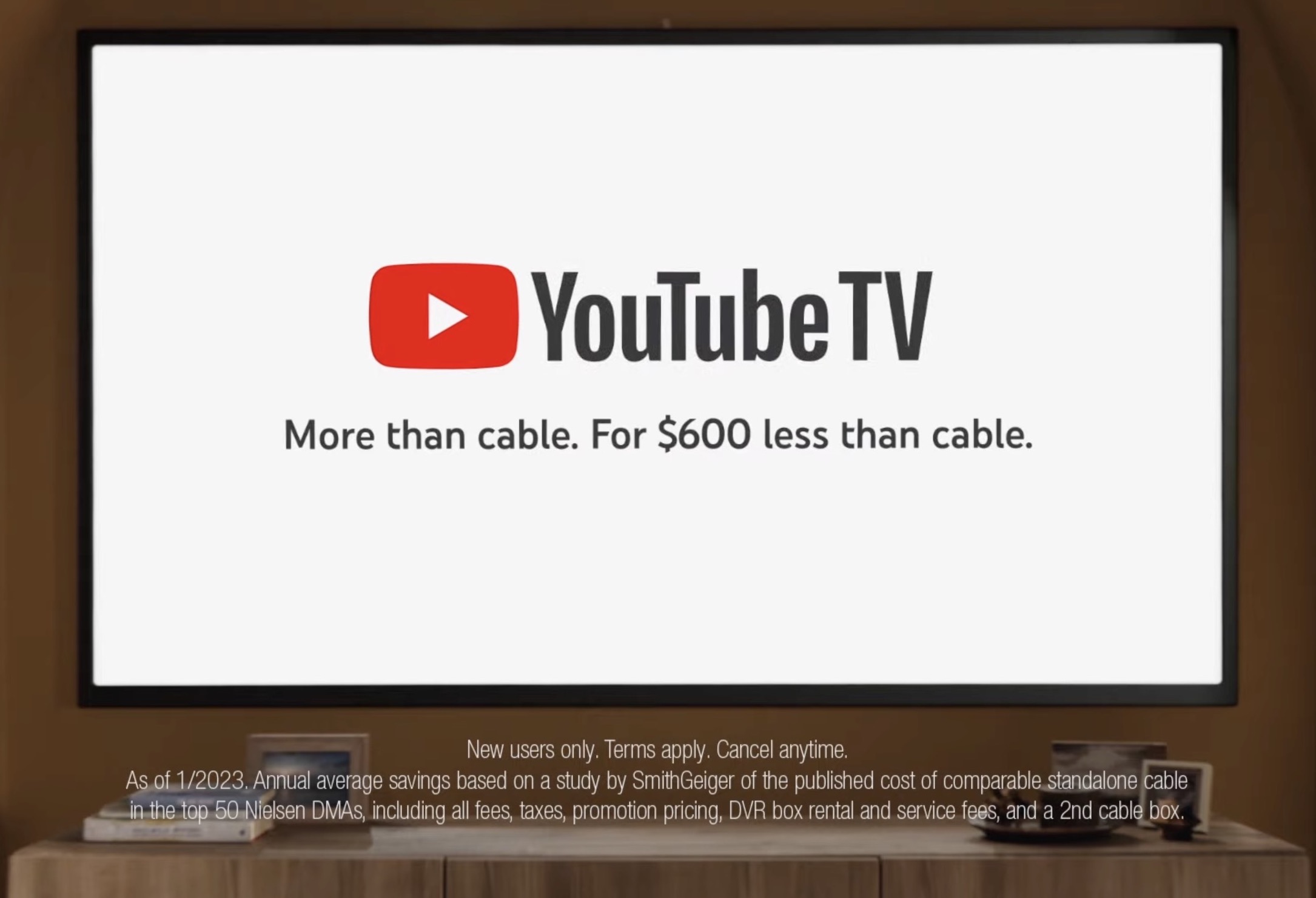
- Cost Savings: Traditional cable bills, especially with promotional rates expiring, can easily climb to $100-$200+ per month when factoring in equipment rental fees, regional sports fees, broadcast TV fees, and bundles with internet. YouTube TV’s base price, even with a few add-ons, typically remains below this threshold.
- Flexibility: Cable contracts often lock consumers into long-term agreements with early termination fees. YouTube TV offers month-to-month subscriptions, allowing for easy cancellation or pauses, providing unparalleled financial flexibility.
- Hidden Fees: Cable providers are notorious for an array of hidden fees (box rentals, installation, broadcast surcharges, regional sports fees). YouTube TV’s pricing is generally more transparent, with taxes being the primary variable add-on to the advertised price.
- Features: YouTube TV’s unlimited cloud DVR and multiple simultaneous streams often surpass the basic offerings of many cable packages without additional cost for premium DVR services or extra boxes.
From a pure financial standpoint, YouTube TV often presents a more economically advantageous and transparent alternative to traditional cable, especially for those who want a comprehensive channel lineup without the associated contractual burdens and complex billing.
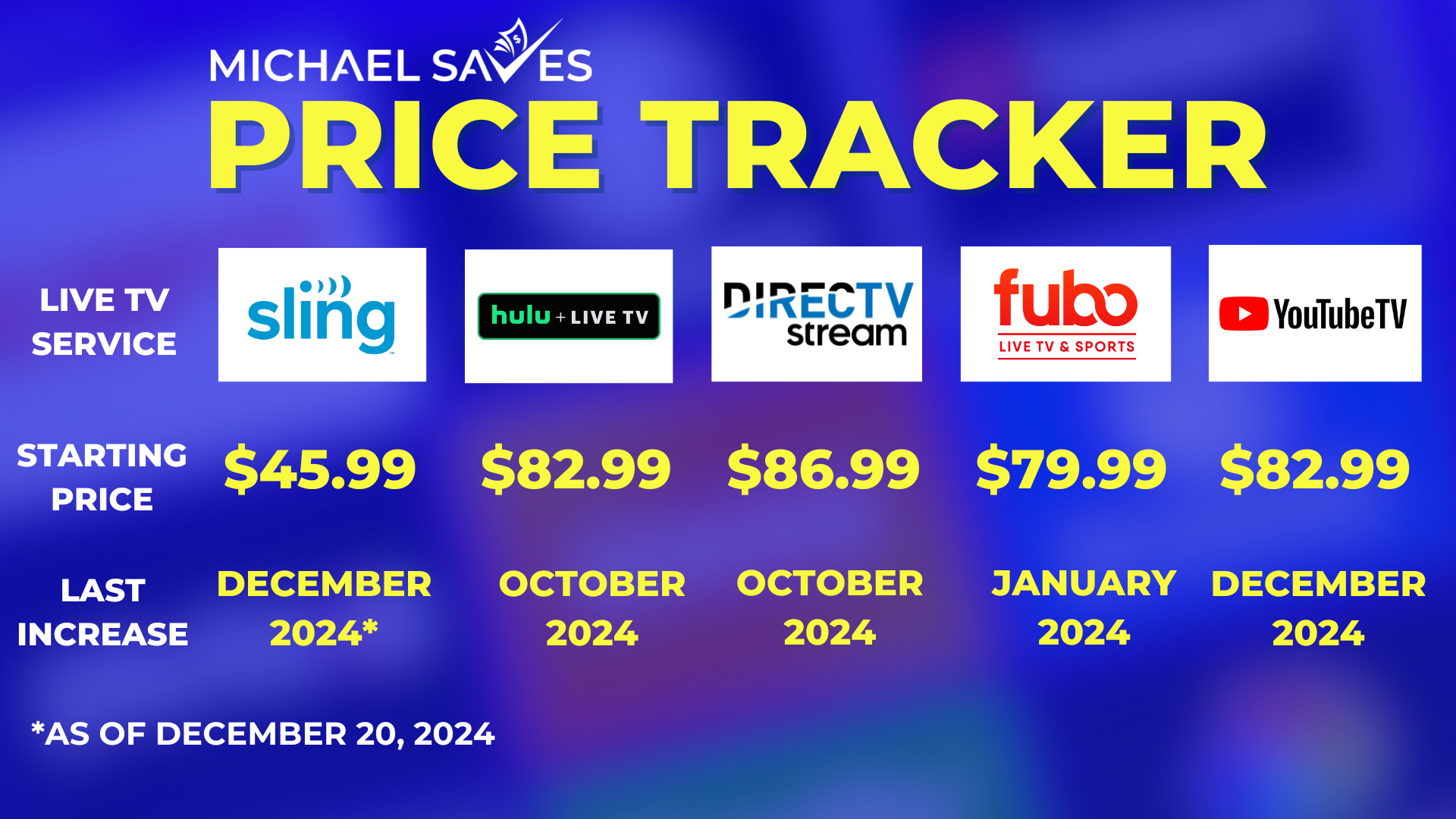
How YouTube TV Stacks Up Against Other Live TV Streaming Services (Sling TV, Hulu + Live TV, FuboTV)
The live TV streaming market is competitive, with several services vying for your entertainment budget. Each has its own pricing structure, channel lineup, and unique features.
- Sling TV: Known for its lower entry price, Sling TV offers multiple base packages (Orange, Blue, or Orange & Blue combo), starting significantly cheaper than YouTube TV. However, its channel lineup is generally smaller, and features like DVR often require an extra fee or are more limited. For budget-conscious consumers needing a slimmer package, Sling TV might be more financially appealing, but it often requires more add-ons to match YouTube TV’s breadth.
- Hulu + Live TV: Often priced similarly to YouTube TV, Hulu + Live TV bundles its extensive on-demand library (Hulu, Disney+, ESPN+) with live TV channels. This can be a better financial value for those who already subscribe to Hulu’s on-demand content and want to combine it with live TV. The decision here often comes down to content preference and whether the bundle offers more integrated value for your specific household.
- FuboTV: Heavily focused on sports, FuboTV often has a similar or slightly higher base price than YouTube TV, particularly for its higher-tier plans. Its channel lineup is robust, especially for international sports, but may lack some non-sports entertainment channels found on YouTube TV. For dedicated sports fans, the financial investment in FuboTV might make sense, but it may be overkill for others.
When comparing, it’s not just about the absolute dollar amount but the value you derive for that money. Consider the core channels you watch, the sports you follow, the need for unlimited DVR, and the number of concurrent streams required before deciding which service offers the best financial return on investment for your household.
Strategies for Cost-Effective Streaming
To minimize your YouTube TV cost and maximize its financial efficiency, consider these strategies:
- Bundle Wisely: Only add premium channels or add-ons that you genuinely watch regularly. Periodically review your add-ons and cancel those you’re not utilizing.
- Leverage Free Trials: Always use free trials to test services before committing to a monthly payment.
- Cycle Subscriptions: If there are specific shows or sports seasons on a premium add-on that you only watch for a few months a year, subscribe only for those months and then cancel.
- Share Responsibly: If YouTube TV allows multiple user profiles and concurrent streams (as it does), and you live in a multi-person household, maximize these features to ensure everyone gets value from the single subscription.
- Annual Review: At least once a year, reassess your entire streaming budget. Are you still getting value from YouTube TV at its current price? Are there cheaper alternatives that now meet your needs? This proactive financial review can prevent unnecessary spending.
Is YouTube TV a Sound Financial Decision for Your Entertainment Budget?
Ultimately, the decision of whether YouTube TV is a wise financial investment rests on a comprehensive evaluation of its cost against the value it delivers for your specific entertainment needs. It’s a question of balancing expenditure with utility and satisfaction.
Assessing the Value Proposition: Channels, DVR, and User Experience
YouTube TV’s value proposition is strong for many cord-cutters. Its comprehensive channel lineup means you likely won’t miss many traditional cable channels. The unlimited cloud DVR is a significant draw, eliminating storage concerns and allowing for ultimate viewing flexibility. The user interface is generally praised for its intuitiveness and integration with the broader YouTube ecosystem.
For a household that watches a wide variety of live TV, appreciates sports, demands robust DVR capabilities, and values a user-friendly experience across multiple devices, the monthly cost of YouTube TV often presents a more flexible and, in many cases, more affordable alternative to traditional cable. It allows for a single, consolidated payment for a broad spectrum of content, simplifying financial tracking compared to managing multiple niche streaming subscriptions.
Long-Term Financial Planning for Streaming Services
When integrating YouTube TV into your personal finance strategy, it’s crucial to consider the long term. While the month-to-month flexibility is excellent, factor in potential price increases and the cumulative cost over a year or several years. Allocate a specific portion of your monthly budget to entertainment and ensure that YouTube TV, along with any other streaming subscriptions, fits comfortably within that allocation.
Consider YouTube TV as a recurring investment in your home entertainment. Like any investment, its worth is measured by the return it provides—in this case, hours of enjoyable, accessible content.
Making an Informed Decision for Your Wallet
Before subscribing to YouTube TV, perform a thorough financial assessment:
- List your must-have channels: Ensure they are included in the base package or a justifiable add-on.
- Calculate your total anticipated cost: Base price + desired add-ons + estimated taxes.
- Compare this to your current cable bill: Factor in all hidden fees and equipment costs.
- Consider indirect costs: Internet speed upgrades, new streaming devices, potential data overages.
- Evaluate the features: Do you truly need unlimited DVR? How many concurrent streams?
- Read reviews: Check user experiences regarding reliability, customer service, and overall satisfaction.
By meticulously analyzing these financial components, you can determine if YouTube TV represents a sound and cost-effective solution for your live TV streaming needs, allowing you to cut the cord without cutting corners on your budget.
aViewFromTheCave is a participant in the Amazon Services LLC Associates Program, an affiliate advertising program designed to provide a means for sites to earn advertising fees by advertising and linking to Amazon.com. Amazon, the Amazon logo, AmazonSupply, and the AmazonSupply logo are trademarks of Amazon.com, Inc. or its affiliates. As an Amazon Associate we earn affiliate commissions from qualifying purchases.