
In an increasingly fragmented entertainment landscape, understanding the financial implications of our digital subscriptions is paramount. YouTube TV has emerged as a significant player in the live TV streaming market, positioning itself as a compelling alternative to traditional cable. But for many consumers, the primary question isn’t about its channel lineup or user interface, but rather, “How much does YouTube TV truly cost?” This article delves deep into the financial aspects of YouTube TV, dissecting its pricing structure, hidden fees, value proposition, and strategies for budgeting, ensuring you make an informed decision for your entertainment investment. We’ll explore the economic realities of cord-cutting with YouTube TV, offering an insightful perspective strictly from a personal finance and investment standpoint.

Unpacking the Core Subscription Cost
The journey to understanding YouTube TV’s financial commitment begins with its foundational subscription. Unlike the bewildering array of packages offered by cable providers, YouTube TV maintains a relatively straightforward core offering, though its price point has seen adjustments over time.
The Standard Plan: What’s Included for the Price
As of late 2023/early 2024, the standard YouTube TV base plan typically hovers around $72.99 per month. This single price point provides access to over 100 channels, encompassing a broad spectrum of live sports, news, entertainment, and local channels. From a financial perspective, this base package is designed to replace a significant portion, if not all, of a traditional cable subscription. Key inclusions that contribute to its financial value are:
- Extensive Channel Lineup: Access to major networks (ABC, CBS, FOX, NBC), popular cable channels (ESPN, TNT, CNN, HGTV, FX, etc.), and a growing selection of regional sports networks, which can be a significant cost driver in cable packages.
- Unlimited Cloud DVR: This feature is a substantial financial perk. Unlike some competitors or traditional cable DVRs that might limit recording hours or charge extra for expanded storage, YouTube TV offers unlimited cloud DVR storage, keeping recordings for nine months. This eliminates the need for expensive physical DVR equipment and the associated monthly rental fees.
- Multiple Streams and Family Sharing: The base plan allows up to three simultaneous streams and can be shared with up to six household accounts, each with its own personal library and recommendations. This multi-user functionality significantly enhances its cost-effectiveness for families or shared living arrangements, effectively lowering the per-person cost when utilized fully.
The value proposition here is clear: for a single monthly fee, subscribers gain access to a comprehensive live TV experience with robust DVR capabilities and multi-user support, all without the long-term contracts, installation fees, or equipment rental charges typical of cable.
Understanding Regional Pricing Variations
While the base price is largely consistent across the United States, subtle financial nuances can arise due to regional variations, primarily concerning local channel availability and regional sports networks (RSNs). In some markets, the inclusion or exclusion of certain RSNs might subtly impact the perceived financial value for sports enthusiasts. Additionally, local taxes and regulatory fees can add a few dollars to the monthly bill, a common factor across all streaming services, and one that consumers should factor into their budget when calculating the “true” monthly cost. It’s crucial for prospective subscribers to input their zip code on the YouTube TV website to confirm exact channel lineups and the final taxed price for their specific area. This due diligence ensures no financial surprises.
Initial Free Trials and Promotional Offers
For the financially astute consumer, leveraging free trials and promotional offers is a key strategy. YouTube TV frequently offers a free trial period, often ranging from 7 to 14 days, allowing potential subscribers to evaluate the service without any financial commitment. Beyond trials, new subscribers might encounter introductory promotions, such as discounted rates for the first few months (e.g., $10-$20 off the standard monthly fee for 1-3 months). While these are temporary savings, they can significantly reduce the initial financial outlay and provide a buffer as users adjust to the new service. Tracking these promotions can represent a smart entry point, effectively lowering the initial investment in cord-cutting.
Beyond the Base: Exploring Add-ons and Extra Fees
While YouTube TV’s base package is comprehensive, its modular nature allows subscribers to customize their experience with various add-ons, each carrying its own additional cost. Understanding these optional expenses is vital for a complete financial picture.
Premium Channels and Niche Bundles
For those seeking content beyond the standard lineup, YouTube TV offers an array of premium add-ons and niche bundles. These function similarly to à la carte channel subscriptions on traditional cable, but with greater flexibility. Popular examples include:
- HBO Max (now Max): A significant add-on for movie and prestige TV show enthusiasts, typically costing around $15.99/month.
- Showtime, Starz, MGM+, Cinemax: Each available for an additional monthly fee, usually ranging from $5 to $11.
- Sports Plus: A bundle for avid sports fans, adding channels like NFL RedZone, FOX Soccer Plus, and Billiard TV, often priced around $10.99/month.
- Spanish Plus: A bundle catering to Spanish-speaking households, offering channels like CNN en Español, ESPN Deportes, and Fox Deportes, typically around $14.99/month.
From a financial perspective, these add-ons can quickly escalate the total monthly bill. A subscriber opting for the base plan plus Max and the Sports Plus bundle could easily see their monthly expenditure rise from $72.99 to over $100. Consumers should carefully evaluate if the content offered by these add-ons justifies the additional financial outlay, weighing it against the possibility of subscribing to these services independently or accessing similar content through other means. The key is to avoid “subscription creep,” where numerous small additions cumulatively create a substantial, perhaps unnecessary, financial burden.
Enhanced Features: 4K Plus and Unlimited Streams
YouTube TV also offers specific feature enhancements for an extra cost, most notably the “4K Plus” add-on. This premium feature typically costs an additional $9.99 per month, though promotional pricing may apply for new subscribers. From a financial viewpoint, the value of 4K Plus is highly dependent on individual usage and equipment. It includes:
- 4K Streaming: Access to available content in 4K resolution (e.g., select sports events, on-demand content). This requires a 4K compatible TV and a robust internet connection, representing an implicit financial investment in hardware and bandwidth.
- Unlimited Simultaneous Streams at Home: While the base plan allows three concurrent streams, 4K Plus removes this limitation when streaming within your home network.
- Offline Downloads: The ability to download recordings to mobile devices for offline viewing.
For households with multiple users concurrently streaming and 4K-ready equipment, the $9.99 might be a justifiable expense for enhanced convenience and quality. However, for those without 4K TVs or who rarely exceed three simultaneous streams, this add-on represents an unnecessary financial drain. Savvy financial planning dictates assessing whether the marginal utility provided by 4K Plus outweighs its recurring cost.
The Hidden Costs: Internet Data and Device Requirements
While YouTube TV eliminates cable box rental fees, it introduces other implicit financial considerations. The most significant of these is the internet service provider (ISP) bill. Streaming live TV in high definition or 4K consumes considerable bandwidth. A stable, high-speed internet connection is non-negotiable for a seamless YouTube TV experience. Depending on your current internet plan, you might need to upgrade to a faster, potentially more expensive tier to avoid buffering and quality degradation. This upgrade, though not directly billed by YouTube TV, is a necessary ancillary expense of cord-cutting that must be factored into the overall financial assessment.
Furthermore, while YouTube TV is widely compatible, users need a streaming device (smart TV, Roku, Apple TV, Chromecast, gaming console, etc.). While many households already own these, acquiring a new one represents an initial financial outlay. The good news is these are one-time costs, often paid off quickly by the savings from foregoing cable box rental fees. Nevertheless, they are part of the true financial picture of setting up YouTube TV.
Value Proposition: Is YouTube TV Worth the Investment?
Determining whether YouTube TV represents a sound financial investment involves more than just looking at its monthly price tag. It requires a holistic assessment of its value proposition against alternatives and a careful consideration of long-term savings.
Cost-Benefit Analysis Against Traditional Cable
For many, the primary financial incentive for switching to YouTube TV is the desire to “cut the cord” from traditional cable providers. A typical cable bill, especially with a comprehensive channel lineup and equipment rentals, can easily range from $100 to $200+ per month. When comparing this to YouTube TV’s base price of around $73, the potential monthly savings are substantial, often ranging from $30 to over $100. Over a year, these savings can amount to hundreds, if not over a thousand, dollars.
Beyond the raw numbers, the financial benefits extend to flexibility. Cable typically involves long-term contracts, installation fees, and penalties for early termination. YouTube TV, like most streaming services, operates on a month-to-month basis, allowing subscribers to cancel or pause their subscription at any time without penalty. This financial agility is a significant advantage, particularly in times of budget constraints or when seasonal viewing habits change. The absence of equipment rental fees also contributes directly to monthly savings. From an investment perspective, this shift offers greater control over entertainment spending and eliminates costly lock-ins.
Comparing YouTube TV’s Price-to-Feature Ratio with Competitors
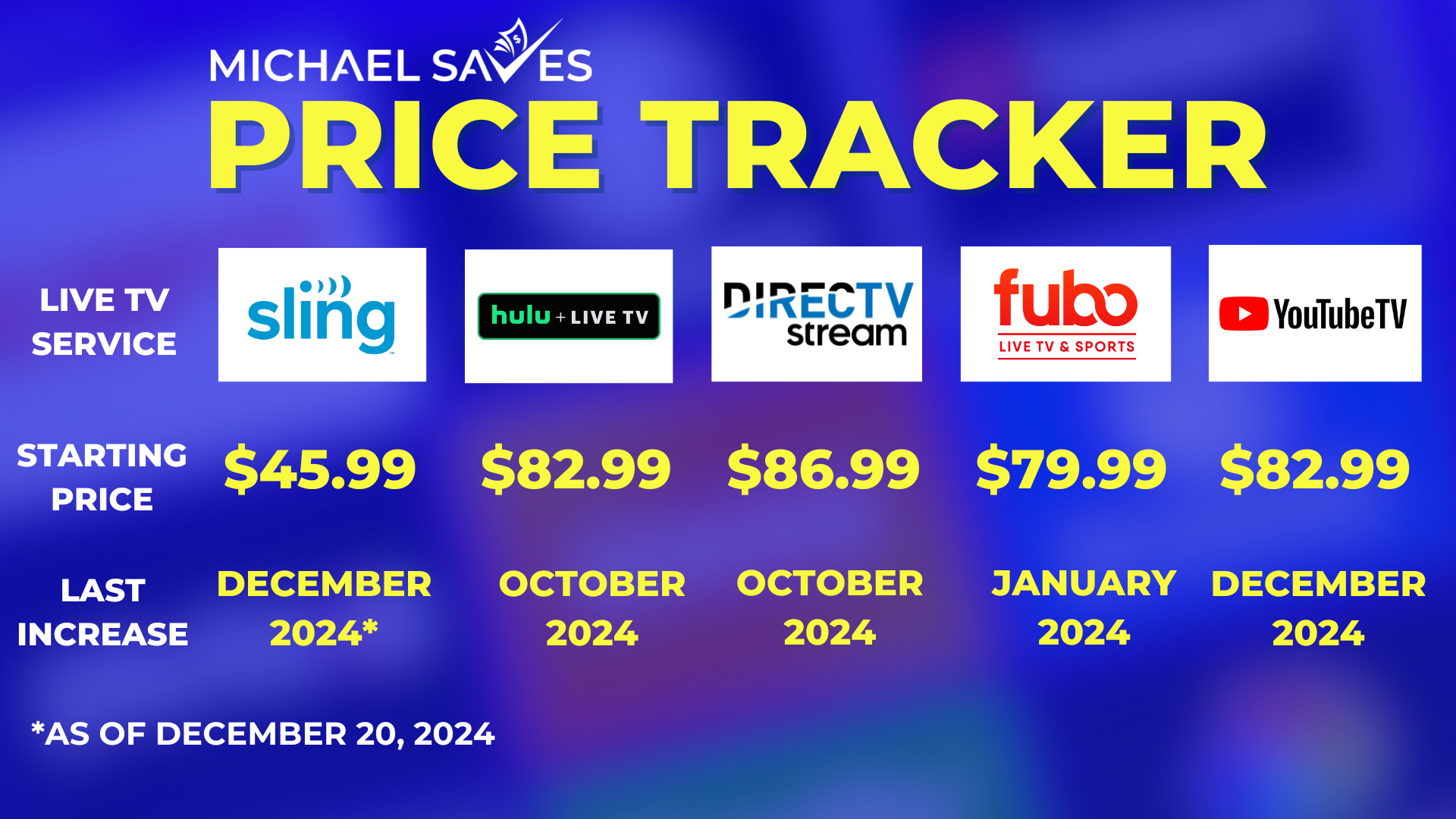
YouTube TV operates in a competitive market, facing rivals like Hulu + Live TV, Sling TV, and FuboTV. A shrewd financial decision requires comparing its price-to-feature ratio against these alternatives:
- Hulu + Live TV: Often priced similarly or slightly higher than YouTube TV (e.g., $76.99 to $89.99/month, depending on ad-free vs. ad-supported base Hulu), it bundles a large on-demand library and sometimes includes Disney+ and ESPN+. While its channel lineup is competitive, its DVR limits might be less generous than YouTube TV’s unlimited option in some tiers, potentially increasing costs for extended storage.
- Sling TV: Known for its lower entry price points (Sling Orange/Blue starting around $40-$55/month), it offers a more à la carte model. While cheaper, a comparable channel lineup to YouTube TV would require subscribing to multiple Sling packages and add-ons, potentially pushing its price closer to or even exceeding YouTube TV’s while offering fewer channels overall. Its DVR is also typically limited, incurring additional cost for upgrades.
- FuboTV: Heavily focused on sports, FuboTV’s base plans are often priced similarly to YouTube TV (e.g., $75-$85/month). It boasts an impressive sports lineup but might lack some general entertainment channels found on YouTube TV. Its unlimited DVR is comparable, but the channel mix might not offer the same financial value for non-sports households.
From a financial lens, YouTube TV often strikes a robust balance. While not always the cheapest, its comprehensive channel list, unlimited cloud DVR, and generous multi-stream/family sharing policy often provide superior “bang for your buck” compared to competitors when aiming for a full cable replacement experience. The clarity of its single base plan, compared to the tiered complexities of some rivals, also simplifies financial forecasting.
Long-Term Savings and Cord-Cutting Economics
The economics of cord-cutting extend beyond immediate monthly savings. Over time, these savings accumulate into substantial sums that can be redirected towards other financial goals—investing, debt reduction, or a savings fund. Consider a household saving $70 per month by switching from cable to YouTube TV. Over five years, that’s $4,200. This long-term perspective highlights the investment potential of smart entertainment choices.
Moreover, the psychological financial benefit of a transparent, no-contract service cannot be overstated. The absence of annual price hikes, hidden fees, and frustrating negotiations with cable companies contributes to a more predictable and less stressful financial management experience. This financial clarity empowers consumers, allowing them to adjust their spending as their economic circumstances or entertainment needs evolve, a flexibility rarely afforded by traditional media contracts.
Budgeting for Your Live TV Entertainment
Integrating YouTube TV into your household budget requires a thoughtful approach. Understanding its financial impact and developing strategies to manage costs effectively are key to maximizing its value.
Assessing Your Household’s Entertainment Spending
Before committing to YouTube TV, conduct a thorough audit of your current entertainment expenditures. This includes existing cable bills, other streaming services (Netflix, Hulu, Prime Video), movie rentals, and even out-of-home entertainment. Calculate your total monthly and annual spend. Then, consider how YouTube TV would replace or supplement these. If YouTube TV replaces cable and allows you to cancel other redundant services, the net financial impact could be positive. However, if it’s simply an addition to an already crowded and expensive suite of streaming services, it might represent a growing drain on your discretionary income. Financial discipline begins with accurate self-assessment.
Strategies for Optimizing Your YouTube TV Subscription
Once subscribed, several financial strategies can help keep costs in check:
- Regular Review of Add-ons: Periodically assess if you’re still actively using premium channels or feature add-ons. If a channel like Max hasn’t been watched in months, pause or cancel it. The beauty of streaming is the ability to subscribe and unsubscribe as needed, aligning spending with current viewing habits.
- Seasonal Subscriptions: For sports fans, consider subscribing to Sports Plus only during relevant seasons (e.g., NFL season). This avoids paying for content you won’t use during off-seasons.
- Bundle Alternatives: Instead of subscribing to premium movie channels directly through YouTube TV, check if you already have them bundled with another service (e.g., Max via your internet provider, or Disney+ with Hulu + Live TV if you opted for that package). Avoiding duplicate subscriptions is a fundamental financial efficiency.
- Leverage Family Sharing: Ensure all eligible household members are utilizing the family sharing feature. This spreads the cost among multiple users, effectively reducing the per-person financial burden for a comprehensive live TV experience.
The Financial Impact of Streaming Service Churning
While the flexibility of month-to-month subscriptions is a financial boon, a phenomenon known as “churning” or “subscription hopping” can inadvertently negate some savings. This involves constantly subscribing, canceling, and re-subscribing to various services to catch specific shows or avoid paying full price. While strategic, frequent churning can lead to:
- Missed Promotional Rates: Many introductory offers are for new subscribers only.
- Administrative Overhead: The time spent managing multiple subscriptions.
- Loss of Continuity: Missing content or having to re-establish profiles.
From a financial planning perspective, aim for a stable core of essential services. Use YouTube TV as that anchor, and only strategically add/subtract niche services for short periods when specific content is critical. This balances financial flexibility with the convenience and cost-effectiveness of a consistent streaming portfolio.
Maximizing Your Investment: Getting the Most Value from YouTube TV
Beyond managing the direct costs, extracting maximum value from your YouTube TV subscription means leveraging all its features to enhance your financial position and overall entertainment experience.
Leveraging Family Sharing for Cost Efficiency
As mentioned, YouTube TV allows up to six accounts per household. Financially, this is a massive advantage. If you can split the cost with family members (who reside in the same physical household as per YouTube TV’s terms of service for location verification), the per-person cost drops dramatically. For instance, splitting a $72.99/month bill among three adults effectively brings the cost down to roughly $24.33 per person – an exceptionally low price for such a comprehensive live TV service. This makes YouTube TV an incredibly attractive option for multi-person households looking to optimize their entertainment budget.
Utilizing DVR and On-Demand Libraries to Reduce Other Subscriptions
The unlimited cloud DVR is not just a convenience; it’s a financial asset. By recording shows and movies from your vast channel lineup, you can build your own on-demand library. This reduces the need for additional paid on-demand streaming services for general entertainment content. If a show airs on a channel included in YouTube TV, you can record it and watch it at your leisure, potentially negating the need for a separate subscription that offers that show on-demand. Similarly, YouTube TV itself offers a growing on-demand library derived from its network partners, further consolidating your entertainment options and reducing the temptation for additional paid services.

Monitoring Price Changes and Adjusting Your Budget
The streaming market is dynamic, and prices for services like YouTube TV are subject to change. Historically, YouTube TV has seen several price adjustments. As a financially responsible consumer, it’s essential to:
- Stay Informed: Keep an eye on news regarding streaming service pricing.
- Re-evaluate Annually: Conduct an annual review of your YouTube TV subscription, comparing its current price and features against competitors.
- Adjust Your Budget: If a price increase occurs, proactively adjust your household budget to accommodate it or explore alternative, more cost-effective options if the value proposition no longer aligns with your financial goals.
This proactive approach ensures that your entertainment spending remains optimized and aligned with your broader financial plan.
In conclusion, “how much is YouTube Live TV?” is a question with a multi-faceted answer that extends beyond a simple monthly figure. It encompasses base costs, optional add-ons, implicit expenses like internet upgrades, and a comparative analysis against traditional cable and rival streaming services. By adopting a diligent financial mindset, leveraging features like family sharing and unlimited DVR, and regularly reviewing your subscriptions, YouTube TV can indeed represent a highly valuable and cost-effective investment in your household’s entertainment. It’s a powerful tool in the arsenal of the financially savvy cord-cutter, offering not just content but also significant long-term savings and greater control over your entertainment budget.
aViewFromTheCave is a participant in the Amazon Services LLC Associates Program, an affiliate advertising program designed to provide a means for sites to earn advertising fees by advertising and linking to Amazon.com. Amazon, the Amazon logo, AmazonSupply, and the AmazonSupply logo are trademarks of Amazon.com, Inc. or its affiliates. As an Amazon Associate we earn affiliate commissions from qualifying purchases.