
In an increasingly fragmented entertainment landscape, consumers are constantly evaluating how to get the most content for their money. Among the myriad of streaming options, YouTube TV stands out as a formidable contender in the live TV streaming market, aiming to replace traditional cable subscriptions for many households. However, the fundamental question for any financially savvy individual or family is: “How much does YouTube TV actually cost?” This article delves into the financial intricacies of a YouTube TV subscription, breaking down its pricing structure, examining the costs of add-ons, comparing its value against competitors, and offering strategies for optimizing your investment in this popular streaming service.
Understanding YouTube TV’s Core Pricing Model
At its heart, YouTube TV operates on a straightforward subscription model, designed to offer a comprehensive cable-like experience without the traditional commitments and hidden fees. Understanding this base price is the first step in budgeting for the service.
The Standard Base Plan: What You Get for Your Money
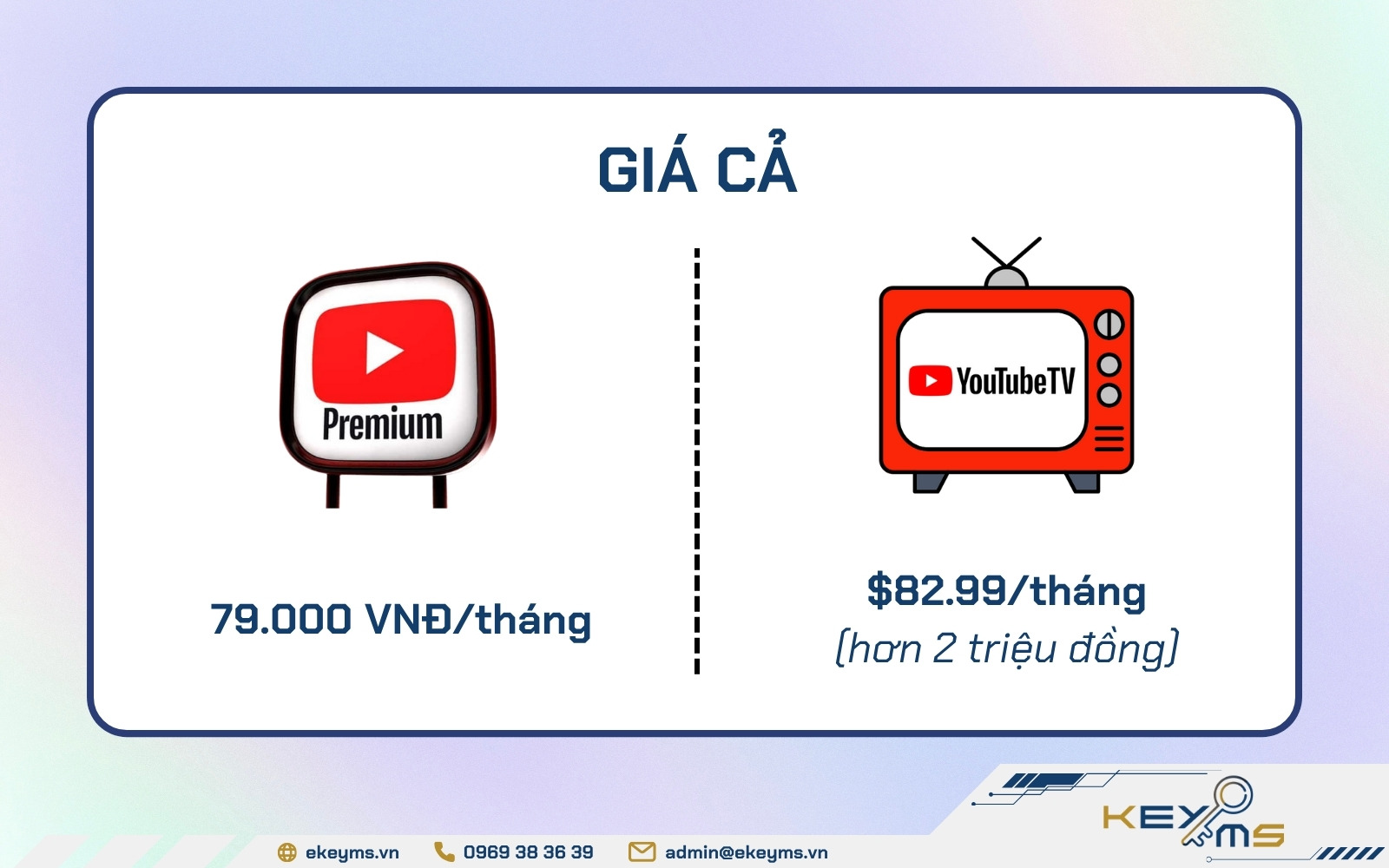
YouTube TV’s primary offering revolves around a single, robust base plan. As of recent updates, the standard monthly subscription typically hovers around $72.99 per month. This price is for the core service and grants subscribers access to over 100 live channels, including major broadcast networks (ABC, CBS, FOX, NBC, CW), popular cable channels (ESPN, TNT, CNN, HGTV, FX, TBS), and a wide array of news, sports, and entertainment options.
Beyond the channel lineup, the base plan also includes several valuable features that contribute to its overall financial value:
- Unlimited Cloud DVR: This is a significant perk, allowing users to record as many shows and movies as they want, with recordings stored for nine months. This feature effectively eliminates the need for expensive physical DVRs or additional cloud storage subscriptions.
- Six Accounts Per Household: A single subscription allows for up to six individual accounts, each with its own personalized library and recommendations. This means that a family or household can share the cost and individualize their viewing experience, drastically increasing the per-user value.
- Three Simultaneous Streams: At any given time, users can watch YouTube TV on up to three different devices simultaneously, a crucial factor for multi-person households.
When assessing the base plan’s cost, it’s essential to view it not just as a monthly fee but as an investment in a broad entertainment package that often outperforms traditional cable in terms of flexibility and included features.
Free Trials and Promotional Offers: Initial Savings Opportunities
For those considering YouTube TV, the service frequently offers a free trial period. Typically ranging from 5 to 14 days, this trial allows prospective subscribers to experience the full features and channel lineup without any upfront financial commitment. This is an invaluable opportunity to determine if the service aligns with your viewing habits and budget before spending a single dollar.
Beyond the free trial, YouTube TV occasionally rolls out promotional offers, especially for new subscribers. These can include discounted rates for the first few months (e.g., $10-$20 off for the first three months) or bundles with other Google services. Keeping an eye on these limited-time financial incentives can lead to significant initial savings, making the transition to live TV streaming more palatable for your wallet. It’s always advisable to check the official YouTube TV website or reputable tech news sites for current promotions.
Regional Pricing Variations and Tax Implications
While the base price is relatively consistent across the United States, it’s crucial to acknowledge that the final monthly bill can vary slightly due to local taxes and regional sports network fees. Depending on your ZIP code, state and local sales taxes may be applied, adding a few extra dollars to your total. Furthermore, in some areas, specific regional sports networks (RSNs) might incur additional surcharges from YouTube TV, although these are typically integrated into the stated base price rather than being an explicit add-on you choose.
Always input your specific ZIP code during the sign-up process or when checking the pricing page to get the most accurate financial estimate for your area. This due diligence ensures there are no surprises when your first bill arrives.
Navigating Add-Ons and Premium Packages
The base plan is comprehensive, but YouTube TV also offers a range of add-ons and premium packages that allow subscribers to customize their viewing experience. While these enhance content options, they also contribute to the overall monthly expenditure, requiring careful budgeting.
Channel-Specific Add-Ons: Tailoring Your Entertainment Budget
YouTube TV allows users to subscribe to various premium channels directly through its platform, centralizing billing and simplifying content access. These are separate monthly fees added to your base subscription. Popular options include:
- Max (formerly HBO Max): Access to HBO’s acclaimed series and Warner Bros. movies.
- Showtime: Premium movies, series, and documentaries.
- Starz: Original series and hit movies.
- Cinemax: A selection of movies and series.
- MGM+ (formerly EPIX): Original series and a curated movie library.
Each of these typically costs an additional $5 to $15 per month, depending on the service. From a financial perspective, subscribing through YouTube TV can be convenient for consolidated billing, but it’s essential to evaluate whether you genuinely watch enough content on these platforms to justify the added expense. For some, subscribing directly to a standalone service might offer more flexibility if they only intend to subscribe for a month or two for a specific show.
4K Plus Add-On: Is the Premium Feature Worth the Investment?
For those with 4K-compatible televisions and a desire for the highest possible picture quality, YouTube TV offers the 4K Plus add-on. This premium feature typically costs an additional $9.99 per month (though promotional pricing might reduce this initially).
The 4K Plus add-on provides several key financial and experiential benefits:
- 4K Streaming: Access to available live and on-demand content in stunning 4K resolution. While 4K content is still somewhat limited, it includes major sporting events, certain shows, and YouTube Originals.
- Offline Downloads: The ability to download recorded DVR content to mobile devices for offline viewing. This is a significant financial benefit for travelers or commuters who want to save on mobile data charges.
- Unlimited Simultaneous Streams at Home: While the base plan allows three simultaneous streams, 4K Plus lifts this restriction for devices connected to your home Wi-Fi network, allowing everyone in the household to stream simultaneously. This dramatically increases the value for larger families or multi-room setups.
Deciding whether the 4K Plus add-on is worth the additional $9.99 depends on your viewing habits, internet speed, the number of simultaneous users in your household, and your display technology. For a single viewer without a 4K TV, it’s likely an unnecessary expense. For a large family with multiple 4K TVs and a desire for offline content, it could be a sound financial decision.
Spanish Plus Add-On: Catering to Specific Language Preferences
Recognizing the diverse linguistic needs of its audience, YouTube TV offers a Spanish Plus add-on. This package typically costs an additional $14.99 per month and expands the channel lineup with over 28 Spanish-language channels, including sports, news, and entertainment options like ESPN Deportes, Fox Deportes, CNN en Español, and Universo.
For households where Spanish-language content is a priority, this add-on represents a targeted financial investment that provides substantial value, often at a lower cost than subscribing to multiple individual Spanish-language streaming services.
Sports Add-Ons and Seasonal Passes: Budgeting for the Game
Sports enthusiasts often find themselves facing the highest entertainment bills. YouTube TV addresses this with dedicated sports add-ons and seasonal passes:
- Sports Plus: This add-on, typically costing around $10.99 per month, adds channels like NFL RedZone, Fox Soccer Plus, GOLTV, and more, catering to diverse sports interests.
- NFL Sunday Ticket: This is a separate, significant annual purchase, distinct from the monthly subscription model. The NFL Sunday Ticket on YouTube TV allows fans to watch out-of-market NFL games every Sunday afternoon. Its price varies annually but typically ranges from $300 to $450 for the full season, with options to bundle with YouTube TV or purchase as a standalone service via YouTube Primetime Channels. This is a substantial financial commitment that needs to be budgeted for separately from your regular monthly streaming expenses.
For dedicated sports fans, these options can be a lifeline, but they significantly impact the overall financial outlay. It’s crucial to weigh the cost against your actual viewing habits and the availability of games on your base plan or local broadcast channels.
YouTube TV’s Value Proposition vs. Traditional Cable and Other Streamers
One of the primary reasons people consider YouTube TV is the promise of savings compared to traditional cable. But how does it truly stack up financially against both legacy providers and other modern streaming solutions?
Cost Comparison with Traditional Cable TV: Realizing Potential Savings
The most compelling argument for YouTube TV, from a financial perspective, often lies in its comparison to traditional cable TV packages.
- Cable TV’s Hidden Costs: Traditional cable bills are notorious for their opacity, often including equipment rental fees (set-top boxes, modems), broadcast TV fees, regional sports fees, installation costs, and activation fees, all of which inflate the advertised price. A typical cable bill, including internet, can easily exceed $150-$200 per month for a comparable channel lineup.
- YouTube TV’s Transparency: YouTube TV’s pricing is generally more transparent. The stated monthly fee, plus any chosen add-ons and local taxes, is usually the final price. There are no equipment rental fees (you use your own streaming devices), no installation fees, and no long-term contracts.
- Long-Term Savings: Over a year, the difference between a $73/month YouTube TV bill and a $150+/month cable bill can amount to annual savings of $900 to $1,500 or more. This represents a substantial financial benefit for cord-cutters.
Evaluating Value Against Competitor Live TV Streaming Services
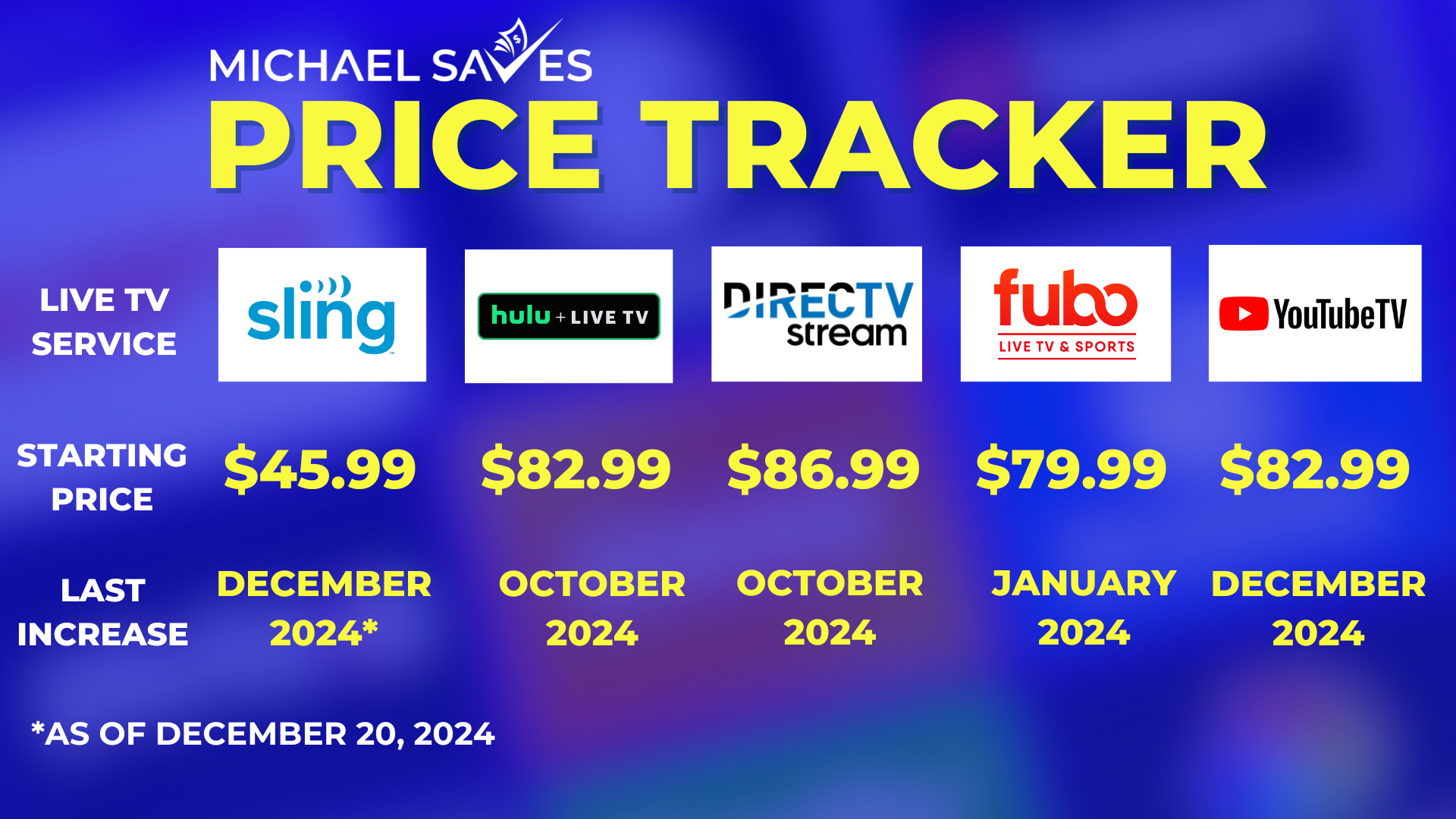
YouTube TV isn’t the only player in the live TV streaming game. Competitors like Hulu + Live TV, Sling TV, and FuboTV offer similar services, each with its own pricing and channel lineup.
- Hulu + Live TV: Often priced similarly to YouTube TV (around $76.99/month, which includes Disney+ and ESPN+), it offers a strong channel lineup and access to Hulu’s extensive on-demand library. The financial decision often comes down to specific channel preferences and whether the bundled Disney/ESPN content adds value for you.
- Sling TV: Known for its more à la carte approach, Sling TV offers lower entry-level prices (e.g., Sling Orange for $40/month or Sling Blue for $40/month, or both for $55/month). However, to achieve a channel lineup comparable to YouTube TV, you often need to combine packages and add-ons, which can bring the price closer, if not above, YouTube TV’s base cost. Sling’s financial advantage lies in its flexibility for those needing a very specific, limited set of channels.
- FuboTV: Heavily focused on sports, FuboTV’s pricing is comparable to YouTube TV, typically starting around $74.99/month. While it offers an impressive array of sports channels, it historically lacks certain major entertainment channels found on YouTube TV (though its offerings are expanding). The financial choice here depends heavily on your sports viewing priorities.
From a financial perspective, YouTube TV often strikes a balance, offering a comprehensive package with a wide range of channels and features at a competitive price point relative to its direct live TV streaming peers, especially when considering its unlimited DVR and robust multi-user support.
The Long-Term Financial Benefits of Cord-Cutting
Beyond the immediate monthly savings, switching to YouTube TV (or similar streaming services) offers long-term financial advantages:
- No Contracts: The absence of long-term contracts means you can cancel or pause your subscription at any time without penalty, allowing for financial flexibility during periods of tight budgets or reduced viewing.
- Scalability: You can easily add or remove premium channels and add-ons month-to-month, tailoring your spending to your current entertainment needs.
- Reduced Debt/Commitment: Avoiding long-term agreements and equipment leases reduces your financial commitments and offers greater freedom to adapt to new services or pricing models as they emerge.
Financial Strategies for Optimizing Your YouTube TV Subscription
Once you’ve decided on YouTube TV, there are several financial strategies you can employ to ensure you’re getting the most value for your money and keeping your entertainment budget in check.
Budgeting for Streaming Services: Fitting YouTube TV into Your Monthly Spend
Integrating YouTube TV into your overall personal finance plan is crucial.
- Allocate a Dedicated Entertainment Budget: Determine a realistic monthly amount you’re comfortable spending on all streaming services (Netflix, Spotify, YouTube TV, etc.).
- Prioritize Needs vs. Wants: Decide which services are essential and which are “nice-to-haves.” YouTube TV, as a cable replacement, often falls into the essential category for many, but its add-ons might be negotiable.
- Track Your Spending: Regularly review your bank statements or use budgeting apps to monitor your actual streaming expenditures. This helps prevent “subscription creep” where multiple small fees add up to a significant sum.
Sharing Costs: Maximizing Value from Multiple Streams
YouTube TV’s feature allowing up to six individual accounts and three simultaneous streams is a significant financial advantage that can be leveraged responsibly.
- Household Sharing: For families or housemates living under the same roof, sharing the cost of a single YouTube TV subscription makes excellent financial sense. If six people contribute, the per-person cost becomes incredibly low.
- Utilize Individual Accounts: Encourage each family member to create their own profile to personalize their DVR and recommendations, enhancing their viewing experience without additional cost.
It’s important to note that YouTube TV’s terms of service generally limit sharing to members of the same household. While some services are more lenient, adhering to these terms ensures the long-term sustainability and fairness of the pricing model.
When to Pause or Cancel: Managing Subscription Costs During Lulls
One of the most powerful financial tools YouTube TV offers is the flexibility to pause or cancel your subscription at any time without penalty.
- Seasonal Viewing: If your primary use of YouTube TV is tied to a specific season (e.g., for football season), consider pausing your subscription during the off-season. You can easily restart it when the season begins again, saving months of fees.
- Vacations or Extended Absences: If you’re going on a long vacation or will be away from home for an extended period, pausing your subscription can lead to direct financial savings.
- Content Cycles: If you’ve caught up on all your favorite shows or are in a viewing lull, pausing or temporarily canceling can be a smart move until new content arrives. Your DVR recordings will remain for nine months, and your preferences will be saved for when you return.
This “on-demand” subscription management is a stark contrast to traditional cable contracts and is a key factor in maximizing the financial efficiency of YouTube TV.
Leveraging Free Content and Alternative Viewing Options
Even with a YouTube TV subscription, smart financial management involves exploring free alternatives where possible.
- YouTube’s Free Tier: Don’t forget the vast amount of free content available on the core YouTube platform. Many creators, news outlets, and even some broadcasters offer free content that can supplement your paid subscription.
- Over-the-Air (OTA) Antennas: For truly local channels (ABC, CBS, FOX, NBC, PBS), a one-time investment in a good OTA antenna can provide reliable, free access to these networks, potentially allowing you to choose a leaner streaming package if YouTube TV’s full lineup isn’t essential for you.
- Free Ad-Supported Streaming TV (FAST) Channels: Services like Pluto TV, Tubi, and Peacock (free tier) offer thousands of hours of free movies and TV shows, which can fill gaps in your YouTube TV lineup or provide entertainment during a paused subscription, further optimizing your overall entertainment budget.
Making an Informed Financial Decision: Is YouTube TV Right for Your Wallet?
Ultimately, the decision to subscribe to YouTube TV, and how much you’re willing to spend on it, boils down to a personal financial assessment.
Assessing Your Viewing Habits and “Must-Have” Channels
Before committing, take stock of your household’s viewing priorities:
- Which channels are absolutely essential? Make a list of your non-negotiable channels (e.g., specific sports networks, news channels, or entertainment hubs).
- How much live TV do you actually watch? If you primarily watch on-demand content, a bundle of standalone streaming services (Netflix, Max, Hulu on-demand) might be a more cost-effective option than a live TV service.
- Are the DVR and multi-user features critical? For multi-person households, these features significantly enhance value.
Calculating Your Potential Monthly and Annual Savings
Perform a direct comparison:
- Current Cable/Satellite Bill: Tally up your total monthly cost, including all fees and equipment rentals.
- YouTube TV Cost: Calculate YouTube TV’s base price + any essential add-ons + estimated local taxes.
- Compare: Subtract the YouTube TV cost from your current provider’s cost. Multiply by 12 to see your potential annual savings. This tangible number is often the most persuasive financial argument.
Beyond the Price Tag: Considering the Intangible Financial Value
While dollars and cents are important, consider the broader financial and lifestyle value:
- Convenience and Flexibility: The ability to stream anywhere, on multiple devices, without contracts, offers immense value in terms of modern lifestyle convenience.
- Future-Proofing: Investing in a streaming service like YouTube TV positions you within the evolving entertainment landscape, which increasingly favors digital delivery over traditional cable.
- Reduced Stress: For many, the simplicity of one bill, no hidden fees, and easy cancellation reduces the financial stress often associated with traditional pay TV providers.
In conclusion, YouTube TV offers a powerful, feature-rich live TV streaming experience that can be a financially sound alternative to traditional cable. By understanding its base pricing, carefully selecting add-ons, comparing it strategically to other services, and employing smart financial management techniques like budgeting and pausing, consumers can effectively control their entertainment spending while enjoying a vast array of content. The answer to “how much is YouTube TV?” isn’t just a number; it’s a dynamic equation that, when managed wisely, can lead to significant financial benefits for your household.
aViewFromTheCave is a participant in the Amazon Services LLC Associates Program, an affiliate advertising program designed to provide a means for sites to earn advertising fees by advertising and linking to Amazon.com. Amazon, the Amazon logo, AmazonSupply, and the AmazonSupply logo are trademarks of Amazon.com, Inc. or its affiliates. As an Amazon Associate we earn affiliate commissions from qualifying purchases.