
In an era where automotive technology continually evolves to make driving safer and more convenient, the rear view camera has transitioned from a luxury feature to a near-essential component. Whether you’re navigating a crowded parking lot, backing out of a tight driveway, or simply want an extra layer of awareness behind your vehicle, a well-installed rear view camera system offers unparalleled benefits. While professional installation is always an option, the truth is that with a little technical know-how, the right tools, and a comprehensive guide, installing a rear view camera yourself is a rewarding and surprisingly achievable DIY project.
This guide, tailored for tech enthusiasts and practical problem-solvers alike, will walk you through every step of the process. We’ll delve into the necessary preparations, the step-by-step installation, and crucial post-installation checks, ensuring you achieve a professional-grade setup without the professional price tag. Get ready to enhance your driving experience, boost your vehicle’s tech credentials, and gain a newfound confidence behind the wheel, all while understanding the technological underpinnings of this vital upgrade.
Why a Rear View Camera is a Modern Driving Essential
The value of a rear view camera extends far beyond mere convenience; it’s a fundamental safety enhancement for any vehicle. As automotive design trends lean towards larger blind spots and higher rear decks, our ability to accurately perceive what’s directly behind us has diminished. A rear view camera fills this critical gap, providing a clear, real-time visual feed that significantly reduces the risk of accidents.
Beyond Just Parking: Safety and Awareness
The most obvious benefit of a rear view camera is assisting with parking maneuvers. Parallel parking becomes less daunting, and backing into a tight spot is transformed from a stressful guessing game into a precise, confident action. However, its utility far surpasses parking assistance. Imagine the peace of mind knowing you can see children, pets, or small objects that might be in your vehicle’s blind spot before backing up. The National Highway Traffic Safety Administration (NHTSA) even mandates rear visibility technology in all new vehicles, underscoring its profound impact on preventing tragic “backover” accidents. This technology effectively broadens your field of vision, making you more aware of your surroundings and thus a safer driver for everyone on the road and in your immediate vicinity.
Furthermore, some advanced rear view camera systems offer additional features like dynamic parking lines that curve with your steering wheel, grid overlays for distance estimation, and even night vision capabilities for improved visibility in low-light conditions. These technological enhancements not only make driving easier but also contribute significantly to overall road safety, making the investment in a quality system a wise decision for any vehicle owner. It’s a simple, yet powerful, technological upgrade that brings immediate and tangible benefits to your daily commute and peace of mind.
The Cost-Benefit of DIY Installation
One of the most compelling reasons to undertake a DIY rear view camera installation is the significant cost savings. Professional installation services can range from $100 to $500 or even more, depending on the vehicle type, the complexity of the system, and the hourly rates of the installer. By choosing the DIY route, you’re essentially paying only for the camera kit itself and any minor tools you might need to acquire, which you can then keep for future projects. This immediate financial benefit makes an already valuable safety upgrade even more accessible.
Beyond the monetary savings, there’s also the satisfaction of a job well done. Successfully integrating new technology into your vehicle with your own hands offers a sense of accomplishment and a deeper understanding of your car’s electrical and mechanical systems. It’s an empowering experience that aligns perfectly with the “Tech” and “Money” aspects of our website’s focus. You’re not just saving money; you’re investing in your own skills, expanding your technical knowledge, and taking control of your vehicle’s enhancements. Moreover, should any minor issues arise in the future, your familiarity with the installation process will make troubleshooting much simpler, potentially saving you more money on diagnostic fees.
Pre-Installation Checklist: Choosing Your System & Preparing Your Workspace
Before you even think about grabbing a screwdriver, thorough preparation is crucial. This phase involves selecting the right camera system that fits your needs and budget, gathering all the necessary tools and materials, and, most importantly, prioritizing safety. A well-prepared workspace and a clear understanding of your vehicle’s electrical system will make the installation process smoother and more efficient.
Selecting the Right Rear View Camera System
The market is flooded with various rear view camera systems, each offering different features and levels of complexity. Making the right choice is paramount to a successful installation and satisfactory user experience. Consider the following factors:
- Wired vs. Wireless: Wired systems generally offer a more reliable and interference-free signal, but require more extensive routing of cables through your vehicle. Wireless systems are easier to install as they eliminate the need to run long video cables, but can be susceptible to signal interference, especially in congested urban areas. Modern digital wireless systems have largely mitigated these issues, offering a good balance of convenience and reliability.
- Camera Type and Mounting: Cameras come in various forms, often integrated into license plate frames, mounted as small discreet modules near the license plate light, or flush-mounted into the bumper. Consider the aesthetics and durability. Look for cameras with wide-angle lenses (120-170 degrees) for comprehensive coverage, and ensure they are waterproof (IP67 or IP68 rating is ideal) and have good low-light performance. Some even feature adjustable angles, which can be very useful for fine-tuning your view.
- Monitor/Display Options: You’ll need a display to view the camera feed. Many systems come with a dedicated monitor (typically 3.5-7 inches), which can be dashboard-mounted or clip over your existing rear view mirror. Alternatively, if your vehicle has an aftermarket head unit with a video input, you might be able to integrate the camera directly into that display, offering a cleaner, factory-like finish. Ensure the monitor resolution is adequate for a clear image.
- Additional Features: Look for features like parking guide lines (static or dynamic), night vision (infrared LEDs), and wide dynamic range (WDR) for better image quality in varying light conditions. Budget will play a role here, but investing a little more for better image quality and robust features often pays off in the long run. Researching brand reputations and reading user reviews can provide invaluable insights into a product’s real-world performance and reliability, aligning with the “Brand” aspect of informed consumer choices.
Essential Tools and Materials You’ll Need
Having the right tools at hand will save you time and frustration during the installation. Gather these before you start:
- Basic Hand Tools: Screwdrivers (Phillips and flathead), a socket wrench set, wire strippers, crimpers, and possibly a drill with appropriate bits (if drilling holes for camera mounting or wire routing).
- Electrical Supplies: Electrical tape, heat shrink tubing, zip ties, wire connectors (e.g., tap connectors, butt connectors), and possibly a multimeter for testing circuits.
- Trim Removal Tools: Plastic pry tools are invaluable for safely removing interior trim panels without scratching or damaging them. These are relatively inexpensive and a must-have for any automotive DIYer.
- Fishing Wire/Coat Hanger: Useful for routing wires through tight spaces.
- Safety Gear: Safety glasses and gloves.
- Cleaning Supplies: Rubbing alcohol and a clean cloth for preparing mounting surfaces.
- Vehicle-Specific Wiring Diagram: If possible, obtain a wiring diagram for your specific vehicle model. This will be immensely helpful for identifying the correct power sources for your camera system, particularly the reverse light wire. Online forums and service manuals are good resources.
Safety First: Crucial Precautions Before You Begin
Working with automotive electrical systems requires caution. Prioritizing safety will prevent accidents and damage to yourself or your vehicle.
- Disconnect the Battery: Always disconnect the negative terminal of your vehicle’s battery before working on any electrical components. This prevents accidental short circuits, electrical shocks, or damage to your vehicle’s sensitive electronics.
- Read Instructions Thoroughly: Even with this guide, always refer to the specific installation manual provided with your camera kit. Manufacturers often have unique wiring requirements or mounting recommendations.
- Test Connections Before Finalizing: Before buttoning everything up, make temporary connections and test the system to ensure it functions correctly. This saves you the headache of disassembling everything if something isn’t working.
- Work in a Well-Lit, Ventilated Area: Ensure you have ample light and fresh air, especially if you’re working with adhesives or performing any light soldering.
- Protect Your Vehicle’s Interior: Lay down towels or blankets over seats and sensitive surfaces to prevent scratches or dirt during trim removal and wire routing.
The Installation Journey: Step-by-Step Guide to a Seamless Setup
With your system chosen, tools gathered, and safety precautions in place, it’s time to dive into the core of the project: the installation. This section breaks down the process into manageable steps, focusing on precision and a clean, professional finish.
Strategic Camera Mounting: Placement is Key
The optimal placement of your rear view camera is critical for a clear and comprehensive view. Most cameras are designed to be mounted near the license plate.
- Identify the Best Location: For license plate frame cameras, simply replace your existing frame. For discreet cameras, aim for a central position just above the license plate. Ensure the camera’s view is not obstructed by the license plate itself, the bumper, or any other part of the vehicle.
- Test Fit: Temporarily hold the camera in place and check the view from inside the car (if possible, with a temporary monitor connection or by envisioning the angle). Confirm it provides the desired field of vision without obstructions.
- Prepare the Surface: Clean the mounting area thoroughly with rubbing alcohol to ensure good adhesion if using adhesive mounts, or mark drilling points precisely if a more permanent bolt-on solution is required. If drilling is necessary, choose a drill bit slightly larger than the camera’s cable connector, apply rust-proof paint to any bare metal edges to prevent corrosion, and be absolutely sure of what’s behind the panel you’re drilling into.
- Secure the Camera: Mount the camera according to its specific instructions. Ensure it’s firmly attached and angled correctly. A wobbly camera will provide a shaky image.
Masterful Wire Routing: Concealing for a Professional Finish
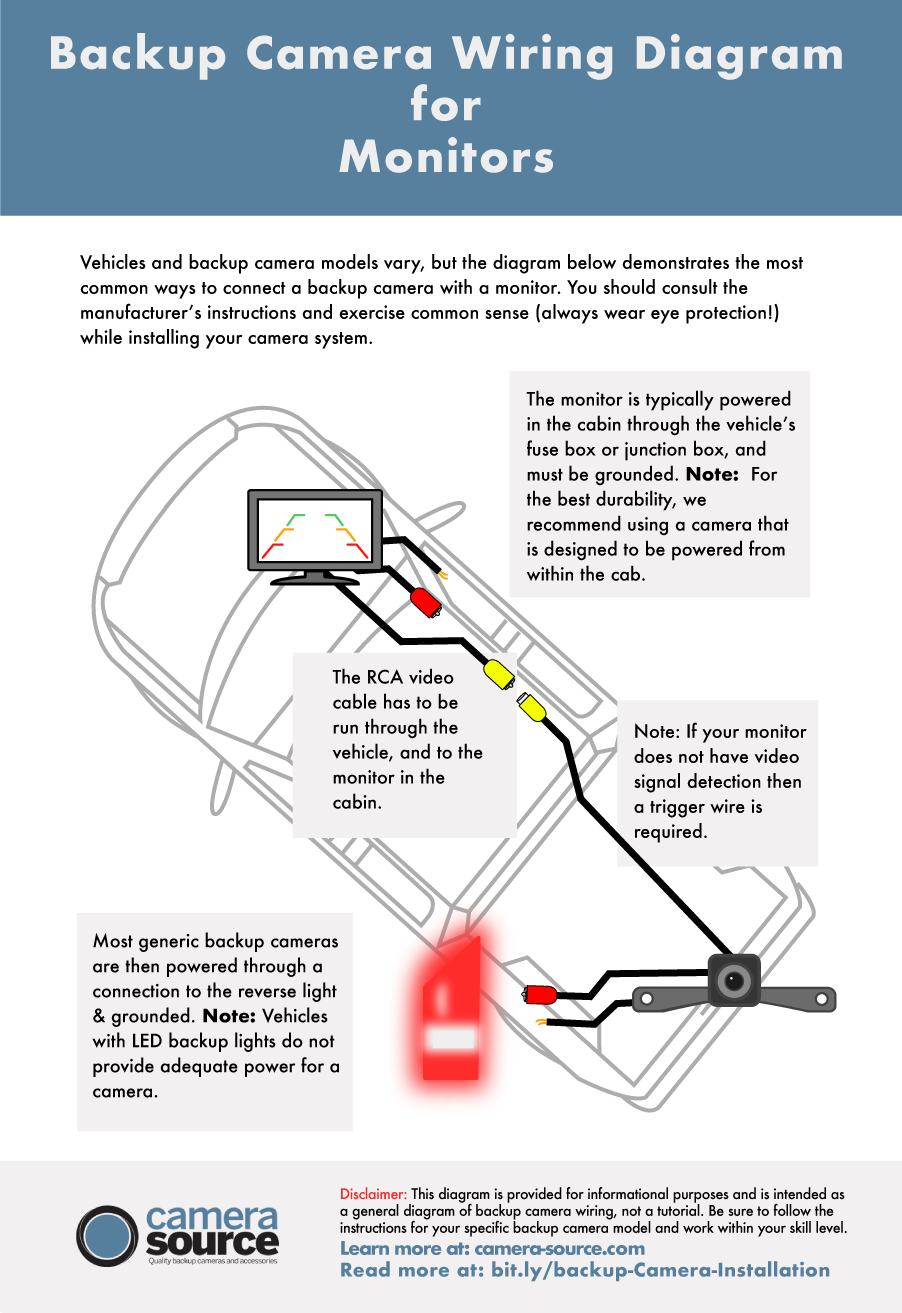
This is often the most time-consuming part of the installation, but crucial for a clean and durable setup. The goal is to route the camera’s power and video cables from the rear of the car to the front, where the monitor or head unit is located, while concealing them neatly.
- Accessing the Vehicle Interior: You’ll typically need to route the camera cable from the outside through a grommet or existing wiring harness opening into the trunk or hatchback area. Many vehicles have rubber grommets near the license plate light housing that can be used or carefully pierced. If you drill a new hole, seal it thoroughly with silicone sealant to prevent water intrusion.
- Running Cables Through the Trunk/Hatchback: Once inside the trunk, route the cable along existing wiring harnesses, securing it with zip ties to prevent rattling and damage.
- Routing Through the Cabin:
- Side Panels: Carefully remove interior trim panels (kick panels, door sills) along one side of the vehicle using your plastic pry tools. Start from the rear and work your way forward.
- Under Carpeting/Headliner: Tuck the cable discreetly under the edge of the carpeting or along the vehicle’s headliner, following existing wiring channels if available. Use fishing wire or a stiff coat hanger to pull the cable through tight spots, such as behind the dashboard. Avoid running cables near hot components or moving parts.
- B-Pillar: Route the cable up the B-pillar (the pillar between the front and rear doors) and along the headliner, or down the B-pillar and under the floor sills, depending on where your monitor is located.
- Reach the Dashboard: Continue routing the cable to the desired location for your monitor or head unit, ensuring there’s enough slack to make the final connections. Take care to avoid interfering with airbags or other safety systems.
Powering Up: Connecting to Your Vehicle’s Electrical System
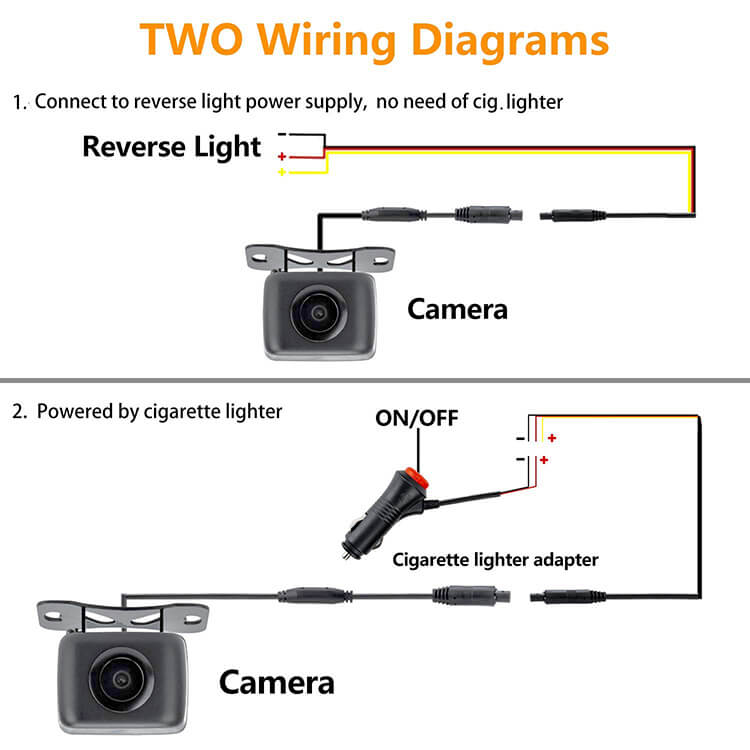
The camera requires power, and the most common and convenient source is the vehicle’s reverse light circuit. This ensures the camera only activates when you put the car in reverse.
- Locate the Reverse Light Wire: In the trunk or tailgate area, carefully expose the wiring harness leading to your tail light assembly. Using a multimeter, identify the positive wire that supplies power to the reverse light (it will show 12V when the ignition is on and the car is in reverse, and 0V otherwise). A wiring diagram for your vehicle is incredibly helpful here.
- Make the Power Connection:
- Tap Connector: The easiest method is to use a T-tap or Scotchlok connector to tap into the reverse light’s positive wire. This creates a secure, non-permanent connection without cutting the original wire.
- Solder/Butt Connector: For a more robust and permanent connection, cut the reverse light wire, strip both ends, and splice in the camera’s positive power wire using a butt connector or by soldering and then insulating with heat shrink tubing.
- Ground Connection: Connect the camera’s ground wire to a bare metal bolt or chassis ground point nearby. Ensure it’s a clean, secure connection.
- Connecting Video Cable: Plug the camera’s video cable (usually an RCA connector) into the video input of your chosen monitor or head unit. If using a dedicated monitor, it will also need a power source, which can often be tapped from an accessory fuse or another constant 12V source that activates with the ignition. Some monitors are designed to power on automatically when they receive a video signal, simplifying their power connection.
Integrating the Monitor: Your New Digital Rear View
The final electrical step is integrating the display unit where you’ll view the camera feed.
- Mount the Monitor: If using a dedicated dashboard monitor, clean the mounting surface with rubbing alcohol and securely attach the monitor mount. Position it where it’s easily visible but doesn’t obstruct your view of the road.
- Connect Power to Monitor (if applicable): If your monitor has a separate power wire, connect it to a suitable power source. For automatic activation when in reverse, you might connect its power wire to the same reverse light circuit you used for the camera, or to a separate “reverse trigger” wire if your head unit has one. This signals the head unit to switch to the camera input.
- Connect Video Input: Plug the RCA video cable from the camera into the corresponding video input on your monitor or head unit. Ensure it’s the correct input, often labeled “Camera In” or “Rear View.”
- Manage Cables: Neatly tuck away any excess wiring for the monitor behind the dashboard or console, securing it with zip ties.
Post-Installation: Testing, Troubleshooting, and Enjoying Your New View
Once all connections are made and everything is theoretically in place, the work isn’t quite finished. Rigorous testing is essential to confirm proper functionality, and understanding how to troubleshoot common issues will save you headaches down the line. Finally, it’s about enjoying the enhanced safety and convenience your new tech upgrade brings.
Calibration and Initial System Testing
Before reassembling all the interior trim panels, perform a comprehensive test of your new rear view camera system.
- Reconnect the Battery: Reconnect the negative terminal of your vehicle’s battery.
- Ignition On, Vehicle in Reverse: Turn your vehicle’s ignition to the “on” position (engine doesn’t necessarily need to be running, but it’s recommended if testing for longer periods). Shift the transmission into reverse.
- Check Display: Observe your monitor or head unit. The camera feed should automatically appear.
- Image Quality: Check for a clear, crisp image. Is it upright? Is the color accurate?
- Field of View: Walk around the back of your car and observe yourself on the screen. Does the camera cover a sufficient area behind the vehicle?
- Parking Lines: If your system has parking lines, verify they are visible and appear to be reasonably accurate (you might need to adjust the camera angle slightly for perfect alignment).
- Test Other Gears: Shift out of reverse. The camera feed should disappear, and your monitor should revert to its previous display (radio, navigation, etc.).
- Final Adjustments: If the image is tilted or the angle isn’t quite right, carefully adjust the camera’s position. Once satisfied, fully secure the camera and begin reinstalling all the interior trim panels you removed earlier. Take your time to ensure all clips and screws are replaced correctly to prevent rattles.
Common Hiccups and How to Solve Them
Even with meticulous installation, sometimes issues arise. Here are some common problems and their solutions:
- No Image/Blank Screen:
- Check Power: Use a multimeter to verify the camera and monitor (if separate) are receiving 12V power when in reverse.
- Check Ground: Ensure all ground connections are secure and making good contact with bare metal.
- Video Cable: Confirm the RCA video cable is securely plugged into both the camera and the monitor/head unit. Try wiggling it gently.
- Reverse Trigger (for head units): If using an aftermarket head unit, ensure the “reverse trigger” wire from the head unit is correctly connected to the vehicle’s reverse light circuit.
- Flickering or Intermittent Image:
- Loose Connections: Recheck all power, ground, and video connections.
- Poor Ground: A weak ground connection can cause flickering. Relocate the ground point if necessary.
- Interference (Wireless Systems): If it’s a wireless system, try repositioning the transmitter/receiver or ensuring they aren’t near other high-frequency electronics. Digital wireless systems are less prone to this.
- Image is Upside Down or Mirrored:
- Many cameras have small wires or dip switches that allow you to flip or mirror the image. Consult your camera’s manual.
- Poor Image Quality (Blurry, Dark, Washed Out):
- Lens Cleanliness: Ensure the camera lens is clean and free of dirt, water spots, or condensation.
- Lighting Conditions: Some budget cameras struggle in very low light or bright sunlight. Consider a camera with better low-light performance or WDR if this is a consistent issue.
- Power Fluctuation: Verify stable 12V power.

Maintaining Your Rear View Camera System
To ensure longevity and consistent performance from your newly installed rear view camera, a little ongoing maintenance goes a long way.
- Keep the Lens Clean: Periodically wipe the camera lens with a soft, damp cloth. Dirt, dust, road grime, and water spots can significantly degrade image quality.
- Check Connections: Every few months, give a quick check to the visible wiring connections, especially if your vehicle frequently encounters rough roads. Ensure nothing has come loose.
- Inspect for Damage: After car washes or extreme weather, quickly inspect the camera housing for any cracks or damage that could compromise its waterproofing.
- Software Updates (for advanced head units): If your camera is integrated with a sophisticated aftermarket head unit, check for any available software or firmware updates that might improve camera performance or add new features.
By successfully installing your own rear view camera, you’ve not only saved money and gained valuable technical skills but also significantly upgraded your vehicle’s safety profile. Enjoy the clear view and the newfound confidence that comes with mastering this essential automotive tech enhancement. Drive safe and smart!
aViewFromTheCave is a participant in the Amazon Services LLC Associates Program, an affiliate advertising program designed to provide a means for sites to earn advertising fees by advertising and linking to Amazon.com. Amazon, the Amazon logo, AmazonSupply, and the AmazonSupply logo are trademarks of Amazon.com, Inc. or its affiliates. As an Amazon Associate we earn affiliate commissions from qualifying purchases.