
Navigating the landscape of personal finance often involves opening new accounts, but equally important, and sometimes more complex, is the process of closing existing ones. Whether you’re consolidating your finances, switching to a different institution, or simply no longer need a particular account, understanding the correct procedure is crucial to avoid unforeseen fees, administrative headaches, or even potential financial security risks. For a major financial institution like Chase, a common question arises: “How do I close a Chase account online?” While the digital age has transformed many banking interactions, the complete online closure of a primary checking or savings account often involves a blend of digital initiation and, at times, traditional verification steps. This guide will meticulously break down the considerations, processes, and best practices for successfully closing your Chase account, focusing on the most efficient and financially sound approaches.

The Strategic Decision to Close Your Chase Account: Why and When?
Before embarking on the practical steps of account closure, it’s prudent to reflect on the reasons driving this decision and to ensure that all preliminary financial groundwork has been laid. A hasty closure can lead to complications with recurring payments, direct deposits, or linked accounts.
Common Motivations for Account Closure
People choose to close bank accounts for a variety of valid financial and personal reasons. Understanding these can help you confirm if closing is indeed the best path forward.
- Switching Banks: Often, individuals find a new bank offering better rates, lower fees, or more convenient services that align better with their evolving financial needs. A seamless transition requires closing the old account after establishing the new one.
- Consolidating Finances: Managing multiple accounts across different institutions can be cumbersome. Consolidating finances into fewer, more manageable accounts can simplify budgeting, tracking expenses, and overall financial oversight.
- Dissatisfaction with Services or Fees: Experiencing persistent issues with customer service, encountering unexpected fees, or finding that Chase’s offerings no longer meet your expectations can be strong motivators for seeking alternatives and closing the account.
- Life Changes and Relocation: Moving to a new state or country might necessitate opening accounts with local branches or international banks, making old accounts less convenient or even obsolete.
- Inactivity or Dormancy: Holding an inactive account can sometimes incur dormancy fees, particularly if the balance falls below a certain threshold. Closing such an account can prevent these unnecessary charges.
Pre-Closure Financial Audit: Essential Considerations
A thorough financial audit is non-negotiable before initiating any account closure. This critical step ensures a smooth transition and prevents financial disruptions.
- Identify and Update Direct Deposits: Ensure all incoming funds, such as salary, government benefits, or investment dividends, are redirected to your new account. Allow ample time for these changes to process before closing the old account.
- Review and Relink Automatic Payments: Compile a comprehensive list of all recurring payments, including utility bills, subscriptions, loan payments, and credit card payments. Update these with your new account information. Missing an automatic payment due to an account closure can lead to late fees and negative impacts on your credit score.
- Check for Outstanding Checks and Pending Transactions: Verify that all checks you’ve written have cleared and that there are no pending transactions that could be rejected after closure. It’s advisable to cease using the account for new transactions well in advance of closure.
- Manage Linked Accounts and External Transfers: If your Chase account is linked to investment platforms, other bank accounts for external transfers, or peer-to-peer payment apps (like PayPal or Venmo), update these connections to prevent service interruptions.
- Consider Safe Deposit Box Contents: If you have a safe deposit box with Chase, you will need to empty its contents and officially terminate the rental agreement separately, as this is typically not tied directly to your checking or savings account closure.
Demystifying Chase’s Account Closure Policies and Online Capabilities
Understanding Chase’s specific policies regarding account closure is paramount. While many aspects of banking have moved online, closing a primary transactional account often requires more stringent verification than simply clicking a button.
General Banking Protocols for Account Closure
Most financial institutions follow similar protocols when it comes to account closures, primarily aimed at protecting both the customer and the bank from fraud or financial oversight.
- Zero Balance Requirement: An account must typically have a zero balance before it can be closed. This means withdrawing all funds or transferring them to another account. Overdrawn accounts cannot be closed until the negative balance is resolved.
- Identity Verification: Banks are required to verify the identity of the account holder requesting closure. This is a critical security measure.
- Confirmation and Documentation: Expect to receive official confirmation that your account has been closed, often in writing. Keep this documentation for your records.
- Associated Products: Be aware that closing one type of account (e.g., checking) does not automatically close others (e.g., savings, credit card, loan) even if they are linked. Each product usually requires a separate closure process.
The Nuance of “Online” for Account Closure with Chase
The term “online” can have different interpretations when it comes to banking services. For Chase, while you can manage many aspects of your account online, complete closure of a checking or savings account may still require more than just a few clicks.
- Online Initiation vs. Full Online Closure: It’s common for banks to allow you to initiate the closure process online, such as sending a secure message or downloading a form. However, a full, end-to-end online closure without any external interaction (phone call, branch visit, mail) is less common for primary accounts due to security and verification requirements. This is particularly true if the account has a remaining balance or outstanding issues.
- Mobile App Limitations: While the Chase mobile app offers extensive functionality for managing your accounts, transferring funds, and paying bills, it typically does not facilitate direct account closure.
- Chase.com Secure Messaging: Your Chase online banking portal often provides a secure messaging system where you can inquire about the closure process or request forms. This can be a good starting point for gathering information specific to your account.
- Required Information for Closure: Regardless of the method, you’ll generally need your account number(s), routing number, personal identification (like your Social Security Number), and possibly identification documents.
Step-by-Step Guide to Initiating Chase Account Closure
With a clear understanding of the ‘why’ and the ‘what,’ let’s delve into the practical ‘how’ of closing your Chase account.
Preparing Your Account for a Smooth Exit
This preparation phase is the most crucial to prevent complications.
- Zero Out Your Balance: Transfer all funds from your Chase account to your new bank account. Ensure the balance is exactly $0.00. If you leave a small amount, it might become subject to inactivity fees or simply held by the bank. If you try to close an account with a positive balance, Chase will typically issue you a check for the remaining funds, which can delay the process.
- Update All Direct Deposits and Automatic Withdrawals: As detailed earlier, confirm that all recurring payments and income streams are rerouted. Give a buffer of at least one to two billing cycles for changes to take effect.
- Confirm No Pending Transactions: Wait until all recent checks or debit card transactions have fully cleared. Check your online banking statement meticulously.
- Download and Save Statements: Before closure, download and save at least 7 years of your bank statements and any other important financial documents. Once the account is closed, accessing these might be difficult or incur fees.
- Cut Up or Destroy Debit Cards and Unused Checks: This is a vital security measure to prevent unauthorized use after the account is closed.
Exploring Chase’s Digital Channels for Closure (Initiation)
While full online closure may not be an option, digital channels are excellent for initiating the process or gathering necessary forms.
-
Secure Message via Chase Online Banking:
- Log into your Chase Online Banking account.
- Navigate to the “Secure Messages” or “Customer Service” section.
- Compose a new message stating your intent to close your account(s) and request information on the exact procedure, including any required forms or steps.
- Specify the account number(s) you wish to close.
- Chase customer service will typically reply within a business day or two with specific instructions tailored to your situation. They may send a secure link to a closure form or advise on the next steps.
-
Chase.com Information Pages:
- Search Chase.com for “close account” to find any official guidelines or FAQs. While these might not offer a direct closure button, they often provide valuable information on the required steps.
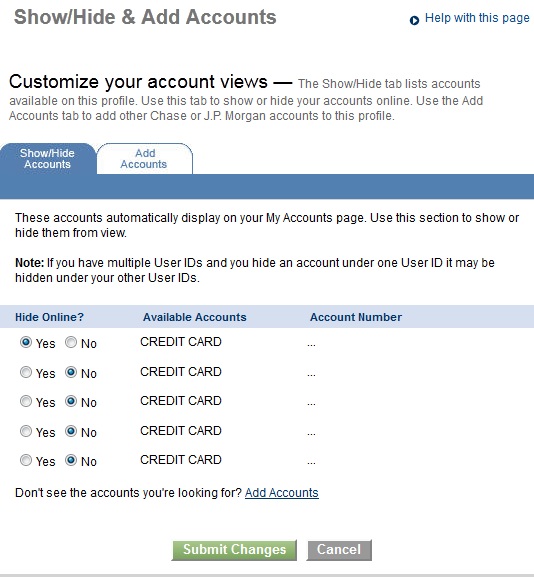
Alternative and More Common Closure Methods (Beyond Pure Online)
Given the limitations of a purely online closure for security reasons, you will likely engage in one of these methods after initial online inquiry.
-
Phone Call: This is often the quickest and most direct method.
- Call Chase customer service (the number is usually on the back of your debit card or on Chase.com under “Contact Us”).
- Be prepared to provide your account number, personal identification information, and answer security questions.
- Clearly state your intention to close the account. The representative can guide you through the process, confirm the zero balance, and initiate the closure. They will often send a written confirmation afterward.
- Pro Tip: Ask for the representative’s name and a confirmation number for your call.
-
In-Person Branch Visit: For those who prefer face-to-face interaction or have complex situations, visiting a branch is a reliable option.
- Locate your nearest Chase branch using the branch locator on Chase.com.
- Bring a valid government-issued photo ID (driver’s license, passport) and your Chase debit card.
- A branch representative can complete the closure process, ensure all funds are properly transferred, and provide immediate confirmation.
-
Mail (Less Common but an Option): While less common today, some banks still allow account closure via mail, particularly if you are unable to visit a branch or call.
- After inquiring online or by phone, you may be directed to download a specific account closure form from Chase.com or have one mailed to you.
- Fill out the form completely, sign it, and potentially have it notarized as required.
- Mail the form along with a formal letter stating your intent to close the account, including your account number and signature, to the address provided by Chase for account closures.
- Crucial: Send the mail via certified mail with a return receipt requested to ensure proof of delivery.
Post-Closure Best Practices and Verification
The process isn’t truly complete until you’ve verified the closure and taken steps to safeguard your financial records.
Confirming Account Closure
It’s imperative to follow up and ensure the account is indeed closed.
- Monitor Your Mail/Email: Chase will typically send a formal letter or email confirming the account’s closure. This document is critical to keep for your records.
- Check Online Banking: Attempt to log into your Chase online banking portal. If the account is closed, it should no longer appear, or you may receive a notification that the account is inactive/closed.
- Wait for a Statement Cycle: After closing, wait for one full statement cycle to pass. If no statement arrives and no activity is shown online, it’s a strong indicator of successful closure.
What to Do with Old Statements and Records
Responsible record-keeping is a cornerstone of good personal finance.
- Retain Digital Copies: Keep the digital copies of statements you downloaded before closure for at least 7 years, or longer if required for tax purposes or specific financial planning needs. Store them securely, perhaps on an encrypted drive or a secure cloud service.
- Shred Physical Documents: Once you’ve confirmed closure and have digital backups, securely shred any physical debit cards, unused checks, and old bank statements to prevent identity theft.
Monitoring Your Financial Standing
Even after closure, vigilance is key.
- Regularly Check Your New Account: Monitor your new bank account for a few months to ensure all direct deposits and automatic payments have successfully transitioned and are processing correctly.
- Review Credit Reports Annually: While closing a checking/savings account doesn’t directly impact your credit score, it’s always good practice to review your credit reports annually from the three major bureaus (Experian, Equifax, TransUnion) to detect any unauthorized activity or errors.
Navigating Potential Challenges and Seeking Support
While often straightforward, closing a bank account can sometimes present unexpected hurdles. Knowing how to address them is crucial.
Common Issues During Account Closure
Anticipating these can help you respond effectively.
- Unexpected Fees: Occasionally, a bank might try to impose a fee for closing an account too soon after opening (if applicable to your account type) or if the account was inactive. Be prepared to politely challenge these if they are not clearly stipulated or seem unfair.
- Balance Discrepancies: Ensure your internal records of the account balance match Chase’s records. Discrepancies need to be resolved before closure.
- Unresolved Transactions: Sometimes a transaction might pend for longer than expected. Ensure all are resolved before proceeding.
- Difficulty Reaching Customer Service: High call volumes can make it challenging to connect with a representative. Try calling at off-peak hours or using the secure message feature.
Contacting Chase Customer Service for Assistance
Chase’s customer service channels are your primary resource for resolving issues.
- Phone Support: The most direct way to resolve complex issues or get immediate answers.
- Secure Messages: Ideal for less urgent inquiries, sending documentation, or getting written responses.
- In-Branch Support: Best for issues requiring in-person verification or detailed consultation.

Legal and Financial Implications
Be aware of broader financial implications.
- Dormant Account Laws: If an account becomes truly dormant and unclaimed, states have “escheatment” laws where funds are turned over to the state’s unclaimed property division. Closing an account properly prevents this.
- Tax Implications: For standard checking and savings accounts, closing typically has no direct tax implications. However, if the account held investments or generated significant interest, ensure you’ve received all necessary tax forms (e.g., 1099-INT) for the year of closure.
In conclusion, while the question “how do I close a Chase account online?” points to a desire for digital convenience, the reality often involves a multi-step process that combines online initiation with crucial offline verification or communication. By meticulously preparing your account, understanding Chase’s policies, utilizing available channels, and diligently following up, you can ensure a smooth, secure, and financially responsible closure of your Chase account. Always prioritize thoroughness and confirmation to safeguard your financial well-being.
aViewFromTheCave is a participant in the Amazon Services LLC Associates Program, an affiliate advertising program designed to provide a means for sites to earn advertising fees by advertising and linking to Amazon.com. Amazon, the Amazon logo, AmazonSupply, and the AmazonSupply logo are trademarks of Amazon.com, Inc. or its affiliates. As an Amazon Associate we earn affiliate commissions from qualifying purchases.