
In an increasingly digitized world, peer-to-peer (P2P) payment applications have become indispensable tools for managing everyday financial transactions. Among the leading innovators in this space is Venmo, a mobile payment service that has revolutionized how individuals send and receive money. Far beyond a simple transaction platform, Venmo embodies a blend of robust financial technology, intuitive user interface design, and social networking elements, making it a fascinating subject for technological exploration. This guide delves into the technical process of acquiring, setting up, and mastering Venmo, providing insights exclusively from a technology-centric perspective. We’ll explore the app’s foundational tech, its security architecture, and the step-by-step technical journey to integrate it into your digital life.

Understanding Venmo: The Technology Powering Social Payments
At its core, Venmo is a sophisticated mobile application designed for secure, real-time financial transactions between individuals. It leverages advanced software infrastructure to facilitate swift money transfers, distinguishing itself not just by its utility but also by its embedded social features. Understanding Venmo from a technological standpoint involves appreciating its architecture, its design for user experience, and the underlying mechanisms that ensure transactional integrity.
The Core Technology Behind P2P Payments
Venmo operates on a client-server architecture, typical of most modern mobile applications. The client-side application, installed on users’ smartphones (iOS and Android), provides the graphical user interface (GUI) and handles local data processing. This app communicates with Venmo’s backend servers, which are responsible for managing user accounts, processing transactions, maintaining balances, and interacting with financial institutions. This communication is secured through encryption protocols, protecting data in transit.
Key technological components include:
- API (Application Programming Interface) Integration: Venmo’s system relies heavily on APIs to connect with banks, credit card processors, and other financial services. These APIs enable the seamless transfer of funds, verification of identities, and adherence to regulatory standards like KYC (Know Your Customer) and AML (Anti-Money Laundering).
- Database Management Systems: Large-scale, secure databases are essential for storing vast amounts of user data, transaction histories, and account balances. These systems are designed for high availability, fault tolerance, and rapid data retrieval to support real-time transactions.
- Cloud Infrastructure: Like many scalable tech companies, Venmo likely utilizes cloud computing services (e.g., AWS, Google Cloud, Azure) to host its servers, databases, and other services. This provides the flexibility to scale operations up or down based on user demand, ensuring consistent performance and reliability.
- Real-time Processing Engines: For instant transfers and notifications, Venmo employs sophisticated real-time processing engines. These systems can process millions of transactions per second, ensuring that payments are reflected almost immediately in users’ balances and notifications are delivered promptly.
Key Features and Technological Advantages
Venmo’s technological edge isn’t just in its backend processing; it also extends to its user-facing features, which are meticulously engineered for convenience and engagement.
- Intuitive User Interface (UI): The app’s design prioritizes ease of use, making complex financial transactions feel simple and accessible. Its minimalist design, clear navigation, and visual cues contribute to a positive user experience, reducing friction in digital payment processes.
- Social Feed Integration: A unique technological differentiator is Venmo’s optional social feed. While financially focused, the app integrates elements akin to social media platforms, allowing users to share payment details (amounts can be hidden) with friends. This feature is enabled by a robust content delivery system and user privacy controls, allowing customization of visibility.
- Multi-Platform Compatibility: Developed for both iOS and Android, Venmo ensures a consistent experience across diverse mobile ecosystems. This requires careful cross-platform development strategies, often utilizing frameworks that allow for efficient code reuse while optimizing for native platform capabilities.
- Notification System: A crucial aspect of real-time payment is the notification system. Venmo’s app leverages push notification technology to instantly inform users of incoming payments, outgoing requests, and other account activities, keeping users constantly updated on their financial status within the app.
The Onboarding Journey: Installing and Setting Up Venmo
Getting Venmo is primarily a process of downloading a mobile application and configuring it for your personal use. This technical setup involves several steps, each designed to integrate the app with your device and secure your financial information.
Downloading the Application
The first step in acquiring Venmo is downloading the official application onto your smartphone. This process is standard for most mobile apps:
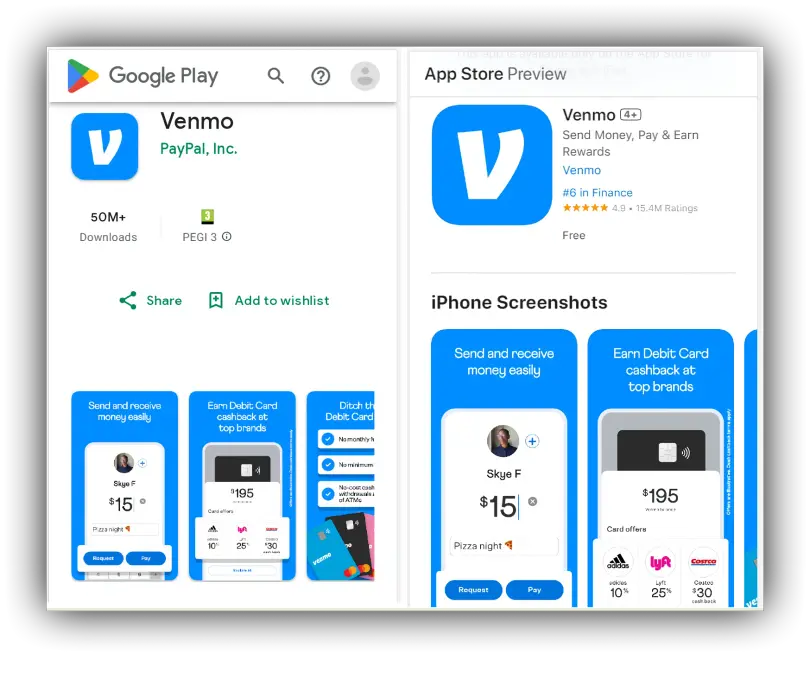
- Accessing App Stores: For iOS users, navigate to the Apple App Store; for Android users, open the Google Play Store. Both are secure, authorized marketplaces for mobile software.
- Searching for Venmo: Use the search function within the app store to find “Venmo.” Ensure you select the official app, typically identified by its blue icon and publisher (Venmo, a PayPal service). Be vigilant against impostor apps that mimic legitimate services.
- Initiating Download and Installation: Tap the “Get” or “Install” button. The app store’s system will then download the application package (APK for Android, IPA for iOS) to your device and automatically proceed with the installation. This process unpacks the app’s executable files and assets, placing them in the appropriate directories on your device.
- Granting Permissions: During or after installation, the app will request certain device permissions (e.g., access to contacts, notifications). These permissions are vital for specific app functionalities. For instance, contact access allows you to easily find friends on Venmo, and notification access ensures you receive payment alerts. Review these requests carefully and grant only those you deem necessary for the app’s intended use.
Crafting Your Digital Identity: Account Creation
Once installed, the next technical step is to create a Venmo account. This establishes your unique digital identity within the Venmo ecosystem.
- Launching the App: Open the newly installed Venmo app from your device’s home screen or app drawer.
- Sign Up Process: Tap “Sign Up.” You’ll typically be prompted to register using either your phone number, email address, or Facebook account. Using a phone number often streamlines the verification process.
- Verification: Venmo employs a multi-factor authentication (MFA) approach for initial setup. If you register with a phone number, a verification code will be sent via SMS. Entering this code confirms your ownership of the number. If using email, a verification link will be sent. This step is crucial for preventing unauthorized account creation and securing your digital identity.
- Profile Creation: You’ll be asked to provide personal details such as your legal first and last name, date of birth, and optionally, a unique username. Your username is your primary identifier for receiving payments on Venmo and acts as your digital handle. Choose a username that is easy for others to remember and find.
- Password Establishment: Create a strong, unique password for your Venmo account. Best practices include using a combination of uppercase and lowercase letters, numbers, and symbols, and avoiding easily guessable information. This password, along with your registered credentials, forms the primary layer of access control to your account.
Securing Your Transactions: Linking Funding Sources
To fully utilize Venmo for sending money, you must link a funding source. This is a critical technical integration step that connects your Venmo account to your existing financial infrastructure.
- Accessing Funding Settings: Navigate to the “Settings” menu within the Venmo app, then select “Payment Methods” or “Bank & Cards.”
- Adding a Bank Account: This is the most common method. You will be prompted to either link instantly via your bank’s online login credentials (utilizing secure third-party authentication services that connect to thousands of financial institutions) or manually by entering your bank’s routing and account numbers. Manual verification typically involves Venmo making two small test deposits to your account, which you then confirm within the app to prove ownership. This verification process is a technical safeguard to ensure the legitimacy of the linked account.
- Adding a Debit Card: You can also link a debit card by manually entering the card number, expiration date, and security code (CVV). Debit cards are often preferred for their instant transaction capabilities.
- Credit Cards (Optional): While you can link a credit card, Venmo may charge a small fee for sending money via credit cards. This is a business decision but impacts the technical flow, as the payment gateway must be configured to apply such fees.
- Setting a Preferred Funding Source: You can designate a primary funding source. When you initiate a payment, Venmo will default to this source, though you can manually select an alternative for each transaction. This configuration is stored within your user profile settings on Venmo’s servers.
Mastering Venmo’s Functionality: Sending and Receiving Funds
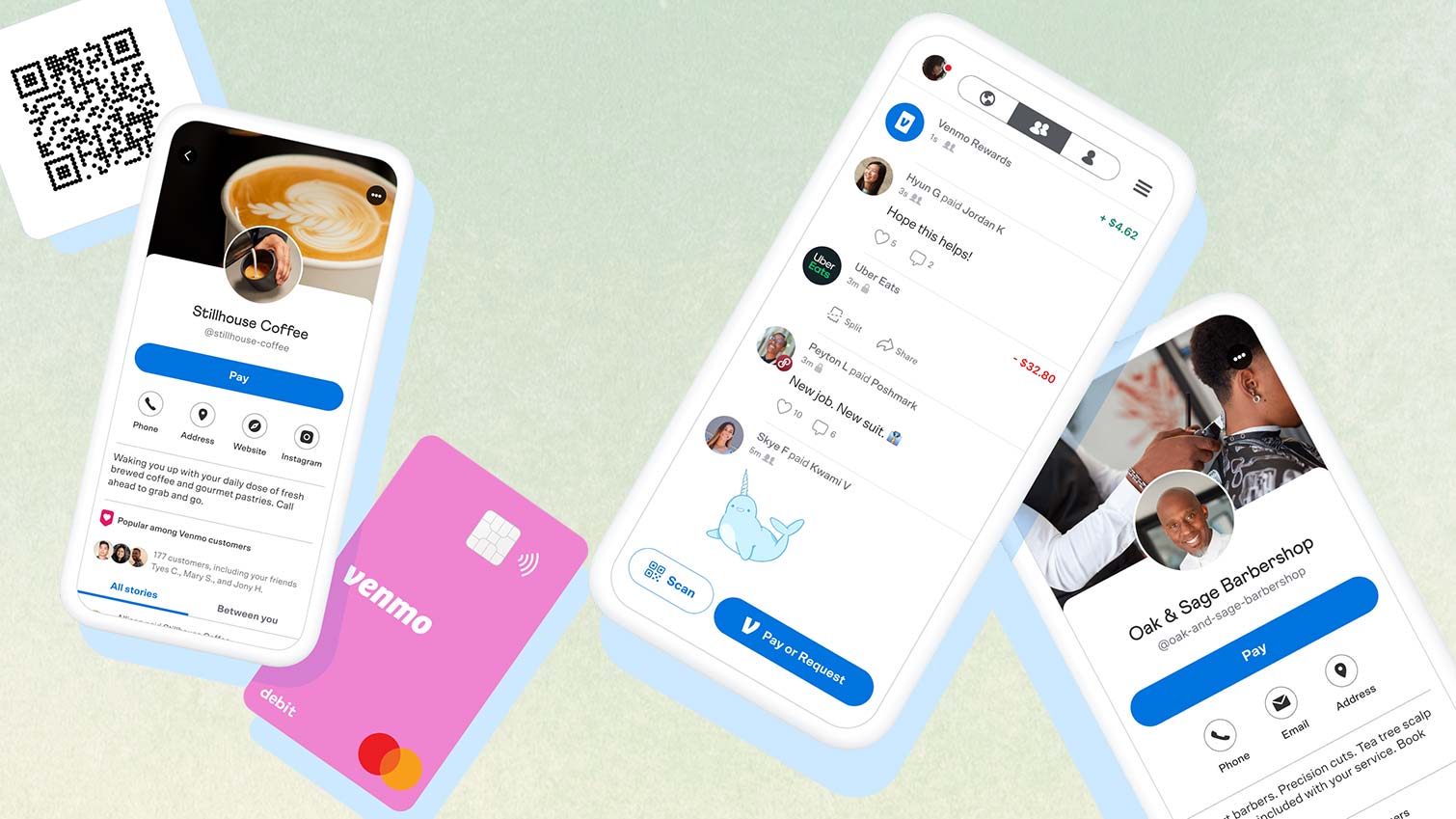
Once your account is set up and funded, the core functionality of Venmo — sending and receiving money — becomes accessible. This section explores the technical aspects of these transactions, from the user interface to the underlying processing.
Navigating the Payment Interface
Venmo’s app design makes initiating payments straightforward. The main interface typically features prominent buttons for “Pay or Request.”
- Initiating a Payment: Tapping “Pay or Request” opens a new screen where you can select or search for the recipient from your Venmo contacts (synced from your phone contacts if permission was granted) or by their username, phone number, or email.
- Entering Transaction Details: You then input the amount to send and a brief description or note for the payment. This note is a crucial element for the social feed, allowing for contextual sharing.
- Selecting Funding Source: The app will display your default funding source, but you can tap to change it if needed. This real-time selection updates the transaction parameters before execution.
- Review and Confirmation: Before sending, a confirmation screen summarizes the transaction details. This is your final technical checkpoint to ensure all parameters (recipient, amount, funding source) are correct. Tapping “Pay” initiates the transaction.
The Social Element: Customizing Transactions
A unique technical and user experience aspect of Venmo is its social feed. Each transaction can be accompanied by a note and emoji, and its privacy setting can be customized.
- Privacy Settings: For each transaction, users can choose its visibility: “Public,” “Friends,” or “Private.” This is implemented using access control lists (ACLs) or similar permission management systems on Venmo’s backend, which dictate who can view the transaction in their feeds. Public transactions are visible globally, “Friends” only to your Venmo friends, and “Private” only to you and the recipient.
- Engagement: The social feed is driven by a content delivery network (CDN) that efficiently distributes transaction updates to relevant users. This feature leverages techniques common in social media platforms, such as real-time updates and personalized feeds.
Understanding Transaction Limits and Speeds
From a technical perspective, transaction limits and processing speeds are governed by Venmo’s backend logic, regulatory compliance, and integrations with financial networks.
- Transaction Limits: Venmo implements various spending limits (e.g., weekly limits for sending money, daily limits for Instant Transfers). These are dynamically enforced by the server-side application logic based on user verification status and account history. These limits are a regulatory requirement and a security measure.
- Standard Transfers vs. Instant Transfers:
- Standard Transfers: Funds moved from Venmo to a bank account typically take 1-3 business days. This delay is inherent to the Automated Clearing House (ACH) network, the standard electronic funds transfer system used by banks in the U.S. Venmo acts as an intermediary, initiating and monitoring these ACH transfers.
- Instant Transfers: Venmo offers an “Instant Transfer” feature, typically for a small fee. This uses faster payment rails (e.g., RTP Network, Visa Direct, Mastercard Send) that allow funds to arrive in a linked debit card or bank account within minutes. The technology behind this involves direct integration with these real-time payment networks, bypassing the slower ACH system.
Enhancing Your Venmo Experience: Advanced Tech & Security
Beyond basic payments, Venmo offers additional features and employs robust security measures to protect user data and transactions. A deeper understanding of these aspects further enhances the user’s technical proficiency and safety.
Digital Security Protocols and Best Practices
Security is paramount in any financial application. Venmo employs a multi-layered security approach, combining industry-standard protocols with user-centric best practices.
- Encryption: All data exchanged between your Venmo app and its servers is encrypted using Transport Layer Security (TLS) or Secure Sockets Layer (SSL) protocols. This prevents eavesdropping and tampering of data in transit.
- Data Storage Security: User data, including financial information, is stored in secure, encrypted databases protected by firewalls and intrusion detection systems. Regular security audits and penetration testing are conducted to identify and patch vulnerabilities.
- Fraud Detection Systems: Venmo utilizes sophisticated algorithms and machine learning models to detect unusual activity and potential fraud. These systems analyze transaction patterns, user behavior, and device characteristics in real-time to flag suspicious transactions for review or rejection.
- Two-Factor Authentication (2FA): Beyond the initial verification, users can enable 2FA for an additional layer of security. This typically involves entering a code sent to your registered phone number or email in addition to your password during login, significantly reducing the risk of unauthorized access.
- PIN/Biometric Lock: For enhanced local device security, Venmo allows users to set up a PIN or use biometric authentication (fingerprint or face ID) to open the app or authorize transactions. This prevents unauthorized use if your phone falls into the wrong hands.
- PCI DSS Compliance: As a payment processor, Venmo adheres to the Payment Card Industry Data Security Standard (PCI DSS), a set of security standards designed to ensure that all companies that process, store, or transmit credit card information maintain a secure environment.
Exploring Venmo’s Ancillary Features
Venmo’s technological evolution has led to the integration of various supplementary features, broadening its utility beyond simple P2P transfers.
- Venmo Debit Card/Credit Card: These physical cards (issued in partnership with Mastercard or Visa) are technically linked directly to your Venmo balance or bank account. They leverage existing card network infrastructure for point-of-sale and online purchases, extending Venmo’s utility into traditional commerce. The card management features within the app (e.g., freezing the card, viewing transactions) are enabled by direct API integrations with the card issuer and network.
- Business Profiles: Venmo allows users to create business profiles, enabling them to accept payments for goods and services. This feature involves different transaction processing mechanisms, often with associated fees, and provides tools for managing transactions, refunds, and tax reporting. The underlying technology supports commercial payment gateways, distinct from P2P.
- Direct Deposit: Users can set up direct deposit to receive paychecks directly into their Venmo balance. This requires Venmo to provide a routing and account number, functioning as a virtual bank account for ACH deposits.
- Crypto on Venmo: In a foray into emerging tech, Venmo has integrated cryptocurrency buying and selling features. This involves partnership with cryptocurrency exchanges and requires secure wallet management solutions within the app, all while adhering to complex regulatory frameworks for digital assets.
- In-App Purchasing: Some merchants accept Venmo directly as a payment method in their apps or websites. This is facilitated by Venmo’s integration as a payment option through its SDK (Software Development Kit) provided to developers.
Troubleshooting Common Technical Issues
Even with robust technology, users might encounter technical glitches. Understanding common issues and their resolutions is part of mastering the app.
- App Crashes/Freezes: Often resolved by restarting the app, clearing its cache (in device settings), or ensuring the app is updated to the latest version. These issues typically relate to memory management or software bugs.
- Login Issues: Problems with passwords or 2FA usually require password resets or verification through linked email/phone. Account lockouts are often a security feature triggered by multiple failed login attempts.
- Transaction Delays/Failures: Can stem from bank processing times (especially ACH), network connectivity issues, or internal Venmo security flags. Checking your bank’s status and Venmo’s in-app support can provide clarity.
- Funding Source Linking Problems: Incorrect routing/account numbers, expired cards, or bank security policies can prevent successful linking. Double-checking input and contacting your bank or Venmo support are key steps.
- Notification Issues: Check your phone’s notification settings for the Venmo app and ensure they are enabled. Sometimes, device-level power saving modes can also interfere with push notifications.
In conclusion, “getting Venmo” is an initiation into a powerful, technologically advanced ecosystem for digital payments. From the seamless app download and secure account creation to the intricate processes of sending funds and leveraging advanced features, every step is underpinned by sophisticated software engineering and digital security protocols. By understanding these technical facets, users can not only acquire Venmo but also confidently integrate it into their daily lives, leveraging its full potential as a cutting-edge financial application.
aViewFromTheCave is a participant in the Amazon Services LLC Associates Program, an affiliate advertising program designed to provide a means for sites to earn advertising fees by advertising and linking to Amazon.com. Amazon, the Amazon logo, AmazonSupply, and the AmazonSupply logo are trademarks of Amazon.com, Inc. or its affiliates. As an Amazon Associate we earn affiliate commissions from qualifying purchases.