
In an increasingly digital financial landscape, peer-to-peer payment applications like Cash App have become indispensable tools for managing everyday money transfers, bill payments, and even investing. Among its core features is the Cash Card, a customizable debit card linked directly to your Cash App balance, offering a convenient way to spend your funds wherever Visa is accepted. However, for many users, the fundamental question arises: “How do I load my Cash App card?” Understanding the various methods available to add funds to your Cash App balance is crucial for leveraging the full potential of this versatile financial instrument. This comprehensive guide delves into the diverse avenues for loading your Cash App card, offering detailed instructions, critical insights into associated fees and limits, and essential tips for secure and efficient money management.

Understanding Your Cash App Card and Its Place in Personal Finance
Before exploring the mechanics of loading, it’s beneficial to grasp the role of the Cash App card within your personal finance ecosystem. The Cash Card is not merely a spending tool; it’s an extension of your Cash App balance, allowing you to access and utilize your funds in the physical world. Issued by Sutton Bank and powered by Visa, it functions much like a traditional debit card, enabling purchases online, in stores, and ATM withdrawals. Its appeal lies in its seamless integration with the Cash App platform, offering features like “Boosts” for instant discounts and robust security measures. For many, it serves as a primary spending card, a budgeting tool, or a convenient way to manage shared expenses with friends and family.
The convenience of a digital wallet paired with a physical card makes Cash App a powerful ally in personal finance. Whether you’re receiving direct deposits, splitting a bill, or simply needing quick access to funds, the ability to effortlessly load your Cash Card is paramount. The platform aims to democratize financial services, providing an accessible and often low-cost alternative to traditional banking for millions. Mastering the methods to fund your account is the first step towards achieving financial fluidity with Cash App.
Diverse Methods to Load Your Cash App Card
Loading your Cash App card essentially means adding money to your Cash App balance. This balance is what your Cash Card draws from for transactions. Cash App provides several flexible options to ensure users can fund their accounts in a way that best suits their needs. Each method comes with its own set of advantages, potential fees, and processing times, making it important to choose wisely based on your immediate requirements.
Linking a Bank Account for Transfers
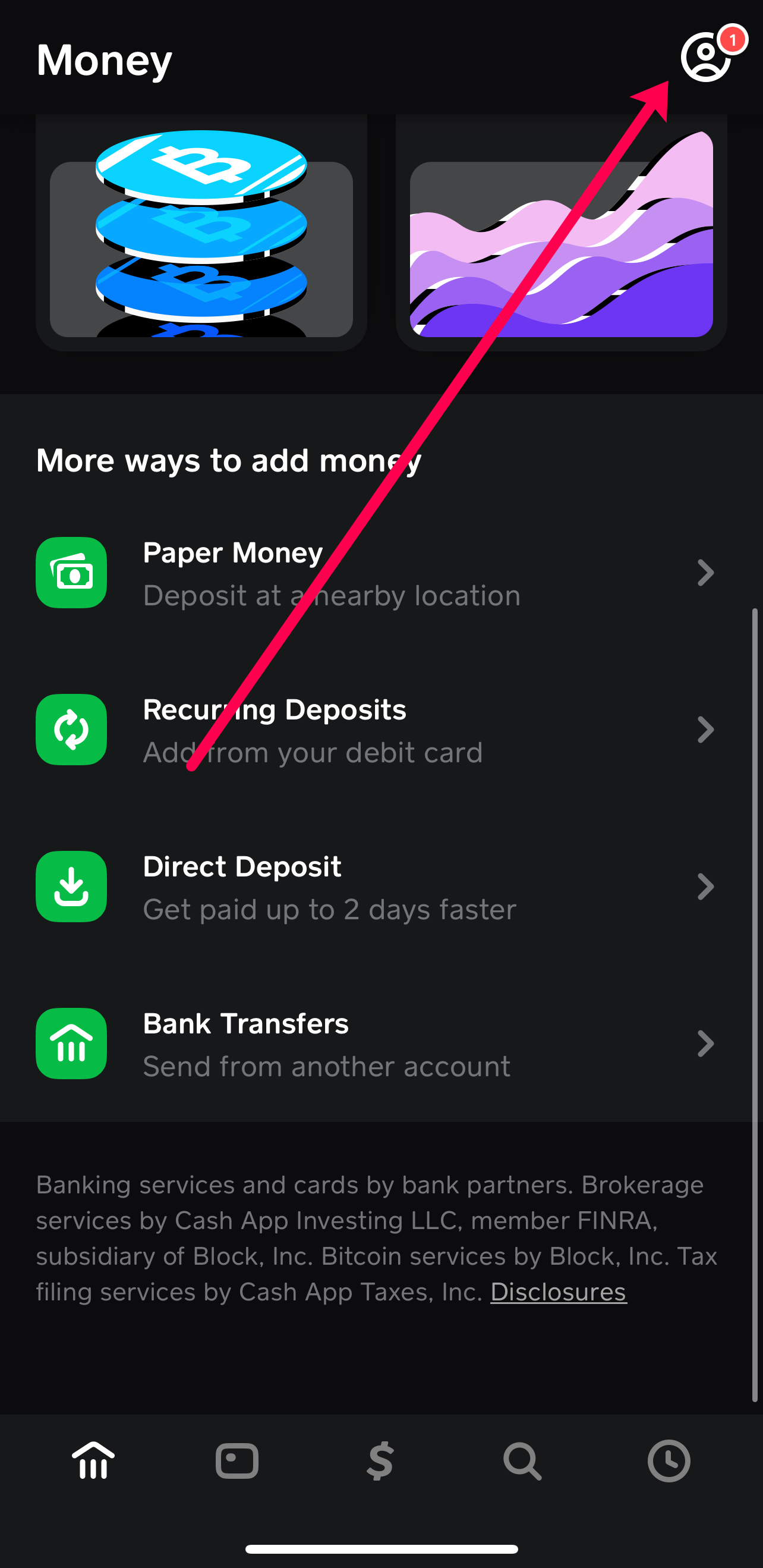
One of the most common and robust methods to load your Cash App is by linking an external bank account. This provides a direct pipeline for transferring funds from your checking or savings account into your Cash App balance.
To link a bank account:
- Open Cash App: Navigate to the main screen.
- Tap the Banking Tab: This icon typically looks like a house or a bank building.
- Select “Linked Banks”: Under the “Add Cash” and “Cash Out” options, you’ll find this section.
- Add Bank: Follow the prompts to add your bank account. Cash App uses Plaid, a secure third-party service, to connect to your bank. You’ll typically log in with your online banking credentials.
- Initiate Transfer: Once linked, go back to the Banking tab and tap “Add Cash.” Enter the desired amount and confirm the transfer.
Insight: Linking a bank account is ideal for larger, less urgent transfers. Standard transfers are usually free but can take 1-3 business days. Instant transfers are available for a fee (typically 0.5% – 1.75%), providing immediate access to funds. This method offers high limits and is suitable for regular deposits or transferring substantial amounts.
Connecting a Debit Card for Instant Funding
For quicker access to funds, linking a debit card is an excellent option. This method bypasses the need for bank login credentials for transfers, offering a more direct and often instant way to add money.
To link a debit card:
- Open Cash App: Go to the main screen.
- Tap the Banking Tab:
- Select “Linked Banks”:
- Link Debit Card: Choose the option to link a debit card and input your card number, expiration date, CVV, and billing ZIP code.
- Add Cash: Once linked, tap “Add Cash” on the Banking tab, enter the amount, and confirm the transaction using your linked debit card.
Insight: Debit card transfers are often instant, making them perfect for situations where you need funds immediately. However, Cash App may charge a fee for instant deposits using a linked debit card (typically 0.5% – 1.75%). It’s crucial to distinguish between a debit card and a credit card; Cash App generally does not support adding funds directly from credit cards.
Utilizing Direct Deposit for Regular Income
For those who use Cash App as a primary banking alternative, direct deposit is a powerful feature. This allows you to have your paycheck, government benefits, or other regular income sent directly to your Cash App account, just like a traditional bank account.
To set up direct deposit:
- Open Cash App:
- Tap the Banking Tab:
- Locate “Direct Deposit”: Scroll down to find your Cash App routing and account numbers.
- Provide Details to Payer: Give these numbers to your employer, government agency, or benefits provider. They will typically require you to fill out a direct deposit form.
Insight: Direct deposit is a free method of loading your Cash Card and is highly convenient for managing regular income. Funds are typically available as soon as your payer releases them, often up to two days earlier than traditional banks. This feature significantly enhances Cash App’s utility as a comprehensive financial tool.
Depositing Cash at Retail Stores
Sometimes, you have physical cash that you need to convert into digital funds on your Cash App. Cash App facilitates this through partnerships with various retail stores.
To deposit cash:
- Open Cash App:
- Tap the Banking Tab:
- Select “Deposit Cash”: This option will display a map or list of nearby participating retailers (e.g., Walmart, Walgreens, 7-Eleven).
- Generate Barcode: Choose your preferred retailer, and Cash App will generate a unique barcode.
- Visit Retailer: Go to the customer service desk or cashier and present the barcode and the cash you wish to deposit. The cashier will scan the barcode and take your cash.
- Confirmation: The funds are typically added to your Cash App balance instantly or within a few minutes.
Insight: This method is invaluable for converting physical cash into digital funds. While highly convenient, participating retailers may impose their own transaction limits, and a small service fee (typically $1-$4) might be charged by the retailer for this service. Always confirm any fees with the store before proceeding.
Receiving Money from Other Cash App Users
One of Cash App’s foundational features is its peer-to-peer payment system. You can easily receive money from friends, family, or customers who also use Cash App.
To receive money:
- Share Your Cashtag: Your unique Cashtag (e.g., $YourName) is how others can send you money. You can find it on your profile.
- Provide Email or Phone Number: You can also receive money via the email address or phone number linked to your Cash App account.
- Sender Initiates Payment: The sender enters your Cashtag, email, or phone number, specifies the amount, and sends the payment.
- Funds Received: The money will typically appear in your Cash App balance instantly.
Insight: Receiving money from other Cash App users is always free and instant, making it an excellent way to split bills, receive payments for goods or services, or get money from family members. This method leverages the social aspect of Cash App and is often the quickest way to add funds without involving external banks or retailers.
Navigating Fees, Limits, and Timelines
Understanding the practical aspects of loading your Cash App card—namely fees, transaction limits, and processing times—is essential for efficient financial management and avoiding unexpected hitches. Each loading method carries its own set of rules and implications.
Understanding Transaction Fees

While Cash App prides itself on many free services, certain transactions do incur fees.
- Instant Deposits from Linked Debit Cards: As mentioned, Cash App charges a fee, typically 0.5% to 1.75%, for instant transfers from a linked debit card to your Cash App balance. This is to cover the expedited processing cost.
- Cash Deposits at Retailers: While Cash App doesn’t directly charge for this, the retail partners often levy a service fee, which can range from $1 to $4 per transaction.
- Standard Bank Transfers, Direct Deposits, and Peer-to-Peer Transfers: These methods are generally free.
Insight: Always be mindful of potential fees. For planned transfers, utilizing free methods like standard bank transfers or direct deposit can save you money. For urgent needs, weigh the convenience of instant transfers against their associated costs.
Daily and Weekly Limits
Cash App imposes limits on how much money you can add to your account, which can vary based on whether your account is verified.
- Unverified Accounts: Typically have lower limits, for example, sending and receiving limits of $250 per week and $1,000 per month. Loading limits might also be restricted.
- Verified Accounts: By providing your full legal name, date of birth, and the last four digits of your SSN (and sometimes a full SSN), you can significantly increase these limits. Verified users often have much higher sending and receiving limits (e.g., $7,500 per week for sending) and virtually unlimited receiving and loading capabilities.
Insight: For consistent or higher-value transactions, verifying your identity is highly recommended. It not only increases your limits but also enhances the security of your account and unlocks other features.
Processing Times for Deposits
The time it takes for funds to reflect in your Cash App balance varies by method:
- Instant Debit Card Transfers: Typically instant.
- Cash Deposits at Retailers: Usually instant or within a few minutes.
- Peer-to-Peer Transfers: Instant.
- Standard Bank Transfers (ACH): Can take 1-3 business days. This excludes weekends and holidays.
- Direct Deposit: Funds are typically available on your official payday, and often up to two days earlier, depending on when your payer releases them.
Insight: Plan your deposits according to your financial needs. If you need immediate access to funds, prioritize instant methods. For regular income, direct deposit offers unparalleled convenience and speed compared to traditional banking.
Enhancing Security and Troubleshooting Common Issues
While Cash App provides a seamless experience, understanding security best practices and knowing how to troubleshoot common loading issues are vital for a smooth and secure financial journey.
Best Practices for Account Security
Protecting your Cash App account and linked financial information is paramount.
- Strong, Unique Passwords/PINs: Use a robust, unique PIN or enable fingerprint/face ID for app access.
- Enable Security Lock: In your app settings, turn on the “Security Lock” feature, which requires your PIN or biometric ID for every transaction.
- Two-Factor Authentication (2FA): Always enable 2FA for an extra layer of security.
- Beware of Phishing Scams: Cash App will never ask for your PIN, sign-in code, or full social security number outside of the app. Be wary of suspicious emails, texts, or calls.
- Only Send Money to Trusted Contacts: Verify the Cashtag, email, or phone number before sending money.
- Regularly Review Activity: Periodically check your transaction history for any unauthorized activity.
Insight: Proactive security measures are your best defense against fraud. Treat your Cash App account with the same level of care as your traditional bank account.
What to Do When a Deposit Fails
Occasionally, a deposit might not go through as expected. Here’s a general approach:
- Check Your Bank/Card Statement: Confirm if the funds left your external account.
- Review Cash App Activity: Look for any error messages or pending transactions within the app.
- Verify Information: Double-check that all linked bank account or debit card details are correct and up-to-date.
- Internet Connection: Ensure you have a stable internet connection when initiating transfers.
- Daily/Weekly Limits: Confirm you haven’t exceeded any deposit limits.
- Expired Card/Account Issues: Ensure your linked debit card is not expired and that your bank account is in good standing.
Insight: Most failed deposits can be traced back to incorrect information, network issues, or exceeding limits. A systematic check of these common culprits can often resolve the problem quickly.
Contacting Cash App Support
If you’ve exhausted troubleshooting steps and still can’t resolve a loading issue, contacting Cash App support is the next step.
- In-App Support: The most efficient way is through the app: Tap the profile icon > “Support” > “Something Else” > “Contact Support.”
- Cash App Website: Visit the support section on the official Cash App website.
- Social Media (Limited): While Cash App has a presence on social media, it’s generally not recommended for sensitive account issues.
Insight: Be prepared to provide specific details about the transaction, including dates, amounts, and any error messages you received. Be patient, as response times can vary.
Maximizing Your Cash App Experience
Loading your Cash Card is just the beginning. To truly integrate Cash App into your personal finance strategy, explore its other features and benefits.
Utilizing Boosts and Discounts
The Cash Card comes with a unique feature called “Boosts.” These are instant discounts applied directly to your purchases when you use your Cash Card at specific merchants (e.g., coffee shops, restaurants, online stores).
- Activate Boosts: In the Cash App, tap the Cash Card tab, then “Save with Boosts,” and select the Boost you want to activate. You can only have one Boost active at a time.
- Spend and Save: Use your Cash Card at the qualifying merchant, and the discount will be applied automatically.
Insight: Regularly checking and activating relevant Boosts can lead to significant savings over time, adding tangible value beyond just convenience. It’s a smart way to stretch your loaded funds further.
Budgeting with Cash App
Cash App can serve as a simple budgeting tool, especially if you use it for specific categories of spending or as a dedicated fund for certain expenses.
- Dedicated Spending: Load a specific amount onto your Cash App card each week or month for discretionary spending (e.g., dining out, entertainment).
- Track Expenses: Review your transaction history within the app to monitor where your money is going.
- Separate Funds: For some, Cash App can act as a separate “envelope” for specific purposes, keeping those funds distinct from their main bank account.
Insight: While not a full-fledged budgeting application, its simplicity and ease of use can make it effective for managing smaller, specific budget categories.
Future-Proofing Your Digital Wallet
As digital payments evolve, staying informed about Cash App’s updates and new features will ensure you continue to maximize its benefits. Cash App is constantly innovating, adding features like investing in stocks and Bitcoin, and expanding its banking capabilities.
- Stay Updated: Regularly update the app to access the latest features and security enhancements.
- Explore New Features: Don’t hesitate to explore new functionalities as they are rolled out, understanding how they might further streamline your financial life.
Insight: Embracing the full ecosystem of Cash App’s offerings, beyond just loading and spending, positions you to benefit from a dynamic and evolving financial platform.
In conclusion, loading your Cash App card is a straightforward process, thanks to the variety of methods available, from instant debit card transfers and direct deposits to in-store cash deposits and peer-to-peer payments. By understanding the nuances of each option, including fees, limits, and security protocols, you can confidently manage your funds, unlock the full potential of your Cash Card, and seamlessly integrate Cash App into your personal financial strategy. This robust accessibility and flexibility underscore why Cash App has become a cornerstone of modern digital finance.
aViewFromTheCave is a participant in the Amazon Services LLC Associates Program, an affiliate advertising program designed to provide a means for sites to earn advertising fees by advertising and linking to Amazon.com. Amazon, the Amazon logo, AmazonSupply, and the AmazonSupply logo are trademarks of Amazon.com, Inc. or its affiliates. As an Amazon Associate we earn affiliate commissions from qualifying purchases.