
In an increasingly digital financial landscape, tools that bridge the gap between physical cash and digital spending are invaluable. The Cash App Card, a debit card powered by Visa, serves precisely this purpose, allowing users to spend the balance held within their Cash App account anywhere Visa is accepted. For many, the primary challenge isn’t how to spend their digital funds, but rather how to get their physical cash onto their virtual balance, making it accessible through their card. This guide delves deep into the practicalities, benefits, and considerations of loading cash onto your Cash App Card, positioning it as a fundamental aspect of modern personal finance management.

Understanding Your Cash App Card as a Financial Tool
The Cash App Card is more than just a piece of plastic; it’s a direct extension of your Cash App balance, offering a tangible link to your digital funds. For individuals navigating their personal finances, understanding how to effectively manage this balance – particularly by loading cash – is crucial for seamless transactions, budgeting, and overall financial flexibility.
The Versatility of Cash App in Personal Finance
Cash App has evolved beyond a simple peer-to-peer payment application. It now encompasses features such as direct deposit, investing in stocks and Bitcoin, and the Cash App Card itself. This suite of services positions Cash App as a comprehensive financial tool, especially for those seeking convenience and accessibility. The ability to load physical cash onto your digital balance broadens its utility, making it a viable option for a wider array of financial scenarios, from managing daily expenses to allocating funds for specific purposes. It democratizes access to digital banking features for individuals who might primarily deal in cash or prefer to keep their primary bank accounts separate from their daily spending.
Why Load Cash? Convenience and Control
The primary motivations for loading cash onto your Cash App Card are convenience and control. For many, physical cash remains a significant part of their income or daily transactions. Whether it’s tips, gig economy earnings, or simply a preference for cash-based budgeting, the need to convert this physical money into a digital, spendable format is constant. The Cash App Card provides an immediate solution, transforming physical currency into a debit card balance that can be used online, in stores, or for ATM withdrawals. This process eliminates the need for traditional bank deposits, often saving time and effort.
Furthermore, loading cash offers a degree of financial control. By funneling physical money onto a dedicated spending card, users can better track their expenditures, set limits, and avoid overspending from their primary bank accounts. It acts as a pre-paid debit card, allowing individuals to spend only what they have loaded, fostering a more disciplined approach to personal finance and budgeting. For those without traditional bank accounts or who prefer mobile-first financial solutions, the Cash App Card effectively serves as a primary spending vehicle.
Direct Retail Deposits: The Most Common Method
For many Cash App users, the most straightforward and frequently utilized method to load cash onto their card is through direct retail deposits. This method leverages a network of participating stores, allowing you to convert physical cash into a digital balance with relative ease.
Locating Participating Stores for Cash Loading
Cash App has partnered with numerous major retailers across the United States to facilitate cash deposits. These partnerships ensure widespread accessibility, making it convenient for users to find a location nearby. Common participating stores include:
- Walmart: A vast network of stores across the country.
- Walgreens: Pharmacies often found in convenient urban and suburban locations.
- 7-Eleven: Known for its extensive reach and 24/7 availability.
- Dollar General: Primarily serving rural and smaller communities.
- CVS Pharmacy: Another widespread pharmacy chain.
- Family Dollar: Offering similar accessibility to Dollar General.
To find the nearest participating store, users can often check within the Cash App itself or visit the Cash App’s official support pages, which usually provide a store locator tool. It’s always a good idea to confirm that a specific location offers Cash App cash deposit services before making a trip, as availability can sometimes vary.
The Step-by-Step Process for In-Store Loading
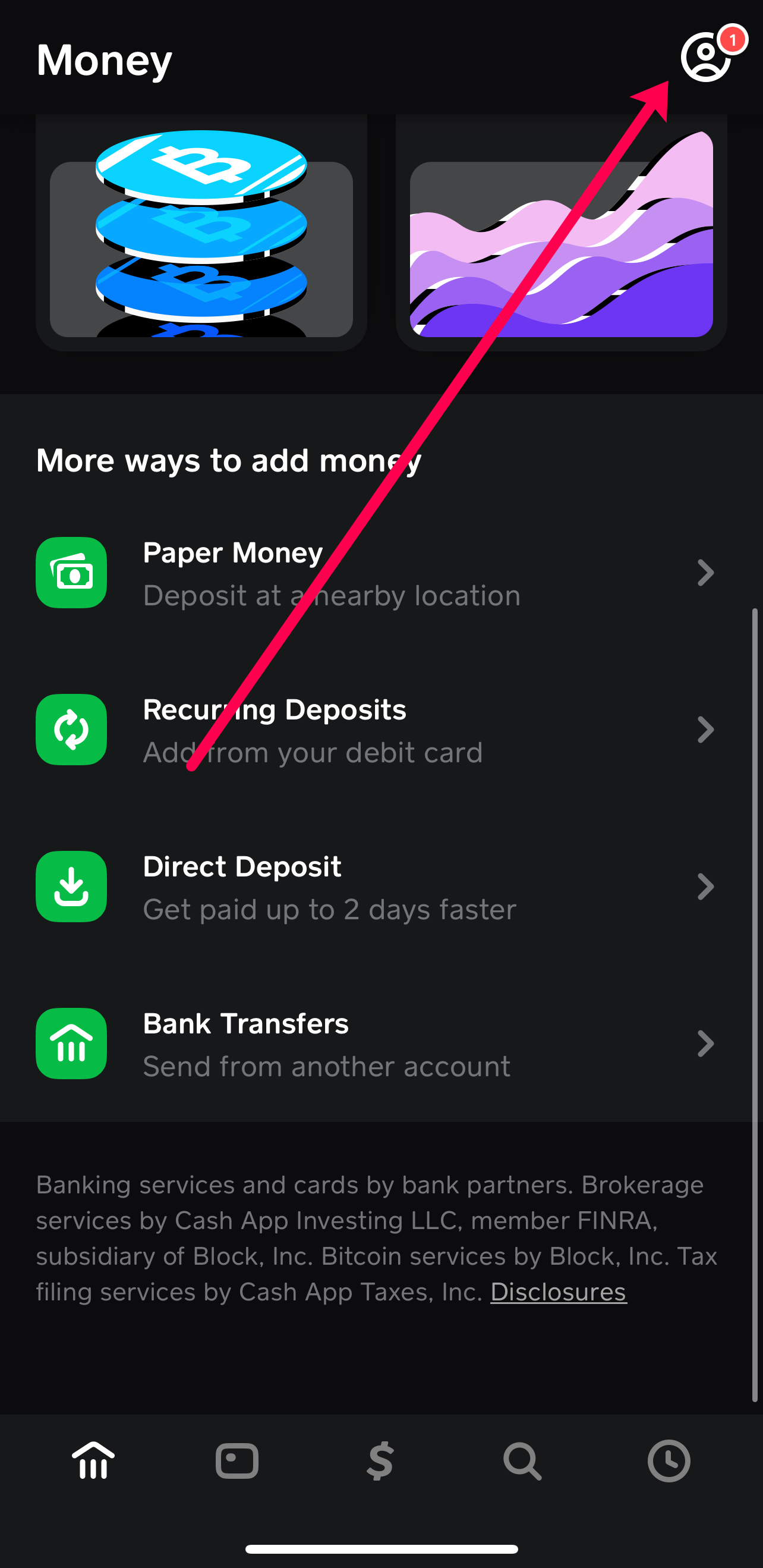
The process for loading cash at a participating retail location is designed to be simple and user-friendly:
- Open Your Cash App: Launch the Cash App on your smartphone.
- Navigate to the Banking Tab: Look for the “Banking” tab, often represented by a bank icon or a dollar sign.
- Select “Paper Money” or “Deposit”: Within the banking section, you’ll typically find an option labeled “Paper Money,” “Deposit,” or “Cash In.” Select this option.
- Locate a Store: The app will prompt you to find a nearby store. Use the in-app map or list to select your preferred location.
- Generate a Barcode: Once you’ve selected a store, the app will generate a unique barcode. This barcode is essential for the transaction.
- Proceed to the Register: Go to the checkout counter or customer service desk at the chosen store. Inform the cashier that you wish to “load cash to your Cash App” or “add money to your Cash App Card.”
- Present the Barcode and Cash: Show the cashier the barcode on your phone. They will scan it. Then, hand them the exact amount of cash you wish to deposit.
- Confirm the Transaction: The cashier will process the transaction. You should receive a confirmation on your Cash App almost instantly, showing the funds have been added to your balance. Always keep the physical receipt from the store as proof of the transaction.
Understanding Fees and Limits for Retail Deposits
While incredibly convenient, retail cash deposits typically come with certain financial considerations that users must be aware of:
- Fees: Most retail partners charge a small fee for this service. This fee can vary but is often around $1 to $4 per transaction. It’s crucial to factor this into your financial planning, especially if you frequently make small deposits. These fees are usually deducted from the deposited amount or charged separately.
- Minimum and Maximum Limits: There are usually minimum and maximum limits on how much cash you can deposit in a single transaction, daily, weekly, and monthly. For instance, a common daily limit might be $500 to $1,000, with weekly and monthly limits extending to several thousand dollars. These limits are in place for security and regulatory compliance. Always check the current limits within the Cash App or on their support page, as they can change. Understanding these limits is key to avoiding failed transactions and planning your deposits efficiently.
Digital Pathways to Funding Your Cash App Card
Beyond physical cash deposits at retail locations, Cash App offers several digital methods to fund your account, enabling seamless transfers from other financial sources directly to your Cash App Card balance. These methods are essential for managing a robust digital financial ecosystem.
Linking and Transferring from Your Bank Account
One of the most common digital methods is to link your traditional bank account directly to your Cash App. This allows for easy transfers of funds from your bank to your Cash App balance.
- Link Your Bank Account:
- Open Cash App and go to the “Banking” tab.
- Select “Linked Banks” or “Add Bank.”
- Follow the prompts to connect your bank account using your bank’s login credentials. This process is secure and typically uses a third-party service like Plaid to establish the connection.
- Initiate a Transfer:
- Once your bank account is linked, go back to the “Banking” tab.
- Tap “Add Cash.”
- Enter the desired amount you wish to transfer from your linked bank account.
- Confirm the transaction.
- Funds are usually available in your Cash App balance instantly or within a few business days, depending on the amount and your bank’s processing times.
This method is ideal for moving larger sums or for regular transfers from a primary checking or savings account. While transfers from your bank to Cash App are generally free, it’s always wise to check if your bank imposes any outgoing transfer fees, though this is rare for standard ACH transfers.
Receiving Peer-to-Peer Payments
Cash App’s foundational feature is its peer-to-peer payment system, which naturally serves as a way to load funds onto your card. When friends, family, or even customers pay you via Cash App, those funds automatically appear in your Cash App balance and are immediately available for use with your Cash App Card.

- Requesting Payments: You can easily request money from others by tapping the “$” icon, entering an amount, and selecting “Request.” You can then choose a contact to request from.
- Receiving Payments: When someone sends you money, you’ll receive a notification, and the funds will be added to your balance.
This method is particularly useful for splitting bills, receiving money from a shared expense, or for small business owners who accept Cash App as a payment method. There are typically no fees for standard peer-to-peer transfers, making it an efficient way to consolidate funds onto your Cash App Card.
Leveraging Direct Deposit for Regular Income
For those seeking to integrate their Cash App Card more deeply into their financial routine, setting up direct deposit can be a game-changer. This allows employers or benefit providers to deposit paychecks, government benefits, or other recurring income directly into your Cash App account.
- Locate Your Account and Routing Numbers:
- In the Cash App, go to the “Banking” tab.
- You will see your Cash App routing and account numbers listed. These are unique to your Cash App account and are necessary for setting up direct deposit.
- Provide to Payer:
- Give these numbers to your employer, government agency, or any other entity that provides direct deposits. They will typically require you to fill out a direct deposit form.
Once set up, your regular income will be directly deposited into your Cash App balance, instantly available for use with your Cash App Card. This method significantly streamlines the process of managing income, especially for those who primarily use their Cash App Card for daily spending and budgeting, effectively bypassing the need for a traditional bank account for receiving funds. It also often allows for earlier access to paychecks (up to two days early) compared to traditional banks, a significant perk for managing cash flow.
Maximizing Your Cash App Card: Tips for Seamless Financial Management
Effectively loading cash onto your Cash App Card is just one piece of the puzzle. To truly maximize its utility as a financial tool, users must also adopt best practices for security, monitoring, and troubleshooting.
Best Practices for Secure Loading and Usage
Security should always be paramount when dealing with financial transactions.
- Verify Transactions: Always double-check the amount before confirming any deposit, whether in-store or digitally. When making retail deposits, ensure the amount scanned by the cashier matches what you intend to deposit.
- Keep Receipts: For in-store cash loads, always retain the physical receipt. This serves as vital proof of transaction should any issues arise, such as funds not appearing in your account.
- Protect Your Cash App Account: Use a strong, unique password or PIN for your Cash App account. Enable two-factor authentication (2FA) if available. Be wary of phishing attempts or scams that try to trick you into revealing your account details.
- Only Deposit What You Need: While convenient, storing very large sums solely on your Cash App balance might not be the best strategy for long-term savings or investments, as it’s primarily designed for transactional use. Consider transferring excess funds to a traditional savings account for better interest rates and FDIC insurance (Cash App is not a bank, though some services might be provided by banking partners).
Monitoring Your Balance and Transactions
Active monitoring is key to sound financial management and quickly identifying any discrepancies.
- Regularly Check Your Balance: Periodically open your Cash App to check your current balance. This helps you stay aware of your available funds and prevent overspending.
- Review Transaction History: The “Activity” tab in Cash App provides a detailed history of all your transactions, including deposits, withdrawals, and spending. Regularly review this to ensure all transactions are legitimate and accurate. If you spot an unfamiliar transaction, report it to Cash App support immediately.
- Set Up Notifications: Enable push notifications for all Cash App activity. This way, you receive instant alerts when money is added or spent from your account, giving you real-time oversight of your financial movements.
Troubleshooting Common Loading Issues
Despite the streamlined process, occasional issues can arise when loading cash. Knowing how to troubleshoot can save time and frustration.
- Funds Not Appearing After Retail Deposit:
- Wait a Few Minutes: Sometimes there’s a slight delay.
- Check Transaction History: Verify if the transaction is pending or failed in your Cash App activity.
- Review Your Receipt: Ensure the amount on the store receipt matches your intended deposit and that the transaction was successfully processed by the store.
- Contact Cash App Support: If funds still haven’t appeared after a reasonable time (e.g., 30 minutes to an hour), contact Cash App support with your transaction details and store receipt.
- Transaction Declined:
- Check Limits: Ensure you haven’t exceeded daily, weekly, or monthly deposit limits.
- Incorrect Barcode: Verify the barcode is correctly generated and scannable by the cashier.
- Store-Specific Issues: Occasionally, a store’s system might be down. Try another participating location.
- Bank Transfer Delays:
- Linked Account Status: Ensure your bank account is correctly linked and verified.
- Bank Processing Times: While Cash App processes transfers quickly, your bank might have its own processing schedule, especially for larger amounts. Allow a few business days before raising a concern.
The Broader Financial Implications of Cash App Card Usage
Integrating the Cash App Card into your financial routine extends beyond just loading cash; it influences how you budget, spend, and manage your overall financial health. Understanding these broader implications helps you leverage the card more effectively.
Budgeting and Expense Tracking with Cash App
The Cash App Card can be a powerful tool for budgeting. By intentionally loading specific amounts of cash onto your card for particular spending categories, you create a natural spending limit.
- Allocated Spending: For example, you could load a weekly “fun money” budget or allocate funds specifically for groceries onto your Cash App Card. Once those funds are spent, you know you’ve hit your limit for that category.
- Simplified Tracking: All transactions made with your Cash App Card are meticulously recorded in your activity feed. This provides a clear, real-time overview of your expenditures, making it easier to track where your money is going without sifting through complex bank statements. This simple interface is highly beneficial for individuals who find traditional budgeting methods overwhelming.
- Financial Discipline: The act of consciously loading money can foster greater financial discipline, as it requires an active decision to fund your spending, rather than passively drawing from an ever-present bank account.
Accessing Your Funds: Spending and Withdrawals
Once cash is loaded onto your Cash App Card, its utility expands significantly.
- Everyday Spending: The card can be used anywhere Visa debit cards are accepted, both online and in physical stores. This makes it incredibly versatile for daily purchases, subscriptions, and online shopping.
- ATM Withdrawals: You can also use your Cash App Card to withdraw cash from ATMs. However, be mindful of ATM fees, which are typically charged by the ATM operator. Cash App offers free ATM withdrawals if you receive at least $300 in direct deposits per month. This feature adds another layer of financial access for users who still require physical cash for certain transactions.
Cash App Card as a Component of Your Personal Finance Ecosystem
For many, the Cash App Card doesn’t replace a traditional bank account but rather complements it. It can serve as a primary spending card, a tool for managing specific budgets, or a convenient way to handle gig economy earnings.
- Bridging Cash and Digital: It uniquely bridges the gap between physical cash income and the need for digital spending, making it invaluable for the unbanked or underbanked, as well as for those who prefer to keep their primary bank accounts separate from their transactional spending.
- Financial Inclusion: By simplifying access to digital payments and spending, the Cash App Card promotes financial inclusion, offering a straightforward path for individuals to participate in the digital economy without requiring extensive banking relationships.
- Dynamic Financial Management: As part of a larger personal finance strategy, the Cash App Card provides flexibility. Users can easily move money between their bank, Cash App, and even investment features within the app, creating a dynamic and responsive financial management system tailored to their individual needs and preferences.
In conclusion, knowing how to load cash onto your Cash App Card is a foundational skill for maximizing this powerful financial tool. Whether through convenient retail deposits or digital transfers, the ability to fluidly move money between physical and digital formats empowers users with greater control, convenience, and insight into their personal financial landscape. By understanding the processes, potential costs, and best practices, users can seamlessly integrate their Cash App Card into their daily financial habits, making it an indispensable asset in the journey towards smarter money management.
aViewFromTheCave is a participant in the Amazon Services LLC Associates Program, an affiliate advertising program designed to provide a means for sites to earn advertising fees by advertising and linking to Amazon.com. Amazon, the Amazon logo, AmazonSupply, and the AmazonSupply logo are trademarks of Amazon.com, Inc. or its affiliates. As an Amazon Associate we earn affiliate commissions from qualifying purchases.