
Cash App, a groundbreaking fintech application developed by Block, Inc., has revolutionized the way millions manage their money. Far more than just a peer-to-peer payment service, it has evolved into a versatile financial tool, offering functionalities that range from investing in stocks and Bitcoin to receiving direct deposits. Among its most practical features, especially for those who frequently deal with physical currency, is the ability to deposit cash directly into your Cash App balance. This functionality bridges the gap between traditional paper money and the digital economy, providing unparalleled convenience and accessibility.

This guide delves into the technical intricacies and user-friendly steps involved in depositing physical cash into your Cash App account. We’ll explore the underlying technology that facilitates these transactions, provide a detailed walkthrough of the in-app process, offer crucial tips for a seamless experience, and discuss how this feature integrates into the broader Cash App ecosystem. Whether you’re a long-time user looking to optimize your experience or new to the platform, understanding this feature is key to maximizing the utility of your digital wallet.
The Technological Framework Behind Cash App’s Cash Deposit Feature
At its core, Cash App’s ability to handle physical cash deposits is a testament to sophisticated financial technology designed for user convenience. This feature isn’t merely about handing over cash; it’s a carefully engineered system that integrates an application, retail partnerships, and secure data transfer protocols.
Understanding Cash App as a Digital Wallet Ecosystem
Cash App functions as a comprehensive digital wallet ecosystem, a micro-bank on your smartphone. Its architecture is built to facilitate rapid, secure transactions and provide users with a unified platform for various financial activities. This ecosystem includes a unique Cash App account number and routing number for direct deposits, a linked debit card (Cash Card) for spending, and integrated modules for investing. The cash deposit feature is a crucial component that enhances this ecosystem’s accessibility, particularly for users who receive income or conduct business in physical cash, allowing them to instantly digitize their funds without needing a traditional bank account. The system relies on robust backend servers, secure API integrations with partners, and an intuitive front-end user interface to deliver a cohesive experience.
Prerequisites for Enabling Cash Deposits
Before you can deposit cash, Cash App requires certain technical and verification steps to ensure security and compliance. These aren’t just bureaucratic hurdles; they are fundamental safeguards in any digital financial system.
Firstly, account verification (Know Your Customer – KYC) is paramount. To access advanced features like cash deposits, you typically need to verify your identity by providing your full legal name, date of birth, and the last four digits of your Social Security Number. This data is encrypted and securely stored, used to prevent fraud and comply with financial regulations. Without verification, transaction limits are significantly restricted, and many features remain locked.
Secondly, you need a linked debit card. While you’re depositing physical cash, the debit card is essential for other functionalities within Cash App and often acts as a primary link to a traditional bank account if needed. It establishes a financial pathway for other types of transactions, even if not directly used for the cash deposit itself.
Finally, location services on your mobile device often play a critical role. For finding participating retailers, Cash App leverages your phone’s GPS data. This allows the app to accurately identify and display nearby locations where you can complete a cash deposit, enhancing convenience and user experience. This location data is typically anonymized and used solely to facilitate the service.
The Role of Retail Partnerships and Barcode Technology
The magic of depositing cash into Cash App lies in its innovative use of retail partnerships and barcode technology. Cash App doesn’t operate its own physical deposit centers. Instead, it collaborates with a vast network of third-party retailers like Walmart, Walgreens, Dollar General, and 7-Eleven. This strategic partnership allows Cash App to leverage existing retail infrastructure, making cash deposits widely accessible without the massive overhead of building a proprietary network.
When you initiate a cash deposit within the app, Cash App generates a unique, single-use barcode. This barcode isn’t just a random pattern; it’s a digitally encoded identifier linked directly to your specific Cash App account and the deposit amount you’re requesting. The barcode serves as a secure, ephemeral key. When scanned by a participating retailer’s point-of-sale (POS) system, it communicates the transaction details to Cash App’s servers via secure APIs. The retailer’s system acts as an intermediary, confirming the cash received and digitally notifying Cash App to credit your balance. This entire process, from barcode generation to account credit, is designed to be swift and secure, often taking only minutes. This intricate dance between app, barcode, retailer POS, and secure servers is a prime example of fintech innovation bridging the digital and physical financial worlds.
Navigating the In-App Process: Step-by-Step Cash Deposit Tutorial
The beauty of Cash App’s cash deposit feature lies in its straightforward, user-friendly interface. Designed for intuitive navigation, the app guides users through each step, making what might seem like a complex financial transaction surprisingly simple.
Initiating the Deposit Request
To begin the process, open your Cash App on your smartphone. The main screen typically displays your current balance and quick access to common actions.
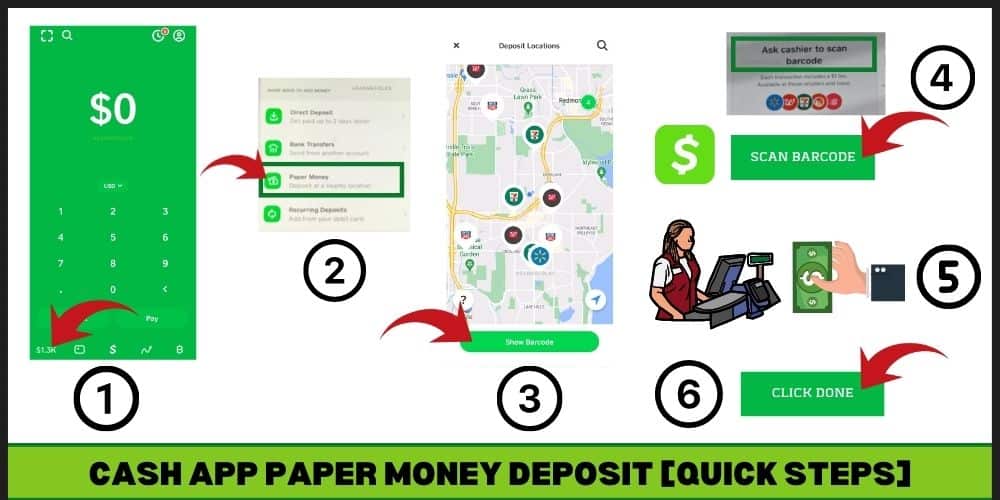
- Tap the Banking Tab: Look for the tab that resembles a banking icon (often a house or a bank building silhouette) at the bottom left of your screen. This is your central hub for balance, direct deposit information, and other banking-related features.
- Locate “Paper Money”: Within the Banking tab, scroll down until you see an option labeled “Paper Money.” This is Cash App’s terminology for physical cash deposits. Tapping this option will launch the deposit workflow.
- Select “Deposit Paper Money”: Follow the prompts to confirm your intention to deposit paper money. The app may briefly explain the process, including informing you about potential retailer fees and limits. Always review these details.
This initiation phase is designed to be quick and unambiguous, ensuring users can easily start the deposit process without confusion.
Locating a Participating Retailer
Once you’ve indicated your desire to deposit cash, the app’s geolocation features come into play to help you find a suitable location.
- Access the Map or List: After initiating the deposit, Cash App will often display a map interface or a list of nearby participating retailers. This feature leverages your device’s GPS (which you must have enabled for the Cash App) to pinpoint your current location and highlight authorized deposit points.
- Search and Filter Options: If you’re not at a convenient location, or wish to plan ahead, the app usually provides search functionality. You can input an address or zip code to find retailers in a different area. Some versions of the app might also allow filtering by specific store chains.
- Check Operating Hours and Specifics: Before heading out, it’s wise to check the listed operating hours for the chosen retailer within the app or on the retailer’s own website. While Cash App provides the capability, the actual transaction is handled by the store’s cashier, so their availability is crucial. This step ensures you don’t make a wasted trip.
The integration of mapping and search functionalities within the app significantly enhances user convenience, making it easy to find where to complete the physical part of the transaction.
Generating and Utilizing Your Unique Barcode
This is the pivotal technical step that bridges your digital account with the physical cash transaction.
- Generate Your Deposit Barcode: Once you’ve selected a retailer (or are ready to proceed at any participating location), the app will prompt you to generate your barcode. Tap the button to do so. A unique, scannable barcode will appear on your screen. It’s important to understand that this barcode is typically time-sensitive and single-use. If it expires or you don’t use it, you’ll need to generate a new one.
- Inform the Cashier: At the retailer, go to the customer service desk or a cashier. Inform them that you wish to “deposit cash to your Cash App” or “add money to your Cash App.” Some retailers might use different terminology, so clarity is key.
- Present the Barcode and Cash: Present your phone with the barcode clearly visible to the cashier. They will scan it using their POS system. Once scanned, the system will prompt them for the amount of cash you wish to deposit. Hand over the exact cash amount you want to deposit. Ensure the amount you hand over matches what you intend to deposit and what the cashier enters into their system.
- Confirm the Transaction: The cashier will process the transaction. You might see a confirmation on their screen. Always ask for a physical receipt, in addition to the digital confirmation you’ll receive on Cash App.
This barcode system is a secure and efficient way to digitize physical currency. The unique identifier ensures that the funds are correctly allocated to your account, and the real-time processing minimizes delays.
Confirmation and Digital Receipt

After the cashier processes your deposit, the technological feedback loop quickly closes to update your Cash App balance.
- Real-time Balance Update: Almost immediately after the transaction is completed at the retailer, you should receive a notification from Cash App. Your balance on the main screen of the app will update to reflect the newly deposited funds.
- Transaction History: Navigate to your activity feed (often represented by a clock icon at the bottom of the screen). Here, you will find a detailed digital receipt for your cash deposit, including the date, time, amount, and the retailer where the deposit was made. This digital record is a crucial audit trail, providing proof of your transaction within the app.
- Review and Reconcile: It’s a good practice to quickly review the digital receipt and compare it with the physical receipt you received from the retailer. Ensure all details match, providing an extra layer of verification for your financial records.
This robust confirmation system ensures that users have immediate feedback and comprehensive records, bolstering confidence in the digital deposit process.
Optimizing Your Cash Deposit Experience: Tips, Troubleshooting, and Security
While Cash App’s cash deposit feature is designed for ease of use, understanding best practices and potential pitfalls can significantly enhance your experience. This section focuses on practical advice, technical troubleshooting, and crucial security measures to ensure smooth and secure transactions.
Best Practices for Seamless Transactions
Adopting a few simple habits can make your cash deposits hassle-free:
- Verify Participating Retailers: Always use the in-app map to confirm that a specific location is a participating retailer before you go. Retail partnerships can change, and not all locations of a given chain may participate. A quick check saves time and frustration.
- Have Exact Cash Ready: While some retailers might offer change, it’s generally best practice to have the exact amount of cash you wish to deposit. This streamlines the process for the cashier and reduces potential for errors.
- Be Aware of Limits: Cash App, and often the retailers themselves, impose daily, weekly, and monthly limits on cash deposits. These limits are a security measure and vary by user and verification status. Check your app for your specific limits before attempting large deposits.
- Keep Your Receipt: Always request and keep the physical receipt from the retailer. While Cash App provides digital confirmation, the paper receipt is your immediate proof of transaction from the physical point of sale, invaluable in case of any discrepancies or delays.
- Check Retailer Specifics: Some retailers might have specific hours for certain services or dedicated customer service desks for these types of transactions. A quick call ahead or a glance at their website can prevent issues.
Addressing Common Technical Glitches and User Errors
Even with robust technology, occasional issues can arise. Knowing how to address them can save you time and stress:
- Barcode Not Scanning:
- Screen Brightness: Ensure your phone screen brightness is set to maximum for optimal barcode readability.
- Screen Condition: A cracked or dirty screen can obscure the barcode. Clean your screen.
- Lighting: Poor lighting at the cashier’s station can interfere with the scanner.
- Expired Barcode: If too much time has passed since you generated the barcode, it might have expired. Simply generate a new one in the app.
- Cashier Unfamiliarity:
- Politely Guide: If a cashier seems unfamiliar, calmly explain you’re using the “Cash App deposit” feature for “paper money.” They might need to select a specific option on their POS system.
- Ask for Manager: If they are truly unsure, ask if another cashier or manager can assist.
- Deposit Not Appearing:
- Wait a Few Minutes: While usually instant, occasionally there can be a slight delay due to network congestion. Wait 5-10 minutes.
- Check Activity Feed: Refresh your activity feed within the Cash App.
- Contact Cash App Support: If the deposit doesn’t appear after a reasonable waiting period (e.g., 30 minutes) and you have your physical receipt, immediately contact Cash App support through the app. Provide them with details from your receipt.
- Verify Account Status: Ensure your Cash App account is fully verified and not experiencing any temporary restrictions.
- App Issues: If the Cash App itself is freezing or not responding, try restarting the app or your phone. Ensure your app is updated to the latest version, as bugs are often fixed in updates.
Ensuring Digital Security During Physical Deposits
Security is paramount in all financial transactions, digital or physical.
- Protect Your Phone: Your phone is the key to your Cash App. Ensure it’s password-protected with a strong PIN, fingerprint, or facial recognition.
- Guard Your Barcode: The barcode is directly linked to your account for that specific transaction. Do not show it to strangers or share it online. Only present it to the legitimate cashier at a participating retailer.
- Beware of Scams: Be vigilant against phishing attempts or individuals claiming to be Cash App support outside of the official channels. Cash App will never ask for your PIN or full login details via unprompted calls or emails.
- Review Transaction History Regularly: Periodically check your Cash App activity feed for any unauthorized transactions. Report anything suspicious immediately.
- Enable Notifications: Keep push notifications enabled for Cash App so you are instantly alerted to any activity on your account, including successful deposits or withdrawals.
By adhering to these best practices, troubleshooting common issues effectively, and prioritizing digital security, you can ensure a reliable and safe experience every time you deposit cash into your Cash App.
Expanding Your Cash App Functionality: Beyond Physical Cash
While depositing physical cash is a highly convenient feature, it’s just one facet of Cash App’s expansive digital financial ecosystem. Understanding how this feature integrates with others helps users fully leverage the app’s capabilities, demonstrating its comprehensive technological design.
Seamless Digital Integrations: Linking External Accounts
Beyond cash deposits, Cash App excels at integrating with other digital financial tools. Users can effortlessly link their traditional bank accounts and debit cards to their Cash App profile. This integration allows for:
- Instant Transfers: Moving funds digitally from your linked bank account to your Cash App balance, or vice versa, typically occurs in real-time or within a few business days depending on the selected speed. This provides flexibility for managing larger sums or transferring money for specific purposes.
- Diverse Funding Options: Having a linked debit card not only enables transfers but also provides a backup funding source for sending money to friends or making payments directly from your Cash App, even if your Cash App balance is low.
- Direct Access: This seamless digital connection essentially makes Cash App an extension of your existing banking setup, offering an alternative interface for many common transactions. The underlying technology relies on secure API connections (like Plaid, often used for bank linking) that encrypt and protect your banking credentials.
Leveraging Direct Deposit for Regular Income
For many, Cash App has become a primary banking solution, especially due to its direct deposit functionality. This feature allows users to receive their paychecks, government benefits, or tax refunds directly into their Cash App balance, bypassing traditional bank accounts entirely.
- Unique Account Details: Upon setting up direct deposit, Cash App provides users with a unique routing number and account number. These are the details you provide to your employer or benefit provider, similar to a traditional bank account.
- Early Paycheck Access: A significant technological advantage offered by Cash App (and many other fintech apps) is the potential to receive paychecks up to two days earlier than traditional banks. This is often due to how these platforms process incoming ACH transfers faster, crediting funds once they are “pending” rather than waiting for full settlement.
- Financial Independence: For individuals who might not have a traditional bank account or prefer a mobile-first banking experience, direct deposit into Cash App offers a powerful tool for financial independence and managing income digitally.
Exploring Other App Features: P2P Payments, Investing, and More
Cash App’s design philosophy aims for a holistic financial experience, with cash deposits serving as an entry point into a broader suite of functionalities:
- Peer-to-Peer (P2P) Payments: This is Cash App’s foundational feature, allowing users to send and receive money instantly from friends and family using a unique $Cashtag or phone number/email. This core technology facilitates social payments and bill splitting with unparalleled ease.
- Investing in Stocks and Bitcoin: Cash App also acts as a simplified investment platform. Users can buy fractional shares of stocks (starting with as little as $1) and purchase Bitcoin directly within the app. This lowers the barrier to entry for investing, making it accessible to a wider audience, all managed from the same digital wallet where you deposit cash.
- Cash Card and Boosts: The Cash Card is a customizable, free debit card linked to your Cash App balance. It allows you to spend your funds anywhere Visa is accepted. The “Boosts” feature provides instant discounts at various merchants when using your Cash Card, adding a loyalty program layer to the app’s functionality.
By understanding how the cash deposit feature fits into this larger technological ecosystem, users can better appreciate Cash App’s comprehensive approach to modern digital finance. It truly is a versatile tool designed to meet diverse financial needs, from digitizing physical cash to managing investments.
Conclusion
The ability to deposit physical cash into Cash App stands as a testament to the platform’s commitment to accessibility and technological innovation. It effectively bridges the divide between the traditional cash economy and the burgeoning digital financial landscape, offering a practical solution for millions. From the sophisticated barcode technology facilitating seamless retail transactions to the robust in-app guidance and real-time confirmations, every aspect of this feature is meticulously engineered for user convenience and security.
This comprehensive guide has illuminated the technological underpinnings of Cash App’s cash deposit functionality, walked through the step-by-step process, and provided essential insights into optimizing your experience with best practices, troubleshooting tips, and vital security considerations. Furthermore, by placing cash deposits within the broader context of Cash App’s diverse offerings—including direct deposits, seamless bank integrations, and investment capabilities—we underscore its role as a powerful, all-encompassing financial tool.
As fintech continues to evolve, platforms like Cash App exemplify how technology can democratize financial services, making money management more intuitive, immediate, and inclusive. Mastering the cash deposit feature is not just about moving money; it’s about unlocking a richer, more flexible digital financial experience made possible by cutting-edge application development.
aViewFromTheCave is a participant in the Amazon Services LLC Associates Program, an affiliate advertising program designed to provide a means for sites to earn advertising fees by advertising and linking to Amazon.com. Amazon, the Amazon logo, AmazonSupply, and the AmazonSupply logo are trademarks of Amazon.com, Inc. or its affiliates. As an Amazon Associate we earn affiliate commissions from qualifying purchases.