
In an era defined by digital convenience and instant gratification, peer-to-peer (P2P) payment applications have revolutionized how we manage and transfer funds. Among these, Cash App stands out as a ubiquitous tool, simplifying everything from splitting dinner bills with friends to sending emergency funds to family members across the country. Developed by Block, Inc. (formerly Square, Inc.), Cash App has grown into a versatile mobile payment service, offering a straightforward interface combined with robust features that cater to a wide demographic. This comprehensive guide will delve into the intricacies of using Cash App specifically for sending money, exploring its functionalities, security protocols, and best practices to ensure seamless and secure digital transactions.
At its core, Cash App is designed for simplicity. It allows users to send and receive money, often without transaction fees for standard transfers, making it an attractive alternative to traditional banking methods for everyday financial interactions. But beyond its obvious utility, understanding the underlying technology and user experience it offers is key to leveraging its full potential. This guide aims to provide a professional, insightful, and engaging tutorial, positioning Cash App not just as a financial tool, but as a prime example of accessible and efficient digital technology.
The Digital Gateway: Understanding Cash App’s Core Functionality
Before delving into the step-by-step process of sending money, it’s crucial to understand what Cash App is and how it integrates into the broader landscape of digital finance. As a mobile application, it represents a significant technological leap in personal banking, offering a digital wallet experience that is both intuitive and powerful.
What is Cash App and Why It Matters for Digital Transactions
Cash App is a mobile payment service available for iOS and Android devices, enabling users to transfer money to one another quickly and securely. It operates primarily through a linked debit card or bank account, allowing funds to be moved directly between users. What makes Cash App particularly impactful in the digital transaction space is its low barrier to entry and user-friendly design. Unlike complex banking portals, Cash App distills the process of sending and receiving money into a few taps, making it accessible even to those less familiar with digital financial tools.
Its significance extends beyond mere convenience. Cash App has democratized financial services, offering features like direct deposit, a custom debit card (Cash Card), and even the ability to buy and sell Bitcoin, which were traditionally confined to more conventional financial institutions. For the purpose of sending money, its real-time processing capability means that funds are often available to the recipient almost instantly, a critical feature in a fast-paced digital economy. This emphasis on speed and accessibility, built on a robust technological infrastructure, is why Cash App has become a cornerstone of modern P2P payments.
Setting Up Your Digital Wallet: Account Creation and Linking
The journey to sending money via Cash App begins with setting up your digital wallet. This initial configuration is a testament to the app’s commitment to user experience, guiding new users through a streamlined onboarding process.
- Downloading the Application: The first step is to download the Cash App from the Apple App Store (for iOS devices) or Google Play Store (for Android devices). The app is free and typically requires minimal storage space.
- Account Creation: Upon opening the app, you’ll be prompted to enter your phone number or email address. This contact information serves as your primary identifier for the account and will be linked to your unique Cashtag (a personalized username, e.g.,
$YourName). You’ll receive a verification code via SMS or email, which you’ll enter into the app to confirm your identity. - Linking a Bank Account or Debit Card: To send money, you need a funding source. Cash App requires you to link a debit card, which is then connected to your bank account. Navigate to the “Linked Banks” section within the app’s profile icon. You’ll enter your debit card number, expiration date, CVV, and billing zip code. While credit cards can be linked, they often incur a 3% fee for sending money, so a debit card is generally preferred for fee-free transactions. This linking process is secured through encryption and often utilizes third-party authentication services to safeguard your banking credentials.
- Optional: Depositing Funds into Your Cash App Balance: While you can send money directly from your linked bank account, you also have the option to add funds to your Cash App balance. This can be done by tapping the “Add Cash” button on the main screen, entering an amount, and confirming the transfer from your linked bank account. Having a balance can sometimes streamline payments further, particularly for frequent small transactions.
This setup process, while seemingly simple, involves sophisticated backend technology to secure your financial information and authenticate your identity, ensuring that only you can access and control your digital wallet.
Navigating the Interface: A Step-by-Step Guide to Sending Funds
Once your Cash App account is set up and funded, sending money is remarkably straightforward. The app’s intuitive user interface (UI) is designed to make the process quick and error-free, minimizing friction in digital financial exchanges.
Initiating a Payment: Entering Recipient Details and Amount
The core functionality of Cash App lies in its ability to facilitate swift money transfers. The steps are designed to be logical and user-friendly:
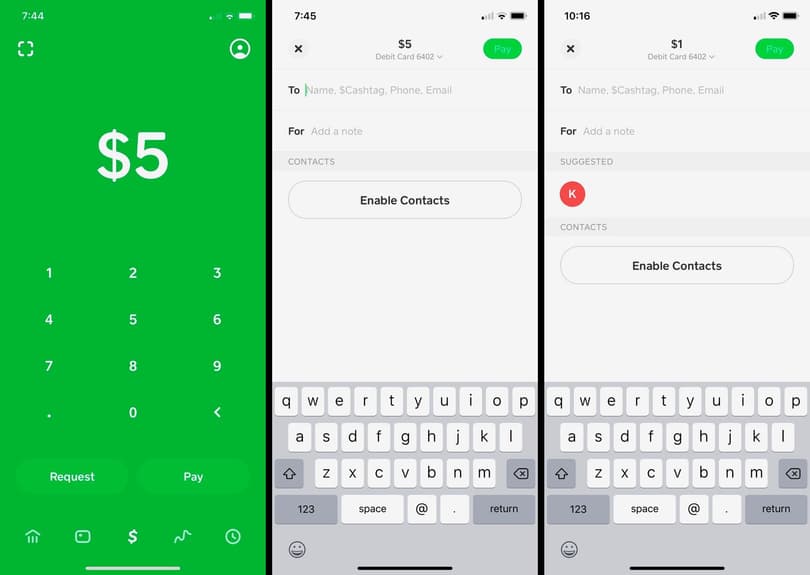
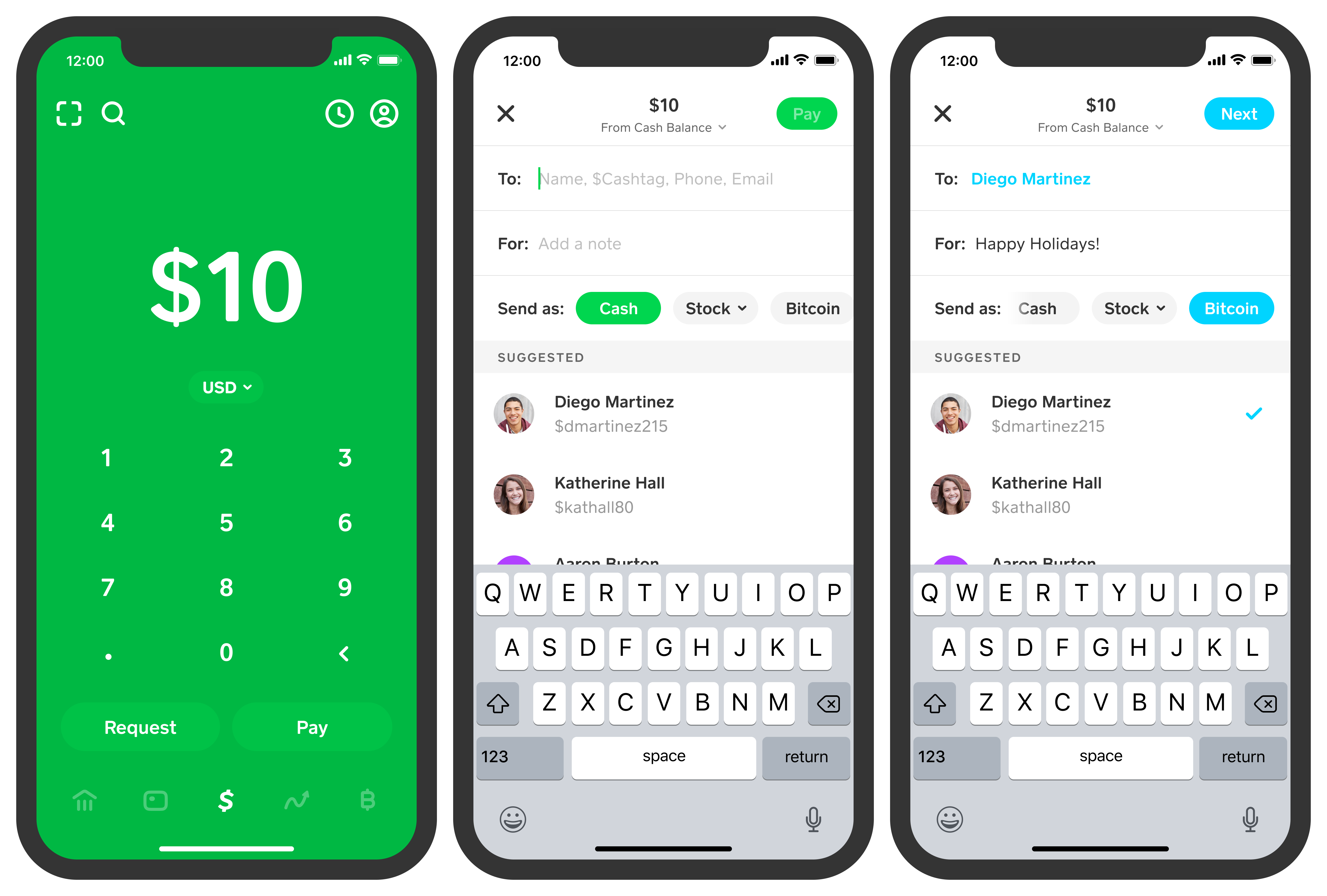
- Open Cash App and Navigate to the Payment Screen: Launch the Cash App on your mobile device. The main screen typically features a prominent dollar sign icon ($) in the center, which serves as the gateway to sending or requesting money. Tap this icon to begin a new transaction.
- Enter the Desired Amount: On the payment screen, you’ll see a numeric keypad. Enter the exact dollar amount you wish to send. The app displays this clearly, allowing for easy verification.
- Identify the Recipient: After entering the amount, you’ll be prompted to enter the recipient’s details. Cash App offers several ways to identify the recipient, enhancing flexibility:
- Cashtag ($Cashtag): This is the most common and unique identifier for Cash App users. If you know the recipient’s Cashtag, simply type it in.
- Phone Number: You can send money to a recipient’s phone number, provided it’s linked to their Cash App account.
- Email Address: Similarly, an email address linked to their Cash App account can be used.
- Contacts List: Cash App can integrate with your phone’s contacts, allowing you to select a recipient directly from your address book, further simplifying the process.
- Add a Note (Optional but Recommended): Below the recipient details, there’s an option to add a note or memo for the payment. This is highly recommended for record-keeping and clarity. For example, “Dinner,” “Rent,” or “Birthday Gift.” This simple feature aids in personal financial tracking and provides context for the transaction.
This stage emphasizes precision and verification. The app’s design ensures that you have multiple opportunities to review the recipient and amount before proceeding, a critical component of digital transaction security.
Confirming and Executing Transactions: Speed and Simplicity
The final steps involve reviewing and confirming the transaction, where Cash App’s digital security features come into play.
- Review Transaction Details: Before sending, Cash App presents a summary of the transaction: the amount, the recipient, and your optional note. Carefully review these details to ensure accuracy. A common mistake in P2P apps is sending money to the wrong person or amount, and this review screen is your last line of defense.
- Tap “Pay”: Once you’ve confirmed all details are correct, tap the “Pay” button.
- PIN, Fingerprint, or Face ID Authentication: For security, Cash App will often prompt you to enter your PIN, use fingerprint authentication (Touch ID), or facial recognition (Face ID) to authorize the transaction. This biometric or PIN-based verification adds a crucial layer of security, ensuring that even if your phone is compromised, unauthorized transactions cannot be made easily.
- Confirmation: Upon successful authentication, the money is typically sent instantly. Both you and the recipient will receive an in-app notification and often an email confirmation of the transaction. The funds will appear in the recipient’s Cash App balance, ready for use or withdrawal.
This entire process, from opening the app to confirming the payment, can often be completed in less than a minute, showcasing the technological efficiency that underpins Cash App’s utility.
Understanding Transaction Limits and Associated Dynamics
While Cash App offers immense convenience, it also operates within specific parameters, particularly concerning transaction limits. These limits are a standard practice across digital payment platforms, designed for security and regulatory compliance.
- Initial Limits: New or unverified Cash App accounts typically have lower weekly sending limits (e.g., $250) and receiving limits (e.g., $1,000). These are put in place to prevent fraud and money laundering until a user’s identity is fully verified.
- Increasing Limits: To increase these limits, users must verify their identity by providing their full legal name, date of birth, and the last four digits of their Social Security Number (SSN). This process aligns with Know Your Customer (KYC) regulations and allows Cash App to grant higher sending limits (e.g., $7,500 per week) and remove receiving limits entirely.
- Instant Deposit Fees: While sending money from your Cash App balance or linked debit card is generally free for standard transfers, if a recipient wishes to instantly transfer money from their Cash App balance to their linked debit card, a small fee (typically 0.5% to 1.75%, with a minimum fee of $0.25) applies. Standard deposits to a bank account are free but can take 1-3 business days. This distinction highlights the balance between convenience and cost within the app’s financial mechanics.
Understanding these limits and fees is vital for effective financial planning and utilization of the app, ensuring that your digital transactions align with your needs without unexpected hitches.
Beyond the Basics: Advanced Features and Digital Security Measures
Cash App is more than just a money-sending tool; it’s a comprehensive digital financial ecosystem. Understanding its extended features and inherent security measures is crucial for a complete appreciation of its technological capabilities.
The Art of Requesting Money: Reversing the Digital Flow
Just as easily as you can send money, Cash App allows you to request it. This feature is invaluable for splitting costs, collecting dues, or reminding someone of a payment.
- Navigate to the Payment Screen: From the main screen, tap the dollar sign icon ($).
- Enter the Amount: Input the amount you wish to request.
- Identify the Sender: Tap “Request” instead of “Pay.” You’ll then enter the Cashtag, phone number, or email of the person you’re requesting money from.
- Add a Note: Include a clear note explaining the request (e.g., “Lunch,” “Concert Tickets”).
- Send Request: Tap the “Request” button. The designated user will receive a notification and can then choose to accept or decline the request.
This “request” functionality mirrors the sending process in its simplicity and efficiency, further solidifying Cash App’s role as a versatile P2P technology.
Fortifying Your Finances: Cash App’s Security Protocols
Security is paramount in any financial application, and Cash App employs several layers of digital security to protect user funds and data. Understanding these protocols fosters confidence in the platform.
- Encryption: All information transmitted within Cash App is encrypted, safeguarding your personal and financial data from unauthorized access. This includes sensitive details like bank account numbers and debit card information.
- PIN, Touch ID, or Face ID: As mentioned, these authentication methods are essential for authorizing transactions, adding a personalized security layer that prevents others from making payments even if they gain access to your device.
- Security Lock: Users can enable a “Security Lock” that requires a PIN or biometric authentication every time they open the app or initiate a transaction. This is a crucial setting to enhance overall account security.
- Fraud Protection: Cash App employs fraud detection systems that monitor transactions for suspicious activity. If unusual patterns are detected, transactions may be flagged or temporarily held for review.
- Dedicated Support: While primarily self-service, Cash App offers customer support for security concerns, including reporting unauthorized transactions or compromised accounts. Users can contact support directly through the app.
Despite these measures, user vigilance remains critical. Always use strong, unique passwords for linked email accounts, be wary of phishing scams, and never share your PIN or account details with others.
Troubleshooting Common Digital Transaction Glitches
Even with advanced technology, occasional hiccups can occur. Knowing how to troubleshoot common issues can save time and frustration.
- Failed Transactions: If a transaction fails, check your internet connection, ensure sufficient funds in your linked account or Cash App balance, and verify the recipient’s details. Sometimes, a temporary system error on either end can cause a failure, and retrying after a few minutes can resolve it.
- Pending Transactions: A pending transaction usually means Cash App is still processing it. This can happen if there’s a slight delay in communication with your bank or the recipient’s. Most pending transactions resolve within minutes, but some can take longer.
- Money Sent to the Wrong Person: This is a critical issue. If you’ve sent money to an incorrect Cashtag or contact, your first step should be to request the money back from the unintended recipient through the app. If they don’t respond or refuse, you can contact Cash App support, but successful recovery is not guaranteed, as P2P payments are often instant and final. This underscores the importance of double-checking recipient details.
- Account Freezes/Holds: Occasionally, Cash App might freeze or put a hold on an account due to suspicious activity or if a transaction exceeds limits without proper verification. Contacting support with the necessary identity verification documents is typically required to resolve such issues.
Effective troubleshooting relies on understanding the digital mechanics of the app and following basic security hygiene.
The Evolution of Peer-to-Peer Payments: Cash App’s Place in the Tech Landscape
Cash App is not an isolated phenomenon; it’s a key player in the rapidly evolving landscape of digital financial technology. Its design and features reflect broader trends in how technology is reshaping personal finance.
Comparing Cash App with Other P2P Payment Technologies
Cash App operates alongside other prominent P2P payment applications like Venmo, PayPal, and Zelle. While all aim to facilitate easy money transfers, they often have distinct features and user experiences.
- Cash App vs. Venmo: Both offer social elements and P2P transfers. Cash App distinguishes itself with the Cash Card (a customizable debit card), Bitcoin trading, and stock investing, pushing beyond simple P2P.
- Cash App vs. PayPal: PayPal is more established and internationally recognized, offering a broader suite of services for online shopping and business payments. Cash App is often perceived as more agile and streamlined for domestic P2P and direct personal finance management.
- Cash App vs. Zelle: Zelle is typically integrated directly into banking apps, making it highly convenient for users of participating banks to send money without downloading a separate app. Cash App offers more features outside of core P2P and has its own distinct digital wallet environment.
Cash App’s competitive edge often lies in its straightforward interface, its integrated features (like Bitcoin and the Cash Card), and its strong brand identity, appealing particularly to younger demographics seeking an all-in-one digital financial tool. Its commitment to regular updates and new feature rollouts ensures it remains competitive in a dynamic tech market.
Future-Proofing Your Digital Transactions
The technology behind Cash App and similar services continues to evolve. Staying informed about new features, security updates, and potential regulatory changes is crucial for future-proofing your digital transaction habits. Cash App’s developers are constantly working on enhancing security, improving user experience, and expanding functionalities, often integrating cutting-edge technologies to maintain its relevance. The adoption of biometric security, real-time transaction monitoring, and encrypted communication are examples of how the app leverages technological advancements to keep user funds safe and accessible.

Best Practices for Secure and Efficient App Usage
To maximize the benefits of Cash App while minimizing risks, adhere to these best practices:
- Always Double-Check Recipient Details: This cannot be stressed enough. Verify the Cashtag, phone number, or email before confirming any transaction.
- Enable All Security Features: Utilize a strong PIN, Touch ID/Face ID, and enable the Security Lock for enhanced protection.
- Be Skeptical of Unsolicited Requests: Beware of requests for money from unknown individuals or those promising too-good-to-be-true offers. Cash App is a common target for scams.
- Keep the App Updated: Regularly update your Cash App to ensure you have the latest security patches and features.
- Monitor Your Activity: Periodically review your transaction history within the app to spot any unauthorized activity promptly.
- Use Strong Passwords for Linked Accounts: Ensure that the email associated with your Cash App account has a strong, unique password and multi-factor authentication enabled.
By following these guidelines, users can confidently navigate the functionalities of Cash App, making the most of its innovative approach to peer-to-peer payments and embracing it as a reliable tool in their personal technology arsenal.
In conclusion, Cash App exemplifies the power of modern technology to simplify complex financial tasks. Sending money through the app is a testament to intuitive design, robust security, and efficient processing. By understanding its core functionalities, navigating its interface effectively, and adhering to best practices, users can harness the full potential of this indispensable digital tool, making financial interactions faster, easier, and more secure than ever before.
aViewFromTheCave is a participant in the Amazon Services LLC Associates Program, an affiliate advertising program designed to provide a means for sites to earn advertising fees by advertising and linking to Amazon.com. Amazon, the Amazon logo, AmazonSupply, and the AmazonSupply logo are trademarks of Amazon.com, Inc. or its affiliates. As an Amazon Associate we earn affiliate commissions from qualifying purchases.