
In the landscape of standardized testing, the SAT stands as a pivotal hurdle for college admissions, and the Math section, in particular, often prompts questions about permissible technological aids. Navigating the College Board’s specific regulations regarding calculators is not merely about adherence; it’s about optimizing your performance with the right tools while understanding the underlying philosophy of these restrictions. This article delves into the technological specifications and guidelines surrounding calculator use on the SAT, ensuring test-takers are well-equipped and compliant. We will explore the types of devices allowed, those strictly prohibited, and strategic considerations for leveraging your calculator effectively within the exam’s tech-savvy yet rigorously controlled environment.

Navigating the Digital Tools for Standardized Testing
The College Board’s stance on calculators for the SAT Math section is a careful balance between enabling students to demonstrate advanced mathematical reasoning and preventing unfair advantages or potential for digital malpractice. Understanding this equilibrium is crucial for anyone preparing for the exam. The rules are not arbitrary; they reflect a pedagogical and logistical approach to assessing mathematical proficiency in a high-stakes setting.
The Rationale Behind Calculator Regulations
At its core, the SAT aims to evaluate a student’s readiness for college-level work, which includes foundational mathematical skills, problem-solving abilities, and the capacity to apply concepts. While calculators are indispensable tools in modern mathematics and science, their unrestricted use could obscure a student’s grasp of basic arithmetic or conceptual understanding. The regulations exist to:
- Ensure Fairness and Equity: By standardizing the types of calculators allowed, the College Board aims to provide a level playing field, preventing students with access to overly sophisticated or communication-enabled devices from gaining an undue advantage.
- Prevent Cheating: Calculators with internet access, cameras, or advanced communication features pose significant security risks, potentially allowing students to access unauthorized information or communicate with others during the test.
- Focus on Mathematical Reasoning: The SAT Math section is designed to test not just computation, but also logical thinking and problem formulation. Many questions can be solved more efficiently without a calculator, or with minimal calculator use, emphasizing that the device is a tool, not a crutch.
- Maintain Test Integrity: Strict rules help maintain the credibility and validity of the test scores, ensuring they accurately reflect a student’s individual capabilities.
General Guidelines for SAT Calculator Use
Before diving into specific models, a few overarching principles apply to all acceptable calculators:
- Portability and Power: Your calculator must be battery-operated and portable. It cannot require an electrical outlet.
- No Wireless Communication: Any calculator with wireless communication capabilities (Bluetooth, Wi-Fi, cellular) is strictly forbidden.
- No QWERTY Keyboards: Devices resembling a computer or smartphone with a full alphanumeric keyboard are not allowed. The input should primarily be numerical and function-based.
- No Audio/Video Recording or Playback: Calculators with camera functions, video recording, or audio playback features are prohibited.
- Silent Operation: Your calculator must not make any noise.
- No Internet Access: This is a fundamental restriction across all standardized tests.
- Self-Contained Functionality: The calculator must operate independently without external data sources or connections during the test.
Adhering to these general guidelines ensures you select a device that aligns with the College Board’s strict security protocols and assessment philosophy.
Permitted Technological Aids: Graphing and Scientific Calculators
The vast majority of calculators acceptable for the SAT fall into two main categories: scientific calculators and graphing calculators. Each offers a distinct set of features, and understanding their capabilities can inform your choice and preparation strategy.
Deep Dive into Graphing Calculators: Capabilities and Recommended Models
Graphing calculators are the most powerful permitted devices, offering advanced functions crucial for some higher-level math problems, particularly those involving functions, graphs, matrices, and complex equations. Their ability to visualize mathematical relationships can be a significant advantage.
Key Features of Acceptable Graphing Calculators:
- Graphical Representation: They can plot functions, analyze curves, find intercepts, and determine minimum/maximum values.
- Equation Solving: Advanced solvers for polynomials, systems of equations, and inequalities.
- Matrix Operations: Essential for linear algebra problems.
- Statistical Analysis: Regression analysis, probability distributions, and data plotting.
- Programming Capabilities (with caveats): While some graphing calculators are programmable, any pre-loaded programs that could give an unfair advantage or access prohibited material must be cleared or not used. College Board staff reserve the right to inspect calculators.
Widely Accepted and Recommended Models:
- Texas Instruments (TI) Series:
- TI-83 Plus / TI-84 Plus (and their various CE versions): These are arguably the most popular and recommended graphing calculators due to their widespread use in schools, extensive online tutorials, and robust functionality. The TI-84 Plus CE is a modern iteration with a color screen and rechargeable battery, highly favored by students.
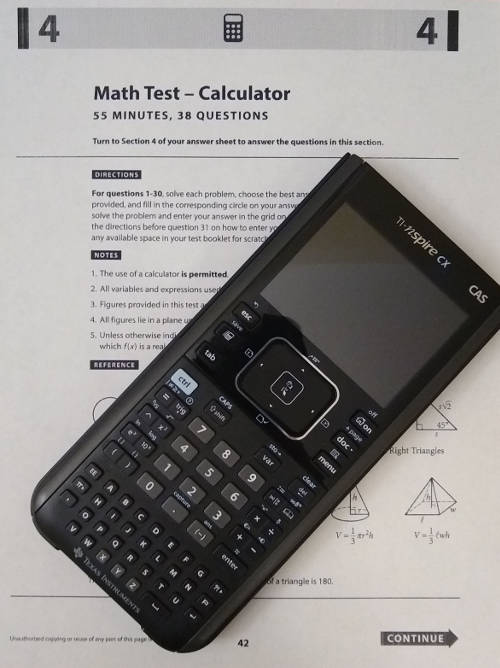
- TI-Nspire (and CX/CX II versions): These are powerful calculators with a more intuitive interface and often a computer-like experience. However, the TI-Nspire CX CAS (Computer Algebra System) is not allowed if it has a QWERTY keyboard, and the TI-Nspire CAS is typically prohibited due to its symbolic manipulation capabilities that can solve problems step-by-step. The non-CAS versions, specifically the TI-Nspire CX and CX II, are generally acceptable if they don’t have prohibited features like wireless communication or a full QWERTY keyboard. Crucially, CAS versions are often disallowed due to their symbolic algebra capabilities. Always double-check the exact model’s allowed status.
- Casio Series:
- Casio FX-9750GII / FX-9860GII: These are strong alternatives to the TI models, offering similar graphing and scientific functionalities at a competitive price. They are also widely accepted.
- Hewlett-Packard (HP) Series:
- HP Prime: A powerful modern graphing calculator with a touch screen (though touch functionality is often disabled for testing or not a core input method) and advanced capabilities. Acceptable versions typically do not have a QWERTY keyboard or wireless features enabled.
Scientific Calculators: The Reliable Workhorses
For students who don’t require the advanced graphing capabilities or prefer a simpler interface, scientific calculators are perfectly acceptable and often sufficient for the SAT Math section. Many questions can be solved with just a scientific calculator.
Key Features of Acceptable Scientific Calculators:
- Basic Arithmetic: Addition, subtraction, multiplication, division.
- Exponents and Roots: Square roots, cube roots, powers.
- Logarithms: Natural and common logarithms.
- Trigonometric Functions: Sine, cosine, tangent, and their inverses.
- Memory Functions: For storing intermediate results.
- Fractions and Decimals: Conversion between them.
- Parentheses: Essential for complex operations.
Widely Accepted and Recommended Models:
- Texas Instruments (TI) Series:
- TI-30X IIS / TI-30XS MultiView: These are excellent, affordable, and highly functional scientific calculators, often recommended for their clear displays and user-friendly interface.
- Casio Series:
- Casio FX-115ES Plus / FX-991EX (ClassWiz): These are very popular and robust scientific calculators, known for their natural display (showing fractions and square roots as they appear in textbooks) and extensive features, including basic matrix and vector calculations.
- Sharp Series:
- Sharp EL-W516X: Another solid choice offering a wide range of scientific functions.
Understanding Keyboard Features and Display Requirements
Beyond functionality, the physical design of the calculator is also scrutinized.
- Keyboard Layout: As mentioned, a full QWERTY keyboard (like on a computer or smartphone) is a red flag. The keys should primarily be numerical, operational, and function-specific.
- Display: While color screens are allowed (e.g., TI-84 Plus CE), the display should not be capable of displaying internet content, videos, or full documents. The primary purpose of the display is to show calculations, graphs, and input/output.
- Touchscreen Functionality: While some advanced calculators have touchscreens (like HP Prime), their use is generally restricted to basic input, not for browsing or complex interaction that could mimic a disallowed device. In many testing scenarios, touch input might be disabled or irrelevant.
Prohibited Devices: What to Leave at Home
Just as important as knowing what’s allowed is understanding what is strictly forbidden. Bringing a prohibited device can lead to immediate dismissal from the test, cancellation of scores, and even a ban from future College Board tests.
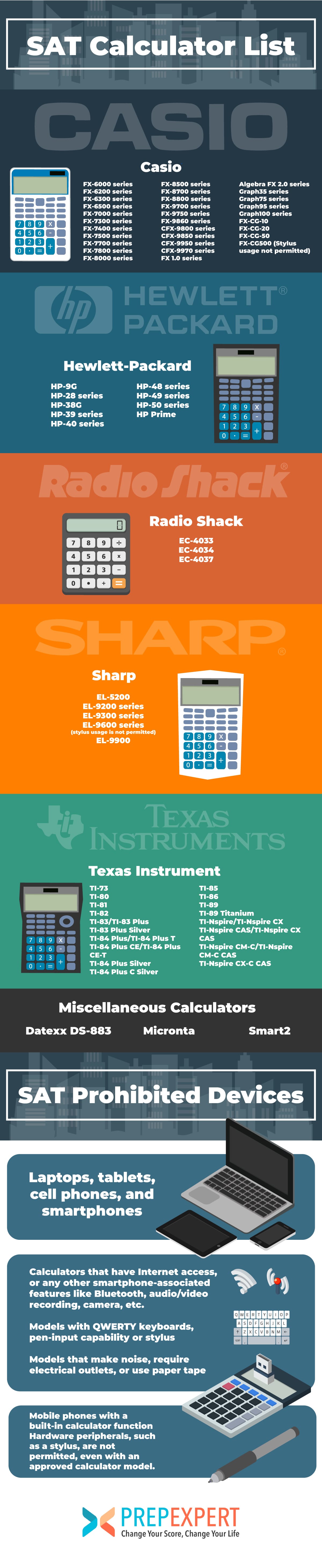
Smartphones, Tablets, and Other Connected Devices
This is perhaps the most obvious category of prohibited devices. Any device primarily designed for communication, internet access, or general computing is banned.
- Smartphones: iPhone, Android phones, etc.
- Tablets: iPad, Android tablets, Microsoft Surface, etc.
- Laptops/Notebooks: Any personal computer.
- Smartwatches/Wearable Technology: Apple Watch, Samsung Galaxy Watch, Fitbits, etc., are all forbidden. Even if they have calculator functions, their communication and notification capabilities make them unacceptable.
- Portable Media Players: iPods, MP3 players, etc.
- Electronic Listening Devices: Headphones, earbuds (wired or wireless).
- Any Device with an Audio/Video Recording or Playback Function: This includes devices that could have these functions, even if you don’t intend to use them for that purpose.
Calculators with QWERTY Keyboards and Advanced Features
Certain types of calculators, even if they appear to be dedicated computing devices, are prohibited due to their advanced features or keyboard layout.
- Calculators with QWERTY (typewriter-like) Keyboards: This is a firm rule. Examples include some older TI-92 or Voyage 200 models, or dedicated word processing devices. The rationale is that these keyboards could facilitate unauthorized messaging or access to stored text.
- Calculators with Computer Algebra System (CAS) Capabilities (specific models): While some CAS features are integrated into acceptable graphing calculators, dedicated CAS systems that can perform symbolic manipulation (like solving algebraic equations for variables rather than just numerical outputs) are often prohibited. The TI-Nspire CAS and some HP CAS models fall into this category, as they can “solve” problems in a way that bypasses genuine understanding. Always verify if your specific CAS model is allowed.
- Calculators with Wireless Communication (Bluetooth, Wi-Fi, cellular): Even if a calculator has advanced mathematical features, if it can connect wirelessly, it’s out.
- Calculators with Pen-Input or Stylus-Input Capabilities that Allow Text Entry: Devices designed for note-taking or drawing in a way that mimics a digital notepad are disallowed.
- Calculators that Require an Electrical Outlet: All acceptable calculators must be battery-powered.
The “No-Go” List: Specific Examples and Why They’re Banned
While the College Board doesn’t publish an exhaustive list of every prohibited model, understanding the types of banned calculators is key.
- TI-89, TI-92, TI-Nspire CAS (often): These models, especially older versions or CAS variants, are frequently cited as problematic due to their symbolic manipulation capabilities or QWERTY-like interfaces.
- HP 48GII (often): Similar to the TI-89, its advanced features and potential for symbolic manipulation often lead to it being prohibited.
- Any calculator integrated into a phone, tablet, or smartwatch.
- Any calculator that beeps, talks, or makes any noise.
The fundamental principle is that the device should aid computation and visualization, not provide solutions directly or enable communication/information access beyond its numerical functions. When in doubt, err on the side of caution and opt for a simpler, universally accepted model like the TI-84 Plus CE or a reliable scientific calculator.
Optimizing Your Calculator Strategy for the SAT Math Section
Having the right calculator is only half the battle; knowing how to use it effectively and responsibly on test day is equally important.
Pre-Test Preparation: Practice and Familiarity
Your chosen calculator should be a familiar extension of your thought process, not a new gadget you’re trying to figure out during the exam.
- Consistent Practice: Use the same calculator you plan to bring to the SAT for all your practice tests and homework.
- Master Key Functions: Be proficient in all the functions you might need: basic arithmetic, exponents, roots, logarithms, trigonometric functions, graphing (if applicable), statistical functions, and memory storage.
- Efficiency: Learn shortcuts and efficient ways to input calculations to save precious time.
- Problem-Solving without a Calculator: Practice identifying problems where a calculator is unnecessary or even a hindrance. Sometimes, mental math or algebraic manipulation is faster.
Battery Life and Backup Plans
A dead calculator is as useless as no calculator at all.
- Check Batteries: Always ensure your calculator has fresh batteries or is fully charged (for rechargeable models) the night before the test.
- Bring Spares: For battery-powered calculators, bring an extra set of batteries and the tiny screwdriver needed to change them, if applicable.
- Consider a Backup Calculator: Some students bring a simple scientific calculator as a backup, just in case their primary graphing calculator malfunctions. This ensures you’re never without a tool.
Ethical Use and Test Day Etiquette
The College Board takes test security very seriously.
- Clear Memory: Before the test, ensure your calculator’s memory is clear of any unauthorized programs, notes, or data. Test proctors have the right to inspect your device.
- Silent Operation: Ensure your calculator is silent. Turn off any sound features.
- Respect Instructions: Follow all instructions from the test proctors regarding calculator use. If asked to put it away or demonstrate its functionality, comply immediately.
- No Sharing: Calculators cannot be shared between students during the test.
The Future of Calculators in Standardized Testing
The role of technology in education is constantly evolving, and standardized tests like the SAT are not immune to these shifts. As digital tools become more sophisticated, the College Board will likely continue to adapt its policies.
Balancing Technology with Foundational Math Skills
There’s an ongoing debate about the appropriate level of technological integration in high-stakes testing. While calculators can democratize access to complex calculations, the core objective remains to assess a student’s underlying mathematical understanding. Future policies will likely continue to walk this tightrope, ensuring that technology serves as an aid to demonstration rather than a substitute for knowledge.
Potential Shifts in Permitted Devices
As new technologies emerge, the list of acceptable and prohibited devices may change. The College Board monitors technological advancements and revises its policies periodically. For instance, the rise of powerful, miniature computing devices (like advanced smartwatches) necessitates constant vigilance. It’s plausible that future tests might incorporate on-screen calculators for specific sections or become entirely digital, potentially standardizing the calculator interface for all test-takers, much like the digital PSAT.
The Evolving Role of Digital Competence
Beyond simply using a calculator, digital competence — understanding how to select the right tool, interpret its output, and apply it efficiently — is becoming an increasingly important skill. The SAT, by allowing specific types of calculators, implicitly assesses a student’s ability to integrate technology into problem-solving, a critical skill for college and career success in the 21st century. Therefore, while restrictions remain, the emphasis is also on fostering a responsible and strategic approach to using technological aids in mathematics.
In conclusion, preparing for the SAT’s calculator section involves more than just having a device; it requires understanding the technological landscape, adhering to strict guidelines, and developing a strategic approach to using your chosen tool. By selecting an approved calculator, practicing diligently, and staying informed, test-takers can ensure their technological aid truly enhances their performance on this crucial exam.
aViewFromTheCave is a participant in the Amazon Services LLC Associates Program, an affiliate advertising program designed to provide a means for sites to earn advertising fees by advertising and linking to Amazon.com. Amazon, the Amazon logo, AmazonSupply, and the AmazonSupply logo are trademarks of Amazon.com, Inc. or its affiliates. As an Amazon Associate we earn affiliate commissions from qualifying purchases.