
In an increasingly data-driven world, the scientific calculator remains an indispensable tool for students, engineers, scientists, and anyone grappling with complex mathematical and scientific concepts. Far from being a mere relic of pre-digital education, these sophisticated handheld devices, or their software counterparts, are powerful engines designed to streamline intricate calculations, saving invaluable time and mitigating errors. This comprehensive guide delves into the mechanics and mastery of the scientific calculator, transforming it from a perplexing array of buttons into a trusted computational companion.
Understanding how to effectively wield a scientific calculator goes beyond punching in numbers; it’s about comprehending its logical framework, leveraging its diverse functions, and integrating it seamlessly into problem-solving workflows. From fundamental arithmetic to advanced calculus, statistics, and complex number operations, this article will demystify the scientific calculator, empowering users to unlock its full potential in academic pursuits and professional applications. We will explore its core functionalities, delve into advanced features, and provide insights into best practices, ensuring accuracy and efficiency in every calculation.

I. Demystifying the Interface: Getting Started with Your Scientific Calculator
The initial encounter with a scientific calculator’s crowded keypad can be daunting, but its design is meticulously structured for logical operation. Familiarity with its layout and fundamental operational principles is the first step towards mastery. Most scientific calculators adhere to a standard hierarchical button arrangement, categorizing functions by type and frequency of use.
A. Core Arithmetic Operations and Input Logic
At its heart, a scientific calculator performs basic arithmetic: addition, subtraction, multiplication, and division. These foundational operations are typically represented by large, easily accessible buttons. However, the true power begins with understanding the input logic.
- Order of Operations (PEMDAS/BODMAS): Unlike basic four-function calculators, scientific calculators inherently understand and apply the standard order of operations (Parentheses/Brackets, Exponents/Orders, Multiplication and Division, Addition and Subtraction). This means you can often input an expression as you read it, and the calculator will process it correctly. For instance,
3 + 4 * 2will correctly yield11, not14, because multiplication is performed before addition. - Parentheses are Your Best Friends: While the calculator understands the order of operations, explicitly using parentheses
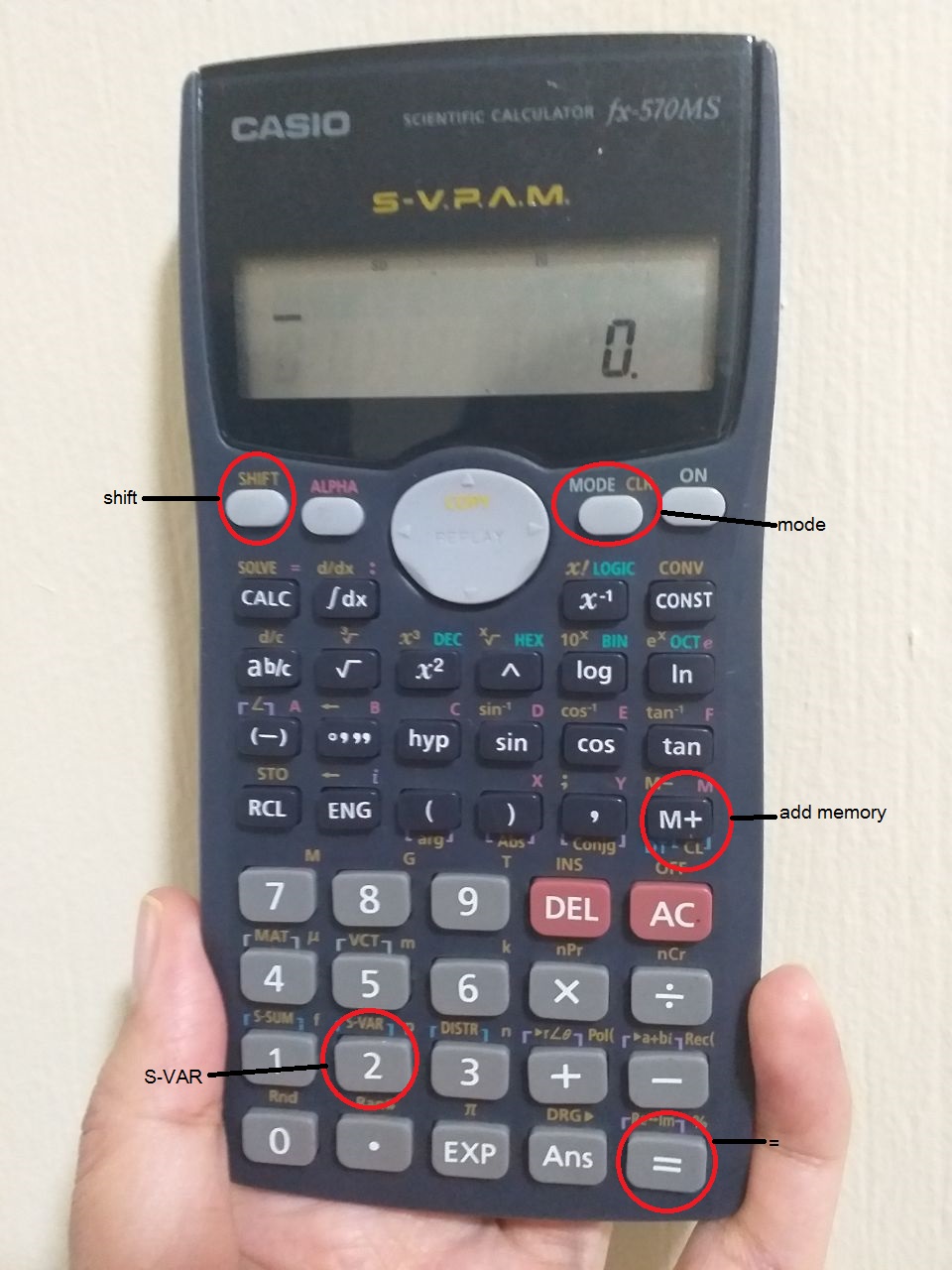
(and)is crucial for complex expressions, especially when dealing with denominators, exponents, or nested functions. They force the calculator to evaluate the expression within them first, overriding or clarifying the default order. For example, to calculate(3 + 4) * 2, you must use parentheses to ensure the addition is performed first. - The Equals Button (
=): This button triggers the calculation and displays the result. It’s often paired with anANS(Answer) button, which recalls the result of the previous calculation, allowing for chained operations without re-typing.
B. Essential Mathematical Functions Beyond the Basics
Once basic arithmetic is mastered, the next step involves exploring fundamental mathematical functions that underpin various scientific disciplines.
- Powers and Roots: Raising a number to a power (e.g., $x^y$ or $x^2$) and extracting roots (e.g., $sqrt{x}$, $sqrt[y]{x}$) are common operations. Look for
x^yor^buttons for general powers,x^2for squares, and√(square root) andshift+^(for $y$-th root) for roots. - Reciprocals and Fractions: The
x^-1or1/xbutton quickly calculates the reciprocal of a number. Many scientific calculators also offer a fraction button (a b/cord/c) to input and display numbers as fractions, simplifying calculations that require exact fractional values rather than decimal approximations. Converting between fractions and decimals is also a common feature. - Constants and Special Numbers: Buttons for
π(pi) ande(Euler’s number) are standard. These provide high-precision values for these fundamental mathematical constants, essential in geometry, calculus, and engineering.
II. Unlocking Advanced Capabilities: Navigating Specialized Modes and Functions
The true power of a scientific calculator lies in its ability to perform advanced mathematical, trigonometric, statistical, and logarithmic operations, often inaccessible with simpler devices. Understanding and utilizing these functions correctly is paramount for higher-level problem-solving.
A. Trigonometry, Logarithms, and Exponentials
These functions are cornerstones of many scientific and engineering fields.
- Trigonometric Functions (
sin,cos,tan): These calculate the sine, cosine, and tangent of an angle, respectively. Crucially, pay attention to the angle mode of your calculator (degrees, radians, or gradians), usually indicated by aDEG,RAD, orGRADsymbol on the display. Most problems in general math are in degrees, while calculus and advanced physics often use radians. AMODEorDRGbutton usually cycles through these. Their inverse functions (sin^-1,cos^-1,tan^-1orarcsin,arccos,arctan), accessed via theSHIFTor2ndkey, compute the angle corresponding to a given trigonometric ratio. - Logarithmic and Exponential Functions (
log,ln,e^x,10^x):logtypically refers to the common logarithm (base 10).lnrefers to the natural logarithm (basee).10^xande^x(oftenSHIFT+logandSHIFT+ln, respectively) are their inverse exponential functions, allowing calculations involving exponential growth/decay or scientific notation.
B. Statistical Modes and Data Analysis
Many scientific calculators incorporate dedicated statistical modes, transforming them into basic data analysis tools.
- Entering Data: In statistical mode (accessed via
MODEorSTATbutton), you can typically input a series of data points (xvalues, and sometimesyvalues for regression). TheDATAorM+button is often used for this. - Calculating Statistics: Once data is entered, the calculator can compute various statistical measures:
- Mean (
x̄): The average of the data set. - Standard Deviation (
σx,sx): Measures the dispersion of data points around the mean.σxis for population standard deviation,sxfor sample standard deviation. - Sum (
Σx,Σx^2): Sum of the data points and the sum of their squares, useful for manual calculations or further analysis. - Regression Analysis: For paired data (
xandy), some calculators can perform linear regression, providing the slope (a), y-intercept (b), and correlation coefficient (r) for the line of best fit.
- Mean (
C. Working with Memory, Variables, and Scientific Notation
Efficiency is key, and scientific calculators offer features to store and recall values.
- Memory Functions (
M+,M-,STO,RCL):M+adds the current display value to the memory,M-subtracts it.STO(Store) allows you to save a value to specific memory registers (e.g.,A,B,C,X,Y), whileRCL(Recall) retrieves them. This is invaluable for multi-step calculations where intermediate results need to be preserved. - Scientific and Engineering Notation (
EXP,EE): For very large or very small numbers, scientific calculators automatically switch to scientific notation (e.g., 6.022 x $10^{23}$). TheEXPorEEbutton is used to input the “times 10 to the power of” part of a number (e.g., to enter $3.0 times 10^8$, you’d press3,.0,EXP,8). Engineering notation is similar but uses powers of 10 that are multiples of 3.
III. Mastering Complex Operations and Troubleshooting
Beyond individual functions, combining them effectively and navigating potential pitfalls are hallmarks of proficient scientific calculator use. This section focuses on advanced techniques and problem-solving strategies.
A. Advanced Input Techniques and Equation Solving
Handling intricate equations requires a systematic approach and an understanding of the calculator’s parsing logic.
- Nested Parentheses and Brackets: When expressions contain multiple levels of grouping, always work from the innermost set of parentheses outwards. Your calculator can handle several levels of nesting, but careful input is essential. Some calculators have
[and]buttons, though(and)are generally sufficient. - Complex Numbers (Optional Feature): Higher-end scientific calculators often include a complex number mode (e.g.,
CMPLXmode). In this mode, you can input and perform operations (addition, subtraction, multiplication, division, powers) on numbers with real and imaginary components (e.g., $a + bi$). This feature is critical in electrical engineering, quantum mechanics, and advanced mathematics. - Equation Solver (Limited): While not full-fledged computer algebra systems, some advanced scientific calculators offer basic equation solving capabilities, often for specific types of equations (e.g., linear equations with multiple variables, or finding roots of polynomials) or an iterative solver that can find an approximation for
xinf(x) = 0. Consult your specific model’s manual for this functionality.
B. Common Errors, Troubleshooting, and Display Management
Even experienced users encounter errors. Knowing how to interpret and resolve them is crucial.
- Syntax Error: Often caused by incorrect input order, missing parentheses, or trying to use a function incorrectly (e.g., dividing by zero). Review your input carefully, paying special attention to nested operations.
- Math Error / Domain Error: Occurs when an operation is mathematically undefined (e.g., taking the square root of a negative number in real mode, dividing by zero, or taking the logarithm of a non-positive number). Check the values you are operating on.
- Overflow / Underflow Error: The result is too large or too small for the calculator to represent. This is rare with modern calculators but can happen with extremely high powers or very small fractions.
- Angle Mode Mismatch: A frequent source of error in trigonometry. Always double-check if your calculator is in
DEG,RAD, orGRADmode, and adjust as necessary for the problem at hand. - Understanding Display Modes (
FIX,SCI,NORM):FIX: Displays a fixed number of decimal places.SCI(Scientific): Displays numbers in scientific notation.NORM(Normal): Displays numbers in standard format unless they are too large or too small, then switches to scientific notation. Knowing how to switch between these ensures your results are presented in the desired format.
IV. Beyond the Buttons: Maintenance, Practice, and Digital Evolution
Mastering a scientific calculator is an ongoing process that benefits from consistent practice, proper maintenance, and an awareness of how this technology continues to evolve.
A. Sustaining Performance: Battery Life and Physical Care
A scientific calculator is a durable tool, but like any gadget, it benefits from good care.
- Battery Management: Most scientific calculators use standard AAA batteries or button cells. Keep spare batteries on hand, especially before exams or critical work. Some advanced models are solar-powered or rechargeable. If the display dims or functions become erratic, it’s usually a sign of low battery.
- Cleaning and Protection: Keep the calculator clean and free of dust and liquids. Use a soft, dry cloth. Many calculators come with a hard slide-on case; always use it to protect the screen and buttons from damage when not in use. Avoid dropping the calculator, as this can damage internal components or the delicate LCD display.
- Resetting Your Calculator: If your calculator starts behaving unexpectedly, or you wish to clear all memory and settings to their factory defaults, there’s usually a
RESETbutton or a specific key combination (oftenSHIFT+CLEARorRESEThole on the back). Be aware that this will erase any stored data.
B. Practice Makes Perfect: Engaging with Real-World Applications
The best way to become proficient with a scientific calculator is through consistent practice.
- Solve Example Problems: Work through textbook examples, online tutorials, and practice problems specifically designed for scientific calculators. Start with simpler problems and gradually increase complexity.
- Simulate Real-World Scenarios: Apply your calculator skills to problems in physics (e.g., kinematics, electromagnetism), chemistry (e.g., stoichiometry, equilibrium calculations), engineering (e.g., circuit analysis, structural load calculations), and finance (e.g., compound interest, annuities – though a financial calculator is specialized here, a scientific one can handle many basic financial equations).
- Understand the “Why”: Don’t just rely on the calculator for answers. Ensure you understand the underlying mathematical principles. The calculator is a tool to execute your understanding, not a replacement for it.
C. The Digital Frontier: Scientific Calculators in the Modern Tech Landscape
While dedicated hardware calculators persist, the concept of a scientific calculator has significantly evolved within the broader tech ecosystem.
- Software Emulators and Apps: Numerous scientific calculator apps are available for smartphones, tablets, and computers, often replicating the functionality and interface of popular physical models. These offer convenience and portability, though physical buttons can sometimes be more tactile and efficient for rapid input.
- Integrated Tools in OS and Software: Operating systems (like Windows, macOS) often include built-in “scientific” modes in their default calculator applications. Advanced software like MATLAB, Python with NumPy/SciPy, and even spreadsheets like Excel, provide far more powerful computational capabilities that supersede handheld scientific calculators for complex, large-scale data analysis and numerical methods.
- Online Calculators and Interactive Tools: Websites offering scientific calculators are prevalent, often featuring interactive graphing capabilities and step-by-step solutions, which can be excellent for learning and verification.
- Choosing the Right Tool: While a basic scientific calculator suffices for most high school and undergraduate STEM courses, professionals or students in highly specialized fields might opt for programmable calculators, graphing calculators, or dedicated software for enhanced functionality. The choice depends on the specific requirements of the tasks at hand.
Conclusion
The scientific calculator, whether a physical device or a digital emulation, remains a cornerstone of computational efficiency in science, technology, engineering, and mathematics. From mastering basic arithmetic to navigating complex trigonometric functions, statistics, and even simple equation solving, its utility is expansive. By understanding its logical framework, practicing regularly, and leveraging its advanced features, users can transform this powerful gadget into an intuitive extension of their problem-solving capabilities. In an age of sophisticated technology, the humble scientific calculator stands as a testament to practical design and enduring utility, bridging the gap between theoretical understanding and practical application across countless disciplines.
aViewFromTheCave is a participant in the Amazon Services LLC Associates Program, an affiliate advertising program designed to provide a means for sites to earn advertising fees by advertising and linking to Amazon.com. Amazon, the Amazon logo, AmazonSupply, and the AmazonSupply logo are trademarks of Amazon.com, Inc. or its affiliates. As an Amazon Associate we earn affiliate commissions from qualifying purchases.