
In today’s fast-paced business world, effective financial management is not just a desirable skill—it’s a necessity. For entrepreneurs, small business owners, and aspiring bookkeepers, mastering financial software like QuickBooks is paramount. QuickBooks, developed by Intuit, stands as the industry standard for accounting software, offering robust tools for managing income, expenses, payroll, invoicing, and much more. While the software itself comes with a subscription cost, the good news is that acquiring proficiency in QuickBooks doesn’t have to strain your budget. This comprehensive guide will illuminate the myriad free resources available, empowering you to learn QuickBooks from the ground up and take control of your financial destiny, all without spending a dime on training.
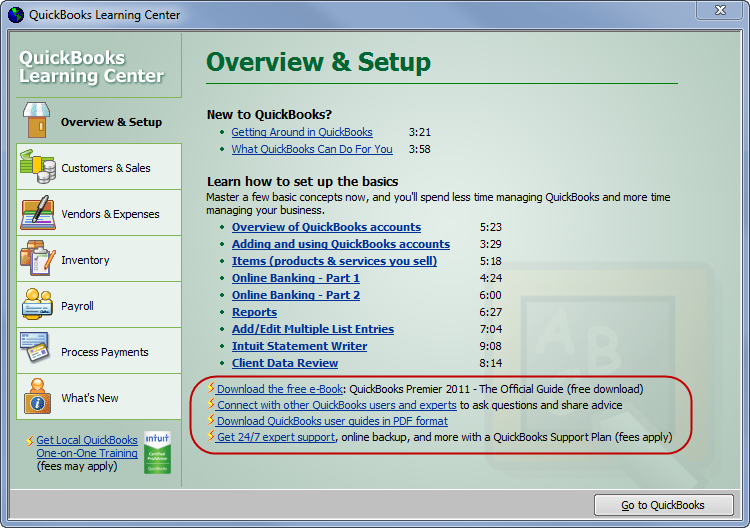
Learning QuickBooks for free isn’t just about saving money; it’s about investing in your financial literacy and business acumen. Whether you’re aiming to streamline your own business finances, pursue a career in bookkeeping, or simply gain a deeper understanding of financial operations, the resources outlined here will provide a structured and accessible pathway to expertise. By leveraging these free tools, you can transform complex financial data into actionable insights, making informed decisions that drive growth and stability.
Understanding the Indispensable Role of QuickBooks in Financial Management
Before diving into how to learn QuickBooks for free, it’s crucial to appreciate why it’s such a vital tool in the financial landscape. QuickBooks simplifies complex accounting tasks, offering a user-friendly interface that even those without a strong accounting background can navigate. Its power lies in its ability to centralize and automate many aspects of financial record-keeping, freeing up valuable time and reducing the risk of costly errors.
Why QuickBooks is Indispensable for Your Financial Health
For small to medium-sized businesses, QuickBooks is often the backbone of their financial operations. It moves accounting beyond spreadsheets, offering integrated solutions that improve accuracy and efficiency. From tracking sales and purchases to managing inventory and payroll, QuickBooks provides a holistic view of a company’s financial health. For individuals running side hustles or freelance operations, it offers an organized way to manage income and expenses, crucial for tax preparation and financial planning. The ability to generate detailed financial reports at the click of a button empowers users to understand their cash flow, profitability, and overall financial performance, leading to smarter strategic decisions.
Core Features and Their Direct Financial Impact
QuickBooks is packed with features designed to streamline financial processes. Understanding these core functionalities is key to appreciating its value:
- Invoicing and Payments: Create professional invoices and track payments, significantly improving cash flow and reducing outstanding receivables.
- Expense Tracking: Categorize and track all business expenses, simplifying tax preparation and identifying areas for cost savings.
- Bank Reconciliation: Connect bank and credit card accounts to automatically import transactions, making reconciliation faster and more accurate, and minimizing discrepancies.
- Financial Reporting: Generate profit & loss statements, balance sheets, and cash flow reports, providing critical insights into financial performance.
- Payroll Management: For an additional cost (not free to learn or use this specific feature without subscription), but understanding how it integrates is key, automating wage calculations, tax deductions, and direct deposits.
- Inventory Management: Track stock levels, cost of goods sold, and manage suppliers, optimizing inventory investment and preventing stockouts.
Each of these features directly contributes to robust financial management, enabling businesses and individuals to maintain accurate records, comply with tax regulations, and make data-driven financial decisions.
Different Versions and What They Offer Your Finances
QuickBooks comes in several versions, primarily QuickBooks Online (QBO) and QuickBooks Desktop. For free learning, QuickBooks Online is usually the most accessible due to its cloud-based nature and free trial availability.
- QuickBooks Online (QBO): A cloud-based subscription service accessible from any device with internet access. It’s ideal for businesses needing remote access, collaboration, and automated updates. Learning QBO is highly relevant as it’s the future direction of Intuit’s offerings.
- QuickBooks Desktop: A traditional software installed on a computer, favored by businesses with very specific needs or those preferring local data storage. While not as easy to access for free learning, many core concepts are transferable from QBO.
Focus your free learning efforts primarily on QuickBooks Online, as it offers the most readily available free resources and a user-friendly interface that encapsulates modern accounting needs.
Leveraging Official Free Resources for Your QuickBooks Education
Intuit, the creator of QuickBooks, understands the need for users to master their software and provides an array of official resources designed to facilitate learning. These are often the most accurate and up-to-date sources of information.
QuickBooks Online Free Trial: Your Gateway to Hands-On Experience
The single most valuable free resource for learning QuickBooks is the QuickBooks Online free trial. Intuit typically offers a 30-day free trial of QBO, providing full access to all features (or a significant discount for the first few months). This trial is not just a demo; it’s a fully functional version of the software.
- Sign Up Strategically: Plan your 30-day trial period. Use it when you can dedicate consistent time to exploration and practice.
- Create a Practice Company: During the trial, you can set up a “sample company” or practice environment without affecting your actual business data. This allows for risk-free experimentation with all features.
- Experiment with Scenarios: Practice creating invoices, entering expenses, reconciling accounts, and generating reports. The trial period is your sandbox to make mistakes and learn from them. This hands-on experience is critical for internalizing concepts and understanding the financial implications of each transaction.
Intuit’s Knowledge Base and Support Forums
Intuit maintains an extensive online knowledge base and active support forums that are completely free to access.
- Knowledge Base: A searchable library of articles, guides, and FAQs covering every conceivable QuickBooks topic. From basic setup to advanced reporting, you’ll find step-by-step instructions and explanations.
- Community Forum: An active forum where users can post questions and receive answers from other users and Intuit experts. This peer-to-peer learning environment is invaluable for troubleshooting specific issues and understanding best practices in a real-world financial context. Engaging here can deepen your understanding of diverse financial scenarios.
QuickBooks Community and Webinars
Intuit often hosts free webinars and online events, especially for new features or common financial challenges. Keep an eye on the official QuickBooks website for announcements. These webinars often provide live demonstrations and Q&A sessions, offering dynamic learning experiences from experts directly involved with the software. They can cover topics from tax preparation tips using QuickBooks to optimizing cash flow management.
Exploring Unofficial and Community-Driven Free Learning Paths

Beyond official channels, a vibrant ecosystem of community-driven content offers diverse perspectives and practical demonstrations for learning QuickBooks without cost.
YouTube Tutorials and Channels: Visual Learning for Financial Mastery
YouTube is a treasure trove of free QuickBooks tutorials. Many accounting professionals, educators, and consultants create in-depth video guides covering everything from basic navigation to complex financial workflows.
- Search Strategically: Look for channels dedicated to QuickBooks or small business accounting. Search for specific tasks like “QuickBooks bank reconciliation tutorial” or “how to set up sales tax in QuickBooks.”
- Follow Series: Many channels offer structured playlists that function as a free, comprehensive course.
- Practice Along: Pause videos and replicate the steps in your QuickBooks Online free trial. This active learning approach is highly effective for skill retention and understanding the financial implications of each action.
Free Online Courses and MOOCs: Structured Learning for Financial Acumen
While many in-depth courses require payment, some platforms offer free audit options or introductory modules.
- Coursera/edX: Some university-level courses on accounting or bookkeeping that use QuickBooks as a tool might allow you to audit the course for free, giving you access to lectures and readings without graded assignments or certification.
- Udemy/Skillshare (Free Sections): Instructors on these platforms often provide free preview lectures or even entire introductory courses to attract students. Search for “free QuickBooks course” and filter by price.
- Public Libraries and Educational Institutions: Many local libraries offer free access to online learning platforms like LinkedIn Learning (formerly Lynda.com), which hosts professional QuickBooks courses. Check your local library’s website for digital resources. Additionally, some community colleges offer free introductory workshops or open educational resources related to basic accounting and QuickBooks.
Blogs, Articles, and Free E-books: Written Resources for In-Depth Knowledge
Numerous financial blogs, accounting firm websites, and industry publications offer free articles and guides on using QuickBooks effectively.
- Specialized Content: These resources often delve into niche topics, such as “QuickBooks for real estate investors” or “managing non-profit finances with QuickBooks,” providing context-specific financial advice.
- Downloadable Guides: Many sites offer free e-books or PDF guides in exchange for an email address. These can be excellent reference materials that you can keep and consult offline. Look for step-by-step guides on setting up your chart of accounts, managing payroll, or understanding financial statements within QuickBooks.
Practical Application and Hands-On Learning Without Cost
Theoretical knowledge is only half the battle. True mastery of QuickBooks, and by extension, your financial management, comes from practical application. The beauty of free resources is that they enable extensive hands-on practice without financial risk.
Setting Up a Practice Company with Your Free Trial
As mentioned, the QuickBooks Online free trial is your ultimate practice ground. Don’t just browse; actively set up a fictional company.
- Define Your Business: Create a hypothetical business scenario (e.g., a freelance graphic designer, a small retail shop). This makes the learning more relatable.
- Customize Chart of Accounts: Learn how to tailor the chart of accounts to your business’s specific financial needs, a fundamental skill for accurate financial reporting.
- Enter Opening Balances: Understand how to record starting balances for bank accounts, liabilities, and equity, laying a solid foundation for your financial records.
Simulating Real-World Transactions
Once your practice company is set up, simulate common financial transactions.
- Create Invoices and Receive Payments: Practice the full sales cycle, from issuing an invoice to recording payment and bank deposit.
- Enter Bills and Pay Them: Learn how to manage accounts payable, ensuring you track expenses accurately and pay vendors on time.
- Record Deposits and Withdrawals: Simulate bank activity to get comfortable with reconciling accounts.
- Run Reports: After entering various transactions, generate and analyze profit & loss statements, balance sheets, and cash flow reports. Understand what each report tells you about your business’s financial performance. This is where the true value of QuickBooks shines – transforming raw data into meaningful financial insights.
Participating in Online Challenges and Exercises
Some online communities or educational platforms offer free QuickBooks challenges or exercises. These are often scenario-based problems designed to test your understanding of specific features or financial workflows. Engaging in these can provide structured practice and gauge your progress, reinforcing your ability to apply QuickBooks to real financial situations.
Maximizing Your Free Learning Journey for Long-Term Financial Success
Learning QuickBooks for free is a journey, not a destination. To truly benefit from this skill, you need a strategic approach to continuous learning and application.
Creating a Structured Learning Plan
While using free resources, it’s easy to jump from one topic to another without a clear path. A structured plan helps.
- Start with Basics: Begin with setting up a company, managing the chart of accounts, and understanding basic navigation.
- Progress Logically: Move to daily operations like invoicing, expense tracking, and bank reconciliation.
- Advanced Topics: Finally, delve into more complex areas like reporting, payroll (understanding the concept, even if the feature isn’t free), and inventory management.
- Set Goals: Define what you want to achieve (e.g., “By end of month 1, I will be able to reconcile a bank account”).
Networking with Other QuickBooks Users
Connect with other individuals who use QuickBooks, whether through online forums, local business groups, or professional networking events.
- Share Knowledge: Discuss challenges, share tips, and learn from their experiences. This can provide practical context and insights you might not find in tutorials.
- Mentorship: You might even find a mentor who can guide you through more complex financial scenarios or career paths involving QuickBooks.
Transitioning from Learning to Application in Your Business
The ultimate goal of learning QuickBooks is to apply it effectively to manage your own or your clients’ finances.
- Start Small: If you’re managing your own business, begin by migrating a small portion of your financial data to QuickBooks (e.g., just expenses for one month).
- Seek Feedback (if applicable): If you’re learning for a career, consider volunteering to help a small business with their QuickBooks for a brief period to gain real-world experience.
- Continuous Improvement: The financial landscape and software features evolve. Commit to continuous learning, regularly checking for updates and new tutorials to keep your skills sharp and relevant to current financial best practices.
Learning QuickBooks for free is an achievable and highly rewarding endeavor. By systematically utilizing the wealth of official and community-driven resources available, combined with dedicated hands-on practice, you can master this essential financial tool. This mastery will not only save you money on training but will also empower you with the financial literacy and practical skills needed to drive informed decisions, ensure compliance, and foster sustainable growth in your personal finances or business ventures. Embrace the journey, commit to the practice, and unlock the full potential of QuickBooks to manage your money with unparalleled efficiency and insight.
aViewFromTheCave is a participant in the Amazon Services LLC Associates Program, an affiliate advertising program designed to provide a means for sites to earn advertising fees by advertising and linking to Amazon.com. Amazon, the Amazon logo, AmazonSupply, and the AmazonSupply logo are trademarks of Amazon.com, Inc. or its affiliates. As an Amazon Associate we earn affiliate commissions from qualifying purchases.