
In an increasingly digital world, platforms like Google Play serve as the primary gateway to a vast universe of applications, games, movies, books, and more. For Android users, efficiently managing funds within this ecosystem is crucial for seamless access to premium content and subscription services. Understanding the various methods to add money to your Google Play balance, along with best practices for security and troubleshooting, empowers users to make the most of their digital experience. This guide delves deep into the technical intricacies and user-friendly processes of funding your Google Play account, ensuring you’re always ready to explore new digital horizons.
Understanding Your Google Play Balance: The Gateway to Digital Content
At its core, your Google Play balance is a digital wallet within the Google ecosystem, specifically allocated for purchases on the Google Play Store. It acts as a centralized fund that you can use for anything from a single app purchase to recurring subscriptions, without the need to enter your payment details for every transaction.
What is Google Play Balance?
Your Google Play balance represents pre-loaded credit linked to your Google account, exclusively usable within the Google Play Store. This credit can be accumulated through various methods, such as redeeming Google Play gift cards, receiving promotional codes, or direct top-ups from your chosen payment methods. Unlike a bank account, it’s not a transferable cash equivalent outside the Google Play ecosystem, but rather a dedicated spending pool for digital goods and services offered through the platform. It simplifies the purchasing process, providing a quick and secure way to acquire content without repeatedly exposing sensitive financial information.
Why Maintain a Google Play Balance?
Maintaining a positive Google Play balance offers several distinct advantages for the avid digital consumer:
- Convenience and Speed: With funds already loaded, purchases become instant. There’s no need to fetch your wallet or type out card details for every small transaction, streamlining the buying process for apps, in-app purchases, or media rentals.
- Budgeting and Control: Pre-loading funds can be an effective budgeting tool. By setting a specific amount aside, users can better control their digital spending, preventing impulse purchases from directly impacting their primary financial accounts. It’s particularly useful for parents looking to manage their children’s app spending.
- Security Layer: Using a Google Play balance adds an extra layer of security. Since your primary credit card or bank details are not directly exposed during each transaction, the risk of data compromise is significantly reduced, especially when making numerous smaller purchases.
- Gifting and Promotions: Google Play gift cards are a popular and convenient gift option, allowing recipients to choose their preferred content. Furthermore, Google often issues promotional credits that automatically add to your balance, providing free access to premium content.
- Subscription Management: For services like Google Play Pass or various app subscriptions, having a sufficient balance ensures uninterrupted service, as payments can be automatically drawn from your existing credit.
Diverse Methods for Funding Your Google Play Account
Google Play offers a variety of flexible options to add money to your balance, catering to different user preferences and financial situations. Each method is designed for ease of use and integrates seamlessly with your Google account.
Redeeming Google Play Gift Cards
Google Play gift cards are perhaps the most popular and versatile way to add funds. They come in both physical and digital formats, offering flexibility for both gifting and self-use.
- Physical vs. Digital Gift Cards: Physical gift cards can be purchased from various retail stores, supermarkets, and electronics outlets. They usually feature a scratch-off panel revealing a unique redemption code. Digital gift cards, on the other hand, can be bought online from authorized retailers and delivered directly via email, providing instant access to the code. Both types function identically once redeemed.
- Step-by-Step Redemption Process:
- Open Google Play Store: Launch the Google Play Store app on your Android device or visit play.google.com/redeem in a web browser.
- Access Redemption: In the app, tap your profile icon (top right), then navigate to “Payments & subscriptions” > “Redeem gift code.” On the web, simply enter the URL mentioned above.
- Enter Code: Carefully enter the 16-digit alphanumeric code found on your gift card (either by scratching off the panel on a physical card or copying from the digital delivery).
- Confirm and Add: Tap “Redeem.” You’ll see a confirmation message indicating the amount being added to your balance. Tap “Confirm” to finalize the transaction. The funds are instantly available for use.
Integrating Credit and Debit Cards
Directly linking your credit or debit card is a straightforward method for topping up your Google Play balance or making direct purchases. Google’s payment system is robust, supporting a wide range of major card networks.
- Adding a New Card:
- Open Google Play Store: Launch the app.
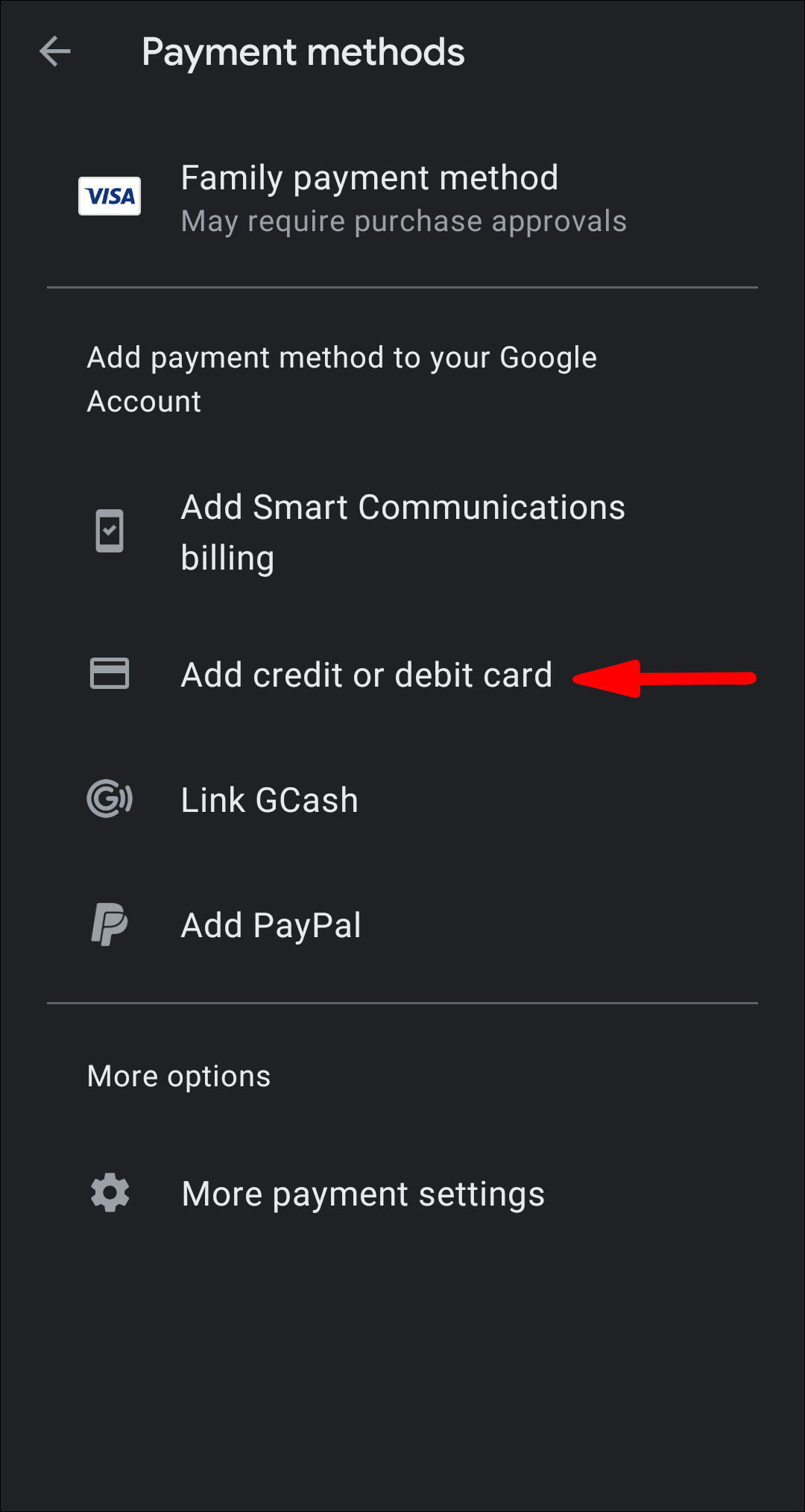
- Access Payment Methods: Tap your profile icon, then “Payments & subscriptions” > “Payment methods.”
- Add Payment Method: Select “Add credit or debit card.”
- Enter Card Details: Input your card number, expiration date, CVC, and billing address. Google Pay will securely store these details.
- Save: Tap “Save” or “Done.” Once added, you can select this card as your payment option when making a purchase or when adding money to your Google Play balance.
- Managing Existing Payment Methods: From the “Payment methods” section, you can update card details (like expiration dates), remove old cards, or set a preferred payment method. This centralized management ensures your payment information is always current and secure.
Utilizing PayPal for Seamless Transactions
PayPal offers a widely recognized and secure alternative for digital payments, and it’s fully integrated with Google Play. Linking your PayPal account allows you to draw funds directly from your PayPal balance or any linked financial instruments within PayPal.
- Linking Your PayPal Account:
- Open Google Play Store: Launch the app.
- Access Payment Methods: Tap your profile icon, then “Payments & subscriptions” > “Payment methods.”
- Add Payment Method: Select “Add PayPal.”
- Login to PayPal: You’ll be redirected to the PayPal login page. Enter your PayPal credentials and authorize the connection.
- Confirm Link: Once authorized, your PayPal account will appear as a valid payment method in Google Play.
- Security Considerations with PayPal: Linking PayPal adds an extra layer of security as you don’t directly share your bank or card details with Google Play. PayPal’s robust fraud protection and buyer safeguards further enhance transaction security. Always ensure you are logging into the legitimate PayPal website when linking accounts to avoid phishing scams.
Exploring Carrier Billing and Other Local Payment Options
In many regions, Google Play supports carrier billing, allowing users to charge purchases directly to their mobile phone bill. This is particularly convenient for those without credit cards or who prefer consolidated billing.
- Eligibility and Setup:
- Check Availability: Carrier billing availability depends on your mobile service provider and region. To check, open Google Play, go to “Payment methods,” and look for “Enable [Carrier Name] billing.”
- Enable: If available, tap on it and follow the on-screen prompts to enable this payment option. This typically involves verifying your phone number.
- Regional Variations: Beyond carrier billing, Google Play may offer other localized payment methods such as net banking, digital wallets specific to certain countries, or direct debit options. These vary significantly by geographic location, so it’s always worth checking the “Payment methods” section in your Google Play account for country-specific options.
Managing Your Funds and Ensuring Security
Once you’ve added money to your Google Play account, effective management and robust security practices are paramount to protect your digital assets and financial information.
How to Check Your Google Play Balance
Regularly checking your Google Play balance helps you keep track of your spending and ensures you have sufficient funds for upcoming purchases or subscriptions.
- Open Google Play Store: Launch the app.
- Access Account: Tap your profile icon (top right).
- View Balance: Your current Google Play balance will typically be displayed directly under your email address and name. Alternatively, you can go to “Payments & subscriptions” > “Payment methods,” and your balance will be clearly listed there.
Best Practices for Payment Security on Google Play
Digital security is non-negotiable. Adhering to these best practices can significantly mitigate risks associated with online transactions.
- Two-Factor Authentication (2FA): Enable 2FA for your Google account. This adds a critical layer of security by requiring a second form of verification (like a code from your phone) in addition to your password, making it much harder for unauthorized users to access your account even if they somehow obtain your password.
- Password Management: Use strong, unique passwords for your Google account and any linked payment services (like PayPal). Consider using a reputable password manager to generate and store complex passwords securely. Avoid reusing passwords across different platforms.
- Recognizing Phishing Attempts: Be vigilant against phishing emails or messages that try to trick you into revealing your account credentials or payment information. Google will never ask for your password or full payment details via email. Always verify the sender and the legitimacy of links before clicking.
- Secure Wi-Fi: Avoid making financial transactions over unsecured public Wi-Fi networks, which can be vulnerable to eavesdropping. Use a VPN if you must transact on public networks, or switch to mobile data.
- Regular Review of Activity: Periodically check your Google Play order history and linked payment account statements for any unfamiliar transactions. Report any suspicious activity immediately to Google Play support and your financial institution.
Troubleshooting Common Funding Issues
Despite the seamless nature of Google Play, users might occasionally encounter issues when adding funds. Knowing how to diagnose and resolve these problems can save time and frustration.
- Payment Declined Errors:
- Insufficient Funds: Check your card or PayPal balance.
- Incorrect Details: Double-check the card number, expiration date, and CVC for typos.
- Bank Restrictions: Your bank might have security measures flagging online transactions. Contact your bank to approve the transaction.
- Expired Card: Ensure your credit/debit card is not expired.
- Google Pay Profile Issues: Ensure your Google Pay profile is complete and up-to-date with your current billing address.
- Gift Card Redemption Problems:
- Incorrect Code: Re-enter the 16-digit code carefully.
- Already Redeemed: The code might have already been used. If you suspect fraud, contact the retailer where it was purchased.
- Region Restriction: Google Play gift cards are region-locked. Ensure the card’s region matches your Google Play account’s country.
- Invalid Card: The card might not have been activated correctly at the point of sale. Return to the retailer with your receipt.
- Contacting Google Play Support: If you’ve exhausted all self-help options, Google Play support is available to assist. You can typically find support options within the Google Play Store app (under Help & feedback) or by visiting the Google Play Help Center online. Provide all relevant details, including error messages, transaction IDs, and steps you’ve already taken.
Maximizing Your Google Play Experience
Beyond simply adding funds, understanding how to leverage your Google Play balance and associated features can significantly enhance your overall digital experience.
Auto-Refill and Subscription Management
For frequent spenders or those with numerous subscriptions, Google Play offers options to ensure your balance never runs dry. While a direct “auto-refill to balance” feature isn’t universally prominent, you can set your primary payment method for subscriptions to automatically draw from your linked card or PayPal when your balance is insufficient. For specific apps, you can manage individual subscription settings within the app itself or through the “Subscriptions” section under “Payments & subscriptions” in the Google Play Store. This prevents service interruptions and simplifies recurring payments.
Gifting Google Play Credit to Others
Google Play gift cards remain the easiest and most universally appreciated way to gift Google Play credit. By purchasing a digital gift card and having it emailed to the recipient, you provide them with the flexibility to choose exactly what they want from the vast Google Play catalog. This also bypasses the complexities of sharing payment methods or making purchases on someone else’s behalf.
Future-Proofing Your Digital Spending Habits
As digital content consumption evolves, staying informed about new payment technologies and Google Play features is key. Keep your apps updated to benefit from the latest security patches and payment system enhancements. Explore newer payment options as they become available in your region, which might offer better security or convenience. Regularly review your spending habits and adjust your funding strategy to align with your budget and digital lifestyle. By proactively managing your Google Play balance and payment methods, you maintain control and security over your digital entertainment and productivity tools.

Conclusion
Adding money to your Google Play account is a fundamental aspect of navigating the digital content landscape on Android devices. By understanding the diverse methods available—from gift cards and credit/debit cards to PayPal and carrier billing—users can choose the option that best suits their needs. Crucially, prioritizing security through measures like 2FA and diligent password management, alongside knowing how to troubleshoot common issues, ensures a smooth and protected experience. With a well-managed Google Play balance, you unlock a world of apps, games, movies, and books, empowering you to fully immerse yourself in the rich ecosystem of digital content Google Play has to offer.
aViewFromTheCave is a participant in the Amazon Services LLC Associates Program, an affiliate advertising program designed to provide a means for sites to earn advertising fees by advertising and linking to Amazon.com. Amazon, the Amazon logo, AmazonSupply, and the AmazonSupply logo are trademarks of Amazon.com, Inc. or its affiliates. As an Amazon Associate we earn affiliate commissions from qualifying purchases.