
In an increasingly digital world, the ability to send, receive, and manage money online is no longer a luxury but a necessity. Among the myriad of financial tools available, PayPal stands out as a pioneering and enduring platform that has reshaped how individuals and businesses conduct transactions globally. Whether you’re looking to shop online, get paid for freelance work, or simply send money to a friend, understanding how to “get PayPal” and effectively utilize its features is paramount for modern financial literacy and online income generation.
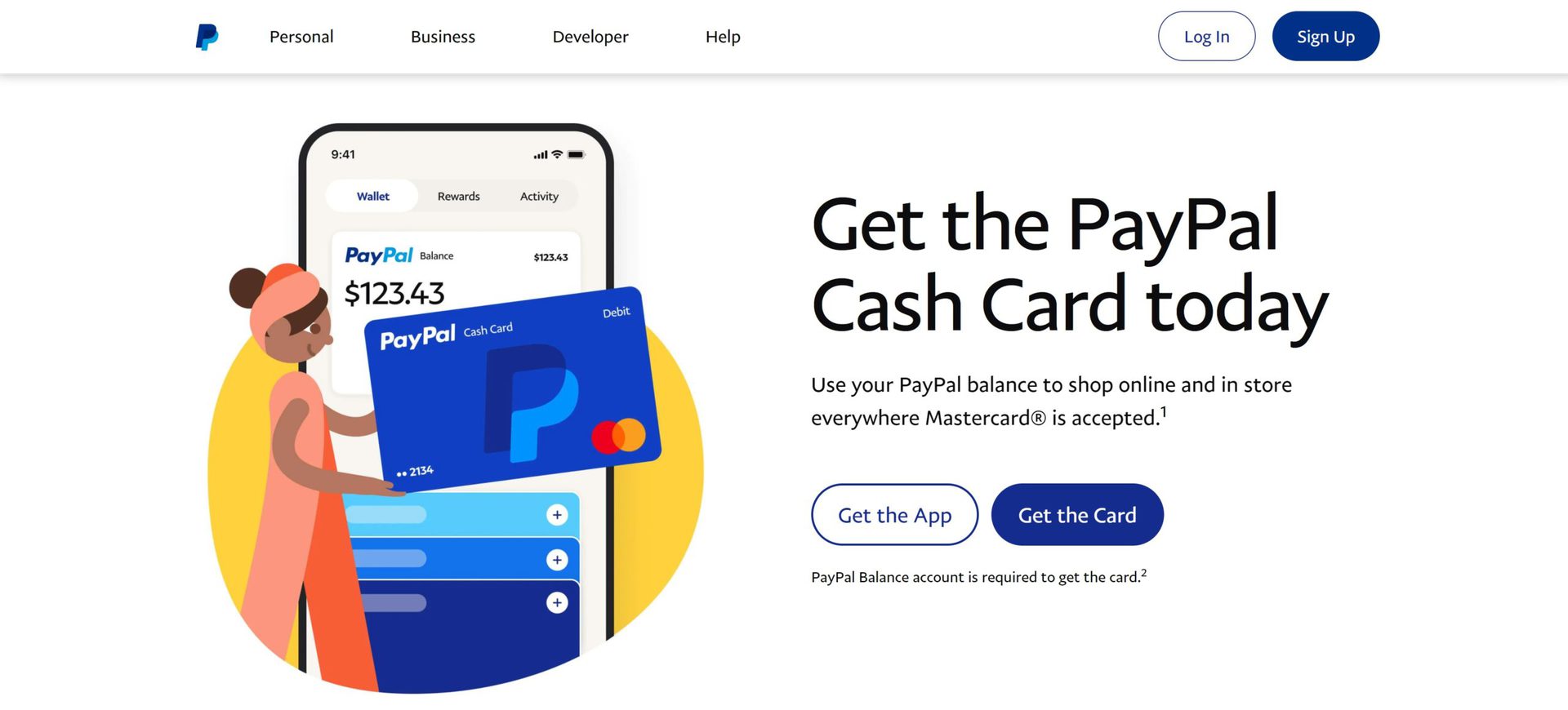
This guide will walk you through the process of setting up and using PayPal, delve into its financial applications for personal use and business, and provide insights into maximizing its value while maintaining security. By the end, you’ll have a clear understanding of how to integrate PayPal seamlessly into your financial life.
Understanding PayPal’s Role in Modern Finance
PayPal emerged at the turn of the millennium as a groundbreaking solution to the challenges of online payments. Before its widespread adoption, digital transactions were cumbersome, often requiring credit card details to be entered directly on various websites, which raised significant security concerns. PayPal offered a trusted intermediary, a digital wallet that simplified and secured the exchange of money, quickly becoming an indispensable tool for e-commerce and peer-to-peer payments.
Today, PayPal is far more than just a payment processor; it’s a global financial ecosystem that supports millions of users and businesses in over 200 markets. Its continuous evolution has seen it integrate with various online platforms, mobile apps, and even physical point-of-sale systems, solidifying its position as a cornerstone of the digital economy.
The Digital Wallet Revolution
At its core, PayPal functions as a digital wallet. This means it allows you to store your payment information—bank accounts, debit cards, and credit cards—in a secure, centralized location. Instead of repeatedly entering sensitive financial details on every website you visit or app you use, you can simply log into your PayPal account to complete transactions. This not only streamlines the payment process but significantly enhances security by minimizing the exposure of your primary financial data.
The convenience of a digital wallet extends beyond simple transactions. It provides a consolidated view of your financial activity, enabling easy tracking of spending, income, and transfers. For individuals managing personal finances, this centralized control can be invaluable for budgeting and financial planning. For businesses, it offers a clear audit trail and simplified reconciliation of online sales.
Key Benefits for Individuals and Businesses
The widespread adoption of PayPal is a testament to its compelling benefits for a diverse user base.
For individuals, PayPal offers:
- Convenience: Fast and easy online payments, often with just a few clicks.
- Security: An extra layer of protection, as merchants only see your PayPal email, not your bank or card details.
- Global Reach: Ability to send and receive money internationally with competitive exchange rates.
- Buyer Protection: Eligibility for refunds on eligible purchases that don’t arrive or aren’t as described.
- Budgeting Tools: Consolidated transaction history for better financial oversight.
For businesses and entrepreneurs seeking online income, PayPal provides:
- Payment Processing: A reliable way to accept payments from customers worldwide.
- Accessibility: Broad acceptance means customers are likely to already have a PayPal account.
- Invoice Management: Tools to create, send, and track professional invoices.
- Seller Protection: Coverage for eligible transactions against chargebacks and claims.
- Global Expansion: Facilitates international sales and currency conversions.
- Integration: Easy integration with e-commerce platforms like Shopify, eBay, and Etsy, crucial for online income streams.
These benefits collectively highlight why getting PayPal is often the first step for anyone looking to fully participate in the digital financial landscape, manage their personal finances effectively, or build an online income stream.
Getting Started: Creating Your PayPal Account
The journey to leveraging PayPal’s financial benefits begins with setting up an account. The process is designed to be straightforward, but understanding the different account types and necessary information will ensure a smooth experience.
Personal vs. Business Accounts: Choosing the Right Fit
Before you begin, consider your primary use for PayPal. This will determine whether a personal or business account is more appropriate.
- Personal Account: Ideal for individuals who primarily use PayPal for personal online shopping, sending money to friends and family, receiving money for occasional sales (e.g., selling items on classified sites), or getting paid for small, infrequent freelance gigs. It’s simpler to set up and has fewer reporting requirements.
- Business Account: Essential for freelancers, sole proprietors, small businesses, and anyone regularly receiving payments for goods or services. A business account offers features like accepting payments under a business name, invoicing tools, multi-user access, and advanced reporting. It also typically has lower transaction limits than a personal account and provides access to PayPal’s seller protection policies, which are critical for sustained online income. If your intention is to generate substantial online income or manage a formal side hustle, a business account is highly recommended. You can always upgrade a personal account to a business account later if your needs change.
Step-by-Step Account Creation
Once you’ve decided on the account type, the creation process is intuitive:
- Visit the PayPal Website: Go to www.paypal.com and click on the “Sign Up” or “Open a Free Account” button.
- Choose Account Type: Select “Personal Account” or “Business Account” as appropriate.
- Enter Your Details: You’ll be prompted to provide basic information:
- Personal Account: Your full legal name, email address, phone number, and a strong password. You’ll also need to verify your email address.
- Business Account: In addition to the above, you’ll need your business name, business type (e.g., sole proprietorship, corporation), industry, and potentially your Employer Identification Number (EIN) or Social Security Number (SSN) if you’re a sole proprietor.
- Agree to Terms: Read and accept PayPal’s User Agreement and Privacy Policy.
- Complete Security Checks: PayPal may ask you to complete a CAPTCHA or other security checks to confirm you’re not a robot.
- Verify Your Account: You’ll receive an email from PayPal to verify your email address. Click the link in the email to complete this step. This is a crucial security measure.
Linking Financial Instruments for Seamless Transactions
To fully utilize your PayPal account for sending money, making payments, and withdrawing funds, you’ll need to link it to your existing financial instruments.
- Link a Bank Account: This is the most common and often recommended method. You’ll typically provide your bank’s routing number and your account number. PayPal will usually send two small deposits (a few cents) to your bank account, which you’ll then need to confirm on PayPal to verify ownership. This process can take a few business days but is essential for higher transaction limits and free withdrawals.
- Link a Debit or Credit Card: You can link one or more debit or credit cards by entering the card number, expiration date, and security code. PayPal may make a small, temporary charge to your card (usually $1-$2) which will be refunded, and you’ll need to verify the charge amount from your card statement to confirm the card. Linking a card provides a backup payment method and allows for immediate payments even if your bank account transfer is still pending.
Having both a bank account and at least one card linked provides flexibility and ensures you can always make payments or receive funds without interruption. It’s a key step in “getting PayPal” fully operational for all your financial needs.
Mastering PayPal for Everyday Financial Needs
With your PayPal account set up and linked, you’re now ready to harness its power for managing your personal finances and daily transactions. PayPal simplifies many common financial interactions, making it a valuable tool in your digital wallet.
Sending and Receiving Money with Ease
One of PayPal’s foundational features is its ability to facilitate quick and easy money transfers.
- Sending Money: To send money, log into your PayPal account and select “Send & Request” or “Send Money.” You’ll need the recipient’s email address or mobile number. You can then choose to send money “To friends and family” (typically no fees for you if funded by your PayPal balance or bank account, but no buyer protection) or “For goods and services” (comes with buyer protection, but usually involves a fee for the seller). Clearly distinguishing between these options is important for managing personal finances and avoiding unexpected costs.
- Receiving Money: When someone sends you money, it automatically appears in your PayPal balance. You’ll receive an email notification. You can then choose to keep the money in your PayPal balance for future purchases, transfer it to your linked bank account, or use it to send money to someone else. For those looking to generate online income, having a PayPal account ready to receive payments is non-negotiable.
Online Shopping and Bill Payments
PayPal has become an ubiquitous payment option for online retailers worldwide, revolutionizing how we shop and pay bills.
- Online Shopping: When checking out on most e-commerce sites, you’ll often see a “Pay with PayPal” button. Clicking this redirects you to a secure PayPal login page, where you confirm the payment. This eliminates the need to enter your card details on multiple websites, adding a layer of security and convenience. Your linked bank accounts or cards are used as the funding source, or you can use your PayPal balance directly. PayPal’s Buyer Protection also adds peace of mind for online purchases.
- Bill Payments: Some utility companies, subscription services, and other businesses accept PayPal directly for bill payments. This can simplify financial management by consolidating payment methods. Additionally, you can often use PayPal Key, a virtual card number, to pay bills online at merchants that don’t directly accept PayPal but do accept Mastercard. This expands PayPal’s utility even further for your everyday financial commitments.
Managing Your PayPal Balance and Withdrawals
Understanding how to manage your PayPal balance and withdraw funds is critical for effective personal finance.
- PayPal Balance: Any money you receive (e.g., from sales, reimbursements, or transfers from friends) will first appear in your PayPal balance. You can view your balance directly on your PayPal dashboard. It can be used immediately for online purchases or to send money.
- Withdrawing Funds: To access your funds in your traditional bank account, you can initiate a withdrawal.
- Standard Transfer: This typically takes 1-3 business days to reach your linked bank account and is usually free of charge. This is the most common method for moving funds out of PayPal.
- Instant Transfer: For a small fee, PayPal offers instant transfers to eligible linked debit cards. This is useful when you need quick access to your funds, perhaps for an urgent expense or to replenish your primary bank account after receiving online income.
Regularly reviewing your PayPal balance and knowing your withdrawal options ensures you maintain liquidity and control over your digital funds, integrating PayPal smoothly into your overall financial strategy.
Unlocking Online Income and Business Opportunities with PayPal
Beyond personal use, PayPal is a powerful engine for generating online income, managing side hustles, and facilitating small business operations. Its global reach and robust features make it an invaluable financial tool for the digital entrepreneur.
PayPal for Freelancers and Gig Workers
For freelancers, consultants, and gig economy participants, PayPal is often the go-to platform for receiving payments.
- Accepting Payments: Clients can easily send you payments via your PayPal email address. This method is universally recognized and trusted, simplifying the payment process for both parties, especially for international clients.
- Invoicing: PayPal offers professional invoicing tools that allow you to create, send, and track invoices directly from your account. You can customize invoices with your branding, itemize services, and set payment terms. When clients pay via the PayPal invoice, the funds are automatically deposited into your account, providing a clear audit trail for your online income.
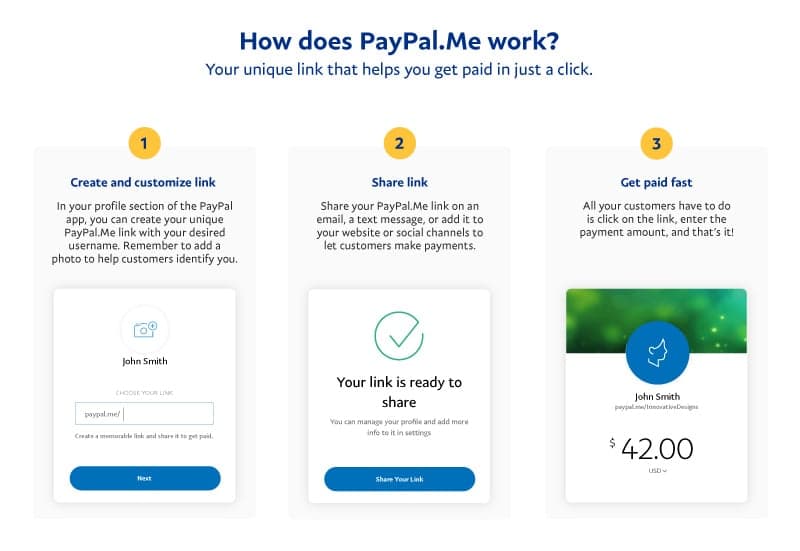
- Payment Links: For quick payments without a formal invoice, you can generate a PayPal.Me link. Clients can simply click this link, enter the amount, and pay you directly. This is ideal for one-off tasks or when you need to quickly receive payment.
- Tracking Income: All payments received are logged in your PayPal activity, making it easier to track your earnings for tax purposes and financial planning. This is crucial for managing your online income stream effectively.
Facilitating E-commerce and Small Business Sales
For entrepreneurs running online stores or small businesses, PayPal integrates seamlessly with various e-commerce platforms, making it an essential component of their financial infrastructure.
- Website Integration: Most e-commerce platforms (like Shopify, WooCommerce, Squarespace) offer built-in PayPal integration. This allows customers to pay directly from your website using their PayPal accounts, providing a trusted and convenient checkout experience.
- Selling on Marketplaces: Platforms like eBay heavily rely on PayPal for transactions. If you’re selling goods online, a PayPal business account is almost a prerequisite for smooth operations, offering seller protection and simplified payment processing.
- Point-of-Sale (POS) Solutions: For businesses with both online and physical presences, PayPal Here offers a mobile POS solution that allows you to accept card payments via a card reader connected to your smartphone or tablet, further expanding your payment acceptance capabilities.
- Subscription Services: If your business offers subscription-based products or services, PayPal can manage recurring payments, providing a steady stream of online income with minimal administrative effort.
International Payments and Currency Exchange
The internet knows no borders, and neither does PayPal’s financial utility. It excels at facilitating international transactions, which is a key advantage for anyone dealing with global clients or suppliers.
- Global Reach: With presence in over 200 countries/regions and support for numerous currencies, PayPal enables you to send and receive money across borders with relative ease. This is particularly beneficial for freelancers with international clients or e-commerce businesses serving a global customer base.
- Currency Conversion: When you receive payments in a foreign currency, PayPal can automatically convert it to your primary currency (e.g., USD) and deposit it into your balance. While PayPal does charge a fee for currency conversion, it often provides competitive rates and removes the complexity of dealing with multiple bank accounts or foreign exchange brokers. You can also hold balances in multiple currencies, giving you flexibility to manage international funds.
By embracing these business-centric features, PayPal transforms from a simple payment method into a comprehensive financial tool capable of supporting and scaling your online income ventures.
Ensuring Security and Maximizing Value
While PayPal offers incredible convenience and financial utility, it’s crucial to approach its use with an understanding of security best practices and fee structures to maximize its value. Protecting your account and understanding the costs involved are vital for responsible financial management.
Protecting Your Account: Security Best Practices
Your PayPal account is essentially a gateway to your money, making its security paramount.
- Strong, Unique Passwords: Always use a complex password that is unique to your PayPal account. Avoid using easily guessable information or passwords you use for other online services.
- Two-Factor Authentication (2FA): Enable 2FA immediately. This adds an extra layer of security by requiring a code from your mobile phone (or another device) in addition to your password when you log in. This significantly reduces the risk of unauthorized access.
- Be Wary of Phishing Attempts: PayPal is a common target for phishing scams. Always double-check the sender’s email address and hover over links before clicking. Never provide sensitive information (passwords, PINs, full card numbers) in response to emails or pop-ups. If in doubt, go directly to the PayPal website by typing the URL into your browser.
- Regularly Review Activity: Periodically check your PayPal transaction history for any unauthorized activity. Report suspicious transactions immediately to PayPal.
- Secure Your Devices: Ensure your computer and mobile devices are protected with up-to-date antivirus software and strong passwords/biometrics.
By adhering to these practices, you significantly reduce the risk of fraud and ensure your financial tool remains secure.
Understanding Fees and Transaction Limits
PayPal is a business, and while many services are free, certain transactions incur fees. Being aware of these helps you manage your finances effectively and avoid surprises.
- Sending Money:
- Friends and Family (Personal Payments): Generally free if funded by your PayPal balance or a linked bank account within your own country. If funded by a debit or credit card, a small fee (typically around 2.9% + fixed fee) may apply.
- Goods and Services (Commercial Payments): The recipient (seller) typically pays a fee (e.g., 2.9% + fixed fee for domestic transactions). This fee covers PayPal’s services and seller protection.
- Receiving Money:
- Personal Payments: Free if funded by PayPal balance or bank account.
- Commercial Payments: The standard fee mentioned above applies to the seller.
- International Transactions: Fees often apply for both sending and receiving international payments, and separate fees apply for currency conversion. These vary by country and currency.
- Withdrawals: Standard transfers to linked bank accounts are usually free. Instant transfers to eligible debit cards incur a small fee (e.g., 1.75% of the transfer amount, up to a maximum fee).
- Transaction Limits: Initially, new accounts may have limits on how much money can be sent or received. Verifying your account (by linking and confirming a bank account) usually increases these limits significantly. For large online income streams, ensure your account is fully verified.
Always check PayPal’s official fee page for the most current and specific details relevant to your region and transaction type. Incorporating these potential costs into your financial planning is essential, especially when calculating profit margins for online income activities.
Troubleshooting Common Issues and Customer Support
Even with careful management, you might encounter issues. Knowing how to resolve them is part of mastering any financial tool.
- Payment Not Going Through: Check for sufficient funds, correct recipient details, and any security flags on your account.
- Disputed Transactions: If you believe you’ve been charged incorrectly or a purchased item didn’t arrive, PayPal’s Resolution Center is the place to open a dispute. This is where Buyer Protection comes into play.
- Account Limitations: If your account is limited (e.g., you can’t send or receive money), it’s often due to unverified information, suspicious activity, or a breach of PayPal’s user agreement. Follow the steps provided in your account notification to resolve these.
- Customer Support: PayPal offers various support channels, including a comprehensive help center, community forums, email support, and phone support. For urgent financial matters, phone support is often the quickest route.
Conclusion
Getting PayPal is more than just signing up for an account; it’s about integrating a powerful and versatile financial tool into your daily life. From managing personal finances and making secure online purchases to unlocking lucrative online income streams as a freelancer or small business owner, PayPal offers a robust platform that caters to a wide array of needs. By understanding its features, embracing security best practices, and being mindful of its operational nuances, you can leverage PayPal to navigate the digital economy with confidence, efficiency, and financial intelligence. Whether you’re just starting your online financial journey or seeking to optimize your existing operations, mastering PayPal is an essential step towards achieving your financial goals.
aViewFromTheCave is a participant in the Amazon Services LLC Associates Program, an affiliate advertising program designed to provide a means for sites to earn advertising fees by advertising and linking to Amazon.com. Amazon, the Amazon logo, AmazonSupply, and the AmazonSupply logo are trademarks of Amazon.com, Inc. or its affiliates. As an Amazon Associate we earn affiliate commissions from qualifying purchases.