
In the rapidly evolving landscape of digital commerce, platforms like Amazon serve as crucial conduits for our daily needs and desires. The efficiency of these platforms hinges not just on their vast product selection or rapid delivery, but fundamentally on the accuracy of the underlying user data – particularly shipping addresses. For anyone navigating the complexities of modern life, from relocations to sending gifts, the ability to manage your delivery addresses effortlessly within Amazon’s ecosystem is a cornerstone of a smooth digital experience. This guide delves deep into the technical intricacies and best practices for updating, adding, and managing your addresses on Amazon, ensuring your parcels always find their way home, or to their intended recipient, without a hitch. We’ll explore the intuitive interface, security considerations, and advanced tips to transform a potentially frustrating task into a seamless aspect of your online shopping journey.
Understanding Amazon’s Address Management Ecosystem
Amazon’s address management system is designed to be robust yet user-friendly, accommodating a wide array of user scenarios. However, understanding its foundational architecture is key to leveraging its full potential and avoiding common pitfalls.
Why Address Accuracy Matters in E-commerce
In the digital realm, an incorrect address isn’t just a minor inconvenience; it can lead to significant logistical headaches, delayed deliveries, lost packages, and even compromised security. From a technical standpoint, Amazon’s algorithms rely heavily on precise address data for everything from calculating shipping costs and estimated delivery dates to assigning packages to the correct distribution centers and delivery routes. An accurate address ensures that the automated systems work in harmony, preventing manual interventions, re-routing fees, and the environmental impact of failed deliveries. Moreover, consistent address hygiene protects your account from potential fraud, as unexpected delivery changes can sometimes be red flags for suspicious activity. Maintaining up-to-date and accurate address information is therefore not merely a personal preference but a critical component of efficient e-commerce operations and digital security.
Navigating Different Address Types on Amazon
While the primary focus is often on the physical delivery address, Amazon’s ecosystem sometimes differentiates between various types of addresses, each serving a distinct technical purpose. Understanding these distinctions can simplify complex scenarios.
- Shipping Addresses: These are the most common and directly dictate where physical goods are dispatched. Your Amazon account can store multiple shipping addresses, making it convenient to send items to your home, office, a friend’s house, or a vacation rental.
- Billing Addresses: While not always explicitly managed separately for every order, your primary payment methods (credit cards, bank accounts) will have associated billing addresses. While Amazon’s system often defaults to using a shipping address for billing verification, ensuring your billing address aligns with your bank’s records is crucial for payment processing success. Technical discrepancies here can lead to declined payments.
- Amazon Locker and Pickup Point Addresses: These are specialized delivery points that function as virtual addresses for package collection. They leverage geo-location and unique codes for secure, self-service pickup, offering an alternative when direct home delivery isn’t feasible or preferred.
Core Principles of Amazon’s Address System Architecture
At its core, Amazon’s address management architecture prioritizes flexibility and user control. Each address you add is stored as a distinct record associated with your account, linked via unique identifiers. This modular approach allows for:
- Multiple Stored Addresses: Users can maintain a diverse portfolio of addresses without limitations on quantity, each accessible for selection during checkout.
- Default Address Assignment: You can designate one address as your “default” for quick ordering, streamlining the checkout process for frequent purchases to a single location.
- Dynamic Selection: During any given transaction, the system allows for the dynamic selection of any stored address or the addition of a new one, overriding the default for that specific order without altering your account’s primary settings. This flexibility is a key technical feature facilitating diverse user behaviors, such as sending gifts or ordering to a temporary location.
- Address Validation: Amazon employs sophisticated address validation algorithms, often leveraging APIs from postal services, to verify the accuracy and deliverability of addresses entered. This real-time validation helps prevent errors at the point of entry, significantly reducing delivery failures.
Step-by-Step Guide to Updating Your Default Shipping Address
Changing your address on Amazon is a straightforward process, primarily managed through the “Your Account” section. This detailed walkthrough covers the essential steps to ensure your primary delivery location is always current.
Accessing Your Account & Addresses Section
The first step in any address management task is navigating to the correct control panel within your Amazon account. This is universally accessible across both desktop and mobile platforms.
- On Desktop: Log in to your Amazon account. Hover over “Accounts & Lists” in the top right corner. From the dropdown menu, click on “Your Account.” On the “Your Account” page, locate the “Ordering and shopping preferences” section and click on “Your addresses.”
- On Mobile (Amazon App): Open the Amazon app and ensure you are logged in. Tap the three horizontal lines (menu icon) in the bottom right corner (for iOS) or top left (for Android). Scroll down and tap “Account.” Under “Account Settings,” tap “Your Addresses.”
This section serves as your central hub for all stored delivery information.
Adding a New Address to Your Account
Whether you’ve moved, want to send a gift to a new recipient, or need an address for a vacation spot, adding a new address is a common operation.
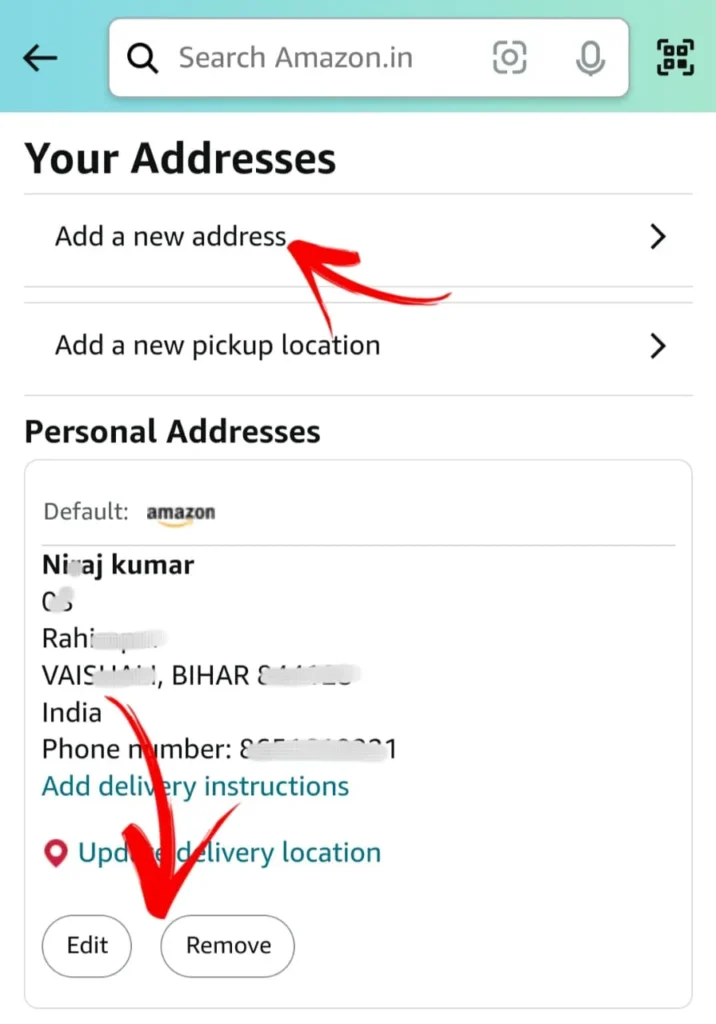
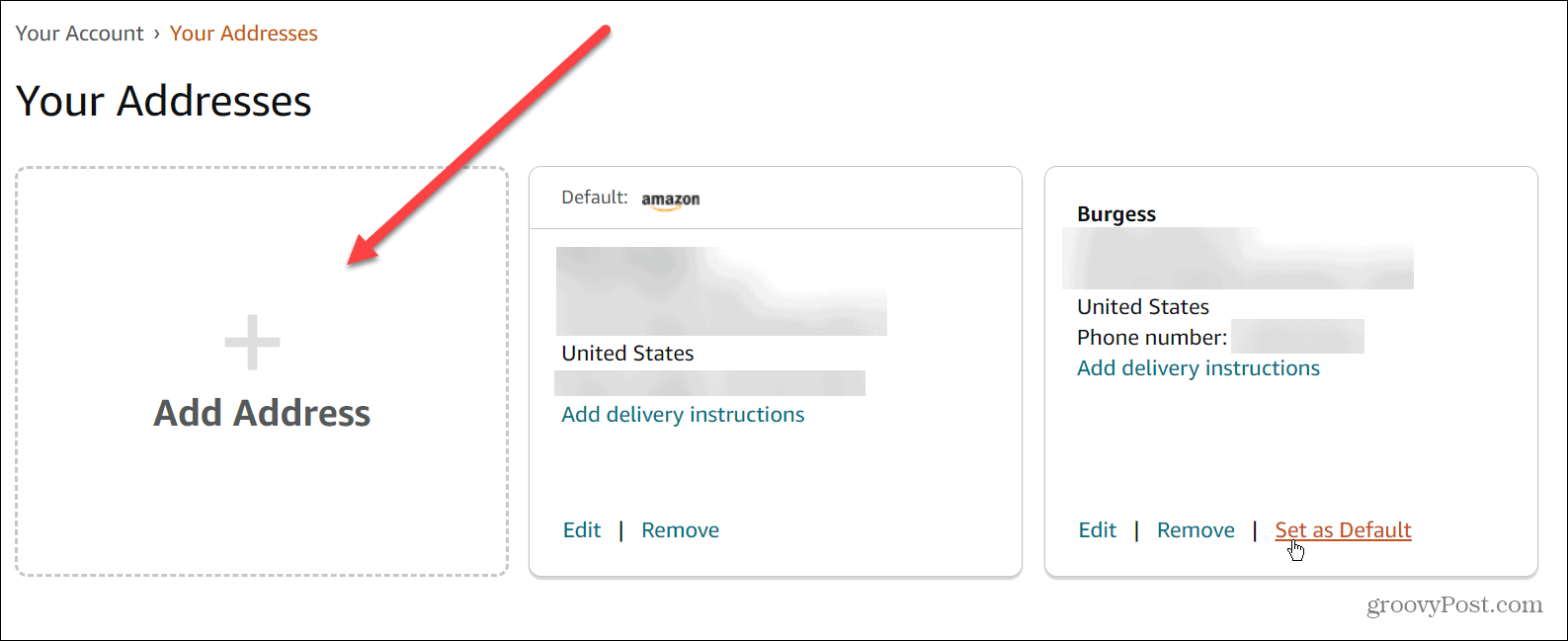
- From the “Your Addresses” page, click the “Add Address” button (or “Add a new address” on mobile).
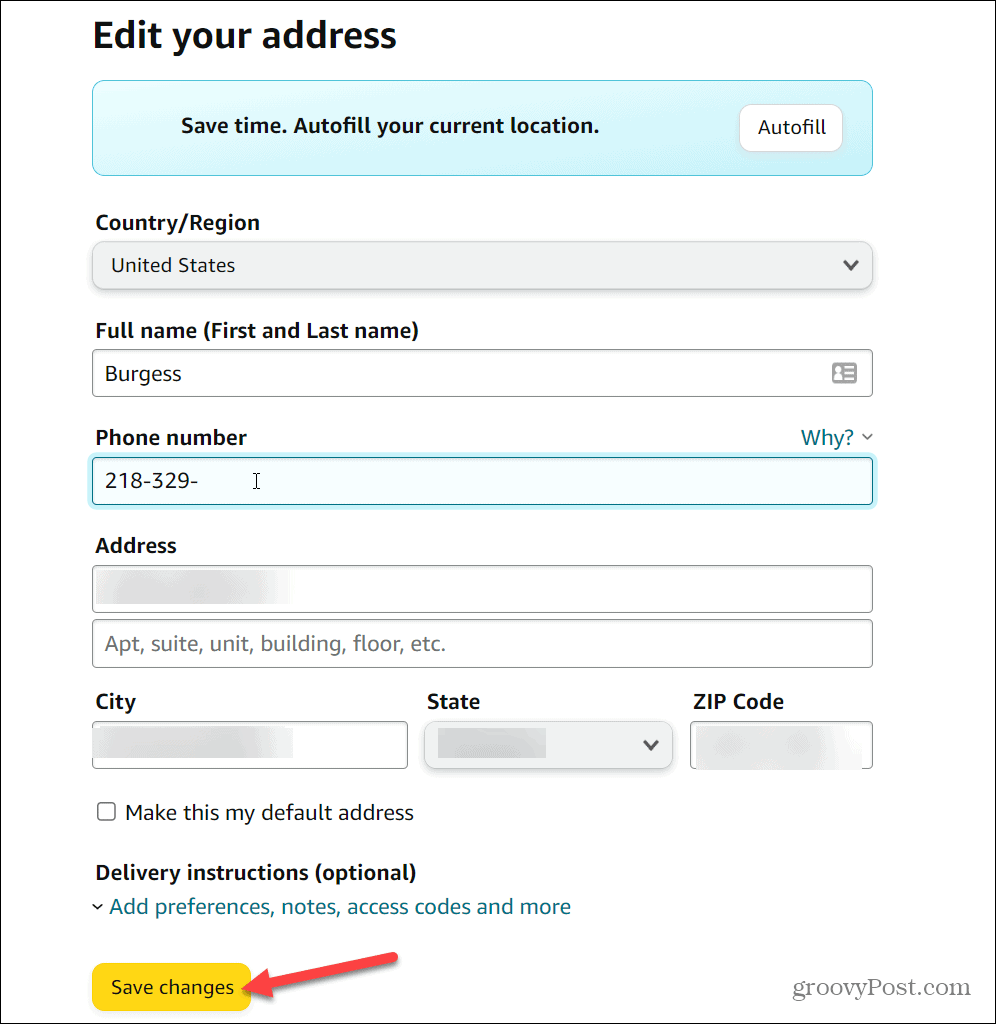
- Fill in the required fields accurately:
- Full Name: The name of the recipient (could be your name, a friend’s, or a business name).
- Street Address: Include apartment, suite, unit, or building numbers if applicable.
- City, State/Province, ZIP/Postal Code: Ensure these match your local postal service format.
- Phone Number: This is crucial for delivery drivers in case of issues.
- Optional Fields: You might have options for “Delivery instructions” or to mark it as a “Residential” or “Commercial” address. Use delivery instructions for specific details like gate codes, preferred delivery spots, or “leave at front desk.”
- Click “Add address”: Amazon will attempt to validate the address. If there are any discrepancies or suggestions, it will prompt you to review and confirm or edit. Always opt for the validated version if it accurately represents your location, as this improves delivery success rates.
Editing an Existing Address
Life changes, and sometimes an existing address needs a minor tweak, such as an apartment number correction or an updated phone number.
- From the “Your Addresses” page, locate the address you wish to modify.
- Click the “Edit” button (or “Edit” link next to the address on mobile).
- Make the necessary changes to the fields.
- Click “Save changes”: As with adding a new address, Amazon may re-validate the updated information.
Setting a Default Address for Future Orders
Having a default address streamlines the checkout process, especially if you frequently order to the same location.
- From the “Your Addresses” page, find the address you want to make your default.
- Click the “Set as Default” link associated with that address.
- A confirmation message will usually appear, and that address will now be automatically pre-selected during future checkouts, though you can always change it for individual orders.
Managing Addresses During the Checkout Process
One of Amazon’s most powerful technical features is the ability to dynamically manage delivery addresses within the checkout flow, allowing for unparalleled flexibility without altering your primary account settings.
Overriding the Default for a Single Order
Even if you have a default address set, you’re not locked into it for every purchase. This functionality is crucial for sending gifts, ordering to a temporary location, or directing specific items to different recipients.
- Proceed to checkout with your selected items.
- On the “Shipping address” page (typically the first step after clicking “Proceed to checkout”), you will see your default address pre-selected.
- Click “Change” next to the displayed address or “Deliver to a different address.”
- A list of your saved addresses will appear. Select the desired alternative address.
- If the address isn’t saved, you’ll have an option to “Add a new address” directly from this screen. After adding, it will be automatically selected for the current order and saved to your account for future use.
- Once you’ve selected or added the correct address, click “Use this address” (or similar) to continue with the checkout process. This change only applies to the current order.
Adding a Temporary or Gift Address at Checkout
This process is largely similar to overriding the default. The key distinction is the intent. When adding a gift address, you might want to ensure it’s saved for future gifting but not made your default. The system handles this seamlessly. Any address added during checkout is automatically saved to your “Your Addresses” section unless explicitly deleted later. This means you don’t have to re-enter recipient details for recurring gifts or deliveries.
Verifying Your Selection Before Purchase
Before finalizing any purchase, always perform a quick but critical check of the delivery details on the order summary page. This typically appears just before the “Place your order” button.
- Review the “Ship To” section: Ensure the correct recipient name, street address, city, state, and zip code are displayed.
- Check the estimated delivery date and shipping method: These can sometimes be affected by the chosen address (e.g., Prime shipping might not be available to all locations, or rural addresses may have longer delivery times).
- This final verification step acts as a crucial digital quality assurance gate, preventing costly and time-consuming delivery errors.
Advanced Address Management and Best Practices
Beyond the basic operations, proactive address management and adherence to best practices can significantly enhance your Amazon experience, improving security and efficiency.
Deleting Unused or Outdated Addresses
Just as adding addresses is important, periodically pruning your list of saved addresses is a good habit.
- From the “Your Addresses” page, locate the address you wish to remove.
- Click the “Remove” button (or “Remove” link on mobile).
- Confirm the deletion when prompted.
- Note: You cannot delete an address if it is currently associated with an active subscription (e.g., Subscribe & Save) or if it’s your primary default payment address and no alternative exists. You would need to update those settings first.
Removing outdated addresses reduces clutter, minimizes the risk of accidentally shipping to an old location, and enhances your digital privacy by removing unnecessary stored data.
- Note: You cannot delete an address if it is currently associated with an active subscription (e.g., Subscribe & Save) or if it’s your primary default payment address and no alternative exists. You would need to update those settings first.
Managing Addresses Across Multiple Amazon Services
Amazon’s ecosystem extends beyond standard retail, encompassing services like Amazon Fresh, Whole Foods Market, and Prime Now, which often operate with localized logistics. While your core Amazon addresses usually sync, specific services might have slightly different interfaces or requirements due to their distinct fulfillment models.
- Amazon Fresh/Whole Foods: These services rely on precise delivery zones and time slots. Ensure your address is accurately entered and recognized by their specific systems. If you encounter issues, verify the address directly within the respective service’s app or website.
- Prime Now (now integrated into the main Amazon app): Similar to grocery services, immediate delivery relies on highly accurate, validated addresses within specific geographical zones.
Always cross-reference your address details within the specific Amazon service you are using if you encounter any delivery discrepancies, as slight variations in address validation logic or service area definitions can occur.
Enhancing Digital Security: Protecting Your Shipping Information
Your shipping address is personal data. Protecting it, along with other account information, is paramount.
- Strong, Unique Passwords: This is foundational. A strong password prevents unauthorized access to your account, including your address book.
- Two-Factor Authentication (2FA): Enable 2FA on your Amazon account. This adds an extra layer of security, requiring a code from your phone or an authenticator app in addition to your password, significantly reducing the risk of unauthorized address changes or orders.
- Beware of Phishing Scams: Be vigilant against emails or messages asking you to “verify” or “update” your address via suspicious links. Always go directly to Amazon’s official website or app to manage your account details.
- Review Account Activity: Periodically check your “Orders” history for any unfamiliar purchases or shipments. Report anything suspicious immediately to Amazon customer service.
- Secure Network Use: Avoid managing sensitive account information, including addresses, over unsecured public Wi-Fi networks where data interception is a higher risk.
By treating your address data not just as delivery instructions but as sensitive personal information, you contribute to a more secure and reliable online shopping experience.
Changing and managing your addresses on Amazon is a fundamental aspect of navigating the digital marketplace effectively. By understanding the underlying technical framework, diligently following the procedural steps, and adopting best practices for security and organization, users can ensure their countless interactions with Amazon remain seamless, efficient, and secure. This mastery over your digital shipping profile ultimately empowers you to fully leverage the convenience of modern e-commerce.
aViewFromTheCave is a participant in the Amazon Services LLC Associates Program, an affiliate advertising program designed to provide a means for sites to earn advertising fees by advertising and linking to Amazon.com. Amazon, the Amazon logo, AmazonSupply, and the AmazonSupply logo are trademarks of Amazon.com, Inc. or its affiliates. As an Amazon Associate we earn affiliate commissions from qualifying purchases.