
In today’s interconnected world, an Amazon account is far more than just a passport to online shopping; it’s a foundational digital identity that grants access to a vast ecosystem of technology services, innovative tools, and essential digital infrastructure. From streamlining your daily tasks with smart home devices to accessing unparalleled digital entertainment and cloud storage, understanding how to effectively create and manage an Amazon account is a crucial skill for navigating the modern technological landscape. This guide will walk you through the process of establishing your Amazon presence, demystifying the associated features, and equipping you with the knowledge to leverage this powerful platform securely and efficiently.

The Gateway to a Digital Ecosystem: Why Create an Amazon Account?
Amazon has transcended its origins as an online bookstore to become a global technology titan, deeply embedded in various facets of digital life. An Amazon account serves as the central hub for interacting with this expansive network, acting as the primary user credential across an astonishing array of services. Creating an account isn’t merely about facilitating purchases; it’s about unlocking a suite of digital capabilities that enhance convenience, entertainment, productivity, and connectivity.
More Than Just Shopping: Exploring Amazon’s Diverse Offerings
While many initially associate Amazon with its ubiquitous e-commerce marketplace, the underlying technology infrastructure and consumer-facing applications extend far beyond retail. Your Amazon account is the key to:
- Amazon Prime: A premium subscription service that bundles free expedited shipping, access to Prime Video (a vast library of streaming movies and TV shows), Amazon Music (ad-free music streaming), Prime Reading (a selection of free e-books), unlimited photo storage, and exclusive deals. Each of these components represents a significant technological service in its own right, from large-scale data streaming to cloud-based storage.
- Digital Content & Services: This includes the Kindle ecosystem for e-books and digital reading, Audible for audiobooks, Amazon Music for streaming, and the Amazon Appstore for Android applications. These platforms rely on sophisticated content delivery networks and user interfaces designed for seamless digital consumption.
- Smart Home & AI Integration: Devices like Amazon Echo (powered by Alexa AI), Ring doorbells, and Eero mesh Wi-Fi systems are all deeply integrated with your Amazon account. This allows for voice-activated controls, smart home automation, and centralized device management through the Alexa app, transforming how you interact with your living space through technology.
- Cloud Computing Services (AWS – indirectly): While Amazon Web Services (AWS) is primarily for businesses and developers, the consumer-facing services mentioned above are built upon this robust cloud infrastructure. Understanding the power of the Amazon account is a step towards appreciating the digital backbone that supports much of the internet.
Essential for Modern Digital Life
In an era where digital convenience is paramount, an Amazon account has become an almost indispensable tool. It centralizes your online activity, from managing subscriptions to tracking deliveries and controlling smart devices, all through a single, secure login. This consolidation simplifies your digital footprint, making it easier to manage your various technological interactions. Moreover, the continuous evolution of Amazon’s services means that an account today offers capabilities that will only expand and integrate further with emerging technologies in the future.
Step-by-Step Account Creation: Navigating the Onboarding Process
Creating an Amazon account is a straightforward process designed for user accessibility. Despite its simplicity, understanding each step ensures a smooth setup and helps establish a secure foundation for your digital identity within the Amazon ecosystem.
Initiating Your Registration: The First Click
The journey begins at the official Amazon website or through one of its dedicated applications.
- Visit Amazon.com (or your regional Amazon domain): Open your preferred web browser and navigate to Amazon’s homepage. Alternatively, download and open the Amazon Shopping app on your smartphone or tablet from your device’s app store.
- Locate the “Account & Lists” (or “Sign In”) Option: On the desktop website, this is typically found in the top right corner. Hover over it, and a dropdown menu will appear. On the mobile app, you’ll usually see a “Sign In” or “New to Amazon?” prompt upon opening.
- Click “Start here” or “Create your Amazon account”: Under the “Sign In” button on the desktop, you’ll see a small link that says “New customer? Start here.” Click this. In the mobile app, select the option to create a new account. This will take you to the registration page.
Personal Information and Security: Crafting Your Digital Identity
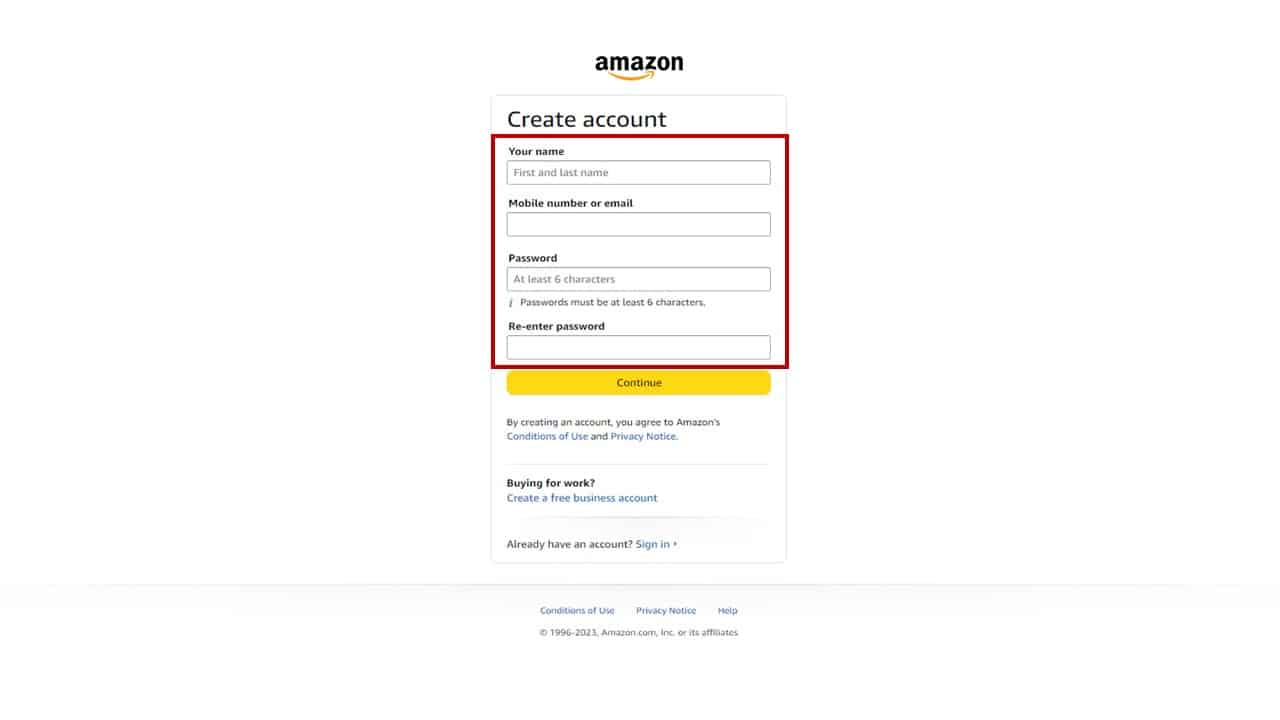
The registration page requires a few essential pieces of information to establish your unique digital identity. This step is critical for both accessibility and security.
- Enter Your Name: Provide your full name. This will be associated with your account for personalizing services and order management.
- Enter Your Mobile Number or Email: You will need to provide either a valid mobile number or an email address. This will serve as your primary username and a crucial point of contact for account verification, password recovery, and notifications. It’s highly recommended to use an email address you regularly check or a mobile number associated with your personal device.
- Choose a Strong Password: This is perhaps the most vital step in securing your new account. A strong password should be:
- Unique: Do not reuse passwords from other online accounts.
- Complex: Include a mix of uppercase and lowercase letters, numbers, and special characters.
- Long: Aim for at least 12-16 characters.
- Memorable (to you): Consider using passphrases or patterns that are easy for you to recall but difficult for others to guess. Avoid easily discoverable information like birth dates or pet names. Amazon will require you to enter the password twice to confirm accuracy.
- Click “Verify mobile number” or “Continue”: After entering your details, proceed to the next step.
Verification and Activation: Confirming Your Account
To ensure the security and legitimacy of your account, Amazon employs a verification process.
- One-Time Password (OTP) Verification: If you provided a mobile number, a One-Time Password (OTP) will be sent to it via SMS. If you used an email address, an OTP will be sent to that inbox.
- Enter the OTP: Retrieve the OTP from your phone or email and enter it into the designated field on the Amazon registration page.
- Click “Create your Amazon account”: Once the OTP is successfully entered and verified, your Amazon account will be officially created. You will then be redirected to the Amazon homepage, logged in, and ready to explore its vast technological offerings.
Leveraging Your Amazon Account: Beyond Basic Transactions
Once your Amazon account is active, the real potential of the platform unfolds. Beyond the initial setup, understanding how to personalize settings, integrate with other Amazon services, and maintain robust digital security is paramount for a rich and protected user experience.
Personalizing Your Experience: Settings and Preferences
Your Amazon account offers extensive customization options to tailor the platform to your specific needs and preferences. Accessible through the “Account & Lists” menu, these settings allow you to manage various aspects of your digital interactions.
- Your Addresses: Add and manage multiple shipping addresses, essential for convenience when sending items to different locations.
- Your Payments: Securely store and manage credit cards, debit cards, and other payment methods. Amazon’s encryption protocols protect this sensitive financial data.
- Order History: Review past purchases, track current orders, initiate returns, and access digital invoices. This detailed record is a core aspect of your interaction with the platform.
- Login & Security: This section is crucial for maintaining your account’s integrity. Here you can change your password, update your name, and crucially, enable Two-Factor Authentication (2FA).
- Content & Devices: Manage your Kindle library, registered Alexa devices, Prime Video profiles, and other digital content settings. This is where you control access to your digital media assets.
Integrating with Amazon’s Digital Services (Prime Video, Music, Kindle, Alexa)
The power of your Amazon account lies in its seamless integration across its diverse technological services. Once logged in, you can effortlessly transition between them without needing separate logins.
- Prime Video: Simply navigate to Prime Video (either through the website or dedicated app) and you’ll be automatically logged in, ready to stream content based on your Prime subscription.
- Amazon Music: Access your ad-free music library and playlists via the Amazon Music app or website. Your account syncs your preferences and purchases.
- Kindle: Register your Kindle e-reader or the Kindle app to your Amazon account to automatically sync your e-book library, reading progress, and highlights across all your devices.
- Alexa & Smart Home: Use the Alexa app to link your Amazon account to Echo devices, smart plugs, lights, and security cameras. Your account becomes the control center for your entire smart home ecosystem, enabling voice commands and automation routines.
Managing Your Digital Security: Protecting Your Account
Given the breadth of services tied to an Amazon account, its security is paramount. Implementing robust security measures protects your personal data, payment information, and digital assets.
- Strong, Unique Passwords: As emphasized during creation, maintain a complex, unique password. Regularly reviewing and updating it is a good practice.
- Two-Factor Authentication (2FA): This is the single most effective security measure you can enable. 2FA requires a second form of verification (typically a code sent to your phone or generated by an authenticator app) in addition to your password when logging in from a new device or browser. This dramatically reduces the risk of unauthorized access, even if your password is compromised. You can enable 2FA in the “Login & Security” section of your account.
- Regularly Review Account Activity: Periodically check your order history and login activity for any suspicious transactions or access attempts.
- Beware of Phishing Scams: Be vigilant against emails or messages pretending to be from Amazon, asking for your login credentials or personal information. Always verify the sender and, if in doubt, go directly to Amazon’s official website to log in.
Advanced Account Management and Troubleshooting
Effectively managing your Amazon account extends beyond initial setup and daily usage. Knowing how to handle common issues, understand privacy implications, and leverage support resources ensures a consistently smooth and secure digital experience.
Recovering Access: Password Resets and Account Recovery
Forgetting your password is a common occurrence. Amazon provides a robust recovery process to help you regain access without compromising security.
- “Forgot your password?” Link: On the sign-in page, click the “Forgot your password?” link.
- Verification Method: You will be prompted to enter the email address or mobile number associated with your account. Amazon will then send a verification code or a password reset link to that registered contact method.
- OTP/Link Confirmation: Enter the OTP or click the link in the email to verify your identity.
- New Password Creation: Once verified, you can set a new strong password. If Two-Factor Authentication is enabled, you may need to provide a 2FA code as well.
In more complex situations, such as suspected unauthorized access or if you lose access to your registered email/phone, Amazon’s account recovery process involves further identity verification through customer support to ensure only the legitimate owner regains control.
Privacy Settings and Data Management
As a major tech platform, Amazon collects data to personalize your experience and improve its services. Understanding and managing your privacy settings is essential for digital literacy.
- Privacy Hub: Amazon offers a dedicated “Privacy Hub” within your account settings, where you can review what data Amazon collects and how it’s used.
- Advertising Preferences: You can manage your interest-based advertising preferences, opting out of personalized ads if desired.
- Alexa Privacy: For Echo device users, the Alexa Privacy settings allow you to review and delete voice recordings, manage skill permissions, and control how your voice data is used to improve Alexa’s services. This granular control over AI interactions is a crucial aspect of managing your digital footprint.
- Requesting Your Data: Amazon provides tools to request a copy of the data associated with your account, offering transparency into what information is stored.
Utilizing Customer Support and Resources
Should you encounter any issues not covered by self-service options, Amazon’s customer support is readily available.
- Help & Customer Service: Found at the bottom of the Amazon website or within the app, this portal provides FAQs, troubleshooting guides, and options to contact support directly.
- Contact Methods: You can typically reach Amazon customer service via phone, email, or live chat. When contacting support, be prepared to verify your identity for security purposes.
- Community Forums: While not official support, Amazon’s community forums can be a source of peer-to-peer assistance for common questions and technical queries.
The Future of Your Amazon Account: Connectivity and Innovation
Your Amazon account is not a static digital entity; it’s a dynamic identifier that continuously evolves alongside Amazon’s technological advancements. As Amazon pushes the boundaries of AI, cloud computing, and integrated services, your account will remain at the forefront of accessing these innovations.
Amazon’s Evolving Digital Landscape
Amazon’s commitment to innovation means new features, services, and integrations are regularly introduced. From advancements in generative AI influencing product recommendations and customer service to expanding its smart home device ecosystem and developing new streaming content, your Amazon account will naturally adapt to incorporate these capabilities. Staying informed about these updates ensures you can fully leverage the cutting-edge technology Amazon offers.

Best Practices for Long-Term Account Use
Maintaining a secure and optimized Amazon account is an ongoing responsibility that contributes to your overall digital wellness.
- Regular Security Reviews: Periodically review your security settings, especially 2FA, to ensure they are up to date.
- Password Management: Consider using a reputable password manager to store strong, unique passwords for all your online accounts, including Amazon.
- Software Updates: Keep your Amazon apps and browser updated to benefit from the latest security patches and features.
- Mindful Permissions: Be aware of the permissions you grant to third-party applications or Alexa skills linked to your Amazon account.
By diligently following these steps and best practices, your Amazon account will serve as a robust and reliable gateway to an ever-expanding world of digital services and technological convenience. It’s an investment in streamlining your digital life, ensuring secure access to a platform that continues to redefine how we interact with technology on a daily basis.
aViewFromTheCave is a participant in the Amazon Services LLC Associates Program, an affiliate advertising program designed to provide a means for sites to earn advertising fees by advertising and linking to Amazon.com. Amazon, the Amazon logo, AmazonSupply, and the AmazonSupply logo are trademarks of Amazon.com, Inc. or its affiliates. As an Amazon Associate we earn affiliate commissions from qualifying purchases.