
In an increasingly interconnected world, where digital footprints are constantly being tracked, and cyber threats loom large, the need for robust online security and privacy has never been more critical. A Virtual Private Network (VPN) stands as a foundational tool in achieving this, offering a shield that encrypts your internet connection, masks your IP address, and grants you greater freedom and security in your digital endeavors. This comprehensive guide will walk you through the process of installing a VPN, demystifying the technicalities and empowering you to take control of your online presence. Whether you’re a tech enthusiast, a business professional safeguarding sensitive data, or simply an individual keen on protecting your privacy, understanding how to effectively deploy a VPN is an essential skill in today’s digital landscape. We’ll delve into the “why,” the “how,” and the “what next,” ensuring you’re well-equipped to navigate the digital world securely.
Understanding the “Why”: The Indispensable Role of a VPN in the Digital Age
Before diving into the mechanics of installation, it’s crucial to grasp why a VPN has become such a vital component of modern digital hygiene. Its benefits extend far beyond mere anonymity, touching upon critical aspects of digital security, access, and even financial protection. For anyone concerned with Tech (digital security, data privacy), Brand (reputation, trust), and Money (financial transactions, online income), a VPN offers multifaceted advantages.
Enhancing Your Digital Security and Privacy
At its core, a VPN is a privacy and security tool. When you connect to the internet via a VPN, your traffic is routed through an encrypted tunnel to a remote server operated by the VPN provider. This process offers several layers of protection:
- Data Encryption: Your internet service provider (ISP), hackers, and surveillance agencies can no longer see your online activities. All data sent and received is scrambled, making it unreadable to anyone without the decryption key. This is paramount for protecting sensitive information, from personal communications to proprietary business documents. It’s a direct application of robust cybersecurity Tech to your everyday browsing.
- IP Address Masking: Your real IP address, which can reveal your geographical location and identify you, is hidden and replaced with the IP address of the VPN server. This significantly reduces the ability of websites, advertisers, and data brokers to track your online movements and build profiles about you. This commitment to user privacy is a key indicator of a trustworthy VPN Brand.
- Protection on Public Wi-Fi: Public Wi-Fi networks in cafes, airports, and hotels are notorious hotspots for cybercriminals. By encrypting your connection, a VPN acts as a fortress, safeguarding your data from potential eavesdropping and man-in-the-middle attacks, even on unsecured networks. This is a critical Tech feature that prevents financial data theft.
- Preventing ISP Throttling: Some ISPs intentionally slow down your internet speed when they detect high-bandwidth activities like streaming or gaming. A VPN encrypts your traffic, making it impossible for your ISP to see what you’re doing, thus preventing arbitrary throttling and ensuring consistent performance.
Unlocking Global Content and Bypassing Restrictions
Beyond security, VPNs are powerful tools for digital freedom and access:
- Bypassing Geo-Restrictions: Many online services, streaming platforms, and websites restrict access to content based on your geographical location. By connecting to a VPN server in a different country, you can effectively trick these services into thinking you are browsing from that region, granting you access to otherwise unavailable content. This is a huge boon for accessing international entertainment or region-specific online resources. This capability aligns with the Tech aspect of overcoming digital barriers.
- Circumventing Censorship: In regions with strict internet censorship, governments often block access to certain websites, social media platforms, or news outlets. A VPN can help you bypass these digital blockades, restoring access to information and promoting freedom of speech. This highlights the transformative power of Tech in fostering global communication.
Protecting Your Financial and Business Transactions
The security a VPN provides has direct implications for your finances and business operations:
- Secure Online Banking and E-commerce: When conducting online banking or making purchases, a VPN ensures that your financial details (credit card numbers, bank credentials) are encrypted and protected from interception. This is a critical layer of defense against identity theft and financial fraud, directly safeguarding your Money.
- Protecting Business Data and Remote Work: For remote workers or businesses operating across different locations, a VPN provides a secure tunnel for transmitting sensitive corporate data. It ensures that confidential information remains private, preventing industrial espionage or data breaches that could severely impact a company’s Brand reputation and financial standing. It’s a cornerstone of modern cybersecurity Tech for businesses.
- Accessing Region-Specific Deals: In some instances, prices for online services, software, or even flights and hotels can vary significantly based on your geographical location. By using a VPN to appear as if you’re browsing from another country, you might be able to access more favorable pricing, directly saving you Money.
Choosing the Right VPN: A Critical First Step
Before you can install a VPN, you need to select a reliable provider. This decision is paramount, as the effectiveness of your online security and privacy largely hinges on the trustworthiness and capabilities of your chosen VPN service. This step bridges the gap between Tech specifications, a provider’s Brand reputation, and the financial investment (Money) you’re willing to make.
Key Factors to Consider When Selecting a Provider
The VPN market is saturated with options, making an informed choice essential. Here are the crucial aspects to evaluate:
- No-Logs Policy: This is perhaps the most important factor. A reputable VPN provider should have a strict “no-logs” policy, meaning they do not store any records of your online activity, connection timestamps, or IP addresses. Look for providers whose claims have been independently audited and verified. A strong commitment to privacy defines a trustworthy Brand.
- Strong Encryption Standards: Ensure the VPN uses industry-standard encryption protocols (like AES-256) and secure VPN protocols (OpenVPN, WireGuard, IKEv2). These are the fundamental Tech underpinnings of your security.
- Server Network and Locations: A large network of servers spread across many countries offers more options for bypassing geo-restrictions and can also contribute to better connection speeds by allowing you to choose a server closer to your physical location.
- Speed and Performance: While some speed reduction is inevitable with encryption, a good VPN should offer fast and consistent connections. Look for reviews and conduct speed tests if possible.
- Compatibility: Ensure the VPN offers dedicated apps for all your devices (Windows, macOS, Linux, iOS, Android, smart TVs, routers). Good Tech integration across platforms is key.
- Features: Look for essential security features like a Kill Switch (which automatically disconnects your internet if the VPN connection drops, preventing IP leaks), Split Tunneling (allowing you to choose which apps use the VPN and which don’t), and DNS Leak Protection. These advanced Tech features significantly enhance security.
- Pricing and Money-Back Guarantee: While cost shouldn’t be the sole determinant, find a plan that fits your budget. Many providers offer discounts for longer subscriptions and a money-back guarantee, allowing you to test the service risk-free. Consider the Money value proposition.
- Customer Support: Responsive and knowledgeable customer support (ideally 24/7 via live chat) is invaluable for troubleshooting any issues. This reflects positively on a provider’s Brand commitment to its users.
- Independent Audits: A VPN provider willing to undergo independent security and privacy audits demonstrates a strong commitment to transparency and trustworthiness, reinforcing their Brand reputation.
Free vs. Paid VPNs: The Truth About “Free”
The allure of a “free” VPN can be strong, but it’s crucial to understand the trade-offs.
- Limitations of Free VPNs: Most free VPNs come with significant restrictions, such as limited data usage, slower speeds, fewer server locations, and annoying ads. These limitations can severely hinder your online experience.
- Potential Privacy Risks: The most concerning aspect of many free VPNs is their business model. If you’re not paying for the service, you might be the product. Some free VPNs have been caught collecting and selling user data to third parties, injecting malware, or displaying intrusive advertisements. This directly undermines the very purpose of using a VPN and can severely compromise your privacy and Money (if your data is exploited). A truly secure and private service requires significant investment in Tech infrastructure, which needs to be funded. Therefore, investing in a reputable paid VPN is almost always the safer and more effective choice for anyone serious about their online security and privacy, justifying the Money spent for a trustworthy Brand.
Step-by-Step VPN Installation Guides for Various Devices
Once you’ve chosen a reputable VPN provider, the installation process is generally straightforward. While specific steps might vary slightly between providers, the core methodology remains consistent across different operating systems and devices, leveraging intuitive Tech interfaces.
Installing a VPN on Desktop (Windows/macOS)
Desktop computers are often the primary workstations for many, making VPN installation here paramount for comprehensive protection.
- Subscribe to a VPN Service: First, visit the website of your chosen VPN provider and sign up for a subscription plan. You’ll typically create an account and complete the payment process. This is where your Money investment secures your Tech tool.
- Download the VPN Client: After subscribing, log into your account on the VPN provider’s website. You’ll find a “Download” or “Apps” section. Select the appropriate client software for your operating system (Windows or macOS) and download the installer file.
- Run the Installer: Locate the downloaded file (usually in your “Downloads” folder) and double-click it to start the installation wizard.
- Follow On-Screen Prompts: The installer will guide you through the setup process. You’ll typically need to agree to the terms and conditions, choose an installation location (usually default is fine), and click “Install” or “Next.” You may be prompted to grant administrative permissions.
- Launch the VPN App and Log In: Once the installation is complete, launch the VPN application. You’ll be asked to log in using the credentials you created during subscription.
- Connect to a Server: The VPN app will usually present a list of available server locations. You can choose a specific country or city, or use a “Quick Connect” or “Best Location” feature to automatically connect to the fastest available server. Click the “Connect” button.
- Verify Connection: Once connected, the app will typically show a “Connected” status, and you might see a new network icon in your system tray or menu bar. You can also visit a website like “whatismyip.com” to verify that your IP address has changed to that of the VPN server, confirming the Tech is working as intended.
Installing a VPN on Mobile (iOS/Android)
Protecting your mobile devices is just as crucial, given their constant connectivity and the sensitive data they hold.
- Subscribe to a VPN Service: Similar to desktop, subscribe to your chosen VPN service if you haven’t already.
- Download the VPN App:
- For iOS: Open the App Store, search for your VPN provider’s name, and download their official app.
- For Android: Open the Google Play Store, search for your VPN provider’s name, and download their official app.
- Install and Open the App: Once downloaded, the app will install automatically. Tap the app icon to open it.
- Log In: Enter your VPN account credentials when prompted.
- Grant Permissions: The app will likely ask for permission to add VPN configurations to your device. Grant these permissions. This is a standard Tech requirement for VPN functionality.
- Connect to a Server: Choose your desired server location and tap the “Connect” button.
- Verify Connection: The app will indicate when you are connected, often with a key or VPN icon appearing in your device’s status bar.
Configuring a VPN on Your Router (Advanced)
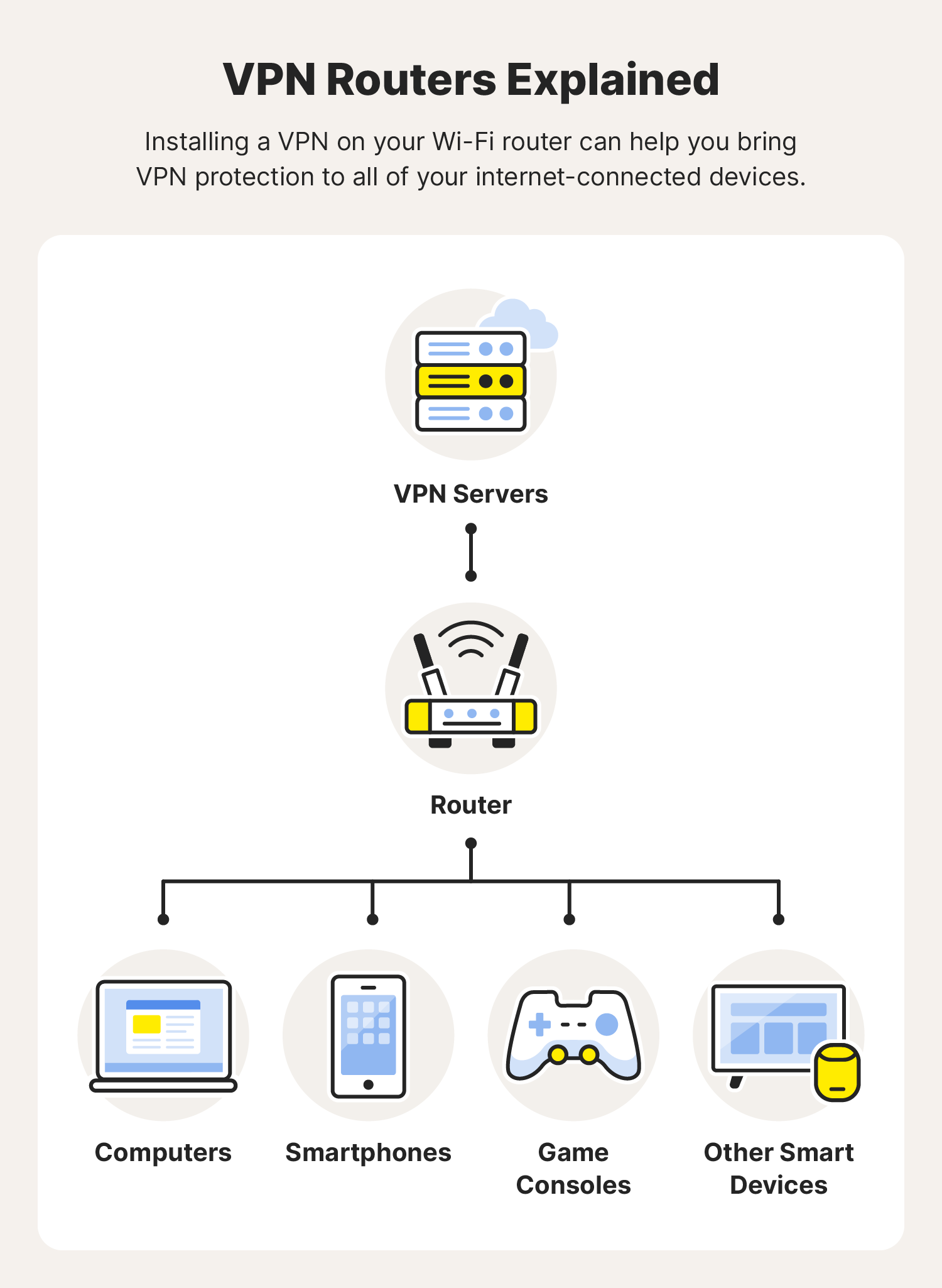
Installing a VPN directly on your router provides a blanket of protection for all devices connected to that network, including those that don’t natively support VPN apps (like smart TVs, game consoles, or IoT devices). This is an advanced Tech solution but offers extensive benefits.
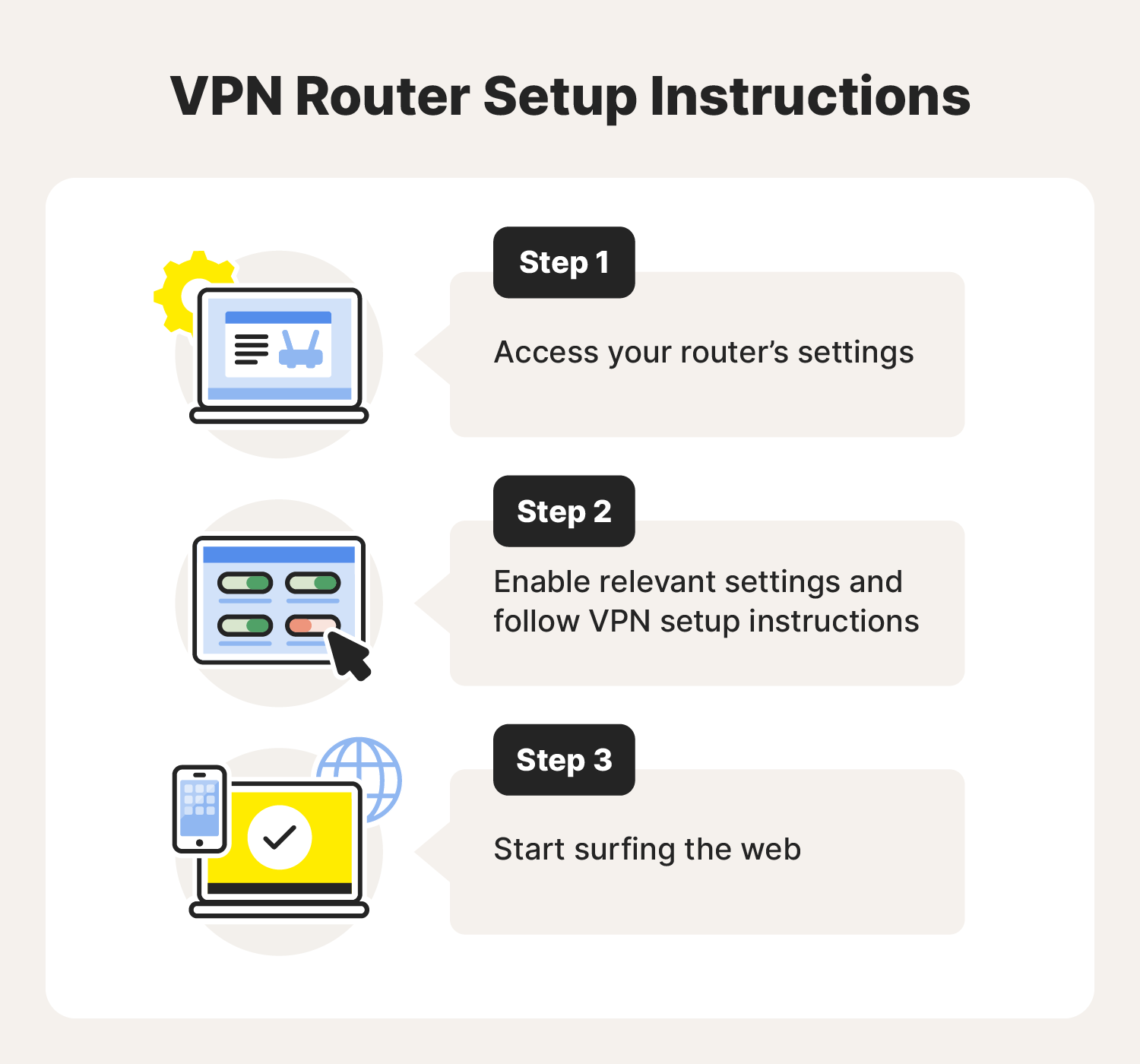
- Check Router Compatibility: Not all routers support VPN client software. Check your router’s specifications or consult your VPN provider’s website for a list of compatible routers or firmware. Many providers offer custom firmware or detailed setup guides for popular router models.
- Purchase a Pre-flashed Router (Optional): Some VPN providers offer pre-flashed routers that come with their VPN software already installed, simplifying the process. This might be a worthwhile Money investment for ease of use.
- Manual Configuration:
- Access Router Admin Panel: Log into your router’s administration interface (usually via a web browser using your router’s IP address, e.g., 192.168.1.1).
- Update Firmware: It’s often recommended to update your router’s firmware to the latest version, or to a custom firmware like DD-WRT or OpenWRT if supported and desired. This is a crucial Tech step.
- Enter VPN Details: Navigate to the VPN client settings within your router’s interface. You’ll typically need to input your VPN provider’s server address, username, password, and upload configuration files (usually
.ovpnfiles) which you can download from your VPN provider’s website. - Save and Apply: Save the settings and reboot your router.
- Verify Connection: All devices connected to your router’s Wi-Fi network should now be protected by the VPN. You can check the IP address on any connected device to confirm.
Browser Extensions: Convenience with Caveats
Many VPN providers also offer browser extensions (for Chrome, Firefox, Edge, etc.).
- Install Extension: Find the extension in your browser’s add-on store and install it.
- Log In and Connect: Log in with your VPN credentials and connect.
Caveats: While convenient, browser extensions usually only encrypt traffic within that specific browser. Your other applications and background processes outside the browser will not be protected. Furthermore, some browser extensions are proxies rather than full VPNs, offering less robust security. For comprehensive protection, the desktop or mobile app is generally preferred over just the browser extension, underscoring the importance of understanding the underlying Tech.
Post-Installation: Optimizing Your VPN Experience and Troubleshooting
Installing your VPN is just the beginning. To truly maximize its benefits and ensure seamless operation, it’s vital to understand how to optimize its settings and troubleshoot common issues. This post-installation phase leans heavily on understanding the Tech capabilities and ensuring your Money investment yields consistent value.
Essential VPN Settings and Features to Explore
Modern VPN applications come packed with features designed to enhance security, privacy, and performance. Taking the time to explore these can significantly improve your experience.
- Kill Switch: This is a non-negotiable feature for serious VPN users. A kill switch automatically cuts off your internet connection if the VPN tunnel unexpectedly drops. This prevents your real IP address and unencrypted data from being exposed, even for a brief moment. Always ensure this is enabled for maximum security. It’s a critical piece of Tech safeguarding your anonymity.
- Split Tunneling: This feature allows you to choose which applications or websites route their traffic through the VPN and which bypass it. For example, you might want your streaming app to use the VPN to access geo-restricted content, while your banking app connects directly for faster speeds or to avoid triggering fraud alerts. This offers flexibility and optimizes your connection based on specific needs.
- VPN Protocols: Most VPN apps allow you to switch between different VPN protocols (e.g., OpenVPN, WireGuard, IKEv2/IPSec).
- OpenVPN: Renowned for its strong security and open-source nature, offering transparency.
- WireGuard: A newer protocol known for its exceptional speed and efficiency, while maintaining strong security.
- IKEv2/IPSec: Often favored for mobile devices due to its stability and ability to quickly re-establish connections when switching networks.
Experiment with different protocols to find the best balance of speed and security for your specific network and location. This is a prime example of customizing Tech for optimal performance.
- Auto-Connect on Startup: Enable this feature to ensure your VPN automatically connects as soon as your device boots up. This provides continuous protection without requiring manual intervention, minimizing the risk of accidentally browsing unprotected.
- DNS Leak Protection: Ensure your VPN app has this enabled. A DNS leak occurs when your operating system bypasses the VPN’s DNS servers and uses your ISP’s DNS servers instead, potentially revealing your online activities to your ISP. Good VPNs prevent this, further enhancing your privacy Tech.
- Dedicated IP Addresses: Some VPN providers offer dedicated IP addresses for an additional fee. This means you always connect to the internet with the same IP address, which can be useful for avoiding CAPTCHAs, accessing whitelisted networks (e.g., for remote business access), or preventing your IP from being blacklisted due to other VPN users. This is a specific Money investment for enhanced business or professional Tech use cases.
Common Issues and How to Resolve Them
Even with the best VPNs, you might occasionally encounter issues. Knowing how to troubleshoot can save you time and frustration.
- Slow Speeds:
- Solution: Try connecting to a different server, preferably one closer to your physical location. Experiment with different VPN protocols (WireGuard is often faster). Ensure no other bandwidth-heavy applications are running.
- VPN Not Connecting:
- Solution: Restart the VPN app and your device. Try a different server. Temporarily disable your firewall or antivirus to see if they are interfering (and then re-enable them, adjusting settings if necessary). Check your internet connection.
- Frequent Disconnections:
- Solution: Switch to a more stable protocol (like IKEv2/IPSec for mobile or OpenVPN TCP for desktops). Try connecting to a different server. Check your internet connection’s stability.
- Website Still Blocked or Geo-Restricted:
- Solution: Clear your browser’s cookies and cache, as websites might still be using old location data. Try connecting to a different server in the desired region. Some streaming services have aggressive VPN detection; try a server specifically optimized for streaming if your provider offers it.
- “IP Leak” or “DNS Leak”:
- Solution: Verify your VPN’s settings to ensure Kill Switch and DNS Leak Protection are enabled. Run an online IP/DNS leak test (like those offered by ipleak.net or dnsleaktest.com) to confirm the issue. If leaks persist, contact your VPN provider’s support, as this indicates a serious Tech flaw.
- Login Issues:
- Solution: Double-check your username and password. Reset your password if necessary. Ensure your subscription is active and hasn’t expired, linking back to your Money investment.
Integrating VPNs into Your Digital Lifestyle
A VPN is most effective when it becomes an integral part of your daily digital routine.
- Always-On Protection: For maximum privacy and security, consider keeping your VPN connected whenever you’re online, especially on public Wi-Fi. Many apps offer “auto-connect” features for this purpose.
- Using with Other Security Tools: A VPN is a powerful tool, but it’s part of a broader cybersecurity strategy. Continue to use strong, unique passwords, two-factor authentication, up-to-date antivirus software, and a firewall. These Tech layers work together to create a robust defense.
- Educate Yourself and Others: Stay informed about new cyber threats and privacy best practices. Share this knowledge with family and colleagues, fostering a more secure digital environment for everyone, which can indirectly protect your personal and business Money interests.
In conclusion, installing a VPN is a fundamental step towards reclaiming your online privacy and enhancing your digital security. By carefully choosing a reputable provider, following the installation steps appropriate for your devices, and understanding how to optimize its features, you equip yourself with an essential tool for navigating the complexities of the internet. From securing personal data and financial transactions to accessing a world of information, a VPN empowers you to browse, stream, and work with confidence. In a world where digital security is synonymous with personal and financial well-being, a VPN isn’t just an option; it’s a necessity, proving its value across Tech, Brand, and Money domains.
aViewFromTheCave is a participant in the Amazon Services LLC Associates Program, an affiliate advertising program designed to provide a means for sites to earn advertising fees by advertising and linking to Amazon.com. Amazon, the Amazon logo, AmazonSupply, and the AmazonSupply logo are trademarks of Amazon.com, Inc. or its affiliates. As an Amazon Associate we earn affiliate commissions from qualifying purchases.