
In the dynamic world of software development, where efficiency and access to a vast ecosystem of tools are paramount, Python stands out as a language of choice for everything from web development and data science to artificial intelligence and automation. At the heart of Python’s power and versatility lies a deceptively simple yet profoundly critical tool: pip. For anyone venturing into Python programming, understanding “what is pip installation” isn’t just a technical detail; it’s a foundational skill that unlocks an entire universe of possibilities, enabling developers to build sophisticated applications with remarkable speed and reliability.
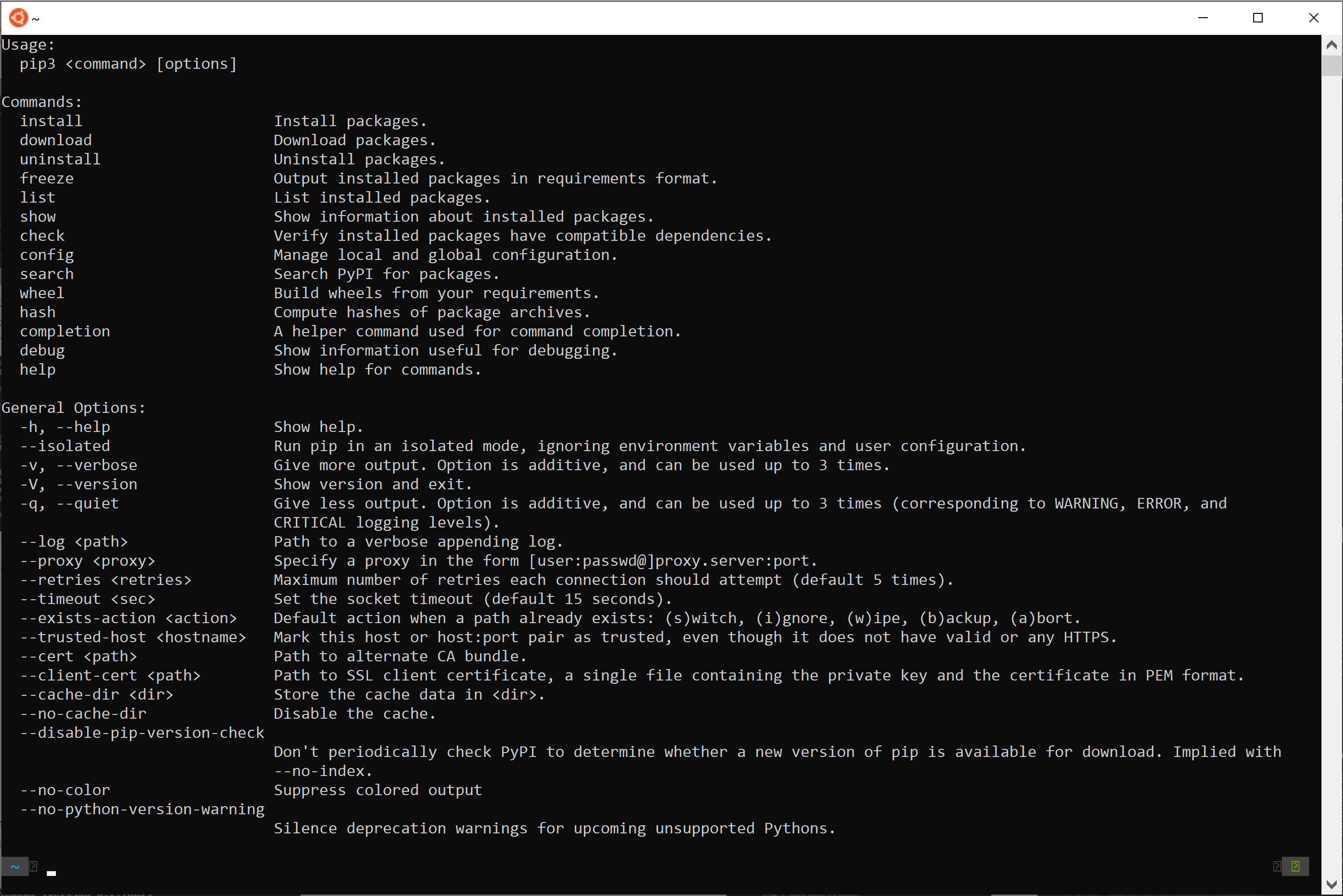
Essentially, pip is the standard package manager for Python. Its primary function is to simplify the process of installing and managing third-party libraries and dependencies that are not part of the Python standard library. Imagine Python as a powerful engine; pip is the mechanic that allows you to easily bolt on all sorts of specialized accessories – from advanced mathematical processing libraries like NumPy and pandas, to robust web frameworks such as Django and Flask, or cutting-edge machine learning toolkits like TensorFlow and PyTorch. Without pip, developers would be stuck manually downloading, extracting, and configuring these components, a tedious and error-prone process that would severely hinder productivity and innovation within the Python community.
This article will delve deep into pip, exploring its core mechanics, demonstrating its essential commands, and guiding you through advanced concepts that ensure robust and maintainable Python projects. We’ll also connect the dots between effective pip usage and broader themes critical to tech enthusiasts and businesses alike: enhancing productivity, safeguarding digital security, and even bolstering brand reputation through reliable software development practices.
The Core Mechanics of pip: Unpacking Python’s Package Manager
To truly grasp the significance of pip, we must first understand what it manages and why that management is so crucial in modern software development.
What Exactly is a “Package” in Python?
In Python, a “package” (often used interchangeably with “library” or “module” in common parlance) is a collection of Python modules, or a directory containing Python code files, along with an __init__.py file, that work together to provide specific functionality. These packages are typically distributed through the Python Package Index (PyPI), a vast repository hosted by the Python community. PyPI serves as a central hub where developers can upload their code for others to use, fostering a collaborative and rapidly evolving ecosystem.
Consider popular examples:
- NumPy: A fundamental package for numerical computing in Python, offering powerful array objects and mathematical functions.
- Requests: An elegant and simple HTTP library for making web requests.
- Django: A high-level Python web framework that encourages rapid development and clean, pragmatic design.
- TensorFlow: An open-source machine learning framework for building and training neural networks.
These packages represent countless hours of development by experts worldwide. By providing easy access to them, pip enables developers to stand on the shoulders of giants, avoiding the need to “reinvent the wheel” for common tasks. This directly fuels “Technology Trends” by accelerating the adoption and implementation of new algorithms, methodologies, and frameworks across various domains, from “AI Tools” to sophisticated web applications.
Why pip is Indispensable for Developers and Businesses Alike
The importance of pip extends far beyond mere convenience. It addresses critical challenges in software development that directly impact productivity, project reliability, and even a company’s financial bottom line and brand image.
-
Dependency Management and Reproducibility: Modern software projects rarely exist in isolation. They depend on numerous external libraries, each potentially requiring a specific version to function correctly. Without
pip, managing these “dependencies” becomes a nightmare. Different projects on the same machine might need conflicting versions of the same library, leading to the infamous “it works on my machine” problem.pip, especially when combined with virtual environments (which we’ll discuss later), ensures that each project has its isolated set of dependencies, resolving conflicts and making projects easily reproducible across different machines and environments. This consistency is vital for “Software” development, guaranteeing that applications behave predictably from development to deployment. -
Access to a Vast Ecosystem: PyPI hosts over 500,000 packages (and growing). This enormous collection represents solutions to nearly every conceivable programming problem.
pipprovides a straightforward command-line interface to tap into this wealth of resources. This significantly enhances “Productivity,” allowing developers to integrate complex functionalities (like data visualization, database interaction, or natural language processing) with just a single command, rather than building them from scratch. -
Accelerated Development Cycles: By abstracting away the complexities of package installation and management,
pipfrees developers to focus on writing application-specific logic. This rapid prototyping capability is invaluable for businesses looking to quickly test new ideas, iterate on features, and bring products to market faster. A shorter “time-to-market” directly correlates with competitive advantage and “Money” generation, as businesses can capture opportunities more swiftly. -
Enhancing Brand and Reputation: For businesses, the reliability and maintainability of their software products directly impact their “Brand Strategy” and “Reputation.” Software built with carefully managed dependencies, ensuring stability and security, projects an image of professionalism and competence. Conversely, software plagued by dependency conflicts or difficult installations can erode customer trust and increase support costs.
pipfacilitates best practices that contribute to robust, high-quality software development, thereby safeguarding and enhancing a company’s “Corporate Identity.” For individual developers, contributing well-packaged and easily installable libraries to PyPI can significantly boost their “Personal Branding” within the tech community.
Getting Started with pip: Installation and Essential Commands
Before you can harness the power of pip, you need to ensure it’s properly installed and understand its fundamental operations. This section serves as a practical “Tutorial” for newcomers.
Ensuring pip is Installed (and What to Do If It Isn’t)
For modern Python versions (3.4 and later), pip is usually included by default when you install Python. This is thanks to ensurepip, a module designed to install pip into your Python environment.
To check if pip is installed and to see its version, open your terminal or command prompt and type:
pip --version
or, more explicitly for Python 3:
python3 -m pip --version
If you see a version number (e.g., pip 23.3.1 from ...), then pip is ready to go! It’s always a good practice to keep pip itself updated to its latest version to ensure you have access to the newest features and bug fixes:
python3 -m pip install --upgrade pip
If, for some reason, pip is not installed (which is rare with recent Python versions), you can manually install it using a script called get-pip.py.
- Download
get-pip.pyfrom the official PyPA website:curl https://bootstrap.pypa.io/get-pip.py -o get-pip.py(or download it directly from your browser). - Navigate to the directory where you saved the file in your terminal.
- Run the script using Python:
python3 get-pip.py
Your First Steps: Fundamental pip Commands
Once pip is installed, you can start interacting with the Python package ecosystem. Here are the most essential commands you’ll use daily:
-
pip install <package_name>: This is the most frequently used command. It downloads the specified package from PyPI and installs it into your current Python environment.- Example:
pip install requests(to install the Requests HTTP library) - You can install multiple packages at once:
pip install flask beautifulsoup4 - To install a specific version:
pip install package_name==1.2.3 - To install a version greater than or equal to:
pip install package_name>=1.2.3
- Example:
-
pip uninstall <package_name>: Removes an installed package from your environment.pipwill usually ask for confirmation.- Example:
pip uninstall requests
- Example:
-
pip list: Shows all packages currently installed in your Python environment, along with their versions. This is incredibly useful for getting an overview of your dependencies. -
pip freeze > requirements.txt: This command is crucial for project reproducibility.pip freezeoutputs a list of all installed packages and their exact versions in a format suitable for installation. Redirecting this output to a file namedrequirements.txtcreates a definitive list of your project’s dependencies. This file is then committed to your version control system (like Git) so that anyone else working on the project, or your deployment environment, can install the exact same set of dependencies. -
pip install -r requirements.txt: Used to install all packages listed in arequirements.txtfile. This is how you quickly set up a project environment on a new machine or for a new team member.- Example: After cloning a project, you’d navigate to its directory and run
pip install -r requirements.txt.
- Example: After cloning a project, you’d navigate to its directory and run
-
pip show <package_name>: Provides detailed information about an installed package, including its version, author, license, location on disk, and its own direct dependencies.- Example:
pip show django
- Example:
-
pip search <keyword>(Deprecated in newer pip versions): (Note: While useful for discovery,pip searchhas been deprecated due to load on PyPI. It’s now recommended to use the PyPI website for searching.) This command was traditionally used to search PyPI for packages matching a keyword. It’s now better to directly visit pypi.org for searching packages.
These basic commands form the backbone of package management in Python, enabling developers to efficiently set up and maintain their project environments.
Mastering Advanced pip Concepts for Robust Development
While the basic pip commands are sufficient for many tasks, truly mastering Python development, especially for larger or more complex projects, requires understanding more advanced concepts like virtual environments and sophisticated dependency management.
The Power of Virtual Environments: Isolating Your Projects
One of the most common pitfalls for Python developers, especially beginners, is dependency hell – when different projects on the same machine require conflicting versions of the same library. Python’s solution to this is virtual environments.
A virtual environment is an isolated Python installation that allows you to manage dependencies for each project separately. When you create a virtual environment, it gets its own Python interpreter and its own pip executable, completely independent of the system-wide Python installation. This means packages installed in one virtual environment won’t affect others.
The standard tool for creating virtual environments in Python 3 is venv.
-
Create a virtual environment: Navigate to your project directory and run:
python3 -m venv myenv(You can name
myenvanything you like, butvenvor.venvare common conventions). This creates a directory (e.g.,myenv) containing the isolated environment. -
Activate the virtual environment:
- On macOS/Linux:
source myenv/bin/activate - On Windows (Command Prompt):
myenvScriptsactivate.bat - On Windows (PowerShell):
myenvScriptsActivate.ps1
Once activated, your terminal prompt usually changes to indicate the active environment (e.g.,
(myenv) $). Now, anypip installcommands you run will install packages only within this isolated environment.This practice has positive implications for “Digital Security” as well. While not a complete sandboxing solution, isolating project dependencies can limit the blast radius if a compromised package were accidentally installed, preventing it from affecting other system-wide applications. It’s a crucial part of a secure development workflow.
- On macOS/Linux:
Managing Dependencies: From requirements.txt to Beyond
While requirements.txt is excellent for pinning exact versions, more advanced projects sometimes benefit from more sophisticated tools for dependency management, especially when dealing with complex dependency trees.
-
Version Pinning Strategies:
- Exact versions (
package==1.2.3): Best for production and deployment to ensure absolute reproducibility. - Minimum versions (
package>=1.2.3): Useful during development to allow for minor updates while ensuring compatibility. - Compatible release (
package~=1.2): Installs versions like1.2.0,1.2.1, but not1.3.0. This provides a balance between stability and receiving bug fixes/minor improvements.
- Exact versions (
-
Advanced Dependency Tools (Brief Mention): For very large projects or those requiring lock files for deterministic builds across teams, tools like Poetry or PDM offer more robust solutions than
pipalone. They handle dependency resolution, package building, and publishing in a more integrated way. Whilepipremains the underlying installer, these tools provide a higher-level abstraction. Understanding these tools helps developers stay abreast of “Technology Trends” in the Python ecosystem. These are particularly relevant for “Software” development that involves complex interdependencies, such as large-scale “AI Tools” projects that rely on specific versions of numerous scientific libraries.
Custom Sources and Private Packages
pip isn’t limited to just PyPI. It can install packages from various sources, which is particularly useful for corporate environments or when working with private repositories.
-
Installing from Git Repositories: You can directly install a package from a Git repository:
pip install git+https://github.com/user/repo.git#egg=packagenameThis is handy for testing development versions or internal tools not yet published to PyPI.
-
Using Private Package Indexes: Many organizations host their own private PyPI servers (e.g., using tools like Artifactory or Nexus) to manage internal libraries or cached copies of external ones.
pipcan be configured to use these “extra index URLs”:
bash

pip install --extra-index-url https://my.private.repo/pypi/ simple_package
This is crucial for “Corporate Identity” and “Brand Strategy” as it allows companies to securely manage proprietary code, maintain quality control, and streamline internal development workflows without exposing sensitive packages to the public internet.
Common Pitfalls and Troubleshooting with pip
Even with its simplicity, developers occasionally encounter issues with pip. Knowing how to troubleshoot these problems efficiently is a valuable skill, improving “Productivity” and reducing frustration.
Addressing Installation Errors
-
Permissions Issues (
Permission denied): Ifpiptries to install packages globally into a system-wide Python installation without sufficient privileges, you might get a permission error.- Solution: Always use virtual environments! This is the best practice. If you must install globally (rarely recommended), use
pip install --user <package_name>to install into your user directory, or preface withsudoon Linux/macOS (use with extreme caution, as it can mess up your system Python).
- Solution: Always use virtual environments! This is the best practice. If you must install globally (rarely recommended), use
-
Network Connectivity: If you’re behind a firewall or have no internet connection,
pipwon’t be able to download packages from PyPI.- Solution: Check your network connection. If behind a proxy, configure
pipto use it (e.g.,pip install --proxy http://user:pass@proxy.server:port package_name).
- Solution: Check your network connection. If behind a proxy, configure
-
Compiler Errors (
error: command 'gcc' failed...): Some Python packages, especially those with performance-critical components (like scientific libraries), include C/C++ extensions that need to be compiled during installation. If you don’t have the necessary build tools (like a C compiler), the installation will fail.- Solution:
- On Windows: Install “Build Tools for Visual Studio” (including C++ build tools).
- On macOS: Install Xcode Command Line Tools (
xcode-select --install). - On Linux: Install
build-essentialor equivalent (sudo apt-get install build-essential).
- Solution:
-
Python Version Incompatibility: A package might require a newer or older version of Python than what you have installed.
- Solution: Check the package documentation on PyPI. Ensure you are using the correct Python interpreter (e.g.,
python3instead ofpython) and consider creating a virtual environment with the appropriate Python version if you manage multiple Python installations.
- Solution: Check the package documentation on PyPI. Ensure you are using the correct Python interpreter (e.g.,
Dependency Conflicts and How to Resolve Them
This is often the most challenging pip issue. If package_A requires library_X==1.0 and package_B requires library_X==2.0, pip will struggle to satisfy both.
- Prevention is Key: Again, virtual environments are your first line of defense. By isolating projects, you drastically reduce the chance of conflicts.
- Use
pip check: This command examines the installed packages and checks for compatible versions. It will report any inconsistencies. - Review
requirements.txt: When conflicts arise, carefully review yourrequirements.txtfile (or similar dependency lists). Can you loosen version constraints (~=instead of==)? Can you upgrade/downgrade one of the conflicting packages to a version that satisfies both? This often requires careful research on PyPI to find compatible versions. - Consider Advanced Tools: Tools like Poetry or PDM excel at resolving complex dependency graphs, often doing a better job than raw
pipin preventing conflicts from arising in the first place.
Finally, a note on “Digital Security”: Always be cautious about the source of your packages. Rely on PyPI for most installations. Avoid downloading and installing packages from unknown or untrusted websites, as they could contain malicious code. Using pip from a trusted source, like PyPI, minimizes security risks associated with third-party code.
pip’s Role in the Broader Tech and Business Landscape
Beyond the technicalities, pip plays a strategic role that resonates across the broader technology and business landscape, affecting innovation, competitive advantage, and financial performance.
Enhancing Productivity and Innovation with pip
pip is a quiet enabler of rapid innovation. By making it effortless to integrate external libraries, it allows developers to quickly prototype ideas, build complex systems, and experiment with new technologies.
- Accelerates Prototyping and Development Cycles: Imagine developing a new “AI Tool.” Instead of writing matrix operations or neural network architectures from scratch,
piplets you install TensorFlow or PyTorch in seconds. This allows researchers and engineers to focus on model design and data, accelerating the pace of discovery and deployment. This directly contributes to faster iteration, a cornerstone of agile development and modern “Technology Trends.” - Fosters Collaboration: The ease of sharing and consuming packages via
pip(and PyPI) promotes an open-source culture. Developers can contribute their solutions, and others can readily incorporate them. This collaborative ecosystem fuels collective intelligence and shared progress, impacting “Software” development globally.
Strategic Implications for Brands and Businesses
For any organization building software, the tools and practices employed have tangible impacts on their strategic positioning and financial health.
- Brand Reputation and Trust: A company’s software products are a direct extension of its brand. Robust, reliable applications that install smoothly and function predictably build customer trust and enhance “Brand Reputation.”
pip, through its role in managing consistent and stable project dependencies, underpins this reliability. Conversely, software riddled with installation issues or dependency conflicts can quickly tarnish a brand’s image. - Cost Efficiency and “Money” Savings: Efficient development practices translate directly into “Cost Efficiency.” By simplifying dependency management,
pipreduces development time, minimizes bug fixes related to environmental inconsistencies, and streamlines deployment. These operational savings contribute positively to the bottom line, freeing up resources for further investment or innovation. Faster “time-to-market” for new features or products means quicker revenue generation and a stronger competitive position. - Competitive Advantage: Leveraging the vast Python ecosystem through
pipallows businesses to build sophisticated, feature-rich applications without prohibitive development costs or timelines. This ability to rapidly integrate advanced functionalities – whether it’s machine learning capabilities, complex data analytics, or scalable web services – can be a significant “Competitive Advantage.” Companies that effectively harness Python’s ecosystem are better positioned to respond to market demands and innovate ahead of their rivals. - Talent Attraction: A well-maintained, modern tech stack that includes efficient tools like
pipcan also be a magnet for top engineering talent. Developers prefer working in environments where tools are effective and best practices are followed. This contributes to a company’s “Personal Branding” within the tech community as a desirable employer.

Conclusion
“What is pip installation?” is far more than a simple query about a command-line tool. It’s an exploration into the very foundation of Python’s power, flexibility, and expansive ecosystem. pip serves as the indispensable bridge between your Python projects and the myriad of external libraries that make modern development so efficient and exciting.
From its basic function of installing and uninstalling packages to its critical role in enabling virtual environments and managing complex dependencies, pip is central to ensuring robust, reproducible, and scalable Python applications. Its impact reaches beyond the developer’s console, influencing “Technology Trends,” fostering “Productivity,” enhancing “Digital Security,” and ultimately contributing to a stronger “Brand” and more resilient “Money” management for businesses.
As the Python ecosystem continues to evolve, with new packages and tools emerging constantly, mastering pip remains a fundamental skill for anyone looking to build, innovate, and thrive in the world of programming. Embrace pip, understand its nuances, and you’ll unlock the full potential of Python, paving the way for endless possibilities in your development journey.