
The Ring Video Doorbell Pro stands as a testament to how far home security and convenience have come. More than just a simple doorbell, it’s a sophisticated piece of smart home technology that offers high-definition video monitoring, two-way communication, and advanced motion detection, all accessible from your smartphone. For those looking to fortify their home’s perimeter, keep an eye on deliveries, or simply know who’s at the door without leaving the couch, the Ring Video Doorbell Pro is an excellent investment. This guide will walk you through the installation process, transforming a complex task into a straightforward DIY project and empowering you to take control of your home’s digital security.
Preparing for Your Smart Home Upgrade
Before you unbox your new Ring Video Doorbell Pro, a little preparation goes a long way in ensuring a smooth and successful installation. This preliminary phase focuses on understanding why the Pro model is a superior choice, gathering your necessary tools, and confirming your existing doorbell system’s compatibility – critical steps to avoid headaches down the line and fully leverage the power of this cutting-edge gadget.
Why Choose the Ring Video Doorbell Pro?
In a market saturated with smart home gadgets, the Ring Video Doorbell Pro carves out its niche through a blend of reliability, advanced features, and seamless integration into the broader Ring ecosystem. Unlike its battery-powered counterparts, the Pro model is hardwired, meaning it draws continuous power from your home’s existing doorbell wiring. This eliminates the need for battery changes, ensuring uninterrupted surveillance and real-time alerts.
From a technological standpoint, the Ring Pro boasts 1080p HD video with a wide 160-degree field of view, providing crystal-clear footage day or night, thanks to its infrared night vision. Its advanced motion detection features customizable motion zones, allowing you to specify areas you want to monitor while ignoring others, significantly reducing false alarms from passing cars or pets. The slim, elegant design with interchangeable faceplates also ensures it blends aesthetically with any home exterior, making it a thoughtful choice for those who value both form and function in their tech investments. It’s not just a doorbell; it’s a vigilant digital guardian, reflecting the growing trend towards comprehensive, app-controlled home security solutions.
Essential Tools and Safety First
Approaching any electrical installation requires a methodical approach, starting with the right tools and, most importantly, prioritizing safety. Having these items on hand before you begin will prevent unnecessary interruptions and ensure the job is done correctly and safely.
You will need:
- Drill: For creating pilot holes for the mounting screws.
- Drill bits: Appropriate sizes for pilot holes and masonry bits if drilling into stucco, brick, or concrete.
- Screwdriver (Phillips head): For securing the mounting bracket and connecting wires.
- Wire nuts (optional, but helpful): If you need to extend or secure existing wires.
- Electrical tape: For insulating wire connections and tidying up.
- Ladder or sturdy step stool: To safely reach your existing doorbell.
- Pencil: For marking drill holes.
- Level: To ensure your Ring Pro is mounted straight.
- Safety glasses: Always protect your eyes when drilling or working with electrical components.
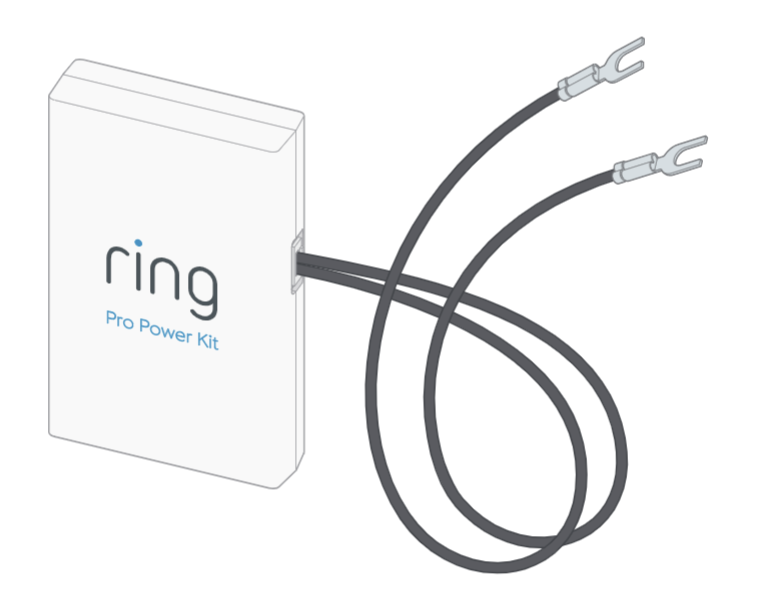
- The Ring Video Doorbell Pro kit: This includes the doorbell unit, mounting bracket, Power Kit (Chime Connector), screws, anchors, and a mini screwdriver.
Safety is paramount. Before touching any wires or removing your old doorbell, you must turn off the power to your doorbell system at your home’s circuit breaker. This typically involves flipping the breaker for the entire house or the specific circuit that powers your doorbell. Use a voltage tester to confirm the power is off at the doorbell wires before proceeding. This step is non-negotiable and protects you from electrical shock.
Checking Compatibility: Your Existing Doorbell System
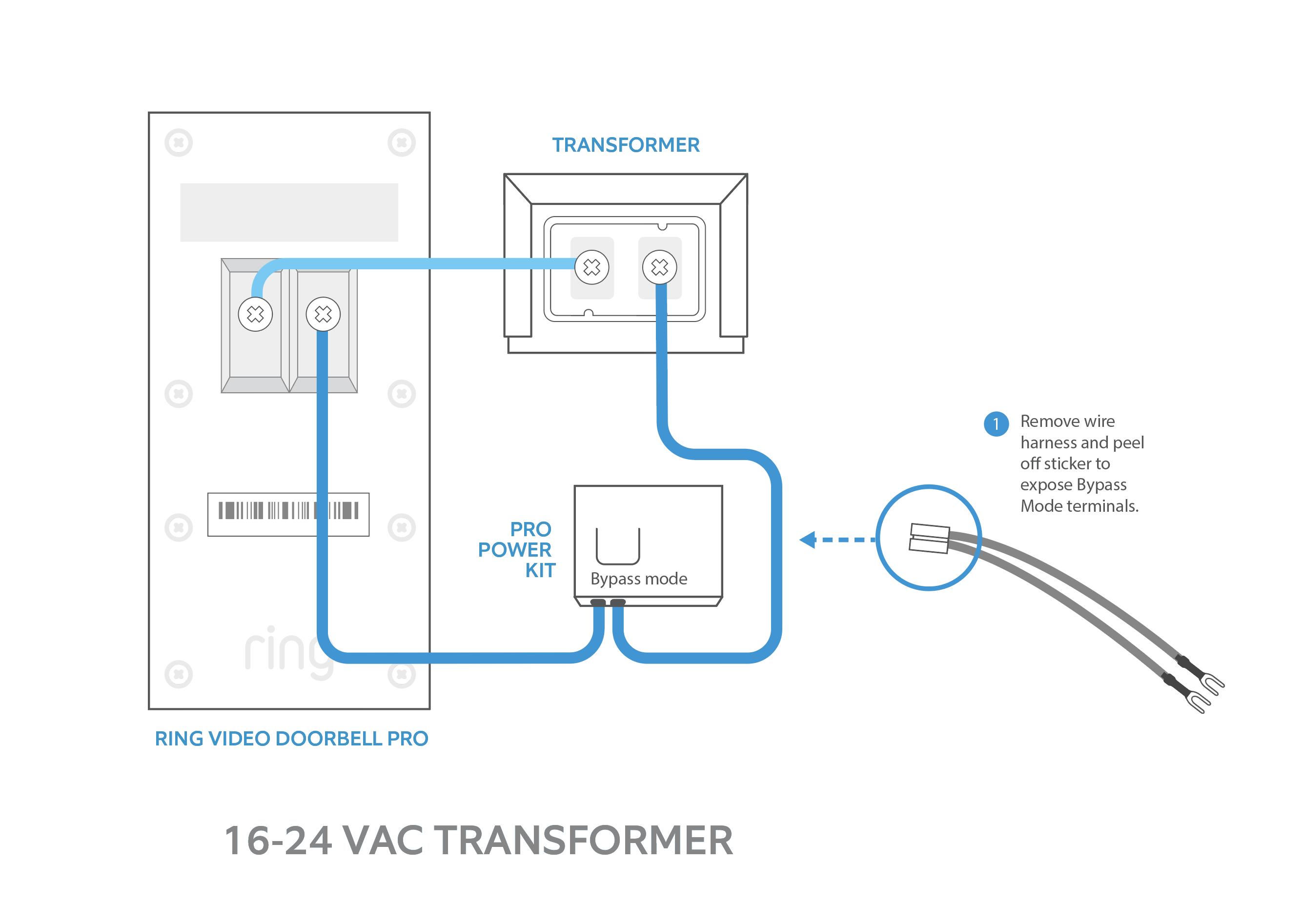
The Ring Video Doorbell Pro requires specific electrical specifications to function correctly. It needs a wired doorbell system with a transformer delivering between 16 and 24 Volts AC (VAC). Most standard doorbell systems fall within this range, but it’s crucial to confirm this before installation.
How to check your transformer voltage:
- Locate your transformer: It’s often found near your home’s main electrical panel, in a utility closet, attic, or basement. It might also be mounted to a junction box.
- Inspect the transformer: The voltage output is usually printed on the transformer itself (e.g., “16V,” “24V,” “10VA”). If it’s outside the 16-24 VAC range, you may need to upgrade your transformer, which might require professional electrical assistance.
- Chime Compatibility: The Ring Pro works with most mechanical and electronic indoor chimes. However, it requires the installation of the included Ring Power Kit (Chime Connector). This small device connects to your indoor chime to ensure adequate power delivery to your Ring Pro and to bypass the chime when necessary, preventing damage to the chime or the Ring device. This intricate power management system is a key technological aspect that ensures the hardwired reliability of the Ring Pro.
Confirming these details ensures a seamless transition and protects your financial investment in the device. If you’re unsure about your electrical system, consulting a qualified electrician is always the safest option.
The Physical Installation: Bringing Your Ring Pro to Life
With preparations complete and safety assured, it’s time to physically integrate the Ring Video Doorbell Pro into your home. This section details the hands-on steps, from removing your old doorbell to mounting and wiring your new smart device, ensuring it’s securely in place and ready for its digital setup.
Disconnecting Your Old Doorbell and Bypassing the Chime
The first step in modernizing your doorbell system is to respectfully retire the old one. Remember, ensure the power is off at the breaker before proceeding.
- Locate your indoor doorbell chime: This is typically a box mounted on a wall inside your home, often in a hallway, kitchen, or living area.
- Remove the chime cover: This usually involves gently prying it off or unscrewing it.
- Install the Ring Power Kit (Chime Connector): The Ring Pro comes with a small white device called the “Power Kit” or “Chime Connector.” This is crucial for regulating power to your Ring Pro and ensuring your existing chime works correctly.
- Identify the “FRONT” and “TRANS” (transformer) terminals on your chime.
- Loosen the screws on these terminals.
- Connect the two wires from the Power Kit to the “FRONT” and “TRANS” terminals, one wire to each. It doesn’t matter which Power Kit wire goes to which terminal.
- Tighten the screws to secure the wires.
- Attach the Power Kit to the inside of your chime box using the adhesive strip, ensuring it doesn’t obstruct the chime’s moving parts. Replace the chime cover. This step is a sophisticated bit of tech designed to manage the power flow effectively for optimal performance.
- Remove your old doorbell button: At your front door, carefully unscrew and detach your old doorbell button from the wall. You should see two low-voltage wires protruding from the wall. Gently pull them out enough to work with them, but ensure they don’t retract fully into the wall. If they do, fishing them out can be a challenge.
Mounting the Ring Pro: Placement and Secure Attachment
Proper placement and secure mounting are essential for optimal performance and durability. The slim profile of the Ring Pro makes it adaptable to most existing doorbell locations.
- Determine optimal placement: The ideal height for your Ring Video Doorbell Pro is approximately 48 inches (120 cm) from the ground. This ensures that the camera can capture faces and packages effectively.
- Use the mounting bracket as a template: Hold the Ring Pro’s mounting bracket against the wall where your old doorbell was, ensuring the wires come through the center opening. Use a level to ensure it’s straight and a pencil to mark the four mounting holes.
- Drill pilot holes: Using your drill and the appropriate drill bit, carefully drill the pilot holes at the marked locations.
- If drilling into wood siding, you might not need anchors.
- If drilling into stucco, brick, or concrete, insert the provided wall anchors into the pilot holes before securing the bracket. These anchors provide a robust grip in masonry, crucial for the long-term security of your device.
- Secure the mounting bracket: Feed your existing doorbell wires through the center hole of the mounting bracket. Then, align the bracket with the pilot holes and use the provided mounting screws to firmly attach it to the wall.
- Consider wedge/corner kits: If your doorbell is positioned on an angled wall or if you need a better viewing angle to capture activity, Ring offers optional wedge or corner kits. These allow you to adjust the camera’s angle by 15-30 degrees, optimizing your field of view – another example of the careful design considerations enhancing this tech gadget’s utility.
Wiring Your Ring Video Doorbell Pro
This is where your Ring Pro connects to your home’s power. It’s a straightforward process, but precision is key.
- Connect the doorbell wires: You should have two wires coming from your wall. The Ring Pro has two terminal screws on the back of the unit.
- Loosen these terminal screws.
- Connect one doorbell wire to each terminal screw. It doesn’t matter which wire goes to which terminal, as the Ring Pro doesn’t have a specific positive/negative polarity for power input.
- Ensure the wires are securely wrapped around the screws and tighten them firmly. Wires should not be able to pull out easily.
- Tuck in excess wire: Carefully push any excess wire back into the wall opening, ensuring there are no exposed wires that could short circuit.
- Attach the Ring Pro to the mounting bracket: Align the Ring Pro unit with the top tabs on the mounting bracket and then push the bottom of the unit towards the wall until it clicks securely into place.
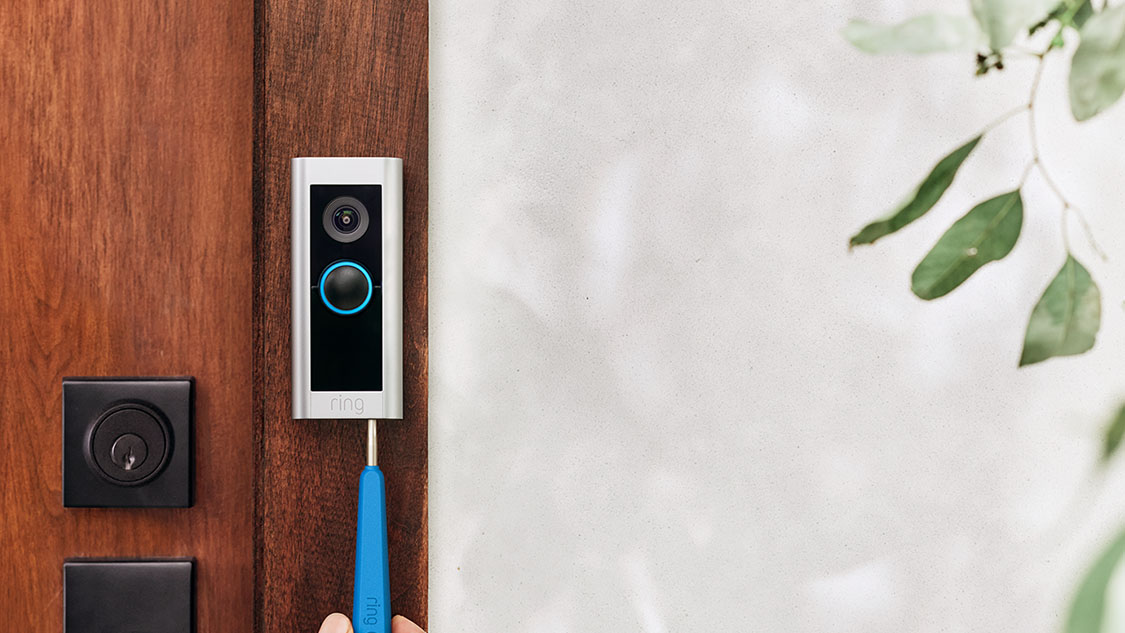
- Secure the security screw: At the bottom of the Ring Pro, you’ll find a small security screw. Use the specialized mini screwdriver included in your kit to insert and tighten this screw. This prevents tampering and theft, safeguarding your investment.
- Restore power: Once the Ring Pro is physically mounted and secured, return to your circuit breaker and turn the power back on. Your Ring Video Doorbell Pro should light up, indicating it’s receiving power and ready for the digital setup.
Digital Setup and Configuration: Connecting to Your Smart Home
With the physical installation complete and power restored, your Ring Video Doorbell Pro is poised to join your home’s digital network. This phase covers downloading the app, connecting to your Wi-Fi, and customizing settings to personalize your security, fully activating the “smart” in your smart doorbell.
Downloading the Ring App and Account Creation
The Ring app is the central hub for managing your device, receiving alerts, and interacting with visitors. It’s the gateway to your digital security ecosystem.
- Download the Ring app: Search for “Ring – Always Home” in your smartphone’s app store (Apple App Store for iOS or Google Play Store for Android). Download and install the application.
- Create an account: If you’re a new user, open the app and select “Create Account.” You’ll be prompted to enter your email address, create a strong, unique password (essential for digital security), and provide your name. Ring emphasizes two-factor authentication for enhanced account protection, which you should enable.
- Set up a new device: Once logged in, tap “Set Up a Device” and then select “Doorbells.” The app will guide you through scanning the QR code on your Ring Pro or its packaging to automatically detect your device and initiate the setup process.
Connecting Your Ring Pro to Wi-Fi
For your Ring Pro to communicate with your smartphone and the Ring servers, it needs a stable Wi-Fi connection.
- Put Ring Pro into setup mode: Follow the in-app instructions. Typically, you’ll press the small button on the side or back of the Ring Pro. The light ring on the front of the doorbell will start spinning blue, indicating it’s in setup mode.
- Connect to Ring’s temporary Wi-Fi network: Your phone will temporarily disconnect from your home Wi-Fi and connect to a Wi-Fi network generated by your Ring Pro (e.g., “Ring-XXXXXX”).
- Select your home Wi-Fi network: Once connected to the Ring network, the app will ask you to select your home’s 2.4 GHz or 5 GHz Wi-Fi network from a list. The Ring Video Doorbell Pro supports both frequencies, offering more flexibility and potentially better performance depending on your router.
- Enter your Wi-Fi password: Carefully type in your home Wi-Fi password. Accuracy here is crucial.
- Connect and update: The Ring Pro will then connect to your home Wi-Fi and may perform a firmware update. This process ensures your device has the latest features and security patches, a core aspect of maintaining robust digital security for your smart home gadgets.
Customizing Your Settings: Motion Zones and Alerts
Once connected, optimizing your Ring Pro’s settings is vital for effective home monitoring and to avoid notification fatigue.
- Name your device: Give your Ring Pro a descriptive name (e.g., “Front Door”).
- Configure motion zones: This is one of the most powerful features. The Ring app allows you to draw specific “motion zones” within the camera’s field of view. By excluding busy public sidewalks or streets, you can significantly reduce unwanted alerts. Conversely, you can create a precise zone for your porch or mailbox, ensuring you capture important activity.
- Adjust motion sensitivity: Fine-tune how sensitive the motion detection is. This helps distinguish between significant movement and minor disturbances like leaves blowing.
- Set alert preferences: Choose how you want to receive alerts (e.g., push notifications, email). You can also link other Ring devices to trigger recordings or lights when motion is detected, creating a cohesive security response across your connected devices. Consider privacy settings for recordings and sharing to balance security with personal data protection.
Maximizing Your Ring Pro Experience
Installation is just the beginning. To truly unlock the full potential of your Ring Video Doorbell Pro and ensure it serves as a robust component of your home’s security, understanding its ecosystem, troubleshooting capabilities, and integration options is key. This section delves into enhancing your experience, offering practical advice and insight into the broader value proposition of Ring’s technology.
Understanding Ring Protect Plans
While your Ring Video Doorbell Pro offers live view and basic motion alerts out of the box, a Ring Protect Plan unlocks its full capabilities and significantly enhances your home’s digital security. These subscription plans represent an ongoing financial commitment, but they offer substantial value.
There are typically two main tiers:
- Ring Protect Basic: Covers a single device. It includes video recording, storing all motion-activated and Live View videos in the cloud for up to 180 days (depending on region). This allows you to review, download, and share crucial footage after an event, which is invaluable for identifying suspects or sharing with authorities. It also often includes a snapshot capture feature, capturing still images throughout the day.
- Ring Protect Plus: Covers all Ring devices at a single location. In addition to all Basic features, it extends your device warranties, often provides professional monitoring for Ring Alarm systems (if you have one), and sometimes includes a discount on future Ring purchases. This plan provides comprehensive security for your entire Ring ecosystem, offering peace of mind and protecting your investment across multiple devices.
These plans transform your doorbell from a simple notification device into a full-fledged surveillance system, demonstrating the “Money” aspect of investing in subscription services for enhanced “Tech” functionality and “Digital Security.” Without a plan, recorded videos are not saved, limiting the doorbell’s utility in retrospective incident review.
Troubleshooting Common Installation Issues
Even with careful planning, sometimes issues arise. Here are solutions to common problems you might encounter:
- No Power to Ring Pro:
- Double-check breaker: Ensure the power is indeed on at your circuit breaker.
- Verify Power Kit installation: Ensure the Power Kit (Chime Connector) is correctly wired to your indoor chime’s “FRONT” and “TRANS” terminals. An incorrect connection will prevent power from reaching the doorbell.
- Check transformer voltage: Confirm your transformer meets the 16-24 VAC requirement. An underpowered transformer can lead to intermittent power or device failure.
- Inspect wiring: Ensure the wires are securely connected to the Ring Pro’s terminals and are not loose or frayed.
- Poor Video Quality or Wi-Fi Issues:
- Wi-Fi signal strength: Use the “Device Health” section in the Ring app to check your Wi-Fi signal strength (RSSI). If it’s weak, consider repositioning your Wi-Fi router or using a Wi-Fi extender to boost the signal near your doorbell. Ring Pro’s reliance on a strong Wi-Fi connection is a key aspect of its tech-driven performance.
- Network congestion: If many devices are using your Wi-Fi, it might impact performance. Consider using the 5 GHz band if available, as it typically offers faster speeds with less interference, though its range might be shorter.
- Indoor Chime Not Ringing:
- Power Kit connection: This is almost always due to an incorrect or loose connection of the Power Kit at the indoor chime. Double-check the “FRONT” and “TRANS” wires.
- Chime type: While the Power Kit supports most, some older or highly proprietary chimes may not be fully compatible.
Integrating with Other Smart Home Devices
The Ring Video Doorbell Pro is not a standalone device; it’s a component of a larger smart home ecosystem. Its ability to integrate with other devices significantly enhances its value and the overall convenience and security of your home. This interoperability is a prime example of modern tech trends.
- Amazon Alexa: As an Amazon company, Ring devices seamlessly integrate with Alexa-enabled devices. You can ask Alexa to show you the front door live view on an Echo Show, Echo Spot, or compatible Fire TV. You can also set up announcements when someone rings the doorbell or motion is detected.
- Ring Alarm System: If you have a Ring Alarm system, the Video Doorbell Pro can act as another sensor, triggering alarm events or recording when the alarm is disarmed or armed.
- Other Ring Cameras and Lighting: Create a comprehensive surveillance network by linking your Ring Pro with other Ring Stick Up Cams, Floodlight Cams, or smart lights. For instance, when motion is detected at the doorbell, a connected Ring Floodlight Cam in the backyard could start recording, or a smart light could turn on.
- IFTTT and Third-Party Integrations: For advanced users, platforms like IFTTT (If This Then That) can connect Ring to a vast array of other smart home devices and services, allowing for custom automations that go beyond the native Ring ecosystem.
This level of integration transforms individual gadgets into a cohesive, intelligent home, showcasing the immense potential of interconnected technology for enhanced security and lifestyle.
Beyond Installation: The Benefits of a Secure Smart Home
Installing your Ring Video Doorbell Pro is more than just a home improvement project; it’s an investment in a smarter, more secure, and convenient lifestyle. The benefits extend far beyond the initial setup, impacting your daily routines and offering profound peace of mind.
Enhanced Home Security and Peace of Mind
The primary benefit of the Ring Video Doorbell Pro is the significant boost it provides to your home’s digital security posture.
- Deterrence: The visible presence of a Ring doorbell can act as a powerful deterrent to potential intruders. Criminals are less likely to target homes with visible surveillance.
- 24/7 Monitoring: Whether you’re at home or thousands of miles away, you have a constant eye on your front door. Motion alerts notify you of activity, and the live view feature allows you to check in anytime.
- Package Protection: With the rise of online shopping, porch piracy is a growing concern. The Ring Pro helps you monitor package deliveries and provides evidence if a package goes missing.
- Remote Interaction: The two-way talk feature allows you to speak to visitors or delivery personnel from anywhere, giving the impression you’re home even when you’re not. This can scare off unwanted visitors or provide instructions for deliveries.
- Evidence Collection: In the unfortunate event of a crime, the high-definition video recordings can be invaluable evidence for law enforcement, aiding in identification and prosecution. This proactive approach to digital security not only protects your home but also contributes to community safety.
Convenience and Connectivity
Beyond security, the Ring Pro delivers unparalleled convenience, integrating seamlessly into your connected life.
- Anywhere, Anytime Access: Receive instant notifications on your phone, tablet, or PC when someone rings the doorbell or motion is detected. Answer the door from work, on vacation, or even just from another room in your house.
- Mobile-First Approach: The intuitive Ring app puts complete control in your hands, allowing you to manage settings, review events, and interact with your home from the palm of your hand. This epitomizes the “Apps” and “Gadgets” trends in modern technology.
- Eliminate Missed Deliveries: No more missed packages because you didn’t hear the knock. You can communicate directly with couriers to leave packages in a specific, secure location.
- Family Communication: Kids coming home from school? You’ll know exactly when they arrive. Grandparents visiting? You can let them know you’ll be right there. It adds another layer of connectivity to family life.
Protecting Your Investment
Investing in a Ring Video Doorbell Pro is an investment in your property and peace of mind. This aligns directly with the “Money” aspect of smart home technology.
- Asset Protection: By deterring crime and providing surveillance, you’re directly protecting your tangible assets within your home.
- Potential Insurance Benefits: Some home insurance providers offer discounts for homes equipped with smart security systems, viewing them as a reduced risk. It’s worth checking with your provider to see if your Ring Pro qualifies.
- Increased Property Value: While minor, integrating smart home technology can make your property more appealing to potential buyers, potentially contributing to its overall market value. It signals a modern, technologically integrated home.
- Brand Trust: Ring, as a recognized and trusted brand in the home security space, offers reliable products and an established support system. This brand reputation itself contributes to the perceived value and long-term reliability of your investment.
By embracing the Ring Video Doorbell Pro, you’re not just installing a gadget; you’re upgrading to a smarter, more secure future for your home. Enjoy the enhanced security, unmatched convenience, and profound peace of mind that comes with a truly connected and protected home.
aViewFromTheCave is a participant in the Amazon Services LLC Associates Program, an affiliate advertising program designed to provide a means for sites to earn advertising fees by advertising and linking to Amazon.com. Amazon, the Amazon logo, AmazonSupply, and the AmazonSupply logo are trademarks of Amazon.com, Inc. or its affiliates. As an Amazon Associate we earn affiliate commissions from qualifying purchases.