
In an era defined by digital connectivity and instant access to information, our smartphones have transcended their initial purpose as mere communication devices. The iPhone, in particular, stands at the forefront of this evolution, not just as a piece of elegant hardware but as a powerful platform powered by an unparalleled ecosystem of applications. From enhancing productivity and managing personal finances to fostering creativity and ensuring digital security, apps are the lifeblood of the iPhone experience. Understanding how to efficiently install, manage, and leverage these apps is fundamental to truly unlocking the full potential of your device.
This comprehensive guide delves into the nuances of app installation on your iPhone, moving beyond simple steps to explore the underlying technological framework, the strategic implications for personal and corporate branding, and the financial considerations that shape our digital lives. Whether you’re a new iPhone user or a seasoned enthusiast looking to optimize your app management, this article provides the insights you need to navigate the vast world of iOS applications with confidence and savvy.
Navigating the App Store: Your Gateway to Digital Innovation
At the heart of the iPhone’s app ecosystem lies the App Store, a meticulously curated digital marketplace. It’s more than just a download portal; it’s a dynamic hub where innovation meets user demand, governed by stringent standards that impact everything from software functionality to digital security.
Understanding the App Store Ecosystem
The App Store, launched by Apple in 2008, revolutionized how we interact with mobile technology. It transformed smartphones from utility devices into personalized hubs of activity. For users, it offers an astounding array of over two million applications, spanning every imaginable category. For developers, it represents a global stage, a powerful distribution channel that connects their creations with billions of users worldwide.
Apple’s approach to the App Store emphasizes quality, security, and user experience. Every app submitted undergoes a rigorous review process, checking for functionality, performance, design, and adherence to privacy guidelines. This vetting process is a cornerstone of Apple’s brand strategy, reinforcing trust and ensuring a consistent user experience – a critical factor in a world grappling with software vulnerabilities and data breaches. From a Tech perspective, this ecosystem leverages robust server infrastructure, advanced content delivery networks, and sophisticated algorithms to recommend apps and maintain a seamless download experience. The ongoing evolution of iOS itself often introduces new APIs and capabilities, driving developers to push the boundaries of what apps can do, from augmented reality experiences to advanced AI-driven features.
This controlled environment, while sometimes criticized for its exclusivity, provides a high level of digital security. Users can generally trust that apps downloaded from the App Store have met a certain baseline of safety and privacy, reducing the risk of malware or phishing attempts that are more prevalent in less regulated marketplaces. This focus on security is a key differentiator for the Apple Brand, fostering a loyal user base willing to invest in its products and services.
Finding the Right App: Search, Categories, and Recommendations
With millions of apps available, discovering the perfect one might seem daunting. However, the App Store is designed with intuitive navigation to help you find exactly what you need, or even inspire new interests.
- Search Bar: The most straightforward method. Simply type keywords related to the app’s function, name, or developer. For instance, searching “productivity” will yield a plethora of tools like task managers, note-taking apps, and calendar organizers. If you’re looking for a specific AI Tool, typing “AI assistant” or “AI image editor” will narrow down your options significantly.
- Categories: Apps are logically organized into categories such as Games, Productivity, Education, Finance, Health & Fitness, and more. Browsing categories allows for exploratory discovery, helping you unearth apps you might not have known existed but perfectly align with your interests or needs.
- “Today” Tab: This editorial section features daily stories, in-depth interviews with developers, curated app lists, and tips. It’s an excellent resource for discovering trending apps, understanding developer insights, and seeing how apps are solving real-world problems. This tab also highlights the human element behind app development, fostering a connection that can enhance a developer’s Brand recognition.
- Top Charts: View the most popular free and paid apps, as well as top-grossing apps. This gives you a snapshot of what’s currently trending and highly utilized by other users.
- App Recommendations: The App Store’s algorithms learn from your downloads and usage patterns, offering personalized recommendations. This intelligent system helps you discover apps that align with your past choices and presumed interests, making the discovery process more efficient and tailored to your preferences.
The visual design and user interface (UI) of the App Store itself play a significant role in this discovery process. High-quality screenshots, concise descriptions, user ratings, and reviews provide critical information, helping you make informed decisions before committing to a download. For developers, mastering App Store Optimization (ASO) – essentially SEO for apps – is crucial for visibility and discoverability, directly impacting their Brand‘s reach and potential for Money generation.
Step-by-Step: Installing Free and Paid Applications
The process of installing apps on your iPhone is streamlined and user-friendly, designed for efficiency whether you’re downloading a free utility or purchasing a premium service. This section walks you through the practical steps, highlighting the security features integrated into each transaction.
Downloading Free Apps with Ease
Even “free” apps are typically downloaded through a secure process that confirms your identity, serving as a safeguard against unauthorized use of your device.
- Open the App Store: Tap the blue icon with a white ‘A’ on your Home Screen.
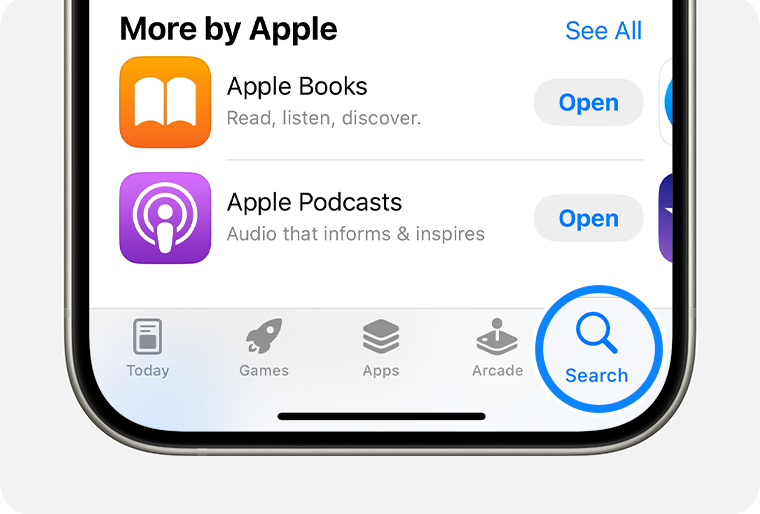
- Find Your App: Use the “Search” tab, browse “Today,” “Games,” or “Apps” tabs to locate the application you want.
- Tap “GET”: Once you’ve found an app, you’ll see a button that says “GET” (for free apps) or displays a price (for paid apps). Tap “GET.”
- Confirm Installation: Depending on your iPhone model and settings, you might be prompted to confirm the installation using one of the following methods:
- Face ID: Double-click the side button, then glance at your iPhone.
- Touch ID: Place your finger on the Home button.
- Passcode: Enter your device passcode.
- Wait for Download: The app icon will appear on your Home Screen, displaying a progress circle as it downloads and installs. Once complete, the circle will disappear, and the app will be ready to open.
It’s important to note that while an app might be listed as “GET,” it may still offer in-app purchases (IAPs) or subscriptions. These are often highlighted on the app’s product page under a section like “In-App Purchases” and are a significant revenue model for many developers, intertwining with the Money aspect of the app ecosystem.
Purchasing Premium Apps and Managing Payments
Many high-quality applications require a one-time purchase or a subscription. These premium apps often offer enhanced features, an ad-free experience, or specialized tools that justify their cost.
- Open the App Store: Navigate to the App Store icon.
- Find Your App: Locate the paid app you wish to purchase using the search or browsing features.
- Tap the Price: Instead of “GET,” you’ll see a button displaying the app’s price (e.g., “$4.99”). Tap this button.
- Confirm Purchase: You will be prompted to confirm your purchase using Face ID, Touch ID, or your device passcode, similar to downloading free apps. This step is crucial for financial security, ensuring that only you can authorize transactions.
- Payment Method: Ensure your Apple ID account has a valid payment method associated with it (e.g., credit/debit card, PayPal, Apple ID balance). If not, you’ll be prompted to add one. You can manage your payment methods by going to Settings > [Your Name] > Payment & Shipping. This direct link to personal Money management underscores the importance of regularly reviewing your financial details within your Apple ID settings.
- Download and Install: After successful confirmation and payment, the app will download and install on your Home Screen.
This seamless integration of secure payment processing is a testament to Apple’s Tech infrastructure and its commitment to user confidence. It allows both large corporations and independent developers to monetize their creations, contributing to a vibrant and competitive market where quality applications can thrive.
Essential Authentication: Face ID, Touch ID, and Passcodes
The authentication methods – Face ID, Touch ID, and your device passcode – are not just conveniences; they are critical security layers. From a Digital Security standpoint, they prevent unauthorized access to your device and, more importantly, unauthorized purchases.
- Face ID: Utilizes advanced TrueDepth camera technology to map your unique facial features. It’s incredibly secure and convenient, making app downloads and purchases almost instantaneous with a glance.
- Touch ID: A fingerprint recognition sensor, typically integrated into the Home button (on older models) or the side button (on some newer iPads). It offers a rapid and secure way to authenticate.
- Passcode: A numerical or alphanumeric code you set. This is your fallback authentication method if Face ID or Touch ID are unavailable or if you prefer manual entry.
These biometric and passcode protections are integral to Apple’s security framework, safeguarding your Money and personal data while facilitating a smooth user experience. They reinforce the Tech prowess behind the iPhone, providing robust defense against digital threats.
Beyond Installation: Optimizing Your App Experience and Digital Security
Installing an app is just the beginning. To truly harness its power and maintain a secure and efficient device, ongoing management and awareness are essential. This extends to understanding how to update, troubleshoot, and secure your app ecosystem.
Managing Your App Library: Updates, Offloading, and Deletion
An organized and up-to-date app library is key to a smooth iPhone experience.
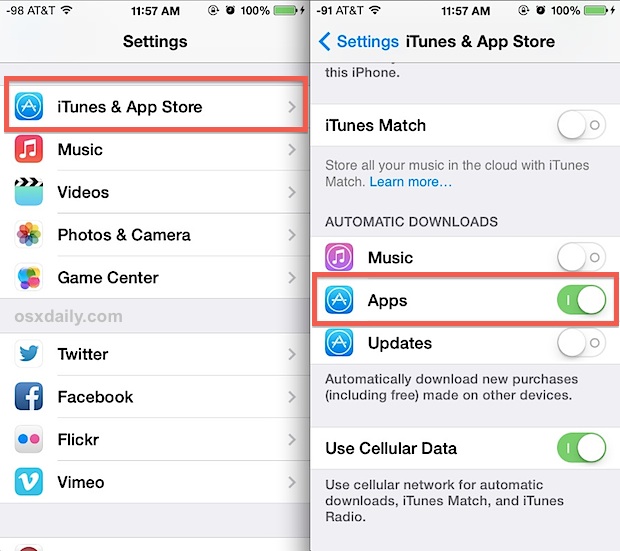
- App Updates: Developers constantly release updates to fix bugs, improve performance, add new features, and patch security vulnerabilities.
- Automatic Updates: Go to Settings > App Store, and toggle “App Updates” on. This ensures your apps are always current.
- Manual Updates: If automatic updates are off, or if you want to force an update, open the App Store, tap your profile icon (top right), and pull down to refresh the page. You’ll see a list of available updates. Tap “Update All” or “Update” next to individual apps.
Keeping apps updated is a crucial Tech maintenance task, ensuring compatibility with the latest iOS versions and protecting against potential security exploits.
- Offloading Apps: If your iPhone storage is running low but you don’t want to permanently delete an app (and its associated data), you can “offload” it. This removes the app itself but keeps its documents and data, so you can reinstall it later without losing your progress or settings. Go to Settings > General > iPhone Storage, tap the app, and select “Offload App.” This is a smart Productivity hack for managing limited device storage without losing valuable information.
- Deleting Apps: To permanently remove an app and all its data, tap and hold the app icon on your Home Screen until all icons jiggle. Then, tap the “—” (minus) sign on the app you wish to delete and confirm “Delete App.” This is often necessary for apps you no longer use, freeing up valuable storage space and decluttering your digital environment.
Troubleshooting Common App Installation Issues
While the process is generally smooth, you might occasionally encounter issues. Here are common problems and their solutions:
- “Cannot Connect to App Store”: Check your internet connection (Wi-Fi or cellular data). Try restarting your iPhone or resetting network settings (Settings > General > Transfer or Reset iPhone > Reset > Reset Network Settings).
- “Payment Required” or Payment Method Issues: Ensure your payment method is up-to-date and valid. Go to Settings > [Your Name] > Payment & Shipping to review and update your details. Check if there are any pending unpaid purchases. This directly relates to your Money management and Apple ID configuration.
- “Waiting” or Stuck Downloads: Try pausing and resuming the download by tapping the app icon on the Home Screen. If it persists, restart your iPhone. As a last resort, delete the partially downloaded app and try again.
- Insufficient Storage: If your iPhone is full, apps cannot download. Go to Settings > General > iPhone Storage to identify and offload or delete unused apps, large files, or clear Safari cache. This highlights the practical Tech constraint of device capacity.
- Apple ID Issues: Ensure you’re signed in with the correct Apple ID. Sometimes signing out of the App Store and signing back in (Settings > App Store > Apple ID) can resolve authentication problems.
Safeguarding Your Digital Life: Privacy and Permissions
One of the most critical aspects of app management is understanding and controlling app permissions. Many apps request access to various features and data on your iPhone, and knowing what you’re granting access to is paramount for Digital Security and privacy.
- Reviewing Permissions: When you first open an app, it will often ask for permission to access your location, photos, camera, microphone, contacts, etc. Always read these requests carefully.
- Managing Permissions Post-Installation: You can review and adjust permissions at any time. Go to Settings, scroll down to the app’s name, and tap it. You’ll see a list of permissions granted or requested, which you can toggle on or off.
- Location Services: Decide whether an app needs “Always,” “While Using the App,” “Ask Next Time,” or “Never” access to your location. For example, a map app needs location access, but a game might not.
- Tracking Transparency: iOS features App Tracking Transparency, which requires apps to ask for your permission before tracking your activity across other companies’ apps and websites. This is a significant step in empowering users with greater control over their data, directly impacting Brand trust and user privacy expectations.
- Reading Privacy Policies: While often lengthy, reviewing an app’s privacy policy (usually linked on its App Store page) gives insight into how your data is collected, used, and shared. Understanding these policies is crucial for protecting your Personal Branding and digital footprint.
Being proactive about app permissions minimizes the risk of unwanted data collection and ensures that your personal information remains secure. It’s a key part of maintaining robust Digital Security in today’s interconnected world.
The Broader Impact: Apps, Productivity, and Personal Finance
The impact of apps extends far beyond simple functionality; they profoundly influence our daily productivity, reshape our financial habits, and even contribute to our personal and corporate branding. The iPhone’s app ecosystem is a testament to the convergence of Tech, Brand, and Money.
Leveraging Apps for Enhanced Productivity and Lifestyle
Apps are powerful tools for optimizing virtually every aspect of our lives. From managing work tasks to fostering personal well-being, the right apps can be game-changers for Productivity.
- Task Management & Organization: Apps like Things 3, Todoist, and Apple Reminders help users organize their daily tasks, set reminders, and manage projects. For professionals, these tools are indispensable for staying on top of deadlines and managing workloads effectively.
- Note-Taking & Creativity: Apps such as Notion, Evernote, Bear, and Apple Notes provide platforms for capturing ideas, drafting content, and collaborating. Graphic design apps like Procreate or Affinity Photo empower artists and designers directly on their iPhones, fostering creative expression.
- Health & Wellness: Mindfulness apps (e.g., Calm, Headspace), fitness trackers (e.g., Strava, MyFitnessPal), and sleep monitors contribute to holistic well-being. These apps leverage advanced Tech like device sensors and AI to offer personalized insights and guidance.
- Learning & Skill Development: Language learning apps (Duolingo), online course platforms (Coursera, Udemy), and educational resources provide accessible ways to acquire new skills or deepen existing knowledge, supporting continuous personal growth.
By integrating these specialized applications into our routines, we can streamline processes, make better use of our time, and cultivate habits that lead to a more balanced and fulfilling lifestyle. This enhanced efficiency also implicitly contributes to stronger Personal Branding as individuals demonstrate competence and effective time management.
Financial Savvy: Navigating In-App Purchases and Subscriptions
The monetization models within the App Store are complex, and understanding them is crucial for responsible Money management. In-app purchases (IAPs) and subscriptions are ubiquitous, and while they fund developers, they also require careful attention from users.
- Understanding IAPs: These are one-time purchases made within an app, such as unlocking premium features, buying game currency, or removing ads. Always check the app description for details on available IAPs.
- Subscription Models: Many apps now operate on a subscription basis (e.g., monthly or annually) for continued access to content or premium features. Examples include streaming services, premium fitness apps, or professional software tools.
- Managing Subscriptions: It’s vital to regularly review and manage your active subscriptions to avoid unintended charges. Go to Settings > [Your Name] > Subscriptions. From here, you can see all active and expired subscriptions, cancel unwanted ones, or change plans.
- Budgeting for Digital Services: As digital expenses accumulate, it’s wise to incorporate them into your personal budget. Finance apps (e.g., Mint, YNAB, Personal Capital) available on the App Store can help you track spending, categorize transactions, and set financial goals, making you more financially savvy.
- Security for Purchases: Always ensure your Apple ID is secured with two-factor authentication to prevent unauthorized purchases, adding an extra layer of Digital Security to your financial transactions.
The interplay between Tech (secure payment gateways), Brand (developer reputation impacting willingness to subscribe), and Money (personal budgeting and income for developers) is evident in this aspect of the app ecosystem.
Apps as Tools for Personal Branding and Financial Growth
Beyond personal use, apps have become instrumental in building Personal Branding, supporting entrepreneurs, and even fostering Financial Growth.
- Brand Building for Individuals: Social media management apps, content creation tools (photo/video editing), and portfolio showcase apps allow individuals to curate their online presence, market their skills, and build a professional brand. Influencers, artists, and freelancers heavily rely on this suite of tools.
- Business and Entrepreneurship: For small business owners and side hustlers, apps facilitate everything from customer relationship management (CRM) and invoicing to social media marketing and e-commerce (e.g., Shopify, Square). These tools dramatically lower the barrier to entry for establishing and running a business, directly impacting Online Income and Business Finance.
- Investing and Trading: Apps from brokerage firms (e.g., Robinhood, Fidelity, E*TRADE) have democratized Investing, allowing individuals to manage their portfolios, research stocks, and execute trades directly from their iPhone. Cryptocurrency apps further expand these opportunities. While offering convenience, these apps require users to understand the associated risks and responsibilities.
- Side Hustles and Gig Economy: Platforms like Uber, Lyft, DoorDash, and TaskRabbit are entirely app-based, providing opportunities for individuals to generate Side Hustles and flexible income, reshaping the modern workforce.
The iPhone, through its versatile app ecosystem, has become a powerful accelerator for both personal and economic development, blurring the lines between work and life, and offering unprecedented access to tools that once required significant capital investment.
Emerging Trends and the Future of iPhone Apps
The app landscape is constantly evolving, driven by advancements in technology and shifting user demands. Understanding these trends provides a glimpse into the future of our digital interactions.
The Rise of AI-Powered and Specialized Apps
Artificial Intelligence (AI) is rapidly becoming an integral component of many applications, moving beyond simple automation to offer highly personalized and intelligent experiences.
- AI Tools Integration: We’re seeing more apps leveraging AI for tasks like smart suggestions, personalized content feeds, advanced image and video editing (e.g., AI upscaling, object removal), language translation, and even complex data analysis. AI writing assistants and voice-to-text transcription services are becoming commonplace.
- Enhanced User Experience: AI algorithms enable apps to learn from user behavior, providing more relevant recommendations, predictive text, and adaptive interfaces. This improves overall Productivity and user satisfaction.
- Specialized and Niche Apps: As the market matures, there’s a growing demand for highly specialized apps catering to very specific needs (e.g., apps for specific medical conditions, niche hobbies, professional tools for particular industries). These apps often integrate cutting-edge Tech to solve complex problems for a targeted audience.
The integration of AI into apps represents a significant Technology Trend, promising even more intuitive, efficient, and powerful tools that will continue to redefine our digital capabilities.

App Store Optimization and the Developer’s Perspective
From a developer’s standpoint, the App Store is a highly competitive arena. For an app to succeed, it must not only be innovative and well-developed but also strategically marketed.
- App Store Optimization (ASO): This is the process of improving app visibility within the App Store and increasing app conversion rates. It involves optimizing app titles, keywords, descriptions, screenshots, and video previews. Effective ASO is crucial for a developer’s Brand visibility and directly impacts their potential Money generation through downloads and in-app purchases.
- User Reviews and Ratings: These are paramount. Positive reviews improve an app’s ranking and build trust, directly influencing its Brand Reputation. Developers actively engage with user feedback to improve their apps and maintain a good standing.
- Monetization Strategies: Developers constantly refine their monetization models, balancing free trials, one-time purchases, subscriptions, and ad placements to ensure financial sustainability while offering value to users. This strategic aspect is deeply intertwined with Business Finance and market positioning.
The future of iPhone apps will continue to be shaped by this interplay between advanced Tech capabilities, sophisticated Brand strategies from developers, and innovative Money models that drive continuous innovation within this dynamic ecosystem. As users, staying informed about these trends and actively managing our app libraries empowers us to make the most of our iPhones in an ever-evolving digital world.
aViewFromTheCave is a participant in the Amazon Services LLC Associates Program, an affiliate advertising program designed to provide a means for sites to earn advertising fees by advertising and linking to Amazon.com. Amazon, the Amazon logo, AmazonSupply, and the AmazonSupply logo are trademarks of Amazon.com, Inc. or its affiliates. As an Amazon Associate we earn affiliate commissions from qualifying purchases.