
In the modern landscape of digital communication, emojis have transcended their origins as simple pictographs to become a sophisticated, universal language. For iPhone users, the arrival of new emojis is more than just a minor software update; it represents a shift in how we convey tone, emotion, and cultural nuances across digital platforms. With the latest iterations of iOS, Apple has continued its tradition of integrating the Unicode Consortium’s standards while adding its own signature design flair. This article explores the latest emoji additions for the iPhone, the technical processes that bring them to our keyboards, and the future of AI-driven expression.
The Anatomy of an Emoji Update: How Unicode and Apple Collaborate
The journey of an emoji from a conceptual sketch to a pixel-perfect icon on your iPhone screen is a rigorous technical process involving international standards and meticulous design work. Understanding this pipeline is essential to recognizing why certain icons appear when they do.
The Role of the Unicode Consortium
At the heart of every emoji update is the Unicode Consortium, a non-profit organization dedicated to maintaining software standards for text representation. Since computers essentially deal with numbers, Unicode provides a unique “code point” for every character, regardless of the platform or language. When a new emoji is proposed—whether it’s a “phoenix” or a “shaking head”—the Unicode Emoji Subcommittee reviews it based on factors like “frequently requested,” “distinctiveness,” and “potential usage levels.” Once approved as part of a new Unicode version (such as Emoji 15.1 or 16.0), these symbols are standardized across the tech industry.
From Approval to iOS Integration
While Unicode provides the “definition” of an emoji, it does not provide the artwork. This is where Apple’s software engineering and design teams take over. Apple is known for its highly detailed, almost photorealistic emoji style, which often contrasts with the flatter designs seen on Android or Windows platforms.
The transition from a Unicode approval to an iOS release typically takes several months. Designers must render the icons in various sizes to ensure they look crisp on everything from an Apple Watch Ultra to a Pro Display XDR. Furthermore, Apple must integrate these new characters into the iOS keyboard architecture, ensuring that the predictive text engine recognizes the new symbols and that the “Search Emoji” function is updated to reflect the new vocabulary.
Highlights of the Latest Emoji Release
The most recent updates to the iPhone emoji library focus on filling gaps in representation, expanding the natural world category, and introducing more dynamic physical gestures. These additions are designed to make digital conversations feel more fluid and inclusive.
New Symbols and Objects: From Myths to Nature
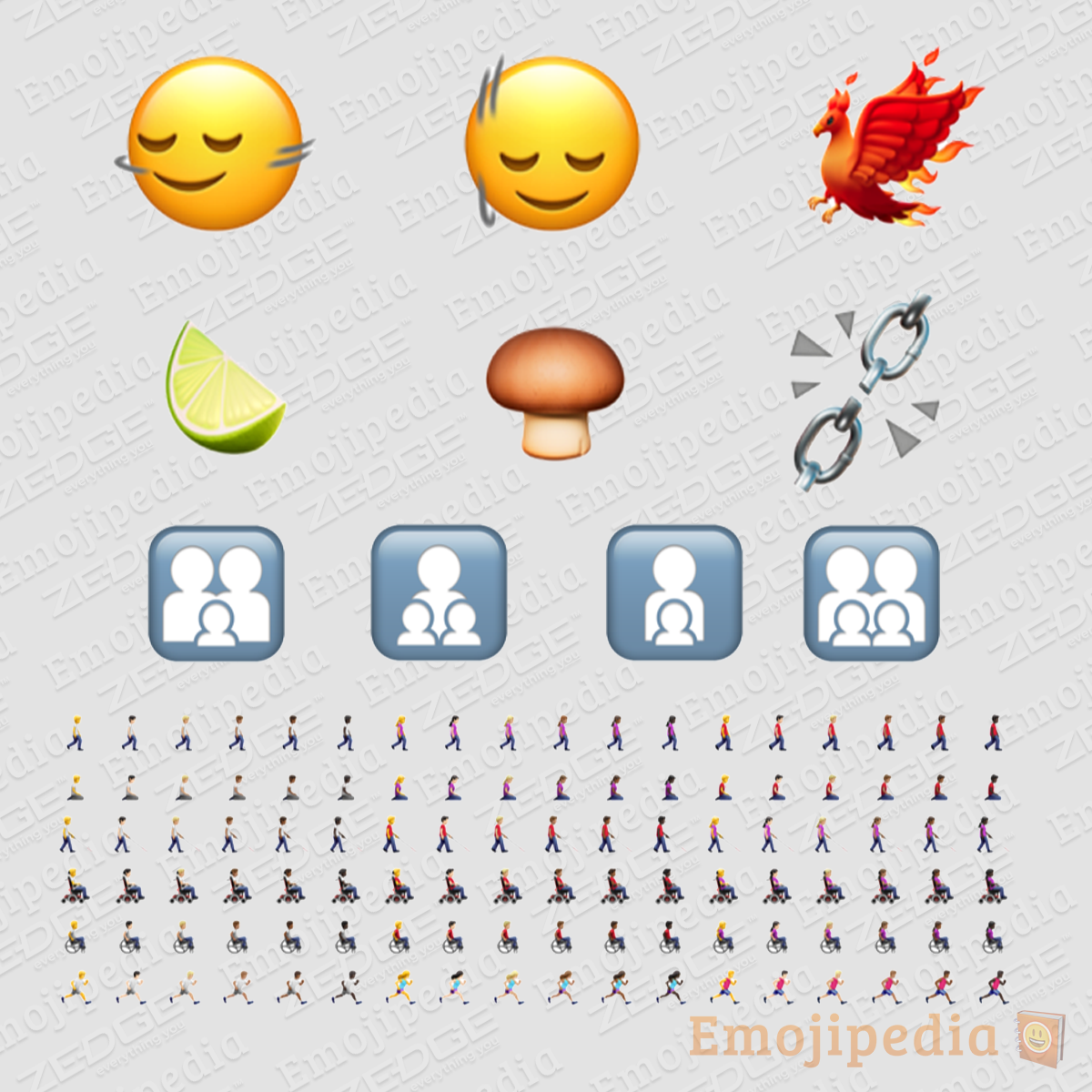
One of the standout additions in the recent iOS cycle is the Phoenix. This mythical bird, representing rebirth and resilience, was one of the most requested symbols for years. Its vibrant orange and red plumage is rendered with the intricate detail typical of Apple’s “Symbol” category.
Joining the phoenix is the Lime, a long-overdue addition to the fruit category that distinguishes itself from the existing lemon. In the realm of fungi, we now have a non-toxic Brown Mushroom, providing a more realistic alternative to the red-and-white toadstool that has dominated the keyboard for a decade. Additionally, the Broken Chain emoji has been introduced, offering a powerful metaphor for liberation, technical failure, or a literal severed connection.
Dynamic Directional Changes and Personalization
A significant technical shift in the latest emoji set is the introduction of directional variations. For years, emojis like the “Person Running” or “Person Biking” only faced one direction (usually left). The latest update allows users to choose the orientation of these icons.
This may seem like a minor aesthetic choice, but from a UI/UX perspective, it allows for better visual storytelling within a line of text. If you are describing a race, you can now have emojis “running” toward each other. This update applies to several movement-based icons, including:
- Person Walking
- Person Running
- Person Kneeling
- Person with White Cane
- Person in Motorized Wheelchair
- Person in Manual Wheelchair
Inclusive Family Representation
Apple has also overhauled the “Family” emoji category. Moving away from specific combinations of gendered icons, the new update utilizes neutral silhouettes. This approach is a technical and social solution to the infinite complexity of family structures. Rather than creating hundreds of individual permutations for every possible family makeup, these new icons serve as universal symbols of the family unit, maintaining a clean aesthetic while being more inclusive of diverse household dynamics.
The Technical Side: How to Access and Use New Emojis on iPhone
Accessing the latest emojis is not a matter of downloading a “pack” from the App Store; it is intrinsically tied to Apple’s system-level software updates. Because emojis are baked into the font files of the operating system, they require a full iOS update to function correctly.
Software Compatibility and System Requirements
To see and send the newest emojis, users typically need to be running the latest version of iOS (such as iOS 17.4 or later). If you send a new emoji to someone using an older version of iOS or an outdated Android device, they will likely see a “tofu”—a small rectangular box with a question mark inside. This occurs because their system’s character map does not yet recognize the new Unicode code point assigned to that emoji.
To update your device and unlock these features, navigate to:
Settings > General > Software Update.
Ensuring your device is up to date is the primary way to maintain “emoji parity” with your contacts.
Keyboard Settings and Search Functionality
Once the update is installed, the new emojis are automatically integrated into the standard iOS keyboard. However, with thousands of emojis now available, finding the “Lime” or “Phoenix” can be difficult.
Apple has optimized the Emoji Search Bar to handle these new additions. By tapping the emoji icon and typing “Phoenix” into the search field, the new icon appears instantly. Furthermore, Apple’s predictive text uses machine learning to suggest these new emojis based on the context of your sentence. For example, if you type “rising from the ashes,” the predictive bar will likely suggest the new phoenix emoji before you even finish the sentence.
Why Emojis Matter in the Modern Tech Ecosystem
It is easy to dismiss emojis as trivial, but in the world of technology and digital communication, they serve a vital function. They act as “digital gestures,” replacing the body language and facial expressions that are lost in text-based communication.
Enhancing Digital Nuance and Emotional Intelligence
In professional and personal settings, the lack of tone in text can lead to misunderstandings. A simple “Okay” can sound curt, but adding a “Nodding Face” (one of the new additions) instantly clarifies the sender’s intent. The introduction of the Shaking Head (horizontally) and Nodding Head (vertically) emojis addresses a fundamental human gesture that was strangely absent from the keyboard for years. These icons provide a level of nuance that helps bridge the gap between human emotion and digital interfaces.
The Future of Expressive Technology: Genmoji and AI
As we look toward the future of the iPhone, the “new emojis” may soon become infinite. At the recent Worldwide Developers Conference (WWDC), Apple introduced Apple Intelligence, which includes a feature called Genmoji.
Unlike the standard Unicode emojis discussed so far, Genmoji uses on-device generative AI to create entirely custom emojis based on text prompts. If you want an emoji of a “squirrel wearing a tuxedo,” you won’t have to wait for the Unicode Consortium to approve it. Your iPhone will generate the image on the fly.
This represents a massive shift in the tech landscape. We are moving from a “library-based” system, where we choose from a pre-approved list of icons, to a “generative” system, where our digital vocabulary is limited only by our imagination. While standard Unicode emojis will remain the bedrock of cross-platform compatibility, Genmoji marks the next frontier in personalized tech, allowing users to create icons that are perfectly tailored to their specific social circles and inside jokes.
Conclusion
The new emojis for the iPhone are a testament to the intersection of language, art, and technology. From the technical rigors of Unicode standardization to the creative rendering of a mythical phoenix, these icons reflect our evolving culture and our need for more precise digital expression. As Apple continues to push the boundaries with software updates and the integration of AI-powered Genmoji, the way we “speak” through our screens will continue to become more vibrant, inclusive, and sophisticated. Keeping your iPhone updated ensures that you remain a fluent participant in this ever-growing visual language.
aViewFromTheCave is a participant in the Amazon Services LLC Associates Program, an affiliate advertising program designed to provide a means for sites to earn advertising fees by advertising and linking to Amazon.com. Amazon, the Amazon logo, AmazonSupply, and the AmazonSupply logo are trademarks of Amazon.com, Inc. or its affiliates. As an Amazon Associate we earn affiliate commissions from qualifying purchases.