
In the modern era, travel is no longer just about packing a suitcase with clothes and toiletries. For the professional, the creator, and the digital nomad, the “carry-on” has evolved into a mobile command center. Whether it is a high-end workstation laptop, a fleet of lithium-ion power banks, or a sophisticated cinematography drone, the tech we carry defines our travel experience.
However, as technology evolves, so do the regulations governing air travel. Navigating the intersection of FAA (Federal Aviation Administration), TSA (Transportation Security Administration), and international aviation standards requires more than just a passing knowledge of “electronics.” It requires a deep dive into battery chemistry, signal interference, and digital security. This guide outlines exactly what tech you are allowed to take on a plane, the technical reasons behind the restrictions, and how to optimize your digital ecosystem for the skies.
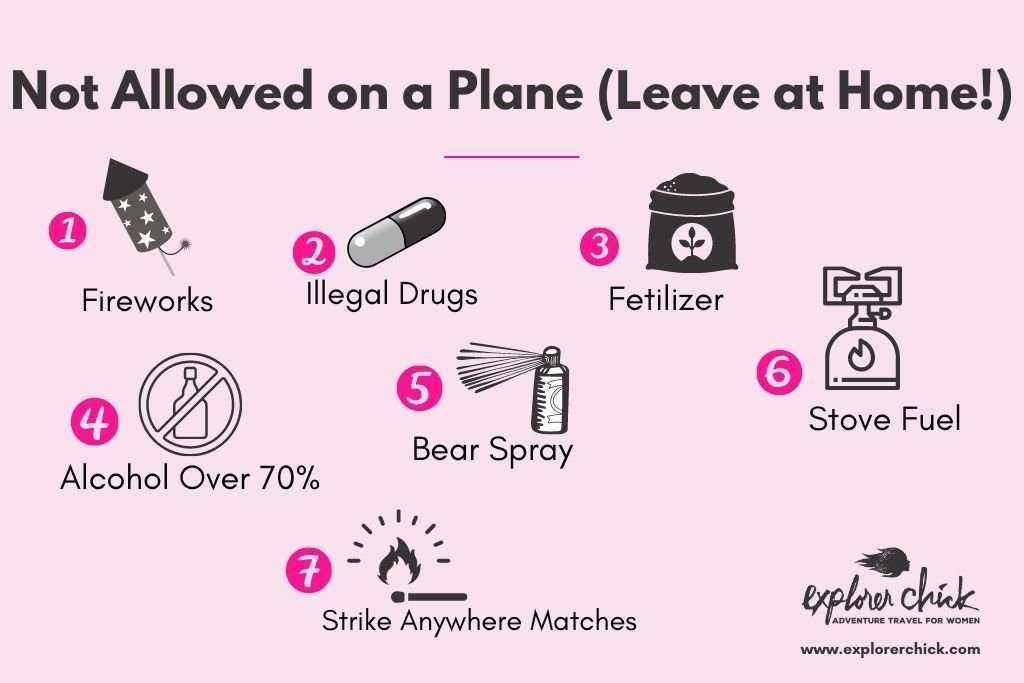
1. Power and Lithium-Ion Batteries: The Core Regulations
The most significant restriction on modern travelers isn’t the device itself, but the energy source powering it. Lithium-ion (Li-ion) batteries are the gold standard for portable tech due to their high energy density, but they also present a “thermal runaway” risk—a chain reaction that can lead to fires that are notoriously difficult to extinguish.
Understanding Watt-Hours (Wh) and Capacity
Aviation authorities categorize batteries based on their Watt-hour (Wh) rating rather than the milliampere-hour (mAh) rating commonly found on consumer packaging. Most laptops and smartphones fall well under the standard 100Wh limit, which is the threshold for unrestricted carry-on.
To calculate your device’s Wh, multiply the voltage (V) by the ampere-hours (Ah). For example, a 20,000mAh power bank operating at 3.7V is 74Wh. If your tech exceeds 100Wh—such as professional-grade camera batteries or oversized portable power stations—you typically need airline approval, and there is a hard cap at 160Wh for most commercial flights.
The “Carry-on Only” Rule for Power Banks
One of the most frequent mistakes tech travelers make is packing spare batteries in checked luggage. International regulations strictly mandate that spare lithium batteries and power banks must be kept in the cabin. In the event of a thermal event, the cabin crew is trained and equipped to handle the fire. In the cargo hold, a battery fire could go undetected until it is too late. If your laptop is in checked baggage, it must be completely powered down (not in sleep mode) to prevent accidental activation and overheating.
Dealing with Spare Batteries and Damaged Tech
It is not just about the capacity; it is about the condition. Aviation security is increasingly vigilant about damaged, bloated, or recalled batteries. If your smartphone screen is lifting due to a swollen battery, or if your laptop chassis is warped, you may be denied boarding with that device. Furthermore, spare batteries should have their terminals protected—either in their original packaging or by taping over the contact points—to prevent short circuits against other metallic objects in your bag.
2. Personal Computing and Entertainment Hardware
For many, the plane ride is a rare window of uninterrupted productivity or immersive entertainment. While almost all personal computers are allowed, the way they are handled during security screening and flight varies.
Laptops, Tablets, and E-Readers
Standard consumer electronics like MacBooks, iPads, and Kindles are universally permitted. However, the hardware “footprint” matters during the TSA screening process. In most airports, any device larger than a smartphone must be removed from your bag and placed in a separate bin for X-ray scanning. This is to ensure that the dense internal components of a laptop do not obscure the view of other items in your bag. If you are an “Advanced Traveler,” investing in a “TSA-friendly” laptop bag—which unfolds to lay the laptop flat without removing it—can significantly speed up the process.
Gaming Consoles and Handheld Devices
The rise of the “handheld PC” gaming market, led by the Steam Deck, ASUS ROG Ally, and Nintendo Switch, has changed the in-flight entertainment landscape. These devices are fully permitted, but they are subject to the same battery rules as laptops. Because these devices draw significant power, it is worth noting that many older aircraft USB ports do not provide enough wattage to charge them while in use. Travelers should ensure their high-output (PD – Power Delivery) chargers are accessible in their seat pocket.
Noise-Canceling Headphones and Wireless Connectivity
High-end wireless headphones, such as the Sony WH-1000XM5 or Apple AirPods Max, are travel essentials. While the “Airplane Mode” rule still technically applies to cellular signals, Bluetooth is now widely accepted by most airlines during all phases of flight. This allows for seamless use of wireless peripherals. However, some older aircraft still require a physical 3.5mm jack for the in-flight entertainment system, making a Bluetooth transmitter (like the AirFly) a vital piece of tech for the frequent flyer.

3. Specialized Tech: Drones, Cameras, and Wearables
For content creators and photographers, the “gear bag” presents unique challenges. Professional equipment often pushes the boundaries of weight and safety regulations.
Flying with Drones: Regulations and Safety
Drones are generally allowed on planes, but they are the most scrutinized items in a tech kit. Because drone batteries (LiPo – Lithium Polymer) are more volatile than standard Li-ion batteries, they must be stored in “Lipo-safe” fire-retardant bags. Furthermore, while the drone itself can be checked, the batteries must be in your carry-on. It is also vital to check the local laws of your destination; for instance, bringing a drone into certain countries without prior registration can lead to the device being confiscated at customs before you even leave the airport.
Photography Gear and External Storage
High-end mirrorless cameras and lenses are fragile and expensive, making them prime candidates for carry-on. Beyond the hardware, the “data” is the most valuable asset. Professionals should always keep their SSDs and SD cards on their person. While modern X-ray machines are generally safe for digital storage, some ultra-high-definition film can be damaged by the newer Computed Tomography (CT) scanners being installed at major hubs. If you are shooting on traditional film, always request a manual hand-check.
Smartwatches and Fitness Trackers
Wearable tech is perhaps the least regulated category. Smartwatches, Oura rings, and fitness trackers do not need to be removed during security screening in most jurisdictions, provided they are not bulky enough to set off a metal detector. These devices are excellent for managing travel-related stress and jet lag, but users should be aware of “Automatic Workout Detection” features that might trigger GPS tracking, which can drain battery life rapidly in an environment where a signal cannot be found.
4. Software and Digital Security in the Air
What you take on a plane isn’t just physical; it is digital. The transition from home networks to airport Wi-Fi and in-flight portals introduces significant cybersecurity risks.
VPNs and Public Wi-Fi Safety
Airport Wi-Fi networks are notorious hunting grounds for “Man-in-the-Middle” (MitM) attacks. Before you even reach your gate, your digital identity is at risk. A robust Virtual Private Network (VPN) is a non-negotiable tool for the tech traveler. By encrypting your data tunnel, a VPN ensures that your passwords, corporate emails, and financial information remain invisible to other users on the same network. Ensure your VPN is installed and updated before you leave, as some countries block the download of encryption software.
Offline Content Management and Cloud Syncing
Modern software relies heavily on the cloud, which is a liability at 35,000 feet. Before boarding, travelers should ensure that “Offline Mode” is enabled for essential applications like Google Docs, Notion, or Trello. Additionally, pausing large cloud syncs (like OneDrive or Dropbox) is recommended; if the in-flight Wi-Fi is spotty, your device may waste significant battery and bandwidth repeatedly trying to upload a single large file.
Biometric Security and Travel Apps
Your smartphone is now your passport, boarding pass, and wallet. Utilizing biometric security (FaceID or Fingerprint) is essential for travel. If your phone is lost or stolen in a foreign terminal, biometrics provide a crucial layer of defense against unauthorized access to your banking and travel apps. Furthermore, utilizing “Digital Wallets” (Apple Pay/Google Wallet) reduces the need to pull out physical cards, minimizing the risk of physical skimming.
5. The Future of In-Flight Tech: Emerging Gadgets
As we look forward, the definition of what we “take on a plane” is expanding to include augmented reality and smarter luggage solutions.
VR/AR Headsets and Spatial Computing
With the release of devices like the Apple Vision Pro and Meta Quest 3, “Spatial Computing” is entering the cabin. Most airlines allow the use of VR headsets, but they recommend using them only during the cruise phase of the flight. These devices offer a “private cinema” experience, which is a massive upgrade for economy-class travelers. However, users should be mindful of “passthrough” modes to remain aware of their surroundings and crew instructions.
Smart Luggage and Integrated Tracking
The “Smart Luggage” craze of a few years ago faced a setback when airlines banned non-removable batteries in suitcases. Today’s smart luggage features removable battery packs and integrated GPS/Bluetooth tracking (like AirTags). Taking an AirTag on a plane is 100% allowed and highly recommended. It provides a digital “breadcrumb” for your belongings, offering peace of mind that your expensive tech gear actually made it onto the aircraft with you.
In conclusion, being “allowed” to take tech on a plane is a matter of understanding the synergy between hardware safety and digital preparation. By respecting battery limits, securing your data with encryption, and organizing your gadgets for efficient screening, you can turn a stressful transit into a productive, high-tech journey. The sky is no longer a limit for your digital life—provided you pack with precision.
aViewFromTheCave is a participant in the Amazon Services LLC Associates Program, an affiliate advertising program designed to provide a means for sites to earn advertising fees by advertising and linking to Amazon.com. Amazon, the Amazon logo, AmazonSupply, and the AmazonSupply logo are trademarks of Amazon.com, Inc. or its affiliates. As an Amazon Associate we earn affiliate commissions from qualifying purchases.