
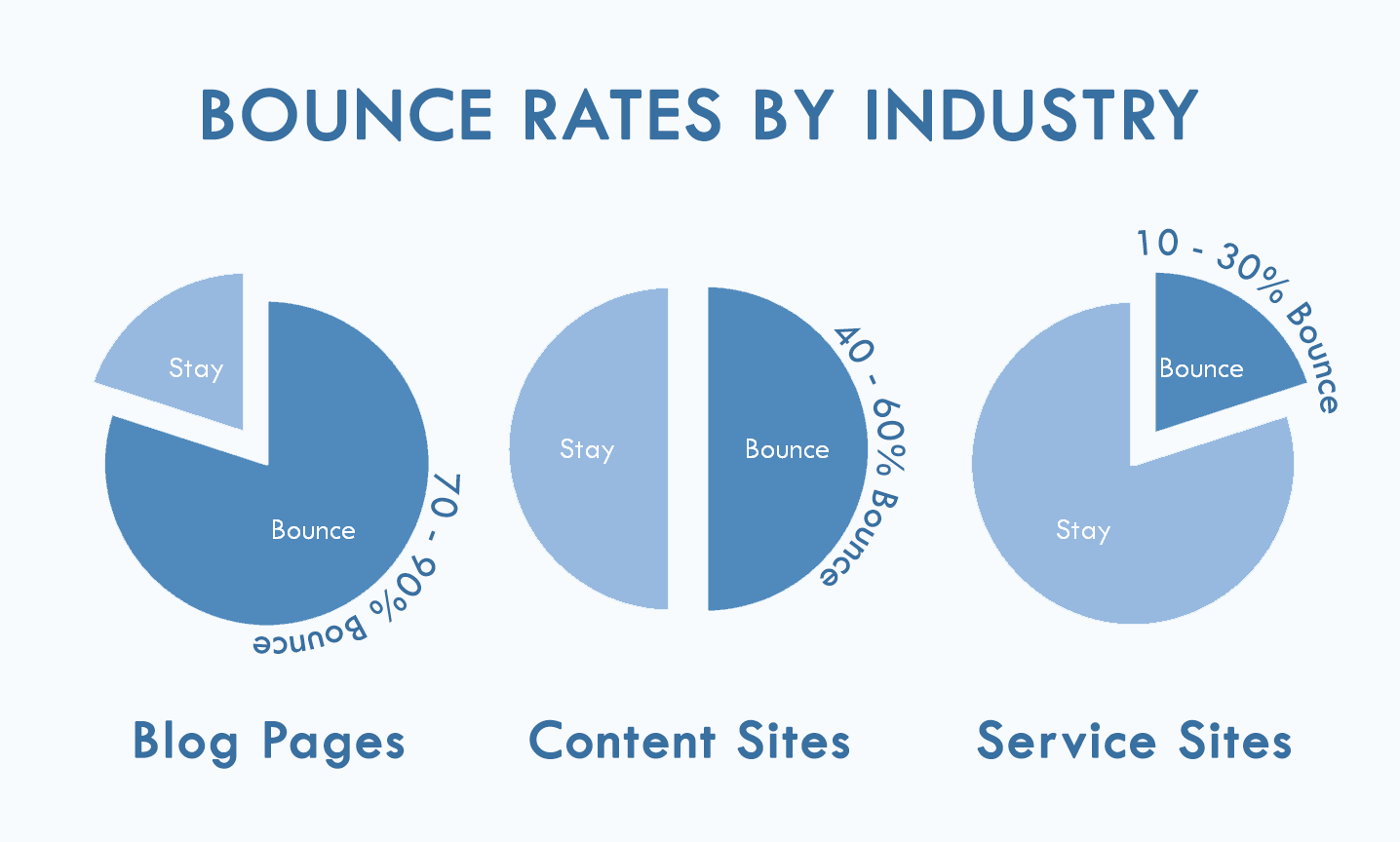
In the rapidly evolving landscape of web development and digital optimization, data is the currency that drives decision-making. Among the myriad of metrics available to developers, data scientists, and technical SEO specialists, the “bounce rate” remains one of the most discussed—and often misunderstood—key performance indicators (KPIs). At its technical core, a bounce rate measures the percentage of visitors who enter a website and “bounce” (leave) rather than continuing to view other pages within the same site.
Understanding this metric is not merely about tracking vanity numbers; it is about diagnosing the health of a website’s technical infrastructure, the efficiency of its user interface (UI), and the relevance of its content delivery systems. In this guide, we will dissect the bounce rate through a technical lens, exploring how it is calculated, the software tools used to monitor it, and the technical optimizations required to improve it.
1. The Technical Architecture of a “Bounce”
To understand bounce rate, one must first understand the concept of a “session.” In web analytics, a session is a group of user interactions with your website that take place within a given timeframe. A bounce occurs when a session involves only a single request to the analytics server.
The Single-Page Session Anatomy
When a user visits a page, the website’s tracking code (usually a JavaScript snippet) executes and sends a “pageview” hit to the analytics server. If the user exits the site without triggering any other hits—such as clicking a link to another internal page, submitting a form, or triggering a manual event—the session is classified as a bounce. From a technical standpoint, the server sees a start point but no subsequent telemetry, leading to a 100% bounce calculation for that specific user.
The Calculation Formula
The mathematical representation is straightforward:
Bounce Rate = (Total number of one-page sessions) / (Total number of sessions).
However, the nuance lies in the “Total sessions.” If a technical glitch prevents the tracking code from firing on the second page a user visits, that session may be erroneously recorded as a bounce, skewing the data.
Interaction Hits vs. Non-Interaction Events
Advanced technical implementations allow developers to define “non-interaction events.” For instance, if a user stays on a page for five minutes to read a technical whitepaper but doesn’t click a link, they might be counted as a bounce. However, by using an event trigger (like a scroll depth sensor or a timer), developers can send a signal to the analytics tool that the user is engaged, thereby preventing the session from being labeled as a bounce.
2. Navigating Analytics Software: From Universal Analytics to GA4
The way we define and measure bounce rates underwent a paradigm shift with the transition from Google’s Universal Analytics (UA) to Google Analytics 4 (GA4). This evolution reflects a broader trend in tech toward event-based tracking rather than session-based tracking.
The Demise of the Traditional Bounce Rate in GA4
In Universal Analytics, the bounce rate was a primary metric. In GA4, Google initially removed it entirely, replacing it with the “Engagement Rate.” The engagement rate is the inverse of the bounce rate, but with stricter criteria. A session is considered “engaged” if it lasts longer than 10 seconds, has a conversion event, or has at least two pageviews.
Eventually, due to industry demand, Google reintroduced the bounce rate to GA4, but it is now calculated specifically as the percentage of sessions that were not engaged. This shift is technically significant because it acknowledges that a user can find exactly what they need on one page (like a technical documentation snippet) and leave satisfied, which shouldn’t necessarily be viewed as a negative “bounce.”
Specialized Analytics and Heatmapping Tools
Beyond Google’s ecosystem, tools like Adobe Analytics, Matomo, and Hotjar provide deeper technical layers to bounce analysis.
- Log File Analysis: This involves looking at server logs to see how bots vs. humans interact with the site.
- Heatmapping and Session Recordings: Tools like Hotjar or FullStory allow developers to watch a playback of a “bounced” session. This reveals if a technical bug—like a broken button or a CSS rendering issue—caused the exit.
3. Technical Factors Influencing High Bounce Rates
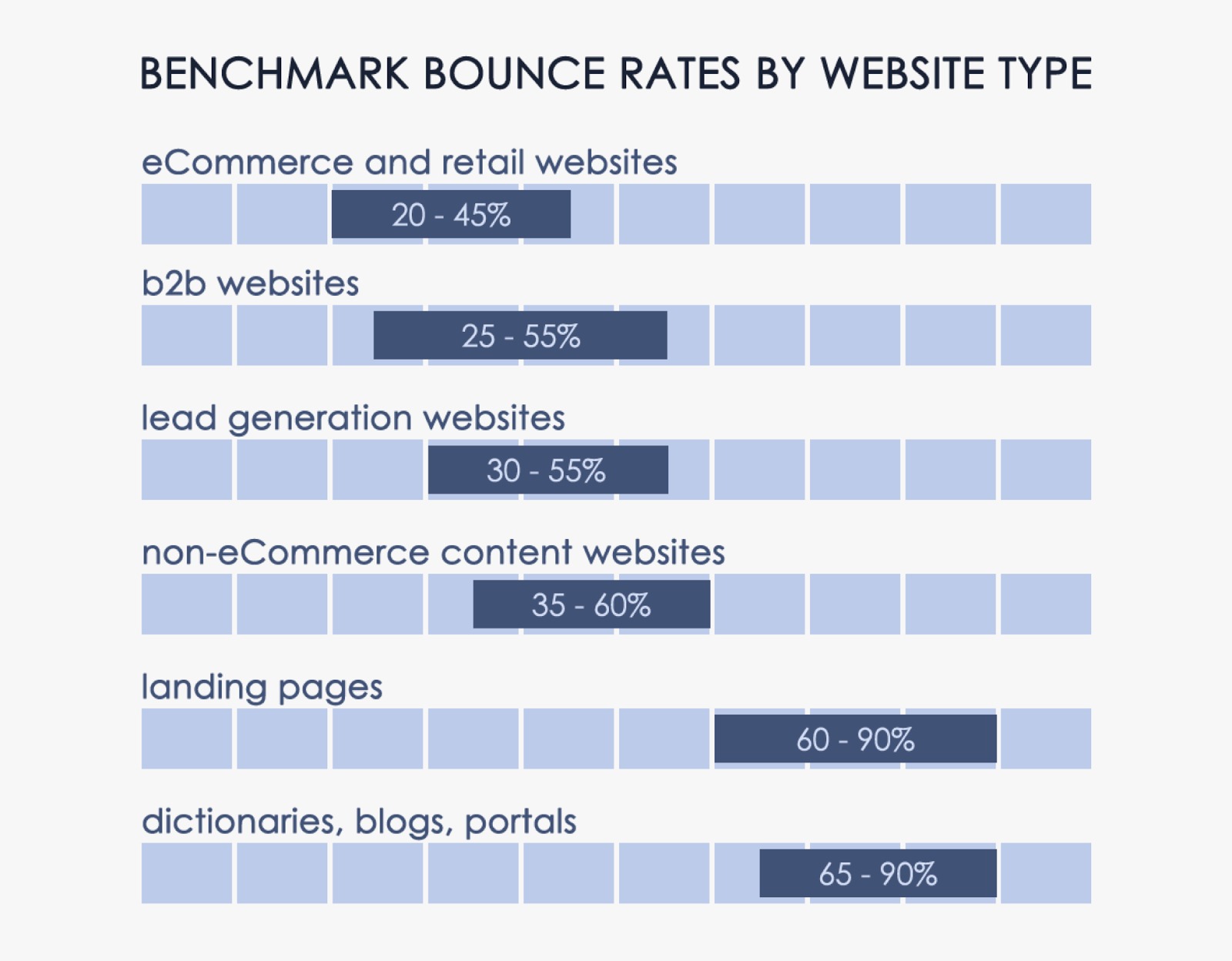
If a website’s bounce rate is high, the culprit is often found within the site’s technical stack. Performance bottlenecks can frustrate users before the page even fully renders.
Latency and Page Load Speed
The most common technical reason for a high bounce rate is latency. According to telemetry data from across the web, a delay of just three seconds in page load time can increase the probability of a bounce by over 30%.
- Core Web Vitals: Google’s Core Web Vitals, specifically Largest Contentful Paint (LCP), measure how quickly the main content of a page loads. If the LCP is slow due to unoptimized images, bloated JavaScript, or slow server response times (TTFB), users will likely bounce.
- Render-Blocking Resources: When a browser encounters a script that must be downloaded and executed before it can continue parsing the HTML, it creates a “jank” or a pause. Optimizing the critical rendering path is essential to keeping users on-site.
Mobile Responsiveness and Cross-Browser Compatibility
A site that functions perfectly on Chrome for Desktop but breaks on Safari for iOS will suffer from an inflated bounce rate.
- Adaptive Design: Technical teams must ensure that media queries and flexible grids are properly implemented.
- Touch Target Size: If buttons are too small or overlap on mobile devices, the “fat finger” syndrome leads to accidental clicks or frustration, causing immediate exits.
Tracking Errors and “Ghost” Bounces
Sometimes, a high bounce rate is a technical illusion.
- Duplicate Tracking Codes: If a page has the tracking snippet installed twice, it may send two hits simultaneously, resulting in a 0% bounce rate (which is also an error).
- Mismatched Redirects: If an ad leads to a 404 page or a redirect chain that hangs, the analytics tool might record a bounce before the user even sees the content.
4. Advanced Optimization Strategies for Technical SEO
Lowering the bounce rate requires a synergetic approach between frontend development and data-driven optimization. By leveraging modern web technologies, developers can create a seamless flow that encourages deeper site exploration.
Implementing Asynchronous Loading and Lazy Loading
To improve the perceived performance of a site, developers utilize asynchronous loading for non-essential JavaScript. This ensures that the primary content is interactive while secondary elements (like ads or third-party widgets) load in the background. Similarly, “Lazy Loading” for images ensures that assets are only downloaded when they enter the user’s viewport, saving bandwidth and reducing initial load-induced bounces.
Single Page Applications (SPAs) and Virtual Pageviews
For sites built on frameworks like React, Vue, or Angular, the concept of a “pageview” is different. Since the browser doesn’t reload the entire page when a user navigates, traditional analytics would see the entire visit as a single-page session (a bounce).
To solve this, developers must implement “Virtual Pageviews.” By triggering a manual hit to the analytics API every time the internal router changes the view, the tech stack accurately reports user movement, providing a realistic bounce rate.
Enhanced Internal Search Logic
A powerful technical feature to reduce bounce rates is a robust internal search engine. Using technologies like Elasticsearch or Algolia allows users to find specific data points quickly. When users interact with a search bar and see relevant, fast results, the “Engagement Rate” climbs, and the likelihood of them leaving the ecosystem decreases.
5. The Future of Engagement: AI and Predictive Analytics
As we move toward a more automated web, the way we interpret bounce rates is being transformed by Artificial Intelligence (AI) and Machine Learning (ML).
Predictive User Behavior Modeling
Modern tech platforms are now using ML models to predict the likelihood of a bounce in real-time. By analyzing mouse movements, hover patterns, and velocity, an AI script can trigger an “exit-intent” event. For example, if the system detects a user moving toward the “close” button, it can dynamically inject a relevant technical resource or a chat assistant to provide immediate value, potentially saving the session.
Automated A/B Testing and Personalization
Algorithms can now perform multivariate testing on technical elements like CTA (Call to Action) placement, font rendering, and color schemes. By automatically serving the version of a page that yields the lowest bounce rate for a specific user segment (e.g., users on Linux vs. users on Windows), the system optimizes itself for maximum retention.
Beyond the Click: Semantic Analysis
In the future, bounce rate analysis will likely incorporate semantic AI to determine “Intent Match.” If a user bounces but spent four minutes reading a complex technical API documentation, the AI will categorize this not as a “failure” but as a “successful single-page session,” further refining how we value technical engagement metrics.

Conclusion
In the realm of technology and web performance, the bounce rate is a vital diagnostic pulse. It acts as a bridge between raw data and user experience, signaling where the technical infrastructure succeeds and where it falters. By understanding the mechanics of session tracking, optimizing for speed and mobile-first design, and leveraging modern analytics frameworks like GA4, developers can transform a high bounce rate from a problem into an opportunity for technical refinement. As AI and machine learning continue to integrate into web analytics, our ability to understand, predict, and influence user behavior will only become more precise, turning the “bounce” into a relic of an unoptimized past.
aViewFromTheCave is a participant in the Amazon Services LLC Associates Program, an affiliate advertising program designed to provide a means for sites to earn advertising fees by advertising and linking to Amazon.com. Amazon, the Amazon logo, AmazonSupply, and the AmazonSupply logo are trademarks of Amazon.com, Inc. or its affiliates. As an Amazon Associate we earn affiliate commissions from qualifying purchases.