
In the landscape of modern technology, data is the currency that drives decision-making. Whether you are a software engineer, a data analyst, or a project manager, the ability to manipulate numerical data accurately is a fundamental skill. At the heart of this manipulation lies one of the four basic arithmetic operations: division. While it may seem elementary, the “divide formula” manifests in various sophisticated ways across different tech platforms, from spreadsheet giants like Microsoft Excel and Google Sheets to powerful programming languages like Python and SQL.
Understanding how to implement division formulas correctly is more than just getting a quotient; it is about ensuring data integrity, handling errors gracefully, and optimizing computational efficiency. This guide explores the nuances of the divide formula within the tech ecosystem, providing a comprehensive look at how digital tools process this essential operation.
The Fundamentals of Division in Excel and Google Sheets
In the world of spreadsheets, which remains the backbone of tech-driven business operations, the divide formula is unique because, unlike addition (SUM), there is no dedicated “DIVIDE” function that users typically employ for simple calculations. Instead, the software relies on operators and specialized functions to handle different types of division.
Using the Forward Slash (/) Operator
The most common way to perform division in any spreadsheet application is by using the forward slash (/) operator. This is the universal symbol for division in the digital world. To use it, a user simply types an equals sign followed by the cell references or numbers they wish to divide. For example, =A1/B1 tells the software to take the value in cell A1 and divide it by the value in cell B1.
This method is preferred for its simplicity and speed. It returns a decimal result (a float, in technical terms), providing the most precise answer possible within the software’s calculation limits. It is the go-to approach for calculating unit prices, ratios, and simple distributions.
The QUOTIENT Function vs. Standard Division
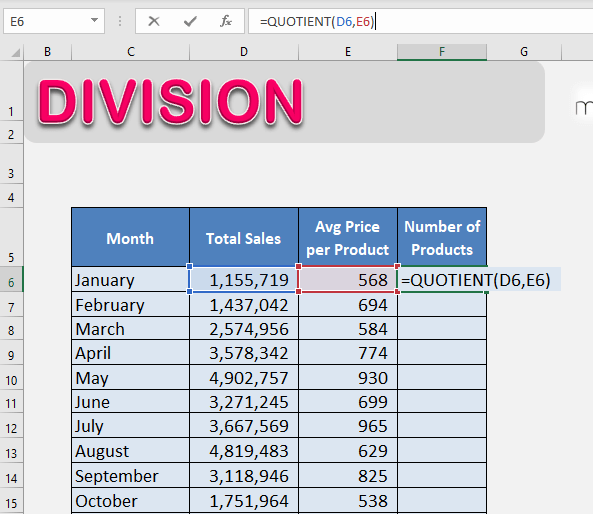
While the forward slash is the standard, Excel and Google Sheets offer a specific function called QUOTIENT. However, it is vital for tech professionals to understand that QUOTIENT does not perform standard division. Instead, it returns only the integer portion of a division, effectively discarding the remainder.
The syntax is =QUOTIENT(numerator, denominator). For instance, =QUOTIENT(10, 3) would return 3, rather than 3.333. This function is particularly useful in tech scenarios involving resource allocation where items cannot be split—such as determining how many full server racks are needed for a specific number of units or how many full pages of data will be displayed in a UI pagination system.
Handling the #DIV/0! Error with IFERROR
One of the most common “bugs” in spreadsheet data is the #DIV/0! error. This occurs when a formula attempts to divide a number by zero or an empty cell, which is mathematically undefined. In a professional tech environment, leaving these errors visible in a dashboard or report is considered poor practice.
To solve this, tech-savvy users wrap their divide formula in an IFERROR or IFNA function. The formula =IFERROR(A1/B1, 0) or =IFERROR(A1/B1, "N/A") ensures that if the denominator is zero, the spreadsheet displays a clean “0” or a custom message instead of a jarring error code. This practice is essential for maintaining clean data visualizations and ensuring that downstream formulas that reference these cells do not also break.
Advanced Division Techniques for Data Analysis
As data sets grow in complexity, simple division evolves into more complex analytical formulas. In tech-heavy roles, division is the primary tool for generating Key Performance Indicators (KPIs) and normalized data points.
Percentage Calculations and Growth Rates
In tech product management and software-as-a-service (SaaS) analytics, division is used to calculate growth rates and churn. The formula for “Percentage Increase” is a classic divide formula application: =(New Value - Old Value) / Old Value.
When implemented in a spreadsheet, this allows teams to track Month-over-Month (MoM) user growth or API call volume increases. By formatting the result as a percentage, the raw decimal produced by the division becomes an actionable insight. Understanding the order of operations (PEMDAS/BODMAS) is crucial here; without the parentheses around the subtraction, the software would divide the old value by itself first, leading to an incorrect result.
Using Array Formulas for Bulk Division
For developers and analysts working with “Big Data” within spreadsheets, dividing hundreds of rows individually is inefficient. Modern tech tools like Google Sheets offer the ARRAYFORMULA, and Excel offers “Dynamic Arrays.”
By using =ARRAYFORMULA(A2:A100 / B2:B100), a user can perform division across an entire column with a single line of logic. This is a “Tech-First” approach to spreadsheets, mirroring the vectorized operations found in data science libraries like NumPy. It reduces the risk of manual entry errors and ensures that as new data is appended to the list, the divide formula is automatically applied.
Division in Pivot Tables and Calculated Fields
Pivot tables are the ultimate tool for tech data synthesis. Often, users need to divide one summarized metric by another—for example, dividing “Total Revenue” by “Total Clicks” to find “Revenue Per Click.”
Instead of performing this outside the table, advanced users utilize “Calculated Fields.” This embeds the divide formula directly into the Pivot Table’s logic. The benefit of this tech-centric approach is that the division remains accurate even when the user filters the data or changes the grouping (e.g., from “Daily” to “Monthly” views), as the software recalculates the division based on the aggregated sums rather than individual row items.
Division Formulas in Programming and Web Development
Beyond spreadsheets, the “divide formula” is a core component of computer science. However, the way a computer handles division can vary significantly depending on the language and the data types involved.
Integer Division vs. Floating-Point Division
In many programming languages like C++, Java, and older versions of Python, the result of a division formula depends on the data type of the inputs. If you divide two integers (e.g., 5 / 2), the system might perform “Integer Division,” returning 2 and discarding the decimal.
Modern languages like Python 3 have moved toward making the / operator always return a float (e.g., 5 / 2 = 2.5). To perform integer division explicitly, Python uses the double-slash // operator. For a software developer, choosing the right “divide formula” is a matter of memory management and logic precision. Using integer division is often faster and uses less memory, making it ideal for low-level system programming or loop counters.
The Modulo Operator (%) and its Role in Logic
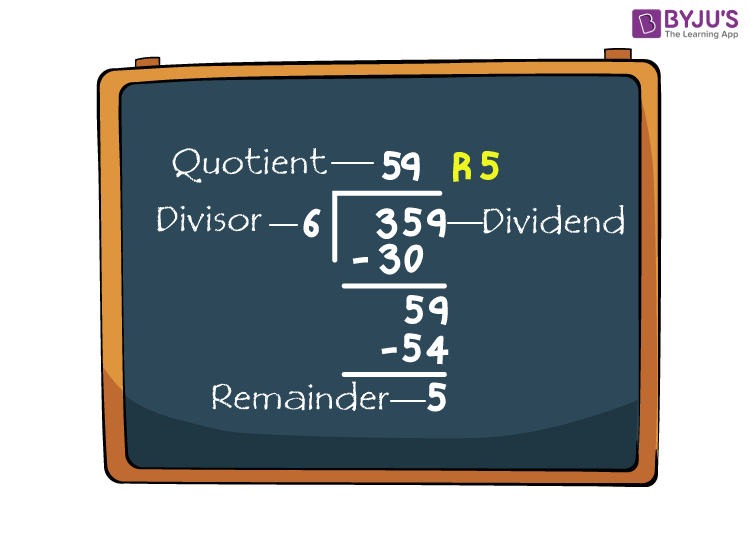
While the divide formula gives us the quotient, the Modulo operator (%) gives us the remainder. In tech, the modulo is just as important as the division itself. It is used in algorithms to determine if a number is even or odd (x % 2 == 0), to trigger actions every $n^{th}$ time in a loop, or to keep values within a certain range (circular buffers).
For example, in web development, if you are building a grid layout and want every third element to have a specific CSS class, you use the remainder of a division formula to identify those elements. It is the “shadow” of the divide formula, essential for backend logic and algorithm design.
Implementing Division Logic in SQL and Python
For data engineers, division is often performed at the database level using SQL or during processing using Python’s Pandas library. In SQL, a common pitfall is “Integer Division.” If you write SELECT 1/2, many SQL engines return 0. To get a decimal, tech professionals “cast” the numbers as floats: SELECT CAST(1 AS FLOAT) / CAST(2 AS FLOAT).
In Python’s Pandas library, division is vectorized. If you have a DataFrame df, you can divide two entire columns of millions of records using df['ratio'] = df['A'] / df['B']. This operation is optimized in C under the hood, demonstrating how the simple divide formula is scaled to meet the demands of modern technology and big data processing.
Best Practices for Precise Digital Calculations
Whether you are writing a script or building a financial model in a spreadsheet, the way you implement division can impact the reliability of your output.
Avoiding Rounding Errors in High-Stakes Data
Computers represent numbers in binary, which can sometimes lead to tiny rounding errors in floating-point division (e.g., 0.1 + 0.2 not equaling exactly 0.3). In tech fields like fintech or scientific computing, these “precision errors” can accumulate.
The best practice is to use specialized libraries designed for high precision, such as the Decimal module in Python, or to perform calculations using integers (e.g., calculating in cents instead of dollars) and only dividing by 100 at the very end for display purposes. This ensures that the divide formula doesn’t introduce “noise” into sensitive data sets.
Documentation and Cell Referencing for Clarity
A common mistake in tech documentation is “hard-coding” numbers into a divide formula—for example, =A1/1.15. This is a “magic number” that other team members might not understand.
The professional approach is to place the divisor (1.15) in a separate, clearly labeled cell or define it as a constant variable in code. By referencing the cell (e.g., =A1/$B$1), you make the formula easier to audit, update, and scale. In software development, this is known as the “Don’t Repeat Yourself” (DRY) principle, and it applies just as much to spreadsheet formulas as it does to code.
Conclusion
The “divide formula” is a deceptive concept; it is simple in theory but multifaceted in technical application. From the basic forward slash in a spreadsheet to the complexities of floating-point arithmetic in programming, mastering division is essential for anyone navigating the tech landscape. By understanding the tools available—such as IFERROR, QUOTIENT, ARRAYFORMULA, and the Modulo operator—tech professionals can ensure their calculations are not only accurate but also robust, scalable, and clear. As we move further into an era defined by data, the precision with which we divide that data will continue to define the quality of the insights we derive from it.