
In the rapidly evolving landscape of software development, JavaScript remains the cornerstone of web technology. As a language, it is unique for its non-blocking, asynchronous nature, which allows for smooth user experiences even when complex background tasks are being executed. At the heart of this flexibility lies a fundamental concept known as the “callback function.” Whether you are a novice developer or a seasoned engineer, mastering callbacks is essential for understanding how data flows and how tasks are orchestrated in modern web applications.
Understanding the Core Concept of Callbacks
To understand a callback function, one must first understand how JavaScript treats functions. In JavaScript, functions are “first-class citizens.” This means that functions are treated like any other variable; they can be assigned to variables, passed as arguments to other functions, and returned by other functions.
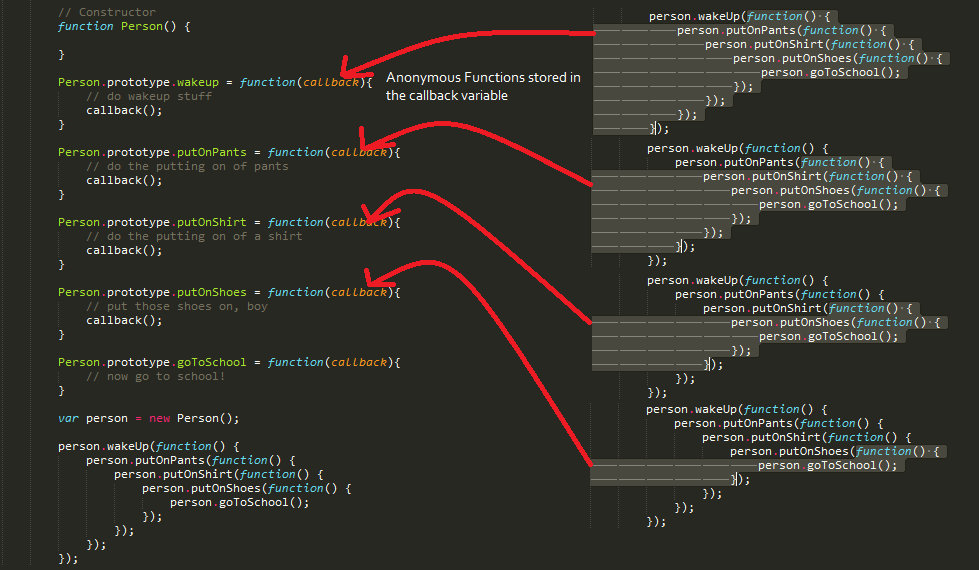
A callback function is essentially a function that is passed into another function as an argument, which is then “called back” or executed at a later time. This architectural pattern allows developers to write more modular, reusable, and efficient code.
Functions as First-Class Citizens
The ability to pass a function as an argument is what makes callbacks possible. When you pass a function into another, you aren’t passing the result of that function (unless you include parentheses); you are passing the function’s definition itself. This allows the receiving function to decide exactly when and under what conditions that code should be triggered. This level of control is vital for handling operations that take an indeterminate amount of time, such as user interactions or network requests.
Higher-Order Functions
In the world of functional programming, any function that accepts another function as an argument or returns a function is known as a “Higher-Order Function.” The higher-order function is the “boss” that manages the callback. For example, JavaScript’s built-in array methods like .map(), .filter(), and .forEach() are classic examples of higher-order functions that rely entirely on callbacks to process data. By separating the logic of how to iterate over an array from the logic of what to do with each element, JavaScript provides a clean and declarative way to manipulate data.
Synchronous vs. Asynchronous Callbacks
One of the most common points of confusion for developers is the difference between synchronous and asynchronous callbacks. While the syntax might look similar, the timing of their execution defines how the application behaves.
The Synchronous Execution Flow
Synchronous callbacks are executed immediately during the execution of the higher-order function. There is no waiting involved; the code runs from top to bottom. If you use a .forEach() method on an array, the callback function you provide is executed for every single item in that array before the code moves on to the next line. This is “blocking” behavior, meaning the program waits for the loop to finish. While efficient for data processing, synchronous callbacks can freeze a user interface if the dataset is massive.
The Asynchronous Nature of JavaScript
JavaScript is single-threaded, meaning it can only do one thing at a time. However, the web environment requires us to do many things at once—loading images, fetching database records, and responding to clicks. Asynchronous callbacks allow us to start a task and then move on to something else, instructing the program to “call this function back” once the task is complete.
This is the foundation of non-blocking I/O. Without asynchronous callbacks, a website would become unresponsive every time it tried to fetch data from a server, as the single thread would be stuck waiting for a response from the network.
The Event Loop and Callback Queue
To manage these asynchronous tasks, JavaScript uses a mechanism called the Event Loop. When an asynchronous callback (like a timer or an API response) is ready to run, it doesn’t just jump into the execution thread. Instead, it is placed in a “Callback Queue.” The Event Loop constantly monitors the main stack; once the stack is empty, it pushes the first function from the queue into the stack for execution. This elegant system ensures that your UI remains fluid while background processes finish their work.
Common Real-World Use Cases

Callbacks are not just a theoretical concept; they are the workhorses of practical web development. From the front-end interface to the back-end logic in Node.js, you will encounter them everywhere.
Event Handling in the DOM
The most frequent use of callbacks is in responding to user input. When you want a button to do something when clicked, you use an event listener. The function you pass to addEventListener is a callback. It sits quietly in the background, waiting for the user to trigger the specific event. This allows the rest of your script to run without interruption while still being “ready” to react to user behavior at any moment.
Timers and Delays
Functions like setTimeout and setInterval are built-in browser utilities that rely on callbacks. setTimeout takes a callback function and a delay in milliseconds. It schedules the callback to be added to the queue after the time has elapsed. This is essential for creating animations, handling session timeouts, or staggering the execution of code to improve performance.
Fetching Data from APIs
Before the advent of modern “Promises,” the primary way to handle HTTP requests was through callbacks. When requesting data from a server, you would provide a “success” callback and a “failure” callback. This allowed the browser to continue rendering the page while the data was traveling across the internet. Even today, many legacy systems and specific libraries use this pattern to manage the transition of data between the client and the server.
The Challenges: Avoiding Callback Hell
While callbacks are powerful, they come with a significant downside often referred to in the developer community as “Callback Hell” or the “Pyramid of Doom.”
Deep Nesting and Readability Issues
Callback Hell occurs when you have multiple asynchronous operations that depend on one another. For example, if you need to fetch a user profile, then fetch their posts based on that profile, and then fetch comments for those posts, you might find yourself nesting callbacks inside callbacks inside callbacks.
The result is a code structure that grows horizontally rather than vertically. This “pyramid” shape makes the code incredibly difficult to read, maintain, and debug. When code is hard to read, the likelihood of introducing bugs increases exponentially, and onboarding new developers to the project becomes a significant challenge.
Error Handling Complexity
In a nested callback structure, handling errors becomes a nightmare. Each layer of the callback requires its own error-handling logic. If an error occurs at the third level of nesting, it can be difficult to propagate that error back up to the user or to a central logging system. This often leads to “silent failures,” where the application simply stops working without providing any feedback to the developer or the user.
Modern Alternatives and the Future of Callbacks
Because of the limitations of “Callback Hell,” the JavaScript ecosystem has evolved to provide more robust ways of handling asynchronous logic. However, these new tools are built on top of the foundation that callbacks provided.
Promises: A Cleaner Approach
Introduced in ES6 (ECMAScript 2015), Promises were designed to solve the nesting problem. A Promise represents an operation that hasn’t completed yet but is expected in the future. Instead of passing a callback into a function, the function returns a Promise object. You can then attach .then() and .catch() methods to handle the results. This allows for “chaining” operations, keeping the code flat and making error handling much more centralized and intuitive.
Async/Await: The Syntactic Sugar
In ES2017, JavaScript introduced async and await. This is a specialized syntax that makes asynchronous code look and behave like synchronous code. While it uses Promises under the hood, it eliminates the need for .then() chains. It allows developers to use standard try/catch blocks for error handling, which is the gold standard for clean, professional code. Despite this advancement, it is important to remember that async/await is essentially a high-level wrapper around the callback principles we have discussed.

When to Still Use Callbacks
Despite the rise of Promises and Async/Await, callbacks are not obsolete. They are still the best tool for:
- Simple Array Operations: Methods like
.map()and.filter()are cleaner with callbacks than any other alternative. - Event Listeners: Responding to repeated events (like mouse movements or keypresses) is inherently a callback-based task.
- Functional Programming: When creating highly modular utility functions, passing logic via callbacks remains the most flexible approach.
In conclusion, the callback function is a foundational pillar of JavaScript. By understanding how to pass functions as arguments, distinguishing between synchronous and asynchronous flows, and recognizing the pitfalls of deep nesting, you can write more efficient and scalable software. As you progress into more advanced patterns like Promises and Async/Await, your fundamental knowledge of callbacks will serve as the compass that helps you navigate the complexities of modern web development.
aViewFromTheCave is a participant in the Amazon Services LLC Associates Program, an affiliate advertising program designed to provide a means for sites to earn advertising fees by advertising and linking to Amazon.com. Amazon, the Amazon logo, AmazonSupply, and the AmazonSupply logo are trademarks of Amazon.com, Inc. or its affiliates. As an Amazon Associate we earn affiliate commissions from qualifying purchases.