
In the contemporary landscape of high-performance computing, the boundary between hardware and software has become increasingly porous. For enthusiasts, gamers, and professional creators using AMD’s Zen-based processors, the “black box” of CPU operation is no longer inaccessible. At the heart of this accessibility lies AMD Ryzen Master, a sophisticated utility designed to provide users with granular control over their processor’s behavior. As the computing world shifts toward more specialized workloads—ranging from AI-driven data analysis to 4K real-time rendering—understanding how to leverage software like Ryzen Master has become a vital skill for anyone looking to maximize their return on hardware investment.
Understanding AMD Ryzen Master: The Command Center for Your CPU
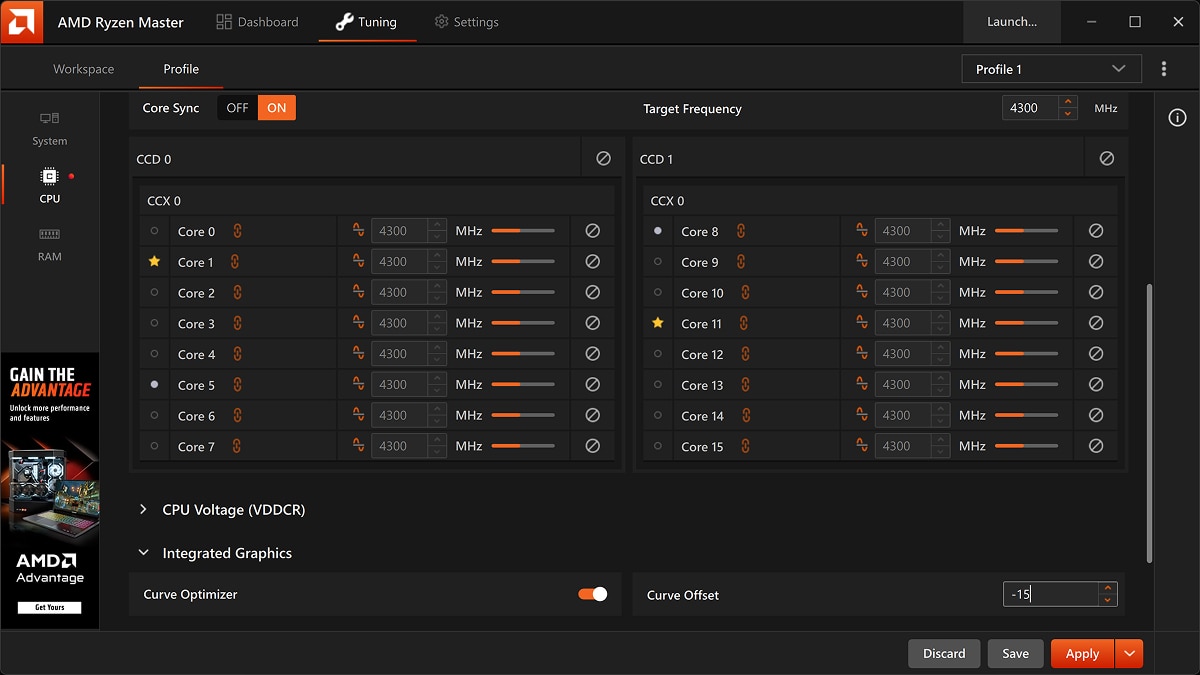
At its core, AMD Ryzen Master is a proprietary performance-tuning user interface (UI) that allows users to monitor and overclock their AMD Ryzen processors directly within the Windows environment. Historically, adjusting CPU parameters like clock speeds and voltages required a reboot into the BIOS/UEFI, a process that was both time-consuming and intimidating for the average user. Ryzen Master changes this paradigm by bringing these enthusiast-level controls to the desktop.
Evolution of AMD’s Software Ecosystem
The development of Ryzen Master coincided with the launch of the original Ryzen 1000 series in 2017. Before this, CPU tuning was often fragmented across various third-party tools and motherboard-specific software. AMD recognized that to compete with industry giants, they needed a unified, sleek, and powerful tool that reflected the “Zen” architecture’s flexibility. Over the years, the software has evolved from a simple clock-speed slider to a complex suite capable of managing multi-die architectures, 3D V-Cache technology, and intricate power delivery systems.
Core Architecture and Compatibility
Ryzen Master is specifically tailored for the “Zen” microarchitecture. This includes the mainstream Ryzen CPUs (AM4 and AM5 sockets) and the high-end Threadripper series. Because Ryzen processors utilize a “chiplet” design (where multiple smaller dies are connected via an Infinity Fabric), Ryzen Master provides a unique view of the hardware. Users can see exactly how many cores are active, which specific “gold” or “silver” cores are the most efficient performers, and how the fabric speed correlates with memory latency. It is important to note, however, that while the software is powerful, it requires a compatible chipset (such as the B450, B550, X570, or the newer B650/X670) to unlock its full potential.
Key Features and Performance Tuning Modes
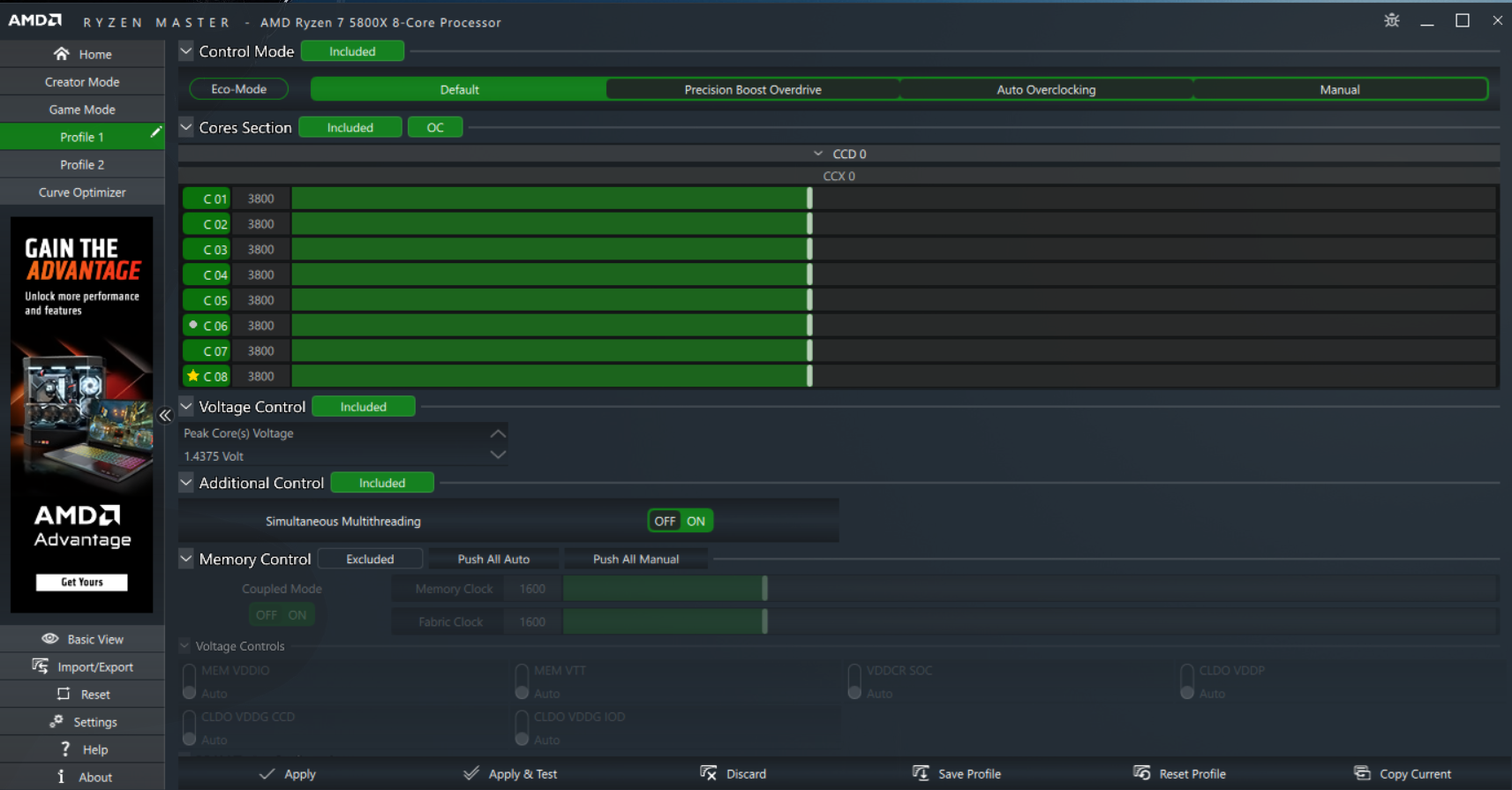
What sets Ryzen Master apart from basic monitoring tools is its ability to actively alter the processor’s state in real-time. The software offers several “modes” designed for different user expertise levels, ranging from “set-and-forget” automation to meticulous manual manipulation.
Precision Boost Overdrive (PBO) and Auto Overclocking
For the majority of users, Precision Boost Overdrive (PBO) is the crown jewel of Ryzen Master. Unlike traditional overclocking, which sets a static frequency, PBO works within the CPU’s built-in intelligence. It analyzes the thermal headroom, the motherboard’s power delivery capabilities (VRMs), and the current workload to “boost” the clock speed beyond the factory-rated limits.
Within Ryzen Master, the “Auto Overclocking” mode takes this a step further by adding a frequency offset (usually up to +200MHz). This allows the CPU to opportunistically jump to higher speeds during single-threaded tasks, such as gaming, without the user having to worry about system stability or permanent voltage damage.
Manual Mode: Granular Control for Enthusiasts
For the “overclocker” demographic, Manual Mode offers total sovereignty over the silicon. Here, users can disable specific CPU cores to reduce heat, adjust the CPU Voltage (Vcore) to find the “undervolt” sweet spot, and set a fixed multiplier across all cores. This is particularly useful for production environments—such as 3D rendering in Blender or video encoding—where a consistent, high all-core clock speed is more beneficial than the fluctuating speeds of an automated boost algorithm.
Curve Optimizer: The Modern Undervolting Standard
Introduced with the Ryzen 5000 series, the Curve Optimizer is perhaps the most sophisticated feature within the tool. Instead of applying a flat voltage, the Curve Optimizer allows users to adjust the entire voltage-to-frequency curve. By applying a “negative offset,” users can effectively lower the voltage the CPU consumes at every frequency point. This results in a cooler-running processor that can actually boost higher for longer periods because it is no longer hitting thermal or power limits as quickly. Ryzen Master includes an automated “Curve Optimizer” stress test that helps users find these stable values without hours of manual trial and error.
Monitoring and Personalization: Beyond the Clock Speed
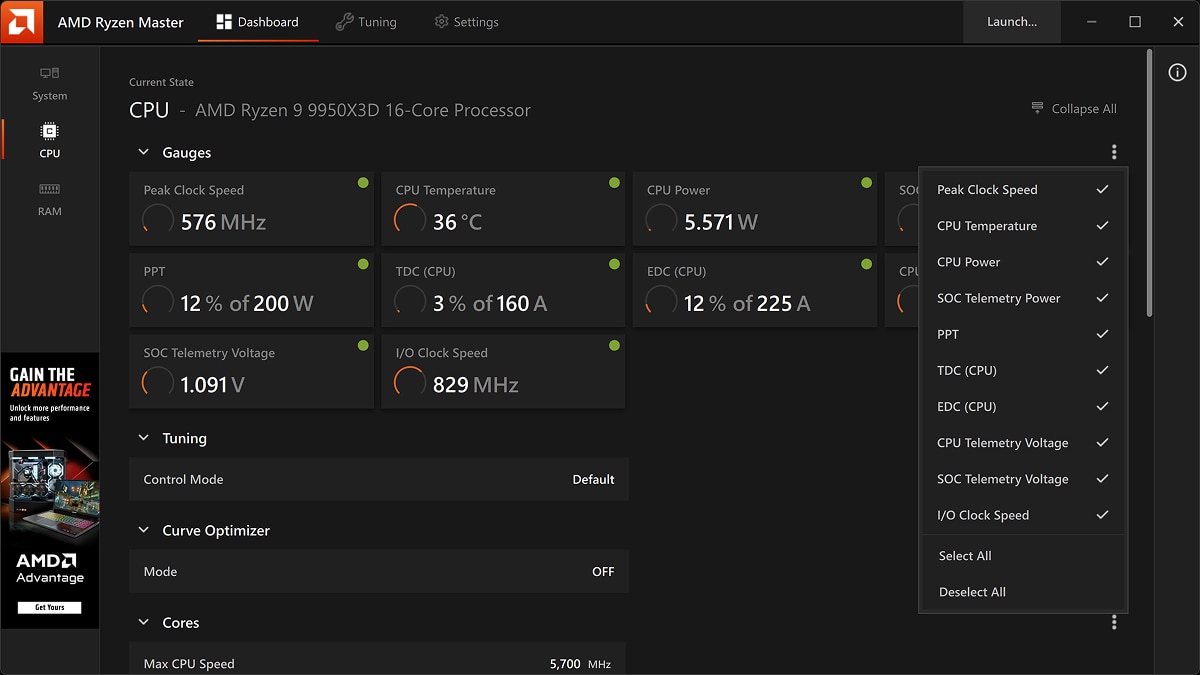
Beyond performance tuning, Ryzen Master serves as one of the most accurate telemetry tools available for the AMD platform. Because it communicates directly with the processor’s internal sensors, it provides a level of detail that many generic hardware monitors miss.
Real-Time Telemetry and Thermal Monitoring
The software provides a live dashboard showing the temperature of the CPU package, as well as specific metrics like:
- Peak Core Voltage: The maximum voltage being pulled by any single core.
- PPT (Package Power Tracking): The total power consumption in Watts allowed through the socket.
- TDC (Thermal Design Current): The maximum current the motherboard’s voltage regulators can deliver when thermally limited.
- EDC (Electrical Design Current): The peak current for short, bursty workloads.
By observing these three pillars (PPT, TDC, EDC), a user can identify exactly what is “bottlenecking” their performance. If the EDC bar is at 100% while the temperature is low, the user knows they need to adjust power limits rather than invest in better cooling.
Profile Management for Different Workloads
Ryzen Master allows for the creation of multiple profiles. A user might have a “Game Mode” profile where SMT (Simultaneous Multi-Threading) is toggled or specific cores are prioritized to minimize latency. Conversely, they might switch to a “Creator Mode” profile for heavy multitasking, ensuring all cores and threads are active and synchronized. This versatility ensures that the PC is always optimized for the task at hand, whether it’s a competitive eSports title or a complex scientific simulation.
Safety, Stability, and Best Practices
With great power comes the responsibility of hardware safety. Overclocking, by definition, pushes hardware beyond its factory-validated specifications, which carries inherent risks.
Managing Heat and Voltage Limits
The primary enemy of silicon is heat and excessive voltage (electromigration). Ryzen Master includes “safety rails,” but it allows the user to override them in certain modes. It is critical for users to understand that exceeding 1.35V to 1.4V for long-term daily use on modern 5nm or 7nm nodes can degrade the processor. Ryzen Master assists here by highlighting “Safe” vs. “Danger” zones in its UI, but the user must remain vigilant. Professional-grade cooling—such as a 360mm AIO or a high-end air cooler—is a prerequisite before diving into aggressive manual tuning.
Understanding the “Silicon Lottery” and Warranty
Every CPU is unique; some can hit 5.5GHz with ease, while others struggle at 5.1GHz. This is known as the “Silicon Lottery.” Ryzen Master provides the tools to test the limits of your specific chip, but it also comes with a legal caveat: AMD’s warranty does not typically cover damage caused by overclocking, even when using their own software. This professional-grade tool is intended for those who accept the risks in exchange for the rewards of peak performance. To ensure stability, users should always use the “Stress Test” feature within Ryzen Master or external tools like Cinebench R23 and Prime95 to verify that their settings won’t lead to system crashes.
The Future of Desktop Optimization
As we look toward the future of the “Zen” architecture and the AM5 platform, Ryzen Master is likely to integrate more deeply with Artificial Intelligence. We are already seeing the beginnings of this with “AI-driven” auto-tuning features that learn the specific thermal characteristics of a user’s PC over time.
AI Integration and Automated Tuning
The next frontier for Ryzen Master involves machine learning models that can predict crashes before they happen, suggesting subtle voltage adjustments to maintain 100% uptime. Furthermore, as hybrid architectures (combining performance and efficiency cores) potentially enter the desktop space, Ryzen Master will be the primary tool for directing Windows thread scheduling, ensuring that the right tasks are assigned to the right cores for maximum efficiency.
In conclusion, AMD Ryzen Master is far more than a simple overclocking utility; it is a comprehensive ecosystem that empowers the user to become the “architect” of their own computing experience. By bridging the gap between complex low-level hardware registers and an intuitive graphical interface, it has democratized high-performance computing. Whether you are looking to squeeze an extra few frames per second out of a favorite game, or you need to shave minutes off a video render, Ryzen Master provides the precision tools necessary to turn a standard PC into a finely tuned workstation. As technology continues to advance, tools like these will remain essential for anyone who refuses to settle for “stock” performance.
aViewFromTheCave is a participant in the Amazon Services LLC Associates Program, an affiliate advertising program designed to provide a means for sites to earn advertising fees by advertising and linking to Amazon.com. Amazon, the Amazon logo, AmazonSupply, and the AmazonSupply logo are trademarks of Amazon.com, Inc. or its affiliates. As an Amazon Associate we earn affiliate commissions from qualifying purchases.