
In the rapidly evolving landscape of digital video production, the quest for fluid, cinematic motion has led to the development of numerous software solutions. Among the most revered and technically sophisticated tools in this category is Twixtor. Developed by RE:Vision Effects, Twixtor is a powerful plug-in designed to manipulate the speed of video footage with unprecedented precision. Unlike standard speed-ramping tools found in basic editing suites, Twixtor employs advanced computer vision algorithms to synthesize new frames, allowing for “super slow motion” that appears smooth and natural even when the original source material was filmed at a standard frame rate.
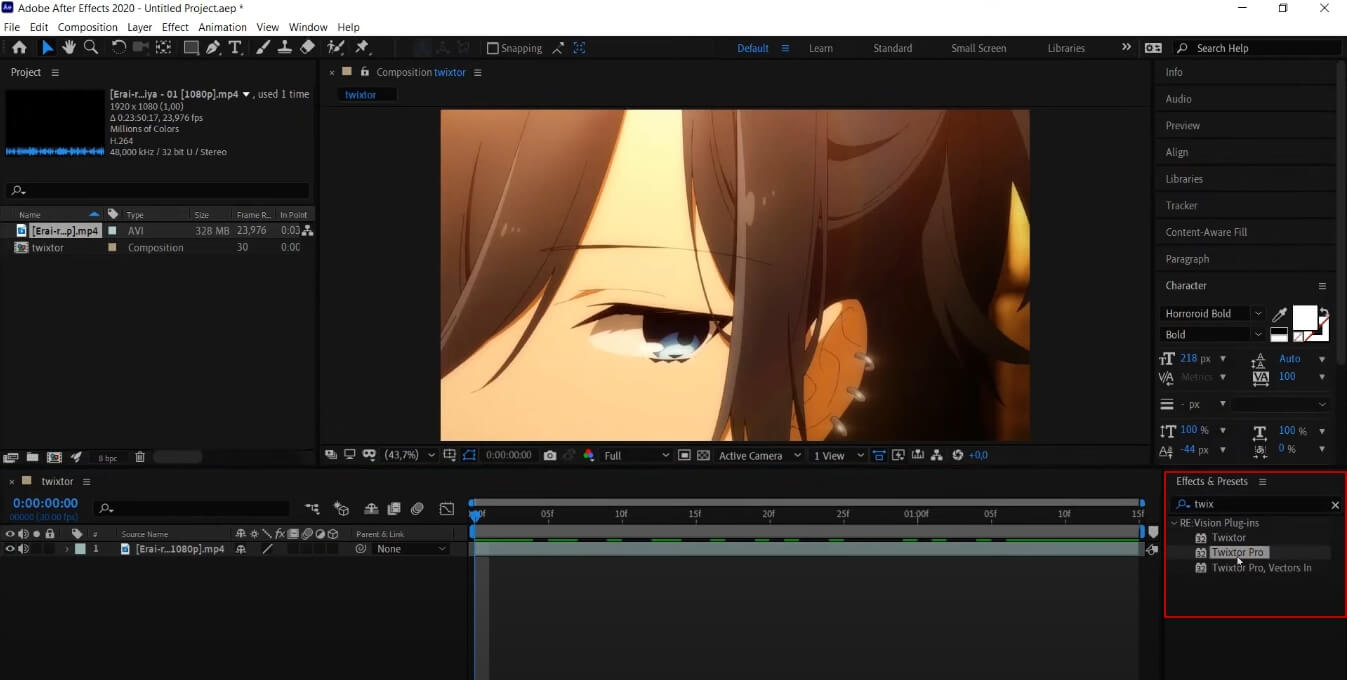
For editors, motion designers, and cinematographers, Twixtor represents more than just a filter; it is a temporal remapping engine. Whether you are working on a high-budget commercial, a professional sports highlight reel, or an intricate social media edit, understanding the mechanics and technical nuances of Twixtor is essential for mastering the art of modern digital manipulation.
The Technical Mechanics of Optical Flow and Frame Interpolation
To understand why Twixtor is considered a gold standard in the tech world, one must first understand the limitations of traditional video editing. When you slow down a clip in a standard editor, the software typically repeats existing frames or blends them together. This results in “stuttering” (judder) or “ghosting,” where moving objects appear to have a transparent trail behind them. Twixtor bypasses these issues through a process called optical flow.
Optical Flow Estimation and Pixel Tracking
The core technology behind Twixtor is its ability to track the movement of individual pixels from one frame to the next. This is known as optical flow estimation. Instead of just looking at a frame as a static image, Twixtor analyzes the direction and velocity of every element within the frame. By calculating “motion vectors,” the software understands where a pixel was in Frame A and where it will be in Frame B.
Synthesizing New Frames through Interpolation
Once the motion vectors are calculated, Twixtor performs frame interpolation. It doesn’t just stretch the time between frames; it actually creates entirely new, synthetic frames that never existed in the original recording. If you slow a clip down to 10% of its original speed, Twixtor generates nine new frames for every original one. Because these frames are generated based on the predicted path of pixels, the motion remains fluid, giving the illusion that the footage was shot on a high-speed camera like a Phantom Flex, even if it was captured on a standard smartphone or DSLR at 24 or 60 frames per second.
Managing Motion Blur and Temporal Consistency
One of the most complex tech challenges in time-remapping is maintaining realistic motion blur. When footage is slowed down significantly, the natural blur of a moving object can become distorted. Twixtor includes sophisticated settings to “smear” or “sharpen” these interpolated frames, ensuring that the temporal consistency—the way motion looks over time—remains believable to the human eye. This level of granular control is what separates Twixtor from the basic “Optical Flow” settings found natively in applications like Adobe Premiere Pro or Final Cut Pro.
Core Features and Professional Capabilities
Twixtor is not a one-click solution; it is a professional-grade tool with a deep feature set designed for high-end post-production workflows. While the “standard” version offers excellent results, the “Pro” version introduces advanced features that cater to complex visual effects (VFX) requirements.
Variable Speed Remapping and Keyframing
The most common application of Twixtor is speed ramping—the process of smoothly transitioning a clip from normal speed to slow motion and back again. Twixtor provides a highly responsive keyframing system that allows editors to pinpoint the exact moment the speed change begins and ends. Because the software calculates motion in the background, these transitions are seamless, avoiding the “jump” often seen when switching speeds in lesser software.
Object Sensitivity and Spline Guidance
In complex scenes where multiple objects are moving in different directions (for example, a person running in front of a moving car), optical flow engines can become “confused,” leading to warping artifacts. Twixtor Pro addresses this by allowing editors to use “splines” or masks to tell the software which parts of the image belong to the foreground and which belong to the background. By providing this human-guided data, the algorithm can more accurately calculate motion vectors without bleeding pixels from one object into another.
Frame Rate Conversion and De-interlacing
Beyond slow motion, Twixtor is a vital tech tool for frame rate conversion. If a production needs to convert a 29.97 fps (NTSC) broadcast into a 24 fps cinematic standard, Twixtor can handle the “pull-down” process with minimal artifacts. It also features advanced de-interlacing capabilities, allowing editors to modernize older, interlaced footage by converting it into progressive frames with high fidelity.
Integration, Compatibility, and Hardware Requirements
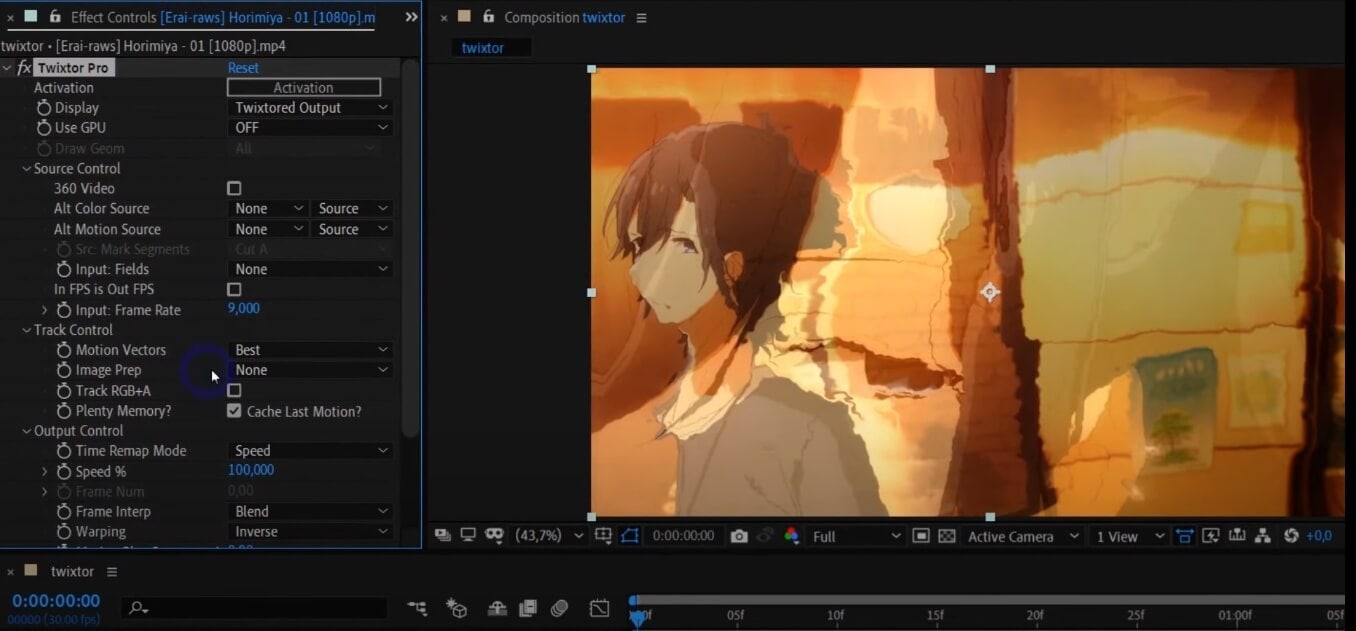
As a plug-in, Twixtor is designed to live within the ecosystem of existing digital video workstations. Its versatility across different platforms has made it a staple in the software kits of professionals worldwide.
Supported Host Applications
RE:Vision Effects has developed Twixtor to be compatible with almost every major video editing and compositing suite. This includes:
- Adobe After Effects & Premiere Pro: The most common platforms for Twixtor, where it functions as a powerful effect layer.
- DaVinci Resolve: Frequently used in high-end color grading and finishing.
- Foundry Nuke: The industry standard for high-end VFX and compositing in Hollywood.
- Sony Vegas & Final Cut Pro: Legacy and boutique editors also find robust support for Twixtor’s architecture.
GPU Acceleration and Processing Power
Calculating optical flow for every pixel in a 4K video file is incredibly computationally expensive. To combat long render times, Twixtor utilizes GPU acceleration through technologies like NVIDIA’s CUDA and OpenCL. By offloading the heavy mathematical lifting to the graphics card, Twixtor can provide real-time or near-real-time previews in many instances. However, for complex “Pro” features involving multiple tracking points, a high-performance workstation with significant VRAM is still highly recommended to ensure stability and speed.
Best Practices for Achieving High-Quality Results
Despite its power, Twixtor is not magic. The quality of the output is heavily dependent on the quality of the input. To get the “Twixtor look”—that ultra-smooth, liquid motion often seen in professional edits—users must follow specific technical guidelines during the filming and pre-processing stages.
The Importance of High Shutter Speeds
The biggest enemy of Twixtor is “motion blur” in the original footage. If a frame is blurry because the shutter was open too long, Twixtor’s algorithm cannot accurately identify the edges of an object, leading to “warping” or “melting” effects. To achieve the best results, tech-savvy videographers shoot at a very high shutter speed (e.g., 1/500th or 1/1000th of a second). This produces crisp, sharp frames that provide the software with the high-contrast data it needs to track pixels accurately.
Background Selection and Contrast
Twixtor performs best when there is a clear distinction between the subject and the background. A subject moving against a flat, monochromatic wall is easy for the software to track. Conversely, a subject moving in front of a complex, busy background (like a chain-link fence or a forest of leaves) will often result in “tearing” artifacts, as the software struggles to differentiate which pixels belong to the subject and which belong to the background.
Pre-processing and Noise Reduction
Digital noise or “grain” can also interfere with Twixtor’s motion estimation. Because noise is random and changes every frame, the software may mistake grain for moving objects. Many professionals apply a “de-noise” pass to their footage before applying Twixtor, then add the grain back in after the slow-motion effect is rendered. This ensures the cleanest possible tracking data for the optical flow engine.
The Cultural and Industrial Impact of Twixtor Technology
Twixtor has transcended its status as a simple utility to become a cultural phenomenon in certain digital circles. Its impact on how we consume and create media is significant, bridging the gap between amateur content and professional cinematography.
The “Anime Edit” and Social Media Subcultures
In recent years, Twixtor has seen a massive surge in popularity within the “AMV” (Anime Music Video) and gaming edit communities on platforms like TikTok and Instagram. Editors use Twixtor to take 24 fps animation and turn it into 60 or 120 fps “fluid” motion. This has created a specific aesthetic—often called “Twixtorized” footage—characterized by a dreamlike, hyper-smooth quality that has become a hallmark of modern digital fan culture.
Professional Sports and Action Cinematography
In the professional realm, Twixtor remains an essential tool for sports broadcasting and action films. When a camera operator misses the chance to switch to high-speed mode during a crucial moment, Twixtor serves as the “fail-safe” that saves the shot. It allows for the dramatic “bullet time” style slowdowns that emphasize the physics of a jump or the impact of a hit, providing viewers with a perspective that the naked eye simply cannot capture.

Twixtor vs. The Rise of AI Slow Motion
As we move further into the era of Artificial Intelligence, new tools like Topaz Video AI and DaVinci Resolve’s “Speed Warp” (powered by the Neural Engine) are entering the market. While these AI tools are becoming highly effective at automated slow motion, Twixtor remains the preferred choice for many professionals due to its manual overrides. The ability to use splines, track points, and specific motion sensitivity settings gives the human editor a level of creative control that fully automated AI tools have yet to match.
In conclusion, Twixtor is a pinnacle of video processing technology. By leveraging the principles of optical flow and pixel-based interpolation, it allows creators to bend time itself. While it requires a technical understanding of shutter speeds and motion vectors to master, its ability to transform standard footage into cinematic art ensures its place as a fundamental tool in the modern tech stack of video production.
aViewFromTheCave is a participant in the Amazon Services LLC Associates Program, an affiliate advertising program designed to provide a means for sites to earn advertising fees by advertising and linking to Amazon.com. Amazon, the Amazon logo, AmazonSupply, and the AmazonSupply logo are trademarks of Amazon.com, Inc. or its affiliates. As an Amazon Associate we earn affiliate commissions from qualifying purchases.