
In an era defined by data, understanding how information is stored, exchanged, and processed is paramount. From the intricate algorithms driving artificial intelligence to the daily financial reports guiding business decisions, data fuels almost every aspect of our digital lives. Within this vast ecosystem, various file formats serve distinct purposes, each with its own set of advantages and limitations. Among these, the .tsv file stands out as a deceptively simple yet incredibly powerful tool for structured data management.
A .tsv file, short for “Tab-Separated Values,” is a plain text file that stores tabular data, meaning data organized into rows and columns, much like a spreadsheet. Its core principle is straightforward: each column in a row is separated by a tab character, and each row is separated by a newline character. This elegant simplicity is precisely what gives the TSV format its enduring relevance and widespread utility, making it a foundational element in many data workflows across technology, branding, and finance.
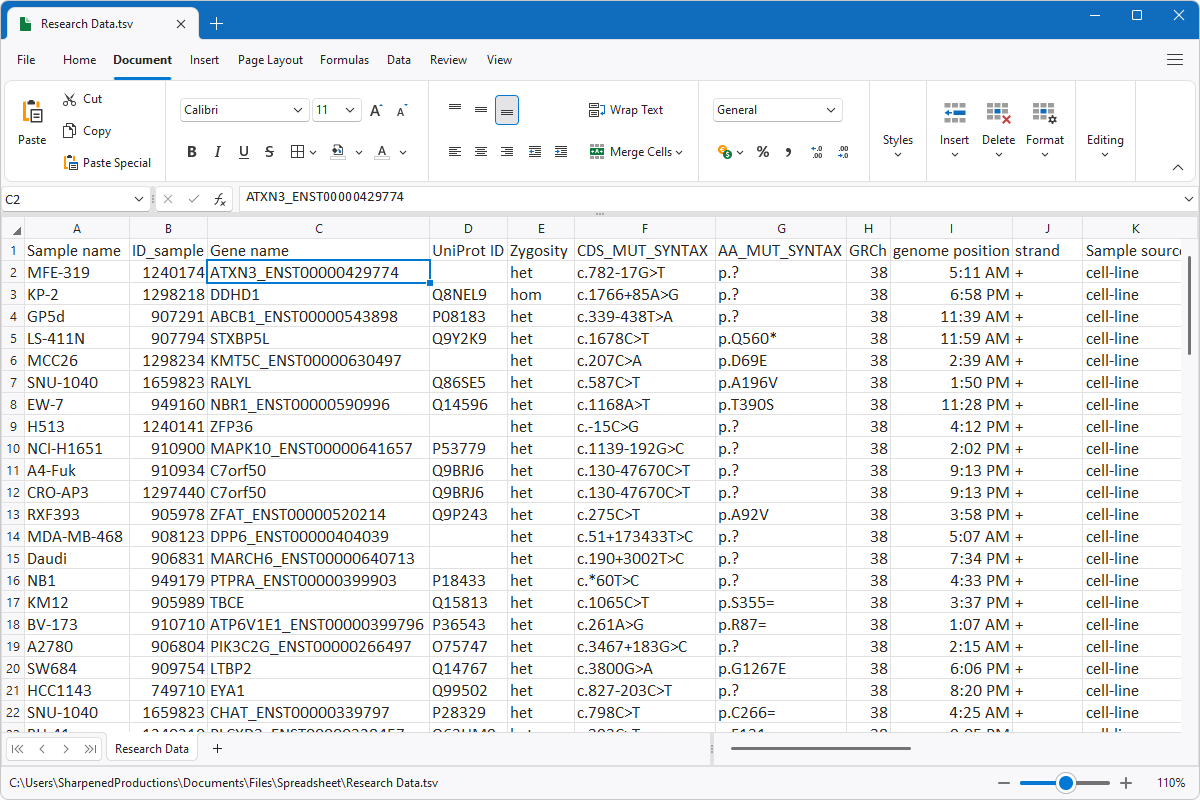
While often overshadowed by its more commonly known cousin, the Comma-Separated Values (.csv) file, the .tsv format offers distinct advantages, particularly in scenarios where data integrity and ease of parsing are critical. It represents a robust, universally readable method for data exchange, enabling seamless communication between disparate software systems, analytical tools, and human users. As we delve deeper into the mechanics, applications, and strategic implications of .tsv files, their quiet strength and pervasive influence across the digital landscape will become abundantly clear. Whether you’re a tech enthusiast, a brand strategist, or a financial analyst, grasping the utility of TSV can significantly enhance your ability to interact with and leverage data effectively.
The Core Mechanics: Understanding TSV’s Structure and Syntax
At its heart, a .tsv file is a testament to the power of simplicity in data representation. Unlike complex binary formats or hierarchical structures like XML or JSON, TSV relies on basic text characters to organize information, making it incredibly accessible and robust.
The Simplicity of Tab-Delimitation
The fundamental characteristic of a .tsv file is its use of the tab character (t) as a delimiter. Imagine a standard spreadsheet program like Microsoft Excel or Google Sheets. Each cell in a row contains a piece of data, and these cells are arranged horizontally, forming a row. In a TSV file, when you export or save this data, the content of each cell is written out, and then a tab character is inserted before the content of the next cell in that row. Once all cells for a row are written, a newline character (n) signifies the end of that row and the beginning of the next.
For example, a simple table with headers like “Name,” “Age,” and “City” might look like this in a spreadsheet:
| Name | Age | City |
|---|---|---|
| Alice | 30 | New York |
| Bob | 24 | London |
When saved as a TSV file, its raw content would appear as:
Name    Age City
Alice    30  New York
Bob    24  London
The tabs are invisible characters, but they are crucial for software to correctly interpret where one data field ends and the next begins. This clear, unambiguous separation ensures that data parsing is straightforward, minimizing errors that can arise from more ambiguous formats. The first line typically serves as the header, defining the names of the columns, while subsequent lines contain the actual data records.
Advantages Over Other Delimited Formats (e.g., CSV)
While CSV files (Comma-Separated Values) are widely used, TSV files offer distinct advantages that make them preferable in specific scenarios, particularly where data integrity is paramount:
-
Robustness with Embedded Commas: The most significant advantage of TSV over CSV lies in its handling of data that naturally contains delimiters. Commas are very common characters found within text data (e.g., “New York, USA,” “Software Engineer, Senior”). In a CSV file, if a data field itself contains a comma, that field must be enclosed in quotation marks (e.g.,
"New York, USA"). This introduces complexity, requiring parsers to differentiate between a delimiter comma and a comma within a quoted field. If the quoting rules are not perfectly adhered to, parsing errors can easily occur. Tab characters, however, are far less common within natural language text or numerical data. This rarity means that the tab character almost exclusively serves its purpose as a delimiter, leading to much simpler and more robust parsing logic. -
Ease of Parsing: Because tabs are rarely found within data fields, TSV files are generally easier and faster to parse correctly. Programmers don’t need to implement complex logic to handle quoting, escaping, or different types of delimiters. A simple split operation by the tab character is often sufficient, reducing development time and the likelihood of bugs. This simplicity makes TSV a favorite for quick data ingestion into analytical scripts and database systems.
-
Human Readability (Sometimes): While both CSV and TSV are plain text, a properly formatted TSV viewed in a basic text editor or a terminal often maintains a somewhat column-aligned appearance due to the consistent width of the tab character in many display environments. This can sometimes make TSV files more human-readable at a glance, especially when column widths are not excessively disparate, without needing to open them in a spreadsheet application.
Limitations and When to Choose Alternatives
Despite its strengths, the TSV format is not without its limitations, and understanding these helps in choosing the right tool for the job:
-
Tabs Within Data: While rare, it is possible for a legitimate data field to contain a tab character (e.g., if a user copies and pastes data from a spreadsheet that includes a tab within a cell). When this occurs, the parser will misinterpret the embedded tab as a field delimiter, corrupting the data structure. Unlike CSV, TSV doesn’t have a standardized quoting mechanism to escape embedded tabs. This is the primary vulnerability of the TSV format.
-
Lack of Strong Typing: TSV, like CSV, treats all data as plain text strings. There’s no inherent way to specify if a column contains integers, floating-point numbers, dates, or boolean values. Data types must be inferred by the parsing application or explicitly defined in a separate schema. This means that while the structure is clear, the semantics of the data are not embedded in the file itself.
-
Less Expressive for Complex Data: For highly nested or hierarchical data (e.g., a customer record that includes multiple addresses, each with its own street, city, and zip code), TSV files become cumbersome. You would either need to flatten the data, leading to redundancy, or create multiple TSV files and link them, which complicates management. Formats like JSON or XML are far superior for representing such complex, tree-like data structures.
In summary, TSV shines brightest when dealing with relatively flat, tabular data where simplicity, robustness against embedded commas, and ease of parsing are top priorities. It’s a workhorse format, foundational to many data pipelines, even if it lacks the bells and whistles of more advanced data interchange formats.
TSV in Action: Practical Applications Across Industries
The widespread adoption of .tsv files is a testament to their versatility. From software development to marketing analytics and financial reporting, TSV serves as a reliable conduit for data, enabling seamless operations and informed decision-making across the tech, brand, and money sectors.
Data Exchange and Interoperability (Tech Focus)
In the technology world, data exchange is a constant. Different applications, databases, and programming languages often need to share information, and they might use incompatible native formats. TSV files act as a common language, a universally understood plain text format that bridges these gaps.
- Software Systems Integration: When two distinct software applications need to communicate, perhaps a legacy system exporting customer data to a modern CRM, TSV is often chosen. Its straightforward structure means less overhead for data transformation and a reduced risk of parsing errors. Developers can easily write scripts in Python, Java, or C# to read and write TSV files, facilitating smooth data migration and synchronization.
- Database Exports and Imports: Database administrators frequently use TSV files for bulk data operations. Exporting large datasets from a SQL database into a TSV allows for easy inspection, manipulation (e.g., cleaning in a spreadsheet), and subsequent import into another database system or analytical platform. The
COPYcommand in PostgreSQL, for instance, can directly export to or import from TSV-like formats. - API Data Transmission: While JSON and XML are common for real-time API responses, for bulk data exports requested via an API, TSV can be an efficient choice. For instance, downloading a large catalog of products or a list of user interactions might be offered in TSV format, providing a compact and easily parsable file.
- Web Scraping Results: When scraping data from websites, the extracted information is often structured into tables. Saving this data directly into a TSV file is an efficient way to capture and organize it, making it immediately ready for analysis or storage.
- AI/ML Dataset Preparation: In machine learning, clean, structured datasets are crucial for training models. TSV files are frequently used to store tabular datasets for tasks like classification or regression. Data scientists often preprocess raw data into TSV format before feeding it into libraries like
pandasin Python ordata.tablein R, which have highly optimized functions for handling such files. Its flat structure is ideal for representing feature sets and labels.
Business Analytics and Reporting (Brand & Money Focus)
Beyond pure tech, TSV files are invaluable for business professionals who need to analyze operational data, track performance, and generate reports. This spans marketing, sales, finance, and operations.

- Marketing Campaign Analysis (Brand): Marketing teams rely heavily on data to measure the effectiveness of campaigns. Ad platforms, analytics tools, and CRM systems can export data on customer interactions, website traffic, conversion rates, and lead generation in TSV format. This allows marketers to consolidate data from various sources into a unified view, enabling comprehensive analysis of brand reach, customer engagement, and ROI for different marketing channels. For example, a TSV file might contain customer segments, their spending habits, and their interaction with branded content, providing insights for future brand strategy.
- Sales and Customer Data Management (Brand & Money): Sales teams frequently work with customer lists, lead pipelines, and transaction histories. TSV files are a simple way to export lists of prospects, current customers, or sales figures from CRM systems. This data can then be used for targeted outreach, personalized marketing initiatives, or for financial reporting on revenue streams. Companies often use TSV for personal branding efforts by tracking influencer engagement or audience demographics.
- Financial Reporting and Auditing (Money): Accountants and financial analysts often deal with vast amounts of transactional data. Bank statements, expense reports, payroll data, and investment portfolio details can all be exported as TSV files. This format simplifies the process of importing data into accounting software, financial modeling tools, or for auditing purposes. For instance, tracking online income from various side hustles or managing small business finances often involves consolidating TSV exports from different payment processors or marketplaces. The simplicity of TSV aids in creating audit trails and ensuring data consistency across different financial systems.
- Inventory and Supply Chain Management: Businesses with physical products use TSV to manage inventory levels, track product movements, and analyze sales trends. Exporting product catalogs, stock counts, and order details in TSV allows for easy integration with inventory management systems and supply chain analytics tools.
Data Archiving and Long-Term Storage
The simplicity and plain text nature of TSV files make them an excellent choice for data archiving. Unlike proprietary binary formats that might become unreadable as software evolves, a TSV file will remain readable by any text editor, even decades into the future. This “future-proof” quality is critical for organizations that need to preserve data for regulatory compliance, historical analysis, or long-term research. Its universality ensures that data stored today will be accessible tomorrow, regardless of technological advancements.
Working with TSV Files: Tools and Techniques
The ease of working with TSV files extends to the wide array of tools available for manipulating them. From user-friendly spreadsheet applications to powerful programming languages and command-line utilities, there’s a method suitable for every skill level and task.
Spreadsheet Software (Excel, Google Sheets, LibreOffice Calc)
For most users, spreadsheet software is the most intuitive way to interact with TSV files. These applications treat TSV files almost identically to their native spreadsheet formats, offering a familiar graphical interface for viewing, editing, and analyzing data.
- Importing TSV Files: All major spreadsheet programs provide robust import functionalities. Typically, you can simply open a .tsv file directly, and the software will recognize the tab delimiter, automatically arranging the data into columns and rows. For files with unusual encoding or specific delimiter settings, there are usually “Text Import Wizards” that allow users to specify the delimiter (tab), text qualifier, and data type for each column, ensuring accurate parsing.
- Exporting to TSV: Similarly, any data you have in a spreadsheet can be easily saved or exported as a TSV file. This is a common practice for preparing data for upload to other systems, sharing with collaborators who use different software, or for creating clean datasets for programming tasks.
- Common Challenges: While generally straightforward, users might encounter issues such as incorrect character encoding (e.g., UTF-8 vs. Latin-1), which can lead to garbled special characters. Ensuring the correct encoding is selected during import/export is crucial. Another challenge can be the automatic interpretation of data types (e.g., a column of product IDs starting with zeros might be interpreted as numbers, dropping the leading zeros, if not handled carefully).
Programming Languages (Python, R, JavaScript)
For automated processing, large datasets, or integration into complex systems, programming languages are indispensable. They offer unparalleled control and efficiency when working with TSV files.
- Python: Python is a dominant language in data science and scripting, and its
pandaslibrary is a de facto standard for data manipulation.pandasmakes reading and writing TSV files incredibly simple:
python

import pandas as pd

# Read a TSV file

df = pd.read_csv('data.tsv', sep='t')

# Write a DataFrame to a TSV file

df.to_csv('output.tsv', sep='t', index=False)
This ease of use, combined with pandas’ powerful data cleaning, transformation, and analysis capabilities, makes Python a top choice for TSV processing in tech. - R: R is another statistical programming language widely used for data analysis and visualization. It also offers excellent support for TSV files:
R

# Read a TSV file

data <- read.delim("data.tsv")

# Write a data frame to a TSV file

write.table(data, "output.tsv", sep="t", row.names=FALSE)
R’s robust statistical packages make it ideal for deep analytical work on data ingested from TSV files, particularly in areas relevant to finance and marketing analytics. - JavaScript: In web development, especially for client-side data processing or server-side Node.js applications, JavaScript can also handle TSV files. While not as common for large-scale data manipulation as Python or R, libraries exist for parsing and generating delimited files. For instance, parsing a TSV string in Node.js might involve splitting by newline, then by tab.
- Automation and ETL: These languages are at the core of Extract, Transform, Load (ETL) processes, where data from various sources (often TSV files) is pulled, cleaned, standardized, and loaded into data warehouses or analytical databases. This is fundamental for tech companies building robust data pipelines.
Text Editors and Command-Line Tools
For quick inspection, minor edits, or basic filtering of TSV files, simple text editors and command-line utilities are highly effective.
- Text Editors (Notepad, VS Code, Sublime Text): Any plain text editor can open a TSV file. While tabs might not be visually distinct from spaces in all editors, many modern editors (like VS Code) can highlight or visibly represent tab characters. This allows for quick glances at the data structure, identifying any obvious issues, or making small, manual corrections without loading the file into a heavier application.
- Command-Line Tools (Linux/macOS): For users comfortable with the terminal, powerful utilities offer fast and efficient ways to interact with TSV files, especially large ones.
cat: Displays the entire content of a file.cat data.tsvhead/tail: Displays the first/last few lines.head data.tsvgrep: Searches for patterns within the file.grep "Alice" data.tsvawk: A powerful pattern-scanning and processing language, excellent for column-based operations. For example, to print the first and third columns:awk -F't' '{print $1, $3}' data.tsvcut: Extracts specific columns. For example, to extract the first and third tab-separated fields:cut -f1,3 data.tsv- These tools are invaluable for quick data exploration, filtering, and basic transformations, particularly in server environments or for tech professionals needing to rapidly manipulate data.
These diverse tools collectively highlight the adaptability of the TSV format. Whether you prefer a graphical interface for visual inspection or powerful scripting for automated processing, TSV files fit seamlessly into a wide range of workflows, demonstrating their enduring utility across the digital spectrum.
TSV’s Role in the Modern Digital Landscape: Tech, Brand, and Money Synergies
The simplicity and versatility of TSV files position them as a crucial, albeit often invisible, component in the contemporary digital landscape. They quietly facilitate the flow of information that drives innovation in technology, shapes brand perceptions, and underpins financial stability.
Fueling AI and Machine Learning Models (Tech Focus)
The explosion of Artificial Intelligence and Machine Learning (AI/ML) is fundamentally driven by data. AI models, whether for natural language processing, image recognition, or predictive analytics, require vast quantities of structured, clean data for training. TSV files often play a foundational role in this process:
- Dataset Preparation: Raw data from various sources (databases, web scraping, sensor logs) is frequently pre-processed and standardized into a tabular format like TSV. This “clean” TSV dataset then serves as the input for machine learning algorithms. Its flat structure is ideal for representing feature vectors where each row is an instance and each column is a feature.
- Feature Engineering: Data scientists use TSV files to store intermediate results during feature engineering—the process of creating new features from raw data to improve model performance. This might involve creating new columns from existing ones or combining data from multiple sources.
- Model Training and Evaluation: Many machine learning frameworks and libraries are optimized to ingest data from delimited files like TSV. Researchers and engineers use these files to train their models and then to evaluate their performance against test datasets, ensuring robustness and accuracy. For instance, sentiment analysis models might be trained on TSV files containing text and corresponding sentiment labels. The reliability and simplicity of TSV help ensure the integrity of the data fed into these sophisticated AI systems.
Enhancing Digital Marketing and Branding Strategies (Brand Focus)
In today’s competitive market, a strong brand relies on data-driven insights to understand customer behavior, personalize experiences, and optimize marketing spend. TSV files are integral to this process:
- Customer Data Segmentation: Businesses collect vast amounts of customer data—demographics, purchase history, website interactions, social media engagement. This data, often exported as TSV from CRM systems or analytics platforms, can be imported into tools or scripts to segment customers into distinct groups. These segments then allow for highly targeted and personalized marketing campaigns, enhancing brand relevance and customer loyalty.
- Ad Campaign Performance Analysis: Digital advertising platforms (Google Ads, Facebook Ads) provide detailed performance metrics. Marketers routinely download these reports in TSV format to analyze key performance indicators (KPIs) like click-through rates, conversion costs, and return on ad spend (ROAS). By combining TSV data from different platforms, brand strategists can gain a holistic view of campaign effectiveness, optimize budgets, and refine their branding message for maximum impact.
- Content Personalization: Understanding what content resonates with different audience segments is crucial for effective branding. TSV files containing user preferences, viewing history, or past interactions can be used to power recommendation engines or tailor content delivery, creating a more engaging and personalized brand experience across digital channels. This helps in building a stronger connection with the audience and solidifying brand identity.
Streamlining Financial Operations and Analysis (Money Focus)
The financial sector, from personal finance management to large-scale corporate banking, is inherently data-intensive. TSV files contribute significantly to the efficiency and accuracy of financial operations and analysis:
- Budgeting and Expense Tracking: Individuals and small businesses can export bank statements, credit card transactions, or online income reports from platforms (e.g., PayPal, Etsy for side hustles) as TSV files. These can then be imported into personal finance software, custom spreadsheets, or analytical tools for detailed budgeting, expense categorization, and tracking of cash flow. This provides a clear picture of financial health and helps in making informed spending and saving decisions.
- Investment Portfolio Management: Investment platforms often allow users to export transaction histories, portfolio holdings, or market data in TSV format. Financial advisors and individual investors can use these files to analyze portfolio performance, calculate returns, assess risk, and rebalance their investments. This is crucial for optimizing wealth growth and managing financial goals.
- Automated Financial Reporting: For businesses, generating accurate financial reports (profit & loss statements, balance sheets) is a continuous process. TSV files facilitate the aggregation of data from various sources—sales systems, payroll software, general ledgers—into a unified format that can then be processed to generate these reports automatically. This not only saves time but also reduces the potential for manual errors, ensuring regulatory compliance and providing timely insights for strategic financial decisions.
- Auditing and Compliance: Regulators and auditors frequently require detailed financial transaction data. Providing this data in a universally readable format like TSV ensures transparency and ease of verification. Its plain text nature makes it straightforward to process and cross-reference, simplifying auditing processes and ensuring adherence to financial regulations.
In essence, the TSV file, with its unpretentious structure, serves as a powerful foundational layer in the data-driven world. Its ability to reliably transport structured information across diverse platforms and applications makes it an indispensable tool for technology development, strategic brand management, and robust financial analysis, underscoring its pivotal role in the modern digital economy.

Conclusion
The .tsv file, or Tab-Separated Values file, might not grab headlines like the latest AI breakthrough or the newest cryptocurrency. Yet, its understated presence and foundational utility make it an indispensable workhorse in the digital world. We’ve explored its elegant simplicity, characterized by tab-delimited fields and newline-separated records, which grants it remarkable robustness in handling complex data and unparalleled ease of parsing compared to formats like CSV.
From its core mechanics that ensure data integrity to its widespread practical applications, TSV files are silently powering countless operations. They act as a universal lingua franca for data exchange between disparate software systems, facilitate the rigorous demands of business analytics and reporting, and serve as a reliable format for long-term data archiving. Whether a data scientist is preparing a dataset for an AI model, a marketing manager is analyzing customer segments for a new brand campaign, or a financial analyst is consolidating transaction data for a quarterly report, the TSV file provides a reliable, efficient, and accessible medium.
The enduring value of the .tsv format lies precisely in its lack of complexity. In an increasingly intricate technological landscape, the ability to rely on a plain text format that is both human-readable and machine-parseable, without the overhead of complex parsers or schema definitions, is a significant advantage. Tools ranging from familiar spreadsheet software and powerful programming languages to nimble command-line utilities all embrace TSV, cementing its place as a versatile and accessible data interchange format.
As data continues to be the lifeblood of innovation, strategy, and economic activity across the domains of technology, branding, and money, the TSV file will undoubtedly retain its critical role. It stands as a testament to the idea that sometimes, the simplest solutions are the most profound, providing a stable and reliable backbone for the intricate data flows that shape our modern digital experience. Understanding “what is a .tsv file” is not just about a file extension; it’s about recognizing a fundamental building block of our data-driven future.
aViewFromTheCave is a participant in the Amazon Services LLC Associates Program, an affiliate advertising program designed to provide a means for sites to earn advertising fees by advertising and linking to Amazon.com. Amazon, the Amazon logo, AmazonSupply, and the AmazonSupply logo are trademarks of Amazon.com, Inc. or its affiliates. As an Amazon Associate we earn affiliate commissions from qualifying purchases.