
In the rapidly evolving landscape of information technology, precision is more than just a preference—it is a requirement. As we navigate an era defined by massive data centers, complex software architectures, and high-speed networking, the way we measure data has come under intense scrutiny. Most casual users are familiar with the term “kilobyte,” but in professional technical circles, the term “kibibyte” (KiB) holds a position of critical importance.
While the two terms are often used interchangeably in casual conversation, they represent two fundamentally different systems of measurement: the decimal system and the binary system. Understanding what a kibibyte is, why it was created, and how it differs from the traditional kilobyte is essential for software developers, hardware engineers, and IT professionals who require absolute accuracy in their technical specifications.
The Evolution of Data Units: From Bits to Kibibytes
To understand the kibibyte, one must first understand the fundamental language of computers. Unlike the human world, which largely operates on a base-10 (decimal) system, computers operate on a base-2 (binary) system. This discrepancy is the root cause of the existence of the kibibyte.
The Binary Foundation of Computing
At the lowest level, every piece of digital information is composed of bits—binary digits that are either a 0 or a 1. Because computer hardware, particularly memory and processors, is designed using logic gates that function in these two states, it is mathematically more efficient to group data in powers of two.
Early computer scientists discovered that $2^{10}$ (1024) was remarkably close to $10^3$ (1000). Because 1024 was the most convenient power of two to represent a “thousand” units of data, the industry began using the prefix “kilo-” to describe 1024 bytes. For decades, this approximation was accepted without much friction. However, as storage capacities grew from kilobytes to megabytes, gigabytes, and terabytes, the slight mathematical gap between 1000 and 1024 compounded into significant discrepancies.
Decimal vs. Binary: The Source of Confusion
The confusion began when the International System of Units (SI) and the computing industry collided. In the SI system, “kilo” strictly means 1000. In a world of physics and chemistry, a kilogram is 1000 grams, and a kilometer is 1000 meters.
When computer manufacturers began selling hard drives, they used the SI definition (1000 bytes = 1 kilobyte) to market their products. Meanwhile, operating systems like Windows continued to calculate file sizes using the binary power of two (1024 bytes = 1 kilobyte). This led to the common consumer frustration where a “1 Terabyte” hard drive appeared to have significantly less space once plugged into a computer. To resolve this ambiguity, the International Electrotechnical Commission (IEC) stepped in 1998 to standardize binary prefixes, giving birth to the term “kibibyte.”
Kilobyte vs. Kibibyte: Defining the Difference
The distinction between a kilobyte (KB) and a kibibyte (KiB) is not merely semantic; it is a matter of mathematical standards. By separating decimal-based measurements from binary-based measurements, the technical community sought to eliminate the “marketing vs. reality” gap in data storage.
The SI Standard (Decimal)
The kilobyte (KB) is officially governed by the SI standard. It is defined as $10^3$ bytes, or exactly 1,000 bytes. This system is referred to as the decimal system or base-10. This measurement is most commonly used by storage manufacturers (HDDs, SSDs, Flash Drives) and in networking speeds (bits per second).
The logic behind using the decimal system for hardware is twofold: it aligns with international scientific standards, and—perhaps more cynically—it makes the storage capacity appear larger on product packaging. For example, a drive marketed as 500 GB (decimal) actually contains about 465 GiB (binary).
The IEC Standard (Binary)
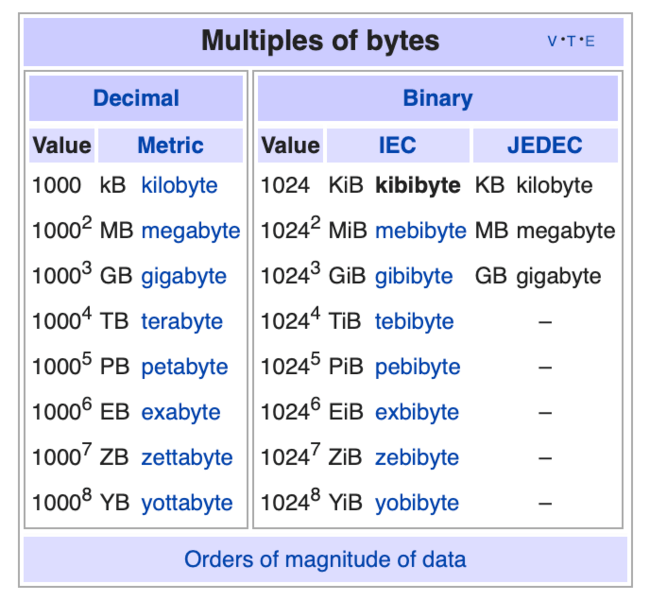
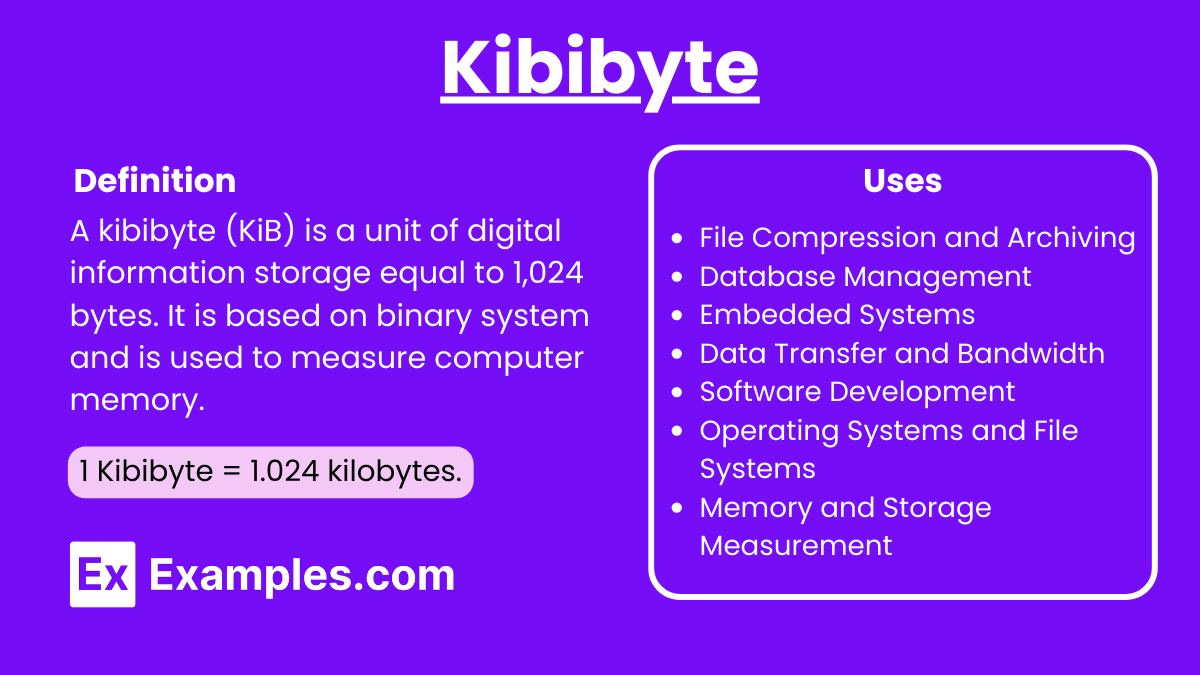
The kibibyte (KiB) is governed by the IEC 80000-13 standard. The name is a contraction of “kilo binary byte.” It is defined as $2^{10}$ bytes, or exactly 1,024 bytes. This system is referred to as the binary system or base-2.
The IEC also introduced other binary prefixes to maintain consistency:
- Mebibyte (MiB): $1,024 times 1,024$ bytes ($2^{20}$)
- Gibibyte (GiB): $1,024 times 1,024 times 1,024$ bytes ($2^{30}$)
- Tebibyte (TiB): $1,024^4$ bytes ($2^{40}$)
By using “kibibyte” instead of “kilobyte,” a technical document clarifies that the calculation is based on the 1024-byte multiplier, removing any guesswork regarding the actual amount of data being discussed.
Why the Distinction Matters in Modern Technology
In an era of cloud computing and “Big Data,” the difference between $10^n$ and $2^n$ is no longer negligible. As we move into the petabyte and exabyte scales, the “binary offset”—the difference between the decimal and binary calculations—becomes massive.
Operating System Discrepancies
One of the most prominent areas of confusion lies in how different operating systems report data. Microsoft Windows is notorious for using binary calculations (1024) but labeling them with decimal prefixes (KB, MB, GB). When Windows says a file is “1.00 GB,” it is actually 1.00 GiB.
Conversely, modern versions of macOS (since Snow Leopard) and many Linux distributions have moved toward the SI standard for disk space reporting. If you have a 500 GB drive, macOS will show it as 500 GB, matching the sticker on the box. This divergence in UX design makes the understanding of kibibytes critical for cross-platform developers who need to ensure their software reports file sizes consistently across different environments.
Storage Capacity and the “Missing” Gigabytes
The most common practical application of the kibibyte is in understanding storage capacity. As mentioned earlier, the gap between decimal and binary measurements grows as the units increase.
- At the Kilo level, the difference is 2.4%.
- At the Giga level, the difference is approximately 7.3%.
- At the Tera level, the gap widens to roughly 10%.
This explains why a 1 TB hard drive (1,000,000,000,000 bytes) only shows up as approximately 931 GiB in a Windows environment. For data center architects and server administrators, this 7-10% discrepancy can mean the difference between having enough overhead for a backup and a catastrophic system failure. When provisioning virtual machines or allocating cloud storage in AWS or Azure, knowing whether the provider bills in GB or GiB is vital for budget and resource planning.
Practical Applications and Calculation
For those working in software engineering, systems administration, or hardware design, being able to pivot between these units is a foundational skill.
How to Convert Between Units
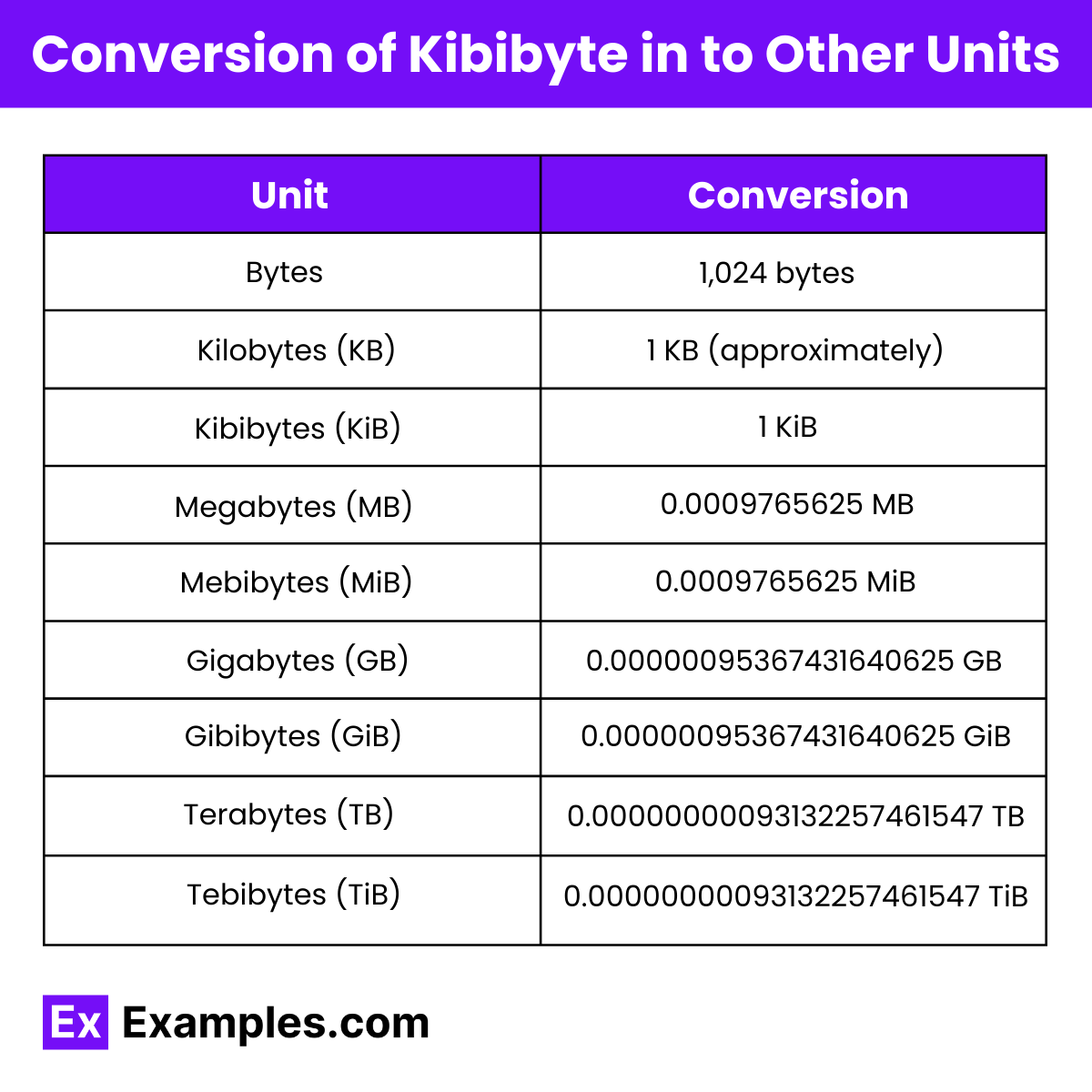
Converting between kilobytes and kibibytes requires a simple but precise mathematical approach. To convert from the decimal “kilo” to the binary “kibi,” you are essentially adjusting for the 2.4% difference.
- To go from KB to bytes: Multiply by 1,000.
- To go from KiB to bytes: Multiply by 1,024.
- To convert KB to KiB: Divide the number of bytes by 1,024.
For example, if you have 50,000 bytes:
- In Kilobytes: $50,000 / 1,000 = 50$ KB.
- In Kibibytes: $50,000 / 1,024 approx 48.83$ KiB.
In programming, many languages provide libraries to handle these conversions. However, a developer must be intentional about which unit they are using in their code, especially when writing low-level firmware or memory-management scripts where every byte counts.
Impact on Software Development and Network Engineering
In network engineering, “bandwidth” is almost always measured in decimal bits per second (e.g., 100 Mbps). However, the software downloading a file over that connection often measures progress in binary bytes (KiB/s or MiB/s). This is why a 100 Megabit connection never seems to download a 100 Megabyte file in one second; beyond the 8-to-1 bit-to-byte ratio, there is the additional layer of the binary-decimal conversion and protocol overhead.
Furthermore, in database management, choosing the wrong unit for “Max File Size” or “Buffer Size” can lead to performance bottlenecks. If a system expects a buffer of 1 MiB but is provided only 1 MB, it is short by 24,576 bytes, which could lead to memory overflow or fragmentation in high-performance environments.
The Future of Data Standardization
As we look toward the future, the tech industry is slowly but surely moving toward the adoption of IEC binary prefixes to reduce consumer and professional confusion.
Moving Toward Universal Clarity
While “kilobyte” remains the dominant term in the public lexicon, the “kibibyte” is gaining ground in technical documentation, open-source software, and hardware specifications. The push for clarity is driven by the legal and technical necessity of transparency. Several class-action lawsuits against storage manufacturers in the early 2000s highlighted the need for better communication regarding “usable capacity,” which has since prompted more manufacturers to include disclaimers or use both units.
In the future, we can expect to see operating systems offer toggles to switch between SI and IEC units, and perhaps a day will come when the term “kibibyte” is as common as “kilobyte” is today. Until then, for the tech professional, the kibibyte remains a vital tool for ensuring that when we speak of data, we are all speaking the same language—one that is mathematically sound and technically precise. By respecting the 1024-byte definition of the kibibyte, we acknowledge the binary heart of the machines we build and maintain.
aViewFromTheCave is a participant in the Amazon Services LLC Associates Program, an affiliate advertising program designed to provide a means for sites to earn advertising fees by advertising and linking to Amazon.com. Amazon, the Amazon logo, AmazonSupply, and the AmazonSupply logo are trademarks of Amazon.com, Inc. or its affiliates. As an Amazon Associate we earn affiliate commissions from qualifying purchases.