
In our increasingly digital world, where smartphones and tablets serve as extensions of our minds and hands, apps have become indispensable tools for everything from communication and entertainment to finance and productivity. With the constant flow of information and intricate functionalities, these apps generate and store a plethora of temporary data to ensure a smooth, efficient user experience. This temporary data is known as “cache.” While often working silently in the background to enhance performance, cached data can sometimes accumulate to the point of becoming a hindrance. So, what exactly happens when you clear the cache on an app? It’s a question many users ponder, often in moments of app sluggishness or low storage warnings. The answer, as we’ll explore, delves into the realms of technology, user experience, brand perception, and even personal finance.

Understanding the Cache: Your App’s Memory Lane
Before we delve into the act of clearing it, it’s crucial to grasp what cache is and why apps employ it. Imagine an app as a busy chef in a restaurant. When a customer orders a popular dish, the chef doesn’t re-prepare every single ingredient from scratch each time. Instead, certain components might be prepped and kept readily available in a temporary storage area, like a pantry dedicated to frequently used items. This pantry is essentially the cache.
What is Cache and Why Do Apps Use It?
Technically, cache refers to small files of data, images, scripts, and other assets that an app downloads and stores locally on your device for quick access. This data can include profile pictures, thumbnails of images, parts of web pages you frequently visit within the app, user interface elements, or even partial data from your last session.
The primary purpose of caching is to speed up the app’s performance and reduce data usage. When you open an app, instead of fetching every piece of information from the internet or processing it from scratch, the app first checks its local cache. If the required data is already there and still valid, it loads instantly, resulting in:
- Faster Loading Times: Content appears quicker because it’s retrieved from your device’s internal storage rather than downloaded over the network.
- Reduced Data Consumption: The app doesn’t need to re-download the same assets repeatedly, saving your mobile data allowance.
- Smoother User Experience: Less waiting and fewer hiccups make for a more fluid interaction with the app.
For example, a social media app will cache profile pictures and feed images, so they don’t have to be downloaded every time you scroll past them. A navigation app might cache map segments for areas you frequent, allowing for offline viewing or faster re-loading. From a Tech perspective, cache is an optimization marvel, a testament to intelligent software design aimed at efficiency.
The Double-Edged Sword of Cached Data
While incredibly beneficial, cached data isn’t always perfect. Over time, these temporary files can accumulate significantly, consuming valuable storage space on your device. More critically, cached data can become corrupted, outdated, or simply too large, leading to unintended consequences:
- App Glitches and Crashes: Corrupted cache files can interfere with the app’s normal operation, causing it to freeze, crash, or behave erratically.
- Outdated Information: The app might display old content because it’s pulling from an outdated cache instead of fetching the latest version.
- Slow Performance: Paradoxically, an overly large or disorganized cache can sometimes slow an app down as it struggles to sort through numerous files.
- Privacy Concerns (Minor): While cache itself isn’t inherently a privacy risk, it does store local copies of content you’ve viewed, which could be a minor consideration in shared device scenarios.
This is where the act of clearing cache comes into play – a necessary maintenance step that can resolve a host of issues and restore an app to its optimal state.
The Immediate Impact: What You’ll Notice After Clearing
The moment you clear an app’s cache, you’re essentially wiping its temporary pantry clean. The immediate effects are often noticeable and typically positive, though there might be a brief adjustment period.
Initial Speed Bumps and Refreshing Content
Upon clearing the cache and reopening the app, you might initially experience a slight delay. This is because the app now has to re-download or re-process all the previously cached data it needs to function. The “pantry” is empty, so the “chef” has to start bringing in fresh ingredients.
- Re-downloading Content: Images, videos, and web elements that were previously cached will need to be fetched again from the internet. This might lead to a temporary increase in data usage and slower loading times for the first few interactions.
- Rebuilding User Interface: Some UI elements might take a moment longer to render as they are pulled fresh.
- No Loss of Login Information or Personal Data: Crucially, clearing cache does not log you out of the app or delete your personal settings, accounts, saved games, or user-generated content. These are typically stored as “app data,” which is separate from cache. You won’t have to re-enter your username and password, for instance.
The trade-off for this momentary slowdown is often a fresher, more current experience. You’re guaranteed to see the latest version of content, rather than potentially outdated cached versions. From a Brand perspective, ensuring users consistently see the most up-to-date information, especially for dynamic content like news feeds, product listings, or pricing, is vital for maintaining credibility and user trust.
Reclaiming Precious Storage Space
One of the most immediate and tangible benefits of clearing an app’s cache is the recovery of storage space on your device. Modern apps can accumulate hundreds of megabytes, or even gigabytes, of cached data over time. Social media apps, streaming services, and web browsers are notorious for this.
- Instant Space Release: Checking your device’s storage settings before and after clearing a cache will show a direct reduction in the space occupied by that specific app. This can be a game-changer for users with devices that have limited internal storage, preventing the dreaded “storage full” notifications.
- Improved Device Performance (Indirect): While clearing cache primarily impacts app performance, freeing up significant storage space can indirectly contribute to overall device performance. A device struggling with minimal free storage often slows down as it constantly juggles resources.
For users managing their device resources, especially on older phones or entry-level models, knowing how to reclaim space efficiently is a valuable Tech tip. This directly impacts their ability to continue using their device effectively without needing to upgrade prematurely, subtly touching on Money concerns related to device longevity.
The Fresh Start for Troubleshooting
Perhaps the most common reason users clear an app’s cache is to resolve performance issues. If an app is crashing, freezing, exhibiting graphical glitches, or simply not behaving as expected, corrupted cached files are often the culprit.
- Resolving Glitches: Clearing the cache provides a “clean slate” for the app. By forcing it to re-download and re-process all necessary files, you eliminate any potentially corrupted or conflicting cached data that might have been causing issues. This often resolves minor bugs and performance hiccups without needing to reinstall the entire app or contact support.
- Improved Stability: A fresh cache can lead to greater app stability, reducing the frequency of crashes and freezes.
- Effective Troubleshooting Step: For many Tech support teams (whether internal for business apps or external for consumer apps), “clear cache” is one of the first troubleshooting steps they recommend. It’s a non-destructive way to address a wide range of common app problems.
The ability to quickly resolve app issues empowers users and enhances their overall experience, reflecting positively on the app’s Brand. An app that can be easily fixed by a simple user action is perceived as more reliable and user-friendly.
Beyond the Surface: Long-Term Benefits and Considerations
While the immediate effects of clearing cache are apparent, the practice carries broader implications that touch upon different facets of our digital lives, including performance, security, brand perception, and even our financial efficiency.
Enhancing Performance and Stability (Tech Focus)
The long-term benefit of periodically clearing cache is a consistently well-performing app.
- Optimized Resource Usage: By preventing cache from growing excessively large, you ensure the app isn’t wasting CPU cycles or battery power trying to manage an unwieldy collection of temporary files.
- Prevention of Stale Data: Regularly clearing cache ensures that apps always retrieve the freshest data, preventing issues that arise from apps relying on outdated information. This is particularly important for apps that deal with time-sensitive information, such as stock tickers, news aggregators, or e-commerce platforms.
- Prolonged App Health: Think of it as preventative maintenance. Just as you clear temporary files on a computer, clearing app cache helps maintain the “health” of your mobile applications over time.
This proactive approach to app maintenance ensures a smoother, more reliable user experience, which is a cornerstone of good Tech practice.
Protecting Your Privacy and Security (Tech/Brand Focus)
While cache primarily stores publicly available or non-sensitive temporary data, there are minor privacy and security considerations:
- Reducing Data Footprint: Clearing cache minimizes the amount of historical data stored locally on your device, which could be beneficial if your device falls into the wrong hands. While not a primary security measure, it’s part of a broader digital hygiene strategy.
- Preventing Data Corruption Attacks: In extremely rare and sophisticated attack scenarios, corrupted cache data could theoretically be exploited. Regularly clearing cache reduces the window of opportunity for such specific vulnerabilities.
- Fresh Security Checks: Forcing an app to re-download content might mean it passes through the latest security protocols and content delivery networks, rather than relying on older cached versions that might have been compromised (a very niche scenario, but technically possible).
From a Brand perspective, demonstrating a commitment to user privacy and security, even through simple actions like encouraging cache clearing, builds trust. An app that encourages good digital hygiene reflects a brand that cares about its users’ well-being.
The Brand Experience: Smooth Apps, Happy Users (Brand Focus)
The performance of an app is inextricably linked to the perception of its brand. A slow, buggy, or constantly crashing app doesn’t just frustrate users; it erodes trust and loyalty.
- Positive User Experience: An app that consistently runs smoothly and reliably is a testament to the brand’s commitment to quality and user satisfaction. Clearing cache, when necessary, contributes directly to this.
- Reduced Customer Support Burden: When users can resolve common issues themselves by clearing cache, it reduces the load on customer support channels, leading to more efficient operations for the brand.
- Brand Reputation: In the highly competitive app market, user reviews and word-of-mouth are paramount. An app known for its reliability and speed will naturally have a better reputation, fostering brand loyalty and attracting new users. Conversely, an app plagued by performance issues, which could sometimes be resolved by cache clearing, will suffer reputational damage.
Therefore, educating users on managing their app cache isn’t just a Tech tutorial; it’s a strategic move for Brand building and maintenance.
The Monetary Implications: Productivity and Resource Management (Money Focus)
The link between clearing app cache and financial implications might seem tenuous at first, but it exists in several practical ways:
- Enhanced Productivity: For those who rely on apps for work, side hustles, or managing personal finances, a well-performing app is crucial. A slow or crashing app means wasted time, which, in a professional context, translates directly to lost money or reduced output. Clearing cache to fix performance issues can restore productivity and efficiency. Imagine a trader using a financial app, a freelancer managing projects, or a small business owner processing orders; app reliability is paramount.
- Data Cost Savings: While clearing cache temporarily increases data usage to re-download content, in the long run, efficient cache management can prevent an app from endlessly trying to load corrupted data or re-downloading unnecessary files. For users with limited mobile data plans, optimizing app performance can lead to tangible savings by ensuring data is used effectively.
- Device Longevity and Upgrade Cycles: By helping to keep your device’s storage lean and apps running optimally, clearing cache can contribute to extending the usable life of your smartphone or tablet. This means delaying the need to purchase a new device, representing a direct Money saving.
- “Time is Money” in Troubleshooting: If an app is critical for earning money (e.g., gig economy apps, online banking, investment platforms), quickly resolving an issue by clearing cache saves time that would otherwise be spent on deeper troubleshooting or contacting support, which can prevent income disruption.
Therefore, understanding and applying cache management principles can be seen as a form of digital financial literacy, directly impacting personal Money management and productivity.
When and How to Clear Your App’s Cache
Knowing what happens is important, but knowing when and how to do it is even more practical. Clearing cache isn’t something you need to do daily, but it’s a valuable tool in your digital arsenal.
Signs It’s Time for a Cache Cleanse
You should consider clearing an app’s cache if you notice any of the following:
- App Sluggishness: The app feels slow, unresponsive, or takes a long time to load.
- Frequent Crashes or Freezes: The app closes unexpectedly or becomes completely unresponsive.
- Display Issues: Images aren’t loading, text is garbled, or the user interface looks broken.
- Outdated Content: The app is showing old information despite new content being available elsewhere.
- “Storage Full” Warnings: Your device is running low on space, and you suspect a particular app is a culprit due to its accumulated cache.
- General Troubleshooting: When an app isn’t behaving as expected, and you’ve tried other simple fixes.
A Step-by-Step Guide for Android and iOS
The process is straightforward on both major mobile operating systems:
-
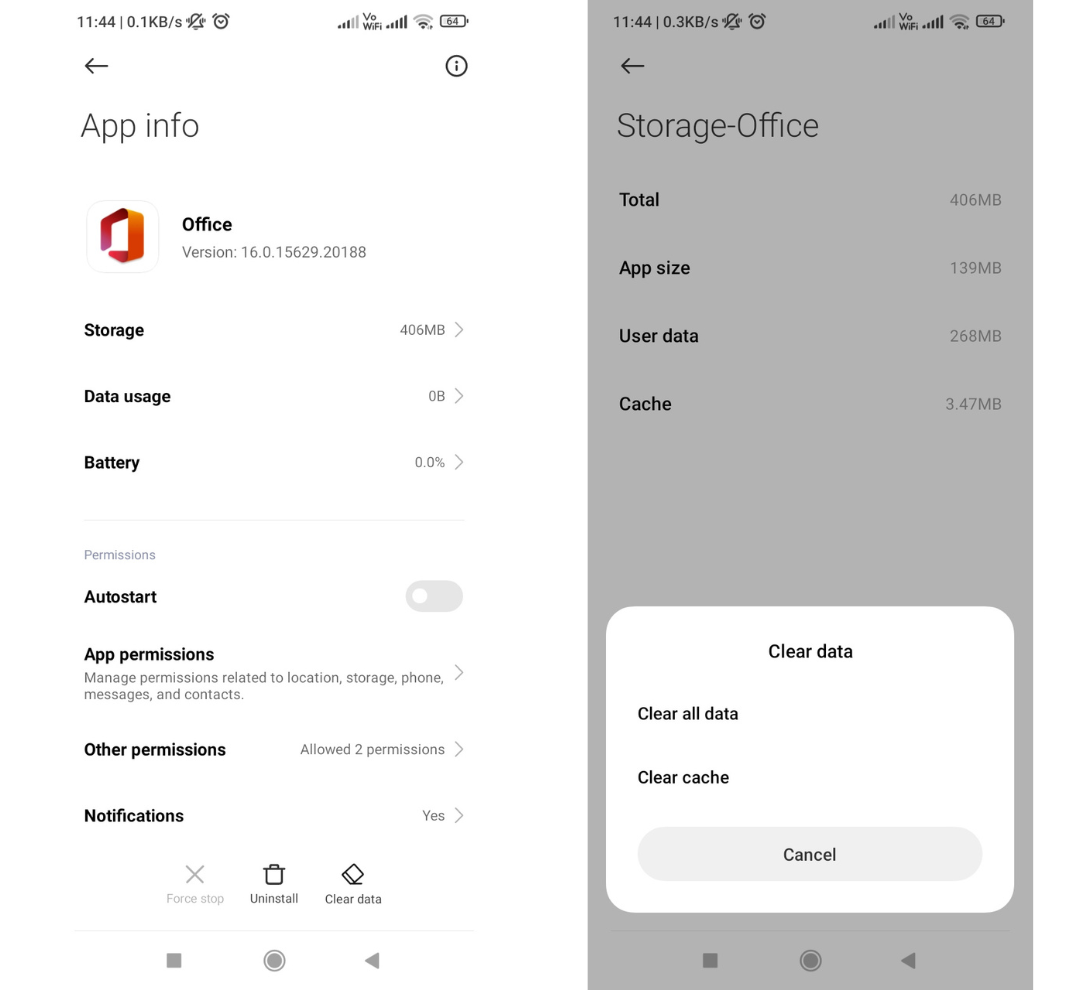
On Android:
- Go to Settings.
- Tap on Apps or Apps & Notifications (wording may vary).
- Find and select the problematic app from the list.
- Tap on Storage & cache.
- Tap Clear cache. (Do NOT tap “Clear data” unless you want to completely reset the app).
-
On iOS (iPhone/iPad):
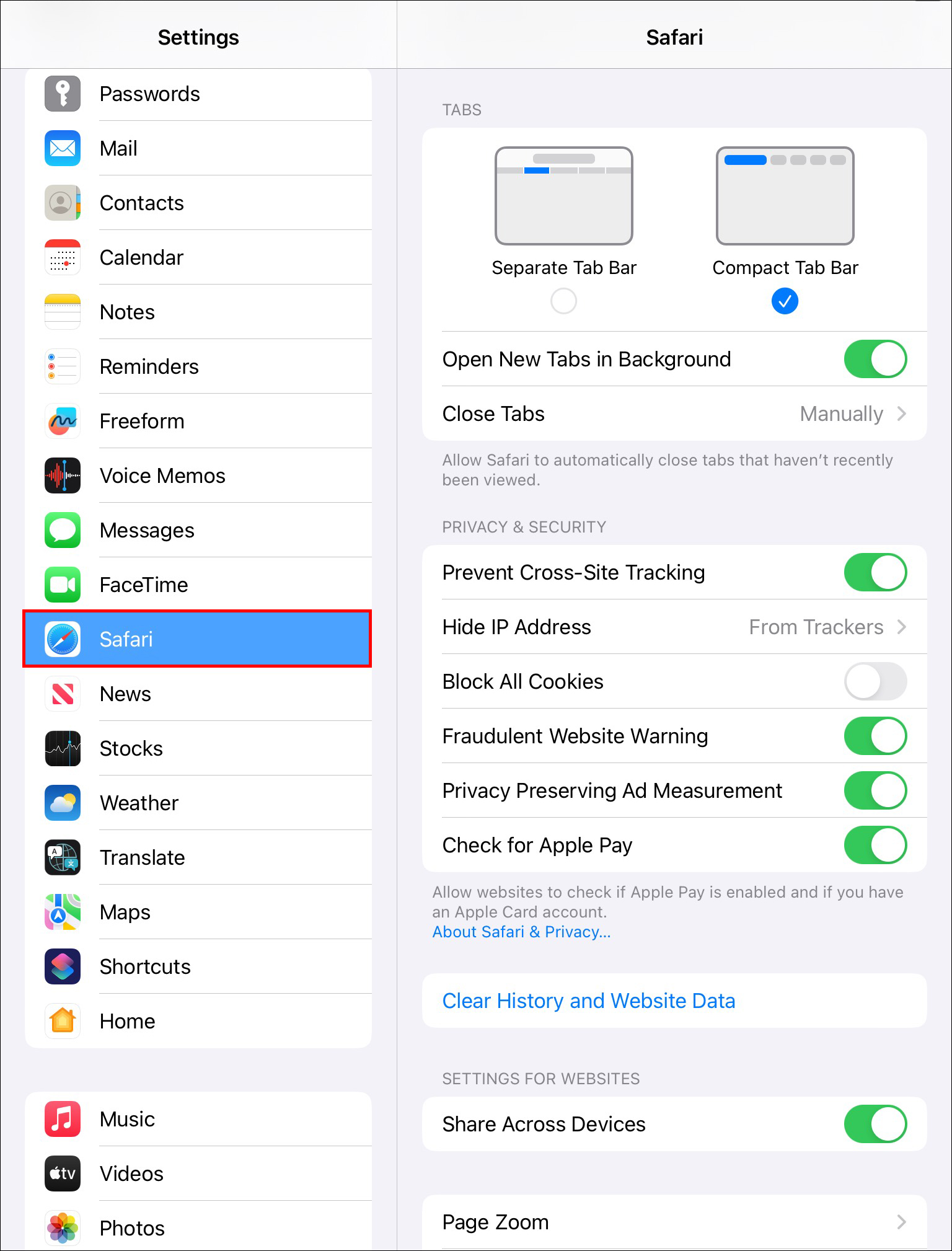
Unlike Android, iOS doesn’t offer a universal “Clear Cache” button for individual apps directly in Settings. For many apps, you need to clear the cache from within the app’s own settings. For example, Safari lets you clear website data, and many social media or news apps have an option like “Clear History” or “Clear Cache” in their internal settings menu.
If an app doesn’t offer this internal option, the most effective way to clear its cache (and other data) is to offload or delete and reinstall the app:- Go to Settings > General > iPhone Storage.
- Find the app in the list.
- Tap Offload App: This frees up storage used by the app but keeps its documents and data. Reinstalling the app will restore your data.
- Tap Delete App: This completely removes the app and all its data. You’ll need to reinstall it from the App Store and log in again, effectively giving you a completely fresh start.
Differentiating Cache from App Data
This distinction is critical.
- Cache: Temporary files used for speed and efficiency. Clearing it does not affect your login status, personal settings, or saved information. It’s safe to clear.
- App Data: Contains all the persistent information related to your user account, settings, saved games, database entries, and any content you’ve created within the app. Clearing app data is akin to uninstalling and reinstalling the app, wiping everything clean. You will lose all personal settings and will have to log in again. Use “Clear Data” only if you want to completely reset an app to its factory state, or as a last resort in troubleshooting.
Understanding this difference is a vital part of Tech literacy for any smartphone user.
Connecting the Dots: Cache Management in the Digital Ecosystem
The simple act of clearing an app’s cache might seem minor, but it highlights broader principles in our digital ecosystem, involving both app developers and end-users.
The Role of Developers in Cache Optimization (Tech/Brand)
App developers play a crucial role in how cache is managed. Good development practices involve:
- Intelligent Caching Strategies: Designing apps to cache only necessary data and to invalidate old cache effectively.
- Providing User Controls: Offering in-app options for users to clear cache where it’s most beneficial (as seen in many browser or social media apps).
- Regular Updates: Releasing updates that address cache-related bugs or optimize cache usage, which reflects positively on the Brand’s commitment to quality.
From a Tech perspective, efficient cache management is a hallmark of a well-engineered application, contributing significantly to a positive Brand experience.
User Empowerment and Digital Hygiene (Tech/Money)
For users, understanding cache management is a form of digital empowerment. It allows individuals to take control of their device’s performance and storage, rather than passively accepting issues.
- Proactive Maintenance: Regularly checking and clearing cache contributes to good “digital hygiene,” akin to regularly cleaning your physical space.
- Resource Management: It’s a key skill in managing personal Tech resources effectively, extending device life and maximizing app utility.
- Saving Money Indirectly: As discussed, a well-maintained device through such practices can delay upgrades and keep productivity high, saving Money in the long run.
In essence, cache management is a small but significant piece of the puzzle that ensures a healthy, efficient, and ultimately more enjoyable digital life, aligning perfectly with the core themes of Tech, Brand, and Money that define our modern existence.
In conclusion, clearing the cache on an app is far more than just deleting some temporary files. It’s a quick, non-destructive troubleshooting step that can revitalize app performance, reclaim valuable storage space, and enhance your overall digital experience. It underscores the intricate relationship between software design, user interaction, and the tangible benefits of maintaining our digital tools. By understanding what happens and why it matters, users can become more proficient in managing their technology, leading to a smoother, more productive, and potentially even more cost-effective digital journey.
aViewFromTheCave is a participant in the Amazon Services LLC Associates Program, an affiliate advertising program designed to provide a means for sites to earn advertising fees by advertising and linking to Amazon.com. Amazon, the Amazon logo, AmazonSupply, and the AmazonSupply logo are trademarks of Amazon.com, Inc. or its affiliates. As an Amazon Associate we earn affiliate commissions from qualifying purchases.