
In the fast-paced ecosystem of JavaScript development, managing dependencies is one of the most critical yet potentially volatile tasks a developer faces. For years, npm install was the ubiquitous command used to fetch libraries and set up projects. However, as development workflows evolved toward automation, containerization, and Continuous Integration (CI) pipelines, the need for a more strict, reliable, and faster installation method became apparent. This led to the introduction of the npm ci command.
While it may seem like a minor alternative to the standard install command, npm ci functions under a fundamentally different philosophy. It is designed specifically for automated environments where consistency is the highest priority. In this article, we will explore the technical nuances of npm ci, how it differs from npm install, and why it has become a non-negotiable tool for modern software engineering teams.

The Core Mechanism: How npm ci Differs from npm install
To understand what npm ci does, one must first understand the “source of truth” in a Node.js project. In a typical project, you have two primary files governing dependencies: package.json (which lists version ranges) and package-lock.json (which records the exact version of every nested dependency installed).
Enforcing the Lockfile as the Absolute Truth
The most significant difference between the two commands lies in how they treat the package-lock.json file. When you run npm install, npm looks at the package.json file and attempts to resolve the best versions of dependencies. If a newer version of a package is available that fits the range specified in package.json, npm install may update your package-lock.json to reflect that change.
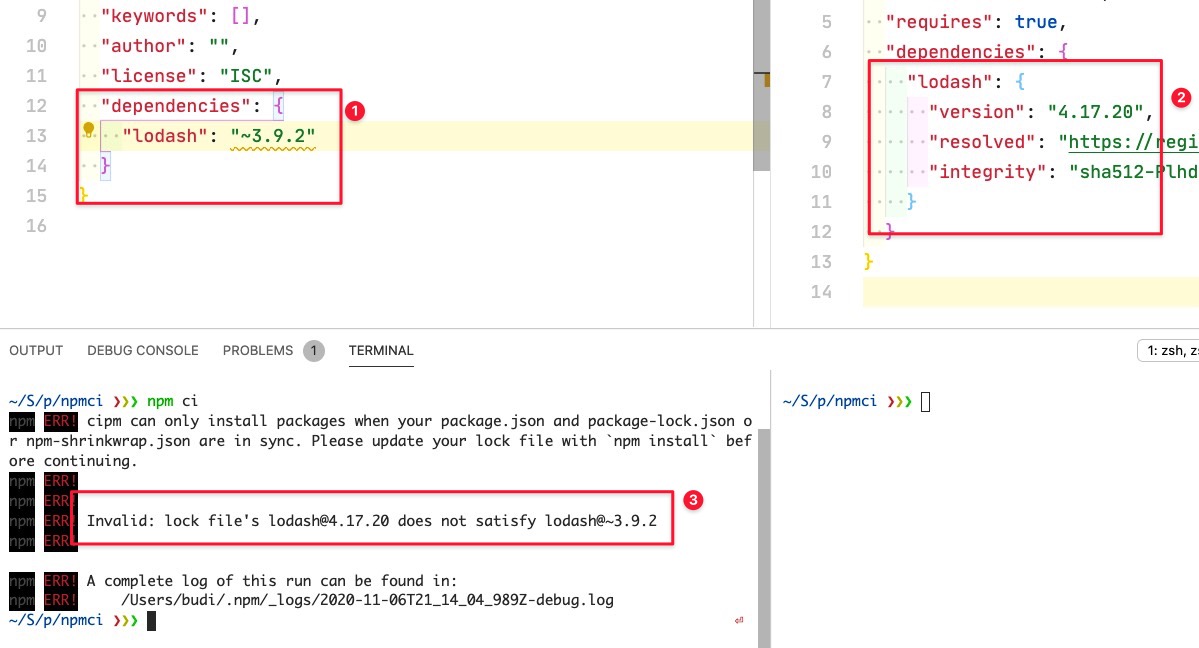
In contrast, npm ci (which stands for “Clean Install” or “Continuous Integration”) is strictly “read-only” regarding the lockfile. It does not look at the package.json to resolve versions; it looks exclusively at the package-lock.json. If the dependencies in the lockfile do not match the requirements in the package.json, npm ci will throw an error and exit rather than attempting to fix the discrepancy. This ensures that the environment is built exactly as the lockfile dictates, with zero deviations.
The “Clean Slate” Philosophy
Another mechanical hallmark of npm ci is its destructive nature. When you run npm install, the command attempts to be efficient by checking the existing node_modules folder and only adding or updating what is missing. While this saves time during local development, it can lead to “ghost dependencies”—leftover files from previous versions or deleted packages that might interfere with the current build.
npm ci removes the guesswork by automatically deleting the entire node_modules directory before it begins the installation. By starting from a clean slate every time, it guarantees that no artifacts from previous builds or manual interventions remain in the environment. This “clean install” behavior is what gives the command its name and its reputation for reliability.
Performance Gains Through Simplified Logic
Because npm ci does not need to perform the complex dependency resolution algorithm that npm install does, it is often significantly faster. In a standard install, npm must traverse the entire dependency tree, check for updates, and resolve version conflicts. Since npm ci treats the lockfile as a pre-resolved roadmap, it skips the “decision-making” phase and goes straight to fetching and extracting the packages. In large-scale enterprise projects with thousands of dependencies, this can shave minutes off a build process.
Why and When to Use npm ci
Understanding the mechanics is only half the battle; knowing when to apply this tool within your software development lifecycle (SDLC) is where the real value lies.
Continuous Integration and Automated Pipelines
As the name suggests, the primary use case for npm ci is within CI/CD pipelines (such as GitHub Actions, GitLab CI, or Jenkins). In an automated pipeline, you want the build to be identical every single time it runs. If a developer pushes code and the CI server uses npm install, there is a non-zero chance that a minor update to a sub-dependency could cause the build to fail on the server even if it passed locally. By using npm ci, you ensure that the server environment is a perfect mirror of the environment in which the lockfile was generated.
Eliminating the “Works on My Machine” Syndrome
One of the most frustrating experiences in software engineering is a bug that appears on one developer’s machine but not another’s. Frequently, these discrepancies are caused by subtle differences in the node_modules folder. One developer might have a slightly newer version of a utility library because they ran an install a day later than their colleague.
By standardizing on npm ci for testing and staging environments, teams can eliminate version drift. If a project fails to build with npm ci, it is a clear signal that the package-lock.json is out of sync or corrupted, forcing the team to resolve the issue at the source rather than working around it with local patches.
Production Deployments and Security
When deploying code to production, stability is paramount. The last thing a DevOps engineer wants is a production server fetching an unvetted version of a package during a deployment. npm ci provides a security layer by ensuring that only the specific, audited versions recorded in the lockfile are ever installed in production. This predictability is essential for maintaining a secure and stable user-facing application.
Technical Prerequisites and Constraints
While npm ci is powerful, it is not a “drop-in” replacement for npm install in every scenario. It operates under strict constraints that must be met for it to function correctly.
The Necessity of the Lockfile
You cannot use npm ci if your project does not have a package-lock.json or an npm-shrinkwrap.json file. Since the command relies entirely on these files to map out the installation, their absence will result in an immediate failure. This makes it unsuitable for the very beginning of a project’s lifecycle, where a developer is still adding initial dependencies and generating the lockfile for the first time.
Version Requirements
npm ci was introduced in npm version 6. If you are working on a legacy system running Node.js versions older than what supports npm 6, the command will be unavailable. While most modern environments have moved well past this, it remains a consideration for developers maintaining “frozen” legacy applications in long-term support.
No Incremental Updates
Because npm ci deletes the node_modules folder, it is generally not recommended for day-to-day local development where you are frequently adding or removing single packages. If you are actively coding and want to add a new library, npm install <package-name> is the correct tool. Using npm ci for every small change during development would be counterproductive, as it would force a full re-download and re-extraction of every dependency, wasting time and bandwidth.
Optimizing Your Workflow with npm ci
To get the most out of npm ci, it should be integrated thoughtfully into your development workflow. Here is how professional teams structure their use of the command.
Integration with GitHub Actions
In a standard GitHub Actions workflow, the npm ci command is the standard for the “Install Dependencies” step. A typical YAML configuration might look like this:
steps:
  - uses: actions/checkout@v3
  - name: Use Node.js
    uses: actions/setup-node@v3
    with:
      node-version: '18.x'
  - run: npm ci
  - run: npm test
By using npm ci here, the developer ensures that the tests are running against the exact dependency tree committed to the repository. If a developer forgot to commit an updated package-lock.json, the npm ci step will fail, preventing potentially broken code from being merged.
Best Practices for Dependency Management
To make the most of npm ci, teams should adopt a “Lockfile First” mentality. This means:
- Always commit the lockfile: Never include
package-lock.jsonin your.gitignore. - Verify lockfile integrity: Periodically run
npm installlocally to ensure the lockfile is up to date, then commit any changes. - Use npm ci for verification: Before pushing a major feature, run
npm cilocally once to ensure that your local environment hasn’t become “polluted” with dependencies that aren’t actually in the lockfile.
Troubleshooting Common Errors
The most common error encountered with npm ci is:
npm ERR! cidr The lock file is out of sync with package.json.
This occurs when someone manually edits package.json (e.g., changing a version number with a text editor) but does not run npm install to update the lockfile. To fix this, a developer must run npm install locally, allow npm to reconcile the differences and update the package-lock.json, and then commit the updated lockfile.
Conclusion: The Professional Standard for Installation
In the modern tech landscape, the goal of any deployment process is idempotency—the ability to run the same process multiple times and achieve the exact same result. npm ci is the primary tool that brings idempotency to the world of Node.js dependency management.
By enforcing the lockfile as the absolute authority, providing a clean installation environment, and offering improved performance for automated tasks, npm ci solves the most common headaches associated with package management. While npm install remains the tool of choice for the creative, additive phase of development, npm ci has rightfully earned its place as the professional standard for testing, integration, and production. Embracing this command is a simple yet profound step toward building more resilient, predictable, and scalable software.