
In the rapidly evolving landscape of gaming peripherals and professional hardware, the distinction between a standard tool and a high-performance instrument often lies in the software ecosystem supporting it. For users of Logitech G series hardware, one of the most powerful yet frequently misunderstood features is “G-Shift.” Integrated within the Logitech G Hub software, G-Shift is designed to bridge the gap between hardware limitations and the complex demands of modern digital environments.
Whether you are a competitive gamer looking for a millisecond advantage or a creative professional seeking to streamline a complex workflow, understanding what G-Shift does is the first step toward unlocking the full potential of your desktop setup. This article explores the technical mechanics, configuration strategies, and practical applications of this innovative technology.
Understanding the Mechanics of G-Shift
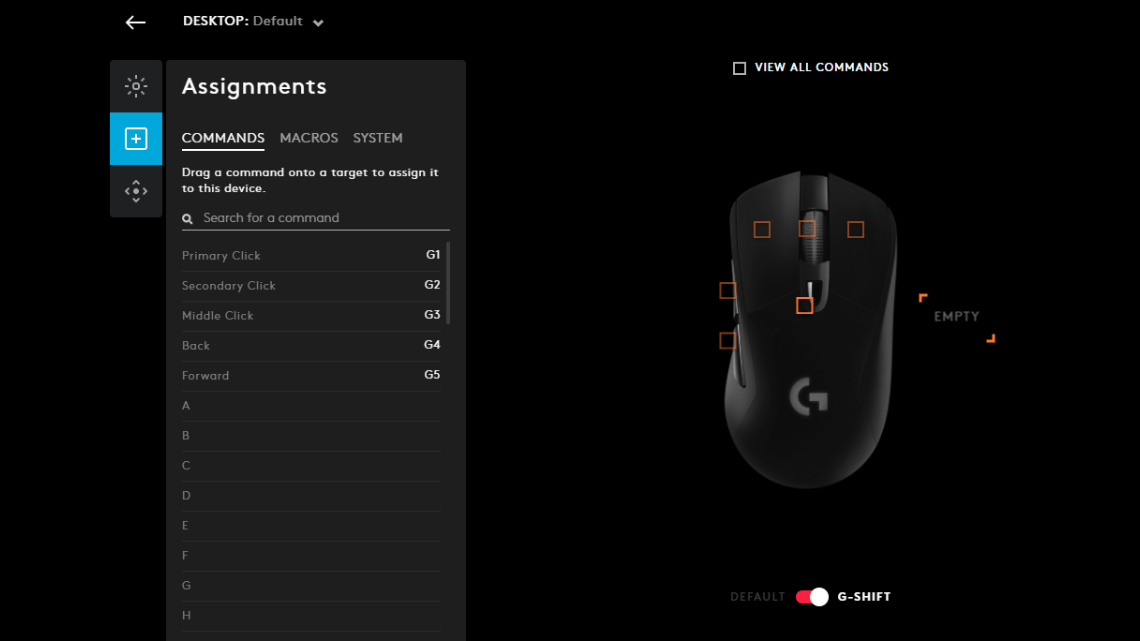
At its core, G-Shift is a software-driven feature that acts as a “modifier” key for your mouse or keyboard, effectively doubling the number of programmable inputs available to the user. To understand this, one can look at the standard “Shift” key on a traditional QWERTY keyboard. When you hold Shift, the “1” key becomes an exclamation point. G-Shift applies this exact logic to every button on your Logitech peripheral.
The Technology Behind the Software
G-Shift operates through the Logitech G Hub (and formerly the Logitech Gaming Software). When a specific button is designated as the “G-Shift Trigger,” pressing and holding that button activates a secondary layer of commands across all other buttons on the device. From a technical standpoint, the software intercepts the hardware signal and reinterprets it based on the active layer. This allows a mouse with six buttons to effectively have eleven distinct functions (one being the trigger, and the other five having two functions each).
How G-Shift Differs from Standard Macros
While many users confuse G-Shift with macros, they serve different purposes. A macro is a recorded sequence of events triggered by a single press. G-Shift, conversely, is a state-change mechanism. It provides a static secondary layout that is often more reliable than complex macros because it relies on direct input mapping rather than timed sequences. This makes G-Shift particularly valuable in environments where precision and immediate response are non-negotiable.
Setting Up G-Shift in Logitech G Hub
To harness the power of G-Shift, one must navigate the Logitech G Hub, the centralized interface for all modern Logitech G-series gear. The setup process is intuitive but requires a strategic approach to ensure the layout remains ergonomic.
Step-by-Step Configuration
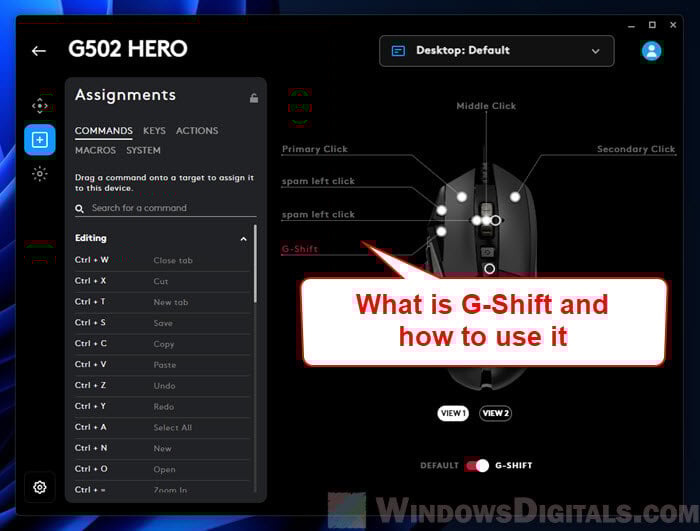
To begin, you must first assign a “G-Shift” command to one of your mouse or keyboard buttons. Usually, this is mapped to a button that is easily accessible but unlikely to be pressed by accident, such as the DPI shift button (thumb button) on a Logitech G502.
- Open Logitech G Hub and select your device.
- Navigate to the “Assignments” tab.
- In the command list, search for “G-Shift.”
- Drag this command onto your chosen trigger button.
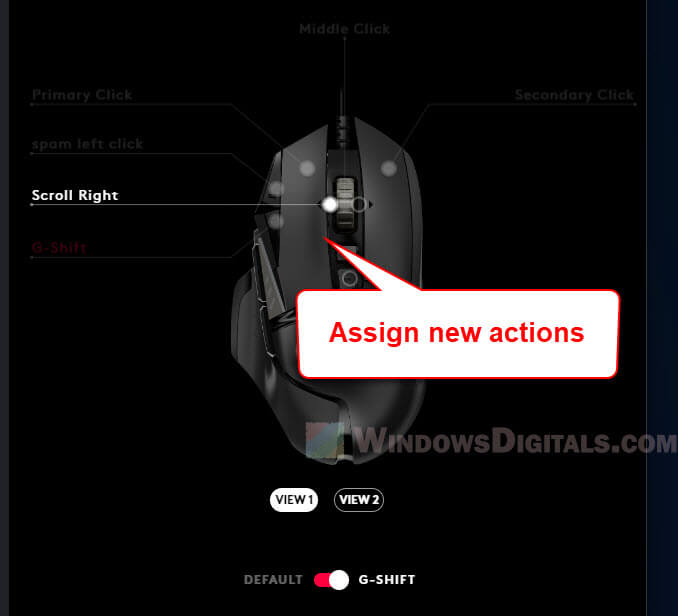
- At the bottom of the screen, toggle the view from “Standard” to “G-Shift.” The interface will now show a blank slate for all other buttons, allowing you to drag and drop new commands, keystrokes, or system functions that will only be active when the trigger is held.
Customizing Profiles for Different Games and Apps
One of the most robust features of the Tech ecosystem Logitech has built is “Automatic Profile Switching.” G-Shift assignments are profile-specific. This means your G-Shift layer for Counter-Strike 2 can be entirely different from your G-Shift layer for Adobe Premiere Pro. When the software detects a specific application is in the foreground, it automatically swaps the G-Shift mappings, ensuring that your secondary layer is always optimized for the task at hand.
Practical Applications in Gaming and Productivity
The true value of G-Shift is realized through its application. By moving complex commands from the keyboard to the mouse—or by layering keyboard functions—users can maintain a “home position” without needing to stretch for distant keys.
Competitive Edge in MOBAs and MMOs
In Massive Multiplayer Online (MMO) games like World of Warcraft or Multiplayer Online Battle Arenas (MOBAs) like League of Legends, the number of required abilities often exceeds the easily reachable keys on a keyboard. G-Shift allows gamers to map their secondary ability bar to the same mouse buttons used for their primary abilities. By holding the G-Shift trigger with their thumb, a player can access an entirely new set of spells without moving their left hand from the WASD movement keys. This reduction in “travel time” can be the difference between a successful play and a defeat.
Boosting Workflow in Creative Software
Beyond gaming, G-Shift is an elite tool for digital artists, editors, and coders. In software like Adobe Photoshop, you can map the scroll wheel to change brush size in the standard layer, but by holding G-Shift, that same scroll wheel can be mapped to zoom in/out or rotate the canvas. For video editors, G-Shift can turn a standard numerical pad into a dedicated color-grading station or a cut-and-trim toolset. This “layered” approach minimizes the reliance on complex keyboard shortcuts that often require two hands, allowing for a more fluid, one-handed navigation of the software interface.
Hardware Compatibility and Best Practices
While G-Shift is a software feature, its effectiveness is heavily influenced by the hardware it runs on. Logitech’s G-series lineup is specifically engineered to handle the high polling rates and rapid input switching that G-Shift demands.
Recommended Devices for G-Shift
The feature shines brightest on devices with a high button count. The Logitech G502 HERO or G502 X are perhaps the most iconic pairings for G-Shift due to their ergonomic thumb rests and abundance of side buttons. The G604 Lightspeed, with its six-button thumb panel, essentially becomes a 12-button powerhouse when G-Shift is utilized. On the keyboard side, the G915 or G815 allows users to map G-Shift to the dedicated G-keys, transforming the entire function row into a secondary command center.
Optimization Tips for Seamless Execution
To get the most out of G-Shift, consider the following technical best practices:
- Trigger Placement: Always place the G-Shift trigger on a button that does not interfere with your primary click fingers (index and middle). The thumb is usually the best candidate.
- Visual Cues: Some Logitech devices feature RGB lighting that can be programmed to change color when G-Shift is active. This provides an immediate visual confirmation that you are in the secondary layer.
- Consistency: Try to keep “Utility” commands (like mute, volume, or screenshot) on the same G-Shift buttons across all your profiles to build muscle memory.
Troubleshooting and Advanced Customization
Despite its reliability, users may occasionally encounter issues where G-Shift fails to activate or conflicts with in-game settings. Understanding the technical nuances of the Logitech ecosystem can help resolve these friction points.
Common Software Glitches and Fixes
The most frequent issue is G Hub failing to recognize the active window, which prevents the G-Shift profile from loading. This is often solved by setting a “Persistent Profile” in the G Hub settings or ensuring the software is running with Administrative privileges. Furthermore, if G-Shift feels “laggy,” check the polling rate of your device; a 1000Hz polling rate is recommended to ensure the software-to-hardware communication is instantaneous.
Layering G-Shift with Scripting
For the truly advanced tech user, Logitech G Hub supports Lua scripting. This allows you to write custom scripts that interact with the G-Shift state. For instance, a user could script a sequence where holding G-Shift not only changes button functions but also lowers the mouse sensitivity (DPI) for precision sniping, then returns it to normal once the button is released. This level of integration represents the pinnacle of hardware customization in the current market.
In conclusion, G-Shift is more than just a simple button remapper; it is a sophisticated productivity and gaming tool that maximizes the utility of modern hardware. By understanding its mechanics, mastering its setup, and applying it to specific use cases, users can significantly enhance their digital efficiency. In a world where speed and precision are paramount, G-Shift provides a streamlined, tech-forward solution to the problem of limited physical space on our devices.
aViewFromTheCave is a participant in the Amazon Services LLC Associates Program, an affiliate advertising program designed to provide a means for sites to earn advertising fees by advertising and linking to Amazon.com. Amazon, the Amazon logo, AmazonSupply, and the AmazonSupply logo are trademarks of Amazon.com, Inc. or its affiliates. As an Amazon Associate we earn affiliate commissions from qualifying purchases.