
In the vast landscape of Python programming, few constructs are as immediately recognizable, and perhaps as initially perplexing, as while True. For newcomers, the idea of an “infinite loop” can conjure images of crashed programs, frozen systems, and endless resource consumption. However, seasoned developers understand that while True is not a bug waiting to happen but a powerful and indispensable tool, serving as the backbone for a myriad of essential applications, from interactive games and web servers to real-time data processing and automated scripts. It represents a fundamental pattern in computer science: the concept of a process that runs continuously until an explicit condition tells it to stop.

This article delves into the heart of while True in Python, demystifying its purpose, exploring its practical applications, outlining best practices for its use, and demonstrating how mastering this simple construct can unlock significant potential across various technological domains, including software development, AI tools, and even financial applications. Understanding while True is not just about knowing syntax; it’s about grasping a critical design pattern that underpins much of the dynamic and responsive software we interact with daily.
The Core Concept: An Ever-Running Cycle
At its essence, while True signifies an unconditional loop. To fully appreciate its implications, it’s crucial to first understand the fundamental nature of while loops in Python.
Understanding while Loops in Python
Python’s while loop is a control flow statement that allows code to be executed repeatedly based on a given boolean condition. The syntax is straightforward:
while condition:
    # Code to be executed repeatedly
    # As long as 'condition' evaluates to True
The condition can be any expression that evaluates to either True or False. Before each iteration, Python checks this condition. If it’s True, the code inside the loop body executes. If it’s False, the loop terminates, and the program proceeds to the statements immediately following the loop.
For example:
count = 0
while count < 5:
    print(f"Count is: {count}")
    count += 1
print("Loop finished!")
In this example, the loop continues as long as count is less than 5. Once count reaches 5, the condition count < 5 becomes False, and the loop exits.
The Anatomy of an Infinite Loop
When the condition provided to a while loop is simply True, we create what is known as an infinite loop. The boolean literal True always evaluates to True, meaning the condition will never become false on its own.
Consider this simple, yet powerful, snippet:
while True:
    print("This message will print forever!")
    # Without a mechanism to exit, this loop never terminates naturally.
If you run this code, “This message will print forever!” would indeed be displayed repeatedly without end. From a basic execution standpoint, an infinite loop would consume CPU cycles indefinitely, potentially making your program unresponsive and requiring a forceful termination (like pressing Ctrl+C in a terminal).
However, the perceived danger of an infinite loop is precisely what makes it useful. The fact that it will always run means that any code placed inside it can be guaranteed to execute repeatedly, forming the basis for processes that need to be constantly active, waiting for events, or performing continuous tasks. The key, then, is not to avoid while True entirely, but to understand how to manage and control its execution, incorporating strategic exit points to ensure the program remains responsive and efficient.
Practical Applications and Strategic Implementations
The utility of while True becomes clear when we move beyond simple examples and look at its role in real-world software. Far from being a niche concept, it’s a fundamental pattern in numerous programming paradigms and applications.
Essential Use Cases in Software Development (Tech Focus)
while True forms the bedrock for applications requiring continuous operation, event listening, or persistent processing. Its applications span various domains within technology.
Event-Driven Programming (GUIs, Games)
Many interactive applications, such as graphical user interfaces (GUIs) or video games, operate on an “event loop” model. The program continuously waits for an event (user input, network packet, timer expiry) and responds accordingly. while True is the perfect construct for this:
# Pseudo-code for a simple game loop
while True:
    # 1. Process user input (keyboard, mouse)
    handle_input()

    # 2. Update game state (character positions, physics, AI)
    update_game_state()

    # 3. Render graphics
    draw_elements_on_screen()

    # 4. Control frame rate to prevent excessive CPU usage
    time.sleep(1/60) # Aim for 60 frames per second
In such a loop, the program is always active, ready to react to new inputs or advance the simulation, making the application feel responsive and alive. This continuous polling mechanism is vital for dynamic user experiences.
Server Processes and Daemons
Backend services, like web servers, database listeners, or custom API endpoints, need to run indefinitely, waiting for incoming network requests. while True is commonly used to keep these services alive:
import socket

HOST = '127.0.0.1'  # Standard loopback interface address (localhost)
PORT = 65432        # Port to listen on (non-privileged ports are > 1023)

with socket.socket(socket.AF_INET, socket.SOCK_STREAM) as s:
    s.bind((HOST, PORT))
    s.listen()
    print(f"Server listening on {HOST}:{PORT}")
    while True: # Keep the server running indefinitely
        conn, addr = s.accept() # Wait for a client connection
        with conn:
            print(f"Connected by {addr}")
            data = conn.recv(1024)
            if not data:
                break # Client disconnected
            conn.sendall(b"Hello from server: " + data)
This server example uses while True to constantly accept() new client connections, ensuring the service is always available. Such daemon processes are critical for the reliability of online applications and services.
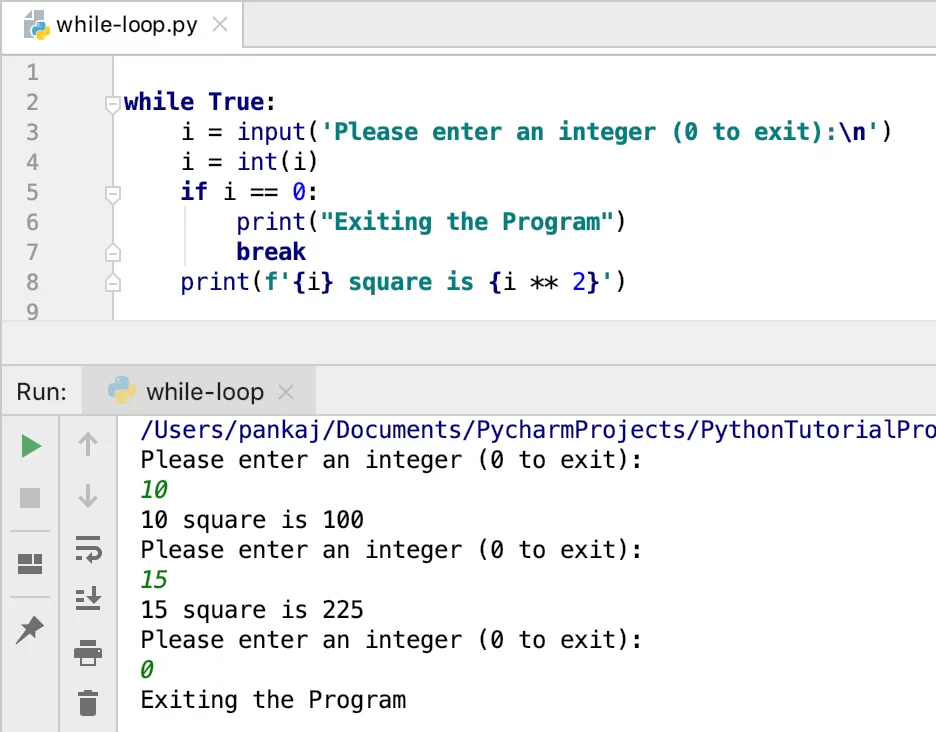
User Input Validation
A common pattern in console applications is to repeatedly prompt the user for input until valid data is provided. while True combined with a break statement handles this elegantly:
while True:
    user_input = input("Please enter a number: ")
    try:
        number = int(user_input)
        print(f"You entered the number: {number}")
        break # Exit the loop once valid input is received
    except ValueError:
        print("Invalid input. Please enter an integer.")
This ensures that the program won’t proceed with invalid data, improving the robustness and user-friendliness of applications.
Data Streaming and Monitoring
In modern data-driven systems, especially those leveraging AI tools, while True is instrumental for continuous data acquisition, processing, or model monitoring. Imagine a script that continuously reads sensor data, monitors a stock ticker, or checks a message queue for new tasks:
# Pseudo-code for a data monitoring loop
import time
import random

def get_sensor_data():
    return random.uniform(20.0, 30.0) # Simulate sensor reading

while True:
    current_data = get_sensor_data()
    print(f"Monitoring: Temperature is {current_data:.2f}°C")
    if current_data > 28.0:
        print("ALERT: Temperature exceeded threshold!")
        # Trigger an action, e.g., send an email, adjust a setting

    # Wait for a few seconds before checking again
    time.sleep(5)
These continuous loops are vital for real-time analytics, predictive maintenance, and ensuring AI models remain performant and up-to-date with incoming data streams.
Controlled Exits: Mastering the break and continue Statements
The true power of while True lies not in its infinite nature, but in the ability to control its infinity. This control is primarily achieved through the break and continue statements.
-
breakStatement: Thebreakstatement immediately terminates the loop in which it is contained. When Python encountersbreak, it completely exits the currentwhile Trueloop and execution resumes at the first statement after the loop. This is the primary mechanism for ending an infinite loop gracefully and intentionally.counter = 0 while True: print(f"Current counter: {counter}") counter += 1 if counter >= 5: print("Time to stop!") break # Exit the loop when counter reaches 5 print("Loop has ended.") -
continueStatement: Thecontinuestatement skips the rest of the current iteration of the loop and proceeds to the next iteration. It does not exit the loop entirely but simply bypasses the remaining code within the current loop block.i = 0 while True: i += 1 if i % 2 != 0: # If i is odd print(f"{i} is odd, skipping print of next line.") continue # Skip the next print statement for odd numbers print(f"{i} is even.") if i >= 10: break print("Loop finished.")This example shows how
continuecan be used to process specific conditions differently within a loop, without terminating the entire loop.
Mastering these control flow statements is paramount when using while True. They transform a potentially runaway process into a carefully orchestrated sequence of operations, allowing developers to design robust and responsive applications that know precisely when to start, what to do, and when to stop.
Best Practices, Alternatives, and Performance Considerations

While while True is a powerful construct, like any tool, it must be used judiciously. Understanding its nuances, when to choose it, and when to opt for alternatives is key to writing efficient and maintainable Python code.
When to Opt for while True (and When Not To)
Advantages of while True:
- Simplicity for Continuous Operations: For tasks that inherently need to run indefinitely, such as server loops, event listeners, or monitoring scripts,
while Trueprovides the clearest and most direct expression of intent. - Dynamic Exit Conditions: It’s ideal when the condition for exiting the loop isn’t known at the outset but emerges dynamically during execution (e.g., user input, external event, a specific state being reached).
- Conciseness: For simple, single-exit-point loops,
while Trueoften results in more concise code than managing an external flag variable.
Disadvantages and When Not to Use:
- Potential for Resource Consumption: If not managed with
breakstatements and potentiallytime.sleep(), an unbridledwhile Trueloop will consume 100% of a CPU core, leading to poor system performance and battery drain for client applications. - Readability (if poorly managed): If exit conditions are overly complex or scattered, a
while Trueloop can become harder to reason about than a loop with a clear, single condition. - Not for Fixed Iterations: For iterating over a known sequence or a fixed number of times, a
forloop or awhileloop with a counter is almost always more appropriate and safer.
Key Rule: Always ensure there is at least one clear, well-defined break condition within a while True loop, unless the program is explicitly designed to run as a truly perpetual background process (e.g., a core daemon, a critical server).
Alternatives for Iteration and Controlled Looping
While while True has its place, other Python constructs often provide more clarity or better suitability for specific looping scenarios:
-
Using a Flag Variable: This is a common and often preferred alternative, especially when the loop’s termination depends on multiple internal conditions or states.
running = True
while running:
    # Perform some operations
    # ...
    if some_complex_condition_is_met:
        running = False # Set the flag to False to exit
    # ...
print("Loop finished via flag.")
This approach can make the loop’s intent clearer, as the termination condition is explicitly tied to a named variable.
-
forLoops: When you need to iterate over a finite sequence (lists, tuples, strings, ranges, generators), aforloop is the idiomatic Python choice. It’s more efficient and less prone to off-by-one errors or accidental infinite loops.for item in my_list: print(item) for i in range(10): # Iterate 10 times print(f"Iteration {i}") -
Event Loop Frameworks (e.g.,
asyncio): For highly concurrent and asynchronous operations, especially in network programming or sophisticated GUI applications, Python’sasynciolibrary provides a more structured and efficient way to manage event loops than a simplewhile True. These frameworks handle the scheduling and execution of tasks, making complex asynchronous logic more manageable.import asyncio async def my_async_task(): while True: print("Async task running...") await asyncio.sleep(1) # Pause without blocking other tasks async def main(): task = asyncio.create_task(my_async_task()) await asyncio.sleep(5) # Let the task run for 5 seconds task.cancel() # Gracefully stop the task print("Async task cancelled.") if __name__ == "__main__": asyncio.run(main())This approach offers superior resource management for complex, long-running applications.
Performance and Resource Management
An unmanaged while True loop is a CPU hog. If it’s constantly checking a condition without any pause, it will consume a full core, making your system sluggish.
-
time.sleep(): For loops that poll for changes or perform periodic tasks, insertingtime.sleep(interval_in_seconds)is crucial. This pauses the execution for a specified duration, freeing up the CPU for other processes.import time while True: # Check for new emails, process data, etc. print("Performing periodic check...") time.sleep(60) # Wait for 1 minute before checking again -
Background Threads/Processes: For genuinely long-running, CPU-intensive operations that shouldn’t block the main program flow, consider offloading the
while Trueloop into a separate thread or process using Python’sthreadingormultiprocessingmodules. This allows the main application to remain responsive while the background task runs continuously.import threading import time def background_task(): while True: print("Background task is alive!") time.sleep(2) # Start the background task in a new thread thread = threading.Thread(target=background_task, daemon=True) # daemon=True allows main program to exit thread.start() print("Main program continues to run...") time.sleep(5) # Main program does other stuff for 5 seconds print("Main program finished.") # The daemon thread will exit when the main program exitsProper resource management ensures that your
while Trueloops contribute positively to your application’s efficiency rather than becoming performance bottlenecks.
Broader Implications: Tech, Brand, and Money
The understanding and skillful application of while True extends beyond mere technical implementation, touching upon aspects of technological advancement, professional reputation, and financial opportunity.
Enhancing Productivity and Innovation in Tech
At the core of technology is the ability to automate and streamline processes. while True is a fundamental building block for this. From simple scripts that monitor log files to complex AI tools that continuously ingest and process data streams, this loop construct enables systems to be perpetually active and responsive. Developers who grasp its nuances can build robust software that:
- Automates Repetitive Tasks: Think of bots that scrape data, scripts that check API statuses, or internal tools that maintain system health. These often rely on
while Trueto run continuously without manual intervention, significantly boosting productivity. - Powers Real-Time Systems: In fields like IoT, financial trading, and gaming, real-time data processing and immediate responsiveness are crucial.
while Truefacilitates the continuous polling and event handling required for such dynamic environments. - Supports AI and Data Pipelines: Many machine learning models require continuous data feeds for training or inference.
while Truecan be used to construct the data acquisition layers, ensuring models always have fresh data to work with, fostering innovation in AI applications. - Enables Robust Software: By understanding how to implement controlled
while Trueloops with graceful exits and proper resource management, developers create more reliable and resilient applications that perform tasks consistently over long periods.
Mastering while True is, therefore, not just about coding; it’s about enabling a class of software that runs tirelessly, efficiently, and effectively, which is critical for modern tech development and innovation.
Building a Strong Developer ‘Brand’ Through Code Quality
In the competitive world of technology, a developer’s “brand” is built on the quality, reliability, and maintainability of their code. The thoughtful use of fundamental constructs like while True directly contributes to this.
- Demonstrating Competence: Knowing when and how to use
while True– including when to choose alternatives, implement proper exit conditions, and manage resources – signifies a strong grasp of core programming principles. This competence is a cornerstone of a solid personal brand. - Creating Maintainable Code: Properly structured
while Trueloops, especially those employing clear flag variables orbreakconditions, are easier for other developers (or your future self) to understand and modify. Clean, readable code enhances collaboration and reduces technical debt, which are critical for corporate identity and project success. - Building Reliable Systems: Applications that use
while Trueeffectively, preventing resource leaks or unexpected crashes, contribute to a reputation for building robust and dependable software. This reliability strengthens a company’s brand, as users trust applications that perform consistently without issues. - Contributing to Best Practices: A developer who advocates for and implements best practices around loop control and resource management elevates the entire team’s code quality, indirectly enhancing their own professional standing and influence.
In essence, the responsible application of while True is a subtle yet powerful way for developers to showcase their expertise, contribute to high-quality software, and positively impact their personal and corporate reputation in the tech industry.
Financial Applications and Opportunities
The seemingly simple while True loop also opens doors to various financial applications and opportunities, particularly in the realm of online income, side hustles, and business finance.
- Automated Trading Bots and Scrapers: One of the most direct applications is in creating scripts that continuously monitor financial markets, stock prices, cryptocurrency exchanges, or news feeds. A
while Trueloop can drive a bot to:- Scrape Data: Continuously pull real-time market data for analysis.
- Execute Trades: Watch for specific conditions (e.g., price reaches a threshold) and automatically place buy/sell orders.
- Arbitrage Opportunities: Monitor multiple exchanges for price discrepancies to capitalize on small, transient opportunities.
These automated tools can generate online income through algorithmic trading or provide critical data for investment decisions.
- Online Income and Side Hustles: Beyond direct trading,
while Truecan power various side hustles:- Content Monitoring: Track changes on websites for product availability, price drops, or new listings for reselling.
- Social Media Automation: Build bots that monitor social media for trends, keywords, or engagement opportunities related to a niche business.
- Lead Generation: Continuously search public databases or web sources for potential client leads for a service business.
These automated tasks can free up time and scale efforts, directly contributing to online income streams.
- Business Finance Tools: For small businesses or personal finance management,
while Truecan be used in:- Automated Reporting: Generate daily or weekly financial reports from various data sources.
- Inventory Monitoring: Continuously check stock levels and trigger reorder alerts.
- Budget Tracking: Monitor spending across different accounts in real-time, providing immediate feedback on budget adherence.
Such tools enhance financial productivity and enable better, more timely decision-making.
By leveraging while True for continuous operation and automation, individuals and businesses can tap into new avenues for generating income, optimizing financial processes, and gaining a competitive edge in various digital markets.
Conclusion
The phrase while True in Python, initially a source of apprehension for many, reveals itself upon closer inspection to be one of the language’s most versatile and powerful constructs. It represents an intentional commitment to continuous operation, serving as the heartbeat for countless applications ranging from responsive user interfaces and robust server backends to critical data monitoring systems and sophisticated AI tools.
Mastering while True is not about creating endless loops, but about harnessing their infinite potential with finite, intelligent control. Through the strategic application of break and continue statements, and by understanding when to employ alternatives or incorporate resource management techniques like time.sleep(), developers can craft elegant, efficient, and resilient software.
Beyond its technical implementation, the skillful use of while True contributes to broader success. It enables innovation and boosts productivity in the tech landscape, strengthens a developer’s professional brand through reliable code, and unlocks significant opportunities for online income and enhanced financial management. In essence, while True is more than just a loop; it’s a testament to the power of controlled persistence in programming, empowering us to build the ever-running, dynamic systems that define our modern digital world.