
In the landscape of modern software, few titles have achieved the architectural complexity and cultural permanence of Minecraft. While often categorized simply as a “sandbox game,” at its core, Minecraft is a sophisticated procedural generation engine that manages vast datasets of voxels, entities, and environmental variables. Within this complex digital ecosystem, tools like the compass are not merely aesthetic items; they are functional scripts designed to solve the fundamental problem of spatial awareness in an infinite coordinate system.
To understand what a compass points to in Minecraft, one must look beyond the pixels and examine the underlying software logic that governs orientation within a 3D simulated environment. This article explores the technical nuances of the Minecraft compass, the mechanics of world-spawn vectors, and how advanced features like Lodestones have redefined navigation within the game’s code.
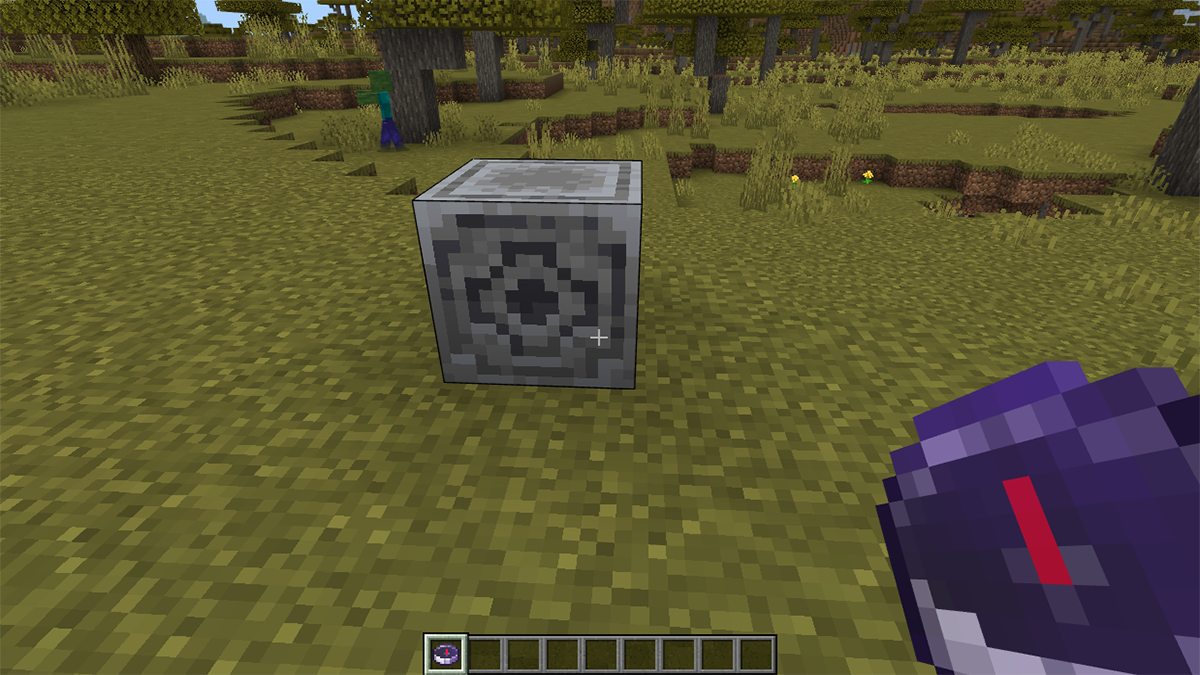
The Core Mechanics of Compass Logic in Sandbox Environments
In physical reality, a compass aligns itself with the Earth’s magnetic field, pointing toward magnetic north. In the digital architecture of Minecraft, there is no inherent “magnetism.” Instead, the compass is programmed to track a specific set of coordinates. By default, the Minecraft compass points to the World Spawn Point.
The Spawn Point Vector
When a new world is generated using a specific “seed,” the game’s algorithm designates a set of X and Z coordinates as the “World Spawn.” This is the location where a player first enters the world. From a programming perspective, the compass is a dynamic UI element that continuously calculates the angle between the player’s current position (an XYZ vector) and the World Spawn vector.
Unlike a traditional map, which provides a bird’s-eye view of rendered data, the compass functions as a real-time pointer. Even if the player is underground or in a dense forest where landmarks are invisible, the compass needle updates its orientation based on the player’s movement relative to that static coordinate.
How the Game Engine Tracks Player Location
The Minecraft engine (specifically the Java and Bedrock editions) tracks players using a Cartesian coordinate system. The Y-axis represents height, while X and Z represent horizontal positioning. The compass ignores the Y-axis entirely, focusing solely on the horizontal plane. This technical choice ensures that the compass remains usable regardless of whether the player is at the world’s ceiling or its bedrock foundation.
For the player, this means the compass does not point to their “home” or “bed” by default. It is a common misconception among new users that the compass functions like a GPS for their personal base. In technical terms, unless the player’s base happens to be located at the original spawn coordinates, the compass will consistently lead them back to the world’s geographic center of origin.
Crafting and Utility: The User Interface of Survival
From a UX (User Experience) design standpoint, the compass is part of Minecraft’s “mid-tier” tech tree. It requires specific resources that signify a player’s progression from basic survival to technical proficiency.
Resource Requirements: Iron and Redstone
Crafting a compass requires four iron ingots and one piece of redstone dust. In the game’s internal logic, redstone acts as the analog for electrical circuitry. The inclusion of redstone in the recipe is a thematic nod to the “electronic” or “magical” nature of the tracking device.
From a game design perspective, requiring redstone ensures that players cannot bypass the challenges of early-game navigation too easily. They must first delve into the subterranean layers of the software’s generated world, facing environmental hazards to acquire the “tech” necessary for more advanced orientation tools.
Lodestone Integration: Overriding Default Logic
One of the most significant updates to Minecraft’s navigational software was the introduction of the Lodestone. This block allows players to fundamentally change the behavior of the compass. By “using” a compass on a Lodestone, the item’s NBT (Named Binary Tag) data is altered.
Technically, the compass stops tracking the World Spawn Point and begins tracking the specific coordinates of that Lodestone block. This is a crucial evolution in the game’s software mechanics, as it allows for decentralized navigation. A player can place Lodestones at various outposts, create “mapped” routes, and manage multiple compasses that each point to different strategic locations. This functionality mirrors how modern software uses bookmarks or saved waypoints to manage vast amounts of spatial data.

Cross-Platform Functionality and Technical Limitations
While the compass is a robust tool within the “Overworld” (the primary simulation dimension), its functionality changes—or fails—when the player moves into different dimensions of the game’s code, such as the Nether or the End.
Behavior in Different Dimensions
The Nether and the End are separate dimensions with different coordinate scaling and environmental rules. In the Nether, a standard compass—if not linked to a Lodestone—will spin erratically. This is a deliberate design choice implemented in the game’s code to simulate the breakdown of standard navigational logic in a chaotic, “hellish” environment.
From a technical standpoint, the Overworld’s spawn coordinates do not exist within the Nether’s coordinate space. Without a valid vector to point toward, the needle’s rotation value becomes randomized. However, if a player uses a Lodestone within the Nether, the compass will function perfectly, pointing to that specific block. This demonstrates the flexibility of the Lodestone’s coordinate-tracking script versus the hard-coded default of the World Spawn pointer.
Impact on Gameplay Strategy and Digital Literacy
Understanding the compass’s limitations is a form of “game-world literacy.” Advanced players often use the compass in conjunction with the F3 debug screen (in the Java Edition). The F3 screen displays raw data—the exact XYZ coordinates, biome information, and frame rates.
While the compass provides a visual, immersive way to navigate, the F3 screen provides the actual data the software is processing. Tech-savvy players often bridge the gap between these two, using the compass for quick orientation and the coordinate data for precise building and world-linking (such as calculating Nether portal ratios).
The Evolution of Navigation in Game Design
The Minecraft compass represents a broader trend in how software developers handle navigation in procedurally generated worlds. As virtual environments grow larger, the tools used to navigate them must become more sophisticated.
From Static Maps to Dynamic Orientation Tools
In early gaming, navigation was often handled via “mini-maps” or static UI overlays. Minecraft took a different approach by making navigation tools physical items within the world. This forces the player to interact with the game’s systems more deeply. The compass is not just an interface; it is an object that occupies an inventory slot and must be managed.
This design philosophy highlights the shift toward “diegetic” UI—user interface elements that exist within the world of the software itself. It enhances immersion and forces the player to understand the “physics” of the digital world they are inhabiting.
The Role of Compasses in Procedural Generation
Because Minecraft’s world is virtually infinite (extending up to 30 million blocks in any direction from the center), a simple “north-pointing” tool would be less useful than one that points to a fixed home base. In an infinite plane, “North” is a direction, but “Spawn” is a destination.
The technical decision to point the compass toward the spawn point rather than a cardinal direction reflects the developers’ understanding of player needs in a sandbox environment. In a world where you can get lost forever, the software’s priority is to give you a path back to your point of origin.

Conclusion: The Software Behind the Pointer
The Minecraft compass is a masterclass in functional simplicity. By leveraging basic vector mathematics and coordinate tracking, Mojang Studios created a tool that is essential for exploring one of the most complex digital environments ever built. Whether it is pointing to the original World Spawn or a player-placed Lodestone, the compass serves as a bridge between the player’s intuition and the game’s underlying code.
As we continue to build and explore increasingly vast virtual worlds, the lessons of the Minecraft compass remain relevant: navigation is not just about knowing where you are, but about understanding the logic of the space you inhabit. In the realm of software and technology, a tool is only as good as the data it tracks, and the Minecraft compass tracks the most important data point of all—the way home.
aViewFromTheCave is a participant in the Amazon Services LLC Associates Program, an affiliate advertising program designed to provide a means for sites to earn advertising fees by advertising and linking to Amazon.com. Amazon, the Amazon logo, AmazonSupply, and the AmazonSupply logo are trademarks of Amazon.com, Inc. or its affiliates. As an Amazon Associate we earn affiliate commissions from qualifying purchases.