
In the modern digital landscape, we often take the seamless transition from typing a URL to viewing a website for granted. Behind every “Enter” keypress lies a complex infrastructure of protocols and handshakes designed to deliver data at lightning speed. However, when a website fails to load, or when a developer updates a server only to find the old version still appearing, the solution often involves a technical maneuver known as “flushing the DNS cache.”
To the average user, clearing a DNS cache might seem like a bit of digital “voodoo,” a ritualistic troubleshooting step recommended by IT professionals. In reality, it is a precise and vital maintenance task that sits at the intersection of network performance, digital security, and internet architecture. Understanding what happens when you clear this cache requires a fundamental look at how the internet maps human language to machine numbers.
Understanding the Mechanics of DNS Caching
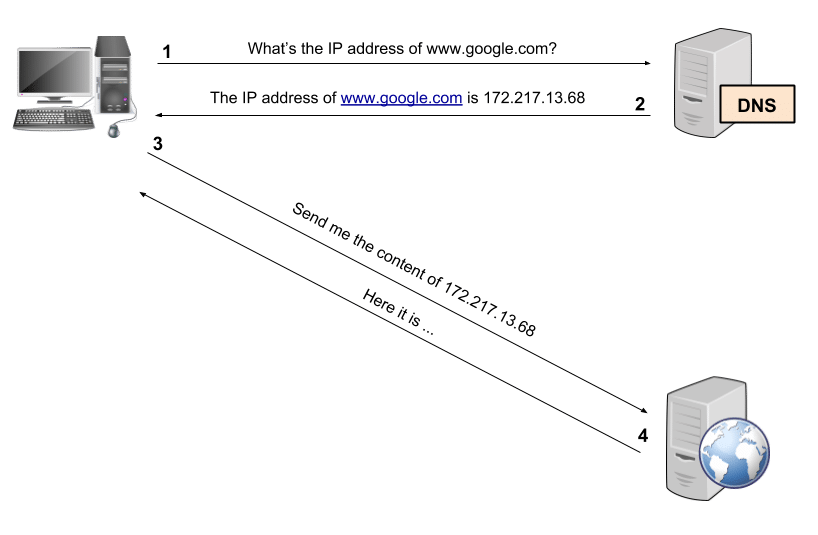
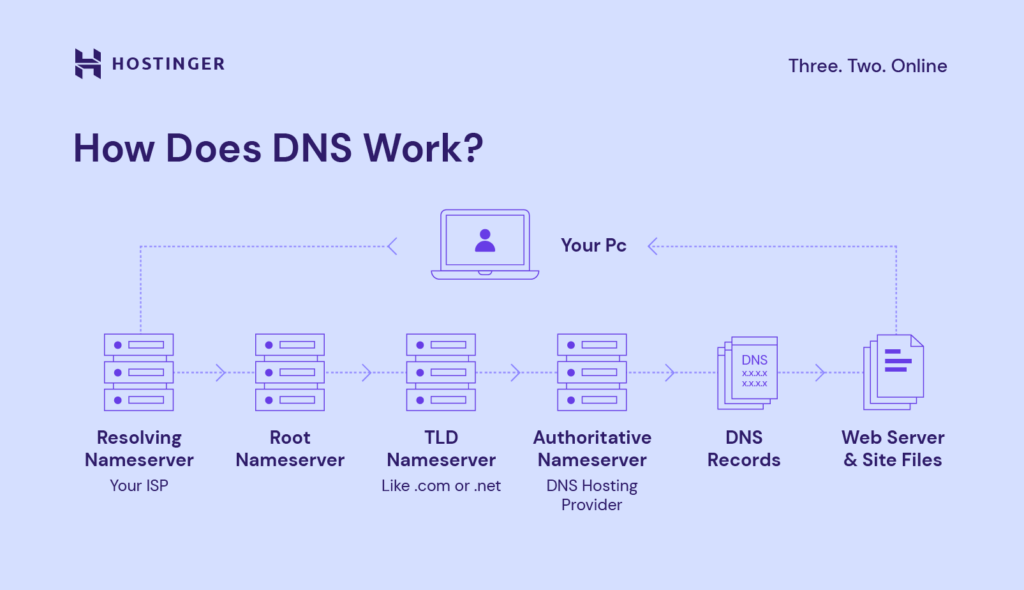
Before we can appreciate the act of clearing the cache, we must understand the Domain Name System (DNS) itself. Often described as the “phonebook of the internet,” the DNS is responsible for translating human-readable domain names (like www.example.com) into machine-readable IP addresses (such as 192.0.2.1).
The Role of Local Resolvers and TTL
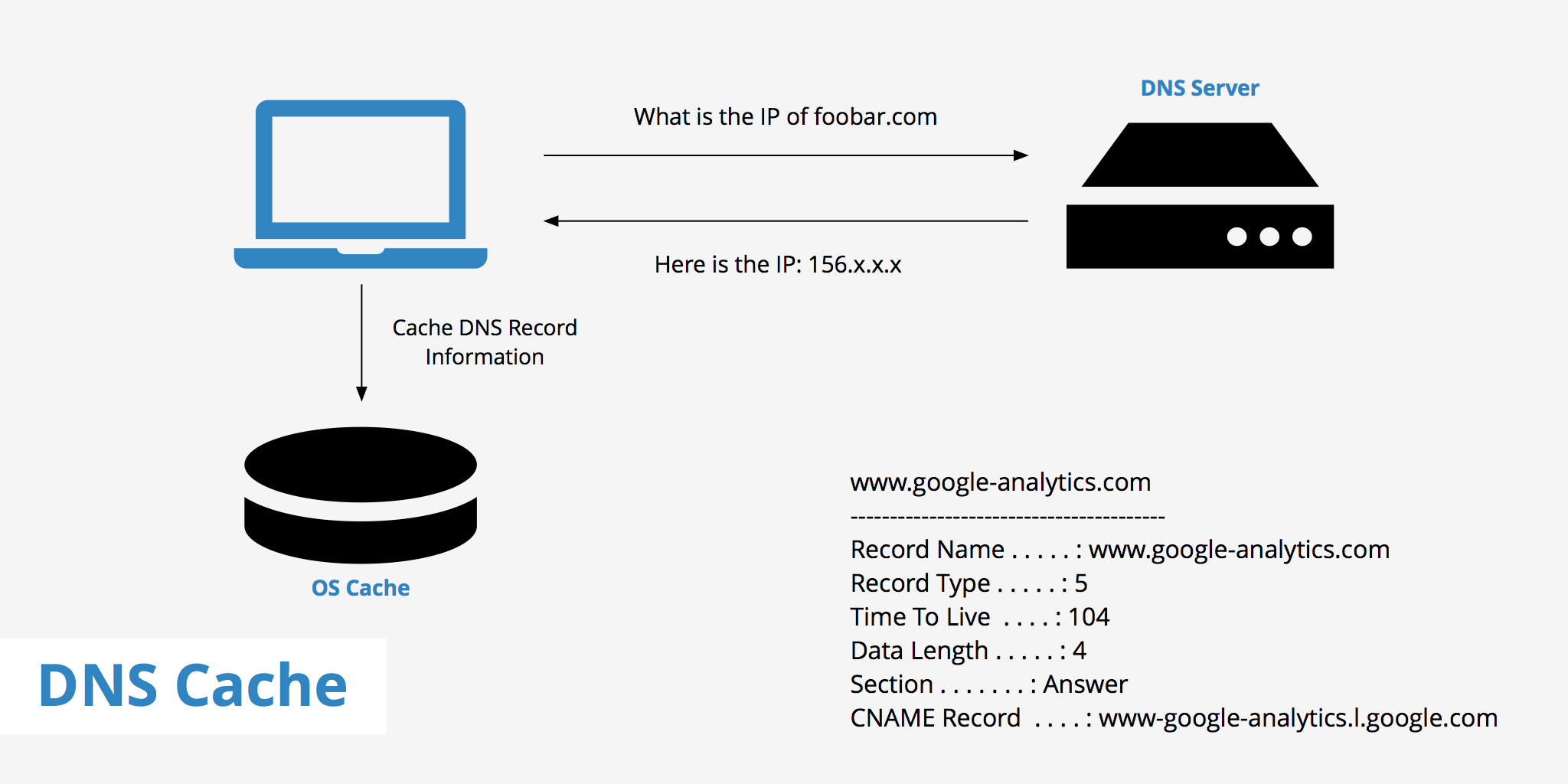
Every time you visit a website, your computer doesn’t necessarily reach out to the global DNS root servers. That would be incredibly inefficient and would slow the internet to a crawl. Instead, your operating system and your web browser maintain a local “address book” known as the DNS cache. This cache stores the results of recent DNS lookups so that the next time you visit the same site, your computer can find the IP address instantly without leaving your local network.
Each entry in this cache is governed by a parameter known as TTL (Time to Live). TTL is a numerical value, usually set by the domain owner, that tells your computer exactly how many seconds it should store that specific DNS record before it expires and requires a fresh lookup.
Why Local Caching is Necessary for Modern Latency Standards
In an era where milliseconds determine user retention and search engine rankings, local caching is a necessity. Without a DNS cache, every single asset on a webpage—from the main HTML file to every tiny icon and script—might require a separate DNS query if hosted on different subdomains. By storing these records locally, your device reduces “latency,” the delay between a request and a response, ensuring that the initial handshake of a connection happens almost instantaneously.
What Happens When You Flush Your DNS Cache
When you execute a command to “flush” or clear your DNS cache, you are essentially wiping this local address book clean. It is a digital “reset” that forces your operating system to start from scratch the next time you request a web resource.
Forcing a Fresh Handshake with the Web
The primary result of clearing the DNS cache is the invalidation of all stored records, regardless of whether their TTL has expired. The next time you type a URL into your browser, your system cannot look it up locally. Instead, it must send a request to a DNS resolver (usually provided by your ISP or a service like Google DNS or Cloudflare). This ensures that the information your computer uses is pulled directly from the source rather than from a potentially outdated local file.
Removing Outdated or Corrupted Records
The DNS cache is not immune to errors. Over time, the data within the cache can become corrupted due to technical glitches or improper shutdowns. Furthermore, if a website moves to a new hosting provider or changes its server configuration, your local cache might still be pointing to the “old” IP address. By clearing the cache, you remove these “stale” records that cause connectivity errors, ensuring that your computer has the most current “map” of the internet.
The Strategic Role of DNS Flushing in Digital Security
While clearing a DNS cache is often viewed as a performance or troubleshooting step, its most critical application often lies in the realm of cybersecurity. Because the DNS is the fundamental layer of internet navigation, it is a prime target for malicious actors.
Preventing DNS Spoofing and Cache Poisoning
One of the most dangerous threats in the tech world is “DNS Cache Poisoning” (also known as DNS Spoofing). In this scenario, a hacker manages to insert a fraudulent DNS entry into your local cache. For example, they might replace the IP address for your banking website with the IP address of a malicious “look-alike” site.
When you type your bank’s URL, your computer looks at its (poisoned) cache, sees the hacker’s IP address, and takes you to a phishing site designed to steal your credentials. Because the URL in your browser looks correct, this attack is incredibly difficult for the average user to spot. Clearing your DNS cache is the primary defense against this; it wipes out any potentially malicious entries and forces your system to retrieve authenticated records from a trusted resolver.
Enhancing Privacy by Wiping Recent Domain History
While most people focus on browser history, the DNS cache is a secondary, often overlooked record of your digital footprints. Anyone with administrative access to your device can query the DNS cache to see which domains have been resolved recently. While it doesn’t show specific pages or data exchanged, it provides a list of every server your device has contacted. For users operating in high-security environments or those who are simply privacy-conscious, regularly clearing the DNS cache is a standard practice to minimize the metadata stored on the hardware.
Troubleshooting and Performance Optimization
From a software and web development perspective, clearing the DNS cache is an essential tool for maintaining the integrity of network connections. It is the “first line of defense” when the digital world stops making sense.
Resolving 404 Errors and Site Connectivity Issues
We have all encountered the “404 Not Found” or the more specific “DNSPROBEFINISHED_NXDOMAIN” error. Often, these aren’t caused by the website being “down” for everyone, but rather by your computer trying to reach the site via an obsolete path. If a site administrator updates their DNS records, it can take anywhere from a few minutes to 48 hours for those changes to “propagate” across the entire internet. However, your local cache might hang onto the old data longer than necessary. Flushing the cache eliminates this bottleneck, often restoring access to a site that appeared broken.
Propagating Changes After a Website Migration
For developers and IT administrators, clearing the DNS cache is a mandatory step after migrating a website to a new server. When a site moves, its IP address changes. If the developer doesn’t flush their local DNS, they may continue to see and edit the version of the site on the old server, leading to massive data discrepancies. By clearing the cache, they ensure that their local environment is synchronized with the live production environment.
How to Clear Your DNS Cache Across Different Platforms
The process of clearing a DNS cache is relatively simple, but it varies depending on the operating system and software you are using. Modern tech ecosystems often have multiple layers of caching—at the OS level and the browser level.
Windows (Command Prompt)
On Windows, the process is handled through the Windows Command Processor. By typing ipconfig /flushdns, the user triggers a system-wide wipe of the DNS resolver cache. The system will return a confirmation message stating that it “successfully flushed the DNS Resolver Cache.” This is the most common method used by IT helpdesks worldwide.
macOS (Terminal)
Apple’s macOS handles DNS caching through various background processes depending on the version of the OS (such as mDNSResponder). Users can clear their cache using the Terminal application with a command like sudo dscacheutil -flushcache; sudo killall -HUP mDNSResponder. This requires administrative privileges but is equally effective at resetting the network pathing.
Mobile Devices and Browsers
While many people focus on computers, mobile devices also cache DNS records. On iPhones and Android devices, toggling “Airplane Mode” on and off is a quick way to reset network settings and clear certain cache layers. Furthermore, modern browsers like Google Chrome maintain their own internal DNS cache independent of the operating system. In Chrome, users can navigate to chrome://net-internals/#dns and click “Clear host cache” to ensure that even the browser-level records are refreshed.
Conclusion: The Importance of Digital Hygiene
Clearing a DNS cache is more than just a troubleshooting “trick”; it is a fundamental aspect of digital hygiene. In an increasingly complex technological world, the data that allows us to navigate the web can become stale, corrupted, or even weaponized.
By understanding and utilizing the “flush DNS” command, users and professionals alike can ensure faster browsing, accurate website rendering, and a significantly higher level of security against redirection attacks. It is a reminder that beneath the user-friendly surface of our apps and websites, a rigorous system of record-keeping is constantly at work—and occasionally, that system needs a clean slate to function at its best.
aViewFromTheCave is a participant in the Amazon Services LLC Associates Program, an affiliate advertising program designed to provide a means for sites to earn advertising fees by advertising and linking to Amazon.com. Amazon, the Amazon logo, AmazonSupply, and the AmazonSupply logo are trademarks of Amazon.com, Inc. or its affiliates. As an Amazon Associate we earn affiliate commissions from qualifying purchases.